
Did you know OCI offers a fully managed MySQL Database service? Integrated with our HeatWave in-memory query accelerator, we’re able to combine transactions, analytics, and machine learning right into the MySQL Database platform. When building out your MySQL Database architecture it’s important to consider DR as part of your design.
This blog will provide an overview on how you can begin deploying a resilient MySQL DR architecture across many OCI regions. With a focus on the networking components required to create and establish connectivity to the source MySQL DB from a replica MySQL DB with the use of an Inbound Replication Channel. This channel asynchronously copies data from the source database to a replica database. The source and replica databases can be located in separate OCI regions. Providing the ability to recover your data during an unplanned event affecting an entire region.
Please be sure to also view the companion video that show’s the creation of the network and replication channel in real-time:
Overview
For this scenario, we’ll deploy a replication channel using two MySQL databases located in separate OCI regions (Ashburn and Phoenix) Ashburn and Phoenix. The regions are interconnected by a remote peering connection and attached to each region’s dynamic routing gateway. We’ll need to build our routing and security rules in both regions to allow channel access from the replica database in Phoenix to Ashburn. Once confirmed, we can deploy our channel then and verify it establishes a successful connection to the source DB in Ashburn.
Note: This blog assumes fundamental knowledge of computer networking and OCI networking constructs. The networking components required to deploy the channel will be the focus of this blog. MySQL and steps to verify replicated data will not be covered in this demo.
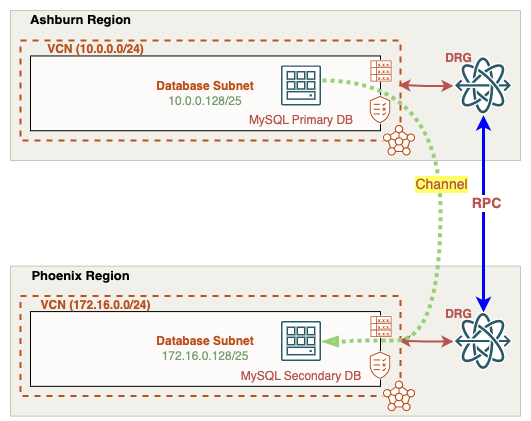
Building our OCI Network Architecture
We’ll need to create the following in both Ashburn and Phoenix regions before deploying our MySQL Databases and Replication Channel:
- x1 VCN
- x1 Subnet
- x1 Dynamic Routing Gateway (DRG)
- x1 VCN DRG Attachment
- x1 Remote Peering Connection
Rather than re-iterate the steps for deploying each of these network components, I’ve linked the documentation guides for each of the items.
Configuring our Network
From the OCI console, we’ll start with the Ashburn VCN and the subnet dedicated to our source MySQL DB. Each OCI subnet includes a route table and associated security lists. The route table determines where outbound traffic will be sent out of this network. The security list controls access to resources in and out of the subnet. Starting with the route table, we’ll need to create a route to reach our Phoenix region MySQL replica IP address 172.16.0.150. Notice the 172.16.0.0/24 route with Ashburn’s Dynamic Routing Gateway (DRG) set as the next hop. The source DB will need a way to respond to the replica DB channel located in Phoenix, this route will do just that.
Route Table - Ashburn Subnet:

Next, let’s check our security list assigned to the source MySQL database subnet. I’ve created two stateful ingress rules that allows access over the two MySQL ports 3306 and 33060. As you’ll see, we’ll set the replica channel to communicate over the MySQL port for proper communication with the MySQL source database.
Security List - Ashburn Subnet:

Remember, our Ashburn database subnet is routing traffic to the Phoenix database subnet via the Ashburn Dynamic Routing Gateway (DRG). A DRG is a regional virtual router that bridges connectivity between different private networks such as other VCNs, on-prem environments, or even other OCI regions. When connecting to other OCI regions, we need to create a Remote Peering Connection (RPC) between the DRGs in their respective regions. Once the RPC peers between both Ashburn and Phoenix DRGs, VCN networks in both regions can be exchanged between each other:
The DRG route table assigned to our Ashburn VCN attachment confirms we’re receiving the Phoenix VCN subnets:

Moving on to the Phoenix region, we can confirm that we’re receiving Ashburn VCN subnets in the Phoenix DRG VCN attachment:

Now let’s take a look at the Phoenix database subnet route table, note the route back to the Ashburn 10.0.0.0/24 network uses the Phoenix DRG as the next hop.
Route Table - Phoenix Subnet:

The custom Security List assigned to this subnet also allows MySQL ports 3306 and 33060 from the Ashburn database subnet.
Security List - Phoenix Subnet:

At this point, we’ve confirmed bi-directional communication between our Ashburn and Phoenix database subnets. We can now move forward with creating our replication channel that will connect across both regions.
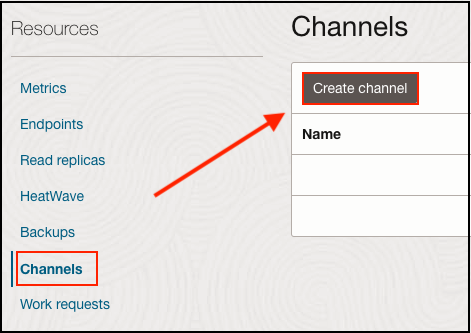
In our Phoenix replica MySQL database menu, scroll down to the Channels selection and then click Create Channel:
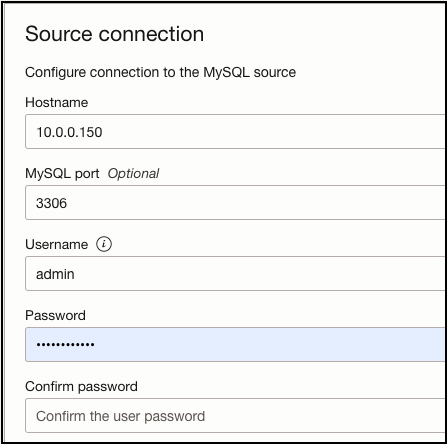
I’ll provide a name, source connection IP address (Ashburn MySQL IP: 10.0.0.150), MySQL port (3306), and source database login credentials. For this demo, I’ll leave everything else as default:
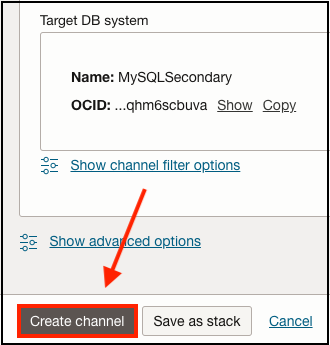
The Target System will be our Phoenix MySQL database which will receive the replicated data from the source MySQL DB in Ashburn. Once finished proceed with creating the replication channel, this will take a few minutes to complete.
After a few moments, if bi-directional connectivity and security rules are correctly applied, our channel will be deployed in an active state. Note the source host IP address and the MySQL port it’s connecting over:
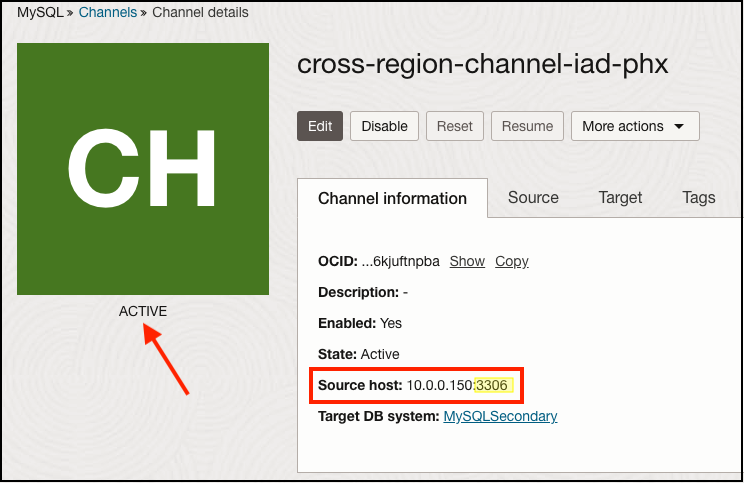
This concludes our configuration steps. At this time you can verify that your source MySQL database is replicating data to the target replica database. For more details about OCI MySQL database replication, please check the reference links at the bottom of this article or visit our OCI documentation website at docs.oracle.com.
References: