
Introduction
Oracle offers a broad set of Cloud offerings to help SaaS customers extending their implementations with AI/ML features. We should assume that the SaaS data provide a rich set of information and knowledge that can be used as a base for many business scenarios that help increasing the customer value. We, as SaaS A-Team intend to provide a series of blogs published on A-Team Chronicles to help our readers create their own ideas and to boost their creativity to achieve those extra values. This series might grow over the time and cover a broader set of aspects. In the beginning we are planning a couple of articles that might be helpful for a jump-up into the Data Science in SaaS environments.
Why could it be so important to use AI/ML features on top of SaaS? One answer would be: everyone is talking about those topics now. We think this is worth to be a considerable reason, but most likely not the most appropriate one. Any of those efforts should have a a significant business improvement in mind. As said: those business data being available in SaaS stands for a potential significant treasure that we could make productive by implementing some custom extensions using AI/ML. Across all SaaS pillars we use business processes producing data and implement customer specific business practices that reflect common or individual requirements. While Oracle is implementing more AI/ML features into the standard SaaS offerings over time, those data and process extensions might bring a benefit today, by tailoring the implementation using AI/ML for our customers.
Amongst a broad set of options to implement AI/ML externally to SaaS like OCI AI Services, we’d like to focus on an offering that we evaluated as part or our investigations: OCI Data Science. This service provides all necessary capabilities to add AI/ML features to SaaS implementations as external extensions. We will introduce more details about those use cases in future blogs. For this common introduction lets discuss what kind of business scenarios can be implemented without the intention to give a comprehensive overview. We must assume that our valuable customers and partners know their business best and will be able to use their own creativity to come up with compelling ideas. Also worth saying that these suggestions are kind of generic and other tools apart from OCI Data Science might be great candidates too to implement any of such extensions.
Overview
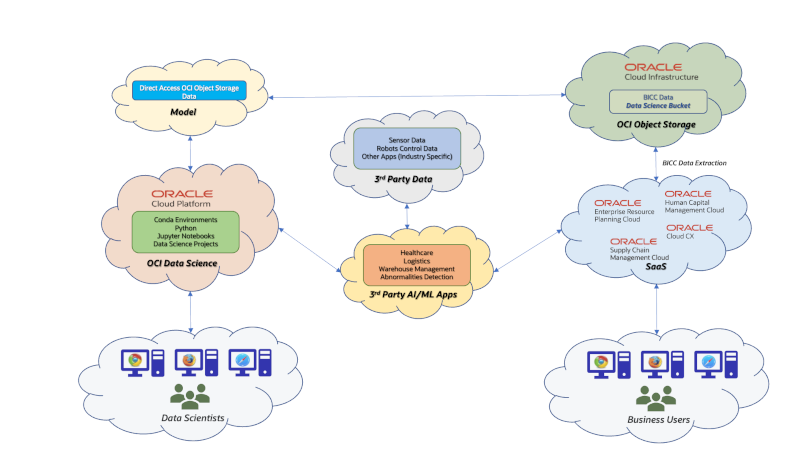
Here are some thoughts how SaaS data can be used to implement intelligent customer extensions. Those suggestions could be seen as some random ideas that hopefully may support our readers own creativity:
- SaaS data extracts from Supply Chain Management pillar (i.e. Product Hub, WMS, Inventory Management etc) could be used to control robots in a warehouse management system. Those robots could learn from SaaS predicting next transport tasks to increase their efficiency or to become familiar with dedicated handling instruction for certain goods and materials.
- Integration (i.e. via Oracle Integration Cloud) of SaaS with external 3rd party Apps can use the AI/ML capabilities to control these business processes dynamically and with an adaptive behavior. Some initial considerations would cover use cases like the employee hiring process (i.e. background checks, market salary comparisons etc) or CX specific tasks (probability rates for deal winning, optimal territory assignments etc).
- Financial SaaS data could be used for custom credit checks, external cost calculations or expense optimizations. Also here AI/ML may help to use the existent data sets for some adaptive and dynamic interfaces. These implementations can be established as kind of roundtrips: the existing data will be used to create a model. Once the process has evolved there might be updates written back into SaaS via API’s or file based loading. Via model training the process execution might change over the time and the system will change its behavior.
The starting point for a SaaS extension using AI/ML capabilities will usually start with a goal and process description: what is the intended outcome and which particular processes are affected?
Once that question has been clarified we will be faced with another question: which data – SaaS and others – are required to build a model?
The number of questions has not ended yet. Here are more worth to be asking:
- Is this model to be built on flat or rather on complex data structures?
- Is the volume of a data set rather small or huge?
- Do we have to train the model continuously or just once?
- How can we access the data? On OCI Storage services or in a database or anywhere else?
- If data are appearing as files: in which format are they existing (CSV, JSON, XML, ZIP etc)?
We will provide some ideas during this article series how these questions could be answered and which options exist. As said: we start this series by handling the basic question how we can build a model in OCI Data Science using SaaS data.
The choices to extract data from SaaS are obvious: for synchronous requests we can use existing REST API’s that will return data in a JSON format. This kind of interface is not recommended for huge data volumes and also because the data would have to be saved in files manually. The other, and most recommended choice is the usage of BI Cloud Connector (BICC). Any other solutions like HCM Extract or various other data extract solutions via Oracle Integrations Cloud (OIC) would work too, while data extracts via BI Publisher are definitely not recommended!
Principles of using BICC data extracts for Data Modeling
By using BICC we have various options to save the extraction files. One option is to use the built-in Oracle UCM coming with SaaS. While that usually works great we might have some special requirements regarding the handling of extracts and therefore we’d suggest to pick the alternate choice which is OCI Object Storage. The main reason is that we can access the files there more easily from local computers or cloud resources when BICC extracts are located in OCI Object Storage. Those are features that will not work in a comparable way via an export to Oracle UCM. The configuration to setup OCI Object Storage as target for extrations is documented in the BICC documentation and various articles in A-Team Chronicles were also handling that topic in the past.
In a future article we will explain details how to use OCI Object Storage containing BICC files as a staging area for modelling.
Some other points should be added to our design considerations:
- Is the model being created based on high or rather lower data volumes?
- Will the modelling use only SaaS/BICC data or are there any other 3rd party data to be mixed with?
- Will there be plans for model trainings that require regular SaaS data imports and updates?
- How actual must the SaaS data be? Can we schedule BICC jobs that run with higher or lower frequencies to extract data or should an extract be triggered via API from OCI Data Science to update the model? For an explanation of this triggering I have written an article on A-Team Chronicles that explains the usage the BICC API’s to initiate, monitor and control an extraction job.
- What about the data persistency of the data underlying the model? BICC can run full data extracts or incremental ones from the last run. The files written to OCI Object Storage may be tidied up after a while in those buckets to save space. That could cause potential data consistency issues for the data modelling.
Sample: for a number of BICC PVO’s we run various data extracts – a full extract first and several incremental extractions run later. All those files will appear in a dedicated bucket that will be used by OCI Data Science to create/train a model. If any of the files becomes deleted caused by periodic file maintenance activities we might end up in a consistency issue.
Data Scientists will usually have all those considerations in mind before they can start thinking about data structures that will be used to build a model. In our blogging series we will cover three options of handling BICC data:
- Accessing the data direct from OCI Object Storage as they are being written by BICC as zipped CSV files.
When to use:
Model is using simple structures with lower volumes containing data that might never be required to be trained. The files can be accessed directly from OCI Data Science for modelling. The uncompressing of those CSV’s can be performed programatically via Python in the Jupyter Notebook session as part of the model creation. This option could be useful if no persistent data layer in form of a database exists or must be used. From this perspective it can be seen also as low-cost option.
Restrictions:
BICC creates file names with job scheduling ID and date in the name. That could it make difficult to add any automation for opening files dynamically from Python.
Also challenging could be a situation where extra huge file extracts would be split up by BICC in chunks of 1 GB or more hence that could require to open all of them to obtain reference data.
Creation of data relations between various entities across multiple files would be challenging as well. Too many files, also those with huge data volumes, will impact the performance and the handling of the model.
BICC extracts are always snapshots of SaaS data for specific entities at a given time. Those can run as initial extracts (full data extract) or incremental extracts providing a delta related to a previous run. Any delta data are changes that cannot give a comprehensive view to the entire data set. That means: using a files based approach for modelling might either require to do a full extract every time or to accept that the model is not using a comprehensive view on SaaS data. - Importing the BICC data into an existing Oracle Database on-premise.
When to use:
If a customer is running his own Oracle Database on-premise then it could be worth a consideration to import the CSV files created by BICC into a DB instance. A definite benefit is the fact that the data import would allow a pre-validation of data and also running a CRUD operation against the existing data. Such an import will help creating a comprehensive external data source that contains all the information being extracted from SaaS. Those SaaS data can be merged and related to those from 3rd party data sources and also be used for any other purpose like BI and Analytics. It would be possible to handle huge volumes and to optimize the performance via DB tuning.
Restrictions:
The only thinkable restriction could result from the fact that an internal DB instances must be made public for OCI Data Science to access. In highly secure environments granting network access could be a challenge, but in most situations this also something that could be resolved. - Loading these SaaS data into an Oracle Cloud Database like Applications Data Warehouse (ADW).
When to use:
This option is similar to the on-premise DB solution above. Using a Cloud Database will provide all the benefits mentioned above about using an on-premise DB above. The import of BICC CSV’s will work differently compared to the on-premise solution, but the load into the cloud instance is a given feature and principles of usage are similar. The network connectivity works pretty straight as the Cloud DB instances can be accessed via Oracle DB networking or REST.
Restrictions:
The usage of external tables as being used in an Oracle on-premise DB is restricted, but with the built-in data load mechanism the import will work. As the BICC data are stored in a zipped format a preceding preperation would be required to prepare the files.
As mentioned above we will provide dedicated blogs in future to discuss the load and import of SaaS data when using an Oracle Database. Another article is planned that will show how to use the BICC extraction files directly from a Jupyter Notebook session in OCI Data Science.
How to use BICC data structures for Data Modeling
Previously, when using Oracle Apps on-premise (i.e. EBS, Fusion Apps, Siebel etc) the tables in underlying databases were fully accessible and the data model was documented almost comprehensively. With the paradigm shift to SaaS such a direct database access became locked and the ability to run DB queries against the SaaS DB became unaccessible. Attempts to access these data directly via BI Publisher by running SQL queries are strictly discouraged despite the fact that there are some technical capabilities to do so. With BI Cloud Connector (BICC) Oracle provides a great choice to extract SaaS data on a supported path. This solution does not extract and provide data as a direct query against database tables, but uses Public View Objects (PVO’s) that will be generated programatically as business oriented data views via BICC.
Despite the occasional existence of a documentation about DB table structures in SaaS the documentation of those BICC view objects is the ultimate starting point for Data Scientists! The entry point to this documentation can be found via this documentation link.
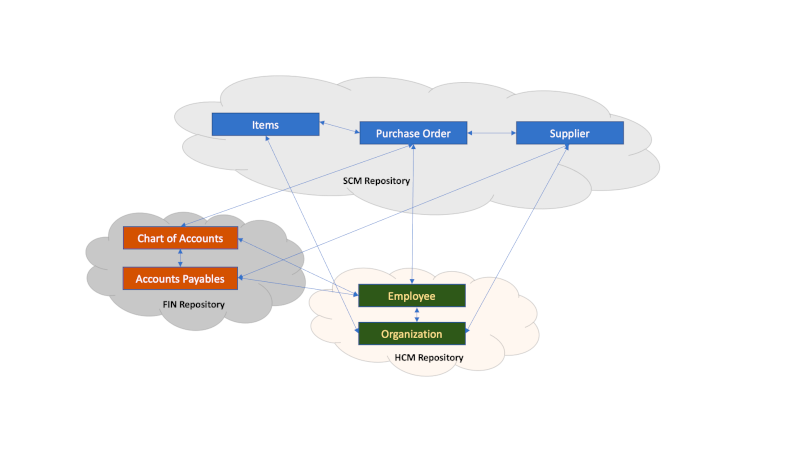
As shown in figure below the responsibility for those view objects is assigned to the various SaaS development teams who are also in charge of the underlying DB tables. Saying this: some objects might exist in multiple repositories or refer to those in the repositories of other SaaS pillars. We can also find core objects in SaaS that play a central role across all SaaS pillars.
Sample: The definition of a business object like Item is under responsibility of the SCM Product Data Hub team and is referenced by many other entities. The view object Item is referenced by SaaS modules like Sales, Service, Order Management, Inventory, Costing or various others. There are many attributes describing this BICC view object – more than 300 fields. This broad bandwidth of available attributes provides a great opportunity to create various models covering multiple AI aspects and use cases.
The Item definition is done in view object FscmTopModelAM.ScmExtractAM.EgpBiccExtractAM.ItemExtractPVO with a combined primary key of Item ID (field ItemBasePEOInventoryItemId) and Organization ID (field ItemBasePEOOrganizationId).
References can be found i.e. in multiple other view objects (PVO’s, also named Data Stores) like those below:
- CX – Sales Lead Products – view object CrmAnalyticsAM.CrmExtractAM.MklBiccExtractAM.LeadItemAssocExtractPVO, primary key attributes InventoryItemId and InvOrgId
- Procurement – Requisition Lines – view object FscmTopModelAM.PrcExtractAM.PorBiccExtractAM.RequisitionLineExtractPVO, attribute CustomerItem if internal customer items are used
- Financials Payables – Invoice Lines – view object FscmTopModelAM.FinExtractAM.ApBiccExtractAM.InvoiceLineExtractPVO, attribute ApInvoiceLinesAllInventoryItemId if an inventory item is used on invoice line level
- SCM Inventory Management Payables – Inventory Reservations – view object FscmTopModelAM.ScmExtractAM.InvBiccExtractAM.InventoryReservationsExtractPVO, attribute InventoryItemId
- …
Those samples above explain possible entity relations being used for data modeling. Those relations reflect the underlying data model in SaaS. While the physical data model remains private to SaaS, the BICC view objects are a public interface that can be used externally by customers and implementers. The private data model might undergo changes during a lifecycle that will not be documented publicly. As mentioned above, those database tables can’t be accessed any way externally except by using BI Publisher, which is a definite no-go. The BICC data stores are fully documented and will be supported in all means – structure changes, performance and future features.
Relationship between Business Objects
Another option to create a model by Data Scientists can use rather semantic relationships that also exists in the SaaS data structures being extracted via BICC.
How does this work?
SaaS uses a concept called Flexfields which has existed since generations of previous Oracle Apps like EBS or Fusion Apps on-premise. Those Flexfields are a number of additional database columns being added to dedicated database tables (or to a view object in BICC as a derivation of those tables) which can be defined for many purposes during the functional setup and configuration of a SaaS instance. By definition these attributes can be distinguished by three different types:
- Key Flexfields – KFF – mandantory for certain business entities and to be defined when performing the functional setup. Those fields are having the term SEGMENT in their name and are enumerated. They appear as attributes like SEGMENT1, SEGMENT2 etc in the respective data structures and their fuctional setup and configuration instructions are explained in the standard Oracle documentation if being used by various SaaS modules.
- Descriptive Flexfields – DFF – optional to save additional information according to the functional requirements individually by each customer. Those fields use the term ATTRIBUTE in their name and are enumerated too. In many cases those fields are defined as type VARCHAR and may contain text, number or also date formatted values. Alternately these attributes can exist as types DATE or NUMBER. The process of configuring these fields for having a meaning is part of the functional SaaS setup. BICC extracts will provide all those attributes and together with a customer specific functional setup documentation Data Scientists can use them for modeling.
- Extensible Flexfields – EFF – some modules in SaaS are providing EFF’s to ensure the highest level of flexibility in their data model. Those EFF’s exist outside of the common data structures as being explained for KFF’s or DFF’s above. While KFF’s and DFF’s are defined as linear attributes inside the standard view objects, EFF’s are implemented as dedicated BICC view objects. That will allow a 1:m:n relationshipi of the data. For instance the business object Item may have so many different flavors across industries and usages that this flexibility is key to support an accurate coverage of all features and requirements describing an Item.
Data Scientists might want to use these Flexfields via three different methods at least when modeling SaaS data:
- These Flexfields can contain links/foreign keys to other entities and therfore being used as soft keys.
- Due to the fact that many definitions are using text as Flexfield content those values can be setup in data modeling for an LLM usage in the context of entity relations.
- It’s also possible to use a bunch of Flexfields via LLM to perform kind of a wildcard search once being setup in a model.
More detailed information about the use and implementation options or requirements of Flexfields are available via this documentation link.
Summarizing the explanations above it might be worth highlighting how important a deeper understanding of the SaaS data model provided by BICC is for Data Scientists.
Ideally Data Scientists should have a SaaS background and a quite good overview about the modules being in use at customers side. To identify the meanings of existing Flexfield being defined during the functional setup it is recommended that Data Scientists have a minimum skill set to use the Functional Setup Manager in SaaS.
In case of some missing experiences, skills or even a missing availability of SaaS data via BICC it is highly recommended to contact the communities like Oracle Customer Connect. These forums are under watch and active participation of the SaaS Product Development teams and there is a chance for an active interaction to solve possible issues.
Quite often AI/ML apps using SaaS data might also incorporate data from other 3rd party systems. As being mentioned further up in this article there are various options to link or merge data from Oracle SaaS and other data sources. In future we’ll cover those topics in dedicated blogs, i.e. by sharing ideas how Oracle DB’s might be used here or even via other solutions.
Creation of Data Sets in OCI Data Science based on SaaS Business Objects
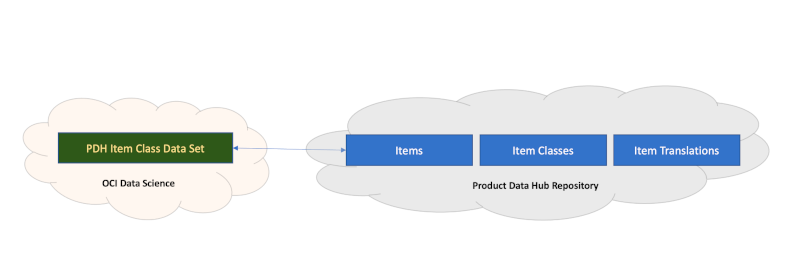
Eventually those data from SaaS (or other data sources in addition) must be provisioned for OCI Data Science in order to support a model creation. It is recommended to build these Data Sets on top of all the data attributes being available as BICC extracts. In terms of SaaS data we’d suggest to set no filter on data extracts within BICC. That will result in a broader bandwidth on attributes being extracted, but give also an opportunity to do the filtering in the definition of the data set in OCI Data Science hence give more flexibility to Data Scientists at a later point in time. Otherwise it would mean that the BICC process for SaaS data extraction might require a continuously ongoing modification of the filter conditions including depending other rework. Same might be true for the data selection on 3rd party data.
Data Scientists should rather use the capabilities in OCI Data Science when doing their data research activities. The documentation of SaaS data and their functional setup/configuration will support those tasks.
Summary
This article was meant to be the starting point and an introduction into other blogs to follow.
We are currently considering sharing more ideas and findings regarding related data centric options. Also to explain some use cases from common customer scenarios and how they can be implemented for the sake of increased features by adding AI/ML capabilities in SaaS using OCI Data Science.
The reason to start with the SaaS data extract and making Oracle SaaS data available for Data Scientists goes back to the fact that we haven’t found much knowledge being published so far. As stated before, this topic will be fine-tuned and more detailed in future blogs, but we will also cover some various other topics related to Oracle SaaS and OCI Data Science.
In general we think that the usage of OCI Data Science or AI/ML at all for SaaS would have a minimum of two different scenarios:
- AI/ML extensions for SaaS can be used to add some features to the SaaS handling itself according to the customers requirements. Samples would be i.e. new features that improve the data quality for data load, add some intelligent controls to UI elements or to allow an invocation of external process (for instance via Oracle Integration Cloud) following some clever rules.
- Those SaaS data are a treasure by themselves and can also be used for AI/ML extensions that run independently from SaaS. Samples would be i.e. feeding external systems with SaaS data like enhanced information for robots or enriching data sets for IoT servers.
I hope this blog will raise some curiosity about AI/ML in the context of SaaS and the future blogs we intend to publish. In case of further questions and feedback please feel free to contact the authors of the SaaS A-Team via eMail.
My very special thanks go to my fellows, colleagues and team mates Magesh Kesavapillai, Lyudmil Pelov, Rekha Mathew, Mani Krishnan, Mark Scarton and Ollie Ireland for their input, feedback and joining some brainstorming!