With Input from Brian Ramos, Senior Principal Product Manager, Fusion Warehouse Management – Development
Validation
Content validated on 05/08/2023 with
ADW Version Oracle Database 19c Enterprise Edition Release – Production Version 19.11.0.0.0
Oracle Cloud Application 23B (11.13.23.04.0)
Fusion Analytics Warehouse Application Version 23.R2
Oracle Transportation Management (OTM) Cloud 23C
Background
Oracle Fusion Analytics provides analytics for Oracle Cloud applications, powered by Autonomous Data Warehouse and Oracle Analytics. More specifically:
Fusion ERP Analytics provides accounting data sourced from ERP Cloud in a warehouse designed to support broad set of analytics use cases.
Fusion HCM Analytics provides comprehensive workforce, turnover data sourced from Fusion HCM Cloud.
Fusion SCM Analytics give customers the ability to gain visibility into Supply Chain performance, correlate Supply Chain processes with business goals and detect, understand and predict Supply Chain issues.
Making the right business decisions is intrinsinclty tied to the system of records data accuracy of a company. In many specific use cases, Fusion Analytics data can be complemented with additional data from external source such as On Premise, Legacy applications, Non Fusion SaaS application, OCI source, Third party cloud applications, and so on…
To support these data enrichment and consilidation requirements, Fusion Analytics is introducing a new Connectors to leverage the Fusion Analytics Oracle data pipeline infrastructure to extract data (full and incremental) from these external sources following a defined schedule, potentially reducing custom data extraction code, infrastructure and platform costs.
This blog describes how to utilize Fusion Analytics (FAW) Data Augmentation feature to replicate transaction data from OTM Cloud into ADW to extend the Data Layer of FAW.
These data sets can provide critical insight when merge with Fusion ERP data.
* Have access to an Fusion Analytics Instance (OAC, ADW) with Administrative privileges
* Have configured SQL level access to Fusion Analytics ADW, as described in Krithika and Gunaranjan blog post here.
Architecture Overview
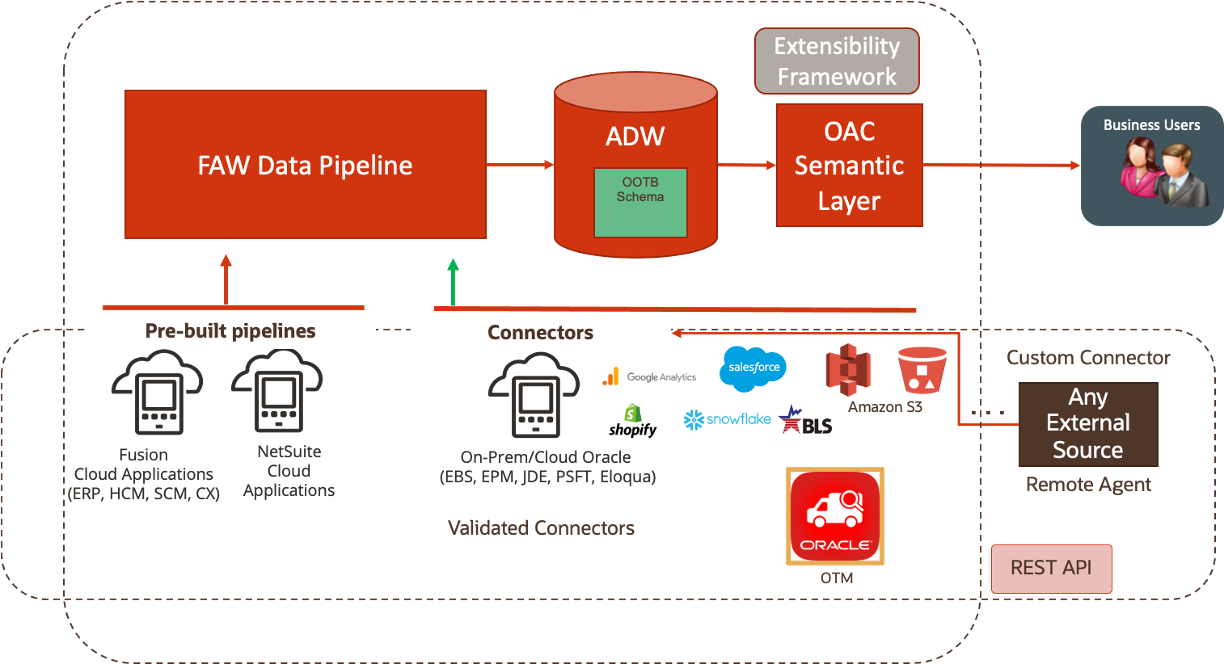
FAW Data Augmentation allows customers to leverage the FAW data pipeline to augment reports with datasets created :
By adding a new dimension in the target instance,
By adding a new fact in the target instance.
The diagram below details the architecture for the Connectors :
Figure 1: FAW Data Augmentation flow with OTM Connector
The high level configuration flow is as follow:
OTM Configuration
Create Application in IDCS
Edit OAuth Configuration in IDCS
Create OTM User with Data Export API – REST Access Control granted
FAW Configuration
Enable OTM feature
Create OTM Connection
Test Connection
Refresh metadata for OTM connection
Set Pipeline Settings
Create OTM data augmentations
FAW Data Pipeline processes the data augmentation pipeline jobs, extract the data from OTM tables and load it into ADW, queryable via synonyms starting with DW_OTM_X_
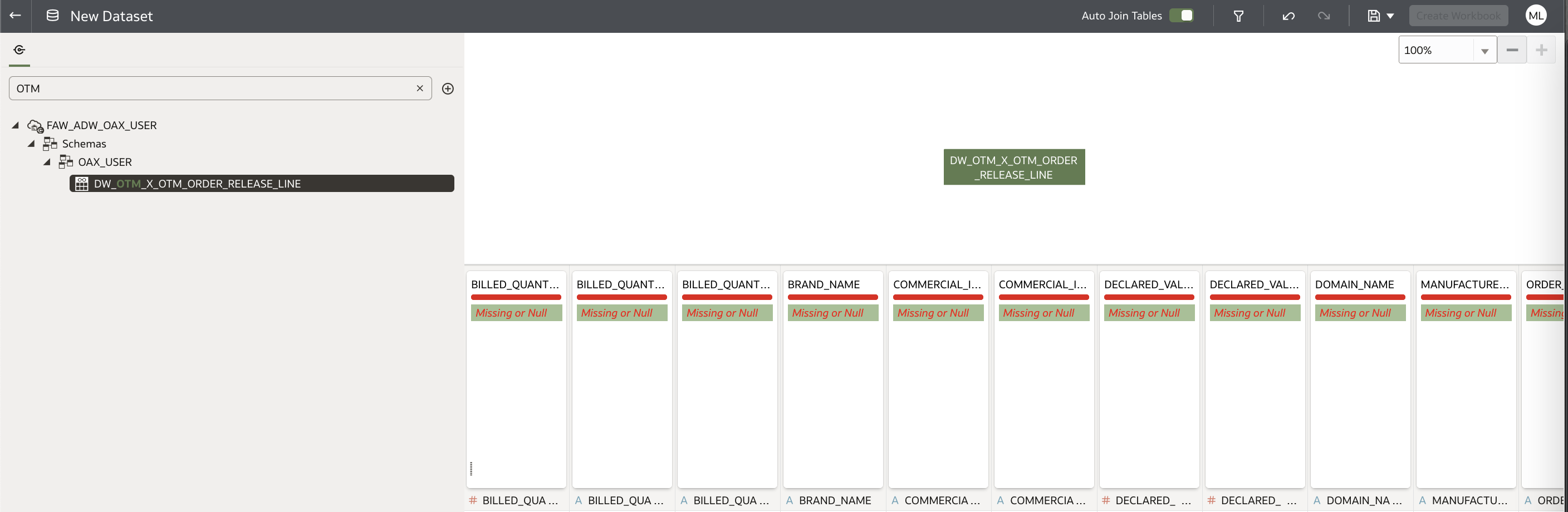
Augmented data can be then queried directly using OAC Data set or a SQL client like SQL developer, through the database synonym named after the table name give in the first step
Semantic model can be extended by using semantic model extension or External Application merge feature allow reporting on augmented data extracted in ADW. We will cover the basics here to be able to build a visualization against the extracted OTM Data. External Application merge will be documented a future blog.
BLS and Fusion Analytics Configuration
Let’s watch the video now
Figure 2: OTM and Fusion Analytics Connector configuration
Creating OAC Artifacts to Gain Business Insight with OTM Data
Now that the Data Augmentation have completed, we can create Data Sets and Workbooks
Figure 3: OTM Data Set
This concludes the activities in the blog.
Want to Learn More?
Click here to sign up to the RSS feed to receive notifications for when new A-team blogs are published.
Summary
This blog described how to utilize Fusion Analytics (FAW) Data Augmentation Connector to replicate transactions data from US Bureau of Labor Statistics into Autonomous Data Warehouse (ADW) to extend the Data Layer of FAW. This blog also detailed the steps to allow customers to answer business questions and gaining business insight with BLS and Fusion Analytics Data.
Bookmark this post to stay up-to-date on changes made to this blog as our products evolve.
Authors
Matthieu Lombard
Consulting Solution Architect
The Oracle A-Team is a central, outbound, highly technical team of enterprise architects, solution specialists, and software engineers.
The Oracle A-Team works with external customers and Oracle partners around the globe to provide guidance on implementation best practices, architecture design reviews, troubleshooting, and how to use Oracle products to solve customer business challenges.
I focus on data integration, data warehousing, Big Data, cloud services, and analytics (BI) products. My role included acting as the subject-matter expert on Oracle Data Integration and Analytics products and cloud services such as Oracle Data Integrator (ODI), and Oracle Analytics Cloud (OAC, OA For Fusion Apps, OAX).