
Introduction
As a recap, my colleague has written a very nice article on how to use rapids on OCI and which GPU can be used for the same. You can refer the article here https://blogs.oracle.com/ai-and-datascience/post/accelerate-machine-learning-in-oracle-cloud-infrastructure-on-nvidia-gpus-with-rapids
In this blog, we take it a bit further with the latest version of Rapids and do some mathematical calculations and feature engineering to show how data science applications written in pandas can be moved to Rapids with a considerable improvement in speed.
Oracle Cloud Infrastructure (OCI) offers a cloud-based platform for deploying and managing Rapids applications. With Rapids on OCI, you can benefit from the scalable computing and storage resources available in the cloud, while also utilizing the high-performance computing capabilities of GPUs.
Rapids is an open-source software library that is designed to accelerate data science workflows. It provides a collection of GPU-accelerated data science tools that can speed up data preprocessing, machine learning, and deep learning tasks.
Here are the steps to accelerate data science with on OCI using Rapids:
- Select an OCI compute instance that provides access to a GPU. For instance, you can choose a compute instance from the “GPU” or “HPC” families.
- To install the Rapids library on your OCI compute instance, you have two options.
- The first is to install Rapids using conda or pip.
- The second option is to use a pre-built Docker image that includes Rapids.
- Load your data into the Rapids environment. Rapids supports a wide range of data formats, including CSV, Parquet, and ORC.
- Use the Rapids tools to preprocess and analyze your data. For example, you can use the cuDF library to perform data cleaning and manipulation tasks, and the cuML library to train machine learning models.
- Visualize your results using the Rapids-compatible visualization tools, such as Datashader and Holoviews.
By following these steps, you can accelerate your data science workflows and achieve faster insights using the power of GPUs on OCI. Additionally, by running Rapids on OCI, you can take advantage of the scalable and secure cloud infrastructure provided by OCI, which allows you to easily scale up or down your compute and storage resources based on your changing needs.
Here are some examples of general-purpose and domain-specific libraries available in Rapids:
General-Purpose Libraries:
- cuDF: a GPU-accelerated dataframe library that supports Pandas-like operations on GPU.
- cuPy: a GPU-accelerated array library that supports NumPy-like operations on GPU.
- cuGraph: a GPU-accelerated library for graph analytics.
Domain-Specific Libraries:
- cuML: a -accelerated machine learning library that supports a variety of algorithms including linear regression, logistic regression, random forests, and more.
- cuPy: a GPU-accelerated array library that supports NumPy-like operations on GPU.
- cuSignal: a GPU-accelerated library for signal processing and time-series analysis.
- Merlin : a GPU-accelerated library for building recommender systems.
These libraries are designed to work together seamlessly and can be used in combination to accelerate a wide variety of data science workflows. Lets take cuDF and try to figure out the performance on an OCI GPU. A few things to note:
- cuDF offers a Pandas-like API. It doesn’t require you to learn a new library to take advantage of the GPU.
- cuDF has a cudf.DataFrame type that is analogous to pd.DataFrame. The primary difference between the two is that cudf.DataFrame lives on the GPU and any operations on it utilize the GPU rather than the CPU (and are hence much faster)
Part 1: Getting the Data
This notebook’s primary dataset is sourced from the New York City Taxi and Limousine Commission (TLC). The TLC provides information on taxi rides, including pick-up and drop-off dates and times, locations, trip distances, fares, rate and payment types, and driver-reported passenger counts. The data is published monthly as PARQUET files.
The code below downloads the PARQUET files containing trip data for “Yellow” Taxis from the year 2021. Additionally, it downloads a second, smaller dataset: a CSV file containing geographical information that will be useful in later parts of our analysis.
The code below loads the data into a cuDF DataFrame. This creates a DataFrame that lives on the GPU, and can be used in any subsequent operations that we perform. Note that because the data is so large, it may take a few minutes to load into memory.

Part 2: Reading the Data:
We will read the data into a pandas data frame and a rapids data frame to perform comparisons.
df = pd.read_parquet(“yellow_tripdata_2021-01.parquet”)
gdf = cudf.read_parquet(“yellow_tripdata_2021-01.parquet”)
Part 3: Data Cleanup
The clean_columns function can be used to perform data cleanup on the input DataFrame df. It drops any columns not present in columns_to_keep, renames columns according to the mapping column_renames, and casts any numeric columns from 64-bit to 32-bit data types while filling any nulls that may be present with the sentinel value -1. It also simplifies the payment_type column by creating a new column called “is_credit_card” that is True when the payment type is 1 (credit card), and False otherwise.
In particular, note the operations invoked on the input DataFrame df:
- df.columns
- df.rename
- df.drop
- df[] (indexing operation returning a Series)
- Series.fillna()
- Series.asype()
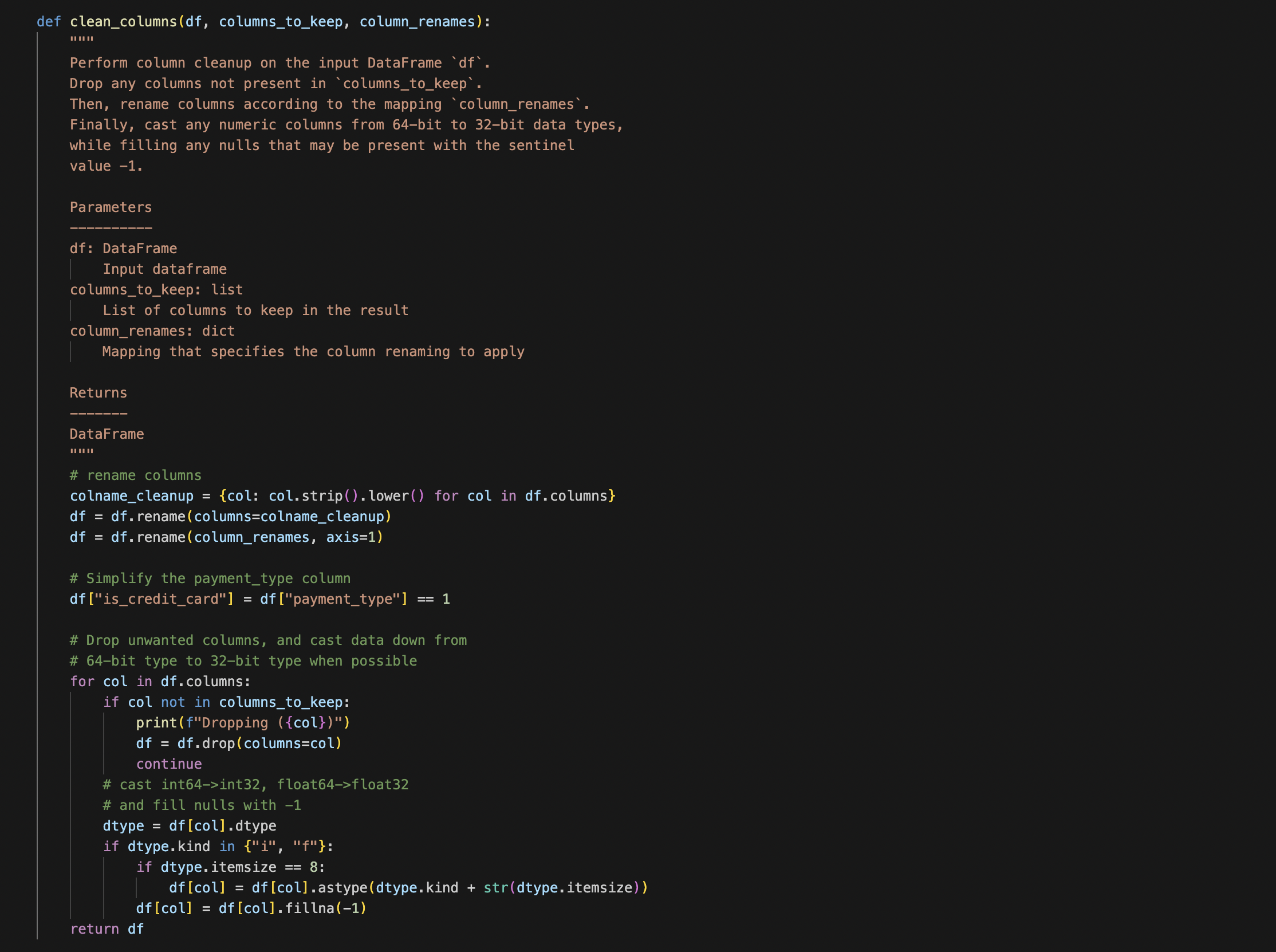
We will now call the below function using a pandas data frame. The time taken is as shown below.
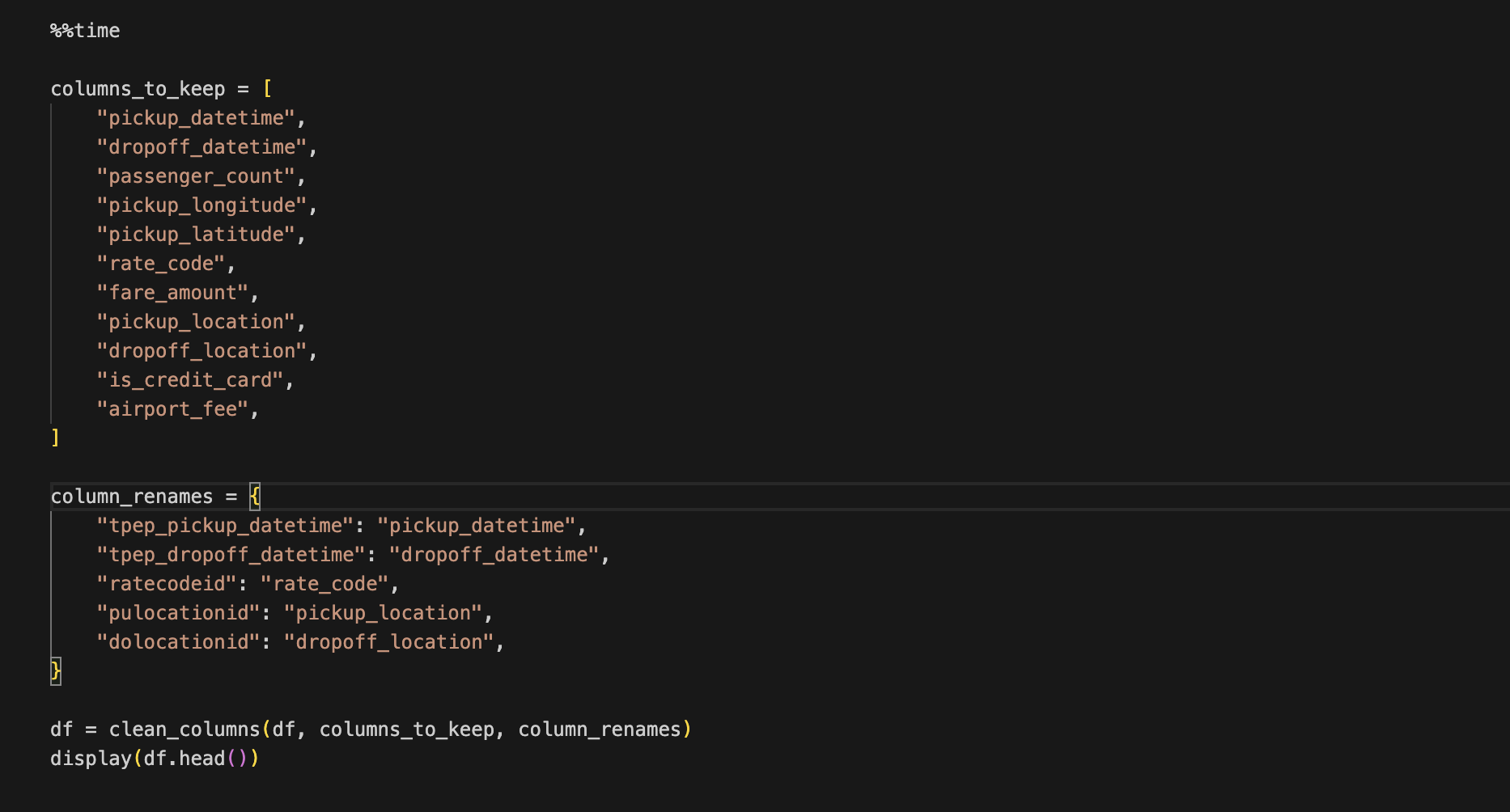

We will perform the same function now with rapids and compare the results.
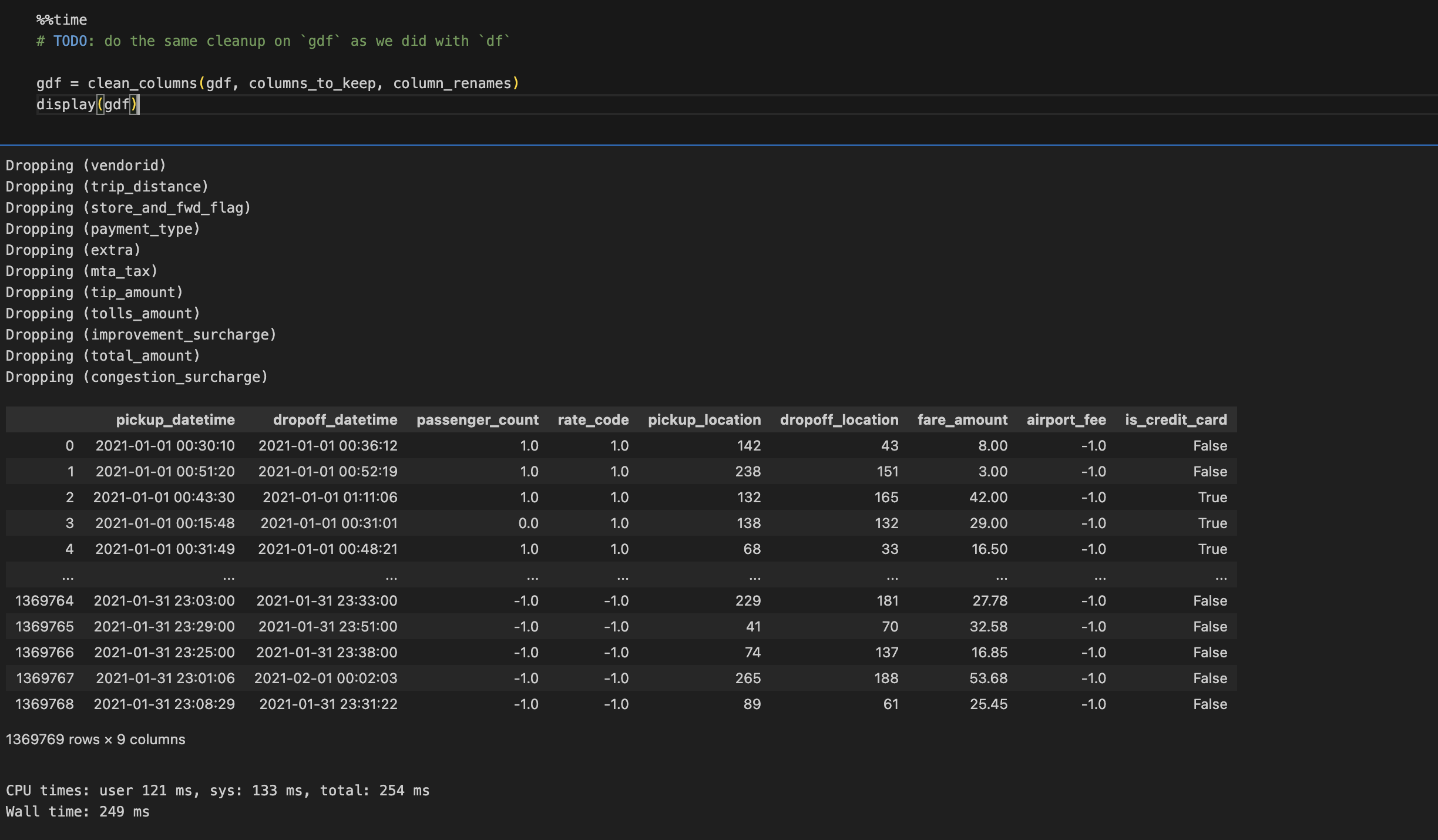
Benchmarking Results:
As you can see there is an improvement of up to 4x when running Rapids on OCI GPU
Part4: Visualizing Data
To visualize the data, we can use popular data visualization libraries like Seaborn and Matplotlib. By leveraging the power of GPUs, we can perform data cleaning and visualization tasks much faster than with traditional CPU-based methods, allowing us to gain insights from our data more quickly.
For SNS plots while using rapids convert to pandas before using. It is as simple as using gdf.topandas() function.
Part 5: Advance Features like Feature Engineering
We will add more features to our dataset, demonstrating the advanced functionality available in cuDF. Our dataset uses “location IDs” to identify pickup and dropoff locations, but we want the actual coordinates (latitude and longitude) which can be found in another dataset (taxi_zones.csv). We will use cuDF to merge the two datasets. Then, we will calculate the distance of the trip between the pickup and dropoff locations using the Haversine Distance Formula.
We will take the taxi_zones data as shown. As you can see there is x and y which is latitude and longitude.

Now we can do the cleanup.

We now will perform a merge operation and check the time taken.

Now let’s compare the same operation with Pandas and the time taken.
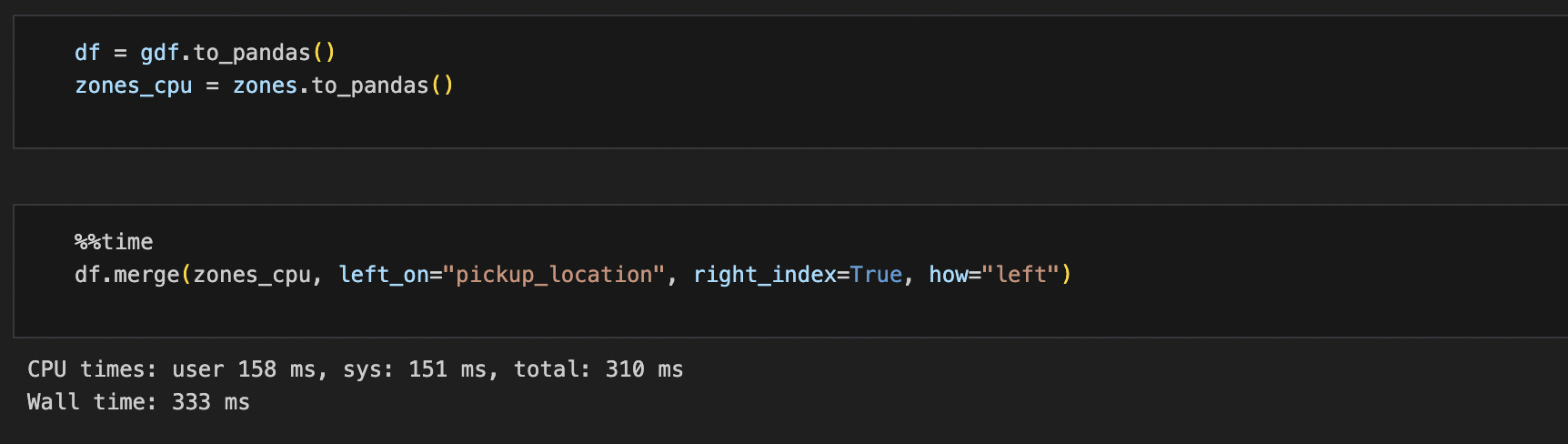
Benchmarking Results:
As you can see merge operations using GPU on OCI is 18x faster than a standard CPU counterpart.
Conclusion:
OCI Data Science is an end-to-end machine learning service that offers JupyterLab notebook environments and access to hundreds of popular open-source tools and frameworks. Additionally, OCI GPU’s can be used to accelerate data science workflows.
Rapids provides a collection of GPU-accelerated data science tools that can speed up data preprocessing, machine learning, and deep learning tasks. cuDF DataFrames and other objects use GPU memory, which makes them faster than Pandas. Code written for Pandas can be easily changed to work with cuDF, and you can still use third-party libraries that work with Pandas by using the .to_pandas() and .from_pandas() functions.
Using OCI along with Rapids can result in substantial speedup gains when doing large calculations. Data scientists can accelerate their workflows and achieve faster insights, while also taking advantage of the scalable and secure cloud infrastructure provided by OCI.
Keep in touch with OCI Data Science!
– Visit our website
– Visit our service documentation
– (Oracle Internal) Visit our slack channel #oci_datascience_users
– Visit our YouTube Playlist
– Visit our LiveLabs Hands-on Lab