

🎯 Overview
Oracle Database@Azure (ODBAA) is revolutionizing how enterprises manage their Oracle workloads across cloud environments. But with great power comes great responsibility—especially when it comes to access control.
If you’re onboarding ODBAA and need granular permissions beyond the default, for example at an Azure subscription level, this guide walks you through customizing Entra ID groups and corresponding OCI policies to make it happen.
This post is your runbook for success—whether you’re tackling this during onboarding or adjusting post-deployment.
🔧 Prerequisites
Before you begin, make sure the following are in place:
- ✅ ODBAA onboarding steps 1–4 completed
- ✅ Azure operator(s) with permission to
- Create/manage Entra ID groups
- Assign roles to the respective groups in the respective subscriptions
- ✅ OCI operator with Tenancy Admin or Identity Domain Admin privileges
👥 Custom Entra ID Groups: Why and How
By default, the Entra ID groups set up for ODBAA per the documentation, follow strict naming conventions because those names map directly to OCI policies created by the automation when the multicloud link is established. Those default OCI policies provide access to the respective ODBAA groups at an Azure Private Offer / OCI tenancy level – meaning the respective access applies to all ODBAA environments provisioned in the tenancy.
But what if you want something a little more tailored? For example, you linked multiple Azure subscriptions to the ODBAA service, following the documentation, which mentions controlling user access at the new OCI sub-compartment linked to the Azure subscription by creating new OCI policies. You are looking for more details to guide you. This post is your answer.
🎯 The Goal: Assign specific privileges to users at a granular scope—like Azure subscription / OCI compartment.
✅ How to Do It:
- Use a custom prefix (e.g., acmeco-finance) in your Entra ID group names
- Create Entra ID groups using this naming pattern – refer to table 1 below
- Assign the built-in Azure roles per task 7 in the onboarding documentation
- Complete or update the Identity Federation to add the groups to the OCI identity synchronization, per task 8 in the onboarding documentation
- Customize OCI policies to point to Assign permissions accordingly (refer to the section below for more detail)
🧠 Pro Tip: Create separate Entra ID groups for each Azure subscription.
⏳ Note: If groups aren’t first synced into OCI, any OCI policy referencing them will fail.
Table 1
| Azure / OCI Group Name | Service | Description |
|---|---|---|
| <prefix>-odbaa-exa-infra-administrators |
ExaDB-D |
Full access to Exadata Infrastructure and VM Cluster resources. |
| <prefix>-odbaa-vm-cluster-administrators |
ExaDB-D |
Full access all Exadata VM Cluster resources |
| <prefix>-odbaa-db-family-administrators |
ExaDB-D, ADB-S |
Full, owner access to all OraDB@Azure resources across ExaDB and ADB. |
| <prefix>-odbaa-db-family-readers |
ExaDB-D, ADB-S |
Read-only access to all OraDB@Azure resources |
| <prefix>-odbaa-exa-cdb-administrators |
ExaDB-D |
Admin access to Container Databases (CDB) in OCI |
| <prefix>-odbaa-exa-pdb-administrators |
ExaDB-D |
Admin access to Pluggable Databases (PDB) in OCI |
| <prefix>-odbaa-network-administrators |
ExaDB-D, ADB-S |
Admin access to OraDB@Azure network resources in OCI |
| <prefix>-odbaa-costmgmt-administrators |
ExaDB-D, ADB-S |
Admin access to cost governance features in OCI |
| <prefix>-odbaa-adbs-db-administrators |
ADB-S |
Admin access to ADB-S resources |
🔐 OCI Policy Customization: Step-by-Step
When you link an additional Azure subscription to the OCI Tenancy, a new sub-compartment is created just below the primary Azure Subscription compartment.
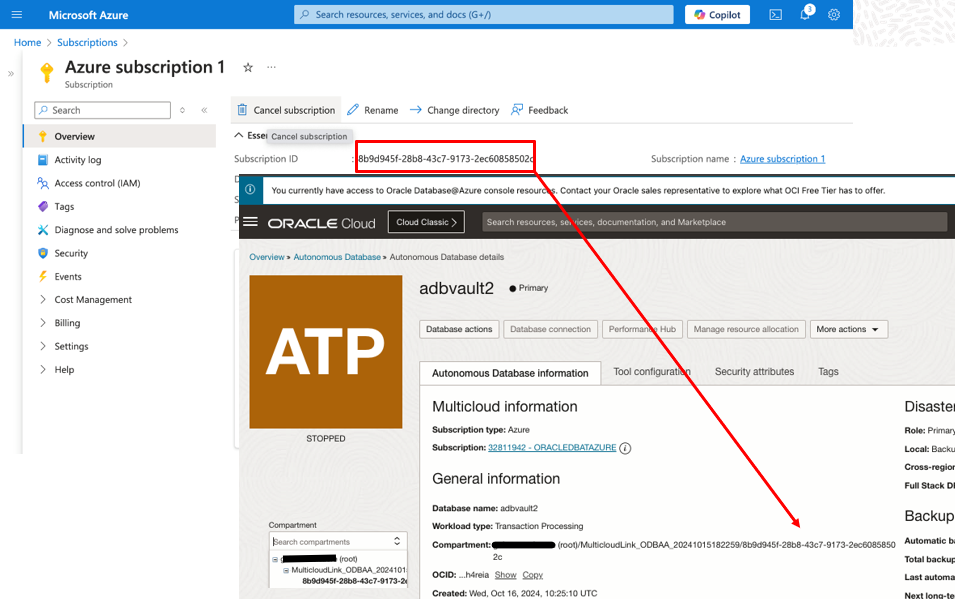
By default, the existing policies from the primary Azure Subscription will also apply to this new compartment (subscription).
To customize the OCI Policies, and grant access only to the new compartment using the custom groups created above, navigate to the OCI Console under Identity & Security → Policies and search for policies, in the root compartment, named like MulticloudLink_ODBAA_*, referencing the default odbaa– groups.
⏳ Note: The names of the specific policies in your tenancy depend on when you onboarded OraDB@Azure – so aren’t specifically documented here. Refer to the screenshot below as an example.
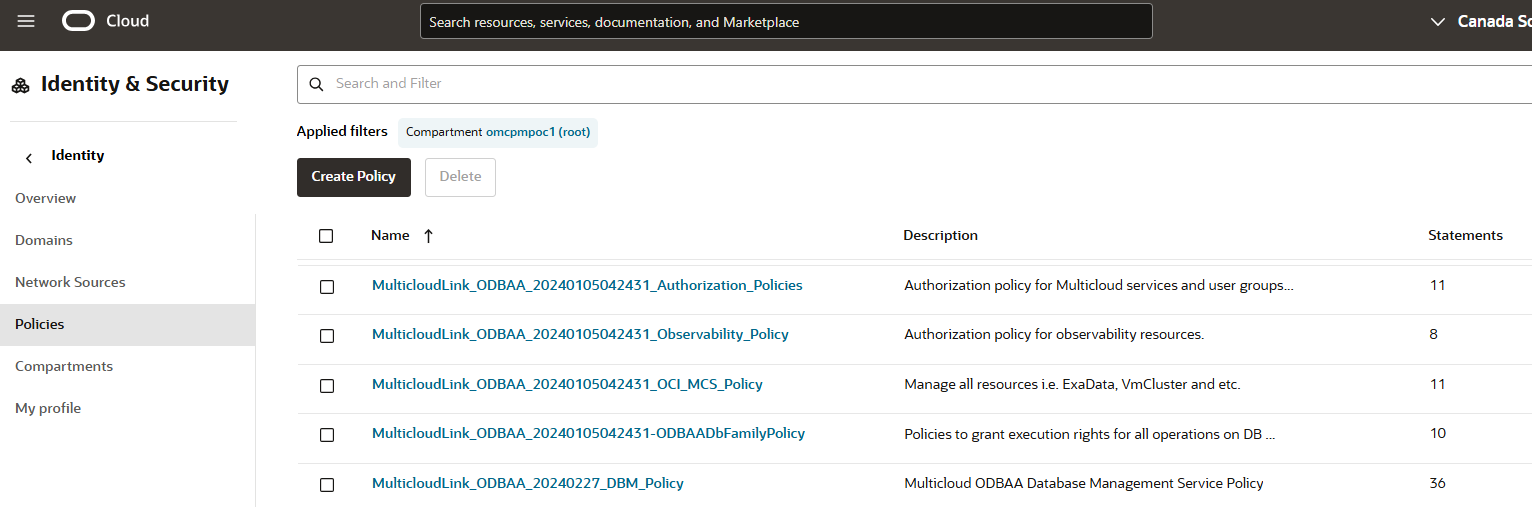
✍️ Create Custom Policies:
- For each existing policy, create a new policy with the same prefix used for the group names above. E.g. acmeco-finance-MulticloudLink_ODBAA_YYYYMMDDHHMMSS-ODBAADbFamilyPolicy
- Copy the original policy statements (use advanced editor) and paste them in the new policy
- Edit each policy statement to:
- Match the corresponding custom group name(s)
- Reference the appropriate compartment, linked to the Azure subscription, instead of the MultiCloudLink compartment
- Example syntax:
- allow group acmeco-finance-odbaa-exa-infra-administrators to manage <resource> in compartment <multicloudlink compartment name>:<subscription sub-compartment name>
🔐 Using Identity Domains other than Default
Your OCI Tenancy comes with an Identity Domain named Default for managing users, groups, Federation, etc. Depending on your use case, you may want to use new Identity Domains to maintain separate identities and configuration for different subscriptions. In this case, the policies that reference the new Identity Domain would need to specify the domain name in each statement. For example, using an Identity Domain named Dev:
Also, make sure Entra ID Federation and Synchronization is configured for the new Identity Domain.
🧩 Bringing It All Together
By customizing your Entra ID groups and OCI policies:
- Empower your org with fine-grained access control
- Enable multi-subscription flexibility for OraDB@Azure
- Keep user access clean, scoped, and secure
🧠 Helpful Resources
Oracle ODBAA Onboarding Guide
Microsoft Entra Group Management
Add Members to an Entra Group
Oracle Guide for Multiple Subscriptions
Overview of Working with OCI Policies
Set Up Role Based Access Control for OraDB@Azure
OCI Identity Domains