

This blog was a collaborative effort between Dipak Chhablani and Siming Mu of the A-Team. It explains the identity propagation within FA Digital Assistant from Fusion to PaaS services. What, there is one more identity propagation blog! Yes but this time the identity propagates from Fusion to PaaS services. This blog will present a pattern that has been implemented to accomplish identity propagation from a FA Digital Assistant, through IDCS Node.js SDK (passport-idcs).
So far we have implemented solutions to propagate user identity from PaaS applications to Fusion Apps which is a common requirement from all customers. Greg Mally explains this concept very well in detail in his Identity Propagation blog. Angelo has also written a blog on Identity Propagation to ORDS for a VBCS Fusion SaaS Extension.
In this blog, we will focus on FA Digital Assistant which is enabled for HCM, ERP and SCM Apps. Users can create expense reports, ask for vacation balance, and request approval using FA digital assistant. The FA digital assistant is embedded into the Fusion application and it receives the logged-in user’s access token from FA to perform REST operations like creating expense reports and getting the user’s vacation balance. FA Digital Assistant can call the FA REST APIs based on the user’s entitlement using his/her access token and it is pretty straightforward. The same token can’t be used to call PaaS services even though these applications share the same user base. The access token is generated exclusively with Fusion Scope and not with any PaaS services scope.
Problem Statement
How can an FA Digital Assistant ensure that the invoking user’s identity gets passed along to a call PaaS services for example OIC, IoT and OTM?
The Use Case
To keep it simple, we have chosen the use case where FA digital assistant will make a call to Echo Integration in OIC by passing the logged-in user’s identity in the Fusion application. The Echo integration sends the response back to FA Digital Assistant and sends “invoked by” details available at runtime as part of the integration instance metadata shows the username from the fusion application. This ensures the logged-in user in FA calls Echo integration in OIC. This solution can be used for calling IoT and other applications which share the same user base.
1. The user logs into the Fusion Application.
2. The user clicks on FA Digital Assistant and initiates the session.
3. FA Digital Assistant ask for a message to send to Echo Integration and receive input from the user.
4. FA Digital calls Echo Integration in OIC by passing user message, integration receives the request and sends a response and “Invoked by” details back to FA Digital Assistant.
5. FA Digital Assistant shows the integration message to the user.
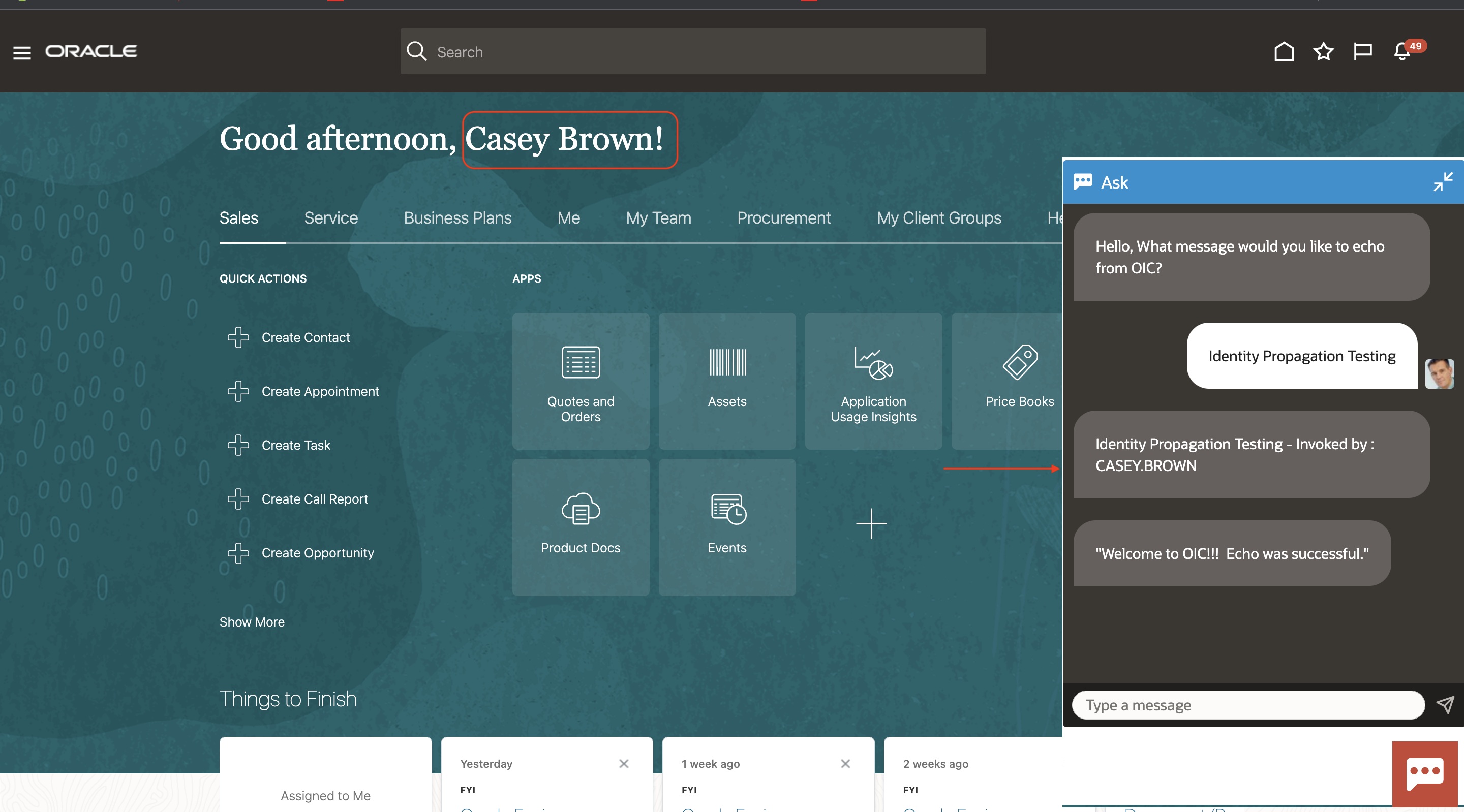
Fig. 1. Fusion Digital Assistant
The Solution
The key component of this solution is to make the access token request on behalf of the fusion user’s identity. Fusion passes the username to FA Digital Assistant, we can use this identity to request an access token on this subject’s behalf to invoke OIC. IDCS provides a user assertion & client assertion OAuth flow for this purpose. Please refer to the following documentation for more information.
The diagram below highlights the steps involved to make the complete flow work.
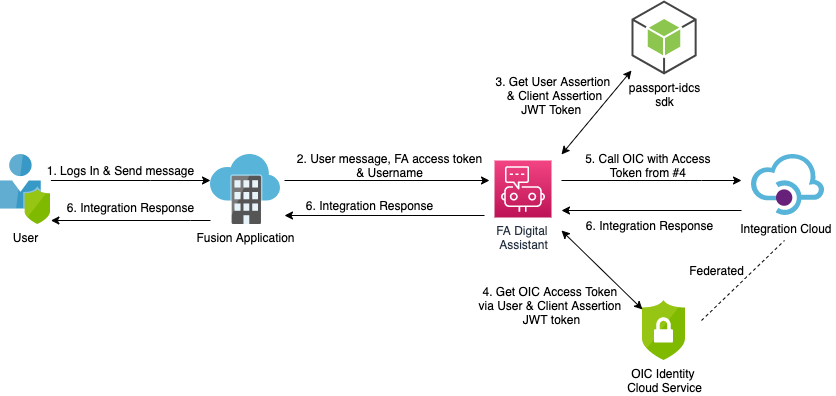
Fig. 2. Identity Propagation Solution
1. User login into the fusion application and initiates the conversation with FA digital assistant.
2. Fusion application passes username behind the scene to FA Digital assistant which gets stored in “${profile.properties.value.principal}” variable.
3. FA digital assistant uses passport-idcs to generate the user assertion and client assertion JWT token by passing user and client subject claims.
4. FA digital assistant then makes a call to IDCS token URL to get the access token on the user’s behalf by passing user assertion and client assertion JWT token. IDCS validates the assertion token and if approved, IDCS returns the appropriate access token.
5. FA digital assistant then calls OIC Integration by passing the access token in the Authorization header.
6. OIC validates the token and returns the response back to FA Digital Assistant which is displayed to the user.
Configurations
The following information describes the configuration required for the identity propagation solution.
Keys: IDCS provides a user assertion & client assertion OAuth flow to generate the access token. IDCS uses ‘x5t’ or a ‘kid’ to identify the public certificate that should be used to validate the assertion tokens. Public/private keys allow IDCS to use a pre-shared public certificate in order to validate JWTs which were generated externally to IDCS and signed with a private key. The private key and public certificate can be generated using openssl or keytool command. The key pair needs to be an RSA keypair for IDCS.
FA digital assistant uses a private key to sign the assertion and IDCS uses a public certificate to validate the assertion tokens.
OIC IDCS Trusted Application
A trusted application needs to be created to generate the user assertion and client assertion tokens. The public certificate as part of the key pair should be uploaded to validate the assertion tokens. The certificate alias will be the value of kid while generating assertion tokens. The application will generate the client id and client secret. The client id will be used to assert the identity of the user associated with the integration instance and generate the user assertion and client assertion tokens.
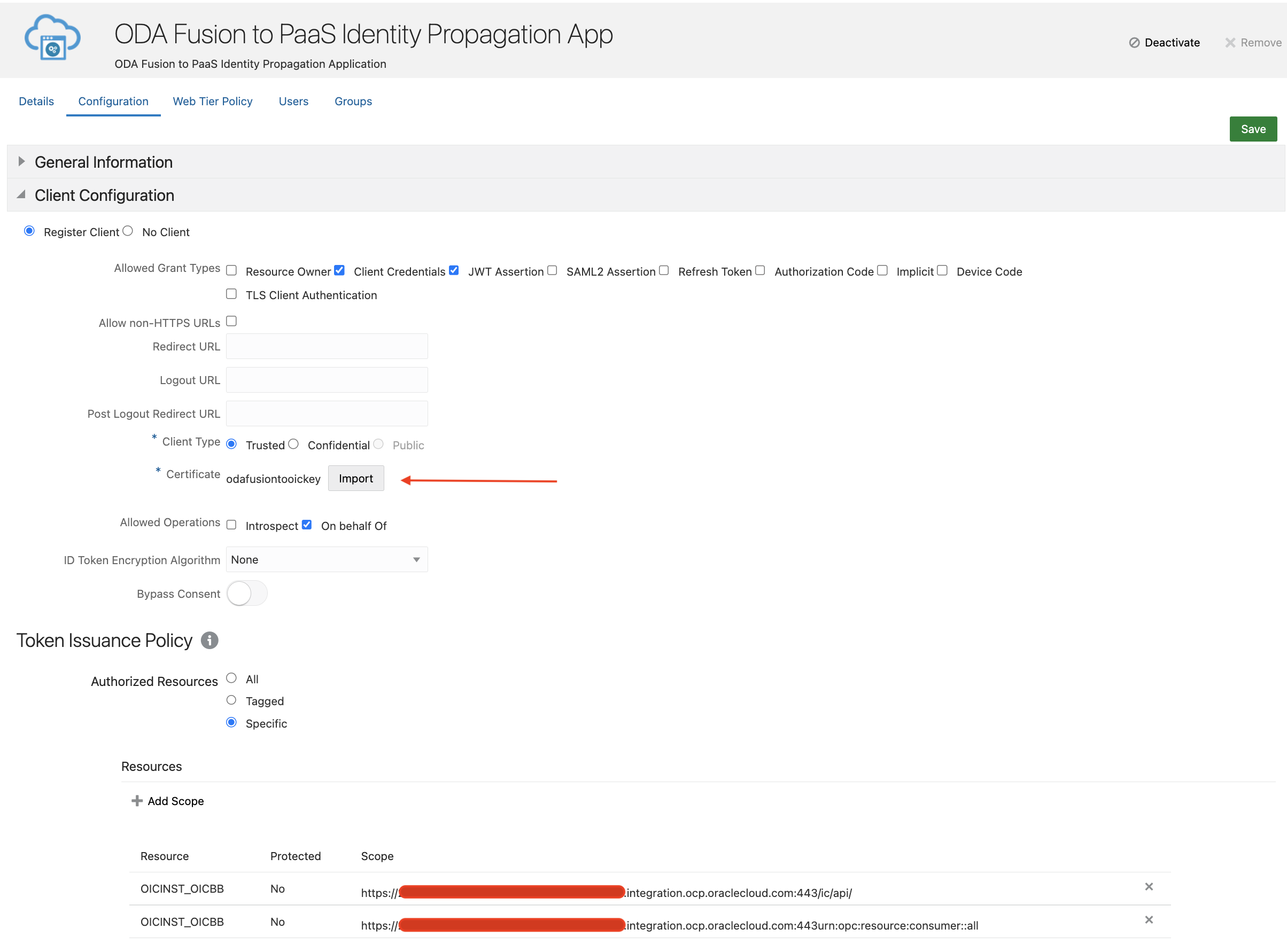
Fig. 3. Identity Propagation IDCS Application
Config Parameters
After generating the keys and registering the trusted application in IDCS, we will get the following details which will be used to generate the user assertion, client assertion and access token.
Private Key: It is a private key from the Public/private key pair.
Certificate: It is a public certificate from the Public/private key pair, uploaded to the OIC IDCS application shown above in the screenshot.
Client ID: It is the client id from the client id/client secret pair. It is present in the general information section of the OIC IDCS application.
KID: It is a certificate alias in the OIC IDCS application shown in the above screenshot (odafusiontooickey)
Scope: It is the scope OIC IDCS application, shown in the above screenshot.
IDCS Token URL: it is IDCS token URL (https://idcs-xxx.identity.oraclecloud.com/oauth2/v1/token)
These config parameters need to be stored securely. For Proof of Concept, we have stored them in skill config parameters of type secure. It is highly recommended to store in OCI Vault for production. To access these parameters from OCI Vault in custom component service, the service needs to be deployed as Oracle Function or in an external container and respected policies, and a dynamic group needs to be created. Once done these parameters can be accessed from OCI Vault using the resource principle.
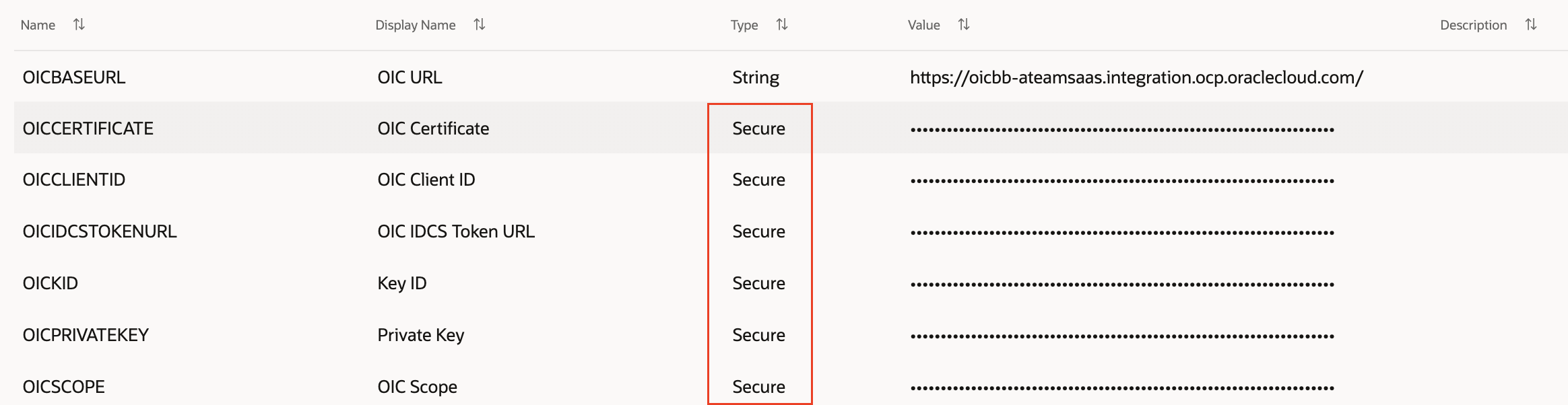
Fig. 4. Config Parameters
IDCS Node SDK (passport-idcs)
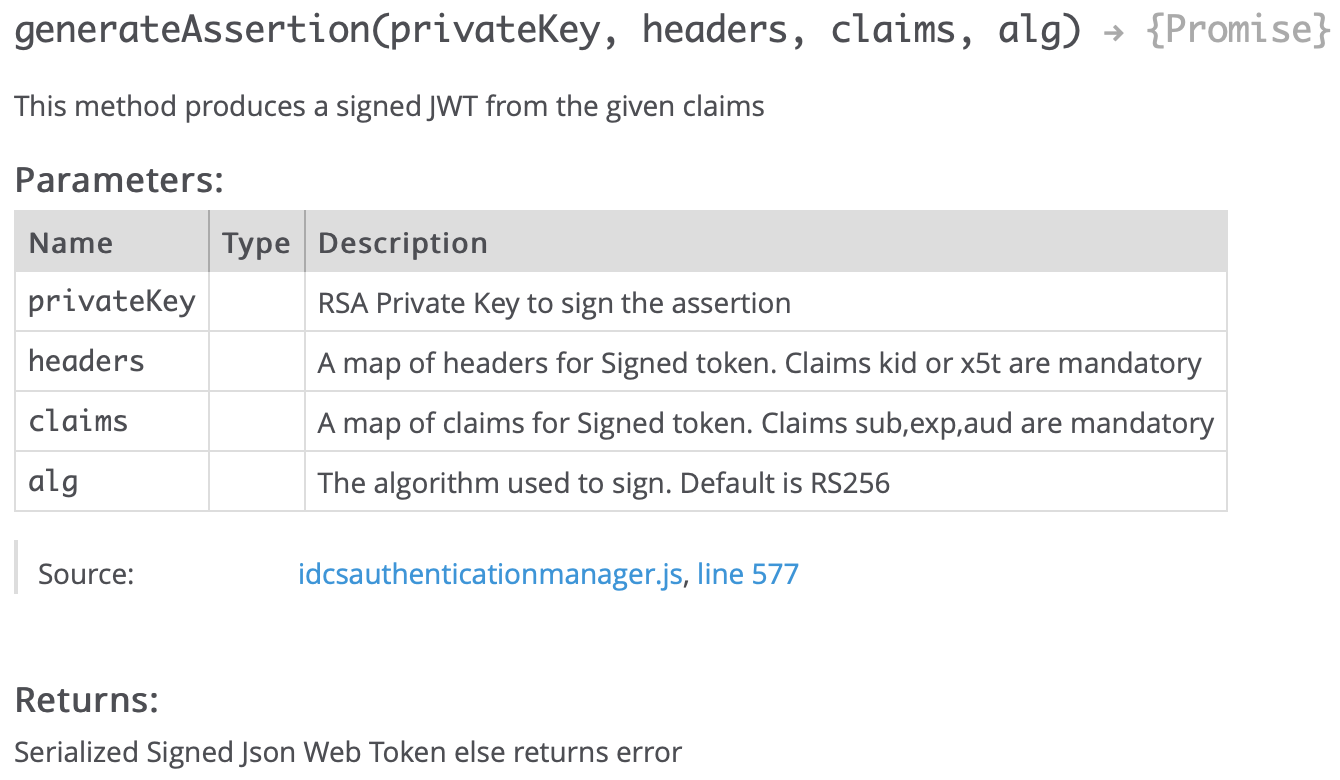
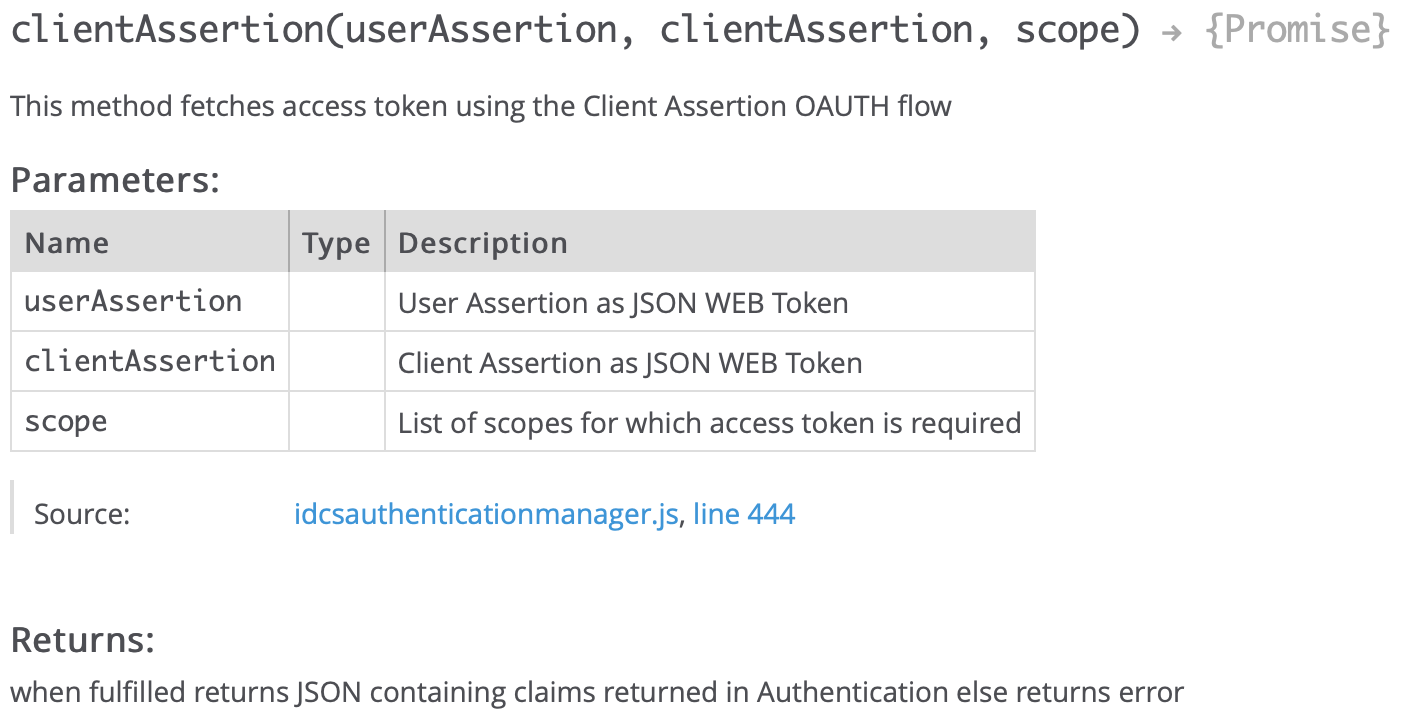
IDCS Node SDK can be downloaded from the IDCS portal (settings->download). The Node.js SDK is available as a passport strategy, called passport-idcs. The SDK has IdcsAuthenticationManager class which contains all the functionality of the IDCS Authentication SDK. The following 2 methods in IdcsAuthenticationManager class are used in FA digital assistant to generate an assertion and access tokens.
generateAssertion: This method creates the user assertion and client assertion tokens. These assertion tokens are signed with the private key. The claims parameter defines if its user or client assertion.
clientAssertion: This method gets the access token from IDCS by passing user and client assertion tokens. IDCS validates assertion tokens using the public certificate and returns the access token of the user’s identity based on the passed scope. The name of a method is clientAssertion but it gets the access token from IDCS which is used to call the PaaS services and in our use case, it is used to call ECHO integration in OIC.
Best Practices: The passport-idcs SDK size is 30 MB. The identity propagation solution only needs 2-3 libraries to generate the tokens. It is not a good design to include complete passport-idcs SDK into custom component services, this will increase the size and execution time. You can include the following libraries (check for supported version) into the package.json file and execute npm install on the project folder.
- “jsonwebtoken”: “^8.5.1”,
- “logger”: “0.0.1”,
- “uuid”: “^8.3.2”
ODA Custom Component
The custom component accepts 2 input parameters, a username to create the user assertion tokens and a message to trigger the Echo integration. It creates the config variable based on the config parameter. The escape line character is added while retrieving the private key and certificate values, it is replaced with a new line character. The custom component then calls the local OICAuthenticationManager module to get the access token by passing the config parameter.
invoke: async (context) => {
    const { username } = context.properties();
    const { message }  = context.properties();
    const baseUrl      = context.getVariable('system.config.OICBASEURL');
    const key               = context.getVariable('system.config.OICPRIVATEKEY');
    const cert              = context.getVariable('system.config.OICCERTIFICATE');
    const search            = String.fromCharCode(key.charCodeAt(27));
    const replacer          = new RegExp(search, 'g');

    var k = key.replace("-----BEGIN PRIVATE KEY-----","-----BEGINPRIVATEKEY-----");
    k = k.replace("-----END PRIVATE KEY-----","-----ENDPRIVATEKEY-----");
    k = k.replace(replacer,String.fromCharCode(10));
    k = k.replace("-----BEGINPRIVATEKEY-----","-----BEGIN PRIVATE KEY-----");
    k = k.replace("-----ENDPRIVATEKEY-----","-----END PRIVATE KEY-----");
    var c = cert.replace("-----BEGIN CERTIFICATE-----","-----BEGINCERTIFICATE-----");
    c = c.replace("-----END CERTIFICATE-----","-----ENDCERTIFICATE-----");
    c = c.replace(replacer,String.fromCharCode(10));
    c = c.replace("-----BEGINCERTIFICATE-----","-----BEGIN CERTIFICATE-----");
    c = c.replace("-----ENDCERTIFICATE-----","-----END CERTIFICATE-----");

    var OICConfig           = {};
    OICConfig.userName      = username;
    OICConfig.privateKey    = k;
    OICConfig.x5t           = c;
    OICConfig.kid           = context.getVariable('system.config.OICKID');
    OICConfig.clientId      = context.getVariable('system.config.OICCLIENTID');
    OICConfig.scope         = context.getVariable('system.config.OICSCOPE');
    OICConfig.tokenUrl      = context.getVariable('system.config.OICIDCSTOKENURL');

    try{
      var response  = await OICAuthenticationManager.getOICAccessToken(OICConfig,context);
      if(response.status === 'success') {
        context.logger().debug("Access Token: "+response.message.access_token);
        var auth         = "Bearer "+ response.message.access_token;
        var headers      = { 'Authorization': auth,'Accept': 'application/json' };
        const endpoint   = baseUrl+"ic/api/integration/v1/flows/rest/ECHO/2.0/"+message;
        context.logger().debug("Endpoint : "+endpoint);
        response  = await oicRestUtil.invokeREST(endpoint,'GET', headers,null,context);
        if(response.status === 'success') {
          context.reply(response.message.Message)
                 .reply(response.message.Welcome)
                 .transition("success");
        }
        else {
          context.reply("There is error in ECHO Integration Execution..")
                 .transition("error");
        }
      }
    }
    catch(err)
    {
      context.logger().debug("Error : "+ err.message);
      context.keepTurn(true)
      .transition('error');
    }
  }
OICAuthenticationManager
The JS module prepares the userclaims and clientclaims payload as per the IDCS token requirement and calls generateAssertion method in IdcsAuthenticationManager (passport-idcs) module to get user assertion and client assertion tokens. It then calls clientAssertion method to get the access token by passing user and client assertion tokens.
- User Assertion Payload: https://docs.oracle.com/en/cloud/get-started/subscriptions-cloud/csimg/user-assertion-workflow.html
- Client Assertion Payload: https://docs.oracle.com/en/cloud/get-started/subscriptions-cloud/csimg/step-step-workflow-client-credentials-grant.html
const { v4: uuidv4 }            = require('uuid');
const IdcsAuthenticationManager = require('./idcsAuthenticationManager.js');
var  OICAuthenticationManager = {};
OICAuthenticationManager.getOICAccessToken = async (config, context) => {
    context.logger().debug("client Id in OICAuthenticationManager : "+config.clientId);
    var privateKey = config.privateKey;
    var x5t = config.x5t;
    const alg = "RS256";
    const headers = {
       "kid": config.kid,
       "x5t": x5t,
       "typ": "JWT"
    }
    var date = new Date();
    var iatSeconds = date.getTime() / 1000;
    var expSeconds = iatSeconds + 7 * 24 * 60 * 60; // set the JWT expiration to 1 week. Can be longer
    const userClaims= {
        "sub": config.userName,
        "prn": config.userName,
        "aud": "https://identity.oraclecloud.com/",
        "exp": expSeconds,
        "iat": iatSeconds,
        "iss": config.clientId,
        "jti": uuidv4().toString
    };
    const clientClaims= {
        "sub": config.clientId,
        "prn": config.clientId,
        "aud": "https://identity.oraclecloud.com/",
        "exp": expSeconds,
        "iat": iatSeconds,
        "iss": config.clientId,
        "jti": uuidv4().toString
    };
    const userAssertion = await IdcsAuthenticationManager.generateAssertion(privateKey,headers,userClaims,alg,context);
    context.logger().debug("userAssertion: "+userAssertion);
    const clientAssertion = await IdcsAuthenticationManager.generateAssertion(privateKey,headers,clientClaims,alg,context);
    context.logger().debug("clientAssertion: "+clientAssertion);
    var response = await IdcsAuthenticationManager.clientAssertion(userAssertion,clientAssertion,config.scope,config.tokenUrl,context);
    return response;
};
module.exports = OICAuthenticationManager;
IdcsAuthenticationManager
The JS module exposes 2 functions to generate user assertion, client assertion and access tokens. These functions refer to idcsconstants to generate the assertion tokens and are signed with a private key. We have created a local oicRestUtil module to call IDCS & OIC rest API. This module is a wrapper to the node-fetch module.
const jwt = require('jsonwebtoken');
const IDCSConstants = require('./idcsconstants');
const oicRestUtil = require('../lib/oicRestUtil.js');

 var IdcsAuthenticationManager = {};
 IdcsAuthenticationManager.generateAssertion = function(privateKey, headers, claims, alg,context){
    return new Promise(function(resolve, reject) {
        if(!claims[IDCSConstants.TOKEN_CLAIM_SUBJECT]){
            var err = new Error("Subject claim is missing");
            reject(err);
            return;
        }
        if(!claims[IDCSConstants.TOKEN_CLAIM_AUDIENCE]){
            var err = new Error("Audience claim is missing");
            reject(err);
            return;
        }
        if(!claims[IDCSConstants.TOKEN_CLAIM_EXPIRY]){
            var err = new Error("Expiry claim is missing");
            reject(err);
            return;
        }
        if(!claims[IDCSConstants.TOKEN_CLAIM_ISSUE_AT]){
            var err = new Error("Issue At claim is missing");
            reject(err);
            return;
        }
        if(!claims[IDCSConstants.TOKEN_CLAIM_ISSUER]){
            var err = new Error("Issuer claim is missing");
            reject(err);
            return;
        }
        if(!headers[IDCSConstants.HEADER_CLAIM_KEY_ID]){
            if(!headers[IDCSConstants.HEADER_CLAIM_X5_THUMB]){
                var err = new Error("No kid or x5t present in header");
                reject(err);
                return;
            }
        }
        if (!alg) {
            alg = 'RS256';
        }
        try {
            jwt.sign(claims, privateKey, {algorithm : alg, keyid: headers.kid}, function(err,token){
                if(err){
                    //context.logger().debug("Error in Assertion token : "+err);
                    reject(err);
                }else {
                    //context.logger().debug("Assertion Token Resolved : "+err);
                    resolve(token);
                }
            });
        }catch(err){
            reject(err);
        }
    });
};
IdcsAuthenticationManager.clientAssertion = async function (userAssertion, clientAssertion, scope, tokenUrl,context){
        if(!clientAssertion || clientAssertion==''){
            var err = new Error("Client Assertion is Empty");
            return err;
        }
        if(!userAssertion || userAssertion==''){
            var err = new Error("User Assertion is Empty");
            return err;
        }

        var params = new URLSearchParams();
        params.append(IDCSConstants.PARAM_GRANT_TYPE, IDCSConstants.GRANT_ASSERTION);
        params.append(IDCSConstants.PARAM_ASSERTION, userAssertion);
        params.append(IDCSConstants.PARAM_CLIENT_ASSERTION_TYPE, IDCSConstants.ASSERTION_TYPE_JWT);
        params.append(IDCSConstants.PARAM_CLIENT_ASSERTION, clientAssertion);

        if(scope){
            params.append(IDCSConstants.PARAM_SCOPE, scope);
        }
        var headers = { 'Content-Type': IDCSConstants.WWW_FORM_ENCODED,'Accept': 'application/json' };
        context.logger().debug("Calling Access Token URL");
        var response  = await oicRestUtil.invokeREST(tokenUrl, 'POST', headers,params,context);
        return response;
};
module.exports = IdcsAuthenticationManager;
Conclusion
The blog explains the identity propagation solution within FA digital assistant from fusion to PaaS services using IDCS Node SDK (passport-idcs). It is recommended to store config parameters in OCI Vault for production. The token cache solution is not covered in this blog but it should be implemented in production for performance gains in custom component services and put less stress on IDCS.