
Oracle CPQ natively supports only one external identity provider for SSO at a time — a real constraint in enterprise environments where different user populations authenticate through different systems. This post explains how Oracle IDCS acts as an intelligent authentication broker, routing users to the correct IDP automatically while eliminating the dependency on deprecated SOAP V1 Web Services.
The Challenge: One CPQ, Many Identity Worlds
In most large-scale Oracle CPQ deployments we encounter as A-Team architects, a single CPQ instance serves multiple, very different user communities. Internal sales agents may authenticate via third party IDP like Azure Active Directory as an example for this blog. External users are managed through IDP like IAM or OAM. Contractors or system integrators connect from entirely different directories.
The business expectation is intuitive: “When a user accesses CPQ, authenticate them using the identity provider they already used for the application they came from.” No re-authentication prompts. No separate credentials to manage. A consistent, branded experience regardless of which user type is logging in.
The Core Constraint
At the time of writing, Oracle CPQ supports only one external IdP for SSO/MFA simultaneously (alongside direct IDCS authentication). In environments with multiple user populations authenticating through different enterprise identity systems, this creates an architectural problem if approached naively.
This challenge is amplified for organisations that relied on SOAP V1 Web Services for partner portal Single Sign-On. SOAP V1 deprecation was announced in Oracle CPQ 25A (2024), with end of life targeted for 26A. Any organisation using SOAP V1 login flows for SSO must migrate to a modern, standards-based architecture before that cutoff.
The Solution: IDCS as an Authentication Orchestrator
The key architectural insight is that even though CPQ can federate with only one external IdP, Oracle IDCS can itself federate with multiple upstream IdPs and route authentication requests dynamically based on configurable policy rules.
By placing IDCS in front of CPQ as that single trusted IdP, you unlock multi-IDP support without changing CPQ’s SSO configuration at all. IDCS becomes the authentication broker — it receives the login request, evaluates its routing policies, and silently redirects the user to Azure AD, OAM, or any other SAML 2.0-compliant provider. After authentication, the assertion flows back through IDCS and into CPQ.
Oracle IAM Federation — Key Capability
Oracle Cloud Infrastructure and IDCS support federation with Oracle Identity Cloud Service, Microsoft Azure Active Directory, Active Directory Federation Services (AD FS), Okta, and any SAML 2.0-compliant identity provider. A federation trust — established through SAML metadata exchange — is configured between each upstream IdP and IDCS. IDCS then acts as the single trusted IdP for CPQ. See the OCI Identity Federation documentation for full details on federation trust setup, SAML metadata, and group mappings.
Architecture Overview
Lets take an example where one IDP is Azure AD for internal CPQ users and the other is OAM or IDCS to explain the solution. The diagram below shows the recommended target architecture. IDCS sits centrally as the broker. CPQ trusts IDCS as its sole IdP. IDCS maintains federated relationships with both Azure AD (for internal and call-centre users) and OAM (for partner portal users). IDCS policies determine, at runtime, which upstream IdP each user is sent to — based on their email domain, group membership, or network origin.
Target Architecture
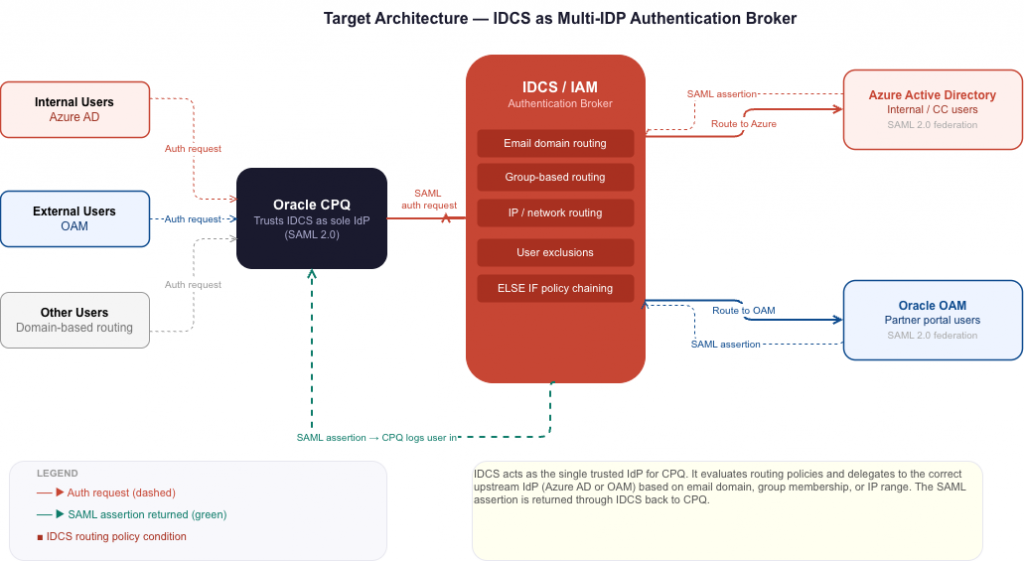
From the user’s perspective the flow is invisible. CPQ redirects to IDCS. IDCS evaluates its routing policies and silently redirects to Azure AD or OAM. After authentication, the upstream IdP sends a SAML assertion to IDCS, which validates it and logs the user into CPQ. No repeated prompts. No additional credentials. A single sign-on experience regardless of which identity system manages that user.
Step-by-Step Implementation
- Configure IDCS as the SSO provider for CPQSet CPQ to use IDCS as its sole identity provider. This establishes IDCS as the authentication gateway for all CPQ logins. Detailed steps are covered in the Oracle CPQ SSO configuration documentation.
- Add Azure AD as a federated IdP in IDCSConfigure Azure Active Directory as an upstream IdP within IDCS using SAML 2.0 metadata exchange. This establishes the federation trust — IDCS can now delegate authentication to Azure AD and receive signed assertions back. Follow the Federating with Microsoft Azure Active Directory guide.
- Add Oracle OAM as a second federated IdP in IDCSConfigure Oracle Access Manager as a second upstream IdP. OAM typically manages partner portal and external user identities. The federation setup mirrors the Azure AD process — SAML metadata exchange establishes the trust. See the OAM and IDCS federation guide.
- Configure IDCS IDP routing policiesCreate conditional routing rules that determine which upstream IdP handles each user’s authentication. This is the heart of the solution and is covered in detail in the next section.
- Verify user synchronisation across all systemsEvery user must exist in CPQ and in their respective upstream authentication system. Partner users must be in CPQ. Internal users must be in CPQ and Azure AD. If using group-based routing, users must also be synchronised into the appropriate IDCS groups.
- End-to-end testing for each user populationValidate the complete authentication flow for each user type: internal users via Azure AD, partner users via OAM, and edge cases such as users with active sessions or those whose accounts span multiple systems.
IDCS IDP Routing Policies in Depth
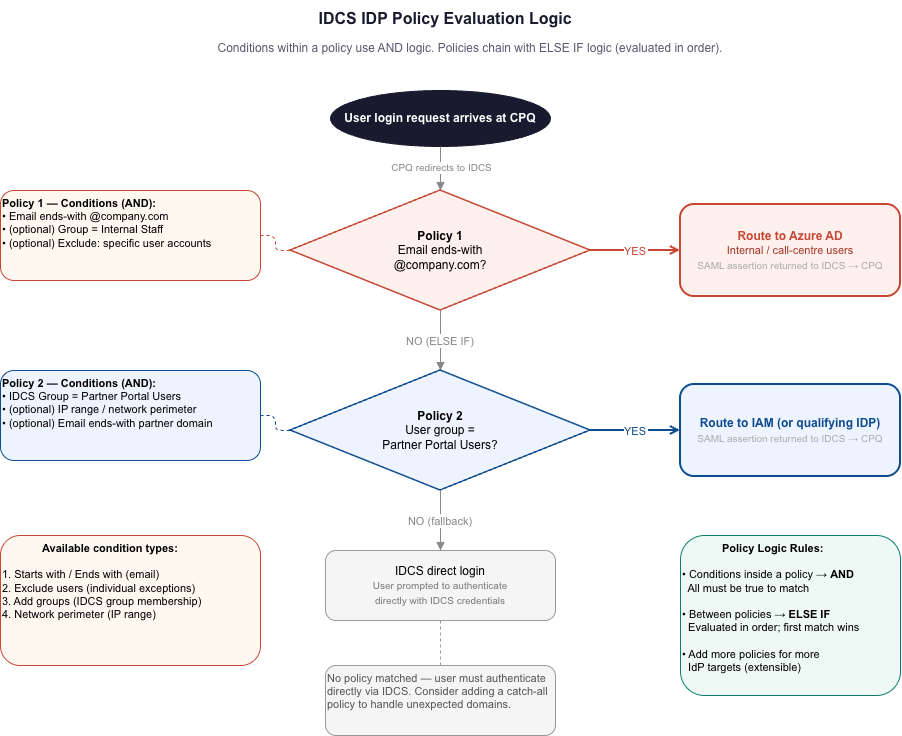
IDCS IDP routing policies are the mechanism that makes multi-IDP routing work. Each policy consists of one or more conditions; when a user matches, IDCS redirects to the assigned IdP. Conditions within a single policy use AND logic. Multiple policies chain using ELSE IF logic — evaluated in order until a match is found.
Available Policy Condition Types
| Condition type | How it works | Example use case |
|---|---|---|
| Starts with / Ends with expression | Routes based on the user’s email address prefix or suffix | IF email ends with @company.com THEN route to Azure AD |
| Exclude users | Defines per-user exceptions to a policy rule by individual email address | Route all @company.com users to Azure, except one specific admin account that uses OAM |
| Add groups | Routes based on IDCS group membership. Requires users to be synchronised from CPQ to IDCS groups. | All users in the Call Centre Agents IDCS group route to Azure AD |
| Network perimeter / IP restriction | Routes based on the client’s IP address or defined network perimeter ranges | Users connecting from corporate VPN IP range route to Azure AD; all others to OAM |
Policy Logic: AND within, ELSE IF between
Conditions within a single policy combine with AND — a policy could require that the email ends with @company.com AND the user is in the Call Centre group; both must be true. Individual policies chain with ELSE IF logic — if Policy 1 does not match, IDCS evaluates Policy 2, and so on. This gives you the flexibility to handle complex, overlapping user populations within a single IDCS configuration.
Mapping User Populations to Routing Strategies
Based on common enterprise CPQ deployment patterns, here is how typical user domain categories map to IDCS routing strategies:
| User population | Recommended routing strategy | Target IdP |
|---|---|---|
| Internal employees | Domain-based rule (ends-with @company.com) with group exclusions for special cases | Azure AD |
| External partners | Domain-based rule per partner domain, or group-based where domains overlap | Oracle OAM |
| SI / contractor users | Domain-based (ends-with @si-partner.com) with per-user exclusions for those needing PP access | Azure AD (with exclusions) |
| No domain (#N/A) | Group-based routing — users must be synchronised into named IDCS groups | Azure AD or OAM based on group |
| Other external domains | Simple per-domain policy rule | Azure AD or OAM as appropriate |
Key Considerations and Gotchas
User provisioning across all systems is non-negotiable
SSO works on the premise that the user identity exists across all systems involved in the authentication chain. Every user who accesses CPQ via IDCS-brokered SSO must exist in CPQ, in the upstream IdP (Azure AD or OAM), and — if group-based routing is used — must be synchronised into the correct IDCS group. A missing user at any step results in SAML assertion validation failures, often with opaque error messages.
The CPQ login page is not being deprecated
A common concern raised during SOAP V1 discussions: is the CPQ login page itself being removed? The answer is no. The deprecation targets the SOAP V1 Web Services used for automated authentication flows — specifically the SOAP v1 Login API endpoints used in Remote Web Services SSO. The standard CPQ login page and IDCS-federated SSO remain fully supported and are unaffected.
Setting up OAM federation mirrors Azure AD
If you have already federated Azure AD with IDCS, adding OAM follows the identical process — SAML metadata exchange establishes the trust. Once OAM is registered as a federated IdP in IDCS, update the IDP routing policy to route the appropriate users to OAM.
SOAP V1 Deprecation Timeline
SOAP V1 deprecation for Oracle CPQ was announced in the 25A release (2024). End of life and removal is targeted for 26A. Organisations should plan, test, and validate their IDCS-brokered SSO implementation well ahead of that deadline.
Conclusion
The combination of Oracle IDCS’s flexible IDP routing capabilities with Oracle CPQ’s SAML 2.0 federation support provides a clean, standards-based answer to a genuinely complex problem: routing multiple distinct user populations — each with their own enterprise identity provider — through a single, unified CPQ authentication entry point.
By establishing IDCS as the authentication broker — with Azure AD and OAM as upstream federated IdPs, controlled by email-domain, group, and network-based routing policies — you eliminate the SOAP V1 dependency entirely, survive the 26A deprecation deadline, and leave the CPQ authentication architecture in a position that is maintainable, auditable, and aligned with Oracle’s platform direction for years to come.
For teams currently relying on SOAP V1 partner portal SSO flows, the time to plan this migration is now. The technical lift is manageable, the Oracle documentation is comprehensive, and the resulting architecture is materially better by every measure.