Overview
This is the third post in a series on OCI break-glass. ( see Part One & Part Two )
We continue from part two by exploring how to “bootstrap security” in the break-glass process.
The Security Bootstrap problem
Thus far in the series, we’re at a point where we have a BreakGlass service with unrestricted access to our OCI account.
A few questions that now come to mind are :
- “How will the BreakGlass service get this level of access? “
- “If we have to bootstrap BreakGlass with a secret that allows this access, how would we manage access to that initial secret to prevent whoever bootstraps the BreakGlass service from using the bootstrap secret to bypass the break-glass process?”
This, in essence, is our security bootstrap problem. It boils down to the fact that our system needs an OCI Administrator’s credential before it can start managing OCI Administrator users. But how do we manage that bootstrap credential? It’s not very useful if we kick the can further down the road and introduce yet another system to manage access to this bootstrap credential and end up in an infinite regress where that system in turn has some privileged credential that we have to manage …
Our Solution is a Coup d’état
Recall from our first post the discussion about the Cloud Account Administrator user that Oracle provisions with every new OCI account. In a nutshell, this is the initial user in the account that has full access privileges in the account. We’re going to solve our security bootstrap problem, without having to kick the can down the road, by having the BreakGlass service take over the Cloud Account Administrator account. Once we stage this coup d’etat, the original Cloud Account Administrator user will no longer be able to access the OCI Account directly .
The Plot
Well, a coup d’etat is an over-statement. The reality is that it’s a peaceful transfer of power since we can’t pull this off without the Cloud Account Administrator’s cooperation.
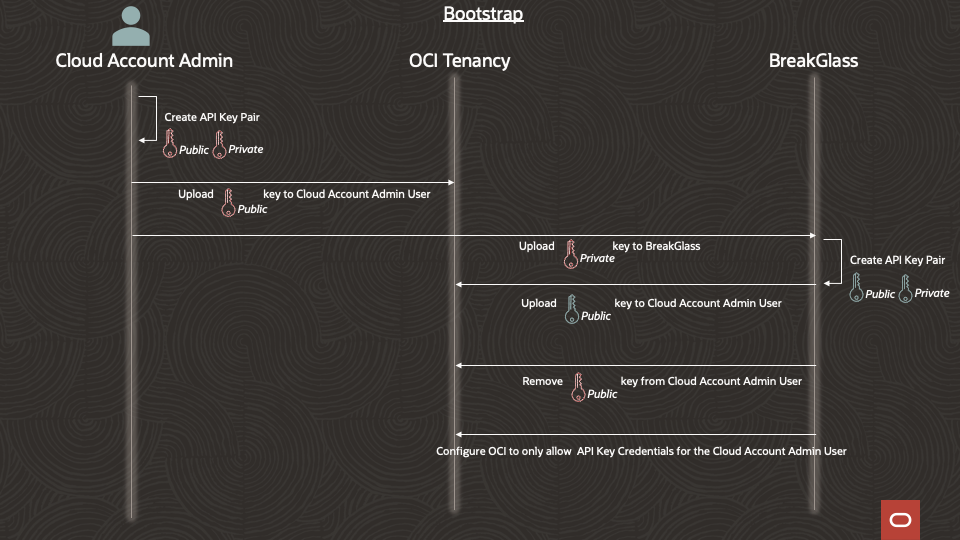
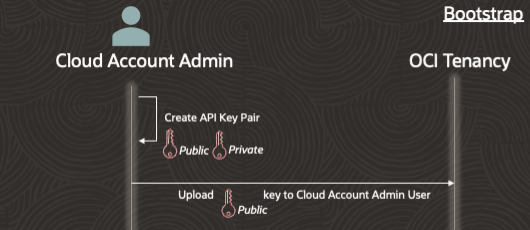
Step 1 – Setup an OCI API Key for the Cloud Account Administrator user
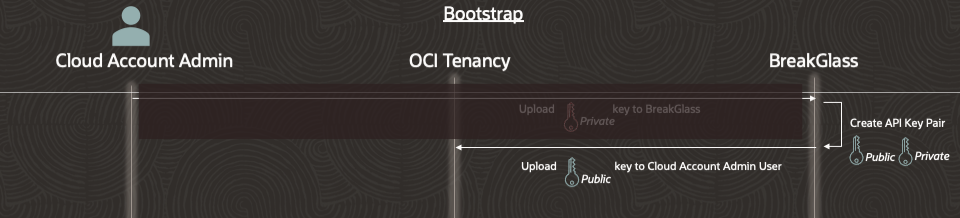
Step 2 – Bootstrap BreakGlass with the private key generated in step 1 and provide the needed information for BreakGlass to use the private key to integrate with the OCI account using the OCI SDK

Step 3 – BreakGlass generates its own API key pair and uploads the associated public key to the Cloud Account Administrator’s account. BreakGlass uses the key generated in step 1 to upload the key generated in this step.. At this point, there are two API keys associated with this user’s account since the key setup by the Cloud Account Administrator is still valid.
Step 4 – BreakGlass removes the API key that was configured in step 1 from the Cloud Account Administrator user account. BreakGlass will use the key configured in step 3 to perform this step, thereby validating that the key from step 3 is configured correctly .

Step 5 – Configure OCI to only allow API key credentials to be used for access by the Cloud Account Administrator.

Everything is going well, and the only way for the Cloud Account Admin to authenticate to the OCI account is with an API key. Furthermore, the only active API key linked to the Cloud Account Administrator account is in the hands of the BreakGlass service. The BreakGlass service now has control of the account, and the original Cloud Account Administrator user has to go through the break-glass process to get privileged access going forward.
Discussion
Now, how exactly do we accomplish step 5 and make sure the BreakGlass service can’t be circumvented or overthrown while also allowing everyday admin activities (like managing users, groups, and policies)? Some of the things to consider will be how to prevent day-to-day admins from managing the Administrators group membership, preventing IAM policy authors from writing policies at the root compartment level, preventing user admins from managing credentials for Administrator group members, preventing users and OAuth Applications from assuming certain Identity Domain roles, and more.
Conclusion
We’ll talk more about these concerns in future posts. For now, let’s leave these loose ends (with the remaining loose ends from Part Two ) and talk about the ServiceNow side in the next post.