
Overview
This is the second blog post in a series of posts dealing with the break-glass of an Oracle Cloud Infrastructure (OCI) account. In this post, we’ll cover the high-level design of one of the strategies that we introduced in the first post in the series. Specifically, we’ll be looking at how to embed the JIT break-glass ID and API Key Credentials mechanism into the ITIL Emergency Change (EC) process.
ServiceNow Emergency Change Model
ServiceNow is a powerful Platform-as-a-Service provider that, among other things, provides IT Service Management (ITSM) solutions to the enterprise. One of the ITSM processes that ServiceNow implements is the above-mentioned ITIL Emergency Change process. ServiceNow’s implementation of this process uses the same stages as ITIL, but with some different names. The illustration shows the ITIL Emergency Change process from the first post, with the stage names from the ServiceNow Emergency Change Model.
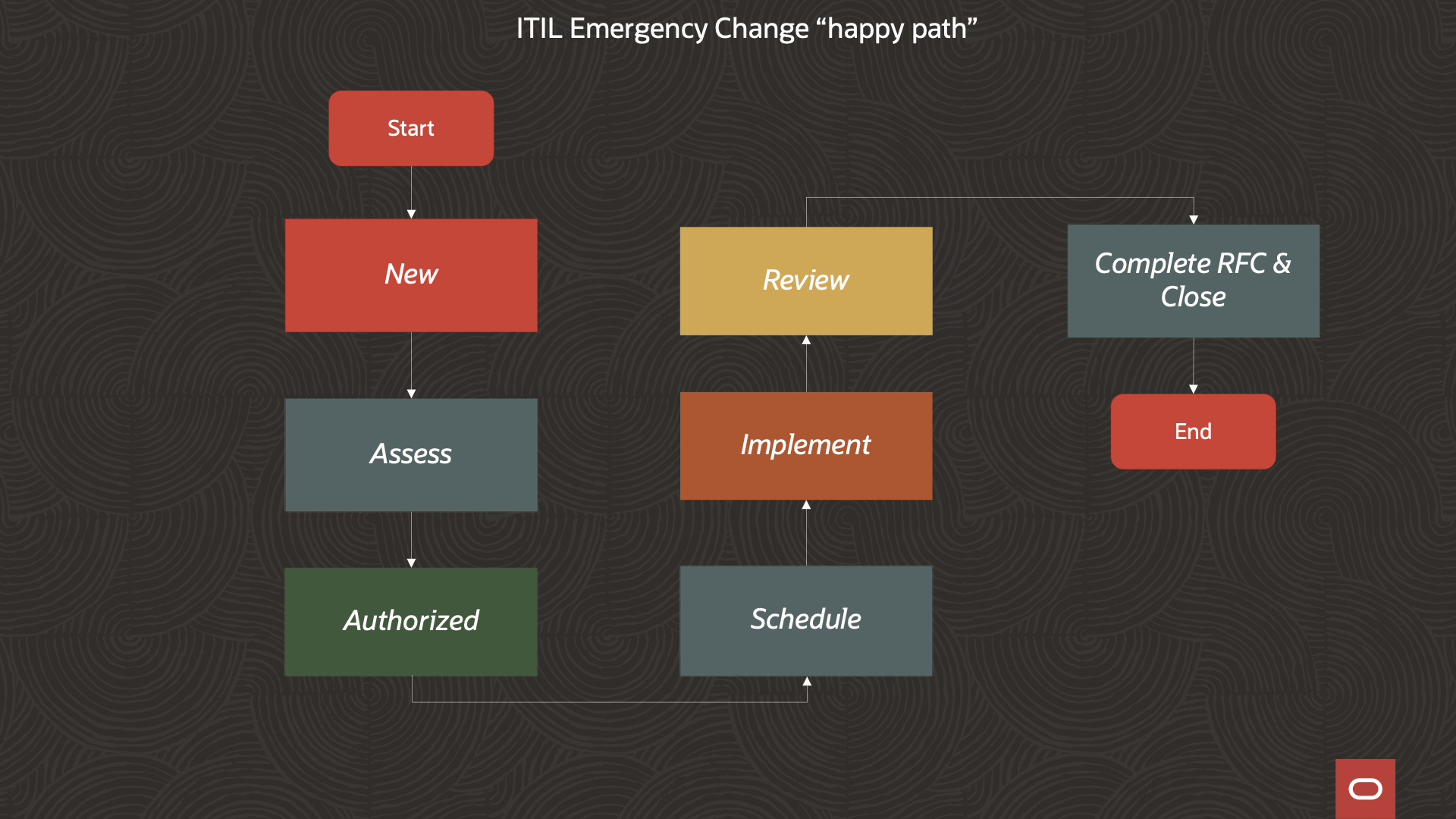
Let’s review these stages to see where we can place the life-cycle hooks for our chosen mechanism to provision/deprovision break-glass access:
1. New
An EC request is created with an initial justification for the change.
2. Assess
The EC is reviewed to ensure accuracy and to validate that the requested change is necessary and possible. The Change Manager can perform a risk assessment and must configure an assignment group before moving the EC to the next stage.
3. Authorize
Emergency Change Advisory Board (ECAB) approves the change.
4. Schedule
The EC is scheduled
5. Implementation
Assignment group members implement the individual break-glass tasks that are scheduled. It is when we transition into this stage of the process that the needed break-glass ID(s), group entitlement, and credentials can be provisioned into the OCI account.
6. Review
After implementing an emergency change, check that it fixed the problem. Also, make sure that the powerful break-glass credentials were not misused. When the process transitions from Implementation to Review is a good spot to trigger the deprovisioning of the break-glass entitlement.
7. Close
Change is closed as either successful, failed, or incomplete.
Break-Glass Proof of Concept (PoC) logical design
We’ve enough pieces in place at this point to come up with a high-level design for implementing our chosen break-glass strategy.
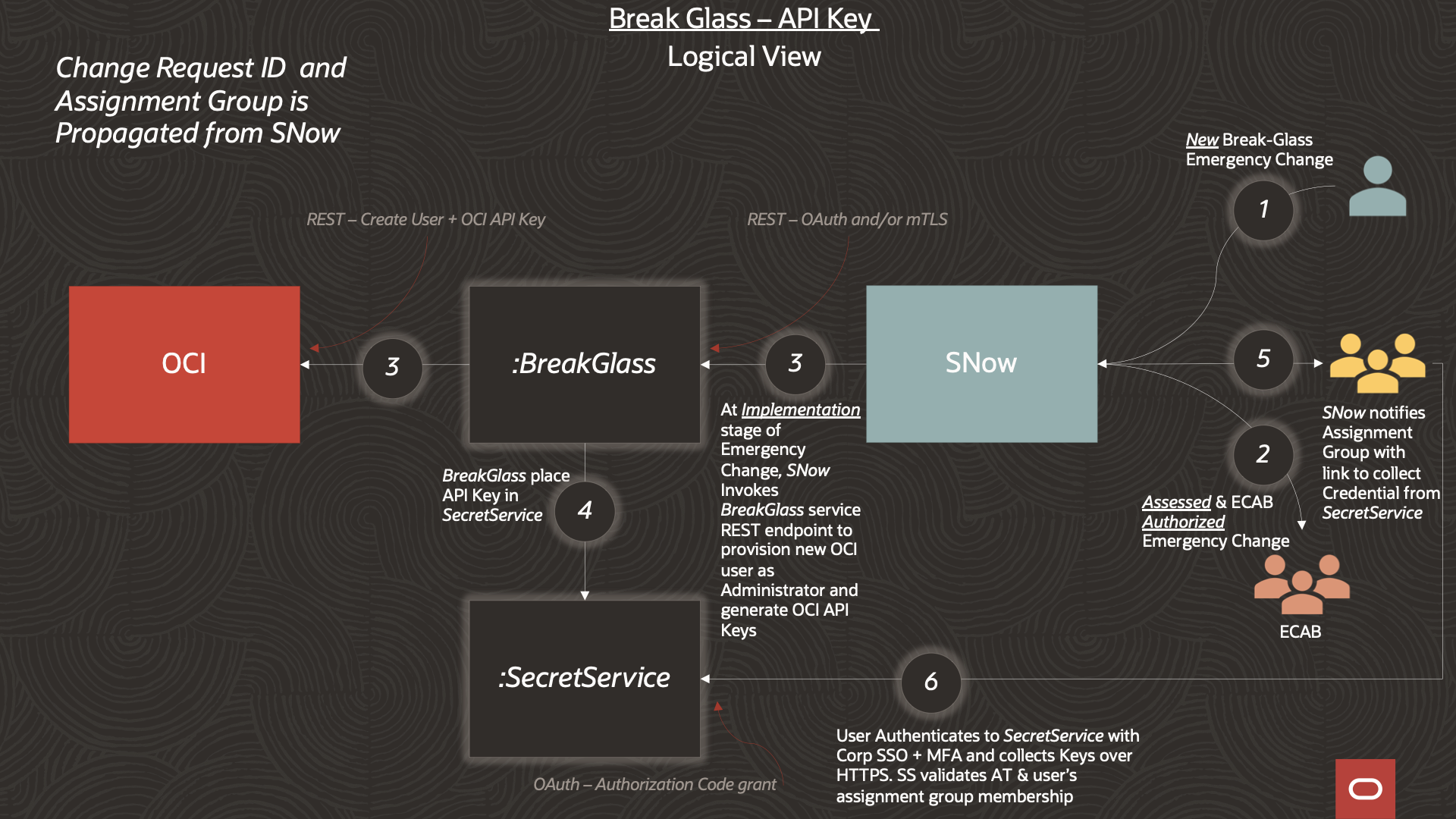
1. A new ServiceNow EC is created requesting break-glass for an OCI Account
2. As described above, after the Change Manager performs the assessment the EC eventually makes its way through ECAB approval into the Authorized state.
3. The EC transitions (after Scheduling) into the Implementation stage. ServiceNow makes an outbound REST API call to a service endpoint of a service (BreakGlass) that implements our chosen break-glass mechanism. BreakGlass: creates the JIT ID, generates an API key pair, uploads the public API key to the JIT ID, and configures Administrators group membership.
4. BreakGlass sends SecretService, the private API key to keep secure.
5. ServiceNow sends notifications to members of the assignment group. The notification includes a link to an endpoint on SecretService where members of the assignment group can retrieve the EC-specific private API key.
6. Assignment group members retrieve the EC break-glass credentials. Unauthenticated members of the assignment group are directed to authenticate with the corporate Identity Provider. SecretService will further verify that the authenticated users are members of the correct assignment group.
In the PoC implementation of this design, SecretService will initiate a 3-legged / Authorization Code grant flow (with Proof Key for Code Exchange extention) with an OCI identity domain.
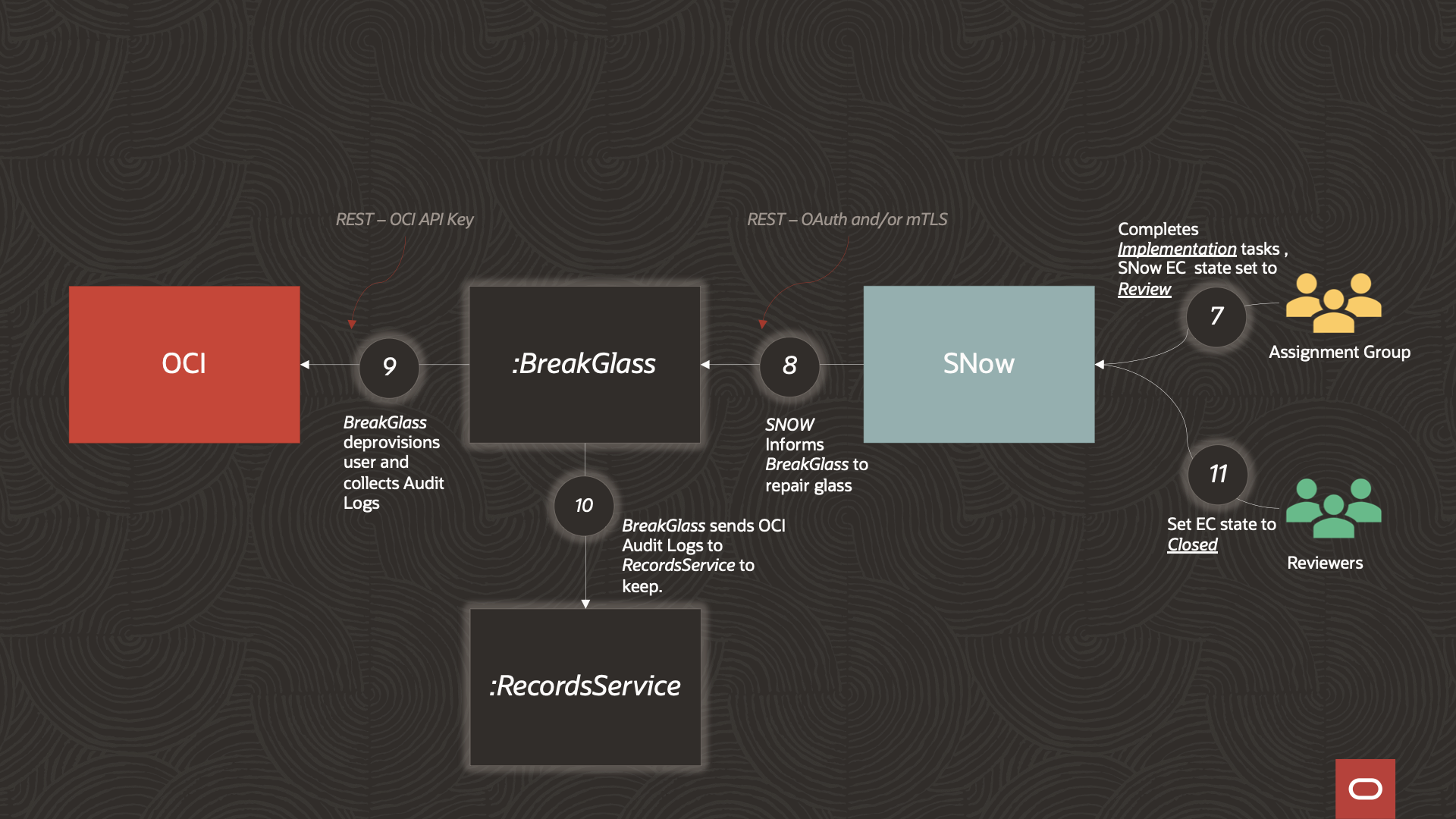
7. Upon completion of all Implementation tasks ServiceNow will transition the EC into the Review stage.
8. ServiceNow invokes a BreakGlass API endpoint to initiate a “repair-glass” action.
9&10. The BreakGlass service removes the break-glass identity from the Administrators group. It also deletes the identity and the associated API key. Optionally, OCI Audit logs, that capture the scope of the work done in the break-glass implementation tasks, can be collected and retained (if an audit history that is longer than the maximum OCI audit log retention period is required).
11. Closes the EC.
Discussion
Let’s finish by looking at some concerns that we have to consider in our design :
1. We have to make sure that the only client that can invoke the BreakGlass Service is ServiceNow. The reason is that we don’t want anyone to circumvent the ServiceNow Emergency Change process. In our design, we use OAuth 2.0 which allows us to validate that BreakGlass API access originates from our ServiceNow service. We can also add mTLS between BreakGlass and ServiceNow to provide additional control. In a future post, we’ll get into the details of how to configure ServiceNow to use an OCI identity domain as an OAuth Authorization Server. We’ll also cover how the BreakGlass service uses OAuth to authorize access to its API endpoints.
2. The BreakGlass service uses the OCI SDK to make changes in the OCI account. Two questions that arise are:
- What credential will the BreakGlass service use to authorize the OCI API calls?
- How do we bootstrap BreakGlass with this “super credential”, while also making sure that the credential cannot be used, outside of the BreakGlass service, to circumvent the established break-glass process?
3. We have to secure the interactions between the BreakGlass service, SecretService, and RecordsService in the design
4. We have to consider how to recover if the BreakGlass service has its own emergency. How do we break-glass Breakglass in a way where we don’t end up with an infinite regress (“turtles all the way down”)
5. We have to make sure that the SecretService securely encrypts the break-glass credentials when they are stored.
We’ll dig into all these concerns in detail in this series, starting, in our next blog post, with the very interesting problem introduced in number 2: how do we bootstrap security in this design?