
Overview
Last July I wrote about Workload Identity Federation (WIF), which lets a workload running on-prem or on another cloud exchange an external Identity Provider (IDP) JWT token for an OCI User Principal Session Token (UPST) — no static credentials required. That post focused on the UPST flow, where the resulting token is valid for up to 60 minutes and represents a user (optionally an impersonated service user).
This March, Oracle advanced the feature. OCI now supports exchanging a trusted third-party JWT token for an ephemeral Resource Principal Session Token (RPST) using the same Identity Propagation Trust foundation. If you already understand WIF, this is a natural next step, and it unlocks two capabilities that matter for modern automation:
- Longer-lived sessions — an RPST can be valid for up to 12 hours, versus the 60-minute UPST.
- Claim propagation into IAM policy — up to three claims from the incoming JWT can be copied into the RPST and referenced directly in OCI IAM policies, enabling fine-grained, context-aware authorization.
Modern automation systems such as CI/CD pipelines, GitHub Actions, and workloads running in other clouds often need access to OCI resources. Storing long-lived credentials inside those systems is risky. Token federation — exchanging a short-lived external token for an OCI session token — is the safer pattern, and ephemeral RPST extends that pattern to resource principals with policy-aware claims.
This post assumes you are familiar with the WIF concepts (Service User, Identity Impersonation, Token Exchange Service, Trust Configuration, and Proof-of-Possession) covered in the previous blog. I will reference them where relevant rather than repeat them, and focus on what is new with RPST.
Why RPST, and what changed
With the original WIF flow, you exchange an IDP JWT token for a UPST that carries a user (or impersonated service user) context. RPST changes the subject: instead of a user principal, OCI issues a Resource Principal Session Token that represents the authenticated workload session. Two things make this powerful for automation:
First, the token can live up to 12 hours. Long-running pipelines and multi-stage deployments no longer have to re-authenticate every hour.
Second, and more importantly, you can propagate claims from the incoming JWT into OCI policy evaluation. A claim is a field inside a JWT token that carries identity or context information. Examples include the repository name, workflow reference, user or actor identity, branch name, and environment name. A GitHub Actions JWT token, for instance, typically contains claims such as repository, workflow_ref, and actor. These claims tell OCI where the workload is running and who triggered it.
OCI policies cannot directly read claims from an external token. In the RPST model, OCI copies selected claims into the RPST token during token exchange, after which they become available for IAM policy evaluation. This is configured using the claimPropagations setting in the Identity Propagation Trust.
Claim Transformation
When configuring propagation, the claims copied from the incoming token must be prefixed with ext_.
Example configuration:
“claimPropagations”: [
“ext_workflow_ref”,
“ext_repository”,
“ext_actor”
]
During token exchange, OCI copies the values from the incoming JWT token and inserts them into the RPST token with the ext_ prefix. These propagated claims then become available in OCI IAM policy evaluation. OCI currently allows up to three claims to be propagated.
Using Claims in OCI Policies
Once claims are propagated into the RPST token, they can be referenced directly in IAM policies.
Example:
allow any-user to inspect policies in tenancy where all {
    request.principal.type = 'identityfederateddomainapp',
    request.principal.ext_repository = 'octo-org',
    request.principal.ext_actor = 'https://token.actions.githubusercontent.com'
}
In this example:
- The ext_repository value comes from the incoming GitHub token and is copied to the RPST.
- OCI compares the repository value in the RPST token with the value in the policy.
- Access is allowed only if the repository matches.
This enables fine-grained access control based on workload metadata.
Using Claims Similar to Tags
This mechanism behaves similarly to tag-based authorization. Policies can restrict access based on repository name, workflow, actor, branch, or environment, enabling scenarios such as:
- Allowing only a specific repository to deploy infrastructure.
- Restricting production access to a specific workflow.
- Limiting access to trusted automation identities.
Because the claims are evaluated inside the RPST token, policies can enforce dynamic authorization decisions based on the runtime context of the workload.
Architecture Overview
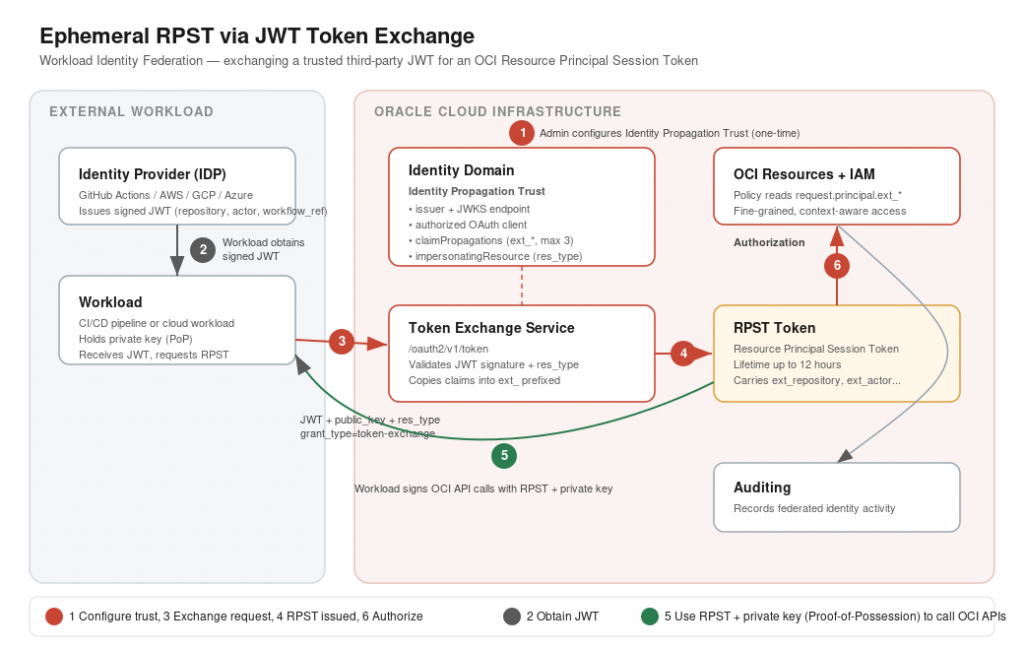
The architecture consists of four main components:
- External workload — for example, GitHub Actions or another cloud workload.
- Identity Provider issuing a JWT token.
- OCI Identity Domain with a Propagation Trust.
- OCI Token Exchange service issuing the Security Token (RPST).
The end-to-end flow has six steps, walked through below.
Implementation
Step 1 – Identity Propagation Trust Configuration
OCI must first trust the external token issuer. This is done using an Identity Propagation Trust configuration — the same construct used for UPST in the prior blog, now extended with claimPropagations and impersonatingResource.
This configuration defines:
- the JWT issuer
- the JWKS endpoint used to validate the token signature
- the OAuth client allowed to perform token exchange
- the claims that can be propagated
- the impersonating resource string
As with the original WIF setup, you create this trust using an Identity Domain Administrator OAuth client. Refer to the Trust Configuration section of the previous blog for how to create the Domain Admin OAuth client and obtain the ADMIN_OAUTH_TOKEN.
Example request:
curl --location 'https://idcsexample123.identity.oraclecloud.com/admin/v1/IdentityPropagationTrusts' \
--header 'Authorization: Bearer <ACCESS_TOKEN>' \
--header 'Content-Type: application/json' \
--data '{
    "active": true,
    "allowImpersonation": true,
    "issuer": "https://token.actions.githubusercontent.com",
    "name": "JWT to RPST Trust",
    "oauthClients": [
        "7a21a9234242342342d5fdf012345"
    ],
    "publicKeyEndpoint": "https://token.actions.githubusercontent.com/.wellknown/jwks",
    "impersonatingResource": "ref_github",
    "claimPropagations": [
        "ext_workflow_ref",
        "ext_repository",
        "ext_actor"
    ],
    "subjectType": "Resource",
    "type": "JWT",
    "schemas": [
       "urn:ietf:params:scim:schemas:oracle:idcs:IdentityPropagationTrust"
    ]
}'
Prefix the claims you want to copy from the incoming JWT with ext_ and list them under claimPropagations in the configuration. OCI allows up to three claims to be propagated. In this example, we are copying the claims ext_workflow_ref, ext_repository, and ext_actor from the incoming GitHub JWT token.
We also set impersonatingResource to a string called ref_github. This value can be any string. It is used for additional validation during token exchange to ensure the request matches the expected resource type.
Note the differences from the UPST trust in the prior blog: subjectType is Resource (not User), and we add impersonatingResource and claimPropagations. The OAuth client model, JWKS validation, and authenticated token-exchange endpoint are unchanged.
Step 2 – Workload Obtains a JWT
The external workload authenticates with its identity provider and receives a JWT token (the incoming token). In this example, the JWT issued by GitHub Actions contains claims such as:
- workflow reference
- repository name
- actor running the workflow
These values will later be copied into OCI using the ext_ prefixed claim propagation configuration.
Step 3 – Token Exchange Request
The workload then calls the OCI OAuth token endpoint to exchange the JWT for an RPST.
The OAuth application configuration requires:
- Client ID and client secret
- a public/private key pair
For more information on creating the OAuth application, refer to Create OAuth Client. As covered in the prior blog, OCI enforces Proof-of-Possession, so generate the PKI key pair first and pass the public key in the request:
# Generate a 2048-bit RSA private key
openssl genrsa -out private_key.pem 2048
# Extract the public key in PEM format
openssl rsa -in private_key.pem -pubout -out public_key.pem
Example request:
curl --location 'https://idcs-example123.identity.oraclecloud.com/oauth2/v1/token' \
--header 'Content-Type: application/x-www-form-urlencoded' \
--header 'Authorization: Basic <BASE64_CLIENTID_SECRET>' \
--data-urlencode 'grant_type=urn:ietf:params:oauth:grant-type:token-exchange' \
--data-urlencode 'requested_token_type=urn:oci:token-type:oci-rpst' \
--data-urlencode 'public_key=<PUBLIC_KEY>' \
--data-urlencode 'subject_token_type=jwt' \
--data-urlencode 'res_type=ref_github' \
--data-urlencode 'subject_token=<JWT_TOKEN>'
Two things to call out versus the UPST request from the prior blog. First, requested_token_type is now urn:oci:token-type:oci-rpst (rather than urn:oci:token-type:oci-upst). Second, there is a new res_type parameter.
The res_type parameter must match the impersonatingResource configured in the propagation trust. This value can either:
- exist in the incoming token as a claim, or
- be passed as a parameter in the request payload.
Step 4 – RPST Token Issues
If validation succeeds, OCI issues an RPST token. The RPST represents the authenticated workload session and can be used to call OCI APIs.
Step 5 – Workload Uses RPST with Private key
The workload signs OCI API requests using:
- the RPST token
- the private key
OCI verifies the request using the public key that was passed during token exchange. This is the same Proof-of-Possession model used for UPST.
Step 6 – Authorization and Auditing
OCI evaluates IAM policies and authorizes access to resources. Claims copied from the incoming JWT can be referenced directly in IAM policies.
Example:
allow any-user to inspect policies in tenancy where all {
    request.principal.type = 'identityfederateddomainapp',
    request.principal.ext_repository = 'vc-ccs-cge-sandbox/gha-kryvenkd'
}
OCI auditing records the activity performed using this federated identity, giving you a traceable record of which workload — and which repository, workflow, or actor — performed each action.
Final Thoughts
RPST federation allows external workloads to access OCI securely without storing long-lived credentials. Building on the Workload Identity Federation foundation, the addition of claim propagation means your IAM policies can now reason about the runtime context of a workload — which repository it came from, which workflow triggered it, and which actor initiated it — rather than just the identity of a principal. Combined with longer token lifetimes, this makes JWT token exchange with propagation trust a clean authentication model that integrates well with modern automation platforms such as CI/CD pipelines and cloud workloads.
If you have not already, I would recommend reading the original Workload Identity Federation post first — the trust configuration, OAuth client setup, and Proof-of-Possession steps described there are prerequisites for everything covered here.