
Overview
Organizations often use GitHub Actions to deploy infrastructure into separate OCI sandbox, preproduction, and production compartments. Each environment requires its own deployment identity and permissions.
A natural design is to create one Identity Propagation Trust per environment. However, when these trusts use the same GitHub issuer in a single OCI identity domain, issuer uniqueness becomes a constraint.
This article shows how to retain environment-specific identities and permissions using one shared trust, multiple OAuth clients, and GitHub subject-to-service-user mappings. GitHub Actions handles authentication and orchestration; Terraform deploys the OCI resources.
The problem: separate environments, the same issuer
Consider an organization with multiple business-unit repositories. Its requirements are:
- Separate deployment credentials for sandbox, preprod, and prod.
- A dedicated OCI service user and IAM group for each environment.
- Access restricted to each environment’s OCI compartments.
- All identities managed within one OCI identity domain.
The initial proposal creates three trusts:
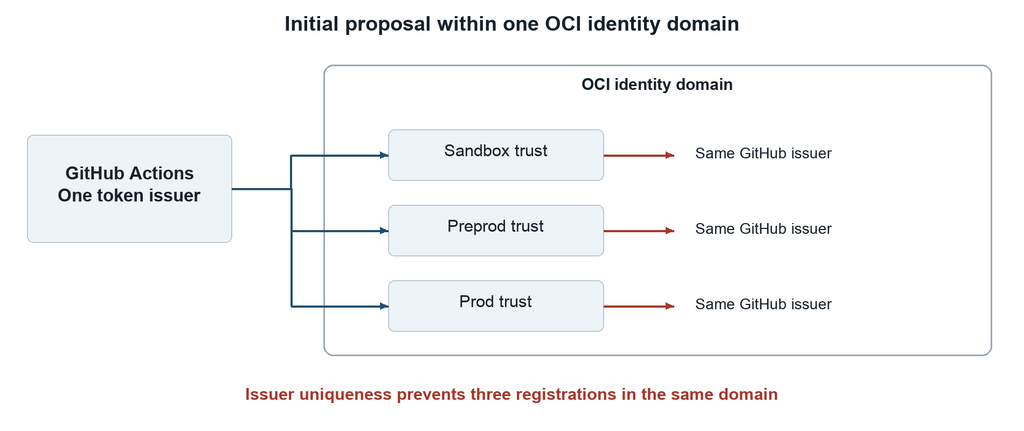
Figure 1: Three environment-specific trusts attempt to register the same GitHub issuer.
For the GitHub.com configuration in this example, the issuer is:
https://token.actions.githubusercontent.com
OCI defines the trust’s issuer attribute with server-level uniqueness. Different trust names or OAuth clients do not make the issuer distinct within the same identity domain. See the Identity Propagation Trust schema.
The architectural question becomes:
How can one trusted issuer support several deployment environments while preserving separate OCI identities and permissions?
The solution: share the trust and separate the mappings
Create one GitHub Identity Propagation Trust. Within it, authorize the required OAuth clients and define separate rules that map GitHub subjects to OCI service users.
Each service user belongs to an environment-specific IAM group. Policies grant that group access to the appropriate compartment.
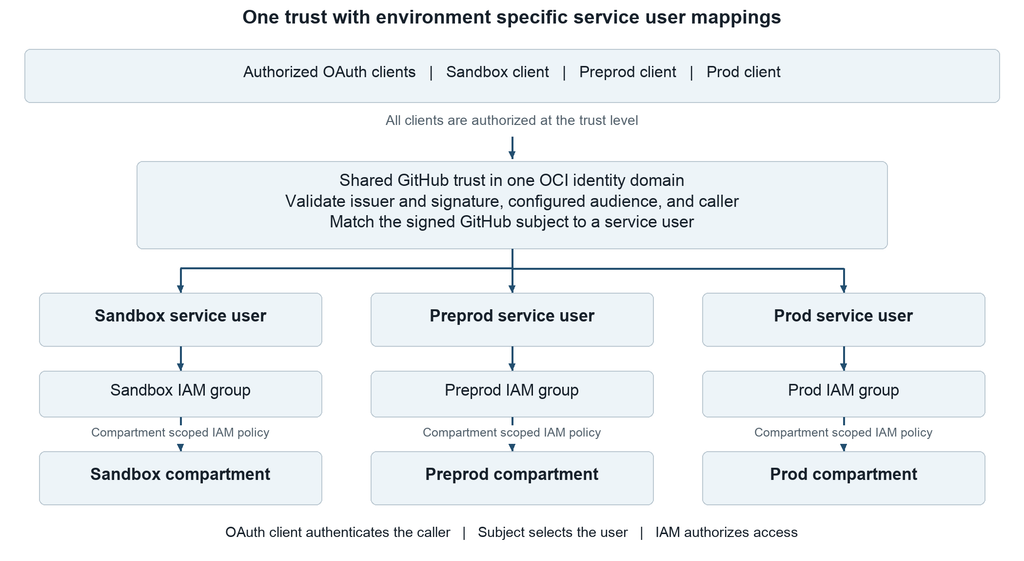
Figure 2: One issuer trust supports multiple service-user mappings and compartment-scoped permissions.
The responsibilities are distinct:
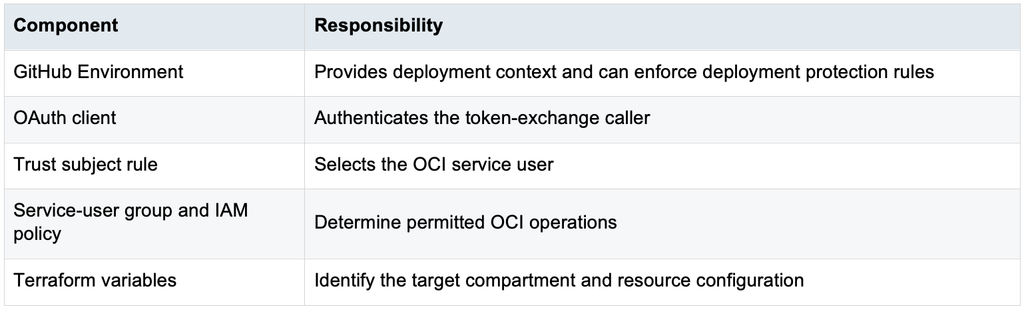
The OAuth client list applies to the whole trust. It does not bind a particular client to one impersonation rule. The signed GitHub subject selects the service user.
Implementing the pattern
1. Create the environment identities
Create a service user, IAM group, and runtime OAuth client for each environment:
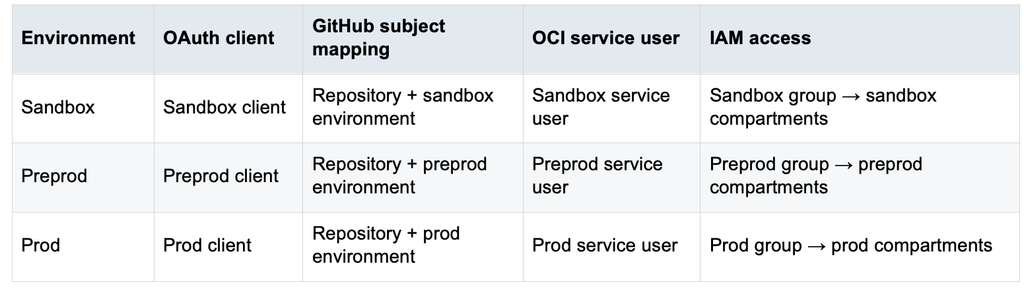
Use a separate administrative identity to configure the trust. Runtime clients should not receive Identity Domain Administrator roles. The A-Team WIF implementation guide describes this separation.
2. Configure one trust with multiple mappings
Register the GitHub issuer once. Add all approved runtime client IDs to oauthClients, then configure impersonationServiceUsers with explicit repository/environment subject rules.
{

  "active": true,

  "allowImpersonation": true,

  "issuer": "https://token.actions.githubusercontent.com",

  "name": "GitHub-Actions-Trust",

  "oauthClients": [

    "<SANDBOX_OAUTH_CLIENT_ID>",

    "<PREPROD_OAUTH_CLIENT_ID>",

    "<PROD_OAUTH_CLIENT_ID>"

  ],

  "publicKeyEndpoint": "https://token.actions.githubusercontent.com/.well-known/jwks",

  "impersonationServiceUsers": [

    {

      "rule": "sub eq repo:vishak-lab@172846109/sandbox@1471630093:environment:sandbox",

      "value": "<SANDBOX_SERVICE_USER_ID>"

    },

    {

      "rule": "sub eq repo:vishak-lab@172846109/preprod@1471630198:environment:preprod",

      "value": "<PREPROD_SERVICE_USER_ID>"

    },

    {

      "rule": "sub eq repo:vishak-lab@172846109/prod@1471630141:environment:prod",

      "value": "<PROD_SERVICE_USER_ID>"

    }

  ],

  "subjectType": "User",

  "type": "JWT",

  "schemas": [

    "urn:ietf:params:scim:schemas:oracle:idcs:IdentityPropagationTrust"

  ]

}
Reading the JSON mappings:
Sandbox
<SANDBOX_OAUTH_CLIENT_ID> → Client ID of the sandbox OAuth application.
sub eq repo:vishak-lab@172846109/sandbox@1471630093:environment:sandbox → Match the GitHub token subject for this repository and its sandbox environment.
<SANDBOX_SERVICE_USER_ID> → Identity-domain user ID of the sandbox service user selected when this rule matches.
Preprod
<PREPROD_OAUTH_CLIENT_ID> → Client ID of the preprod OAuth application.
sub eq repo:vishak-lab@172846109/preprod@1471630198:environment:preprod → Match the GitHub token subject for this repository and its preprod environment.
<PREPROD_SERVICE_USER_ID> → Identity-domain user ID of the preprod service user selected when this rule matches.
Prod
<PROD_OAUTH_CLIENT_ID> → Client ID of the prod OAuth application.
sub eq repo:vishak-lab@172846109/prod@1471630141:environment:prod → Match the GitHub token subject for this repository and its prod environment.
<PROD_SERVICE_USER_ID> → Identity-domain user ID of the prod service user selected when this rule matches.
For each mapping, use the service user’s identity-domain id, rather than its OCI user OCID.
The subject strings in this example use GitHub’s immutable format, which includes owner and repository IDs. Inspect the actual sub claim for each deployment job and configure the exact subject, as described in the next section.
Oracle documents the payload and rule evaluation in JWT-to-UPST token exchange, Step 4.
3. Match the actual GitHub subject
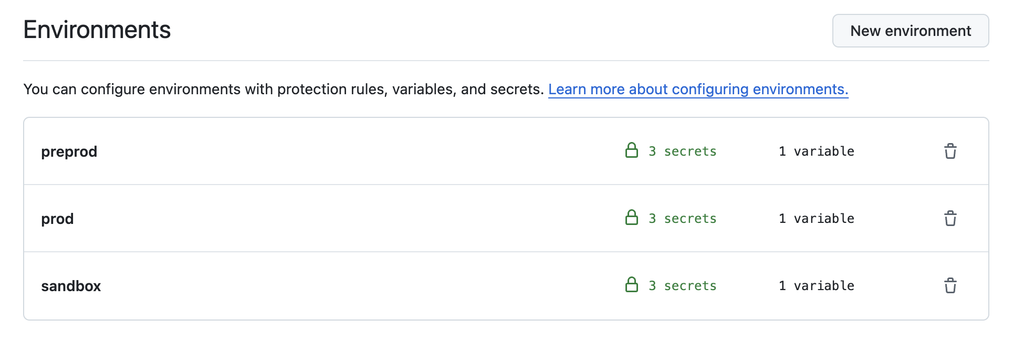
Screenshot 1: Sandbox, preprod, and prod GitHub Environments.
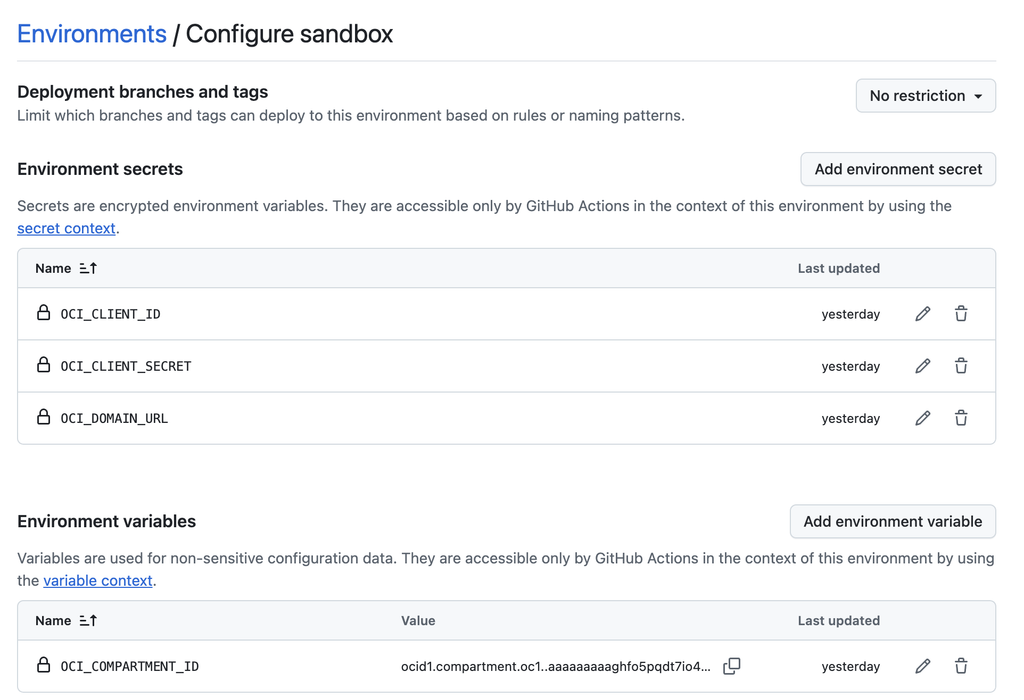
Screenshot 2: The sandbox environment’s OAuth credentials and compartment variable. Repeat same for other environments
The workflow selects its GitHub Environment using the repository name:
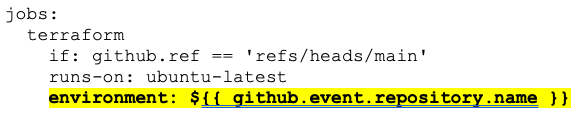
For vishak-lab/sandbox, the expression resolves to sandbox. For vishak-lab/prod, it resolves to prod. This approach assumes that each repository has a GitHub Environment matching its repository name.
The selected environment becomes part of GitHub’s OIDC subject. For example, an illustrative immutable subject is:
repo:example-org@123456/sandbox@789012:environment:sandbox
Configure the OCI trust rule using the actual subject issued by GitHub, including owner and repository IDs where applicable. See the GitHub OIDC reference.
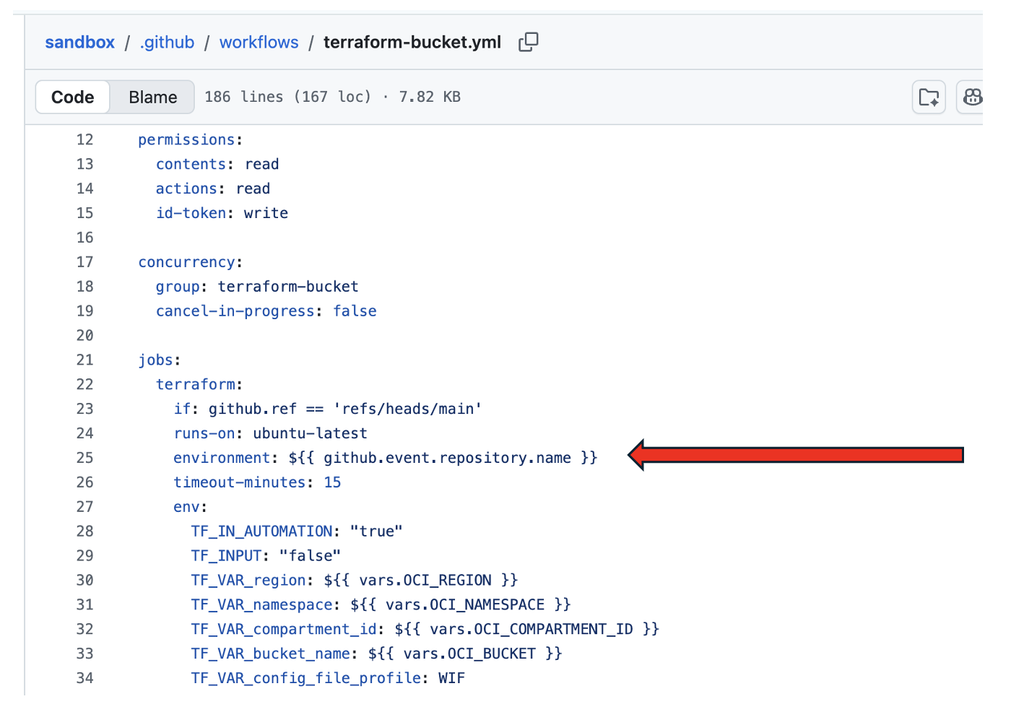
Screenshot 3: In this workflow, the environment is selected from the repository name. The sandbox repository selects sandbox and the prod repository selects prod.
4. Scope OCI authorization independently
Grant each service-user group access to its own compartment. For example:
Allow group '<IDENTITY_DOMAIN>'/'gha-sandbox-group' to manage buckets in compartment <SANDBOX_COMPARTMENT_NAME>Allow group '<IDENTITY_DOMAIN>'/'gha-prod-group' to manage buckets in compartment <PROD_COMPARTMENT_NAME>These statements permit bucket administration in the specified compartments. Object access requires the corresponding object permissions. See OCI Object Storage policy permissions.
Review other applicable policies and group memberships as well: a narrowly scoped policy does not remove permissions granted elsewhere.
5. Run Terraform with the federated identity
At runtime, GitHub Actions obtains an OIDC token and exchanges it for an OCI User Principal Session Token, supplying an ephemeral public key. The matching private key signs subsequent OCI API requests.
The workflow prepares an OCI security-token profile and runs Terraform:
provider "oci" {
  auth                = "SecurityToken"
  config_file_profile = "WIF"
  region              = var.region
}
Repository or GitHub Environment settings supply the deployment target:
env:
  TF_VAR_compartment_id: ${{ vars.OCI_COMPARTMENT_ID }}
  TF_VAR_bucket_name: ${{ vars.OCI_BUCKET }}
The compartment variable determines where Terraform requests creation. IAM policy determines whether the selected service user may perform that operation. Oracle documents Terraform’s authentication settings in Configuring the Provider.
Deployment output
Check the deployment from both GitHub Actions and OCI. GitHub Actions shows the workflow status, while the OCI Console shows the bucket in the target compartment.
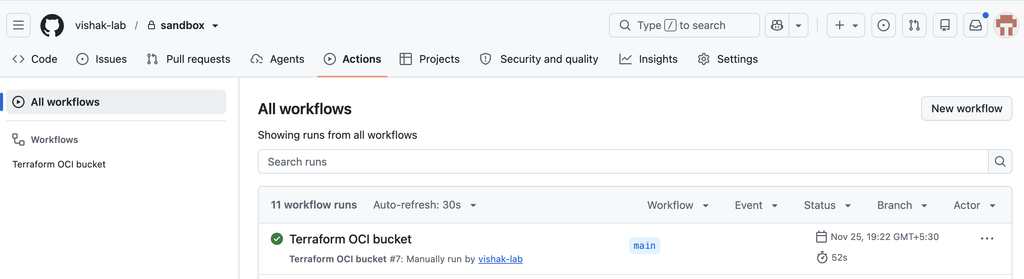
Screenshot 4: The Terraform OCI bucket workflow reports a successful run in the sandbox repository on the main branch.
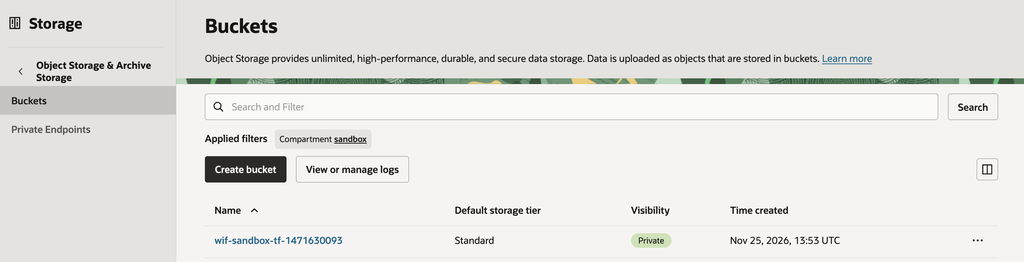
Screenshot 5: OCI Object Storage lists wif-sandbox-tf-1471630093 in the sandbox compartment, with Standard storage tier and Private visibility.
Conclusion: Choosing the identity-domain boundary
A shared trust is suitable when the environments can share issuer configuration and trust administration, while maintaining separate service users and resource permissions.
If environments require independently administered trust configurations, use separate identity domains and establish a GitHub trust in each.
The central design principle is:
Register the issuer once per identity domain, map each approved workload subject to its intended OCI identity, and enforce resource access through IAM policies.