
Hi! In this blog entry, we will talk about adding an Oracle DB@GCP deployment to an existing Google Cloud Network Connectivity Center architecture.
Oracle Database@GCP
Oracle Databases of various types can now be deployed in AWS, Azure and GCP. Since the database now lives in that Cloud, it has to follow the network rules and constructs defined there. Particularly for GCP, we have the following details:
- The database(s) will live in a new network construct called an ODB Network.
- The ODB Network will be automatically connected to a VPC through 4x Partner Interconnect which end up in a dedicated VPC Cloud Router, deployed automatically.
- The automation will make sure than any resource in the Peered VPC can connect to the database without any additional configuration.
Let’s look at what happens at the routing layer, through this diagram:
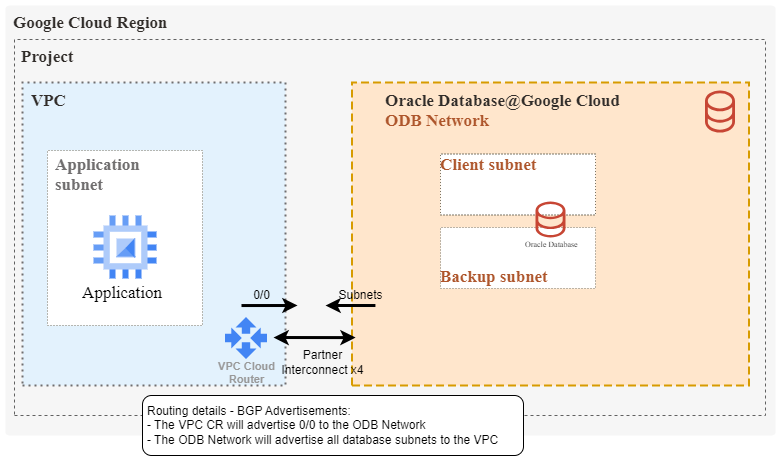
Looking into the initial routing setup, things are quite simple:
- A VPC Cloud Router will automatically be deployed in the VPC that was selected during ODB Network creation.
- The Cloud Router will have 4x Interconnect links to the ODB Deployment.
- Since this is Interconnect, all routing will be handled by BGP:
o The VPC cloud router will advertise 0/0 to the Oracle Database
o The Oracle Database will advertise all deployed subnets. Note that up to five subnets can be deployed in an ODB Network.
For more information about the network fundamentals of the product, please take a look at this blog.
GCP Network Connectivity Center
GCP NCC is a service created to simplify network architectures in Google Cloud. It works as a hub and spoke architecture where an NCC Hub manages routing between the various attached Spokes.
There are many things to consider when creating an NCC architecture, but the focus of this blog is to give some pointers on integrating an Oracle DB@GCP deployment into the NCC setup you may already have.
A typical NCC deployment would have:
- A VPC used for connectivity to all external locations which is usually called a HUB VPC, a Routing VPC or a Transit VPC. This is connected to the NCC deployment as a VPC Spoke.
- An NCC Hub.
- All Application VPCs are connected to the NCC Hub as VPC Spokes.
- All external connections (VLAN Attachments, Cloud VPN, etc.) are connected into the NCC deployment as Hybrid Spokes.
- Other NCC Spoke types, not in scope for this blog.
When you want to add Oracle DB@GCP deployments to this setup, you should know some best practices and limitations:
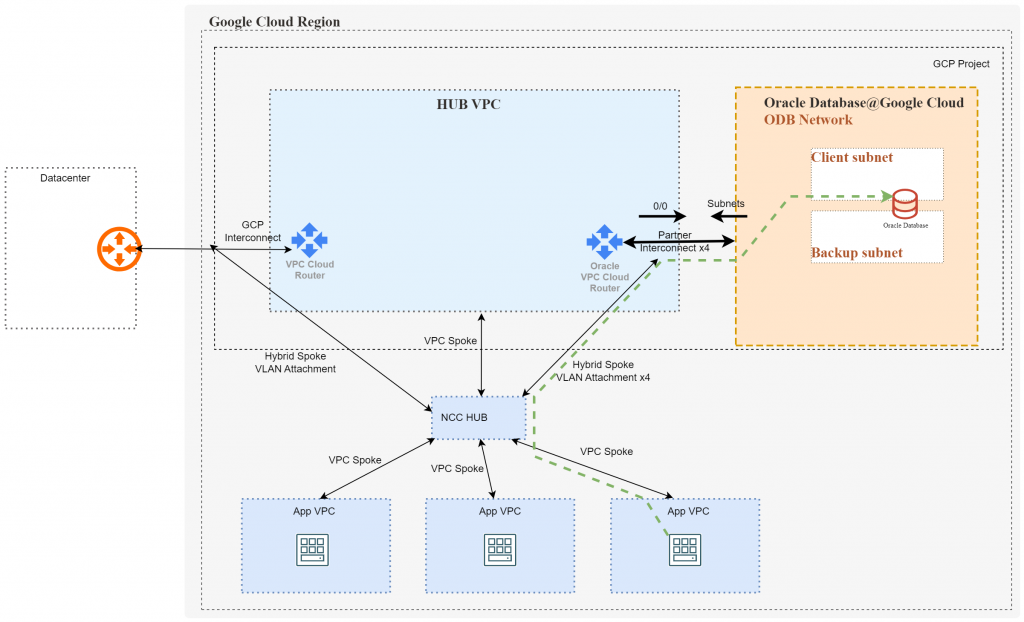
1) When creating an ODB Network (for Oracle databases) you need to select a VPC to which it will be automatically peered. For this setup you need to select the previously mentioned HUB VPC which has all other connections. The Oracle deployment will create a new VPC Cloud Router there and attach the ODB Network to it. Note that the ODB and the VPC must be in the same project.
2) After the ODB Network is deployed and connected to the VPC (note that the VLAN Attachments appear only after the first database is deployed) you need to go into the NCC configuration menu and add the 4x VLAN Attachments as a single Hybrid Spoke.
3) Multiple other ODB Networks, across other regions, can be added to the same VPC and then configured as Hybrid Spokes.
The deployment will look like this:
To add the ODB Deployment as a Hybrid Spoke, you need to go to the NCC Configuration page and add a new NCC Spoke:
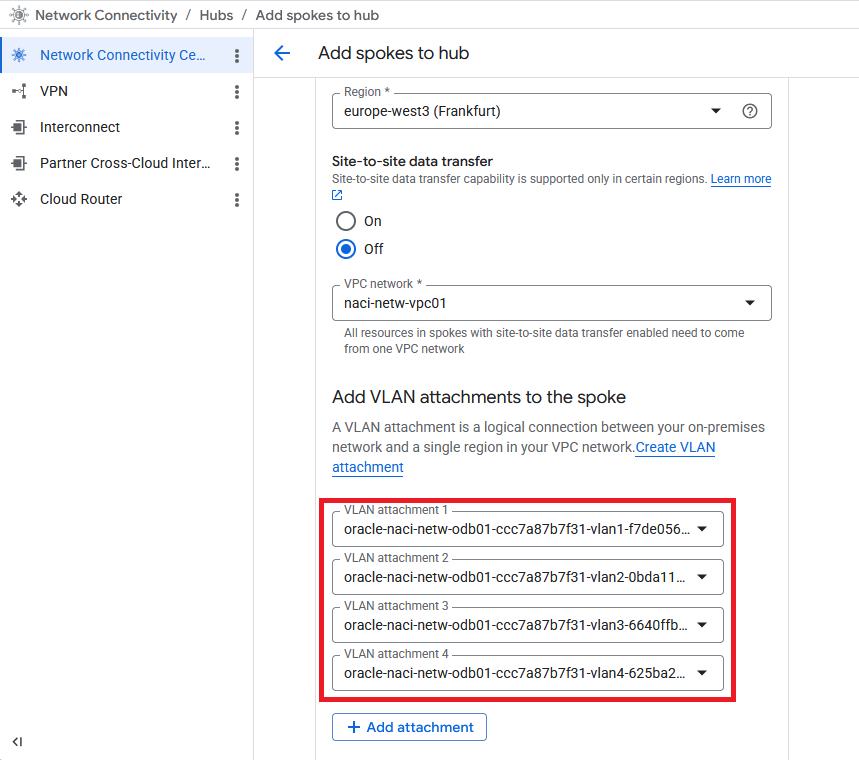
- Select the HUB VPC where you connected the ODB.
- Add all 4 VLAN Attachments as part of the same spoke.
While this fixes connectivity from other VPCs (spokes) to the ODB, connections from remote locations, which are also Hybrid Spokes, will not work without additional configuration.
On-prem datacenter to ODB
For allowing connections from your datacenter, connected with VLAN Attachments and as a Hybrid Spoke, to go to the ODB, there are 2 options:
a) Site-to-site data transfer for NCC – with this option, two hybrid spokes connected as VLAN Attachments can exchange routing information through the NCC Hub and then you will use GCP’s backbone for data connections.
Note that there are some restrictions to using the service, as detailed here.
The configuration is done at each Hybrid Spoke so you will need to enable it on both connections (on-prem and ODB VLAN attachments). You also need to enable the feature when you attach the spoke to the NCC hub:
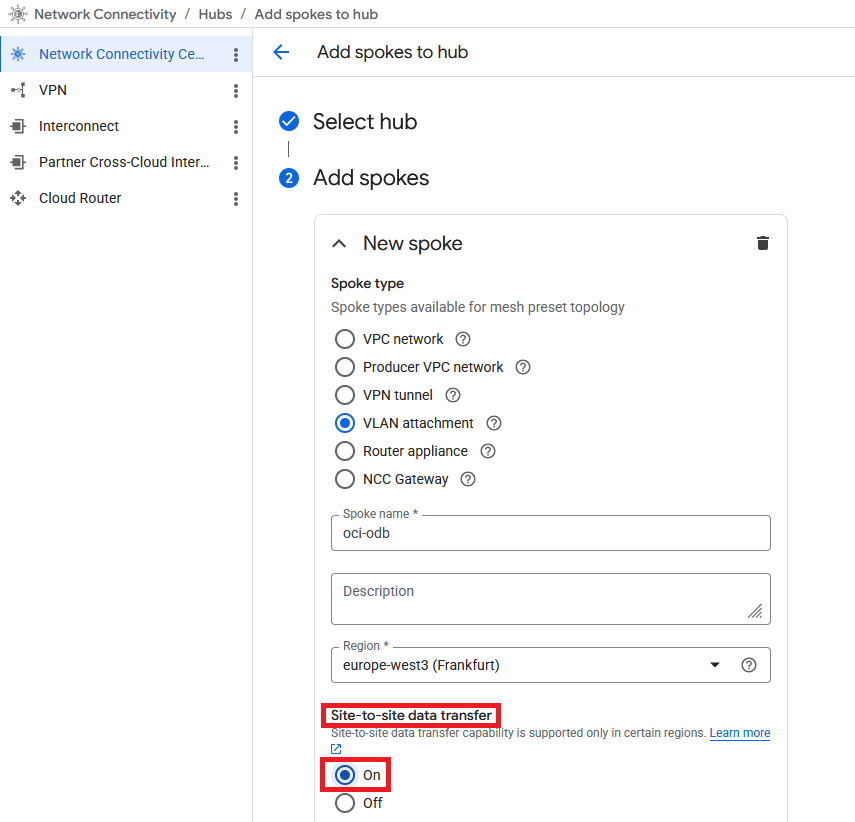
Important note: in this mode, the routes between the spokes are advertised with the full BGP ASN path so the BGP ASNs of each spoke’s remote endpoint must be different. This also means you cannot connect an ODB deployment to OCI via the GCP Interconnect service because both ends will advertise ASN 31898 and routes will not install.
A simple diagram would look like this:
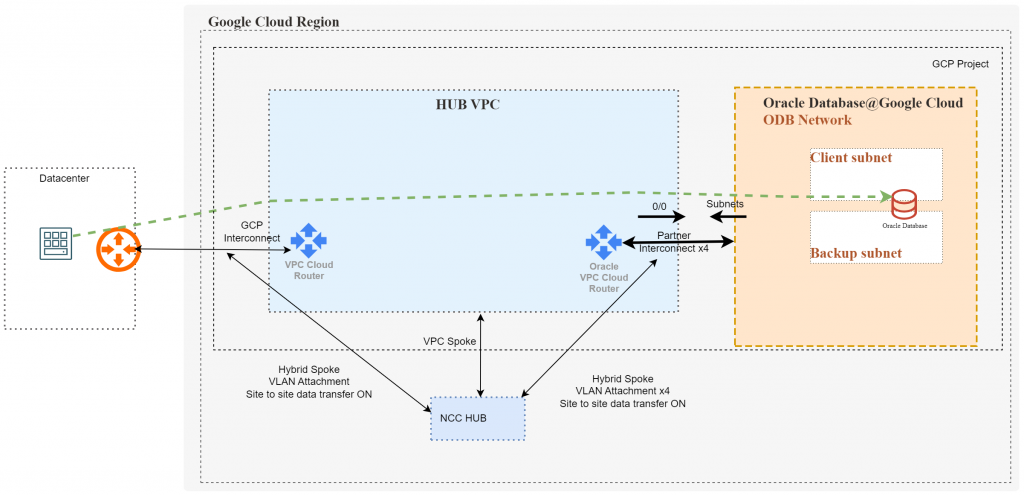
Note that the NCC Hub is only used for route advertisement (control plane) and is not on the path of the actual data flow.
b) Cloud Router Custom Routes
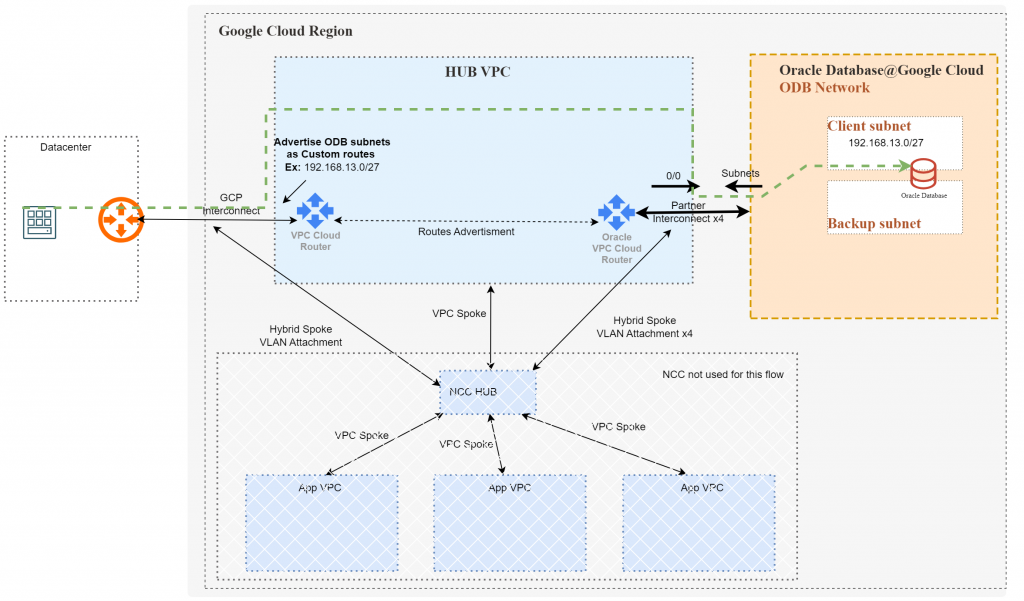
In this mode, the NCC’s routing capabilities are bypassed completely. Since both connections are in the same VPC, the VPC Cloud Routers will advertise routes between themselves. However, we need to ensure the Cloud Routers advertise the required subnets to their BGP peers:
- The Cloud Router used for the ODB Connections, deployed by the service, always advertises 0.0.0.0/0 to the ODB so no action is needed.
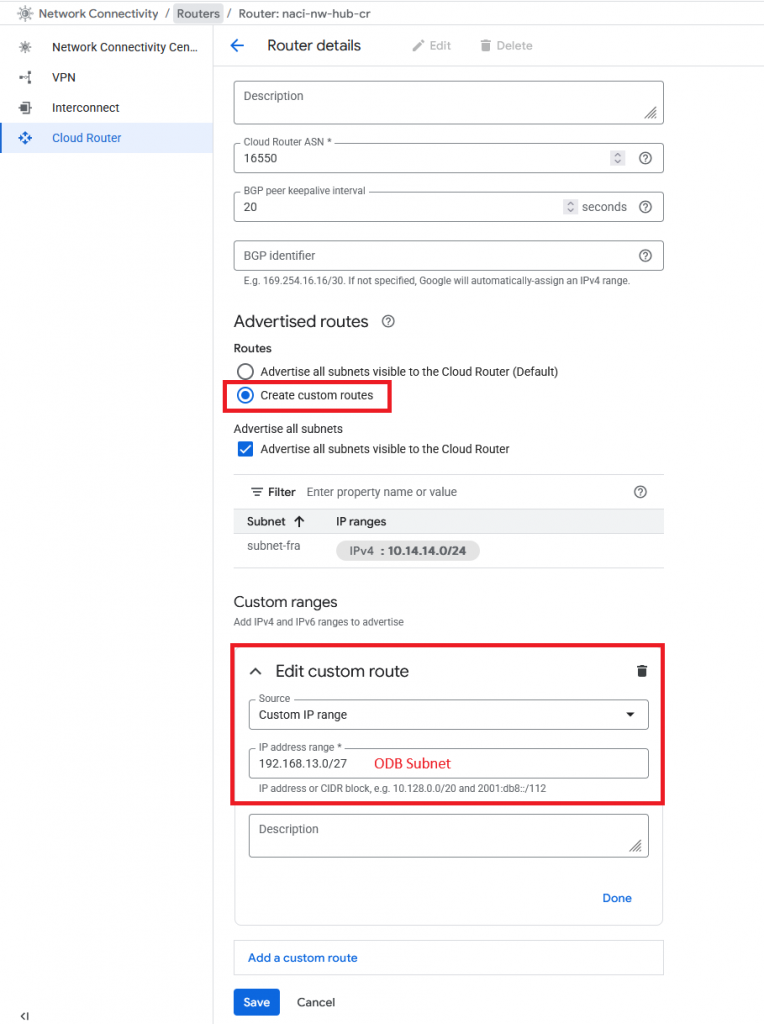
- The Cloud Router used for on-prem connections requires a configuration to advertise the ODB Subnets as Custom Routes.
To add a custom route, you need to edit the Cloud Router handling your connections to the datacenter.
A simple diagram would look like this:
And that’s it! I hope this helps you.