
Introduction
This blog will give you the details about integration challenges, patterns and best practices guidelines on Oracle Fusion Cloud ERP Applications. Oracle Fusion Cloud ERP customers/partners should be able to create quality integration solutions by centralizing/automating the data and by refering best practices guidelines provided by the Oracle.
The success of the Oracle Fusion Cloud ERP integration depends on your understanding of the data flow within your system and data synchronization requirements for accurate accounting and financial reporting. It is always recommended to use the right integration pattern when designing integrations.
Integrations improve the efficiency and effectiveness of your business by sending data to applications and getting data from applications, seamlessly and without human intervention.
Integration Concepts
In every integration, you define information about the applications you are integrating and specify the source and destination of the data that the integration moves. Additionally, you define the logic that controls the flow of data along with the mapping of data between different applications.
This main initiator/trigger for the data integration is moving on-premises applications to OracleFusion Cloud Applications, which are designed and built for the cloud and provide innovations to support a modern digital business. Please refer “Cloud Momentum-Tomorrow’s ERP” resource link for more details.
Challenges
| No |
Challenges |
Short Description |
| 1. |
Syncing issues |
This requires considerable time and extensive testing |
| 2. |
Network |
You need high-speed network connections to avoid delays and lags |
| 3. |
Skilled resources |
This integration requires domain skills and extensive development skills |
| 4. |
Identify contingencies |
Changes in data structure, API, integration methods lead to reorganization/reconfiguration of synchronization/testing process |
| 5. |
Security and compliance requirements |
Study these requirements especially while providing access to business information related to customer and financial data |
| 6. |
Data Accuracy during integration of current system and third-party applications |
Analysis of large volume of data, complicated relationships or dependencies and incompatible formats/structures are especially important for the accuracy of the data. Data cleansing, validation, mapping, and testing (integration, quality of data, performance, etc.) are considered properly. Avoid invalid and duplicate data into the central integrated system. |
Patterns/Use Cases
We have mentioned below some patterns/use cases used in different inbound/outboud/integrations scenarios . It is always recommended to use the right integration pattern when designing integrations.
| No |
Mode |
Type |
Pattern/Use case |
| 1. |
Inbound |
Spreadsheet |
Data upload using spreadsheet. In some of the cases, few setup data can be uploaded using inbuilt spread sheet. e.g: – Currency Rate Conversion Data Upload. Upload daily currency conversion rates using a spreadsheet in Oracle Fusion Cloud Application, you can use the Create Daily Rates spreadsheet. Enter Daily Rates Using the Daily Rates Spreadsheet Note:- Few Oracle Fusion Cloud Application screens has export options to export/extract the data from the Oracle Fusion Cloud Applications in CSV/XL form and Export management (tools) mainly HCM and CX objects. |
| 2. |
Inbound |
FBDI(File-Based Data Import) |
This pattern can be used in any Oracle Fusion Cloud ERP Applications, not just Oracle Fusion Cloud Finance and used for loading bulk data into Oracle Fusion Cloud ERP Applications. |
| 3. |
Inbound |
Oracle Web Services (SOAP) |
Use Simple Object Access Protocol (SOAP) web services to integrate different applications within the enterprise or expose business functions to Oracle Cloud partners and customers. |
| 4. |
Inbound |
REST API |
REST APIs can be invoked from any REST clients such as Oracle Functions and database PL/SQL. Via OIC Integration- Simplifies connection creation by automatically identifying the required service catalog and URLs based on your Oracle Fusion Cloud ERP hostname inputs Select to browse a list of available Oracle Fusion Cloud Applications REST API resources. This option is only available if you specified an interface catalog URL in the Interface Catalog URL field on the Connection Properties page when configuring the Oracle ERP Cloud Adapter. |
| 5. |
Inbound |
Oracle Data Integrator |
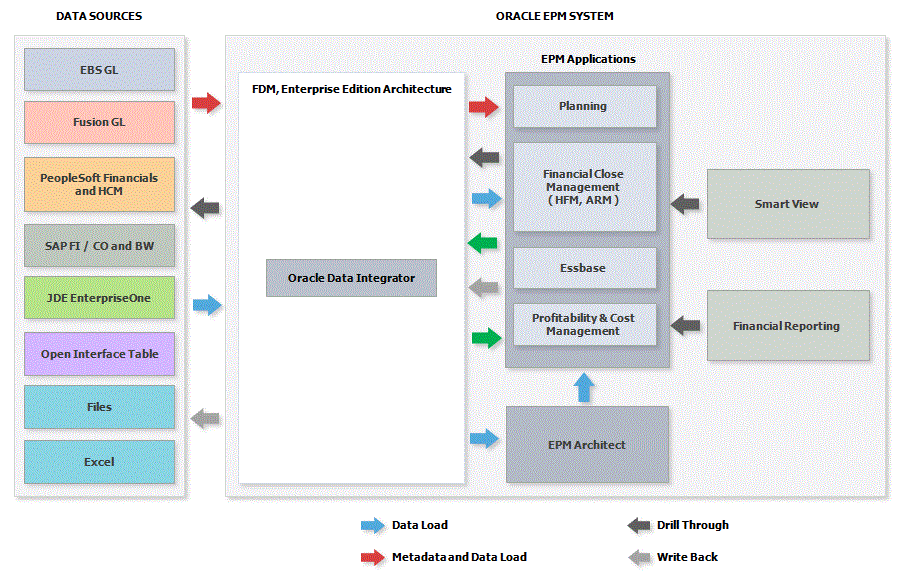
Integration of Enterprise Resource Planning (ERP) systems with Oracle’s Hyperion EPM applications. Oracle Data Integrator and orchestrates the movement of metadata and data into EPM applications. EPM Integrator Architecture-ERP-EPM Integration Also, refer resource list “Defining Data Integration- ERP-EPM” |
| 6. |
Inbound/Outbound |
ERP Integration Service, a substitute of FBDI |
Provides external operations for ERP integration scenarios such as bulk data import and export to execute end-to-end inbound and outbound data flows.
|
| 7. |
Outbound |
BICC |
This guide contains information about Business Intelligence Cloud Connector (BICC) Data Stores for Financials. Oracle Fusion Cloud Financials BICC Details Login Link : https://<saas cloud host name>:<saas cloud port number>/biacm |
| 8. |
Outbound |
BIP |
This pattern recommends using external report web services from Oracle Fusion Cloud ERP Cloud, to run a select SQL query against ERP tables. Do not use this pattern when there is a large volume of data because this is best suited for retrieving small data sets like company codes, memo codes, terms and conditions, etc |
| 9. |
Outbound |
Business Events |
ERP business events publish data that can be consumed by OIC and further processed to downstream. Oracle Cloud ERP integration adapter provides support for subscribing to business events raised by the modules |
| 10. |
Outbound |
REST APIs |
Fusion Pillars offers REST APIs to access the data. OIC Integration- Simplifies connection creation by automatically identifying the required service catalog and URLs based on your Oracle Cloud ERP hostname inputs. Select to browse a list of available Oracle Fusion Cloud Applications REST API resources. This option is only available if you specified an interface catalog URL in the Interface Catalog URL field on the Connection Properties page when configuring the Oracle ERP Cloud Adapter. |
| 11. |
Outbound |
Oracle Web Services (SOAP) |
Use Simple Object Access Protocol (SOAP) web services to integrate different applications within the enterprise or expose business functions to Oracle Cloud partners and customers. |
| 12. |
Inbound/Outbound |
Analytics/Data Warehouse |
Oracle Fusion Analytics Warehouse is a family of prebuilt, cloud native analytics applications for Oracle Fusion Cloud Applications that provides line-of-business users with ready-to-use insights to improve decision-making. Apart from your Oracle Fusion Cloud Applications data, you can load external data from non-Oracle Fusion Cloud Applications sources such as SalesForce or EBusiness Suite into Oracle Autonomous Data Warehouse associated with Oracle Fusion Analytics Warehouse. See About Managing Data Connections. |
| 13. |
Outbound |
OTBI |
With Oracle Transactional Business Intelligence embedded analytics, role-based dashboards, as well as on-the-fly ad-hoc queries capabilities, business users have powerful means for accessing, interpreting and analysing real-time data in Oracle Fusion Cloud Applications (FA). The end users can put together sophisticated reports with various custom attributes, filters, join conditions and analytic functions in just few mouse clicks. It is very important to know how to design such dashboards, prompts, reports and ad-hoc queries in OTBI, ensuring maximum performance and scalability, and minimum impact on Fusion Middleware and Database resources. BI Server generates XML queries to BI Broker to translate these FA ADF VOs into SQLs, that ultimately join FA database tables and views, and produces the PSQL(s), that get executed in Fusion Apps OLTP database. OTBI Analytics is extensively integrated into Oracle Fusion Cloud Applications. The end users can execute the analytic reports directly embedded into Fusion UI pages, run custom dashboards with many OTBI reports, use dashboard prompts for BI Publisher queries, execute integration reports using Web Services APIs, etc. The power users can run ad-hoc queries directly from OBIEE Answers or use BI Cloud Connector (BICC) to extract the data from FA VOs, available from BICC Admin Console’s enabled offerings. BI Broker and BI Server Modes BICC offers two extract modes – BI Server mode, used by default in all extracts, and BI Broker mode. |
Notes:-
1)Oracle Cloud Infrastructure integration services connect any application and data to automate end-to-end processes and centralize management. Oracle Integration and Oracle SOA on Oracle Cloud Infrastructure can integrate any SaaS or on-premises ERP application. Simplify integration across a diverse mix of applications, Oracle offers a library of application adapters that provide you with a better way to instantly connect the various protocols required by each application vendor. In addition to application adapters, Oracle offers numerous other integration options including technology adapters for REST, SOAP, LDAP, FTP, and file-based access.
When you design an integration, you drag trigger (source) and invoke (target) adapter connections into the integration. The information required to connect to the application is already defined in the connection. However, you still must specify certain information, such business object, business event, operation, or other elements to use for the request and response and how to process the data. This invokes the Adapter Endpoint Configuration Wizard that guides you through configuration of the adapter connections.
2)Fusion Accounting Hub (FAH) is a cloud application that unifies data from different financial systems, giving customer finance teams a complete view of financial data to increase forecasting accuracy, shorten reporting cycles, and simplify decision-making.Oracle Fusion Analytics (FAW) provides analytics for Oracle Fusion Cloud Applications, powered by Autonomous Data Warehouse (ADW) and Oracle Analytics (OAC).
3)Fusion ERP Analytics provides accounting data sourced from Oracle Fusion Cloud ERP Applications in a warehouse designed to support broad set of analytics use cases.
Patterns/Use Cases Details
1. Inbound-Spreadsheet
This pattern is typically used for to upload small setup/configuration data instantly by using spreadsheet provided in the redwood page itself. To load rates using the Create Daily Rates Spreadsheet, you must first install Oracle ADF Desktop Integration client software. Oracle ADF Desktop Integration is an Excel add-in that enables desktop integration with Microsoft Excel workbooks. You can download the installation files from the Tools work area by selecting Download Desktop Integration Installer.
Use case – Please refer the Daily Rates Spreadsheet Data Upload for more details on data upload.
2. Inbound – FBDI (File-Based Data Import)
You can use FBDI to import data from external sources to interface tables and then to the application tables in Oracle Fusion Cloud Applications. This pattern recommends storing the data in an intermediate stage before processing it from the staging database to the Oracle Fusion Cloud ERP. This allows you to perform any complex transformation and validation rules against the data. Additionally, you can take advantage of throttling the data from the source to the target in a better way due to the staging database. FBDI is one of the ways to integrate with Oracle ERP Cloud. This pattern is mainly used for loading bulk data into Oracle ERP. The file-based data import process involves generating a FBDI file, uploading the file to ERP, and then receiving a call back from the ERP service. This pattern can be used in any Oracle Fusion Cloud ERP Applications, not just Oracle Fusion Cloud Finance.
The import process includes:
- Microsoft Excel templates that structure, format, and generate the data file according to the requirements of the target application tables.
- The FBDI load process that loads the data files into the interface tables.
- Application-specific data import processes to transfer data from interface tables to the application tables in Oracle Fusion Cloud Applications.
The steps for importing data into Oracle Fusion Cloud Applications using FBDI are:
- Download the appropriate Microsoft Excel spreadsheet templates from your source and enter the required data.
- Run macros in the template to generate the comma-separated values (CSV) files that are used during the import process.
- Combine the CSV files into a compressed (ZIP) archive so that they can be imported together.
- Upload the ZIP archive to the designated location.
- Use the Load Interface File for Import Process to move the data into the application tables
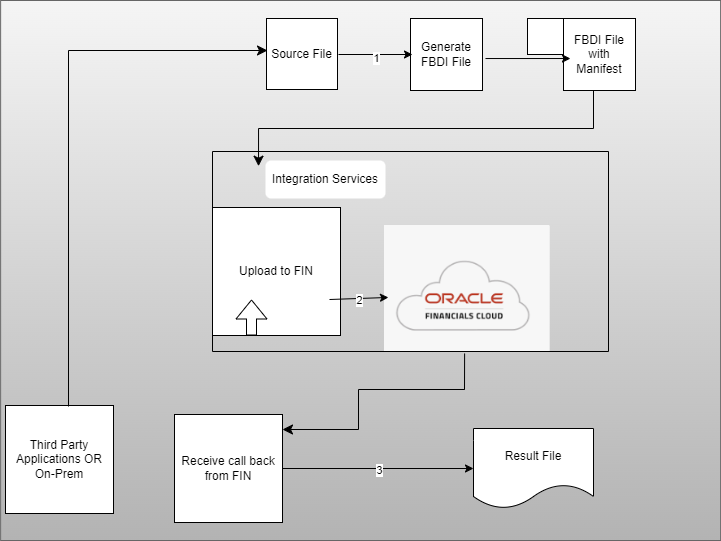
Use case – Use the FBDI feature to import large volumes of data from third-party or other Oracle applications. Use file-based data imports to load data into your Oracle Fusion Cloud Financials Applications from external sources.
e.g:- Fixed Asset Mass Addition Import , Cash management Bank Statement Data Import,AP/AR Invoice Import ,Journal Import etc.
3. Inbound – Oracle Cloud Web Services (SOAP)
Oracle standard web services are available for the CRUD (create/Read/Update/Delete) operations.
The SOAP Adapter can consume an external SOAP API in an integration in Oracle Integration. The message received from Oracle Integration can be passed as payload to an external SOAP endpoint by the SOAP Adapter. The SOAP Adapter does not filter or change any of the APIs exposed by the application to which you are connecting. If there is a native adapter for the application to which you are connecting, use that adapter instead.
Note: –Integrations exposed as SOAP APIs (using a SOAP Adapter-specific connection configured as a trigger) cannot accept attachments.
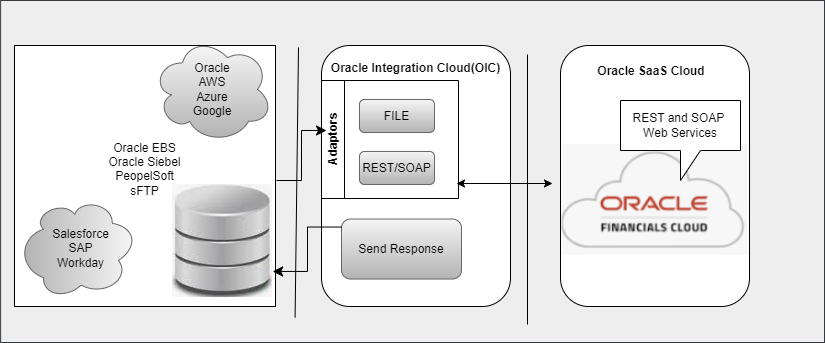
Use case – Use Simple Object Access Protocol (SOAP) web services to integrate different applications within the enterprise or expose business functions to Oracle Cloud partners and customers. Oracle Applications Cloud supports public external SOAP services throughout their life cycle, until the services are obsolete. Don’t make backward incompatible changes to any public external service as it breaks the existing code that initiates the service. See the SOAP Web Services guides for Oracle Applications Cloud services. To browse the web services provisioned on your cloud instance, see Using Service Catalog Service.
4. Inbound – REST API
The REST Adapter can expose integrations as REST APIs by configuring a REST Adapter connection as a trigger. The REST Adapter can also consume any external REST API by configuring a REST Adapter connection as an invoke.
Use case – Use the REST APIs integration option if some of your business processes require real-time updates to your supplier data. A comprehensive set of REST APIs is available for Finance Business Objects and architectures of integrating systems to view, create, update, or delete records for their real-time integration requirements. When performing POST operations, limit the number of records to a maximum of 500. if any of the operations (Get,Patch,Post..etc) are not supported, Please check the other alternate options like SOAP Services and FBDI .
5. Inbound – ERP-EPM Integration
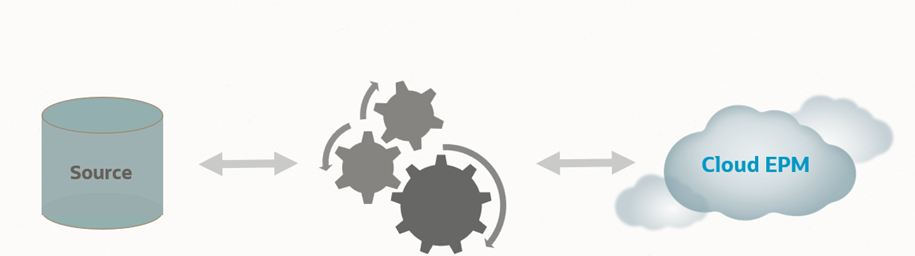
You can integrate Oracle General Ledger data from the Oracle ERP Cloud with your Oracle Enterprise Performance Management Cloud application if you use the Oracle Fusion Cloud ERP Release 11 or higher.
Refer resource lists “Integrating Oracle Fusion Cloud ERP General Ledger Applications” and “Defining Data Integration- ERP-EPM”.
6. Inbound/Outbound – ERP Integration Services
Provides external operations for ERP integration scenarios such as bulk data import and export to execute end-to-end inbound and outbound data flows. It also provides key features such as status tracking, web service callback and error notifications along with business events as part of these flows.
Service WSDL URL: https://servername/fscmService/ErpIntegrationService?WSDL
Please refer resource list “ERP Integration Services” for more details.

Use case -You can trigger an integration based on events in Oracle Fusion Cloud ERP Applications using the Oracle ERP Cloud Adapter., synchronize product data in real time with the supply chain using the Oracle ERP Cloud Adapter, Load planning data from flat files using the ERP Integrations REST service. Also, you can upload files to UCM servers using the ERP Integrations REST service.
7. Outbound – BICC
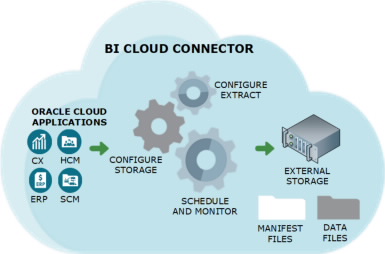
Oracle Business Intelligence Cloud Connector (BICC) can be used to extract business intelligence and other data in bulk and load it into designated external storage areas.BICC is available as part of the Oracle Applications Cloud subscription. Additional access provisioning is required, and you must sign into BICC to perform all tasks related to the data extraction.
Before you extract data, you must know the BI View Objects (VOs) and their attributes. The data store guides describe the view objects and attributes that can be used for extracting data out of your application instances.
BICC extract queries process very large volumes. Some of the VOs produce query execution plans, that result in significant TEMP tablespace usage. Additionally, BICC SQLs take longer time to run in FA environments, causing longer undo retention and require larger UNDO tablespace as well. Make sure you run the internal BICC benchmarks in your TEST instance, and if you observe running into TEMP and UNDO tablespace space issues.
Plan to run your initial BICC extract jobs during off business hours. Some initial extracts may require larger TEMP and UNDO tablespace space, so you will minimize the chance of running out of space during less busier times such as weekends. Carefully construct the list of VOs for your extracts, limiting to the list of required only objects. In some case you may want to correct the execution plans for BICC VO extracts by passing database hints into the extract SQLs.
BI Broker and BI Server Modes BICC offers two extract modes – BI Server mode, used by default in all extracts, and BI Broker mode. The latter has been introduced to improve the extract performance for data fetching, as BI Broker mode bypasses the additional layers in BI technology stack and usually allows to fetch the large data volumes 2-3 times faster.
Hoverer there are known limitations with BI Broker mode:
• BI Broker mode uses ADF case-sensitive calls, so it could run into “NoDefException: JBO-25058: Definition <…>of type Attribute is not found in <…>VO” error. If you get the error with BI Broker mode, you can either mark the columns for extract explicitly or switch back to BI Server mode.
• Typically Flex VOs generated dynamically, and so marking columns for extracts explicitly would not work for BI Broker mode. Such VOs should continue using BI Server mode.
Navigate to: Manage Offering and DataStores → Select Offering -> Select DataStore → Actions → Manage Extract Mode
Use case – This is usually recommended for finance/SCM business objects huge data extraction in CSV files. This option isn’t suitable for real-time data extraction and Conditional data extraction isn’t supported. Perform periodic and incremental extracts (last changed data).
8. Outbound – BIP
Oracle Business Intelligence Publisher (BIP) is a reporting tool that can be used to create, manage, and deliver highly formatted documents. BIP can be used for a variety of purposes, including generating operational reports, shipping labels, checks, and more. You can configure BIP templates to meet your business needs.BIP can generate workflow notifications by retrieving content from standard data models.
It is recommended.
· For long running reports, Run Report Online option should be unchecked so that the report will not be available to View online. Such reports can only be scheduled.
· In case long running reports are included as “Run Report Online” then Auto Run should be disabled to avoid running the report with incorrect parameters.
· For reports to be run through ESS only, enable “Report is Controlled by External Application”. The report cannot be run or scheduled from BI Publisher Catalog and can only be submitted by ESS scheduling user interface.
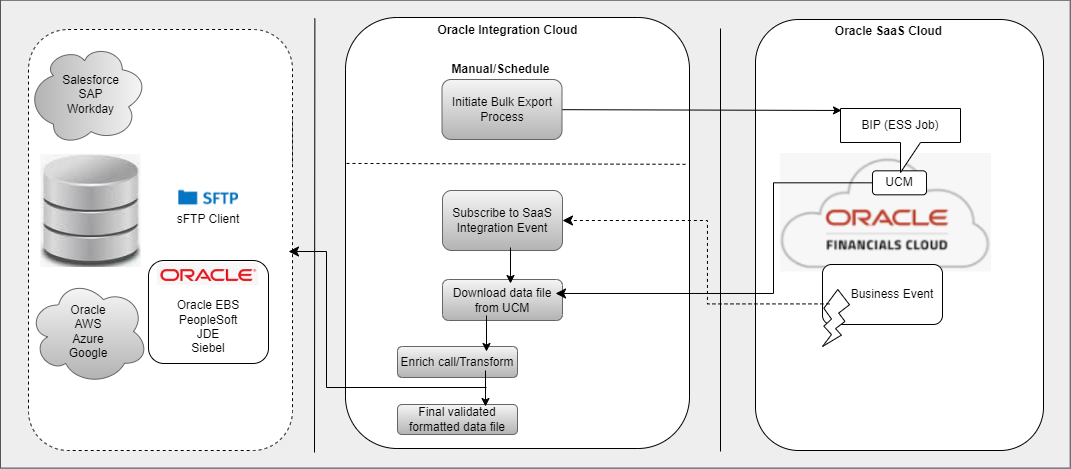
Use case – Do not use this pattern when there is a large volume of data because this is best suited for retrieving small data sets. This is the last option chosen to extract data with less volume of data since underlying BIP SQL might hit performance, timeout and other issues.
9. Outbound – Business Events
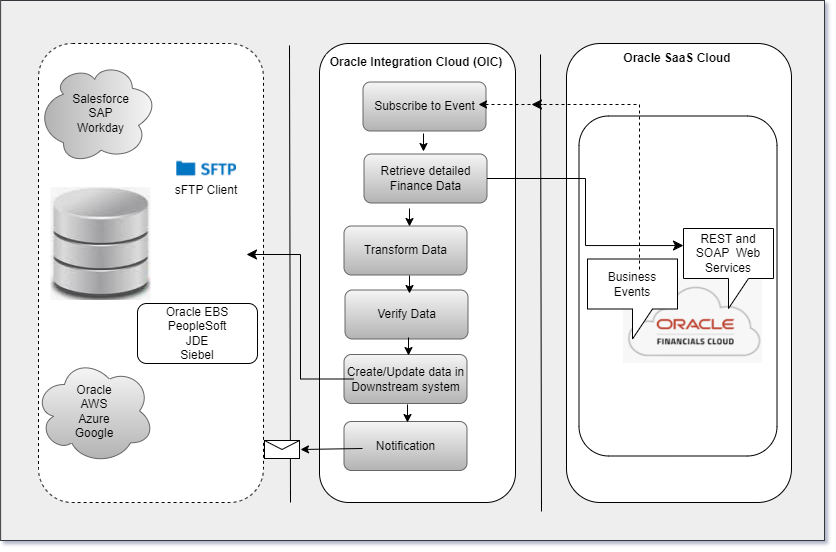
In this case, Oraacle Fusion Cloud ERP business events publish data that can be consumed by OIC and further processed to downstream. Oracle Fusion Cloud ERP Applications raises several business events that can be configured and used for outbound integration with third-party applications.
The Oracle Workflow Business Event System is an application service that leverages Oracle Advanced Queuing (AQ) infrastructure to communicate business events between systems.
Key feature
Ability to use Oracle Integration Cloud (OIC)-based connectors to listen to these events and perform actions in any third-party applications that integrate with Oracle Fusion Cloud ERP Applications.
Best Practices
- Enable business events to integrate Oracle Fusion Cloud ERP Applications with external applications.
- It’s recommended to use Oracle Fusion Cloud ERP REST APIs with business events to get the details that the integrating application requires.
Constraints
- Not recommended for integrations with large volumes of data.
- Third-party platforms cannot be used for business-event integration.
Use case – Outbound business events can be used to send alerts, invoke web services, or send messages.Each outbound event is defined by its structure in an XML Schema Definition (.xsd) or Web Services Description Language (wsdl) file.
Some business events are delivered disabled by default. You can use the Oracle Fusion Cloud ERP Business Events REST API to enable business events before subscribing to them.
10. Outbound – REST APIs
The REST Adapter can expose integrations as REST APIs by configuring a REST Adapter connection as a trigger. The REST Adapter can also consume any external REST API by configuring a REST Adapter connection as an invoke.
Use case – It’s recommended to use REST APIs together with business events in Oracle Integration Cloud (OIC) .The Outbound Synchronization Service lets you perform real-time synchronization of Oracle Financial Business Objects (Invoice,Supplier,etc) updates with other external systems.
11. Outbound – Oracle Cloud Web Services (SOAP)
Oracle standard web services are available for the CRUD (create/Read/Update/Delete) operations.
The SOAP Adapter can consume an external SOAP API in an integration in Oracle Integration. The message received from Oracle Integration can be passed as payload to an external SOAP endpoint by the SOAP Adapter. The SOAP Adapter does not filter or change any of the APIs exposed by the application to which you are connecting. If there is a native adapter for the application to which you are connecting, use that adapter instead.
Note:- Integrations exposed as SOAP APIs (using a SOAP Adapter-specific connection configured as a trigger) cannot accept attachments.
Use case – SOAP services aren’t recommended if an equivalent REST API is available because of low in performance and scalability. Use Oracle Integration Cloud (OIC) to perform near real-time operations and access the data available in the database in real time.Also,It can be used to schedule job for the data extraction.
Guidelines
- Analyse the Infrastructure involved with data integration/extraction.
- Check requirement related to Data format, Data dependency, Security, Mode of Integration (Batch/Real-time data), Data Volume, encryption/ Description, compliance, performance and validation requirements.
- Reconcile the data between source and Target.
- BIP and OTBI is the last option for the data extraction/integration because it is a reporting tool.
- BI Cloud Connector (BICC) is the recommended tool for the bulk data extraction.
- SOAP/REST API are not recommended for huge bulk data extractions and recommended for real-time data interface.
- Bulk export – design/develop how the files from UCM are extracted and loaded in the target.
- Post export – design/develop data transformation as needed.
Conclusion
It is always recommended to use the right integration pattern when designing integrations.Oracle Cloud ERP integration adapters (Oracle Integration 2/3) enable organizations to seamlessly integrate on-premises or third-party SaaS applications with Oracle Fusion Cloud ERP without knowing the specific details involved in the integration process.
The Oracle Cloud ERP integration adapter provides the following benefits and more:
- Easily integrates with the Oracle Fusion Cloud ERP applications.
- Provides support for subscribing to business events raised by modules within Oracle Fusion Cloud ERP and Oracle Fusion Cloud Supply Chain & Manufacturing.
- Automatically generates mapping to business objects, event subscriptions, or business (REST) APIs.
- Simplifies connection creation by automatically identifying the required service catalog and URLs based on your Oracle Fusion Cloud ERP hostname inputs.
Resources
- Application Integration Govt Restriction
- Oracle ERP Cloud Adaptor Connection Integration
- OCI Multi Cloud ERP Azure
- Difference between synchronous and asynchronous integrations
- Implement common pattern using oracle ERP cloud adaptor
- Monitoring REST End Points
- Cloud Momentum-Tomorrow’s ERP
- Oracle Fusion Cloud ERP Implementation Guide
- Data Extraction Options and Guide Lines for Oracle Fusion Cloud Applications
- Integration Sample – ERP Cloud Customer Creation
- Integrations – Security Role Requirements for Oracle Fusion Cloud ERP
- Integrating Oracle Fusion Cloud ERP General Ledger Applications
- ERP Integration Services ERP Integration Services
- Managing fiscal documents approvals through a third party
- Defining Data Integration- ERP-EPM
- Oracle Fusion Analytics
- Data Retention Options for ERP Legay Data
- BIP Report Services