
Introduction
The ERP adapter in Oracle Integration Cloud supports Authorization Code based OAuth authentication. This authentication method is a recommended over basic authentication because OAuth access token authentication is much more efficient, especially in high volume transactions. The configuration of OAuth authentication in the ERP adapter is documented in details at the following link.
Perform Prerequisites to Set Up the OAuth Authorization Code Credentials Security Policy
In a recent customer engagement, the customer is in the process of a large scale Oracle cloud implementation. They use a number of idenitity domains to separate PaaS services (OIC, ATP) from SaaS services (ERP, HCM) as well as to separate development, testing and production environments for PaaS and SaaS. When they try to move away from basic authentication by configuring OAuth in the ERP adapter, they find it confusing and difficult to understand the authentication flow. As a result, when error occurs in the consent flow, it is a struggle to troubleshoot.
In this blog, I try to clearly define some of the terminolgies used in the above document. I use two flow diagrams to visually illustrate the difference between first two scenarios described in the document.
Terminologies
- Domain
- Interchangibly used with identity domain
- FA Domain
- An identity domain where an FA cloud service (such as ERP) is created.
- In the context of this blog, an FA domain is relative to a specific FA instance.
- For example, an ERP service named myerp_dev1 is created in a domain named domain_myerpdev1.
- domain_myerpdev1 is the FA domain for myerp_dev1 instance.
- Non-FA Domain
- In the context of this blog, a non-FA domain is relative to a specific FA instance.
- For example, we have a second domain named domain_myerptest and it has an ERP service named myerp_test.
- In this scenario,
- domain_myerptest is an FA domain for myerp_test service
- domain_myerptest is a non-FA domain to the ERP service myerp_dev1.
- domain_myerpdev1 is a non-FA domain to the ERP service myerp_test.
- OIC Domain
- An identity domain where an OIC instance resides.
- This domain is often separate from domains containing FA services.
- OIC and FA services can reside in the same domain.
- Trust
- In the context of this blog, a trust means accepting an OAuth access token issued (signed) by an external entity with its private key.
- Each identity domain has its own distinct private key and cert pair.
- An identity domain always accepts an access token signed by itself and rejects all access tokens signed by external entities by default.
- An identity domain will accept an access token issued by an external entity if there is a trust relationship established between the domain and the external entity.
- For an identity domain to trust an external entity, we must retrieve the certificate corresponding to the external entity’s private key and import the certificate into the domain’s trust store.
FA API Authentication
FA has its own built-in security layer. This layer sits on top of the FA idenity domain where the FA service is created. The FA security layer has built-in token-based API authentication capability. When a REST API call with a token is made to FA, the FA security layer will perform the token authentication in the following steps:
- Extract the checksum value in the x5t attribute of the incoming token
- Find a matching certificate in the API Authentication trust store based on the checksum
- Verify the signature of the token with the certificate found in step 2 if a certificate is found.
- Authentication is successful only if all above three steps are successful
When an FA service is created in an identity domain, the domain’s certificate is automatically imported into the FA API trust store. This certificate can not be modified or deleted. So by default, FA will always trust a token issued by its own domain.
To configure FA API authentication to trust a token issued by an external entity, the external entity’s certificate must be imported manually to the FA API authentication trust store.
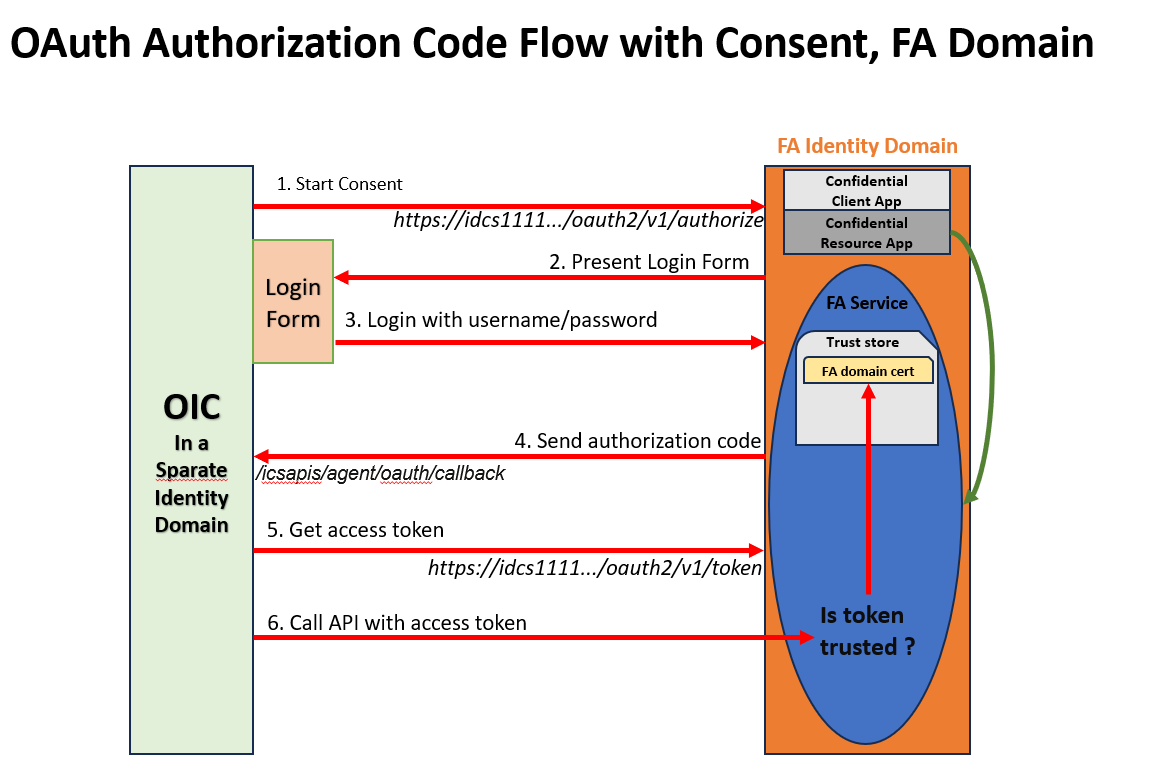
OAuth Authorization Code Flow with Consent, FA Domain
This is the first scenario described in the ERP adapter document. The key points to note about this OAuth flow are the following:
- The confidential apps for resouce and client are created in the same identity domain where the targeted FA service resides
- When the Consent button is clicked in the ERP adapter connection configuration page, the OAuth flow is conducted to the same domain as the FA service.
- The resulting access token is issued by the FA domain and trusted by the FA service by default. No need to establish additional trust relationship.
- If the FA domain is federated to an external authenticator (such as Azure), the username used in the login form must exist in the FA domain with proper privileges.
OAuth Authorization Code Flow with Consent, Non-FA Domain
This is the second scenario described in the ERP adapter document. The key differences between this scenario and the first are below:
- The confidential apps for resouce and client are created in a non-FA domain (external domain) to the targeted FA service
- When the Consent button is clicked in the ERP adapter connection configuration page, the authentication flow is conducted to the non-FA domain (external domain) to the targeted FA service.
- The resulting access token is issued by the Non-FA domain and not trusted by the FA service. A trust relationship must be established. However, in this scenario, the trust relationship is set up between the FA application security layer and the non-FA domain. Token verification takes places in the FA security layer. The FA domain is not involved in the authentication flow. So no trust relationship is necessary between the non-FA domain and the FA domain.
- The username used in the login form must exist in the FA domain with proper privileges.

Set up Trust between the Non-FA Domain and FA API Authentication
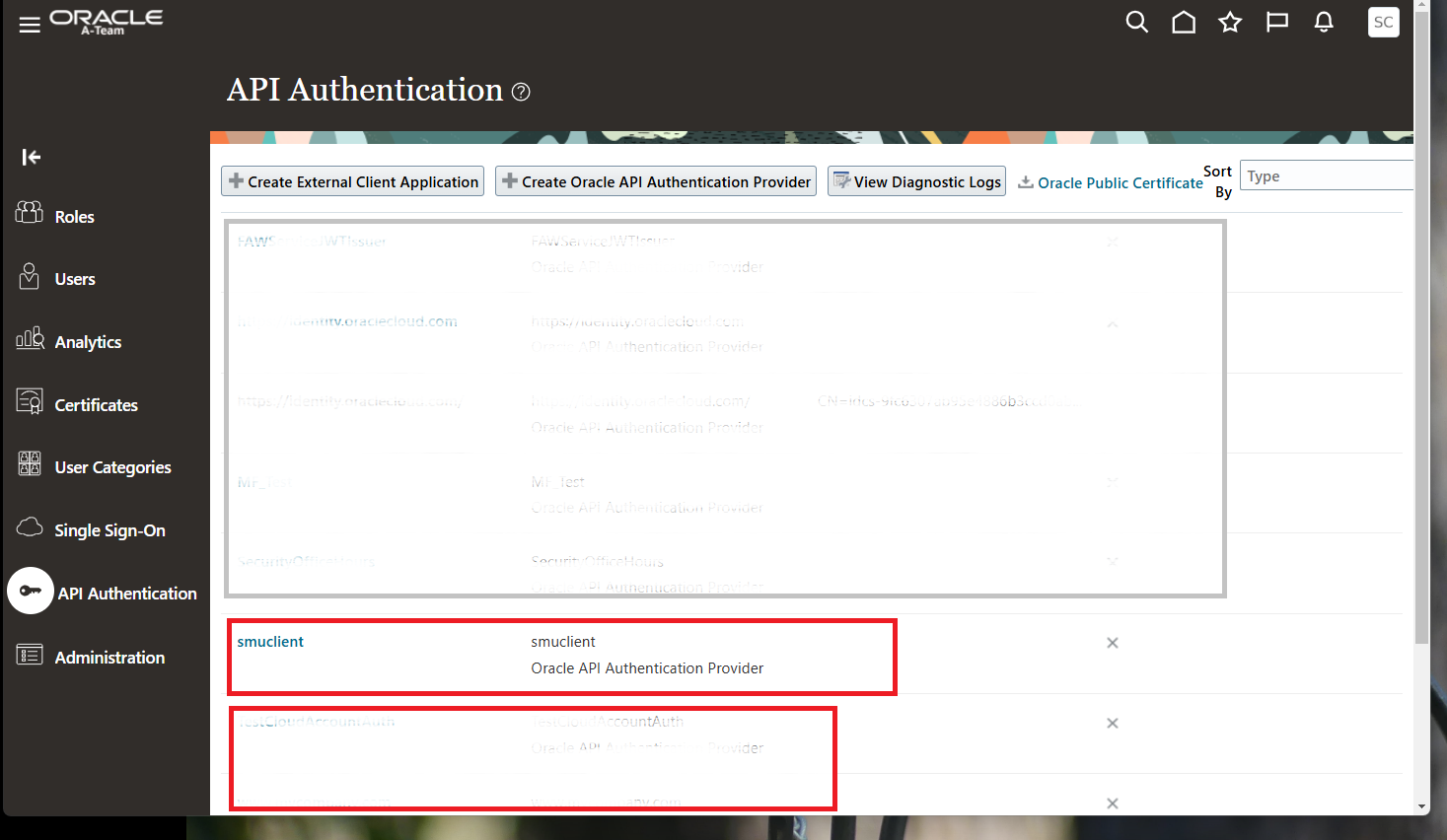
This step is performed in the API Authentication section of the FA Security Console. In earlier versions of FA, customers had to create an SR to have Oracle Support import the certficate. But in the current version, it is all customer self service. To configure FA to trust a non-FA domain, we create a new API authenticatortor. In the new API authenticator, its issuer name must be “https://identity.oraclecloud.com“. The signing certificate from the non-FA domain must be uploaded to the new API authenticator. The following image shows a demo API Authenticator named smuclient.
Two Final Notes on ERP Adapter OAuth Configuration
Offline Access and Refresh Token
When specifying a value for the scope field in the ERP adapter configuration page, it is important to add “ offline_access” to the end of the scope URL. There must be a space before the “offline_access”. When “ offline_access” is appended to the scope URL, a refresh token is returned along with the access token. The refresh token is used to get a new access token when the current token expires.
Offline access or refresh token is enabled in two places. First, the “Is refresh token allowed” box needs to be checked in the confidential resource app. Second, the Refresh token grant type must be checked in the confidential client app. If either of the two is not enabled, having the ” offline_access” in the scope URL will lead to authentication error.
Error: Invalid Redirect URI
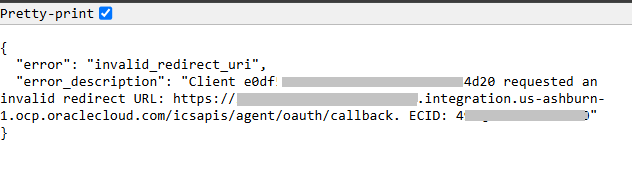
When OIC sends requests to an identity domain to retrieve an authorization code, it sends a redirect URL in the payload. This redirect URL value is compared to the value specified in Redirect URL field in the Confidential Client Application configured iin the identity domain. If you click the Consent buttom in the ERP adapter connection configuration page and get an error like displayed above, this error is caused by a mismatch between the redirect URL value sent from OIC and the redirect URL value specified in the Configuration Client Application in the identity domain.