
TL;DR
Data Definition is an architectural foundation. Successful Oracle Fusion Cloud implementations align data early to standard Fusion models, define ownership, lifecycle, and security clearly, and extend only with justified business needs. Based on my customer engagements, most downstream complexity across integration, reporting, security, and AI can be traced back to incomplete or late data definition especially in global implementations.
Introduction: Data Is Where Implementations Succeed or Struggle
Oracle Fusion Cloud Applications are built on standardized business processes supported by a unified data model. This shifts implementation focus from system configuration to data alignment with the target operating model.
Across customer engagements, a consistent pattern emerges:
What appears as an integration, reporting, security, or AI challenge is often rooted in data definition.
When data is not defined early, complexity moves into:
- integration logic
- reporting inconsistencies
- security design
- testing cycles
These are not product limitations. They are architectural outcomes.
Data Definition Maturity Model
| Level | Description |
|---|---|
| Level 1 | Migration-focused (lift and shift) |
| Level 2 | Structured mapping with limited standardization |
| Level 3 | Standardized data model aligned to Fusion |
| Level 4 | Governed data with ownership and lifecycle |
| Level 5 | AI-ready, fully integrated, scalable data architecture |
Most challenges occur at Level 1–2, where legacy structures are carried forward.
Organizations should target Level 4–5, where:
- data is standardized
- ownership is clearly defined
- governance and lifecycle are embedded
- data supports reporting, integration, and AI
Higher maturity data definition reduces rework and improves scalability.
Scope: Data Across Business Domains
Data definition spans ERP, SCM, HCM, and CX and should be treated as an enterprise-wide activity.
It includes multiple types of data that support business processes, integration, reporting, and governance.
Data Types with Examples Across Domains
| Data Type | ERP (Finance) | SCM (Supply Chain) | HCM (Human Capital) | CX (Customer Experience) |
|---|---|---|---|---|
| Master Data | Customer, Supplier, Bank | Item, Supplier, Organization | Worker, Position, Job | Party, Account, Contact |
| Transactional Data | Invoices, Journals, Payments | Purchase Orders, Inventory Transactions, Shipments | Payroll, Assignments | Leads, Opportunities, Service Requests |
| Reference Data | Chart of Accounts, Payment Terms, Tax Codes | Units of Measure, Item Categories | Grades, Locations, Business Units | Territories, Status Codes |
| System Data | Invoice ID, GL Posting Status | Inventory Transaction ID | Employee ID, Assignment Status | Opportunity ID, Case Status |
| Derived / Analytical Data | Revenue, Profit, Aging | Inventory Valuation, Turnover | Headcount Metrics | Pipeline Value, Conversion Rates |
| Security / Compliance Data | Financial Access Flags | Restricted Inventory Locations | Compensation Data | Customer Contact Details (PII) |
| Metadata | Source System Reference, Mapping Rules | Integration Mapping, Item Lineage | Worker Data Mapping, Assignment Lineage | Account Mapping, Data Lineage |
Data definition must ensure consistency across these data types and domains, rather than treating each system or pillar independently.
Metadata improves traceability and supports integration, governance, and AI readiness.
Many data objects span multiple pillars; defining shared ownership and usage across ERP, SCM, HCM, and CX is critical.
Data Definition Before Process Design
Data definition must precede business process workshops.
Without it:
- workshops become exploratory
- legacy assumptions dominate
- unnecessary extensions are introduced
With it:
- workshops validate standard processes
- data usage is clearly understood
- gaps are identified early
Data Definition in Global Design Phase
In global implementations, organizations typically begin with a Global Design phase.
Defining data before global design workshops significantly accelerates design decisions and improves consistency.
Global vs Local Data Design Pattern
| Data Area | Global Standard | Local Flexibility |
|---|---|---|
| Customer | Standard Party model | Regional segmentation |
| Supplier | Standard structure | Local compliance attributes |
| Item | Global model | Local classification |
| COA | Standard structure | Local reporting segments |
| Reference Data | Standard values | Controlled extensions |
Standardize globally, extend locally only when required.
Core Principle: Standardize Before You Migrate
Define → Standardize → Map → Analyze → Cleanse → Migrate → Validate → Govern
Align to the standard model first. Extend only with clear business purpose.
Commonly Missed Data Definition Areas
| Data Type | Why It Matters |
|---|---|
| Derived Fields | Reporting and business logic |
| Aggregate Fields | Analytics and AI |
| System Fields | Integration and traceability |
| Audit Fields | Compliance |
| PII / Sensitive Data | Security |
| Use-case Fields | Workflow support |
These gaps are typically discovered late, increasing cost and complexity.
Field-Level Extensions: Extend Only When Required
| Pillar | Extension Type | Purpose |
|---|---|---|
| Data | DFF / EFF | Additional attributes |
| Data | KFF | Financial Structures |
| Extensibility | Application Composer | CX extensions |
| Integration | External IDs | System linkage |
| Reporting | Derived / Aggregate | Analytics |
| Governance | Audit fields | Compliance |
| Security | Sensitive fields | Access control |
Decision Framework
The following decision framework helps guide data design decisions:
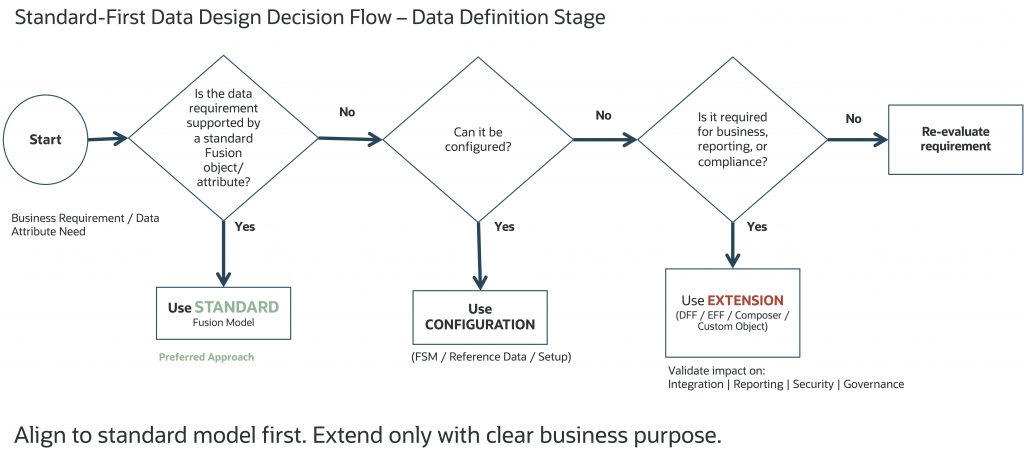
Extensions should enhance, not replicate the standard model.
System of Record and Synchronization Strategy
Define:
- ownership
- system of record
- synchronization rules
Consider:
- real-time vs batch
- latency tolerance
- conflict resolution
Ownership without synchronization strategy leads to integration complexity.
Reference Data and COA Hierarchies
Reference data impacts:
- configuration
- workflows
- integrations
- reporting
COA audit is achieved through versioning, not field-level auditing.
Auditing, PII, and Security Classification
PII and Security Classification Matrix
| Classification | Description | Examples | Access |
|---|---|---|---|
| Public | Non-sensitive | Product data | Open |
| Internal | Business data | Cost center | Role-based |
| Confidential | Sensitive business data | Financial data | Restricted |
| PII | Personal data | Email, phone | Masked / restricted |
| Highly Sensitive | Regulated data | Bank accounts, credit cards | Encrypted |
Platform vs Customer Responsibility
Oracle Fusion Cloud provides:
- built-in security architecture
- role-based and data-level access controls
- platform-level encryption and protection
These are applied to standard application objects and fields.
Customer / SI Responsibilities
Customers must:
- identify and classify sensitive data
- define access policies
- manage security for extension fields (DFF/EFF/custom)
- align with governance and compliance policies
Key Design Principle
Standard fields follow application-defined security behavior. Extension fields require explicit classification and governance.
Third-Party Data and Read-Only Strategy
External data (D&B, tax, address validation):
- should be integrated into the data model
- should be treated as read-only
External data should be consumed as authoritative. Manual changes to third-party data may lead to inconsistencies and can be overwritten during synchronization.
Integration Identifiers: Use Standard Cross-Reference
Avoid storing source system IDs in custom fields.
Use:
- standard Source System Reference
Supports:
- EBS, SAP, Salesforce
- home-grown / custom systems
Scope of Data Definition: How Much Is Enough?
Two Common Approaches
| Approach | Description | Benefits | Challenges |
|---|---|---|---|
| Full Data Dictionary | Define all attributes | Complete visibility | Hard to maintain, duplicates Oracle documentation |
| Targeted Definition | Focus on required attributes | Practical and efficient | Requires discipline |
Recommended Approach
Focus on attributes required for implementation, integration, reporting, governance, and AI without recreating full product documentation.
Data quality ownership must be clearly defined, with business teams responsible for data accuracy and IT enabling validation and tooling.
Data definition should consider how data will be accessed across UI, integrations, and reporting layers.
Conflict resolution rules must be defined when multiple systems interact with the same data object.
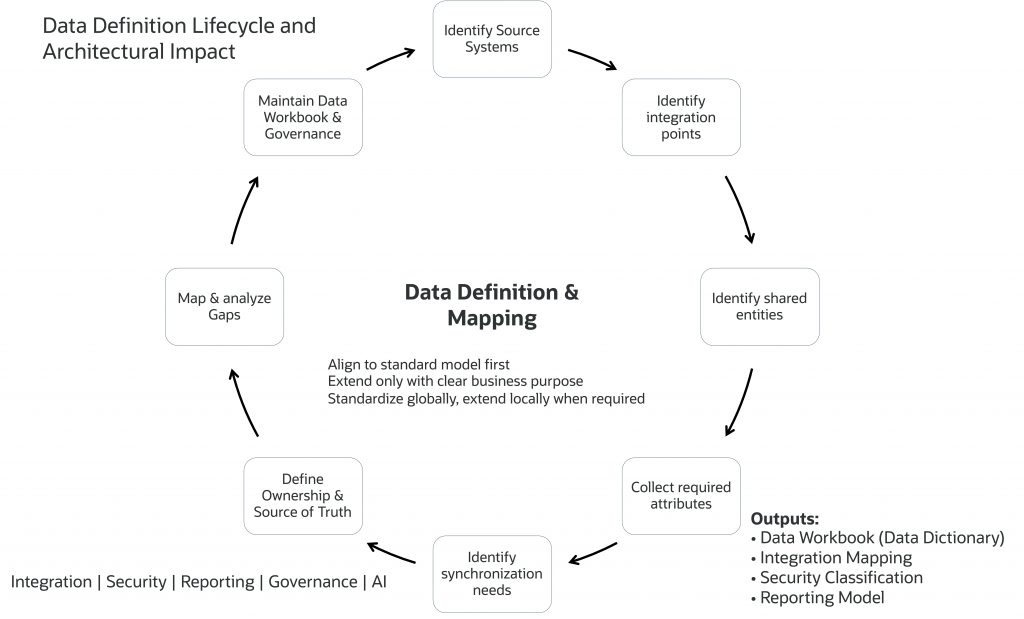
Right-Sized Data Workbook Checklist
The goal is not to document everything, but to define what is required for implementation, governance, and scalability.
- Core data defined (master, transactional, reference)
- Standard model mapping completed
- Extensions identified and justified
- Integration mappings defined
- PII and sensitive data classified
- Ownership and system of record defined
- Lifecycle defined
- Reporting and AI attributes identified
- Test scenarios mapped
A right-sized workbook supports execution, not just documentation.
Data Workbook: A Living Data Dictionary
The workbook should:
- act as a single source of truth
- evolve across phases
- support all teams
A well-maintained workbook reduces ambiguity and improves delivery.
Data definition workbook should also align with migration strategy, including data volumes, sequencing, reconciliation, and cutover approach.
Appendix: Sample Data Definition Workbook
A. Customer (Master Data)
| Pillar | Attribute | Source | Extension | Classification | Behavior | Auditable |
|---|---|---|---|---|---|---|
| Data | Party Name | EBS | No | Internal | Editable | Yes |
| Data | Segment | Salesforce | DFF | Internal | Editable | No |
| Governance | Risk Flag | None | DFF | Confidential | Restricted | Yes |
| Integration | External ID | Multiple | No | Internal | Read-only | Yes |
B. Chart of Accounts (Reference Data)
| Pillar | Attribute | Source | Extension | Classification | Behavior | Usage |
|---|---|---|---|---|---|---|
| Data | Company | EBS | No | Internal | Controlled | Reporting |
| Data | Cost Center | EBS | No | Internal | Controlled | Costing |
| Governance | Compliance Flag | None | DFF | Confidential | Restricted | Audit |
| Reporting | Hierarchy Level | System | No | Internal | Read-only | Analytics |
Note: COA auditing is managed through hierarchy versioning, not field-level auditing.
C. Invoice (Transactional Data)
| Pillar | Attribute | Type | Extension | Classification | Behavior | Auditable |
|---|---|---|---|---|---|---|
| Data | Amount | Standard | No | Confidential | Editable | Yes |
| Reporting | Total Spend | Aggregate | No | Internal | Read-only | No |
| Governance | Comments | Input | DFF | Confidential | Editable | Yes |
| Security | Bank Account | Sensitive | No | Highly Sensitive | Restricted | Yes |
| Integration | External ID | Integration | No | Internal | Read-only | Yes |
Note:
- Classification field is given here as an example. Oracle manages the classification for all standard fields. Standard fields follow application-defined security behavior. Extension fields require explicit classification and governance.
- Recommended Additional Workbook Fields
- Source table / field
- Mapping logic
- Validation rules
- Extension type
- Integration usage
- Reporting usage
- Data owner
- System of record
- Access control
- Metadata / lineage
- Test scenario reference
Implementation Recommendation
Maintain the workbook as a living artifact across:
- design
- build
- testing
- operations
A well-maintained data workbook accelerates implementation and improves long-term maintainability.
Archival and purge strategies should be defined early to support performance and regulatory compliance.
Closing: Define Data Early, Extend Thoughtfully
Successful implementations are not defined by how much data is migrated, but by how well it is defined.
Align to the standard model first. Extend only with clear business purpose.
Data is the foundation of a successful Fusion Cloud implementation. Define it early, align it to standard models, and include governance, security, and AI considerations. Based on my customer engagements, the pattern is clear: when data is defined correctly, everything else becomes simpler across the implementation lifecycle.