
Introduction
Oracle Data Transforms offers powerful capabilities for designing and orchestrating ETL pipelines, now accessible programmatically via its Python API. In this article, I’ll walk through a solution where we automate data pipeline creation using metadata driven logic, extracting mappings dynamically from a metadata table.
Prerequisites
- Target tables have to be created first in Oracle Database. Currently, the auto create table based on source tables is not supported.
Solution Overview
Our approach takes metadata from an Oracle table, identifying source (BICC) and target(ADW) system/table pairs. For each pair, we create a DataFlow in the Data Transforms Python API, dynamically resolving columns, auto matching columns by name, and building data loads between the source and target tables.
Step by Step Implementation
1 – Setting up the Environment and Connections
First, we create the metadata table where we populate with the metata for connections and tables we will read and load.
id NUMBER GENERATED BY DEFAULT AS IDENTITY PRIMARY KEY,
source_connection VARCHAR2(100) NOT NULL,
source_schema VARCHAR2(100) NOT NULL,
source_table_name VARCHAR2(128) NOT NULL,
target_connection VARCHAR2(100) NOT NULL,
target_schema VARCHAR2(100) NOT NULL,
target_table_name VARCHAR2(128) NOT NULL
);
Example:
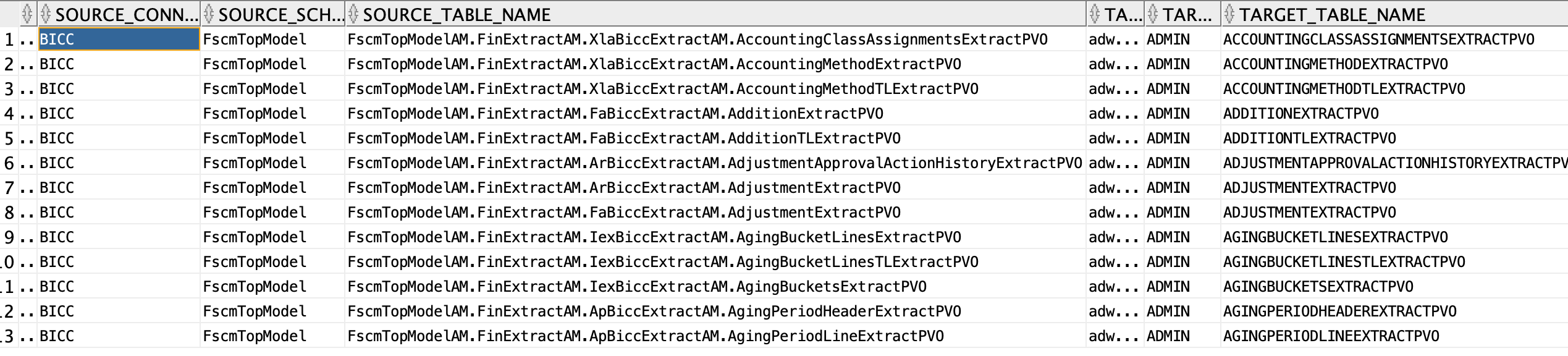
In Oracle Data Transforms I previously created the source and target connections. You need to replace by your own.
Second, we import the required libraries and set up secure connections using Oracle wallet credentials. This ensures secure and compliant database access.
WalletCreadentials.py file:
username=’ADMIN’
pwd=””
config_dir=”<path to wallet folder>”
dsn=”<adb_name>_high”
from datatransforms.workbench import DataTransformsWorkbench, WorkbenchConfig
from datatransforms.dataflow import DataFlow
from datatransforms.dataflow import SourceDataStore
from datatransforms.dataentity import DataEntity
from datatransforms.dataflow_load_options import OracleInsert, DataFlowIntegrationType
import logging
import oracledb
from walletCredentials import username,pwd,config_dir,dsn
# Get workbench config and connect
connect_params = WorkbenchConfig.get_workbench_config(“<password>”)
workbench = DataTransformsWorkbench()
workbench.connect_workbench(connect_params)
# Connect to Oracle
connection = oracledb.connect(
user=username,
password=pwd,
dsn=dsn,
config_dir=config_dir,
wallet_location=config_dir,
wallet_password=pwd
)
2 – Reading ETL Metadata
We query a metadata_info table to retrieve the source and target connection info for each ETL flow. This table contains columns such as source and target connection, schema, and table names.
cursor.execute(“””
SELECT source_connection, source_schema, source_table_name,
target_connection, target_schema, target_table_name
FROM metadata_info
“””)
metadata_rows = cursor.fetchall()
3 – Importing BICC Entities
For each metadata row, we:
-
Iterates through the metadata to dynamically build commands.
-
Executes a CLI tool to generate data entities based on the retrieved metadata.
from walletCredentials import username,pwd,config_dir,dsn
import subprocess
user=username,
password=pwd,
dsn=dsn,
config_dir=config_dir,
wallet_location=config_dir,
wallet_password=pwd)
cursor = connection.cursor()
cursor.execute(“””
SELECT source_connection, source_schema, source_table_name
FROM metadata_info
“””)
metadata_rows = cursor.fetchall()
source_conn, source_schema, source_table = row
command = [
“python”,
“-m”,
“datatransforms.cli.generate_data_entities”,
“–connection”, source_conn,
“–schema”, source_schema,
“–matching”, source_table,
“–live”, “true”
]
result = subprocess.run(command, capture_output=True, text=True)
print(“STDOUT:”, result.stdout)
print(“STDERR:”, result.stderr)
4 – Dynamic DataFlow Creation
For each metadata row, we:
- Initialize a DataFlow.
- Define source and target data entities.
- Dynamically resolve and map columns by matching column names.
- Build and persist the DataFlow
for row in metadata_rows:
source_conn, source_schema, source_table, target_conn, target_schema, target_table = row
source_table_split = str(source_table).split(“.”)[-1]
alias=f”{target_table}_TGT”
flow = DataFlow(f”DF_{source_table_split}”, project)
source_entity = flow.use(connection_name=source_conn,
schema_name=source_schema,
data_entity_name=source_table,
alias_name=source_table_split)
target_entity = flow.use(connection_name=target_conn,
schema_name=target_schema,
data_entity_name=target_table,
alias_name=alias)
resolved_source_column_names = {}
source_columns = source_entity.resolved_columns()
target_columns = target_entity.resolved_columns()
# Reverse-lookup source column names by last segment
source_lookup = {v.split(‘.’)[-1].upper(): v for v in source_columns.values()}
target_lookup = {v.split(‘.’)[-1].upper(): v for v in target_columns.values()}
manual_column_mappings = {}
for col_name in source_lookup:
if col_name in target_lookup:
manual_column_mappings[target_lookup[col_name]] = source_lookup[col_name]
override_column_mappings = {
“column_mappings”: manual_column_mappings
}
load_options = DataFlowIntegrationType.append()
load_options.update(OracleInsert.options())
load_options.update(override_column_mappings)
flow.from_source(source_table_split, f”{source_conn}.{source_schema}.{source_table}”) \
.load(alias, f”{target_conn}.{target_schema}.{target_table}”, load_options)
result = flow.create()
print(“Data flow = ” + flow.data_flow_name + ” Project= ” + flow.project + ” Result= ” + str(result))
5 – Clean Up
Finally, we close the database resources:
connection.close()
If you are interested to schedule these data flows you can check this A-Team blog
Conclusion
By combining metadata driven automation, dynamic column mapping, and Python API integration, organizations can streamline ETL processes, reduce errors, and enable faster, more scalable data transformations.