
Hi! The Oracle Autonomous Database is a fully autonomous database that scales elastically and delivers fast query performance. Related to the deployment mode, it comes in two flavors, serverless and dedicated infrastructure. In this blog we will talk about the serverless mode and the things we need to know about the supported network architectures.
Oracle Cloud Networks
Oracle ADB-S is a Platform as a Service deployed on the Oracle Cloud Infrastructure. In any OCI Region there are two major network domains:
a) IaaS – in the Infrastructure as a Service domain you deploy Virtual Cloud Networks which are part of your routing domain. The IP Space is typically private, chosen from RFC 1918. In this domain you will deploy Virtual Machines which will have private IPs.
b) OSN – In the same region you will find a network called Oracle Services Network. In this domain you will find all SaaS and PaaS deployments (ex: Autonomous Databases, Oracle Integration, Oracle Analytics, Fusion SaaS) and all of them will have Oracle owned Public IPs.
Note: OCI provides a VCN Gateway called Service Gateway for connectivity from IaaS to OSN. OSN to IaaS is not supported via this gateway.
ADB-S Deployment details
From a networking point of view, the Autonomous Database Serverless can be deployed in three modes:
1. Public Endpoint only – the service is deployed in the Oracle Services Network and has a Public IP and a Public DNS entry, both owned and maintained by Oracle Cloud.
2. Private Endpoint only – the service will get deployed in a VCN and subnet that you choose, it will have a private IP from that subnet and DNS entries inside the VCN.
3. Both Endpoints at the same time.
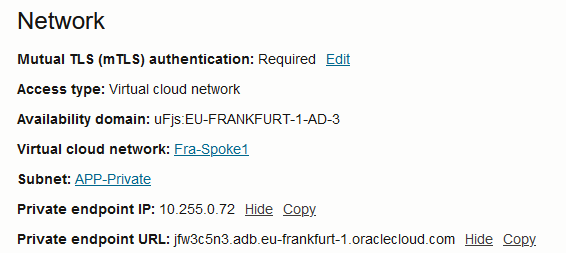
The type of endpoint is selected at the deployment menu, and it looks like this:

You can switch between Public and Private and any point in time, but the database will be unavailable for a few minutes as it switches the endpoint type.
It’s also important to point out that each ADB-S deployment gets automatic access to a set of tools which have their own ingress point and DNS entry. At this moment, the said tools are: Oracle APEX, Graph Studio, Data transforms, Database actions, Oracle Machine Learning user interface, Web Access (ORDS). The access to the ADB and the tools varies accordingly to the deployment method chosen, which we will explore in more detail.
ADB-S Public Endpoint Only
Whenever you deploy the database using the one of the first two options in the “Network access” you will get a Public Endpoint.
– The first option will deploy the ADB without any network restrictions whatsoever, it’s basically open to the whole Internet. Security is still ensured by the user/password combination and Mutual TLS.
– The second option allows you to provide a set of restrictions which can be:
a) Public IPs or Subnets. Note that private IPs/subnets are not supported when you choose this option.
b) Virtual Cloud Networks deployed in the IaaS that use a Service Gateway to reach the DB. You can define the VCN by name if it is in the same tenancy or by OCID if you want to provide access to a different tenancy. Furthermore, you can restrict what source IPs are allowed to come from that particular VCN, most likely private IPs. Also, should you use Transit Routing (more details below), you can restrict which IPs are allowed to come from your Datacenter, via FastConnect or IPSEC.
The Network Access Control will look like this:
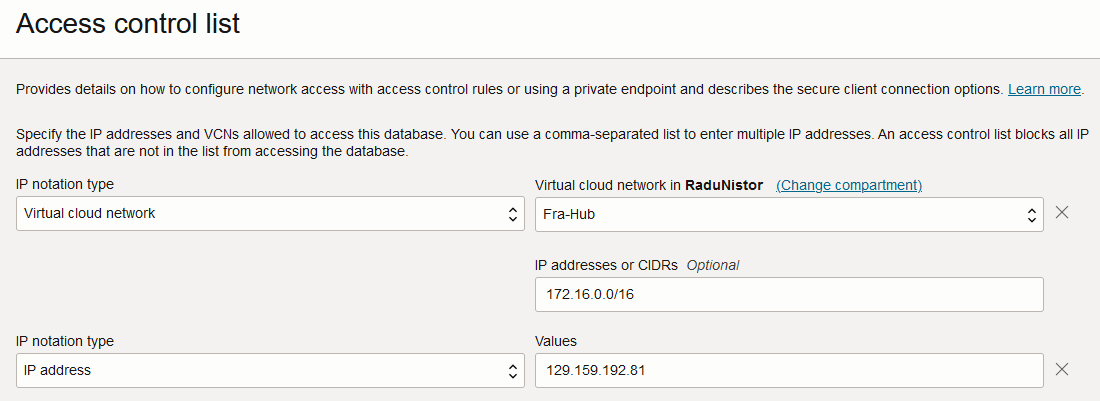
When you deploy the ADB-S with the public endpoint, you get the following a Database Wallet which you can download and use on the clients to connect to the DB. The wallet contains important info, like the public endpoint hostname and the service name. Let’s look at some details:
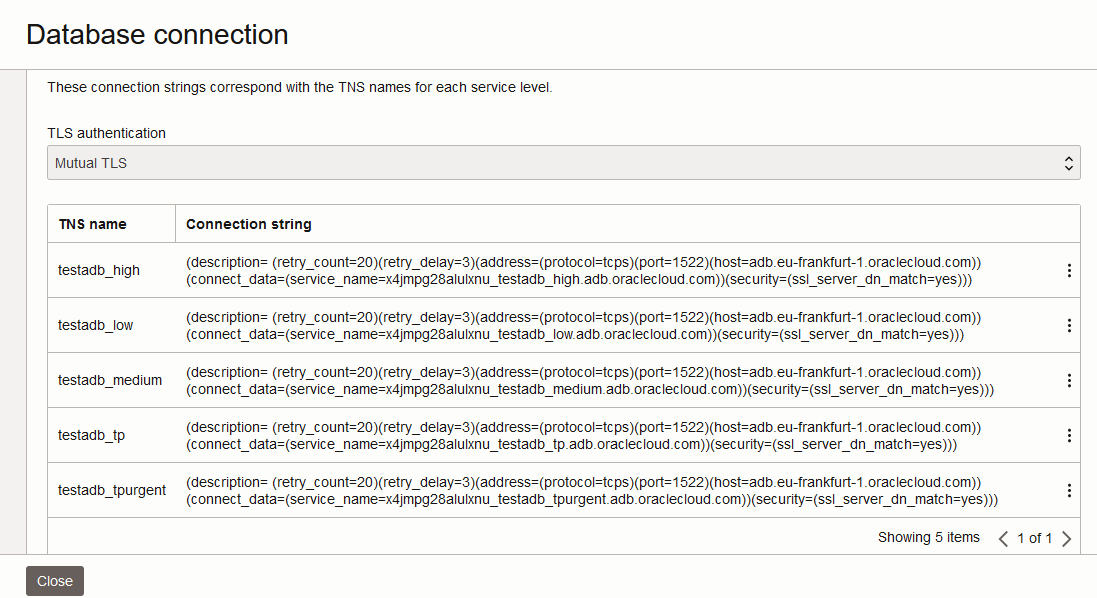
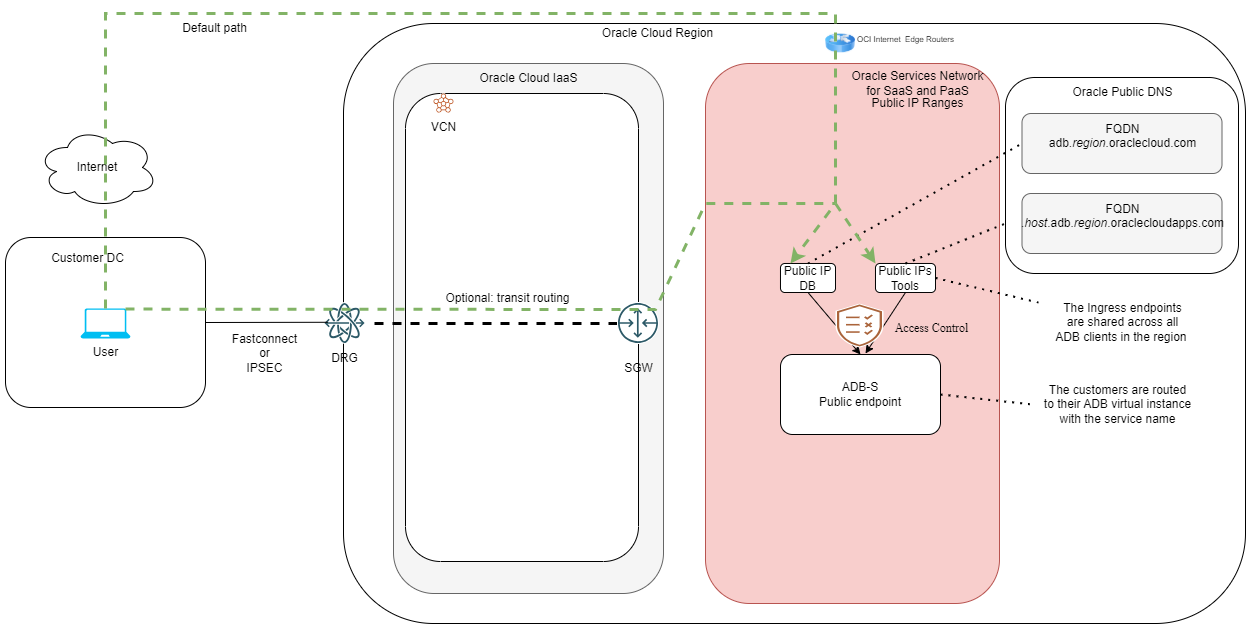
1. The public entry point for the database connections has the following details:
a. The entry point is shared by all the ADB-S clients in the region.
b. The DNS name is constructed in a standardized format which is adb.[region].oraclecloud.com.
c. The DNS will resolve to an Oracle Public IP which is shared by all clients.
2. The service name is important because it’s the actual piece of information which directs the connection to your particular instance of ADB-S and is constructed with the following format:
[random-characters]_[your-DB-name]_[type-of-service].adb.oraclecloud.com.
3. One important thing to note is the line ssl_server_dn_match=yes which tells the client that the Public Endpoint will not accept connections initiated with a different domain. If you create your own DNS entry, in your domain, and point it to the Public IP of the Endpoint, the connection will fail.
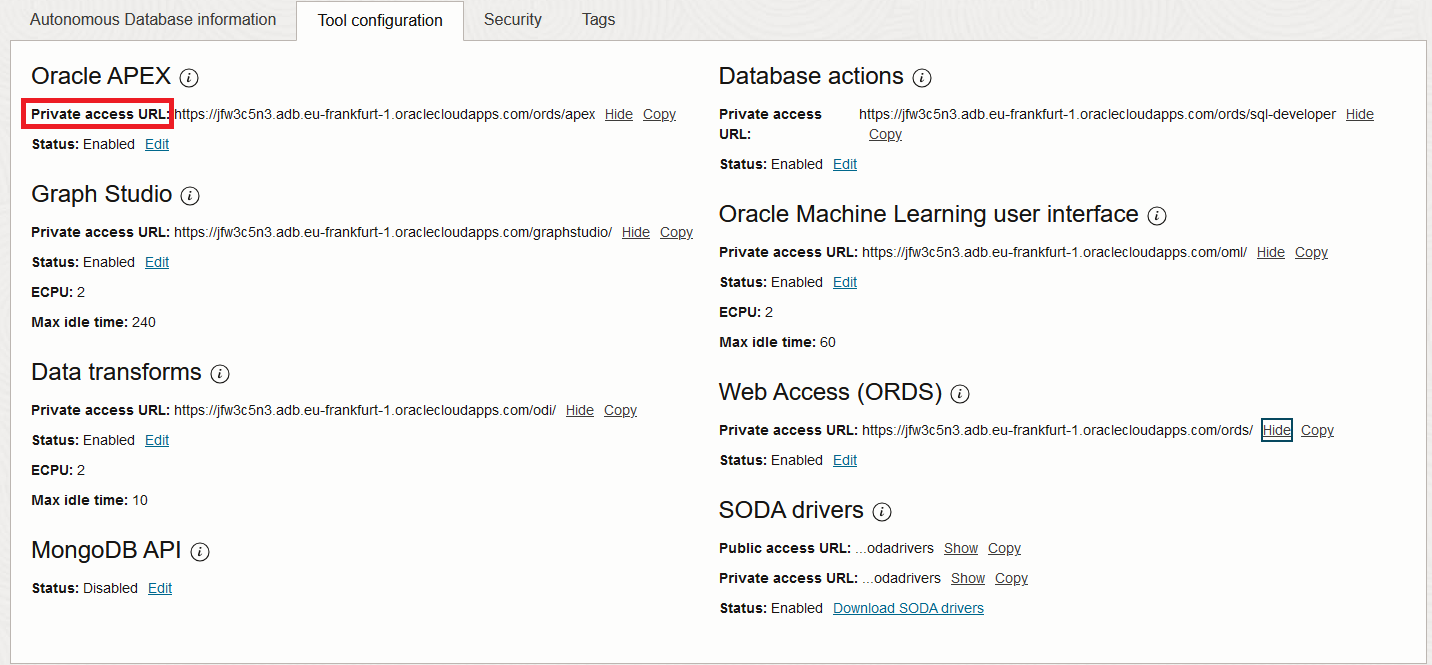
As said above, with the ADB you also get a set of tools which have a different entry point. You can view the tool URLs in the ADB details page:
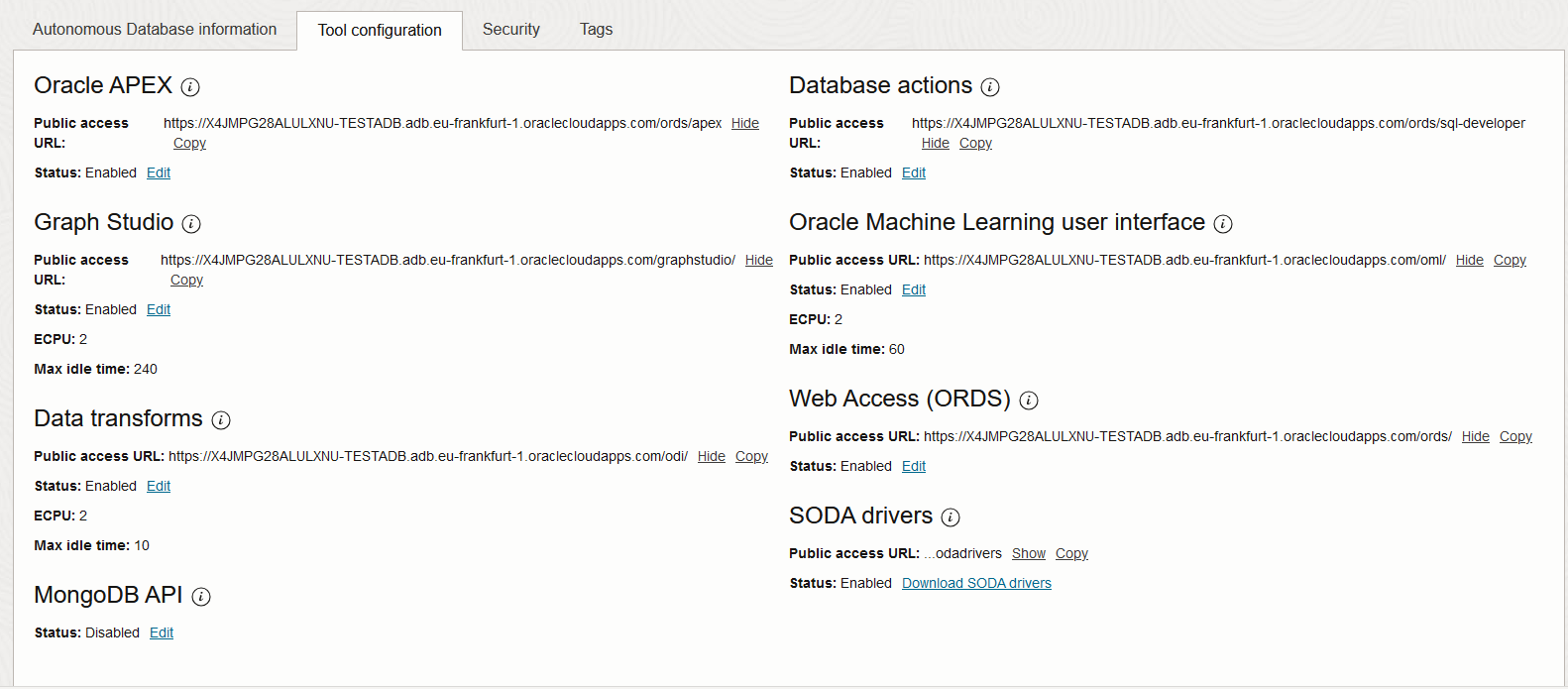
The entry point for the tools is constructed a little different:
[random-characters]-[your-DB-name].adb.[region].oraclecloudapps.com/[path-to-tool]
Note that the tools are deployed in a the oraclecloudapps.com domain as opposed to the DB itself, which lives in oraclecloud.com. The DNS hostname and the Public IP are, again, entirely managed by Oracle and Vanity URLs are not supported. Also, the DNS entry is unique to you but the Public IPs are not, they are shared across all clients.
Transit routing
When you deploy the ADB-S with a Public endpoint the default method of connectivity is via the Internet, for resources outside of OCI, or the Service Gateway for OCI IaaS resources. However, OCI supports a special configuration in the IaaS Layer which allows Private connections such as FastConnect and IPSEC to reach into the Public IP space of OSN with a tunnel from the Dynamic Routing Gateway to a Service Gateway from any VCN. The details can be found here.
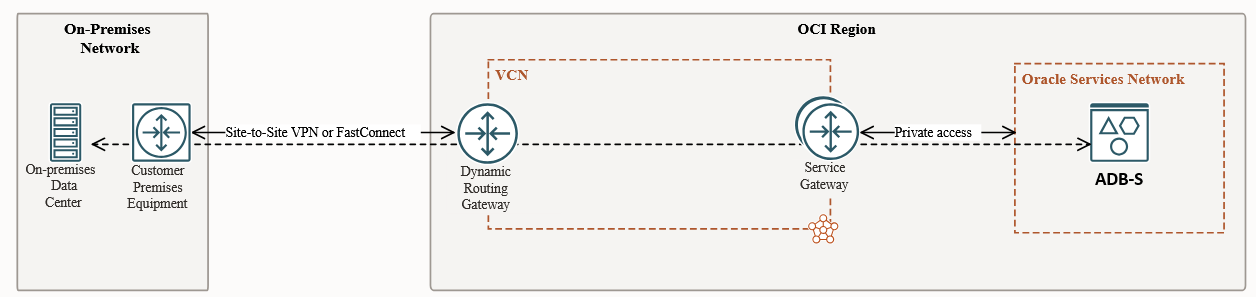
Now that we have all this info, let’s put it in a diagram:
ADB-S Private Endpoint Only
When you want to be more secure, you can choose to deploy the ADB service with only a private endpoint. When you do that, there are some things that happen which are worth mentioning.
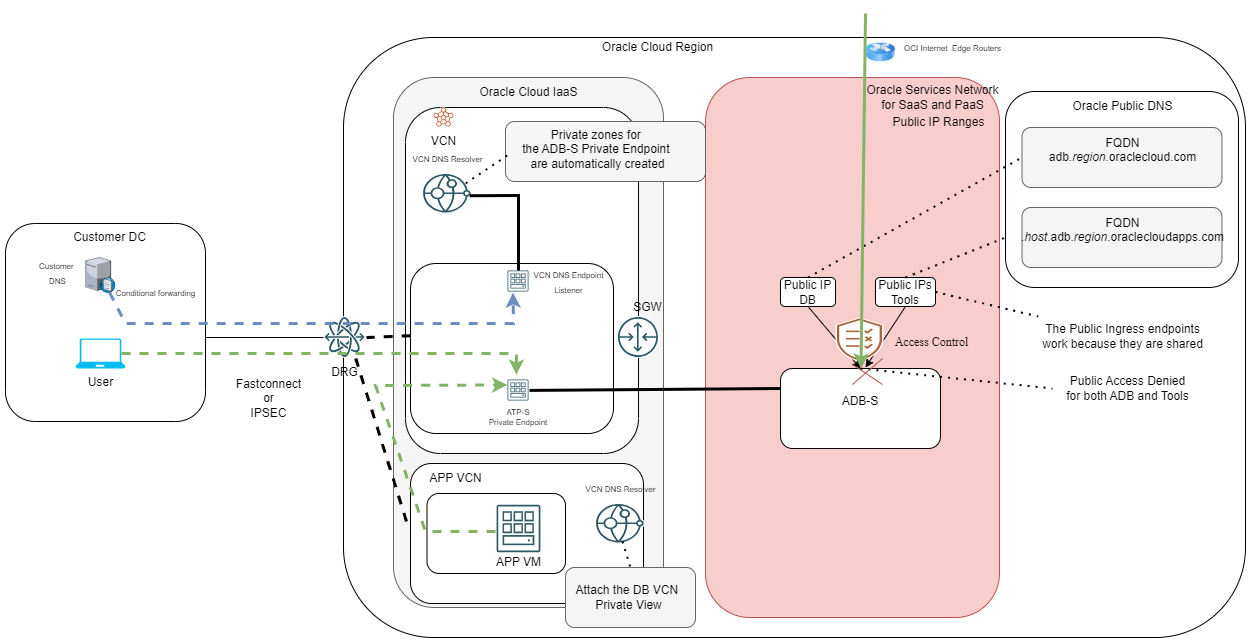
1. The Public Endpoint access for the Database is completely disabled. The DNS entry and the IP are still there because they are shared, but the actual connection to the DB will no longer work.
2. The Database is assigned a new DNS Hostname and a private IP from the VCN subnet that you chose in the deployment menu.
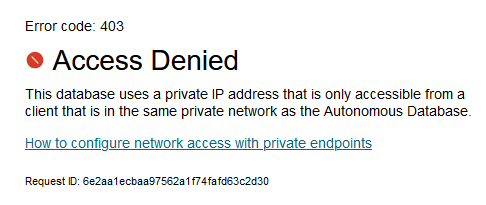
3. The Tools URLs will no longer accept connections, on the public side.
4. Each Tool is assigned a new URL for private access.
5. Oracle will deploy all the required DNS entries as “single-host” zones inside the VCN Resolver. Even though the domain is still public, it is now used in a private way, inside the VCN. Furthermore, the automation will add some oraclevcn.com entries which resolve to the same DB IP. You can view the provisioned zones if you go to the VCN’s default private view:
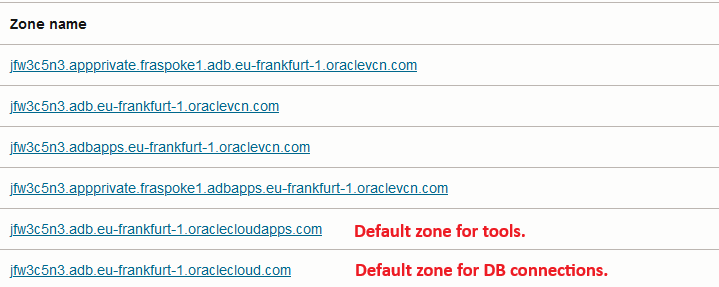
Also, because of how OCI Private DNS works, there are some things to consider:
– Initially, only resources that are in the same VCN and that use the Oracle DNS resolver will be able to resolve the DNS entries and connect to the DB.
– Other VCNs in the region will need extra configuration, either by attaching the Private View of the DB VCN or by using Conditional Forwarding.
– Datacenter private resources and other OCI Regions will need Conditional Forwarding rules to be able to resolve the DNS entries.
For more details on OCI Private DNS and the ways to perform the above tasks, please review this blog. Also, as explained in the best practice blog, try not to forward the whole public zone (oraclecloud.com, oraclecloudapps.com) and do conditional forwarding only for the DB’s exact zone.
6. The DB Wallet used for private connections has the following strings:
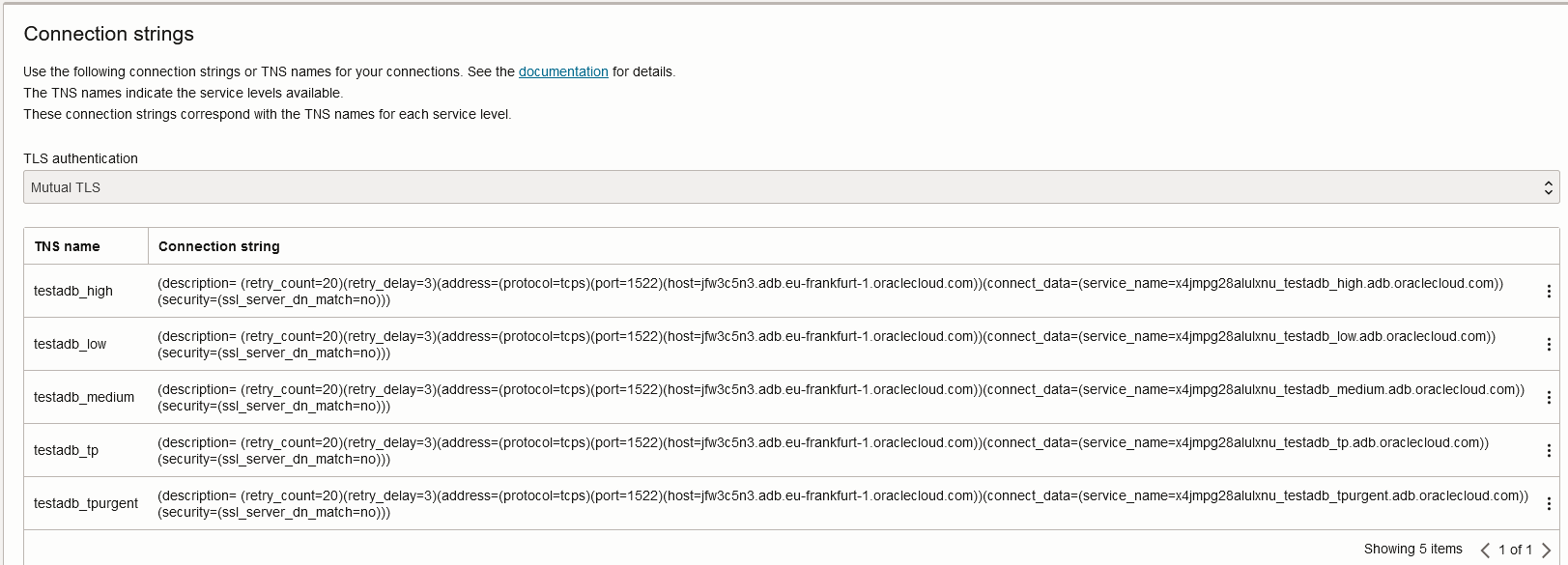
Any resource trying to connect to the DB using this wallet will need to be able to resolve that hostname, as explained above. However, the DB private endpoint will no longer care about the requested domain, which you can see in this line: security=(ssl_server_dn_match=no). This is quite important because it gives you the option to connect to the database with any domain or even the IP directly (which would not have worked on the Public Endpoint). You can:
– Use directly the IP;
– Use any of the provided DNS entries, not just the default oraclecloud.com. This helps because you might already be forwarding oraclevcn.com to OCI.
– Create a static DNS entry or a CNAME in your Datacenter, in your internal domain, and point it to the DB IP or DNS name.
Any domain will work but if you use the wallet, you must modify it to use the new hostname.
Let’s put all of this on a diagram:
ADB-S Private and Public Endpoints
You can also choose to deploy the ADB as a Private Endpoint but also allow the public path to be available. The menu to do that is available when you select the Private Endpoint mode:
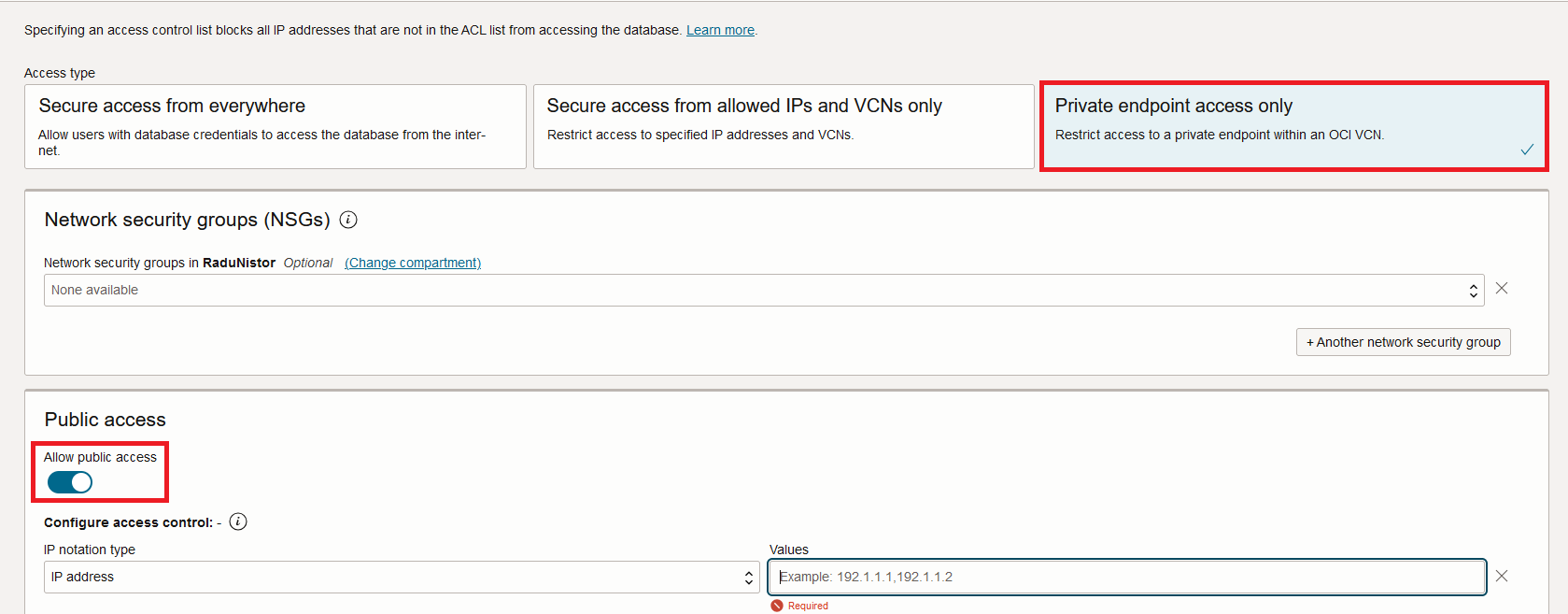
The DB can be accessed on both paths, private and public, with the methods explained in the blog. You can see that the DB is deployed in this mode, in the Console:
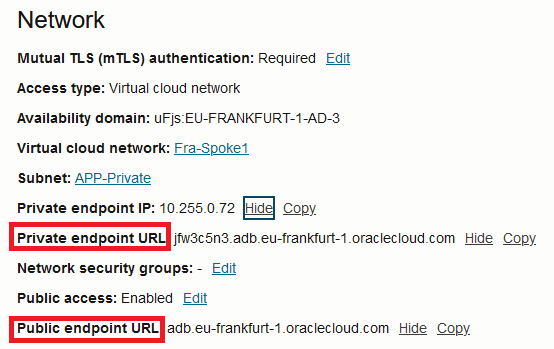
The tools that come bundled with the DB will also get two URLs for access, one for the private path and one for the public:
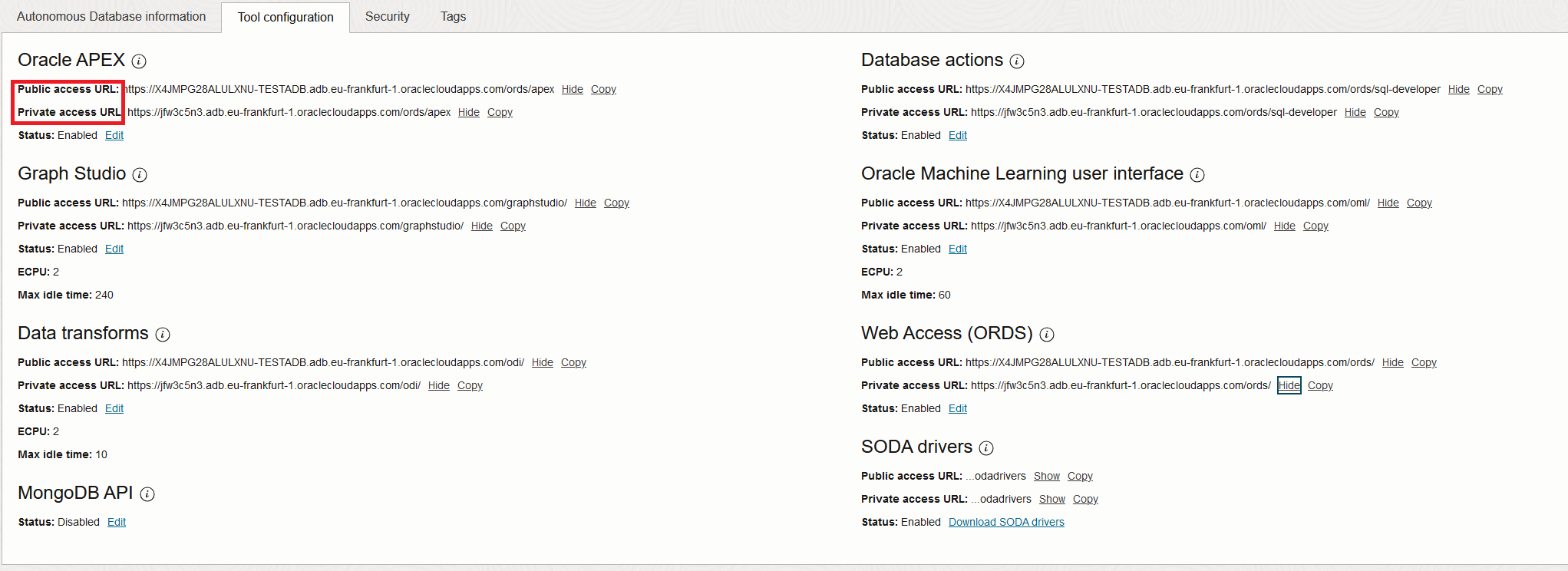
In this mode, you are required to provide access control to the Public side, you cannot leave it open.
Other things worth mentioning
DB Links
The Autonomous DB can create DB to DB connections called DB-Links. You can create these DB-Links over the private infrastructure to target a private DB or over the public infrastructure, to target a Publicly reachable target database.
If you choose the private side, you must make sure the VCN DNS resolver which holds the DB Private Endpoint is capable of resolving the target DB’s DNS name. You also have to make sure the routing and security constructs (NSGs/SLs) will allow the connection.
For the public side, you may need the DB’s Outbound Public IP, so you whitelist it on the target side. Note that the Outbound IP is different from the Public IP used for inbound connections and that you need to create an OCI support ticket to get it.
Vanity URLs
Whenever you deploy the ADB with a Public Endpoint you are required to use the Oracle Provided DNS names and IPs for both the DB and the embedded tools. However, the private deployments are more relaxed in this regard, and you can use “Vanity URLs”.
On the DB side, in the private mode, the endpoint does not have a strict TLS check so you can connect to the DB with anything you want, any DNS name or even the IP.
On the tools side, the main discussion is around APEX and ORDS. Each of these supports a Vanity URL on the private side. The way to do it is to deploy an OCI Load Balancer that holds your TLS Certificates and connects to the DB IP as a backend. A great step-by-step guide is this blog post.
And this concludes this blog. I hope it helps you!