
Oracle Cloud Infrastructure Networking
Private connectivity options for enterprise locations in China using OCI and Console Connect.
Introduction
For global enterprises with locations in China, moving an application to Oracle Cloud Infrastructure (OCI) is only one part of the decision. The other is how offices, factories, data centres, and devices will reach that application day after day.
For a business-critical workload, the network path matters. A company may need a more controlled alternative to relying on public Internet connectivity alone: one that can connect its local environment to OCI through a private network design, while still allowing the architecture to grow as more sites, users, or devices come online.
Oracle FastConnect in partnership with Console Connect (part of PCCW Global) provides building blocks for connecting enterprise sites, data centers, and edge devices to OCI. This article introduces those building blocks and the types of customer situation in which each can be useful.
Important: The supported service, local access availability, OCI destination, and final architecture must be confirmed with Console Connect/PCCW Global and Oracle for each customer deployment in China.
Agenda
- Connectivity considerations for enterprises with locations in China
- Access Ports as the foundation for fixed-site connectivity
- Private Layer 2 connectivity to OCI
- Multi-site connectivity with CloudRouter
- IoT and edge-device connectivity with Edge SIM
- Customer scenarios, resiliency, OCI connectivity, and documentation
Start with the connectivity challenge, not the product
Every organisation reaches OCI from a different starting point. One may have a factory that depends on applications hosted in OCI. Another may have a media-production environment that exchanges content with a cloud workflow. A financial-services organisation may need to connect several sites to a central application landscape, with clear network boundaries and resiliency built into the design.
The questions are usually practical:
- Where are the users, systems, and devices that need access to OCI?
- Is a single site being connected, or is this a multi-site environment?
- Does the customer want to retain its existing network model, or introduce a managed Layer 3 service?
- Are mobile and IoT devices part of the solution?
The Oracle FastConnect partnership with Console Connect addresses these needs with four complementary components: Access Ports, point-to-point Layer 2 connections, CloudRouter, and Edge SIM. They can be used separately or combined into a broader architecture.
The foundation: Access Ports
An Access Port is the physical connection between a customer network and the Console Connect platform. It is the starting point for fixed-site connectivity.
Console Connect describes two Access Port models:
- Data Centre Port for customers connecting from an enabled data-centre location.
- Edge Port for bringing Console Connect connectivity directly to an enterprise building.
Once an Access Port is active, a customer can use it to consume supported Console Connect services, including Layer 2 connections and CloudRouter. In other words, the port is the on-ramp; the services determine where and how the traffic is connected.
For a China-to-OCI design, the first conversation is therefore not, “Which cloud connection should we order?” It is, “What is the most appropriate access point for this location, and what services are available from it?”
Option 1: Extend an existing network with Layer 2 connectivity
Console Connect Layer 2 provides a dedicated, private point-to-point connection between two destinations. In an OCI design, the model can connect a customer Access Port to OCI through Oracle FastConnect.
This is often the most straightforward approach when the customer already operates a mature enterprise WAN and wants to extend that model into OCI. The customer retains control of its own network design, while Console Connect provides the private transport path.
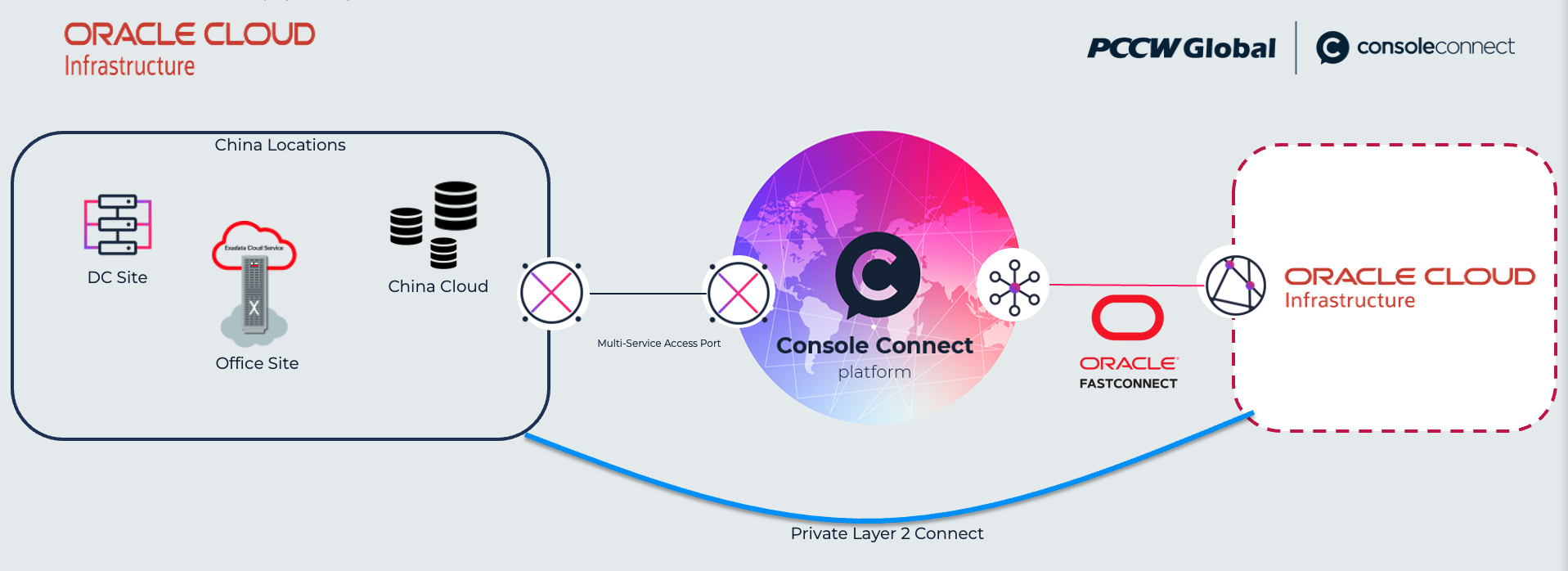
Figure 1: Private Layer 2 connectivity from a China enterprise site to OCI through Console Connect and Oracle FastConnect.
What this option can offer
- A private connection path to OCI instead of using the public Internet for the cloud connection.
- A familiar extension of an existing customer-managed WAN architecture.
- The flexibility to connect a site, data centre, or cloud destination through a direct Layer 2 model.
- Support for resiliency planning through redundant connectivity paths designed to avoid shared physical routes and common points of failure.
Good fit for:
- A single site or data centre that needs a direct connection to OCI.
- An enterprise that wants to keep its current routing and segmentation design.
- A workload for which an isolated, point-to-point path is preferred.
Option 2: Connect multiple locations with CloudRouter
CloudRouter is Console Connect’s Layer 3 private-networking service. It is based on an MPLS VPN model and is designed to connect two or more locations in a private virtual network, allowing customers to create on-demand private WAN connectivity. Those locations can include enterprise sites connected through Access Ports and supported cloud services.
This option becomes especially relevant when the customer’s OCI environment needs to work as part of a wider network rather than as a single cloud destination. For example, multiple offices, plants, and data centres may need access to OCI-based applications. Instead of viewing each connection independently, CloudRouter can provide the Layer 3 foundation for the wider environment.
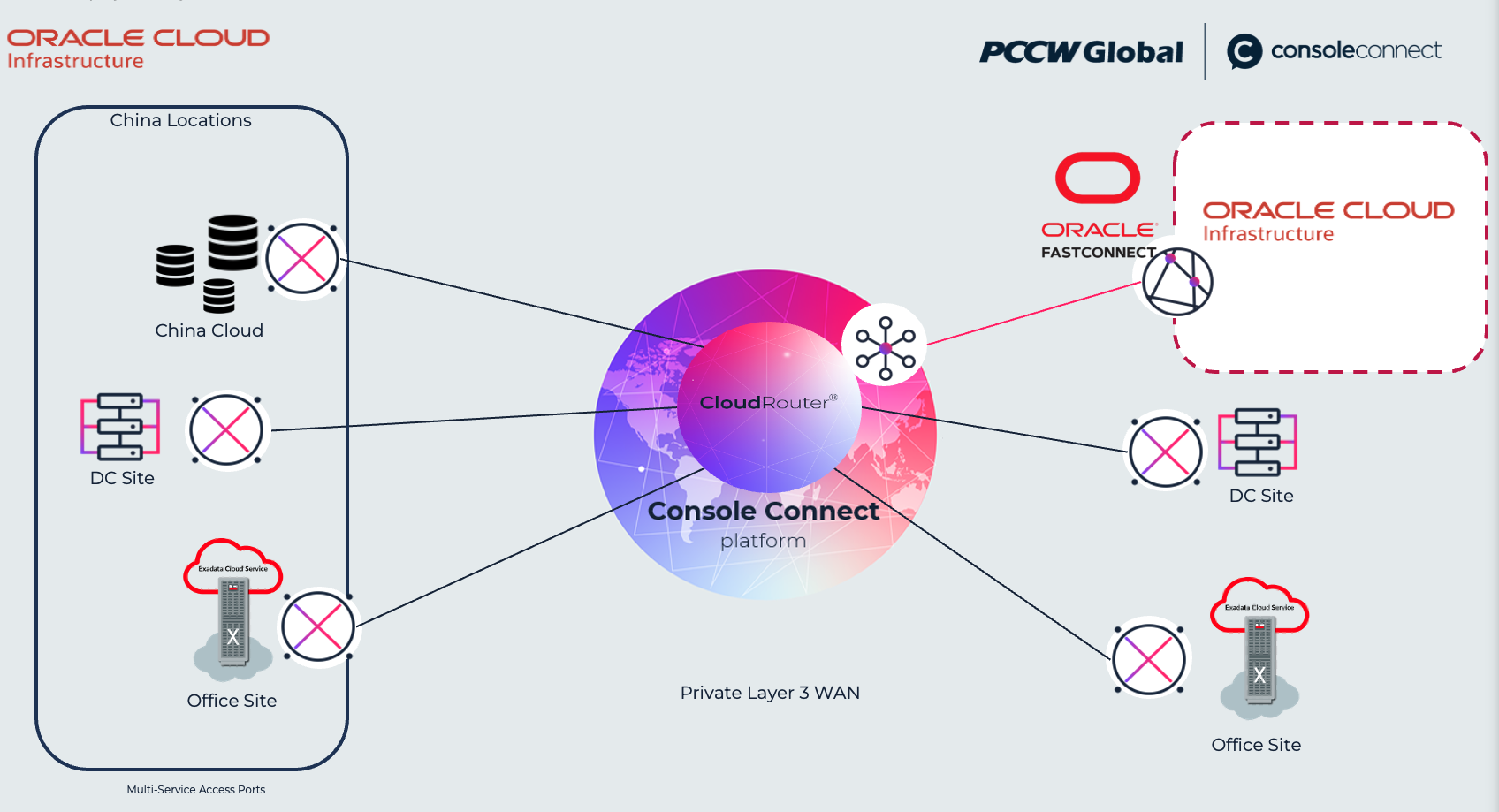
Figure 2: Multi-site private Layer 3 connectivity to OCI with CloudRouter and Oracle FastConnect.
What this option can offer
- A private Layer 3 network that can connect multiple sites and cloud environments.
- A way to bring enterprise locations and OCI into the same managed connectivity model.
- Class-of-service capabilities for organisations that need to distinguish important traffic types as part of their overall network design.
- A cloud-only model for supported cloud connections, or a hybrid model that includes customer sites through Access Ports.
- Support for resiliency planning through redundant connectivity paths designed to avoid shared physical routes and common points of failure.
Good fit for:
- Multi-site enterprises.
- Organisations connecting OCI with data centres or other cloud services.
- Customers that want a single Layer 3 service to support a broader hybrid or multi-cloud environment.
Option 3: Bring IoT and edge devices into the architecture with Edge SIM
Some environments do not begin at an office or data centre. They begin with devices: sensors on a production line, cameras, tracking equipment, payment terminals, or other mobile assets.
Edge SIM is Console Connect’s mobile connectivity service for connecting edge devices to private networks, clouds, data centres, and office locations. It is integrated with CloudRouter, allowing device traffic to become part of the wider private connectivity design rather than being treated as a separate, Internet-only environment.
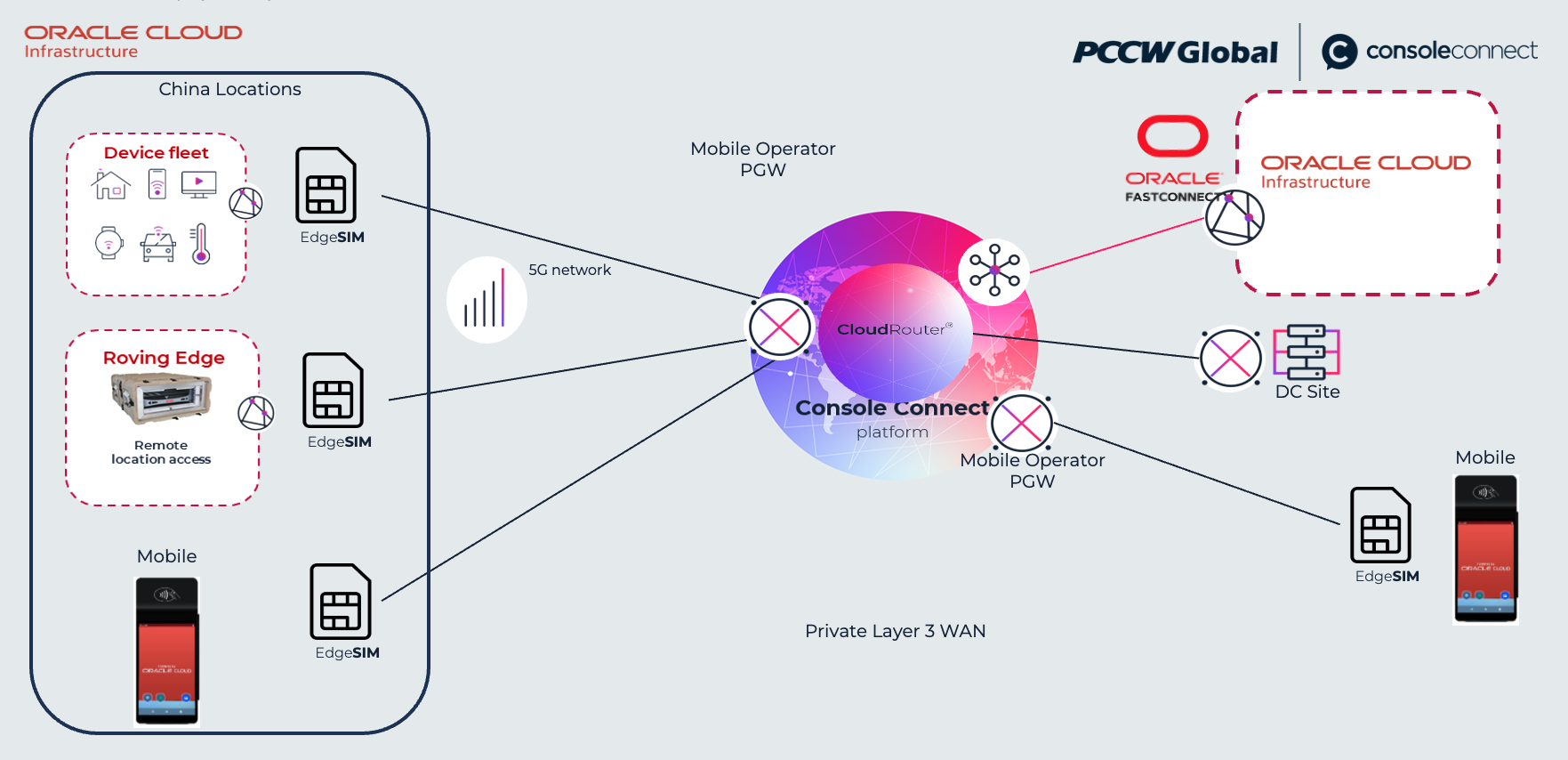
Figure 3: IoT and edge-device connectivity to OCI with Edge SIM, CloudRouter, and Oracle FastConnect.
What this option can offer
- A path for eligible IoT devices to connect into the Console Connect ecosystem without making the public Internet the default cloud path.
- A consistent model for extending the enterprise network from fixed sites to mobile or distributed devices.
- Central management of IoT connectivity alongside the wider Console Connect connectivity environment.
Good fit for:
- Manufacturing environments with operational technology or sensors.
- Logistics and asset-management scenarios.
- Distributed video or media devices.
- Architectures where device data must reach OCI-based applications.
Which option suits which need?
| Customer requirement | Potential Console Connect building block |
|---|---|
| Connect one site or data centre to OCI over a private path | Access Port + Layer 2 + OCI FastConnect |
| Connect several enterprise sites and OCI in one private Layer 3 environment | Access Ports + CloudRouter + OCI FastConnect |
| Connect mobile or IoT devices to OCI-based applications | Edge SIM + CloudRouter + OCI FastConnect |
| Design a resilient path for a critical workload | One of the preceding models, with diverse paths and OCI resiliency designed for the workload |
The final design should be driven by the workload and operating model, not by a product list. A factory may start with a single private connection and later add edge devices. A media company may begin with a studio-to-cloud connection and then connect additional production locations. A financial-services customer may begin with CloudRouter to integrate several branches and an OCI application environment.
Example customer scenarios
Manufacturing and factories
A manufacturer may need production systems, supply-chain applications, quality platforms, or analytics workloads hosted in OCI. An Access Port and Layer 2 connection can provide a direct cloud path from a key site. Where several plants, warehouses, or operational locations are involved, CloudRouter can provide a broader private-network model. Edge SIM can be assessed where equipment and sensors are also part of the solution.
Media and content operations
Media teams may need to connect studios, production locations, and cloud-based workflows. A private connection to OCI can support a more controlled path for these environments. CloudRouter can be relevant where the workflow spans several locations, while Edge SIM may be assessed for mobile-production or distributed video scenarios.
Banking and financial services
Financial-services organisations may need to connect multiple offices and application environments with an architecture that is deliberate about privacy, segmentation, and resiliency. A Layer 2 model can extend a customer-managed network directly into OCI; CloudRouter can provide a Layer 3 approach for connecting a wider set of locations and cloud services.
These are illustrative examples. They do not replace a solution design or confirm service availability for a particular China location.
Designing for availability and growth
Private connectivity is not only about the first connection. Customers should also consider what happens when a site grows, when a new location comes online, or when a business-critical workload cannot tolerate a single path failure.
For workloads that cannot tolerate a single connectivity failure, customers can design for resilience by using redundant access paths, separate network devices, and resilient OCI connectivity. The appropriate design depends on the business impact of an outage, the locations involved, and the required recovery objectives.
For a direct Layer 2 design, this may mean considering two independent connections, two customer edge devices, or separate OCI connectivity paths. For a CloudRouter design, it may mean deciding which locations and applications are part of the private network from the start, then defining how new sites are added over time. For Edge SIM, it may mean separating device groups, applications, or operational environments so that the IoT environment remains manageable as it expands.
The exact high-availability design is customer-specific. The important point is to make resilience a design input early, alongside capacity and location. A connection that is sufficient for development traffic may need a very different design for a production system supporting a factory, a customer-facing service, or a financial workflow.
What happens at the OCI end?
At the OCI boundary, Oracle FastConnect is the private connectivity service that links a customer or partner network with OCI. With a partner model, the customer works with an Oracle FastConnect partner such as Console Connect for the connectivity service, while configuring the OCI-side resources needed to use that connection.
At a high level, the OCI design normally includes:
- A FastConnect virtual circuit, which represents the private connection into OCI.
- A Dynamic Routing Gateway (DRG), which is the OCI network hub for connecting the private circuit to OCI networks.
- One or more virtual cloud networks (VCNs), where the customer’s OCI applications and services run.
This does not need to be complicated for the business reader. The key takeaway is that the Console Connect service provides the path to OCI, and OCI provides the cloud-network constructs that attach that path to the required applications. Oracle and Console Connect/PCCW Global can work with the customer to align both sides of the design.
Operational choices customers should make early
The connectivity technology matters, but so does the way the customer intends to run it. Early decisions make the eventual solution easier to operate:
- Ownership: Decide whether the customer will retain a customer-managed network model with Layer 2 or prefer a Layer 3 service for a wider network environment.
- Visibility: Identify which teams need to see service status, traffic usage, and connectivity changes, and how those teams will coordinate with OCI operations.
- Segmentation: Consider whether production, office, media, IoT, and partner traffic should share a connectivity environment or be separated.
- Capacity: Start with the workload requirement, not only the number of users. File movement, video, telemetry, application transactions, and backups behave very differently on a network.
- Change planning: Agree how new locations, new OCI workloads, and increases in capacity will be assessed and introduced.
None of these choices require the customer to become an expert in every network protocol. They help ensure that the selected connectivity option supports the operating model the business actually needs.
From concept to a customer design
A productive design discussion with Oracle and Console Connect/PCCW Global can begin with five inputs:
- The China locations and device types that need to reach OCI.
- The OCI region and workloads involved.
- Whether the target architecture is a direct site-to-cloud connection, a multi-site network, an IoT-enabled design, or a combination.
- The required capacity, performance, and resiliency objectives.
- The preferred operational model: customer-managed Layer 2, managed Layer 3, or a mix of both.
With those inputs, the teams can determine the supported access model, select the appropriate Console Connect services, and design the OCI FastConnect connection and OCI network attachments.
Documentation and configuration guides
The following Console Connect and Oracle resources provide a useful starting point for solution architects and network teams that want to explore the services in more detail:
| Topic | Documentation |
|---|---|
| Console Connect Access Ports | Service specification · Access Port help and configuration guides |
| Console Connect Layer 2 | Service specification · Layer 2 help and configuration guides |
| Console Connect CloudRouter | Service specification · CloudRouter help and configuration guides |
| Console Connect Edge SIM | Service specification · IoT and Edge SIM help and configuration guides |
| Oracle Cloud connectivity | Connect to Oracle Cloud with Console Connect · OCI FastConnect with an Oracle Partner |
These resources describe the services and configuration process at a general level. They should be used alongside a design discussion to confirm the service options, technical parameters, and supported locations for the specific customer deployment.
Conclusion
For enterprises connecting locations in China to OCI, network planning should start alongside workload planning. Console Connect gives Oracle customers a set of private-connectivity building blocks: Access Ports for fixed locations, Layer 2 for direct private connections, CloudRouter for multi-site Layer 3 networking, and Edge SIM for eligible IoT and edge-device use cases.
The right option depends on the customer’s locations, workload, resiliency objectives, and operating model. The next step is a joint design discussion with Oracle and Console Connect/PCCW Global to validate coverage and translate those requirements into an implementable connectivity architecture.