
Introduction
In today’s cloud-native world, securing data is a top priority for organizations. Oracle Cloud
Infrastructure (OCI) provides powerful Object Storage services that enable businesses to store large amounts of unstructured data, such as backups, logs, and media files. However, ensuring that access to this data is properly managed and secured is essential to maintain the confidentiality and integrity of your data.
I was thrilled when we announced the support of the private endpoint for the Object Storage. I had discussions with my customers around accessing privately the Object Storage for years and these blogs were created showcasing the connectivity from on-premise to Object Storage using fastconnect and the secure access using Network Sources.
In this blog we’ll explore the secure access to Object storage from the networking point of view, will walkthrough the process of creating a private endpoint for the Object Storage and compare, how a customer could secure access a bucket before this release, versus using the private endpoints.
Access Object Storage through the Service Gateway
By default, the Object Storage service has a public endpoint and the customers are connecting via the Internet.
If we want to connect from a Private Subnet inside OCI, or we want to connect from On-premise, to the Object Storage public endpoint without going through the Internet, we leverage the Service Gateway.
If you are not familiar with the Service Gateway, please read the official documentation.
The connectivity from on-prem to Object Storage was covered in this blog. I encourage you to read it first.
After following the post, the customer will receive via the BGP configured on the fastconnect virtual circuit two public ip addresses CIDR of the Object storage.
The IP address used in each region can be found here.
For the purpose of this blog, i am using OCI Germany Central (Frankfurt) region, and if we check in the JSON with ip addresses, we will find these two IP addresses CIDR:
{
“cidr”: “134.70.40.0/21”,
“tags”: [
“OSN”,
“OBJECT_STORAGE”
]
},
{
“cidr”: “134.70.48.0/22”,
“tags”: [
“OSN”,
“OBJECT_STORAGE”
]
}
This is how this would look on the on-prem router:
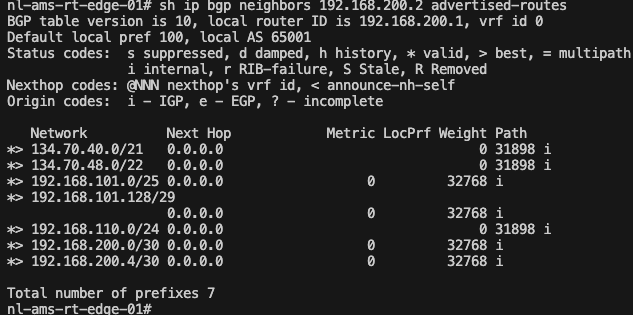
If we want to restrict access to the Public Endpoint, we can leverage the Network Sources. This is explained in this blog.
Access Object Storage through the Private Endpoint
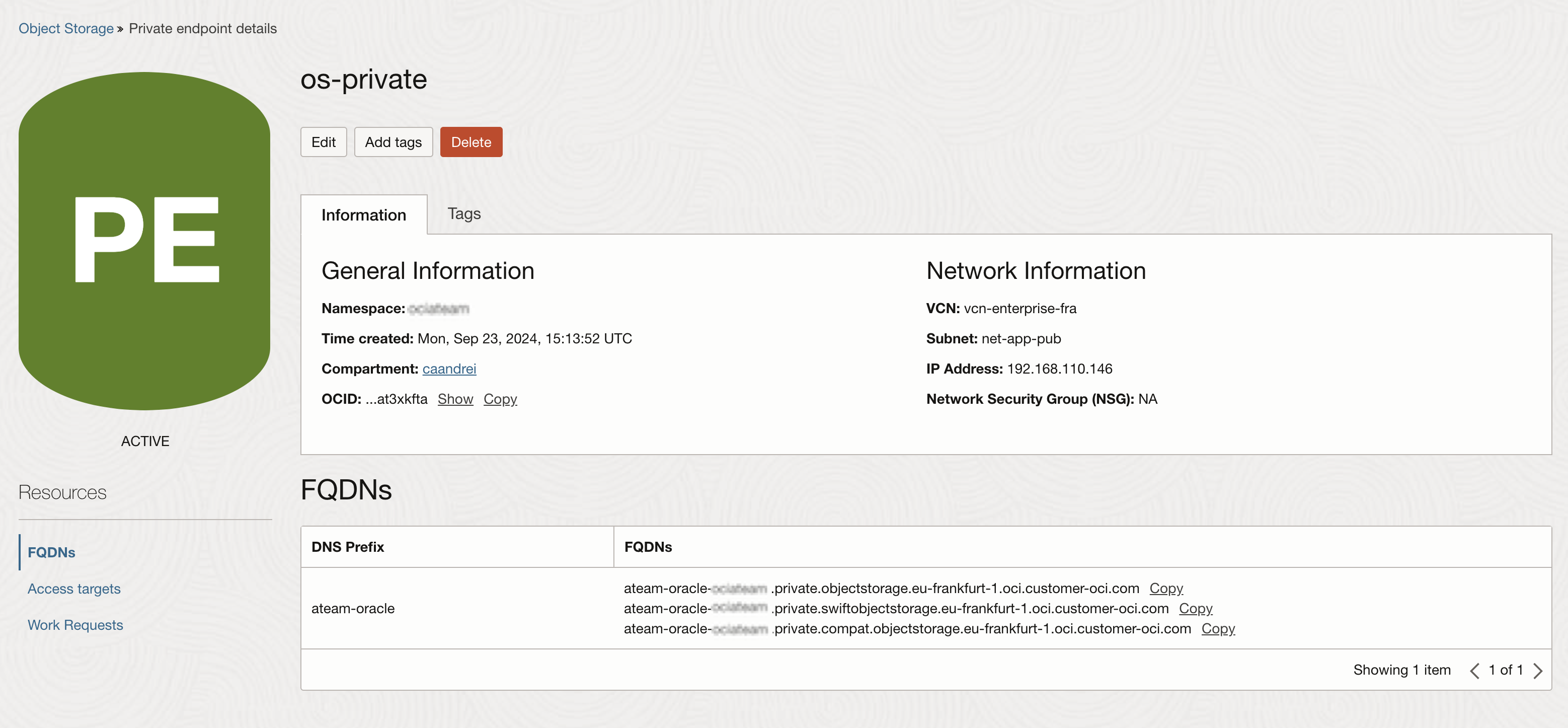
The private endpoint feature will create a vnic inside a VCN subnet and it will create a custom endpoint for the object storage based on the dns prefix we are providing and the namespace. The custom endpoint will resolve the private ip address of the vnic if we are using the vcn dns resolver or it will resolve a public ip address is we are using a resolver from the internet.
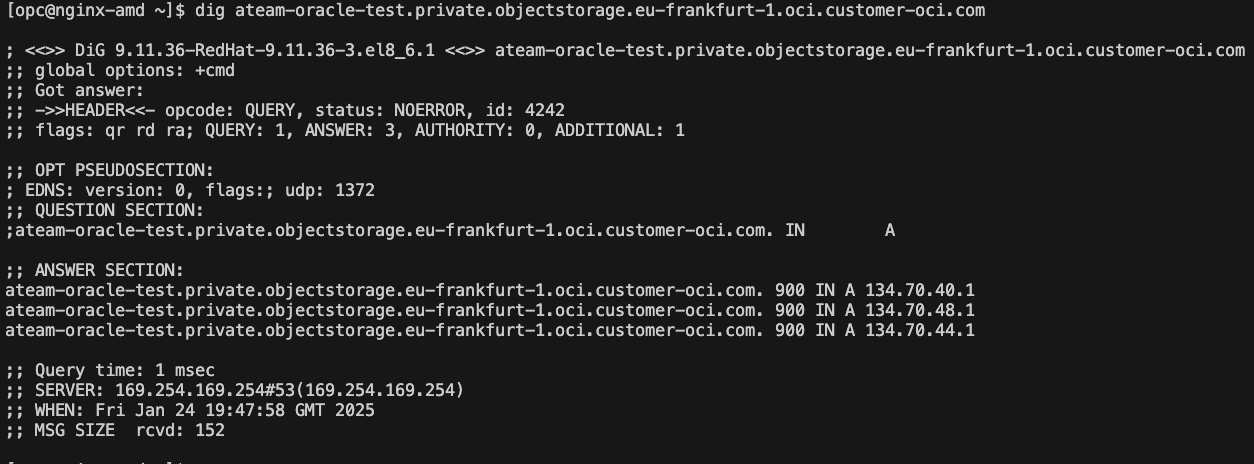
For the configuration of the private endpoint we will use this blog.
The details of the endpoint will be displayed after the creation.
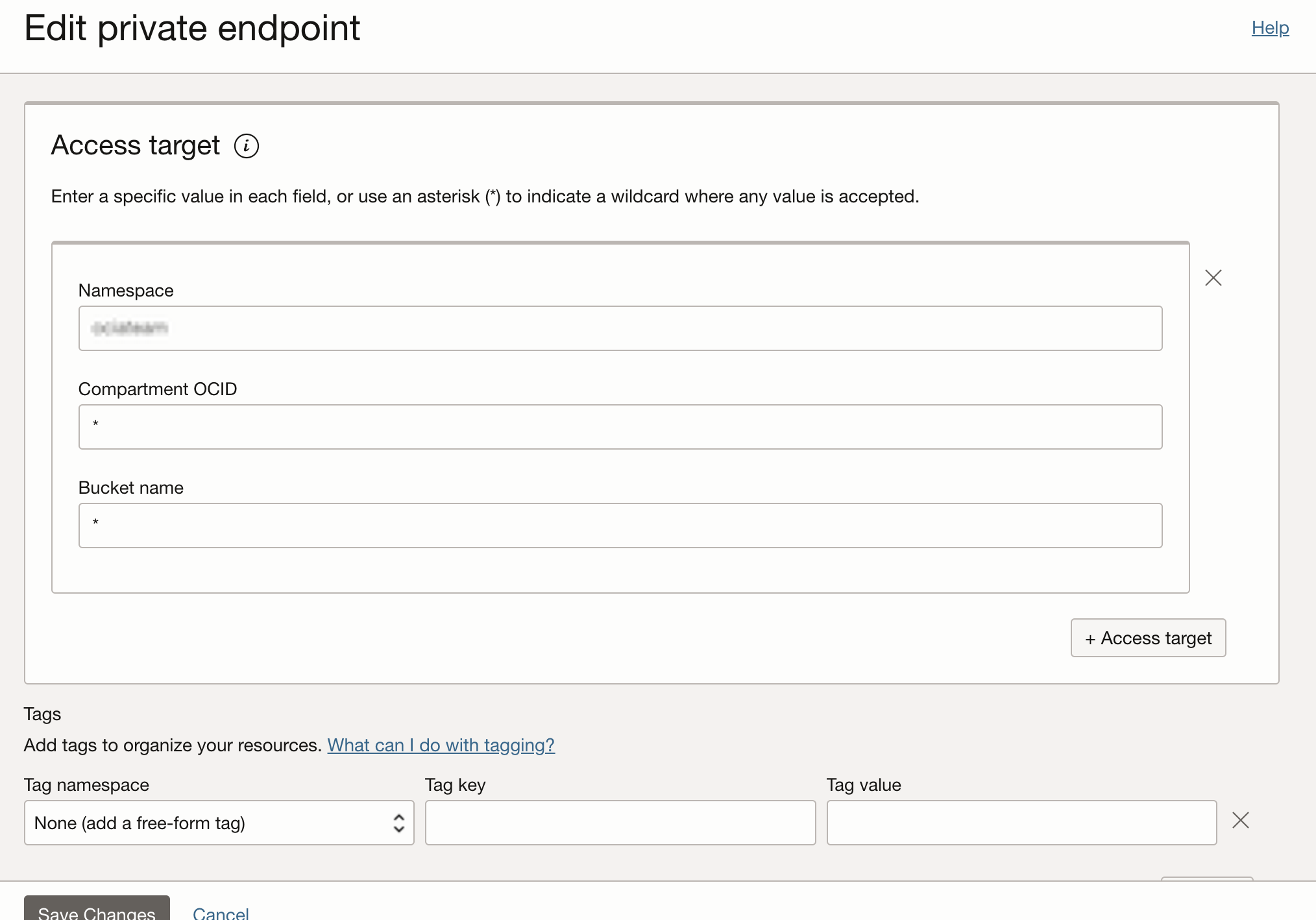
If we create a private endpoint and we permit access from all ip addresses and to all buckets and to all compartments, we will mimic the behaviour of the public endpoint.
To test the calls to the endpoint we are using the oci cli and we will follow the documentation for the structure of the command.
oci os object get –namespace ‘MyNamespace’ –bucket-name ‘MyBucket’ –name MyObjectName -endpoint https://pe1-MyNamespace.private.objectstorage.us-phoenix-1.oci.customer-oci.com –file –

The access targets can be restricted to a compartment or to a bucket.
Bellow is a screenshot of the error we are receiving if we are trying to access the same object and the access targets are not permitting the connection.

Conclusion
Securing access to OCI Object Storage is crucial for maintaining the confidentiality, integrity, and availability of your data. By leveraging the right combination of IAM policies, encryption, bucket policies, and network access (restrict network access from restricted IP addresses or from selected VCNs using network sources and leveraging the access via a private endpoint), organizations can ensure that only authorised entities can access their data and perform operations on it.