
Oracle Analytics Cloud (OAC) provides REST API for accessing and managing snapshots. OAC, like much of the Oracle PaaS services, is protected by OCI IAM using OAuth 2.0. In the OAuth 2.0 scheme of things, OCI IAM serves as the authorization server while the OAC acts as the resource server. Hence invoking the OAC REST endpoints requires an access token (AT) issued by OCI IAM.
The OAC REST API enables you to write scripts to manage snapshots. Managing snapshots is generally an administrative maintenance kind of activity. Typically, client applications such as scripts invoke these REST APIs without any user involvement. The client credential grant flow is ideally suited for this purpose. Of course, that would require the resource server to support the client credential grant flow. However, OAC does not support client credential grant type and requires a user to explicitly authorize a grant.
Device Authorization Grant
To have a user involved, there are few possiblities – i) use the authorization code flow, however, that would require a browser which a script will not support, ii) password credential flow (ROPC), which is not recommended (it has been officially deprecated). This leaves us with the “device flow”, more formally device authorization grant flow which incidentally is the perfect match for the OAC REST API use case. In fact, Chris discusses this use case in his blog post on the device flow:
But there are plenty of other places you can use the device flow.
For example in a command line app that needs an AT but can't be trusted to use the Resource Owner grant type; a command line app means no web browser and there's no way use the AZ Code flow. Or where Resource Owner flow can't work because users don't login to IDCS with just a username + password; perhaps users login via federation, or your sign on policy requires strong authentication (TOTP, Push, email code, etc).
OAC and Client Application Configuration in OCI IAM
I will not go into specifics of configuring OAC; that is readily available in the documentation. However, I would like to point a few salient points. After creating a new OAC instance in OCI IAM, the ‘Resources’ section of the OAC application will show something similar to the following:
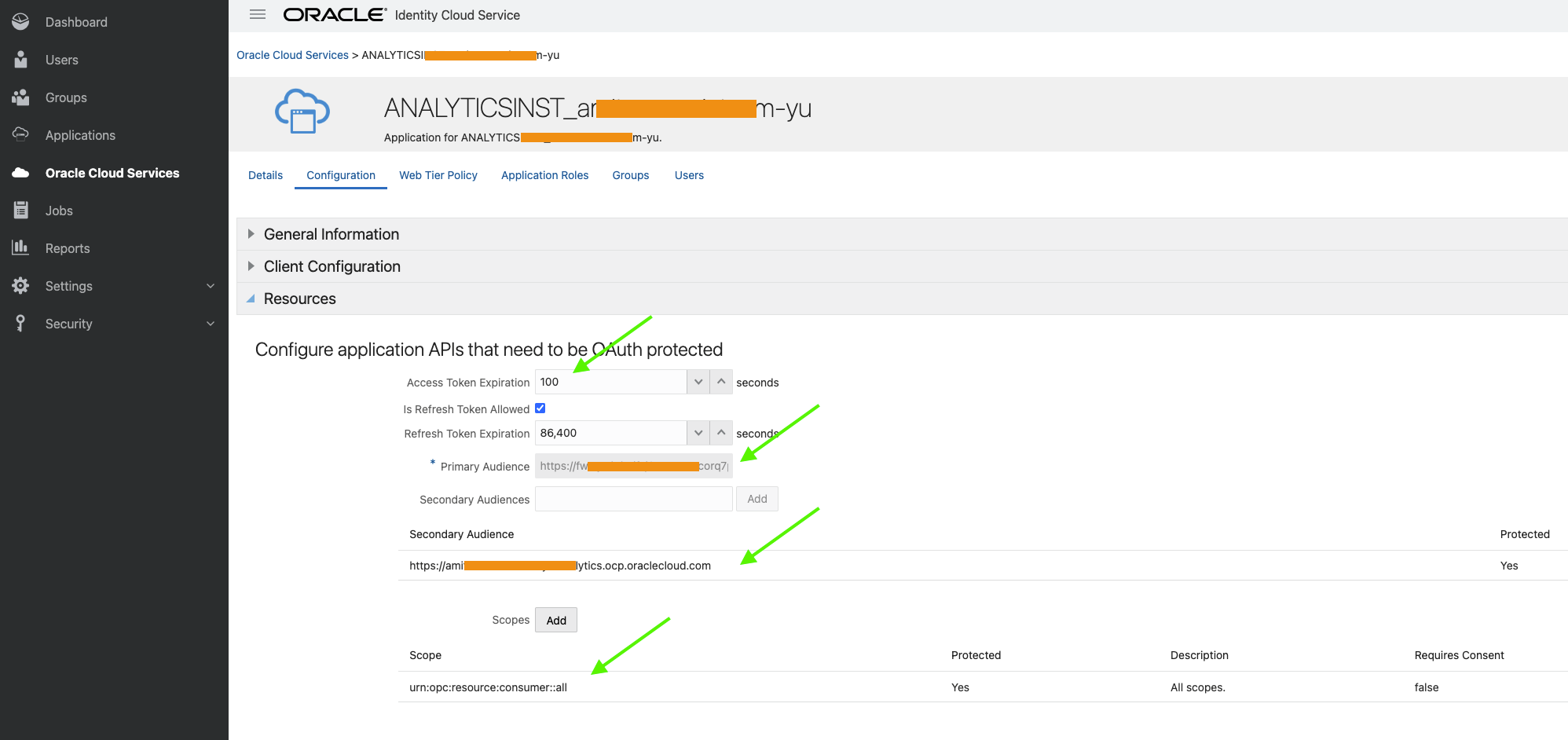
Fig 1
The ‘Resources’ section refers to OAC’s OAuth 2.0 resource server specific configuration. Next define the client application which will invoke the OAC REST API.
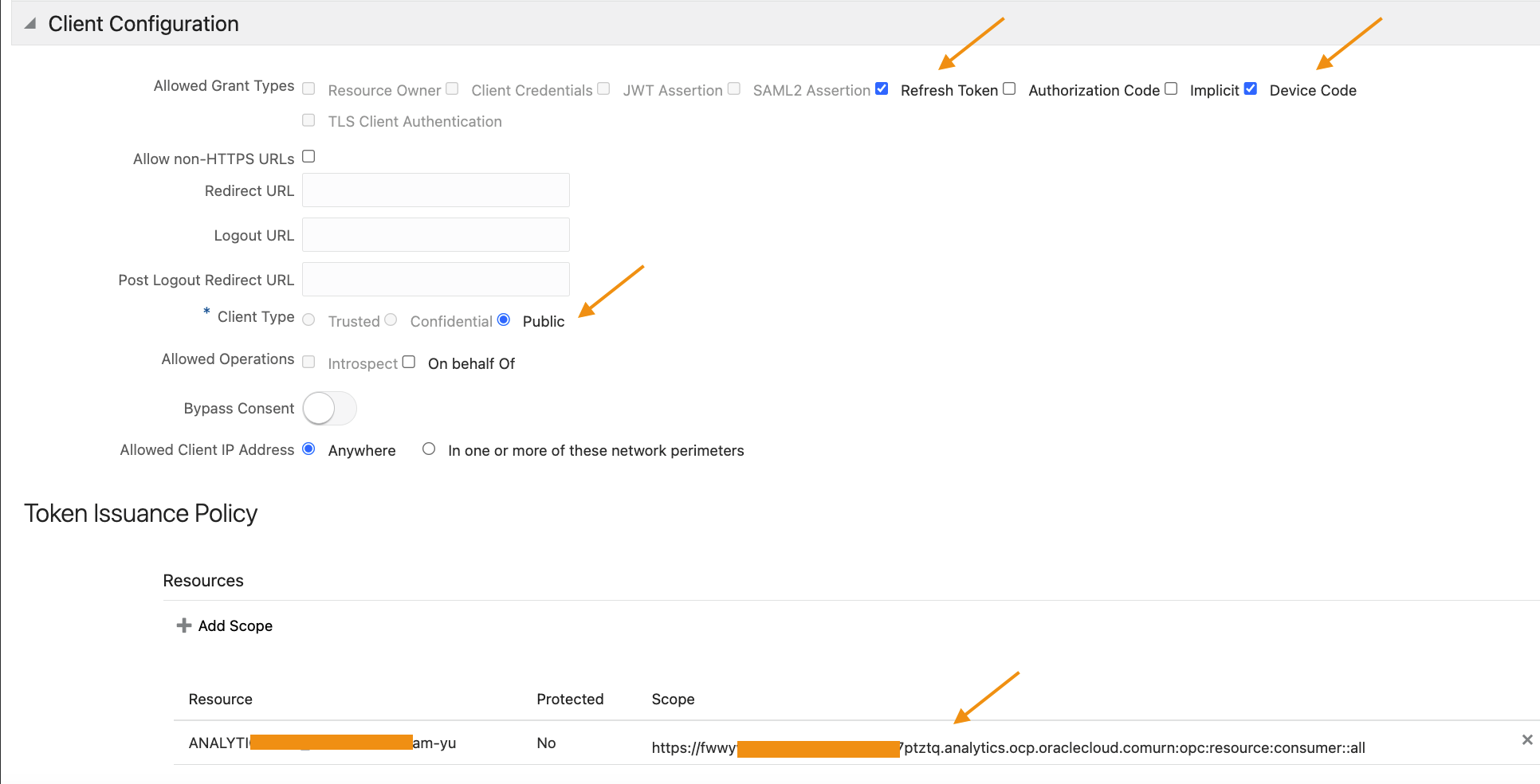
Fig 2
Note that the ‘Client Type’ is ‘Public’ and ‘Refresh Token’ and ‘Device Code’ are selected as grant types. Also, the scope of this application is limited to the scopes of the OAC application (which is a URL formed by concatenating the primary audience and the scope in Fig 1).
The Device Flow
The mechanics of the device flow is explained in detail by Chris in his blog post. Follow the steps enumerated in that post, except in ‘Step 1:Get a code’ section, use the following POST data:
“scope”: “offline_access https://fwwywkd**********corq7ptztq.analytics.ocp.oraclecloud.comurn:opc:resource:consumer::all”,
“client_id”: 6b173c40d8314c0586beaf8faa5efc5c
}
Fig 3
Note that the scope includes the OAC application scope as defined in Fig 2. Also, the scope includes ‘offline_access’. This will enable OCI IAM to send the refresh token (RT) along with the AT.
So why is refresh token needed? Usually AT has a short expiry time. In fig 1, the AT expiration is set to 100 sec (default value). The application can use the RT (which has longer lifespan) to fetch a new AT while accessing the OAC whenever the AT expires without user involvement.
Let’s have alook at the AT generated by the OCI IAM.
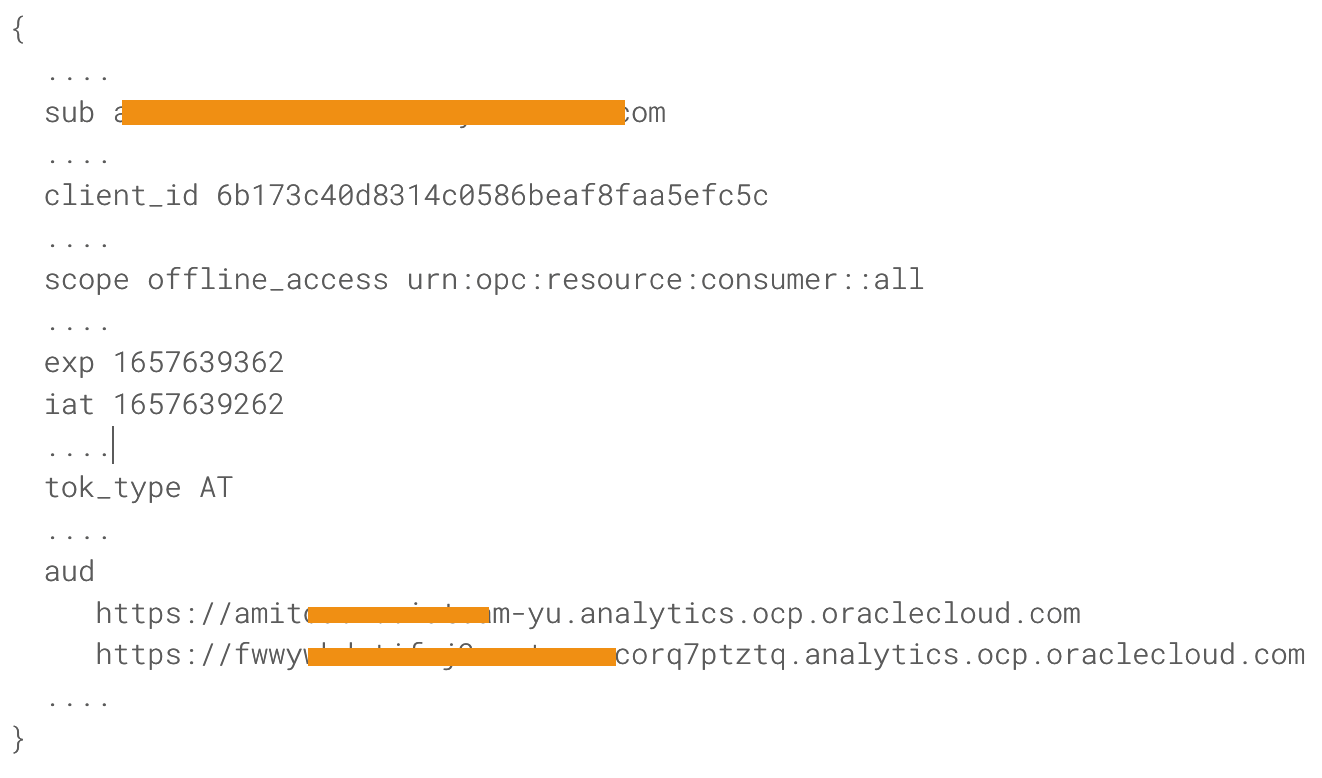
Fig 4
Only few fields are shown above. Note the ‘sub’ field – it has the user’s identity who logged into the OCI IAM during the device code flow. The ‘client id’ is the application’s id as defined in OCI IAM. The scope value matches the scope parameter from Fig 1. ‘iat’ and ‘exp’ specify the expiry of the AT (which is 100s in this case). The ‘aud’ field points to the intended audience, the primary and secondary audience as in Fig 1.
When the above AT is provided to the OAC as part of the REST API invocation, OAC should be able to grant access to the snapshots, contingent upon the user having necessary priviledges. The user should have the ‘BI Service Administrator’ application role to invoke the APIs.
Summary
OAC provides REST API for accessing and managing snapshots. In this blog post we used the OCI IAM device code flow to invoke the REST endpoints of OAC.