
Introduction:
OCI has many customers who want to utilize the Palo Alto VM series firewall for multiple use cases of traffic inspection. For use cases requiring the deployment of a virtual appliance, adopting a hub-and-spoke model is highly recommended.
In this blog series, we will cover all the OCI as well as the Palo Alto configuration required to implement the hub and spoke model on OCI using DRG. We will also go over two different scenarios that require two distinct deployment models. The scenarios and related specific configuration have been discussed in detail in the following blogs:
Palo Alto Hub and Spoke deployment on OCI – Part 1
Palo Alto Hub and Spoke deployment on OCI – Part 2
This main page of this blog series acts as a pre-requisite for the next parts as we will briefly visit the two scenarios and dive deep into the baseline configuration required to implement both scenarios.
Scope:
This blog does not cover:
- VCN and subnets creation
- VCN peering
- VPN provisioning and configuration
- Security lists/NSG configuration
- IAM policies configuration required to provision required resources
- Security policies configuration on Palo Alto
It is expected that the readers have familiarity with OCI networking and Palo Alto.
At the end of this blog series, we will be able to inspect:
- On premises <-> Spoke traffic
- On premises <-> OSN traffic
- Spoke <-> Spoke traffic
- Spoke <-> OSN traffic
- Spoke <-> Internet traffic
Now lets briefly cover the two scenarios.
Scenario 1: Extending interfaces locally in the Hub VCN
In this scenario, we will extend the Palo Alto interfaces within the local VCN, which serves as the Hub VCN, and utilize VCN peering to connect the spoke VCNs to the Hub.
This approach is ideal when you aim to:
- Assign all spoke VCNs to a single security zone
- Minimize the number of interfaces to reduce costs
- Simplify management by keeping the Palo Alto VM within the same local VCN
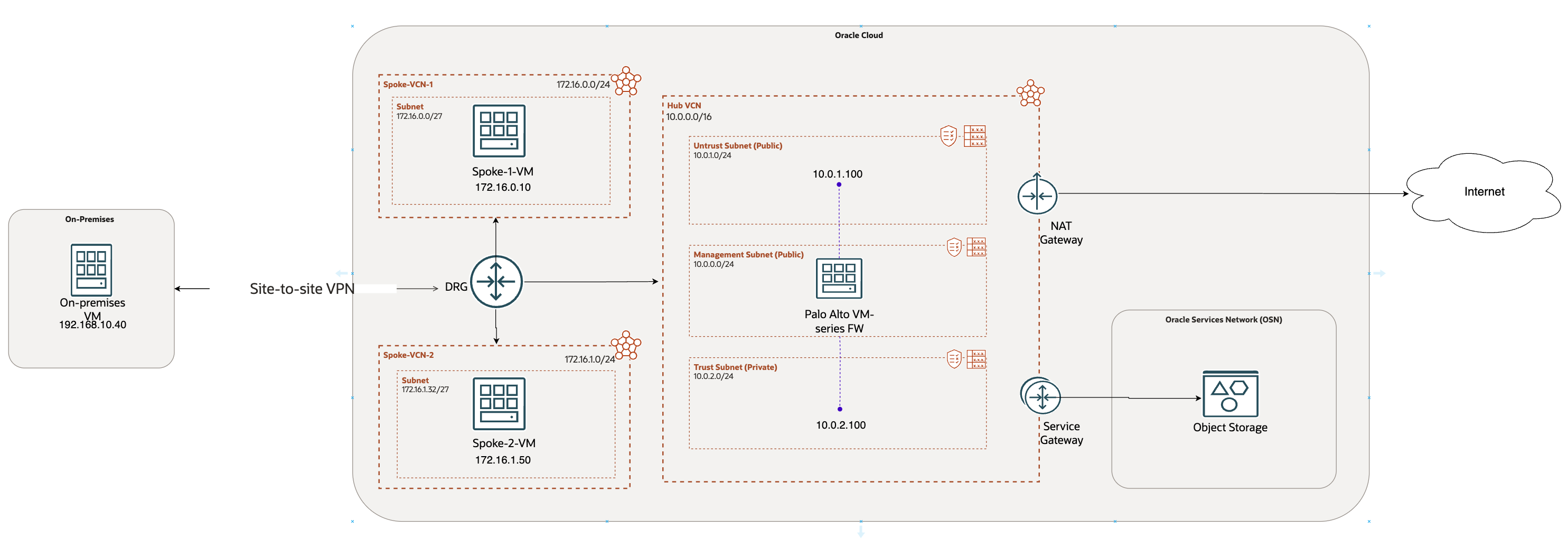
This scenario is discussed in detail in: Palo Alto Hub and Spoke deployment on OCI – Part 1
Scenario 2: Extending interfaces into individual spoke VCNs
This configuration is well-suited for scenarios where isolating network segments based on security zones is essential. While this approach may be costlier, it offers superior performance. It is particularly appropriate for the following use cases:
- Multi-tier architecture: Different VCNs are designated for distinct tiers such as Application, Database, etc., each requiring separate security zones.
- Environment segregation: Separate VCNs are used for environments like Production, Development, and Testing, ensuring each remains in its own security zone.
- ISV (Independent Software Vendor) deployments: Different VCNs are assigned to individual customers (e.g., customer-1, customer-2), with each requiring its own isolated security zone.
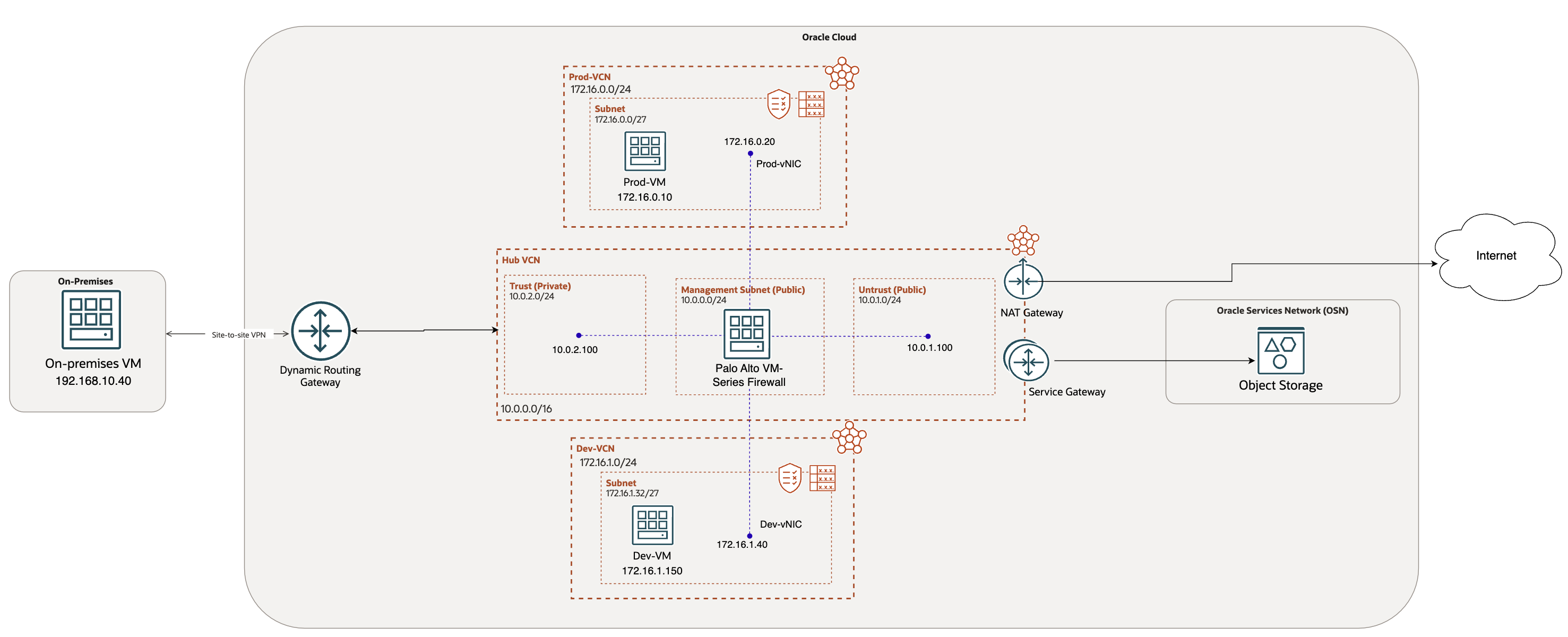
This scenario is discussed in detail in: Palo Alto Hub and Spoke deployment on OCI – Part 2
Let’s start with the baseline configuration.
Baseline Network Diagram (Common for both scenarios):
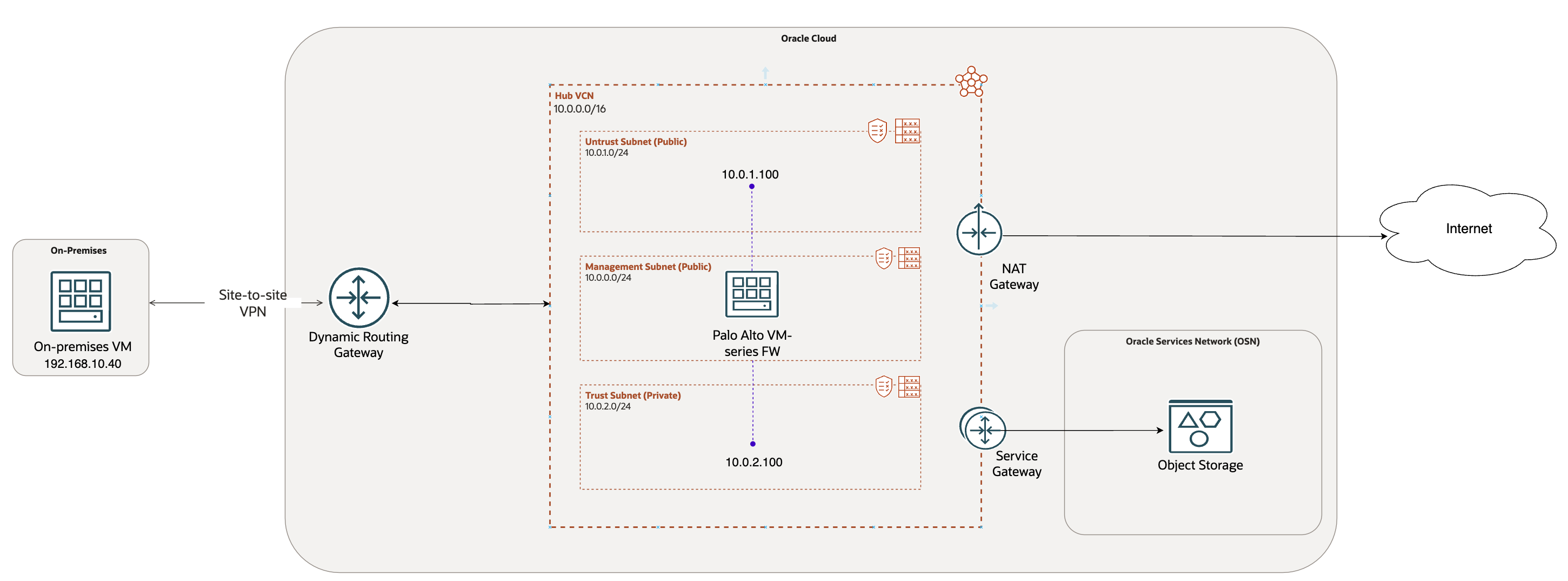
This diagram serves as the foundation for all configurations in both the Hub and Spoke models discussed throughout this series.
I have provisioned:
- A centralized Hub VCN (10.0.0.0/16)
- Management subnet in the Hub VCN to host the Palo Alto VM series firewall. You can choose the subnet to be public or private based on the required access to manage Palo Alto
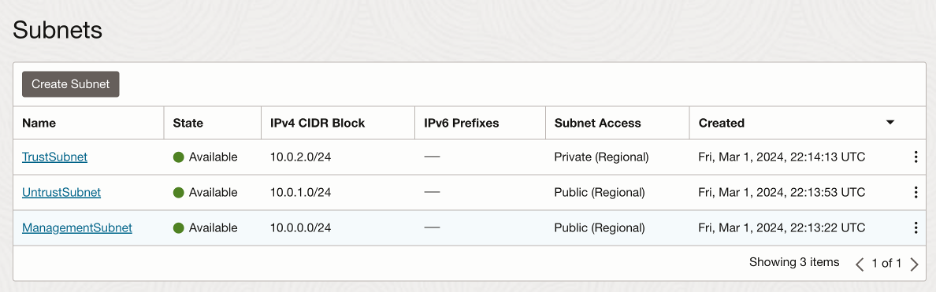
- Untrust (10.0.1.0/24) and trust (10.0.2.0/24) subnet to host respective interfaces
- NAT Gateway and Service Gateway in the Hub VCN
- A Dynamic Routing Gateway
- A VPN tunnel to on premises terminating on the DRG
- Hub VCN attached to the DRG
Now let’s deep dive into the configuration.
Baseline Configuration:
In this section, we will complete all the configuration displayed in the basic network diagram above. As stated earlier, this will form the base of our deployment for both the scenarios that we will discuss later.
- Palo Alto VM series firewall provisioning:
OCI Marketplace offers various offerings of Palo Alto VM series firewall.
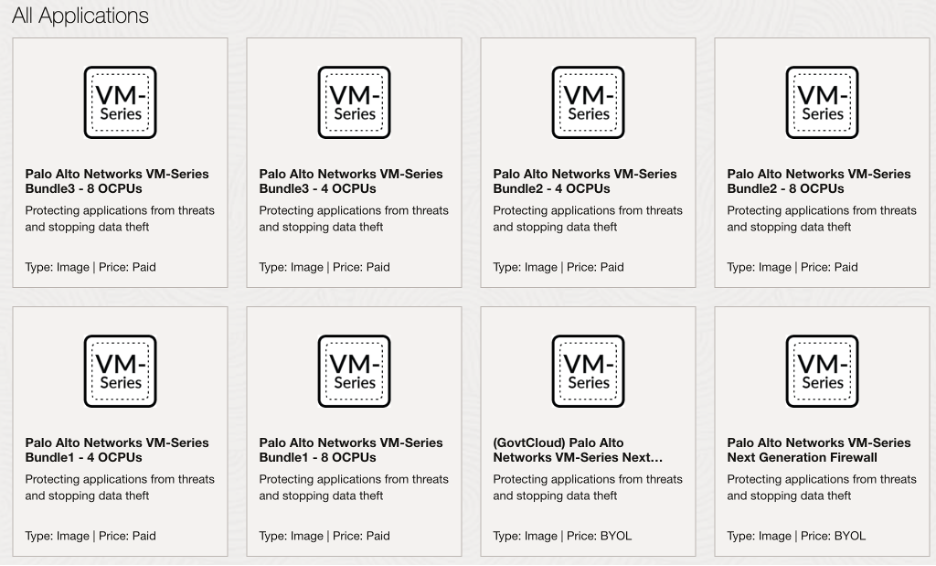
For this blog, I have selected the paid version (Bundle 1). Number of OCPUs depend on the number of interfaces required in your network design. If opting for BYOL version, make sure that Palo Alto license can support the required number of interfaces. If you want to learn more, please visit the following blog:
https://www.ateam-oracle.com/post/palo-alto-networks-vm-series-next-generation-firewall-shape-change
Step by step instructions to deploy the firewall are listed on the Palo Alto website:
Let’s launch the instance:
Proceed to steps 1-12 as described in the document.
Points to consider during provisioning:
- Choose shape according to the number of interfaces you plan to have. For this blog, I am selecting ‘VM. Standard3.Flex’ and 8 interfaces. Please note that you will have to count the default Management interface as well.
- Default vNIC is the management interface. So, select the management subnet that we created previously to host this instance. You will use this vNIC to access the GUI of the VM and terminal command prompt.
- Choose to assign a public IP if you plan to manage the instance from the public internet.
- OCI Configuration:
- Creating Subnets:
We are going to create 2 subnets in the Hub VCN for the 2 interfaces that we will create:
Trust(private) and Untrust(public):
- Interface Configuration:
In this step, we will create the interfaces required on OCI.
We will create 2 interfaces:
- Trust
- Untrust
Navigate to the Palo Alto VM and click on ‘Attached VNICs’ under resources:
Create VNIC for each of the interface. Please note that VNIC for the management interface is already created.
Let’s create Trust interface:
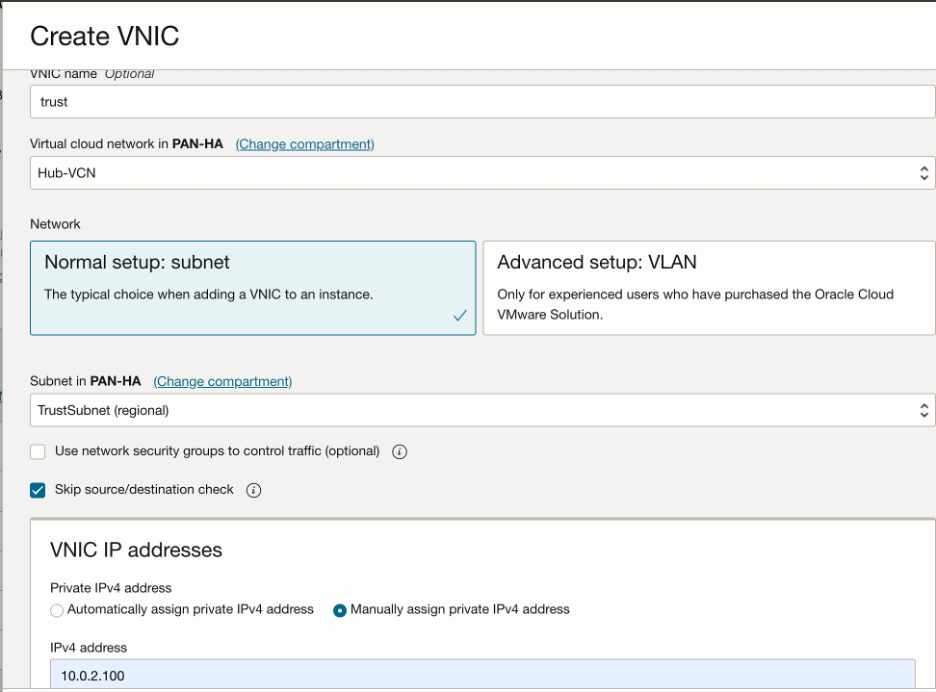
Make sure to select ‘Skip source/destination check’ for all the data interfaces and deploy them in the respective subnets that we created in the previous step.
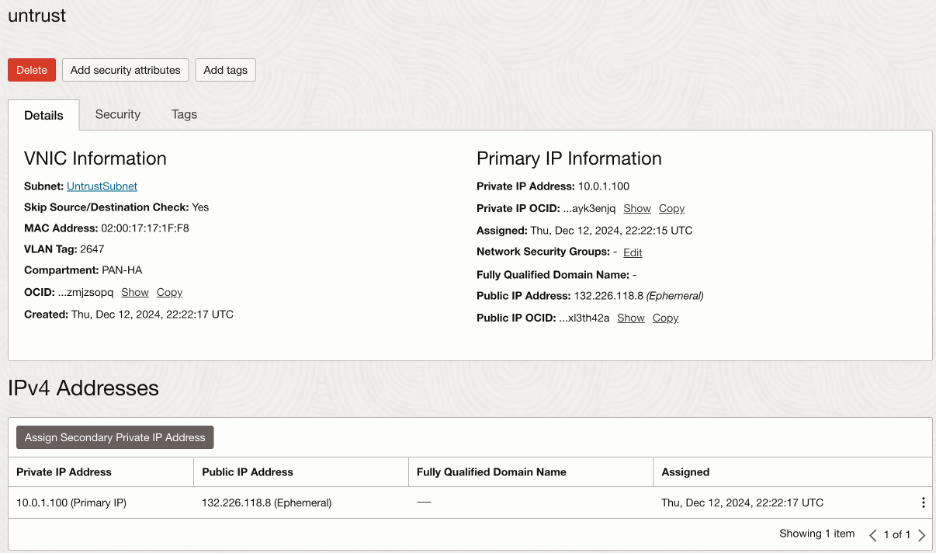
For Untrust interface, I have assigned a public IP, though this is not required for this blog.
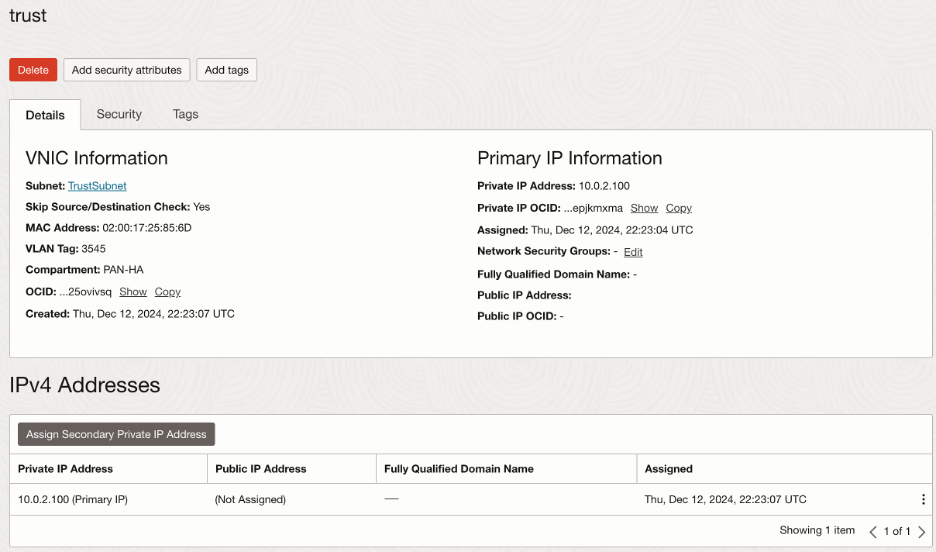
In summary, interface configuration on OCI should look like this:
- Service Gateway:
Since we will be testing the connectivity to OSN with Object Storage, I have created a Service Gateway that supports Object Storage services. All the return traffic from the OSN should be sent to the trust interface (10.0.2.100) first. Hence, we need to create a route table with following route rule and associate it with the Service Gateway:

- NAT Gateway:
NAT Gateway will be used to test the outbound connectivity to the internet such as fetching updates/upgrades and patching for the private instances in the environment. All the return traffic from the public internet should be sent to the untrust interface (10.0.1.100) first. Hence, we need to create a route table with following route rule and associate it with the NAT Gateway:

- Palo Alto Interface Configuration:
Like we configured on OCI, we need to configure interfaces on the Palto Alto VM.
Login to the Palo Alto VM via GUI and navigate to the ‘Network’ tab and ‘Interfaces’.
Points to consider:
- Configure the interfaces in the same order as they were created on OCI
- Do not count the Management interface
- Start from ethernet1/1
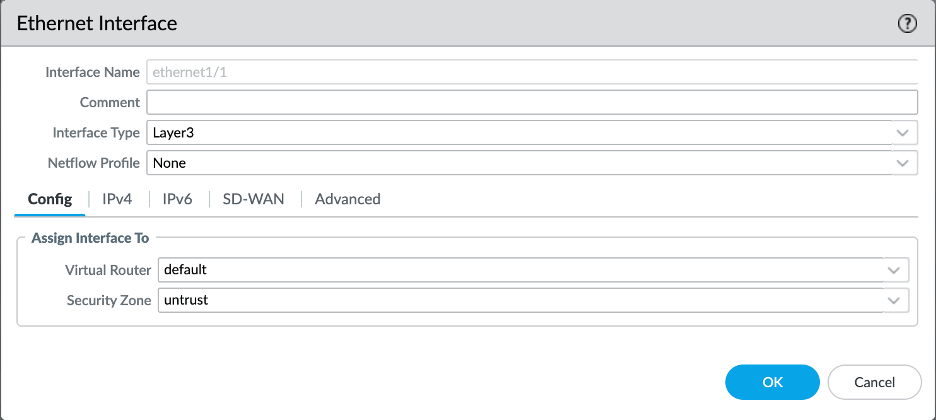
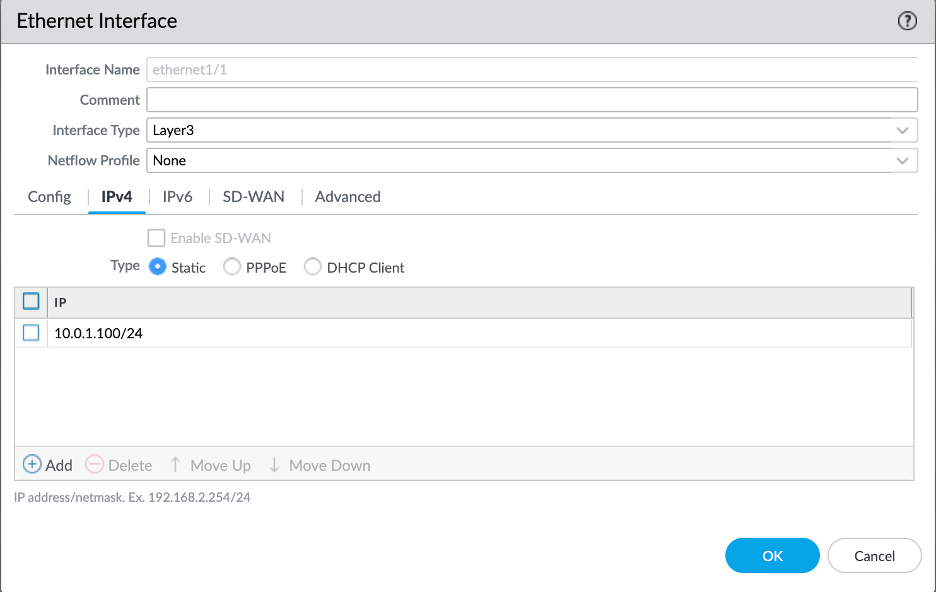
For example, in this case, I will start by configuring untrust interface on ethernet1/1. I have added this interface to the untrust zone and selected default router. For the IP address, you will also need to add the netmask of the subnet that it created in:
To verify the MAC address, we need to enable the visibility of MAC address column:
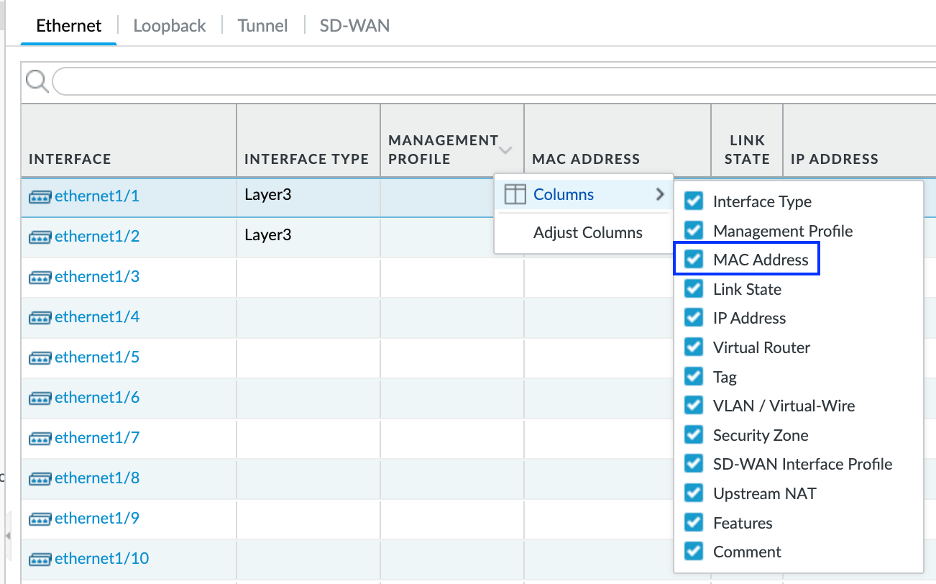
Look for following indications to verify that the interfaces have been configured correctly:
- MAC address should match on Palo Alto and OCI
- Link state turns to green
You may need to reboot the instance before you see them green (activated).
Final ethernet interface configuration should look as follows:

Conclusion:
This wraps up the main page of the our Palo Alto Hub and Spoke deployment series. In this introductory part, we briefly touched upon 2 different scenarios and covered Palo Alto VM-Series firewall provisioning as well as common baseline configuration on OCI.
In the following blog posts, we will explore each scenario in detail along with the specific configurations required.