
Executive Summary
Oracle Fusion Applications Suite includes multiple key pillars like HCM (Human Capital Management), ERP (Enterprise Resource Planning), CX (Customer Experience) and SCM (Supply Chain Management). In this blog, we highlight some of the newly available use cases in the SCM module in Release 24D, where AI agents can help users to streamline and optimize operations, enhancing productivity and efficiency. The AI agents provide context related guidance based on pre-loaded documents, in a conversational form for specific tasks within the framework of a guided journey. The SCM AI agents leverage the technology provided by Oracle Cloud Infrastructure and the Fusion AI platform.
Background
AI agents are now included in Fusion Cloud as it continues to evolve and offer the latest advanced technologies available within the realm of AI [1]. The Supply Chain Management (SCM) module of Oracle Fusion Cloud Release 24D has introduced AI agents in different areas. In this blog, we have selected 2 tasks listed below, from the Supply Chain Execution area for a detailed analysis.
- Operator Workbench in Manufacturing
- Technician Workbench in Maintenance Cloud
The rest of this blog describes the setup and usage of SCM AI Agents for these use cases.
Fusion AI Agent Enablement
The AI agents are deployed in guided journeys to assist with certain tasks in a business process. The agents use contextual documents that are pre-loaded during the configuration and the enablement of the agents. The agents engage with the users in a chat interface which is embedded in the Fusion Applications transactional pages.
Some of the pre-requisite steps may have already been completed in some Fuson environment as part of the enablement of Generative AI (GenAI) features. A blog written by my colleague, Aarti Satyamurthy of Fusion HCM/SCM CoE covers the GenAI enablement steps in great details [2].
At a very high level, the enablement process for SCM AI agent consists of the following tasks [3].
- Enable profile values at the site level to Y (yes)
- ORA_HCM_VBCS_PWA_ENABLED
- ORA_PER_GUIDED_JOURNEYS_SETUP_REDWOOD_ENABLED
- ORA_PER_AGENT_TASK_TYPE_GUIDED_JOURNEYS_ENABLED
- Create a new role with following privileges and grant the role to users of AI agents
- HRC_MANAGE_AI_AGENT_PRIV
- HRC_ACCESS_AI_AGENT_CHAT_PRIV
- Configure HCM and SCM Agents
- Add Tools with Documents to be ingested
- Publish the configuration
- Create an agent and associate the tool with the processed documents
- Create a Guided Journey
- Create the Guided Journey in the relevant functional area
- Attach the agent created earlier to the journey
- Activate the Guided Journey
- Modify the UI to embed the journey
- Edit the relevant UI page in Visual Builder Studio
- Embed the journey created earlier
- Test the agent functionality in the VB UI by switching to Live mode
- Publish the changes made in the page for final deployment
Fig. 1 below highlights the 5 key steps for SCM AI Agent enablement.

Fig. 1 Enablement of SCM AI Agents
Fusion AI Agent Implementation Architecture
The enablement section defines the steps required to enable the SCM AI Agent functionality in any Fusion instance. Fig. 2 shows how the different components configured in the enablement process fit together to deliver the functionality.
- Tool contains the relevant Documents that are uploaded to provide task-specific guidance.
- A tool is associated with an AI Agent.
- The agent, in turn, is included in the task of a Guided Journey.
- A guided journey is finally referenced in an edited Fusion UI Page to provide the embedded AI agent functionality.
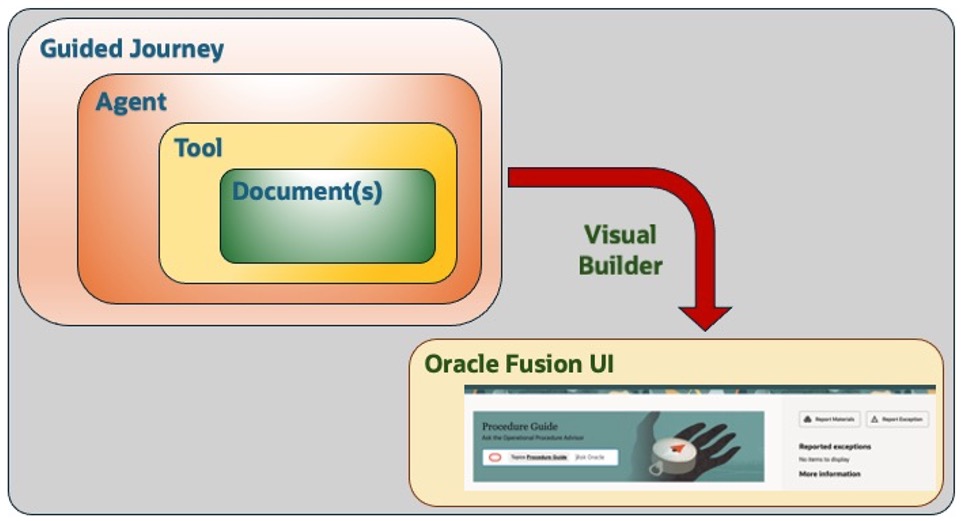
Fig. 2 AI Agent Implementation in Fusion SCM Cloud
Supply Chain Execution Examples in SCM
After the completion of the setup process, the environment will be ready to use the agents for receiving context-specific assistance in the guided journeys. We will look at the sample assistance provided as part of the 2 journeys that are available in SCM modules for Fusion Applications Release 24D.
Operator Workbench in Manufacturing
In this sample scenario, a technician with an assigned a Work Order can get task related help in a conversation with the SCM AI agent. For example, if a work order involves the installation of an attachment to a treadmill, the technician can get model-specific help from the manuals, which would have been pre-loaded as document sources in the configuration of the AI agent. A sample conversation related to the installation guidance is provided in Fig. 3. The yellow arrow points to the button that can reveal the source documents that were cited by the AI Agent to generate the response. Details of the setup for this AI agent is described in the Product Documentation Set for Oracle Fusion Cloud Manufacturing [4].
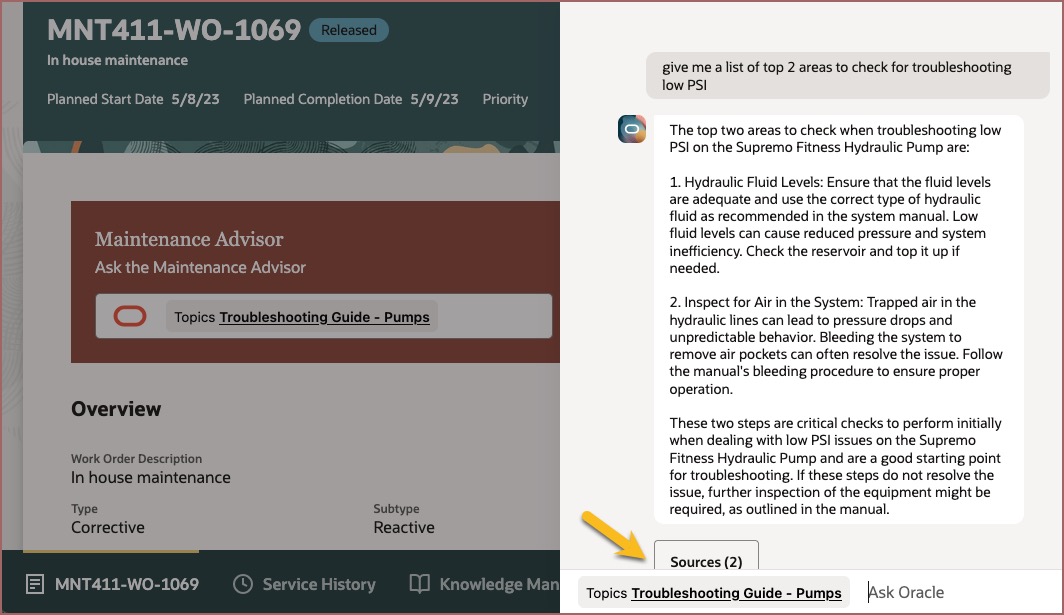
Fig. 3 Sample conversation with SCM AI agent in Work Order Execution (Fusion SCM)
Technician Workbench in Maintenance Management
In this exercise, a technician worker is assigned a Maintenance Work Order to repair a device. The technician can get task related help in a conversation with the SCM AI agent. For example, if the work order involves the repair of a hydraulic pump, the technician can get device-specific help from the manuals, which would have been pre-loaded as document sources in the configuration of the AI agent. A sample of the conversation with the SCM AI Agent from the Work Order Execution screen within the Supply Chain Execution module is shown in Fig. 4. The yellow arrow here as well points to the button that can reveal the source documents that were cited by the AI Agent to generate the response. Details of the setup for this AI agent is described in the Product Documentation Set for Oracle Fusion Cloud Maintenance [5].
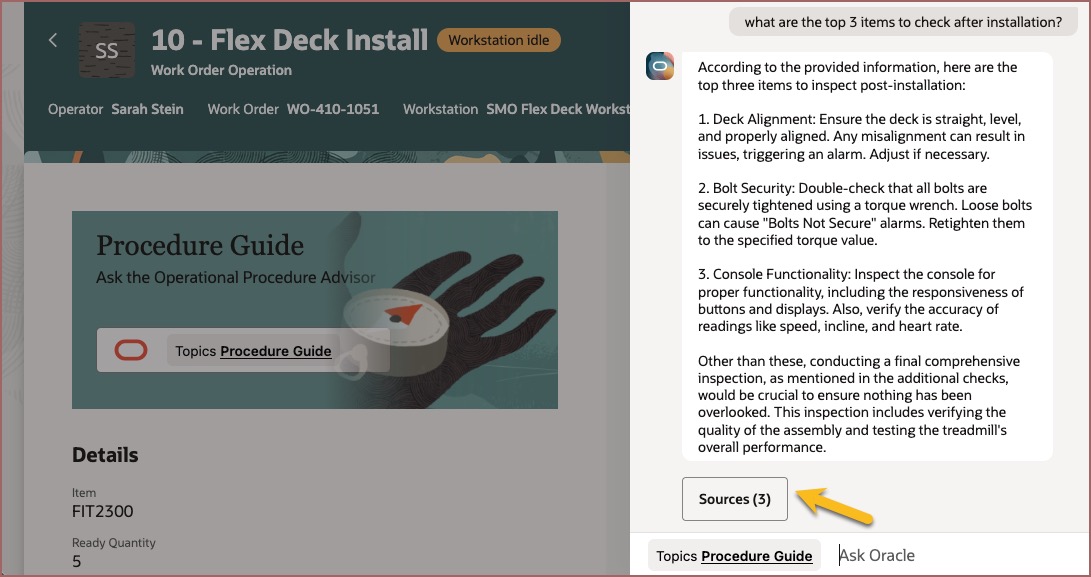
Fig. 4 Sample conversation with SCM AI agent in Maintenance Management (Fusion SCM)
Summary
AI agents offer a convenient way to provide conversational assistance for complex tasks to users in a natural language form. The conversation responses by the agent are, to a larger extent, dependent on the content quality of the reference documents uploaded during the configuration process. So, if relevant documents are uploaded in the reference repository, then the agent should be able to provide meaningful contextual guidance for complex tasks.
Table 1 below summarizes the list of AI agents that are available in Fusion SCM Cloud till Release 24D. More details on these agents and other AI features in SCM Cloud can be found in the Oracle Product Documentation [6].
|
|
Availability Release |
Functional Module |
Agent Functionality |
| 1 |
24D |
Self Service Procurement |
Procurement Policy Advisor |
| 2 |
24D |
Sustainability |
Sustainability Policy Advisor |
| 3 |
24D |
Maintenance Cloud |
Technician Workbench |
| 4 |
24D |
Order Management |
Customer Service Rep Guide |
| 5 |
24D |
Manufacturing |
Operator Workbench |
| 6 |
24D |
Product Lifecycle Management |
Manufacturer Onboarding Advisor |
| 7 |
24D |
Quality Inspection Planning |
Quality Inspection Advisor |
Table 1. AI Agents in SCM Cloud
This list will get longer with newer releases, and we plan to provide more information about the newer functionalities as they are rolled out in Fusion SCM Cloud. So, stay tuned and meanwhile, please reach out for any follow-up queries.
Acknowledgements
I would like to acknowledge the assistance received from my colleagues, Aarti Satyamurthy of Oracle Fusion HCM/SCM CoE and Alistair Bailey of Fusion AI team for enablement of AI features in Fusion Cloud. I would also like to thank Shyam Lakshman and Sachin Patel from the Oracle Fusion Product Management and Strategy teams for their guidance at various stages. Finally, I would like to recognize the efforts of the Oracle Cloud Demo team in setting up the Fusion AI Agent demos, which were frequently utilized to generate some of the technical content in this blog. Oracle account representatives will be able to arrange for these demos to be seen by anyone upon request.
References
- Introducing AI agents in Fusion Apps – The Fusion Insider, Oracle Blog, Fusion Development
- Enabling Generative AI features in Cloud HCM – Aarti Satyamurthy, Oracle Blog, HCM/SCM Cloud CoE
- Redwood: SCM AI Agents – Oracle Fusion Cloud Manufacturing, Oracle Product Documentation
- Use AI Agents to Look Up Operational Procedures during Production – Oracle Fusion Cloud Manufacturing, Oracle Product Documentation
- Redwood: Use Repair Suggestions in the Maintenance Technician Workbench – Oracle Fusion Cloud Maintenance, Oracle Product Documentation
- SCM Features with AI – Fusion AI, Oracle Product Documentation