

Overview
I received some great feedback on my scaling IAM policies blog, which I published a couple of weeks back. However, that blog focused only on non-human identities (a.k.a. instance principals and resource principals). After finishing that blog, I started working on scaling IAM policies for human identities.
The problem Statement
There are some vast differences between human identities and system identities.
- System identities belong to a container referred to as a compartment in OCI. A compartment can have tags, which we can use in IAM policies. However, human identities do not belong to a compartment.
- We could write a policy for specific instances or instances using compartment tags. However, it is not possible to have human identities.
- Human identities, on the other hand, can be added to groups. However, one person can have different levels of access to different resources/targets/compartments. That means a user can be a member of multiple groups. If we write access policies for each one of those groups, we will end up with too many policies. It is a classic RBAC model, though.
I tried various combinations of tags and IAM policies to scale policies with no luck.
The Scalable solution
I figured out a slightly complex but easy-to-implement policy model. The model is in one sentence if it is as below.
Every resource or resource compartment will dictate who has what access to it. We will capture that information as tags on the resource or resource compartment.
It is easier said than done. I had to devise a prescription for creating tag definitions and using them in policy. Here you go!
- Create a tag for every combination of verb and resource type that you manage access to. We will refer to those verb + resource type combinations as permissions or permission tags. For this blog, I create a permission tag namespace as mgmt. Please note that only Administrators should be able to manage the mgmt tag namespace.
- Create an IAM group for every combination of permissions and targets you need to manage access.
- Apply a permission tag to a target (the Target can be a resource or compartment) to dictate which group will have that specific permission on the target. Please note that if a compartment does not have or is not supposed to have certain types of resources (for example, network resources), then you don’t apply those permission tags (network permission tags) to the compartment.
- Tag every group with its name. Please note, other than the group creator, no other user or group of users should have permission to manage group tags. For this, create a tag namespace (we will call this infosec) with one tag key named gname.
- You will write one policy statement for every permission, as below. The verb plus resource-type combination in the policy below is one permission.
Allow any-user to verb resource-type in tenancy where any { request.principal.group.tag.infosec.gname = target.resource.compartment.tag.amgmt.permission, request.principal.group.tag.infosec.gname = target.resource.tag.amgmt.permission }
I warned you it is slightly complex. Reread the above five statements; once you digest them, the implementation becomes easy. The total number of policy statements in the above model should not exceed the number of permissions you define, plus about 50 policy statements to manage access to tags and IAM resources. Since we use tags in IAM policies, we must implement a strong tag governance model and follow the principles below.
- Only the security Administrator should be able to manage tag namespaces.
- Only the terraform runner or Infrastructure-as-a-code script principal should be able to use tag namespaces in IAM policies.
- Do not use ‘manage all-resources’ policies for any target. Otherwise, the principal group can manipulate tags on the target resources and gain access.
- Use compartment-level default tags to eliminate human and configuration errors in the infrastructure-as-a-code script as much as possible.
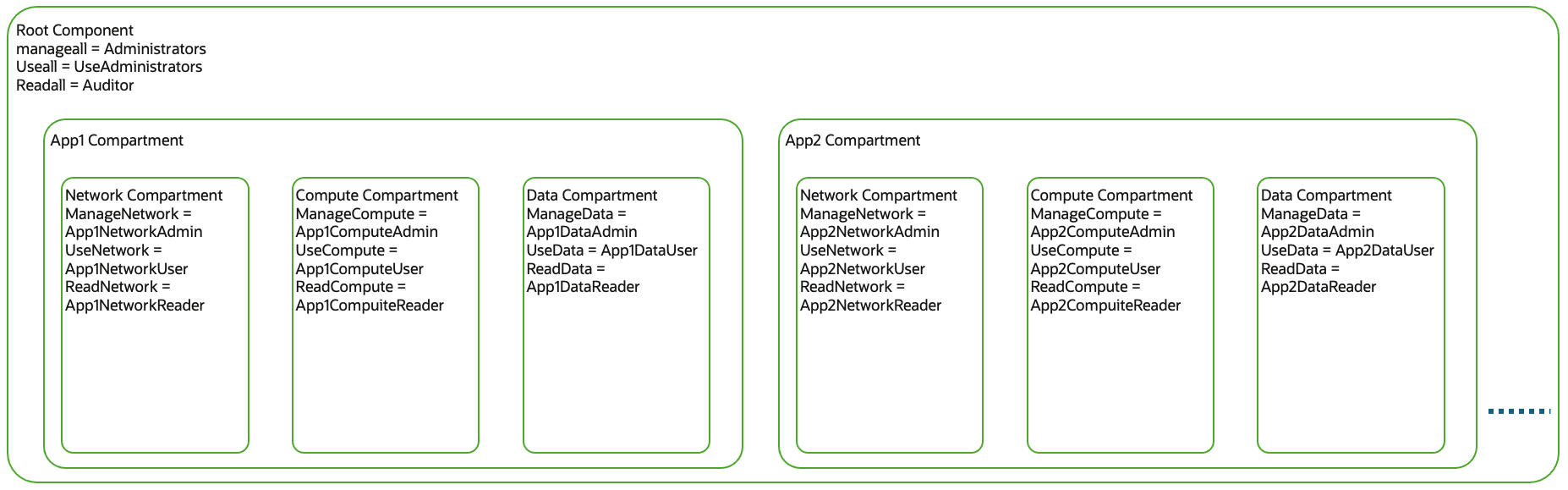
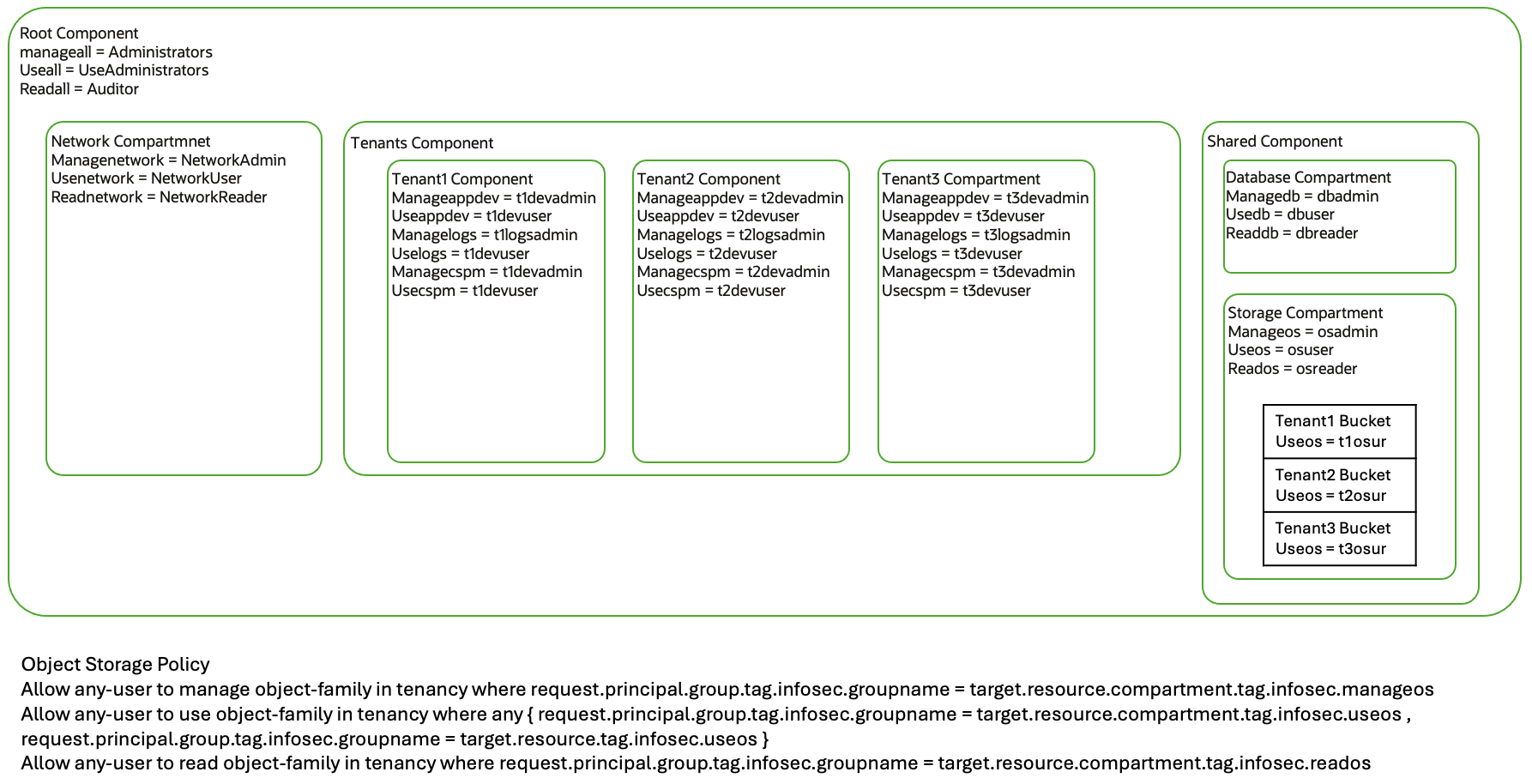
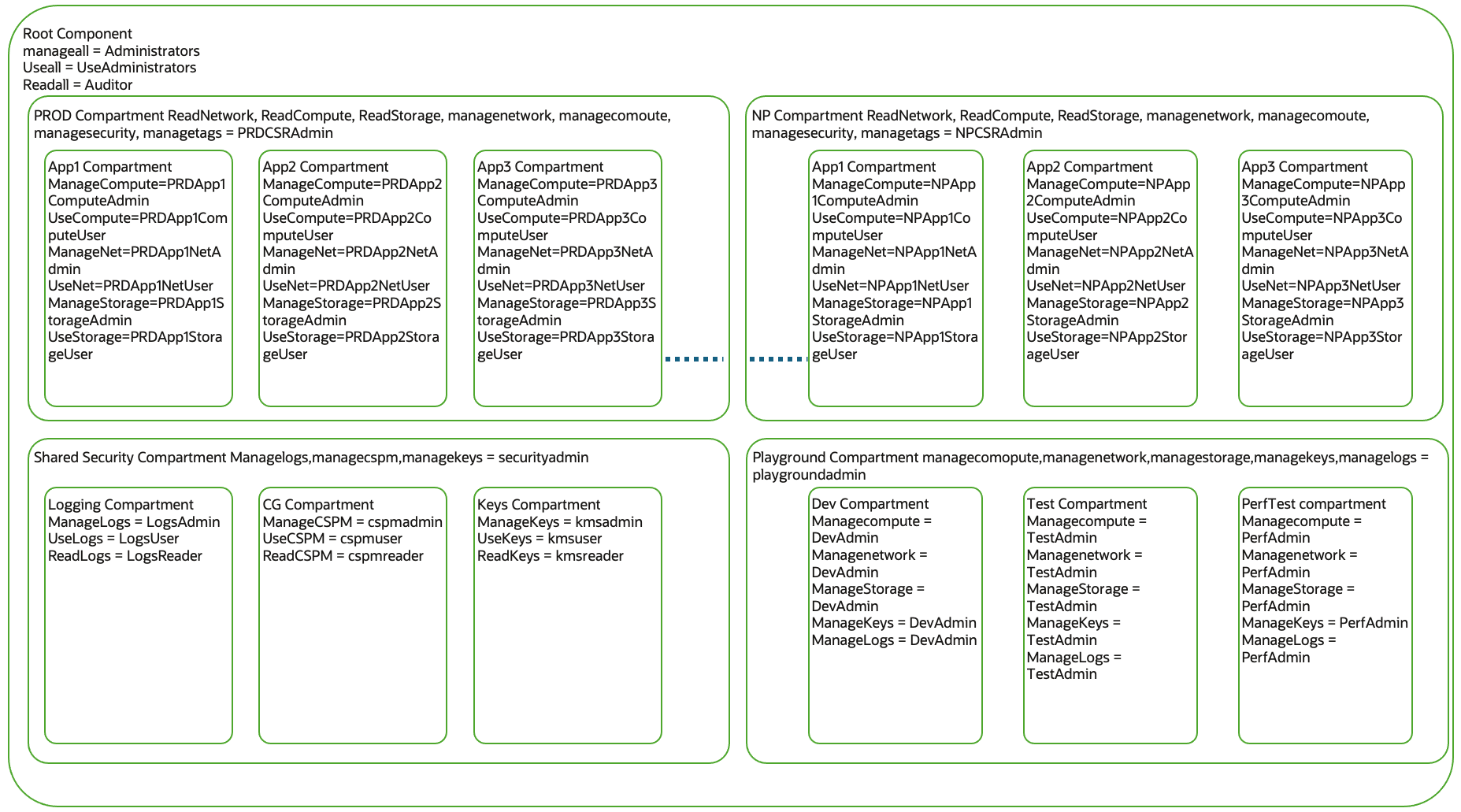
Let’s take a few compartment structure examples and capture the required permission tags. For every compartment structure, I capture the permission tags applied to the compartments in the diagram.
Use Case – 1 Compartment Structure based on resource function
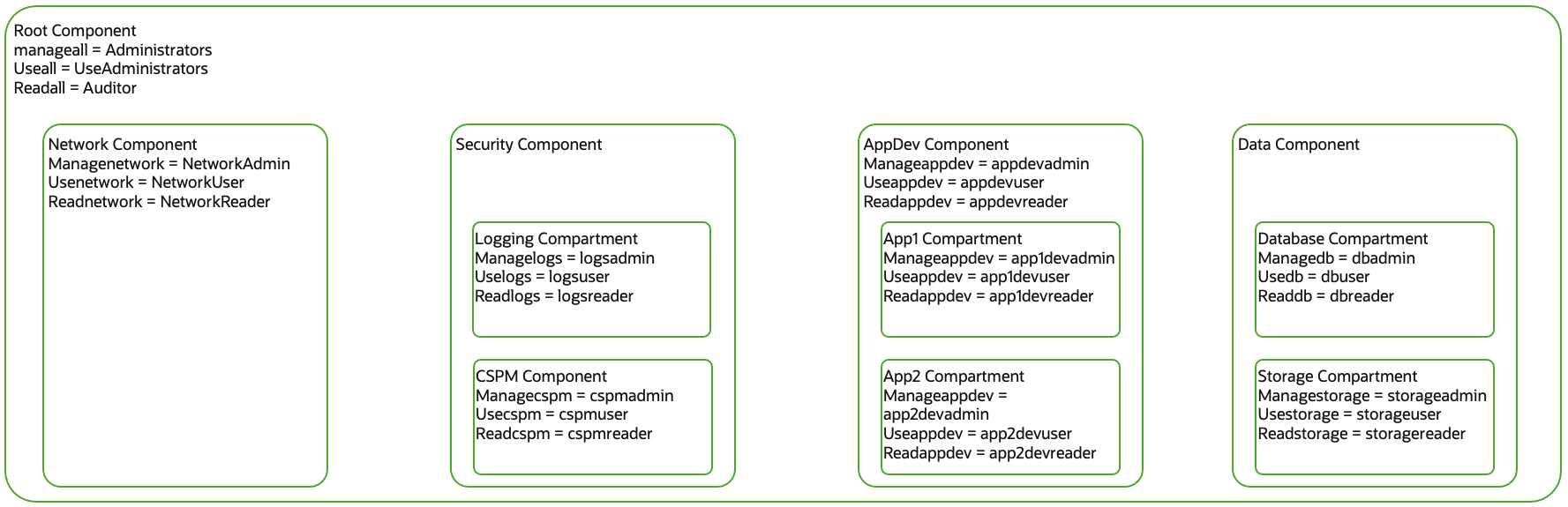
| List of Compartments | List of Permission Tags | List of IAM Groups | |
|---|---|---|---|
| Root, Network, Security, Logging, CSPM, Appdev, App1, App2, Data, Database, Storage |
|
Administrators, UseAdministrators, Auditor, NetworkAdmin, NetworkUser, NetworkReader, logsadmin, logsuser, logsreader, cspmadmin, cspmuser, cspmreader, appdevadmin, appdevuser, appdevreader, app1devadmin, app2devadmin, app1devuser, app2devuser, app1devreader, app2devreader, dbadmin, dbuser, dbreader, storageadmin, storageuser, storagereader |
IAM policies for Functional Compartment Structure
Network Policy
Allow any-user to manage network-family-resources in tenancy where request.principal.group.tag.infosec.gname=target.resource.compartment.tag.infosec.managenetwork
 Allow any-user to use network-family-resources in tenancy where request.principal.group.tag.infosec.gname=target.resource.compartment.tag.infosec.useetwork
 Allow any-user to read network-family-resources in tenancy where request.principal.group.tag.infosec.gname=target.resource.compartment.tag.infosec.readnetwork
Compute Policy
Allow any-user to manage instance-family in tenancy where request.principal.group.tag.infosec.gname=target.resource.compartment.tag.infosec.managecompute
 Allow any-user to use instance-family in tenancy where request.principal.group.tag.infosec.gname=target.resource.compartment.tag.infosec.usecompute
 Allow any-user to read instance-family in tenancy where request.principal.group.tag.infosec.gname=target.resource.compartment.tag.infosec.readcompute
Logs Policy
Allow any-user to manage logging-family in tenancy where request.principal.group.tag.infosec.gname=target.resource.compartment.tag.infosec.managelogs
 Allow any-user to use logging-family in tenancy where request.principal.group.tag.infosec.gname=target.resource.compartment.tag.infosec.uselogs Allow any-user to read logging-family in tenancy where request.principal.group.tag.infosec.gname=target.resource.compartment.tag.infosec.readlogs
Storage Policy
Allow any-user to manage object-family in tenancy where request.principal.group.tag.infosec.gname=target.resource.compartment.tag.infosec.manageobject
 Allow any-user to use object-family in tenancy where request.principal.group.tag.infosec.gname=target.resource.compartment.tag.infosec.useobject Allow any-user to read object-family in tenancy where request.principal.group.tag.infosec.gname=target.resource.compartment.tag.infosec.readobject
Db Policy
Allow any-user to manage dbmgmt-family in tenancy where request.principal.group.tag.infosec.gname=target.resource.compartment.tag.infosec.managedb
 Allow any-user to use dbmgmt-family in tenancy where request.principal.group.tag.infosec.gname=target.resource.compartment.tag.infosec.usedb Allow any-user to read dbmgmt-family in tenancy where request.principal.group.tag.infosec.gname=target.resource.compartment.tag.infosec.readdb
All Resources Policy
Allow any-user to manage all-resources in tenancy where request.principal.group.tag.infosec.gname=target.resource.compartment.tag.infosec.manageall
 Allow any-user to use all-resources in tenancy where request.principal.group.tag.infosec.gname=target.resource.compartment.tag.infosec.useall Allow any-user to read all-resources in tenancy where request.principal.group.tag.infosec.gname=target.resource.compartment.tag.infosec.readall
Cloudguard Policy
Allow any-user to manage cloud-guard-family in tenancy where request.principal.group.tag.infosec.gname=target.resource.compartment.tag.infosec.managecspm
 Allow any-user to use cloud-guard-family in tenancy where request.principal.group.tag.infosec.gname=target.resource.compartment.tag.infosec.usecspm
 Allow any-user to read cloud-guard-family in tenancy where request.principal.group.tag.infosec.gname=target.resource.compartment.tag.infosec.readcspm
Appdev Policy
Allow any-user to manage instance-family in tenancy where request.principal.group.tag.infosec.gname=target.resource.compartment.tag.infosec.manageappdev
 Allow any-user to use instance-family in tenancy where request.principal.group.tag.infosec.gname=target.resource.compartment.tag.infosec.useappdev
 Allow any-user to read instance-family in tenancy where request.principal.group.tag.infosec.gname=target.resource.compartment.tag.infosec.readappdev
I will only lay down compartment structures and required permissions for a few other compartment structures. You are all smart enough to create the required groups and associated IAM policies.
Use Case – 2 Compartment for Every Application
Use Case – 3 Compartment for Every customer/tenant
In the below structure, the ISV needs to host an application, and every customer needs their own instance of an application. However, there is a twist. The policy needs to use a combination of compartment tags and resource tags to determine access. Those policies are in the diagram below.
Use Case – 4 Large Enterprise Compartment Structure
Below are the characteristics of the compartment structure.
- Separate compartments for PROD and Non-PROD workload
- Compartments for every application inside PROD and non-PROD compartments.
- A compartment for shared resources
- Playground compartment for developers to test features
Conclusion
As you saw above, the policy model can accommodate various compartment structures. It does not require new policies for new workloads. Once you finalize permissions and write associated IAM policies, you can accommodate new resources without additional IAM policies. However, you must tag new workload compartments with permission tags for every new workload and create specific groups.
Resources
Please reach out, send an email at (kiran.thakkar@oracle.com), or comment on the blog. I will be sure to respond and help implement the policy model.