
Tagging is an essential practice in managing and organizing cloud resources. In Oracle Cloud Infrastructure (OCI), tagging is an integral part of the OCI Identity and Access Management service(IAM) which provides a systematic way to categorize and manage resources effectively, such as cost tracking, cloud resource searching, filtering and logical organization. OCI also offers standard tags that are tag namespace templates defined by Oracle which customers can import into a tenancy’s root compartment and get started with commonly used tags.
In this blog post, we will explore the significance of tags, different types of tags, and their role in cost management. We will also delve into the process of enabling mandatory tagging for compartments using Tag Defaults, ensuring consistent resource management across your OCI environment.
Understanding Different Tag Types
- Free-form Tags: Free-form t ags are user-defined tags with no predefined schema, allowing flexibility in tagging resources. Free-form tags are limited in functionality, Oracle recommends that you only use them to try out the tagging feature or cater for specific use case.
- Defined Tags: Defined tags provide more features and control than free-form tags. These tags have a predefined schema called Tag Namespaces, offering a structured approach to tagging with specific namespaces, keys, and values.
- Cost Tracking Tags: Cost tracking is a feature of defined tags. These tags are used explicitly for cost management and billing purposes
Tip: To reduce the complexities of creating and managing tags, Oracle Cloud Infrastructure Tagging provides you with templates of standard tag namespaces and tag definitions. For more information, see Understanding Standard Tags.
Design of the Tag Namespace and Tag Key
To organize cloud resources efficiently, you need to have a well-designed tagging structure. Designing tag namespaces, tag keys, and values is akin to designing a table structure, where tag keys are the columns and tag values are the column data. This structured approach allows you to extract important metadata information about your cloud resources.
A well-thought-out tagging structure involves defining tag namespaces that group related tags together. Each tag key within a namespace represents a specific attribute of the resource, and the tag values provide the corresponding data for that attribute. For instance, if you use “classification” as a tag key, the values might include “Prod,” “Dev,” “Test,” and “UAT.” This helps in distinguishing the environment of each resource. Similarly, specifying “cost-center” as a tag key allows you to associate each resource with a specific cost center value, aiding in financial management and cost allocation. For example, you might have cost center values like “Finance,” “HR,” “IT,” and “Marketing.” By tagging resources with these values, you can easily track and manage expenses across different departments.
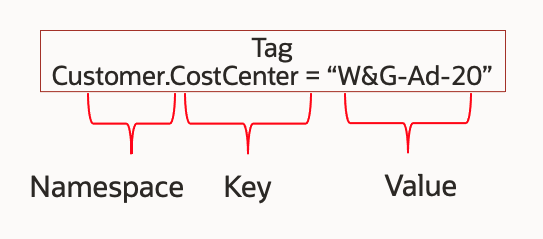
Another example involves cloud infrastructure resources such as VMs and databases. You can use “ApplicationLOB” as a tag key to group all related resources together across different cloud resource types. For instance, by assigning values such as “ERP,” “EBS,” “HCM,” and “EPM” to the “ApplicationLOB” tag key, you can categorize resources according to the specific line of business applications they support. This allows for quick querying of cloud resources and running cost analysis by specifying combinations of tags to filter the resources efficiently.
By designing your tag namespaces and keys to capture critical metadata, you create a powerful framework for managing, organizing, and optimizing your cloud resources. This structure not only supports operational efficiency but also enhances the ability to automate processes, enforce security policies, and gain insights into resource utilization and costs.
Use Tag Defaults for Mandatory Tagging
To ensure that every user in the OCI tenancy assigns the required tags to all cloud resources, you can implement mandatory tagging by using Tag Defaults. This can be achieved by creating tag defaults at the compartment level and then selecting “User-Applied Value” in the tag defaults rather than using a default value.

Tag Defaults provide a way to enforce a tagging scheme across your cloud environment. By setting Tag Defaults at the compartment level, you ensure that all resources within that compartment adhere to the required tagging policies. When you choose the “User-Applied Value” option for Tag Defaults, it mandates that users specify a value for the tag key during resource creation. This approach prevents the automatic assignment of tag values and requires users to actively input the necessary tag information.
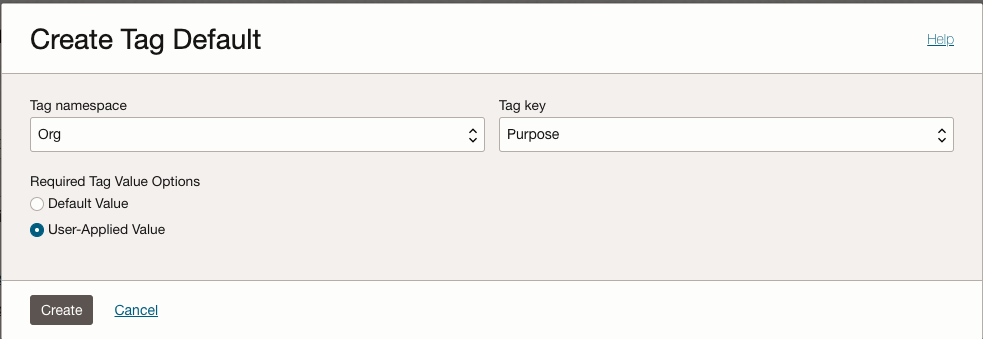
If a user attempts to create a cloud resource without specifying the required tags, the resource creation process will fail, displaying an error message such as, “Resource creation failed because the resource requires tag value(s). Add a value to each of the following tag definition(s): Org.Project.” This enforcement mechanism ensures that all resources are tagged appropriately, facilitating better organization, management, and cost tracking across your OCI environment. By leveraging Tag Defaults, you can maintain consistency and compliance with your tagging policies, ensuring that all resources are properly categorized and managed from the moment they are created.

Steps to Configure Tag Defaults for the Mandatory Tags
Log in to your OCI Console
Navigate to Tag Namespaces:
- Go to the Navigation Menu
- Select Governance & Administration -> Tag Namespaces
- Select the root compartment
- Create a new Tag namespace or import Standard Tags if needed
Define Tags:
- Within the namespace, create Tag Key Definition.
- Provide Tag Key, Description, and provide Tag Value Type.
- Check Cost-Tracking checkbox
Set Tag Defaults for Compartment:
- Navigate to Identity & Security -> Identity -> Compartments
- Select the compartment you want to apply Tag Defaults to
- Select Tag Defaults at Resources menu
- Create Tag Default
- Select Tag namespace and Tag key
- Select User-Applied Value
Apply Tag Defaults:
- Add the tag to the cloud resource otherwise the error message will remind you the missing tag
Considerations and Best Practices for OCI Tagging and Cost Management
Limits on Tags:
- Tags per tenancy: unlimited
- Tags per resource: 10 free-form tags and 64 defined tags
- Tags enabled for cost-tracking: 10 per tenancy (includes both active and retired tags)
- Total tag data size: 5K(JSON). The total tag data size includes all tag data for a single resource (all applied tags and tag values). Sizing is per UTF-8.
- Number of pre-defined values for a tag key: 100 per list
Best Practices and Consideration:
- Use Defined Tags from the root compartment as much as possible to avoid tag spam. You can only use a cost-tracking tag with defined tags.
- Free-form tags cannot be used for cost-tracking.
- Create Tag Definitions for everything you want to search
- Automate Tagging Operation by Bulk editing tags on resources using OCI CLI – Check the great blog post from Chris Johnson
- Secure the tag namespaces: create at least two tag namespaces so that one can be used restrictly for cost tracking
- Use Tag Defaults: Automatically tags all resources in a tenancy or compartment
- Put the Tag Namespaces in parent compartments
- Use Tag Variables in Defined Tags and Tag Defaults when possible, free-form tags cannot use Tag Variables.
Conclusion
Enabling mandatory tagging using Tag Defaults in Oracle Cloud Infrastructure ensures that your resources are consistently categorized and managed. This practice not only enhances organization and compliance but also improves cost management and operational efficiency. By following the steps outlined in this blog post, you can implement Tag Defaults effectively and streamline your cloud resource management in OCI.
Tagging is a powerful tool, and when used correctly, it can provide significant benefits to your cloud strategy. Start tagging your OCI resources today and reap the rewards of a well-organized and cost-effective cloud environment.
Resource
- Bulk Editing tags on resources using the OCI CLI
- View Tagged Resource Usage Cost for An Account
- Tagging resource tags
- Managing Tags and Tag Namespaces
- Tag Defaults via CLI
- Tags API and CLI – ListBulkEditTags ResourceTypes
- Tags API and CLI – BulkEditTags
- Tags API and CLI – BulkEditResource
- Understanding Free-form Tags