
Overview of IoT communication
Internet of Things (IoT) is rapidly transforming many industries by connecting devices and enabling data-driven decisions. As discussed in my previous IoT blog, OCI provides you with the ability to design a scalable, secure, and high-performance network for your IoT environment.
One of the most widely adopted network protocols for IoT is the Message Queuing Telemetry Transport (MQTT) protocol. MQTT is a lightweight publish-subscribe protocol that works very well for communication between IoT devices. In this blog, I’ll continue our IoT discussion by reviewing the MQTT protocol, showing how to monitor and inspect MQTT packets in OCI, followed by investigating the different network access controls available in OCI.
The MQTT Protocol
Before discussing the different MQTT packet types, lets take a high-level look at the MQTT packet format itself:

Three parts makes up the structure of a MQTT packet. The Fixed headers (Control Field/Remaining Length), the variable header, and finally the payload with the MQTT data.
The fixed headers are mandatory for every MQTT packet and contain information about the packet type and control flags.
- Control Field: Separated into two fields that are four bits each.
- Packet Type: The first four bits indicate the type of MQTT packet (i.e. CONNECT, SUBSCRIBE, PUBLISH). There are 16 different packet types, we’ll cover the 4 common types in this blog.
- Flags: The next four bits are reserved for control flags that vary by packet type. For example, in a PUBLISH packet, the flags indicate the Quality of Service (QoS) level and if the message should be retained.
(*Note: For QoS, there are 3 different levels available, I won’t cover them here but there are 3 levels to be aware of: “At most once”, “At least once”, & “Exactly once”.)
Variable length fields:
- Remaining Length: While considered a fixed header, it can vary in length between 1-4 bytes depending on the packet type. This header specifies the total size of the following variable header and payload if any.
- Variable Header: This header contains additional info specific to the packet type such as a PUBLISH or SUBSCRIBE packet, which will include meta-data related to these packet types.
- Payload: The actual MQTT data being transmitted, the MQTT Message payload, and Topic data is located in this field.
Now that we know what the MQTT packet format looks like, let’s cover the most common message types communicated between IoT devices with the MQTT protocol. Remember, this is the data carried within the payload itself:
- CONNECT: This message is used to establish and create a link between IoT devices. An MQTT broker can be used to help maintain and scale connections between IoT publishers and subscribers.
- SUBSCRIBE: Sent to IoT clients subscribed to a particular topic from a publisher. Contains three values, the packet ID, the topic to subscribe to, and the QoS level to subscribe for.
- PUBLISH: Used to advertise Topics from the publisher to the subscriber(s) via the MQTT broker. it includes the packet ID, topic name, QoS value, retain/dup flags, and the payload message for the topic itself.
- DISCONNECT: This message waits for the MQTT client to finish any work it must do along with the TCP/IP session to disconnect.
Monitoring MQTT Packets in OCI
MQTT traffic entering and exiting out of OCI can be logged with our VCN Flow Log capabilities. Not only that, but the flow logs can be exported to our Logging Analytics service where it can be aggregated, indexed, and analyzed with many different visualizer tools. The details on how to configure can be located in my previous blog here.
Once exported to Logging Analytics, the captured data can be presented in customized dashboards providing a visual representation of the MQTT traffic. Showing such things as source of data, destination, total bandwidth consumed, and many other useful statistics:
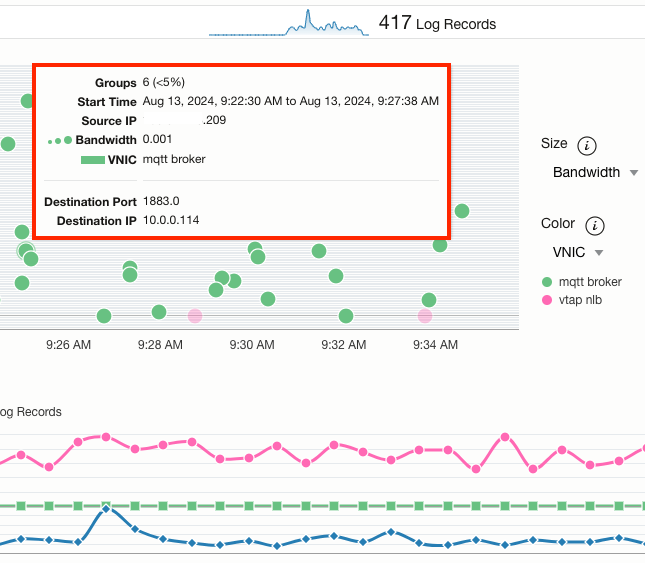
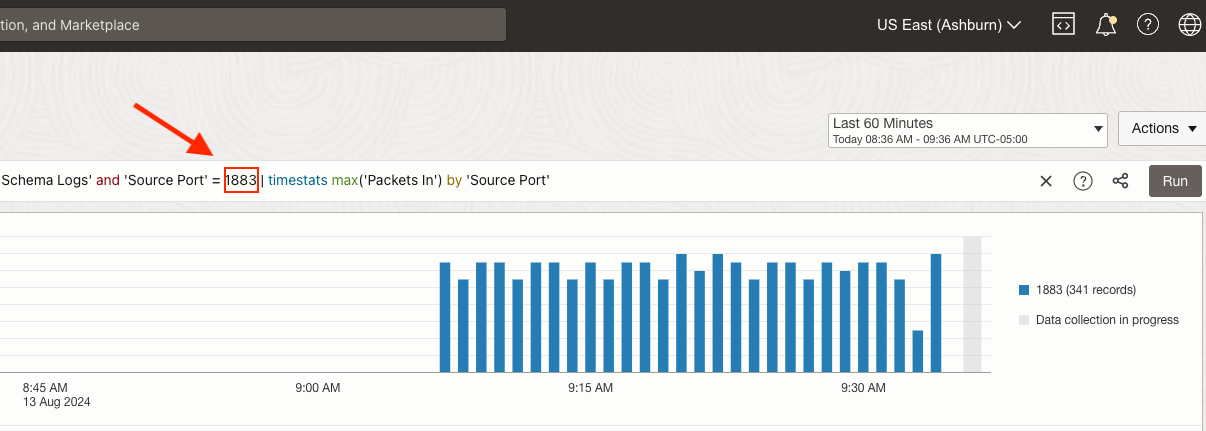
Individualized queries can also be performed to filter and search for specific data as well. The below example shows a query for all data that are using the MQTT TCP Port 1883 as its source port. Typically this would be a reply from an MQTT broker back to an IoT client:
Inspecting MQTT Packets in OCI
Going beyond just monitoring MQTT traffic, we can also make use of OCI’s cloud-native virtual test access point (VTAP) service to inspect the data in detail. This is useful for scenarios such as threat monitoring, compliance, or general troubleshooting. While VTAP configuration is out of scope for our discussion, the following blog shows a good example of how to set up this service.
I’ve set up VTAP in my lab to filter and mirror MQTT packets between an MQTT broker, external subscribers, and publishers to a Windows VM hosting Wireshark. This was confirmed with the VTAP metrics presented in the OCI console:

Let’s take a look at the MQTT messages we captured in-depth:
CONNECT PACKET
Starting with the Connect packet notice the following in the below image:

- After the 3-way TCP handshake, the external subscriber issues a Connect command to the MQTT broker.
- Not related to MQTT but notice that the VXLAN header is encapsulating the original MQTT data between the broker and subscriber. VXLAN is the protocol (UDP Port 4789) used to mirror traffic with the VTAP service.
- This contains the MQTT Connect message data, including some of the flags we talked about earlier such as the QoS level.
PUBLISH PACKET
Next up is a Publish packet from the MQTT broker to the IoT subscriber:
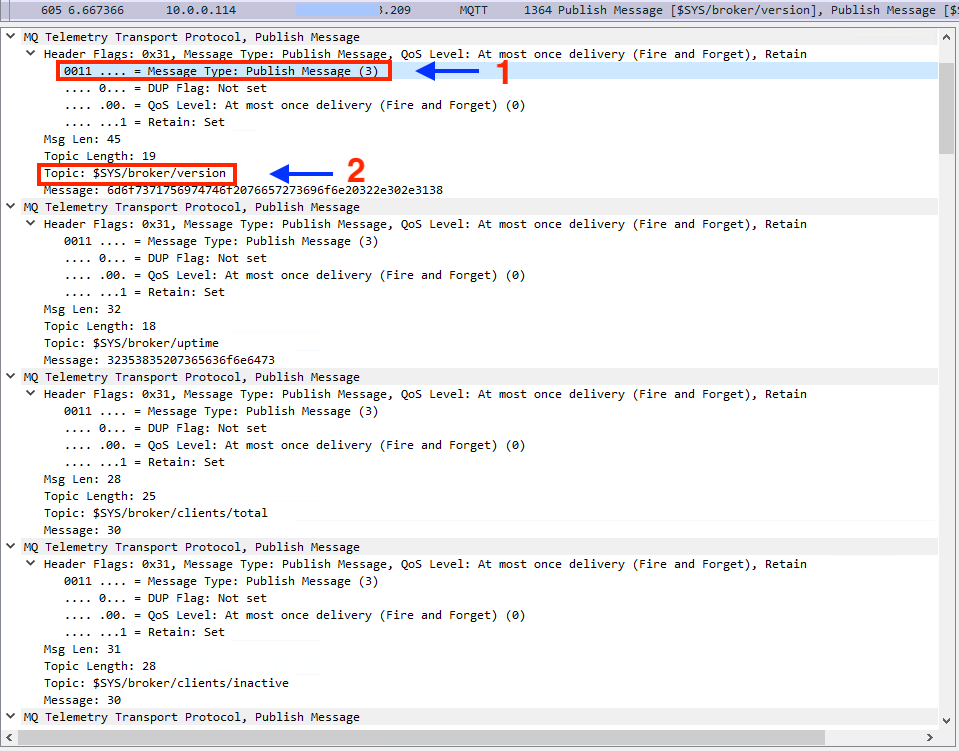
- Note the Publish message listed as the Message Type, with bits set to 3 for this message type flag.
- Within each Publish message is the actual Topic subscribers can register to. One Publish packet lists multiple Topics in the same payload for efficiency rather than requiring a separate packet for each Topic.
SUBSCRIBE PACKET
The last packet that we’ll inspect is the Subscribe message:

- Like the Publish message listed this Message Type is associated with a specific flag, this time with bits set to 8 for this message type. Notice that the IoT client is requesting to subscribe to all of the Topics available on the MQTT broker underneath the $SYS/ directory using the wild card #.
Securing MQTT Traffic in OCI
It’s recommended as a best practice to secure IoT data from potential threats at multiple layers within your network. Starting with the data itself, encryption should be utilized between your IoT clients and MQTT brokers. This can be accomplished by implementing TLS, which requires SSL certificates to properly encrypt, decrypt, and prove MQTT data hasn’t been intercepted or modified by unauthorized users. When configured, we can once again use the VTAP service to prove that this data is properly encrypted using a tool such as Wireshark:
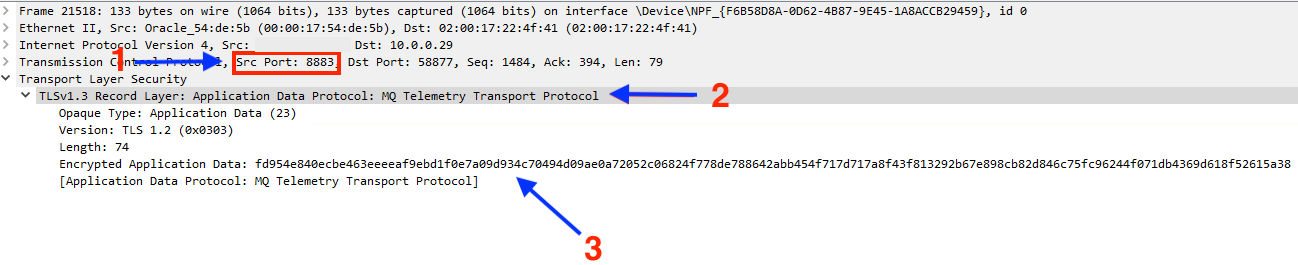
- MQTT with TLS enabled uses the TCP port 8883 by default
- The MQTT data is recognized but it’s listed as being encrypted with a specific TLS version (1.2)
- The original MQTT data is unable to be viewed, anyone sniffing this traffic will only be presented with unusable encrypted data.
Take advantage of VCN security lists and network security groups to control general access to your IoT infrastructure to and within OCI:

The example above shows that we’re allowing MQTT TLS traffic inbound from any IP address.
- As mentioned in my previous blog, make use of OCI’s other cloud-native network security services such as the Web Application Firewall (WAF) and OCI Network Firewall. Each of these services can help provide a defense-in-depth approach to securing your IoT workloads in OCI. The WAF is easy to implement and can be attached directly to an OCI Load Balancer. For an overview of how to implement a WAF policy, check out my video that walks you through this process:
The Network Firewall offers deep packet inspection and granular access control for communication with your IoT infrastructure provisioned in OCI. We have many excellent blogs such as this one that detail the features available and how to implement the Network Firewall. Keep in mind that any of the network services that you’re provisioning should be configured with the ability to decrypt MQTT TLS traffic to take full advantage of their security features such as Intrusion Detection Systems.
Conclusion
The MQTT protocol is the backbone of most IoT communications, enabling devices to exchange data efficiently and reliably. By understanding the structure, types, and significance of MQTT packets, you can better manage, troubleshoot, and secure your IoT workloads in OCI.