

Hi! In this blog entry, we will talk about a network architecture for the Oracle Database@AWS product, mainly how to configure access to the Internet for outbound flows.
Oracle Database@AWS
Oracle Databases of various types can now be deployed in AWS, Azure and GCP. Since the database now lives in that Cloud Provider, it has to follow the network rules and constructs defined there. Particularly for AWS, we have the following details, relevant to this blog:
- The database will live in a new network construct called an ODB Network.
- The ODB Network will be peered to an Amazon VPC so application instances can connect to the database and can use that VPC as a transit to another service like the Transit Gateway or the AWS Cloud WAN.
- The service will also deploy an OCI Virtual Cloud Network and its subcomponents (subnets, route tables, etc.) as a “shadow” of the ODB Network. Basically, it’s the same network but represented on the Oracle Cloud which gives us access to some interesting architectures.
The purpose of this blog is to provide supported architectures for Internet outbound access for the Oracle database deployment in AWS. In the interest of not making this blog extremely long, please read the official documentation or this blog to learn about the product fundamentals. We will not cover in detail all involved components as basic AWS and OCI networking knowledge is required.
Before we begin, let’s talk about Internet access:
- Internet access, both inbound and outbound, is not provided by default.
- In general, it’s not recommended to expose databases to the Internet (especially inbound) but there are cases when you may need Internet outbound to work. This blog post only covers Internet outbound flows and the steps provided will not work for Internet inbound flows.
- Since the network where the databases are deployed is represented on both CSPs, AWS and OCI, you can use either of the two to configure Internet outbound, but the architectures and implementation steps will differ.
Let’s begin.
Internet Outbound flows on OCI
Out of the two paths (AWS and OCI), the OCI one is easier to configure. It is recommended to use the OCI “side” for this flow unless you have a requirement to pass that traffic through an inspection appliance (Firewall) which resides on AWS.
For the OCI path, we can have two architectures:
- Outbound flows through a NAT Gateway in the Database VCN;
- Outbound flows through a Firewall deployed in a Customer-managed VCN.

1.Outbound flows through a local NAT Gateway
In this scenario, we will need to:
- Deploy a NAT Gateway inside the Database VCN.
- Add a routing rule in the VCN Route Table that points the 0/0 route to the NAT Gateway.
- Create outbound security rules, either in the NSGs or in the Security Lists, to allow that traffic to egress.
- If you use the Default Security List – it’s enough to put the entry there and it will be automatically applied to all clusters in the Client Subnet.
- Do not use any of the NSGs deployed by automation. Instead, create a new NSG with the required entry and add that NSG to the VM Cluster Client interface.
A diagram of the architecture would be:
2. Egress to the Internet through a Firewall deployed in another VCN, on OCI.
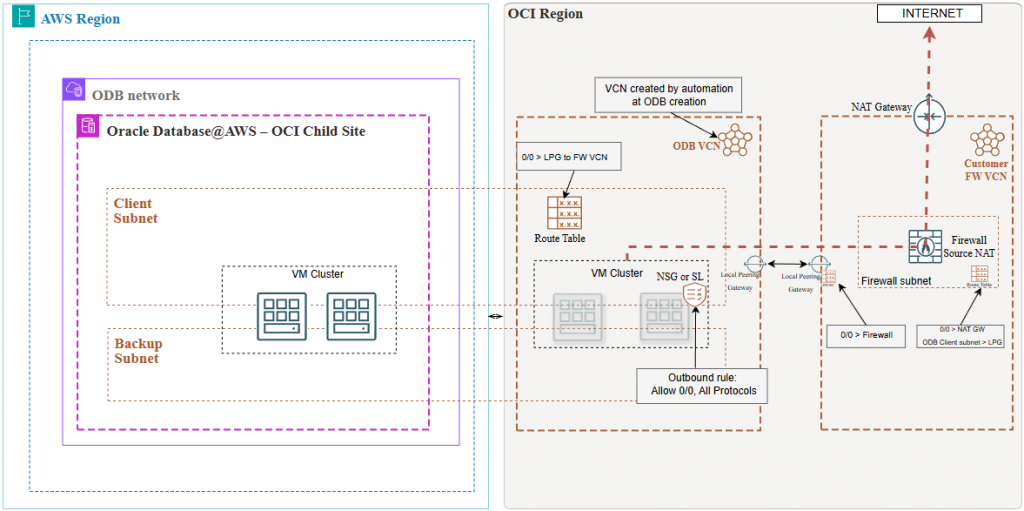
In this scenario, we will connect the shadow OCI VCN to a customer-managed VCN, through a Local Peering Gateway. Implementation steps:
- Create a Local Peering Gateway in each VCN and establish a connection between them.
- On the Shadow VCN:
- Add an entry on the Default Route table pointing 0/0 to the LPG;
- Create outbound security rules, either in the NSGs or in the Security Lists, to allow that traffic to egress.
- In the firewall VCN the architecture may vary based on the existing Firewall architecture:
- Assign a new VCN route table to the LPG and add a route to it pointing the 0/0 to the Firewall IP.
- In the Firewall subnet Route Table add a route for the Client subnet, pointing at the LPG and a route for 0/0 to a NAT Gateway.
- The NSG/SL entries in the Firewall Subnet must allow the traffic and a Firewall policy is needed.
A diagram of this architecture would be:
Internet Outbound flows on AWS
If we want to route outbound Internet traffic on the AWS side we need to declare exactly what IP CIDRs will be routed towards the AWS infrastructure. The menu in question is called Peered CIDRs and there are some restrictions:
- The list of Peered CIDRs cannot overlap with the following: the ODB Client Subnet CIDR, the ODB Backup CIDR, the Peered VPC (Transit) CIDR, the Public IP CIDR assigned to the ODB VPC Lattice.
- The 0.0.0.0/0 entry is not allowed currently.
Considering the above and understanding that there are some routing architectures very specific to Oracle Databases, the AWS infra that can support Internet Outbound flows will have these details:
- Peered CIDR List:
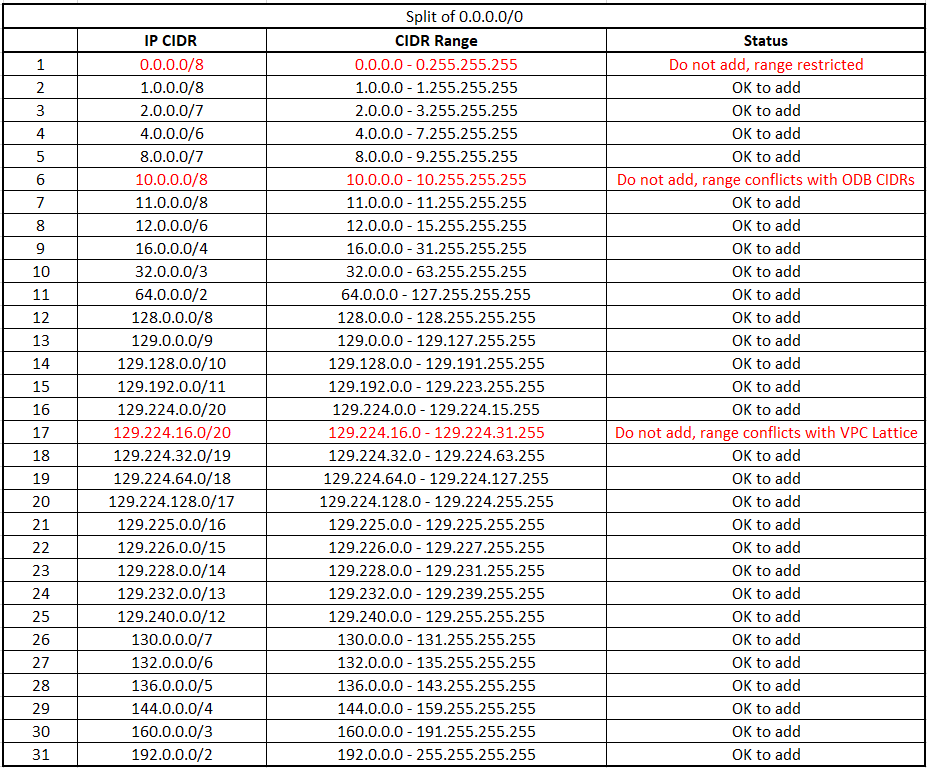
We need to use a subnet calculator and split the Internet (0.0.0.0/0) into a small list of CIDRs with the restrictions above in mind. The challenge is that the more subnets you need to remove the longer the Peered CIDR list becomes. For this example, I will use the following:
- I have an environment where everything is 10.0.0.0/8 so I will simply remove that from the list dedicated to the Internet access. Note that you will probably need to add subsets of the 10/8 for connections to the databases from your internal network but I will not cover that here.
- The VPC Lattice CIDR that was allocated to me is 129.224.16.0/20 so I will need to remove that from the list.
- We will also remove 0.0.0.0/8 from the list.
This brings us to a list like below:
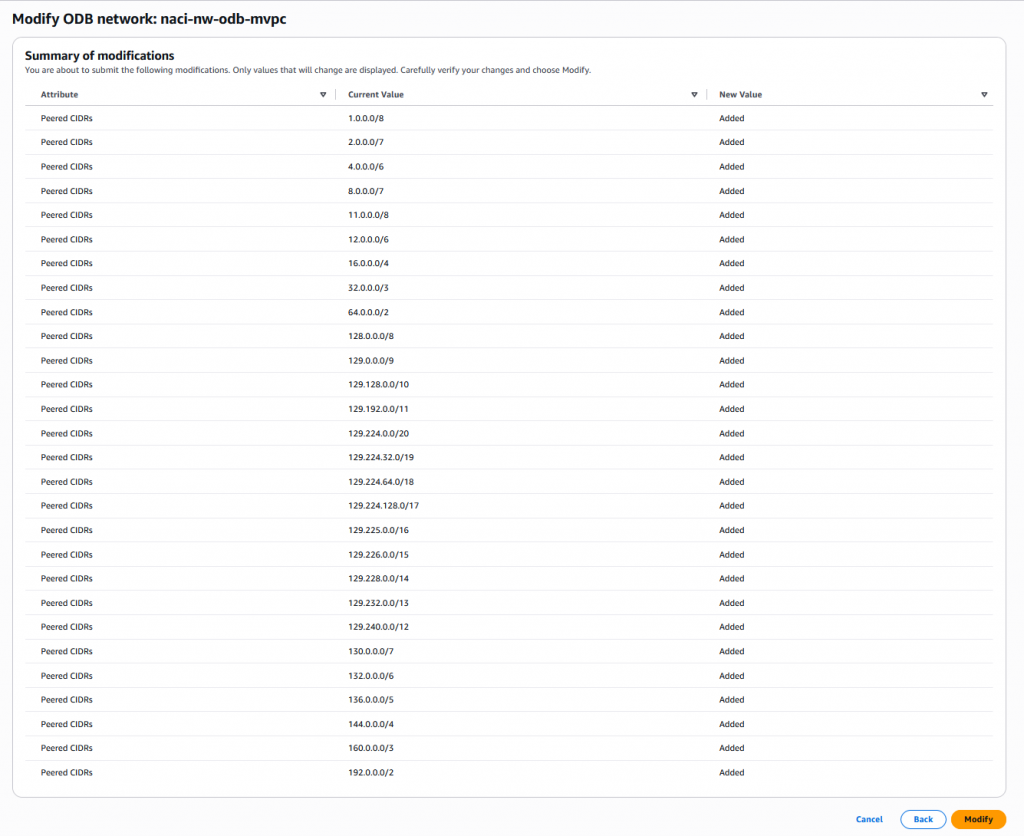
We will need to remove the Peered CIDR list of the ODB Network with all these Subnets, to enforce routing for them through the AWS Infrastructure.
Important notes:
- If you have a specific set of target IPs on the Internet, it is better to simply add that instead of the full 0.0.0.0/0 split because of the next points.
- There is a limit of how many Peered CIDRs you can add out-of-the-box. Without going into details, for each CIDR you add OCI will create entries in a Network Security Group, in the Shadow VCN. The NSG comes with a default limit of 120 entries which limits the number of Peered CIDRs to 19.
- While that limit of Peered CIDRs is currently at around 19, that can change in the future. If, while trying to add new Peered CIDRs, you get an error that says “Network Security Groups entries exceed 120 (or similar)” you will need to open a limit increase request with OCI to increase that value from 120 to 240 (or higher), on the OCI Console.
Steps to increase the number of allowed Peered CIDRs:
Login to the OCI Portal of the tenancy mapped to the AWS account. Go to this menu:
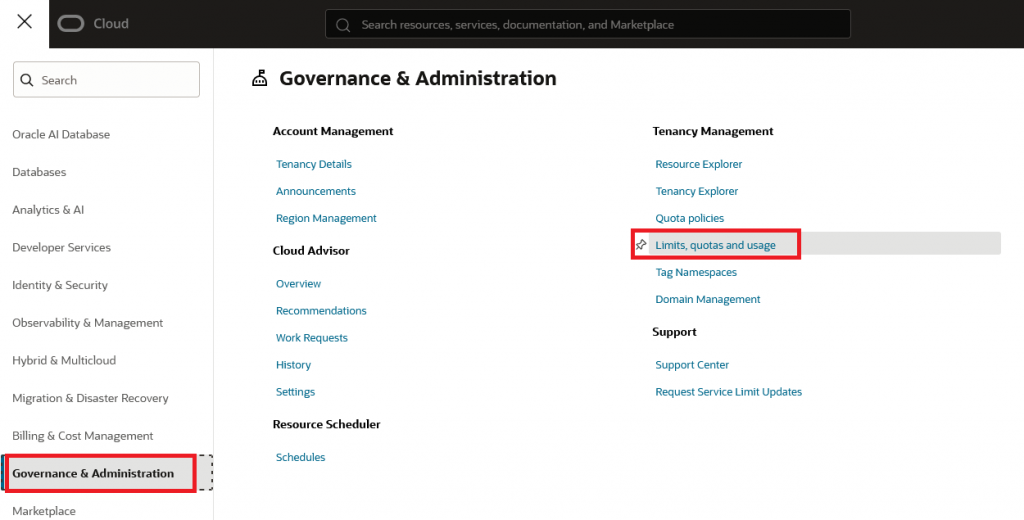
Press the “Create new request” button and input something like this:
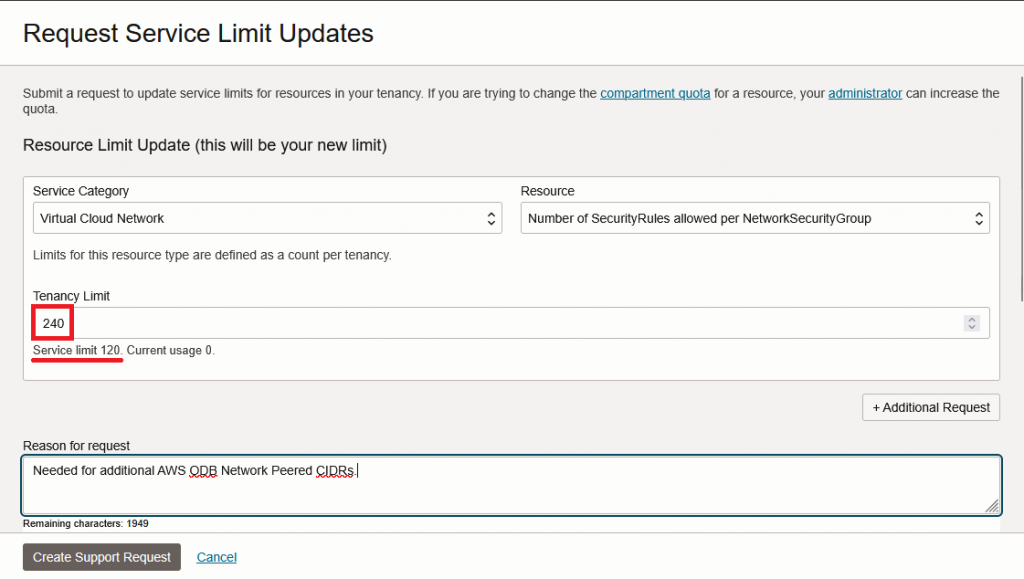
One note here is that you shouldn’t jump to high values but rather request this increase in increments of 120 or 240, to suit your needs, knowing that each 120 entries will give you 19-20 Peered CIDRs.
2. Routing considerations
The ODB Network, in AWS, has special routing restrictions which impact in the architecture. The most important things are:
- The traffic cannot egress to the Internet directly through the Peered VPC of the ODB. You will need to use a Transit Gateway or the AWS Cloud WAN service to send the traffic to a different VPC, typically a Security/HUB VPC.
- In the HUB VPC you will need a service that can send this traffic to the Internet. That service can be an AWS NAT Gateway, a NAT EC2 instance, a Firewall (AWS or NVA), etc.
Considering the above, an architecture that uses AWS Transit Gateway and an AWS NAT Gateway in the HUB would look like this:
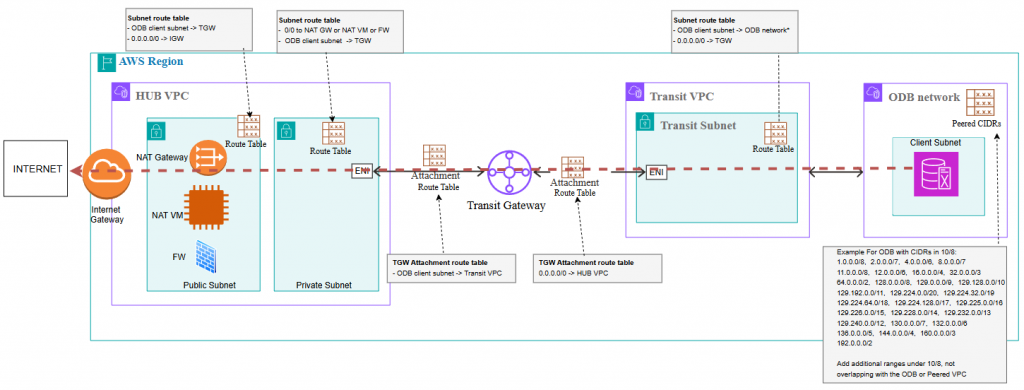
The egress architecture will change depending on what services you decide to use to provide the outbound traffic.
And that’s it! I hope this helps you.