

Introduction
Cloud environments today are dynamic, distributed, and constantly evolving. As organizations adopt microservices architectures and scale their workloads on Oracle Cloud Infrastructure (OCI), managing foundational services like DNS becomes increasingly complex.
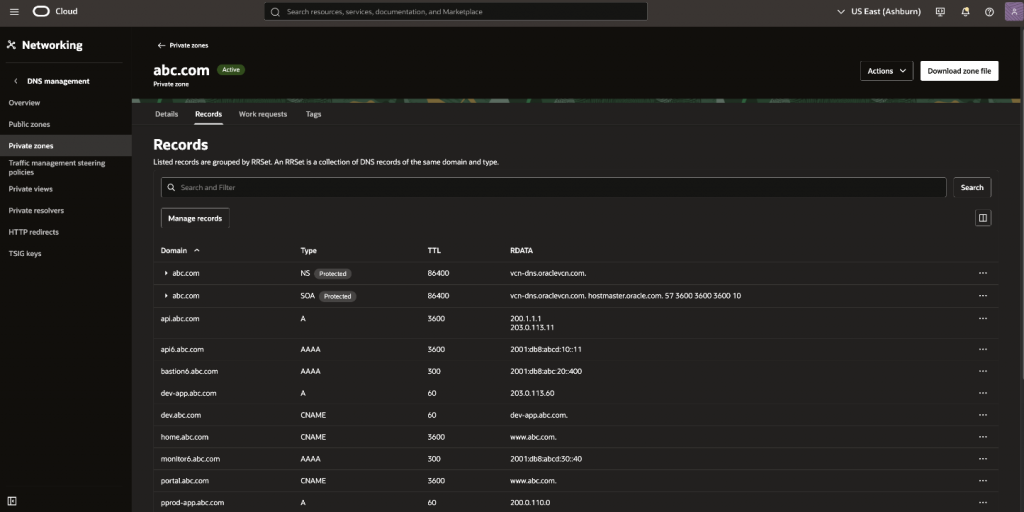
While OCI provides an intuitive interface for DNS management, manual record creation does not scale with growing environments. Teams often rely on spreadsheets or external systems to track DNS entries, leading to operational inefficiencies and increased risk of errors.
This blog demonstrates how to automate DNS record creation in OCI Private DNS Zones using Bash and Python, enabling scalable, repeatable, and reliable DNS management.
Why Automation is Needed
In real-world environments:
- DNS records are often maintained in spreadsheets or CMDB systems
- Bulk onboarding requires creating multiple records at once
- Manual updates through the Console increase the risk of errors
- Duplicate or inconsistent records can easily occur
To address these challenges, we need:
- Bulk processing capabilities
- Input-driven automation (CSV/Excel)
- Safe updates to prevent accidental overwrites
- Repeatable and scalable workflows
Solution Overview:
The automation workflow follows a simple pipeline:
CSV / Excel → Script (Bash / Python) → OCI CLI / SDK → OCI Private DNS Zone
- Input Layer: DNS records from CSV or Excel
- Processing Layer: Script validates and transforms input
- Execution Layer: OCI CLI or SDK updates DNS records
- Output: Records created/updated in Private DNS Zone
GitHub repository: https://github.com/oracle-quickstart/oci-security-networking/tree/main/Networking/Automations/oci-dns-records-create
Approach 1: Bash + OCI CLI
This approach is lightweight and ideal for quick automation or CI/CD pipelines.
Input Format (CSV):
DOMAIN,TYPE,TTL,RDATA

host1.abc.com,A,3600,10.0.0.10|10.0.0.11

alias1.abc.com,CNAME,3600,target1.abc.com
*Supports multiple RDATA values using ‘|’ operator
How It Works: The Bash script
- Reads records from a CSV file
- Validates and normalizes inputs
- Supports
A,AAAA, andCNAMErecords - Supports multiple RDATA values
- Dynamically builds OCI CLI payload
- Updates DNS records using oci dns record rrset update
How to Run the Bash Script from OCI Cloud Shell
1. Open OCI Cloud Shell
- Log in to the OCI Console -> Click on the Cloud Shell icon (top-right-corner)
2. Clone the Repository
(Alternatively, you can directly upload the script and .csv file to the cloud shell.)
git clone https://github.com/oracle-quickstart/oci-security-networking.git
cd oci-security-networking/Networking/Automations/oci-dns-records-create/bash-script-dns-records-update
3. Prepare the Input CSV File
- Create or upload your CSV file:
vi records.csvExample:
DOMAIN,TYPE,TTL,RDATA
host1.abc.com,A,3600,10.0.0.10|10.0.0.11
4. Make the Script Executable
chmod +x dns_records_update.sh5. Run the Script
Update the Private View OCID, Zone Name, and CSV file name as needed.
Syntax:
./dns_records_update.sh -v [Private View OCID] -z [Zone Name] -f [CSV file name]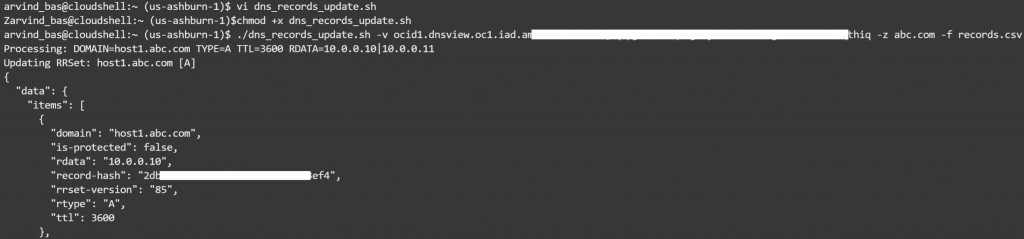
6. Verify the Records
(Optionally, you can also verify using the OCI console.)
oci dns record rrset list \
  --zone-name-or-id [ZONE_NAME_OR_OCID] \
  --domain host1.abc.com \
  --rtype A
When to Use Bash Approach
- Quick bulk updates
- CI/CD pipeline integration.
- Scenarios where full record overwrite is acceptable
Approach 2: Python + OCI SDK
This approach is more robust and suitable for production-grade automation.
Input Format (Excel):
Expected columns:
| TYPE | NAME | TTL | VALUE |
| A | host2.abc.com | 3600 | 203.0.113.10 |
| A | alias2.abc.com | 3600 | 203.0.113.10 |
How It Works: The Python Script
- Reads DNS records from Excel
- Retrieves existing DNS records from OCI
- Normalizes domain and record data
- Identifies new records and builds ADD operations
- Applies updates in batches using the OCI SDK
How to Run the Python Script from OCI Cloud Shell
1. Open OCI Cloud Shell
- Log in to the OCI Console -> Click on the Cloud Shell icon (top-right-corner)
2. Clone the Repository
(Alternatively, you can directly upload the script and .xlsx file to the cloud shell.)
git clone https://github.com/oracle-quickstart/oci-security-networking.git
cd oci-security-networking/tree/main/Networking/Automations/oci-dns-records-create/python-dns-records-update
3. Install Dependencies
python3 -m pip install --user pandas
pip install oci pandas openpyxl
4. Run the Script
Update the Zone OCID, Compartment OCID, and Excel file name as needed.
Syntax:
python3 script.py -z [ocid1.dns-zone.xxx]-c [ocid1.compartment.xxx]-f [dns_sample.xlsx]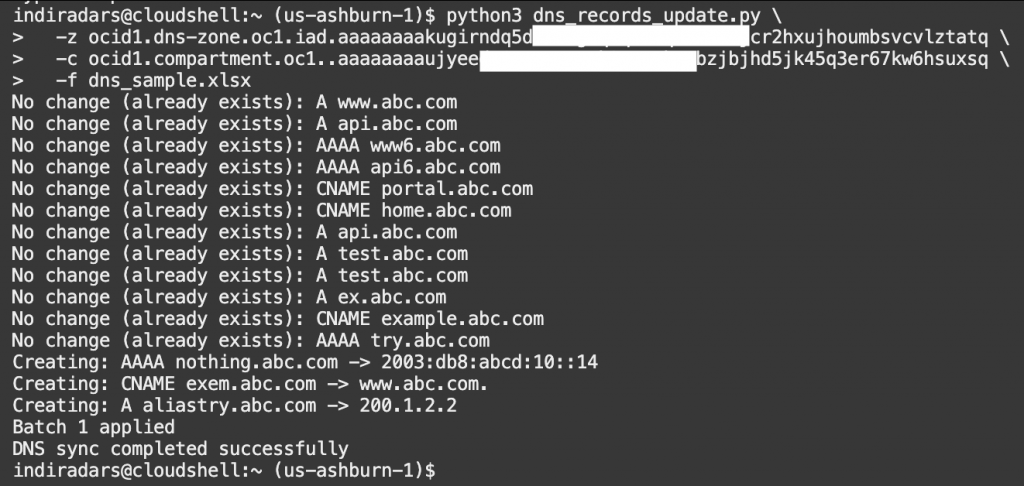
5. Verify the Records
(Optionally, you can also verify using the OCI console.)
oci dns record rrset list \
  --zone-name-or-id [ZONE_NAME_OR_OCID] \
  --domain host1.abc.com \
  --rtype A
When to Use Python Approach
- Managing services with multiple IP addresses.
- Incremental or controlled DNS updates
- Integration with Excel-based workflows
Conclusion
Automating DNS record management in OCI Private DNS Zones significantly reduces manual effort while improving consistency and accuracy across environments. It also enables scalable and repeatable operations, which are essential for managing growing infrastructure efficiently. By combining Bash for simplicity and speed with Python for flexibility and intelligent processing, you can build a reliable, production-ready DNS automation framework tailored to your specific needs.