
Introduction
In this blog, we explore the fundamental network topologies supported with ODB@Azure. We’ll cover key considerations along with the advantages and trade-offs of each approach, helping you choose the topology that best fits your use case. Detailed implementation steps are intentionally out of scope for this discussion.
Before diving in, it’s recommended to review the following blogs to build a solid understanding of the underlying networking concepts for this offering:
Networking Fundamentals for Oracle Database@Azure
Oracle Database@Azure DNS options
DNS resolution with Network Anchors in the Oracle Database at Azure
Agenda
- Local VNet topology
- VNet peering topology
- Hub and spoke topology with traffic inspection
Local VNet topology
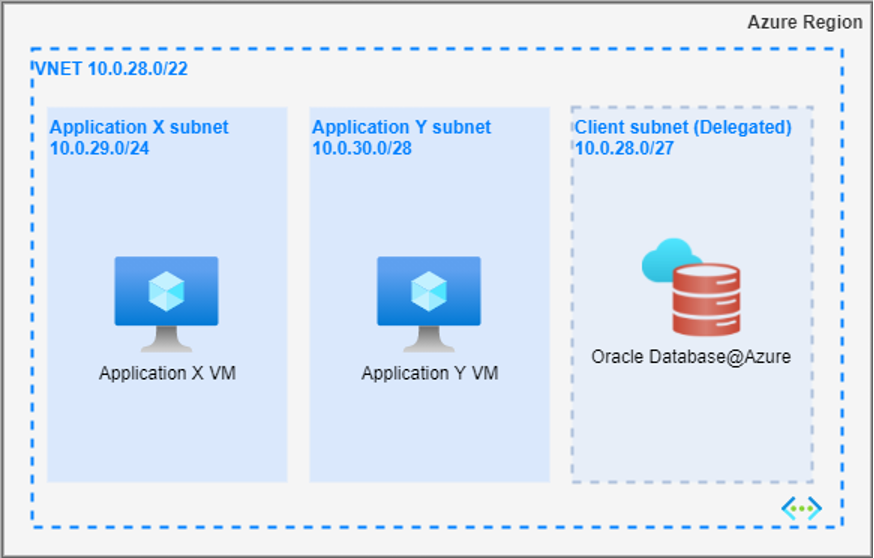
This is the simplest and most basic networking topology. In this model, the application subnets and the delegated subnet for Oracle Database@Azure reside within the same virtual network (VNet). Depending on organizational requirements, these subnets can be placed within the same availability zone (AZ) or distributed across different AZs.
This topology is particularly useful when multiple applications need to access the same database, or when applications are highly latency-sensitive and require minimal network latency between the application and the database.
Routing:
By default, Azure automatically routes the traffic between subnets within a VNet. Hence, no additional routing configuration is required.
Advantages:
- This topology provides minimal latency, as the applications and database are co-located within the same network. Optimal performance can be achieved when both are deployed within the same availability zone (AZ).
- It is cost-effective, as it avoids additional charges such as VNet peering costs.
- It simplifies network management, since the architecture involves only a single VNet.
Trade-offs:
As multiple applications share same database, this design offers less network segmentation and may not work for use cases that demand strong network isolation.
VNet peering topology
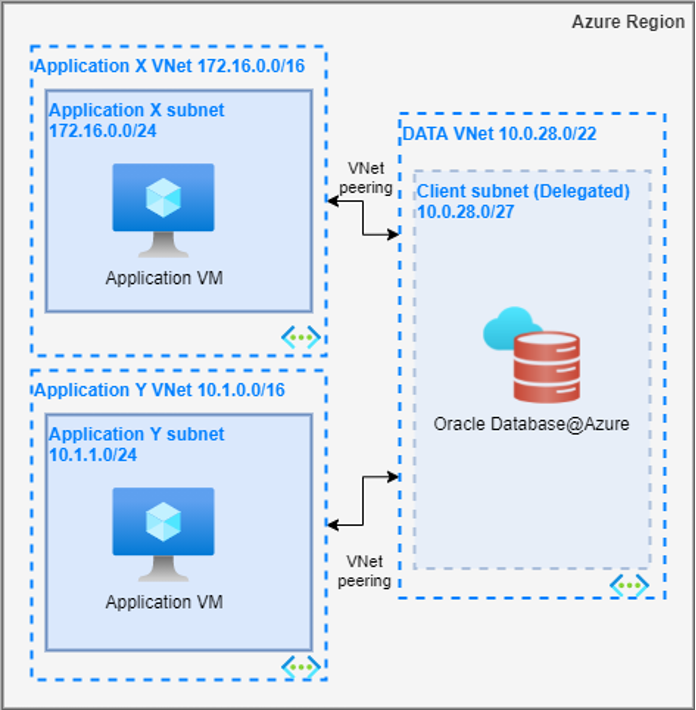
In this topology, Oracle Database@Azure is deployed within a dedicated VNet, while applications are hosted in separate VNets. Connectivity between the application VNets and the database VNet is established through direct VNet peering. Depending on organizational requirements, there can be one or multiple VNet peerings.
This approach is well-suited for scenarios where multiple applications, distributed across different VNets, need to access a shared database.
Routing:
Azure automatically adds routes for each virtual network’s address space to the routing tables of all subnets within the peered networks.
Advantages:
- This topology offers lower latency compared to more complex network architectures, such as hub-and-spoke.
- It is highly scalable, with support for up to 500 direct VNet peerings per VNet by default.
- It provides improved network segmentation and isolation.
Trade-offs:
- Managing multiple application VNets can increase operational complexity, especially as the number of VNets grows.
- VNet peering incurs additional costs, which can add up quickly when multiple peerings are involved in the architecture.
Hub and spoke topology with traffic inspection
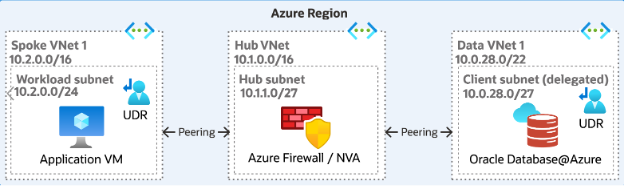
In this topology, Oracle Database@Azure is deployed within a dedicated VNet, while applications are hosted in separate VNets. Network Firewall/Network Virtual Appliance (NVA) is deployed in a separate Hub VNet. Database and application VNets are treated as spoke VNets. All the spoke VNets are directly peered with the Hub VNet.
This topology is ideal for scenarios where centralized security management is a primary concern, and the applications do not have strict latency requirements. By leveraging this model, organizations can ensure robust security controls while maintaining the flexibility to scale and manage network traffic across different VNets efficiently.
Routing:
User defined routes (UDRs) play a crucial role in this network topology. There are two key locations where UDRs need to be configured:
- Application spoke VNets:
- The UDR should specify the prefix of the delegated subnet CIDR, with the destination pointing to the NVA’s private IP. It’s important to note that the prefix can be more specific than the delegated subnet (e.g., /32) but should never be broader than the subnet.
- Oracle Database@Azure VNet:
- The UDR for the delegated subnet should define the prefix of the application spoke VNets and route the traffic to the NVA’s private IP as the destination.
- NVA is responsible for inspecting and managing traffic between the applications and the Oracle database. This is achieved through the enforcement of appropriate security policies
For more details on UDR required for this topology, please refer to ‘UDR requirements for routing traffic to Oracle Database@Azure’
Advantages:
- The centralized security control provided by this topology strengthens overall security, ensuring consistent policy enforcement across all VNets.
- This architecture simplifies network connectivity, enabling centralized management of traffic routing and access.
- Offers better network segmentation.
- The Hub VNet can host critical shared services, such as DNS, which can then be accessed by all spoke VNets
Trade-offs:
- The introduction of an additional routing hop via the NVA in the Hub VNet can add latency. For performance-sensitive applications, direct peering is recommended to minimize delays wherever possible.
- This architecture may lead to increased costs due to VNet peering, NVA licensing, and the need for gateway services, which can add up over time.
- Managing NVAs and User-Defined Routes (UDRs) across multiple VNets can increase operational overhead and complexity.
Conclusion
In this blog, we explored the fundamental connectivity patterns for the Oracle Database@Azure service. In the next installment, we will dive into advanced network topologies, including on-premises and global connectivity.