
Hi! In this blog entry, we will talk about how Oracle Autonomous Databases Serverless can connect to Oracle Generative AI.
OCI Generative AI
OCI Generative AI is a fully managed service that provides a set of state-of-the-art, customizable large language models (LLMs) that cover a wide range of use cases for text generation, summarization, and text embeddings. When it comes to networking, there are two options:
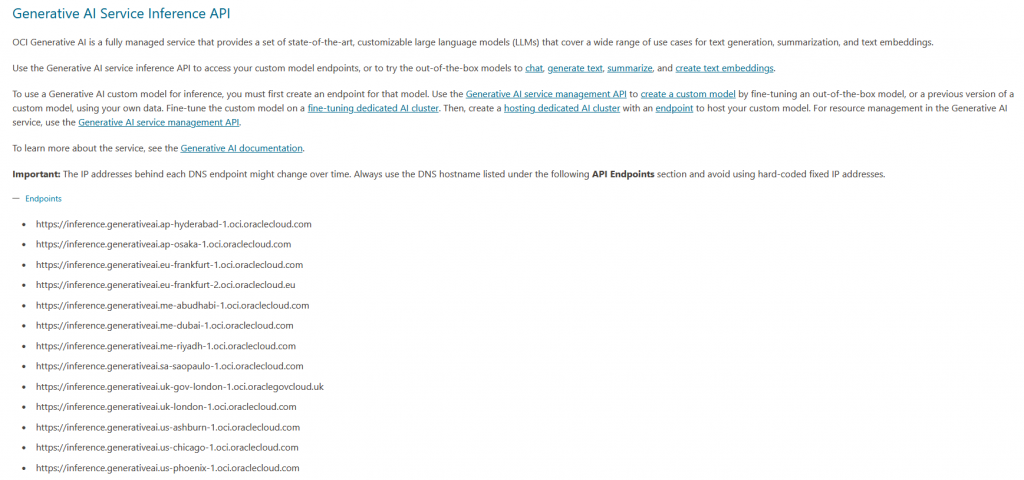
- Public Endpoints – the default exposure of the service is via Public Endpoints which have Oracle owned DNS names and public IPs and are allocated to every OCI Region that the GenAI service supports. The list of these inference endpoints can be found here.
- Private Endpoints – in the supported regions you can deploy Private Endpoints for this service. This will do the following:
- The service will create an endpoint in a VCN and subnet that you choose so that means it will get a private IP from your private routing domain.
- The service will create a private DNS entry in the format
[customer-prefix].pe.inference.generativeai.[region].oci.oraclecloud.com.
When you create the private endpoint, you have to do the additional required configuration so that routing, network security and DNS resolution works in your network, for that endpoint.
Note: You can use the Private Endpoint for both Oracle-managed models and your own custom models built on dedicated AI Clusters. If you want to use them for Oracle models, you have to enable a feature called “Allow Usage In On-Demand Mode”.
Oracle Autonomous Database
Oracle Autonomous Database is a fully managed cloud database service that uses machine learning to eliminate manual database administration. If you want to read about the network capabilities of Oracle ADB Serverless, please review this blog post. As there are many things to consider that are covered in that blog, I will try to give a short summary related to networking.
- The ADB-S defaults to a public endpoint/interface that is used for both ingress and egress traffic.
- The ADB-S can be configured with a private endpoint instead and used for ingress and some egress traffic. When deployed in this mode, the ADB-S public endpoint is blocking all inbound connections but remains the default for outbound connections.
- The ADB-S can also be deployed with both endpoints active for ingress traffic.
Now that we have some info on ADB-S interfaces, let’s see how it can connect to OCI GenAI.
ADB-S and OCI GenAI
Connecting ADB-S to Generative AI is an outbound call performed by the database on HTTPS. Because of that, it matters which endpoint option we choose for both the caller (ADB) and the responder (GenAI). Let’s deep dive on ADB-S outbound connections.
ADB-S outbound connections:
- The default outbound path is through a service VNIC that not visible to customers, even though you deployed the ADB with Private Endpoint only. Without any other configuration, the Internet outbound calls will just work. This means that, in this scenario, only Public GenAI Endpoints are reachable.
- If you deploy the ADB with private endpoint you can route some connections over the private endpoint with the use of this command:
ALTER DATABASE PROPERTY SET ROUTE_OUTBOUND_CONNECTIONS = 'PRIVATE_ENDPOINT';
or this command:ALTER DATABASE PROPERTY SET ROUTE_OUTBOUND_CONNECTIONS = 'ENFORCE_PRIVATE_ENDPOINT';
The documentation for this command is here.
The most important thing is what database packages are affected by the command, which is documented in this table:
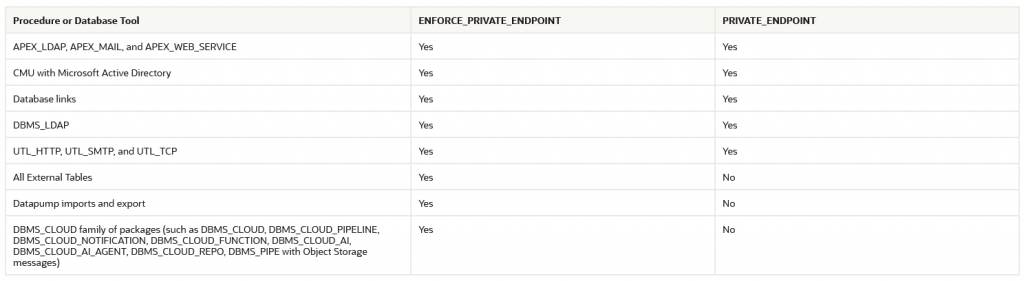
The ADB will use DBMS_CLOUD and more specifically DBMS_CLOUD_AI to connect to GenAI so using ENFORCE_PRIVATE_ENDPOINT is required for connecting ADB-S with Private Endpoint to OCI GenAI endpoints.
The ADB-S with a Private Endpoint can connect to:
a) GenAI Public endpoints if the PE subnet has Internet outbound reachability, typically via a NAT Gateway or a firewall. Since the GenAI DNS name is public, resolution should work automatically.
b) GenAI Private endpoints if the ADB PE subnet and the GenAI PE subnet have network reachability and private DNS configuration has been done (more on this later in the blog).
ADB-S in the Multicloud
Before going to the demo section, one interesting question: can an Autonomous Database deployed in the Multicloud (ex: Azure, GCP) connect to OCI GenAI? The answer is yes. The ADB in DB@Azure/GCP can connect to:
- OCI GenAI Public Endpoints directly, through its service vNIC.
- OCI GenAI Public Endpoints via its private endpoint in Azure if extra network configuration is done to give it Internet outbound capabilities and if “enforce private endpoint” was done in SQL.
- OCI GenAI Private Endpoints, if the connection to the OCI AI VCN was done, DNS was configured and “enforce private endpoint” was done.
Let’s say I have a DB@Azure deployment and I want to connect it to a private GenAI endpoint. This is what I would need to build:
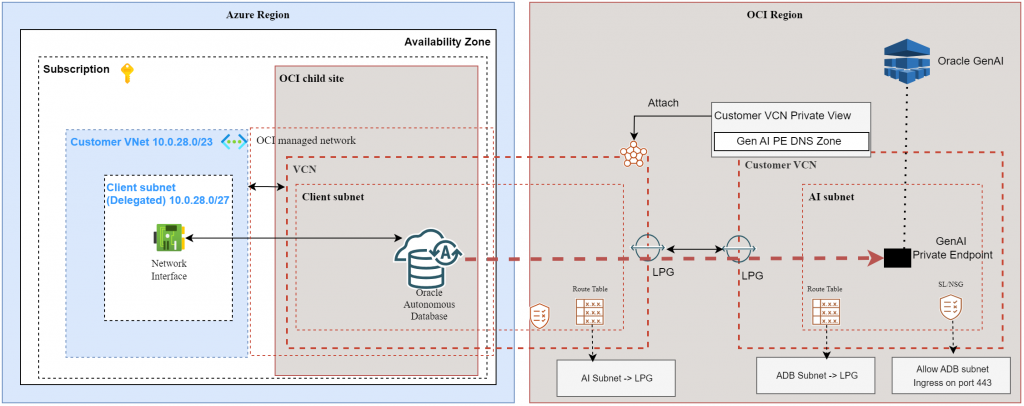
Summary:
- DB@Azure deployments automatically build OCI networking constructs (VCNs, subnets, etc) in the OCI peered region.
- You can peer that “Shadow” VCN with your own OCI VCN that has a GenAI Private Endpoint, with Local Peering Gateways.
- You need to update the route tables and security constructs to allow the traffic (HTTPS).
- You need to attach the GenAI PE VCN Private View to the Database Shadow VCN Resolver so the ADB can resolve the GenAI private DNS name.
Finally, the most important part is the ADB configuration.
ADB-S GenAI configuration
I will provide demo configuration for connecting an ADB-S with Private Endpoint to GenAI with Private Endpoint. This can be used for OCI deployed ADB-S instances but also ones deployed in Azure or GCP.
NOTE: Before starting it is important to say that the provided configuration below is for demo purposes only and should be validated with an Oracle AI Specialist before being put in production.
The configuration provided below is based on the documentation of the DBMS_CLOUD_AI package which can be found here.
Also, deploying the database and connecting to it with an SQL client is not covered by this blog as it will make it too long.
Connect to the ADB and issue these commands:
- As DB Admin, force the database to use the Private Endpoint for outbound connections to Generative AI.
ALTER DATABASE PROPERTY SET ROUTE_OUTBOUND_CONNECTIONS = 'ENFORCE_PRIVATE_ENDPOINT';
- As DB Admin, create a database user that will be used to connect to the AI.
CREATE USER adb_chat_user IDENTIFIED BY "password";
GRANT CREATE SESSION TO adb_chat_user;
GRANT EXECUTE ON DBMS_CLOUD TO adb_chat_user;
GRANT EXECUTE ON DBMS_CLOUD_AI TO adb_chat_user;
- As DB Admin, create a Database Network ACL that allows connectivity to the GenAI Private Endpoint.
BEGIN
DBMS_NETWORK_ACL_ADMIN.APPEND_HOST_ACE(
host => 'demogenai.pe.inference.generativeai.eu-frankfurt-1.oci.oraclecloud.com',
ace => xs$ace_type(
privilege_list => xs$name_list('http'),
principal_name => 'ADB_CHAT_USER',
principal_type => xs_acl.ptype_db
)
);
END;
/
All subsequent steps are performed as user adb_chat_user so logout from ADMIN and login with that user.
- Credentials to interact with OCI GenAI.
You can interact with GenAI with two types of credentials:
- OCI Gen AI API Key – you can create a key for interacting with OCI GenAI. This is configured in the GenAI page of OCI, and it is used for OPENAI compatible calls.
- OCI IAM USER API Key – this is the classic method of interacting with OCI API Endpoints (including Gen AI). I will use this for the demo.
In the OCI portal, go to the top-right and click on your username. In the menu that opens, click “tokens and keys”. Create a new API key by providing RSA public key.
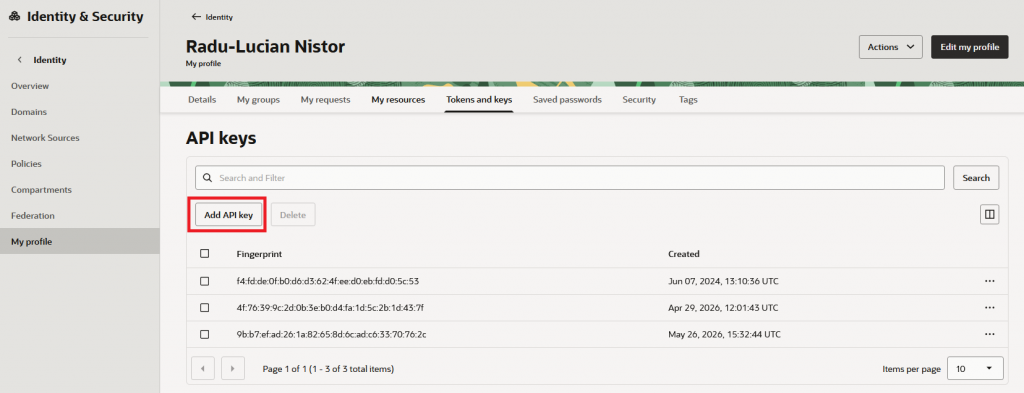
Alternatively, you can create a dedicated IAM user of GenAI interactions. Also, do not forget about IAM Policies related to the user group which are detailed here.
On the database, create DBMS_CLOUD credentials:
BEGIN
DBMS_CLOUD.CREATE_CREDENTIAL(
credential_name => 'OCI_GENAI_IAM_CRED',
user_ocid => 'ocid1.user.oc1..aaaaaaaaark23xxxxxxxxxxxxxxxxxxxxx',
tenancy_ocid => 'ocid1.tenancy.oc1..aaaaaaaaa3qmjxr43tjexx75xxxxxxxxxxxxxxxxxxxxxxxxxxx',
private_key => q'[
-----BEGIN PRIVATE KEY-----
MIIEvgIBADANBgkqhkiG9w0BAQEFAASCBKgwggSkAgEAAoIBAQCwKQ8bL+Mob8g0
//key data
50aFZqMzDY3o+7+D8sIqdoCaT/pFxSxeGvKFfRYoB/jDd2PRNY/Vi6pb9pt4iWZ5
PIi4DgxaGyfQjwSPUSHl2yki
-----END PRIVATE KEY-----
]',
fingerprint => '9b:b7:ef:ad:26:1a:82:65:8d:6c:ad:c6:33:70:76:2c'
);
END;
/
- Create a DBMS_CLOUD_AI profile
BEGIN
DBMS_CLOUD_AI.CREATE_PROFILE(
profile_name => 'OCI_GENAI_PRIVATE_PROFILE_AIPE',
attributes => JSON_OBJECT(
'provider' VALUE 'oci',
'provider_endpoint' VALUE 'https://demogenai.pe.inference.generativeai.eu-frankfurt-1.oci.oraclecloud.com',
'credential_name' VALUE 'OCI_GENAI_IAM_CRED',
'model' VALUE 'openai.gpt-oss-120b',
'conversation' VALUE 'true'
),
status => 'enabled'
);
END;
/
Note: there are many configurable options in the profile, as observable in the documentation page. Adjust this according to your needs.
- To test, let’s issue a SELECT:
SELECT DBMS_CLOUD_AI.GENERATE(
prompt => 'Write a small joke.',
profile_name => 'OCI_GENAI_PRIVATE_PROFILE_AIPE',
action => 'chat'
) AS chat_response
FROM dual;
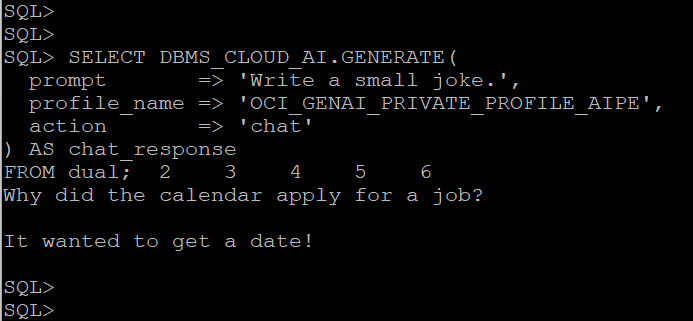
And there you have it, the ADB-S is having a nice chat with the Generative AI.