
Introduction
Oracle Fusion Applications AI Agent Studio now supports Identity Propagation, enabling the authenticated end-user identity to be securely carried from an AI Agent into downstream applications such as Oracle Integration Cloud (OIC), Enterprise Performance Management (EPM), Oracle Transportation Management (OTM), and Oracle Warehouse Management (WMS). This capability allows organizations to preserve user context and authorization across application boundaries, ensuring that AI-driven interactions adhere to the same security and access controls as traditional user-initiated transactions.
Identity Propagation is particularly valuable for AI Agents that interact with enterprise integrations and business processes spanning multiple Oracle SaaS and PaaS services. By maintaining the originating user identity throughout the transaction lifecycle, organizations can improve security, compliance, and personalized user experiences.
In this blog, we will explore a solution architecture in which a Fusion Applications AI Agent invokes integrations developed in Oracle Integration Cloud while propagating the end-user identity. OIC then leverages the same propagated identity to invoke Fusion Applications REST APIs, enabling end-to-end user-context preservation across the integration flow.
Many customers have already invested in prebuilt and custom integrations, extensions, and orchestration workflows within Oracle Integration Cloud that interact with Fusion Applications in production environments. These integrations often support critical business operations and can now be exposed as Tools within AI Agents, enabling conversational and agent-driven experiences without requiring organizations to redesign existing integration assets.
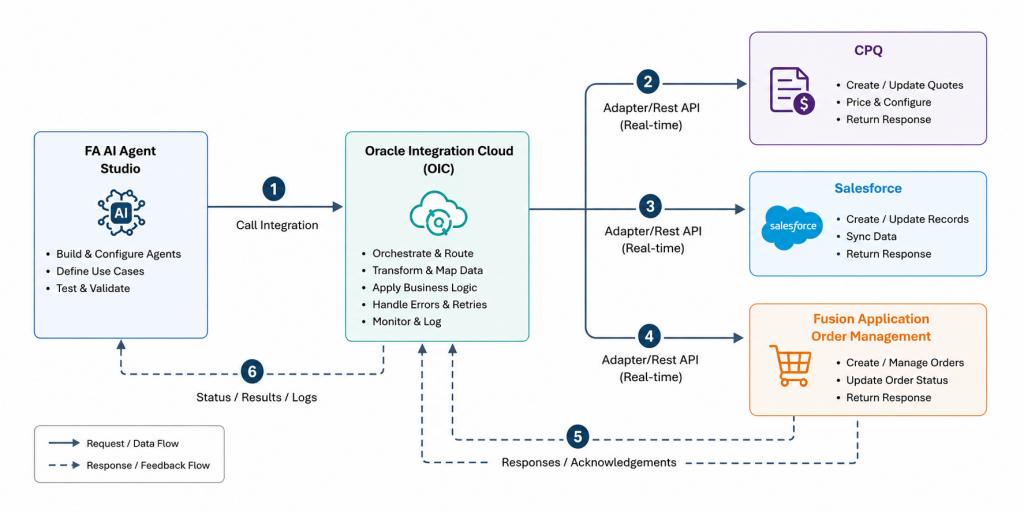
Consider the example of a Quote-to-Order business process that integrates Oracle Fusion Order Management, Oracle CPQ, and Salesforce. In this scenario, Fusion Applications AI Agent Studio can leverage an existing Oracle Integration Cloud integration to securely orchestrate interactions across these systems. By utilizing established integrations as AI Agent tools, organizations can accelerate adoption of AI-driven business processes while preserving existing investments, governance controls, and security policies.
Identity Propagation Flow
In this section, we will take a deeper look at the identity propagation flow from Fusion AI Agent Studio to Oracle Integration Cloud, and subsequently to Fusion REST APIs. The end-to-end identity propagation architecture is illustrated and described below.
My colleague Shreeni has also published a detailed blog on identity propagation from Oracle Integration Cloud to Fusion REST APIs. I recommend reviewing that article first, as it provides useful background before continuing with this blog. This blog focuses specifically on configuring identity propagation from Fusion AI Agent Studio to Oracle Integration Cloud.
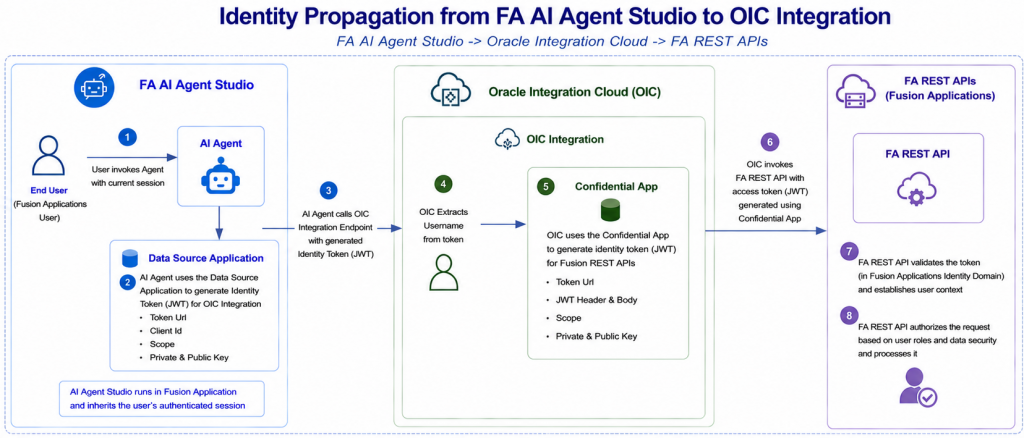
1. User Invokes the AI Agent
- An authenticated Fusion Applications user interacts with an AI Agent in FA AI Agent Studio.
- The AI Agent executes within the context of the user’s active Fusion Applications session.
2. AI Agent Generates Identity Token Using Data Source Application
- The AI Agent uses the configured Data Source Application to generate an access token (JWT) for OIC Integration.
- The Data Source Application contains:
- Token URL
- Client ID
- Scope
- Private Key
- Public Key
3. AI Agent Invokes OIC Integration
- The AI Agent calls the Oracle Integration Cloud (OIC) Integration endpoint.
- The generated access token (JWT) is passed in the Authorization header to OIC.
4. OIC Extracts Username from the Token
- OIC receives the incoming JWT.
- OIC extracts the username from the token and uses it as the user context for downstream processing.
5. OIC Generates Fusion Access Token Using Confidential App
- OIC uses a configured Confidential App to generate an access token (JWT) for invoking Fusion REST APIs.
- The Confidential App contains:
- Token URL
- JWT Header & Body
- Scope
- Private Key
- Public Key
- The generated access token is used for Fusion Applications API access.
6. OIC Invokes Fusion REST APIs
- OIC invokes the required Fusion REST API endpoints.
- The access token generated using the Confidential App is included in the API request.
7. Fusion REST API Validates the Token
- Fusion Applications validates the incoming access token.
- Upon successful validation, the user context is established for the request.
8. Fusion REST API Authorizes and Processes the Request
- Fusion Applications evaluates user roles, privileges, and data security policies.
- The request is authorized and processed according to the user’s access rights.
- The API response is returned to OIC and subsequently to the AI Agent.
Prerequisites
Identity propagation between Fusion AI Agent Studio and Oracle Integration Cloud (OIC) requires the following prerequisites and configurations.
- The Oracle Integration Cloud instance should ideally be provisioned within the same Identity Domain as the Fusion Applications environment. This is the recommended deployment model and simplifies identity propagation.
- In scenarios where OIC is provisioned in a different Identity Domain, the same user account (with an identical username) must exist in both the OIC Identity Domain and the Fusion Applications Identity Domain.
- Users in the OIC Identity Domain must be authorized to invoke integrations. This is typically achieved by assigning appropriate OIC roles such as ServiceDeveloper, ServiceInvoker, or other roles required for the integration use case.
Configurations
The identity propagation configuration consists of several key setup activities that establish trust between Fusion AI Agent Studio, Oracle Integration Cloud (OIC), and the Identity Domain. The process begins with generating a private signing key and its corresponding public key certificate.
Next, a confidential application is created and configured in the OIC Identity Domain with the JWT Assertion grant type enabled, allowing secure token exchange based on the propagated user identity. The public certificate is then uploaded as a Trusted Client in the confidential application to enable validation of JWT user assertions.
Finally, a Data Source Application is configured in Fusion AI Agent Studio using the generated keys, client credentials, and OAuth scope information from the confidential application. Together, these configurations enable secure end-to-end identity propagation from Fusion AI Agent Studio through Oracle Integration Cloud and onward to Fusion Applications REST APIs. The following sections describe each step in detail.
1. Generate private signing key and a corresponding public key certificate
Fusion AI Agent Studio uses a private signing key to generate and sign JWT user assertion tokens. Oracle Identity Domain validates these JWT assertions using the corresponding public key certificate.
The key pair and certificate must be generated externally, outside of both Oracle Integration Cloud and Fusion Applications. Utilities such as keytool and OpenSSL can be used to generate the private key and public certificate. Sample commands for generating the signing key and certificate are provided below.
# generate key pair using JAVA keytool  (create keystore jks)
keytool -genkey -keyalg RSA -alias oicdev -keystore oicdev.jks -storepass welcome1 -validity 3650 -keysize 2048

# export the cert from the jks store using JAVA keytool  (jks --> cer)
keytool -exportcert -alias oicdev -file oicdev.cer -keystore oicdev.jks -storepass welcome1

# import jks key and cert input a pkcs store (jks --> p12 )
keytool -importkeystore -srckeystore oicdev.jks -srcstorepass welcome1 -srcalias oicdev -destalias oicdev -destkeystore oicdev.p12 -deststoretype PKCS12 -deststorepass welcome1 -destkeypass welcome1

# export the key from pkcs12 store to pem format  (p12 --> key)
openssl pkcs12 -in oicdev.p12 -nodes -nocerts -out oicdev.key

# convert the key into pem format
openssl rsa -outform pem -in oicdev.key -out oicdev.pem

# convert the cer into crt format
openssl x509 -inform DER -in oicdev.cer -out oicdev.crt
2. Create a confidential application on OIC Identity domain
Next, create a confidential application within the OIC Identity Domain. While configuring the application:
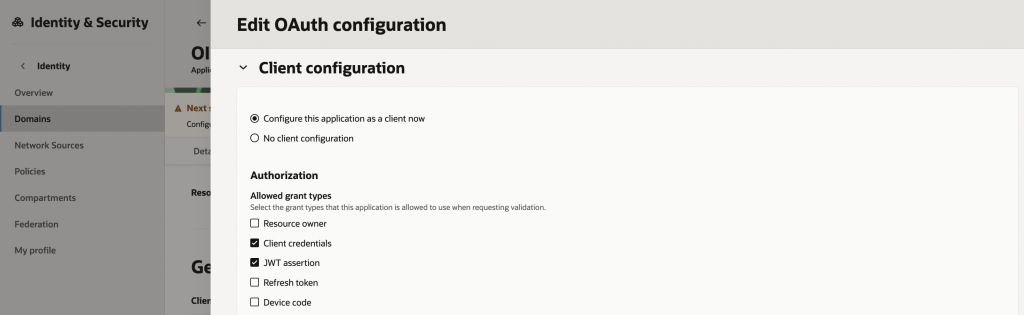
- Enable the JWT Assertion and Client Credential grant types under the OAuth Client configuration.
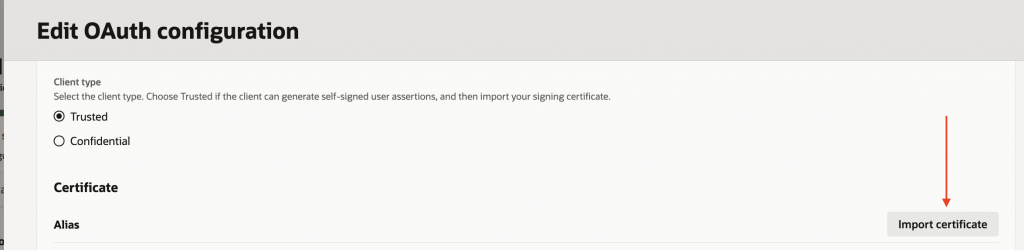
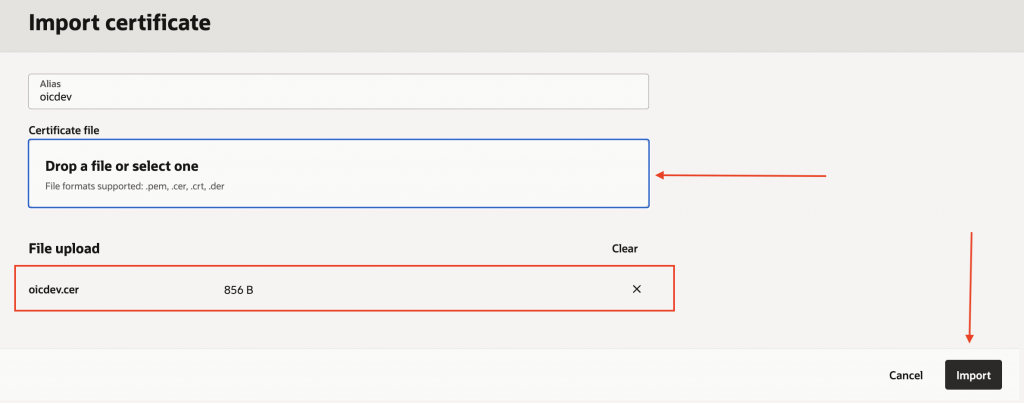
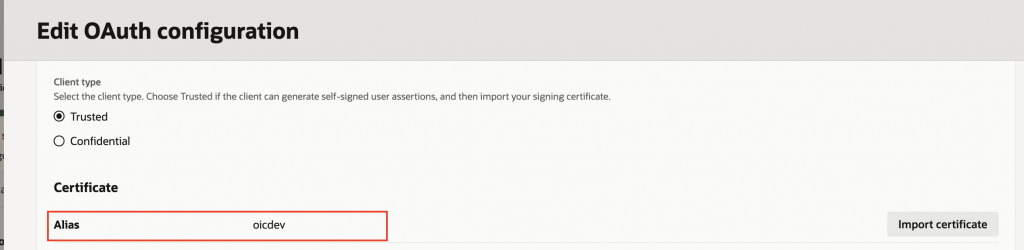
- Import the public certificate created earlier and associate it with the appropriate certificate alias (i.e. oicdev). This certificate enables the Identity Domain to validate JWT assertions generated by Fusion AI Agent Studio.
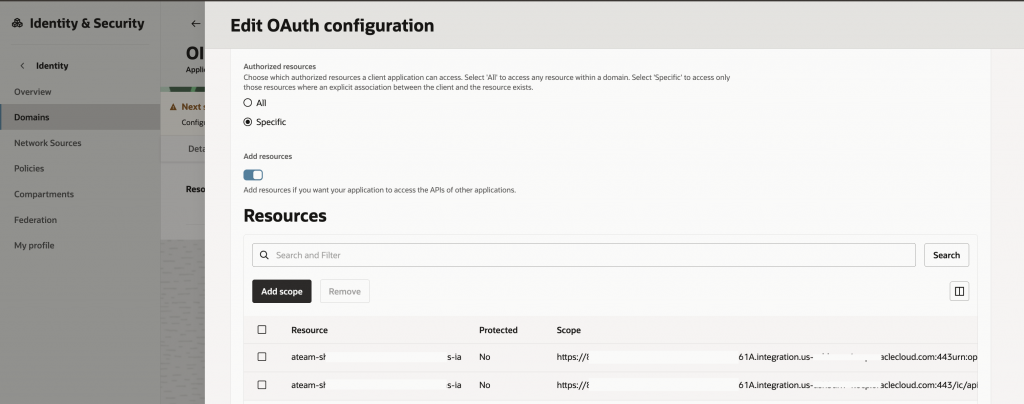
- Configure the required scopes for the Oracle Integration Cloud instance.
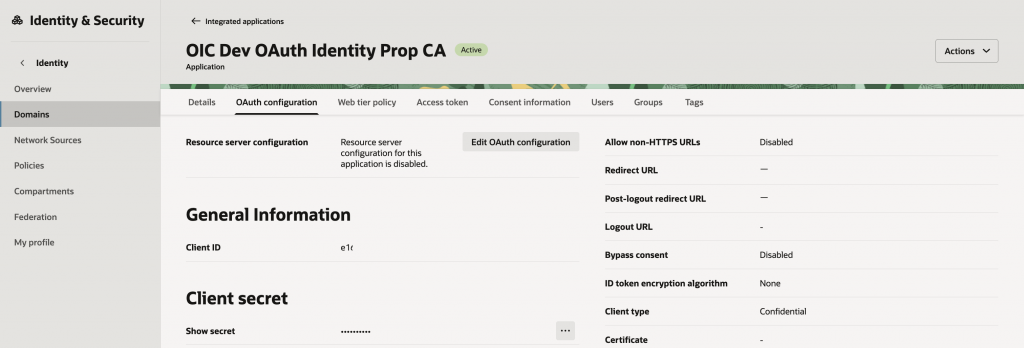
- Activate the confidential application once the configuration is complete.
After activation, make a note of the generated Client ID, as it will be required when configuring the Data Source Application in Fusion AI Agent Studio. The sample screenshots below illustrate the confidential application configuration.

3. Create Data Source Application in FA AI Agent Studio
To complete the setup, create a Data Source Application in Fusion AI Agent Studio.
- Sign in to Fusion Applications.
- Navigate to Tools → AI Agent Studio → Credentials → Data Source Applications.
- Click Add to create a new Data Source Application.
- Provide the following details:
- Oracle Integration Cloud Base URL
- Identity Domain Token Endpoint URL
- Client ID of the confidential application
- OAuth scope configured for the confidential application
- Private signing key (.pem format)
- Public certificate (.crt format)
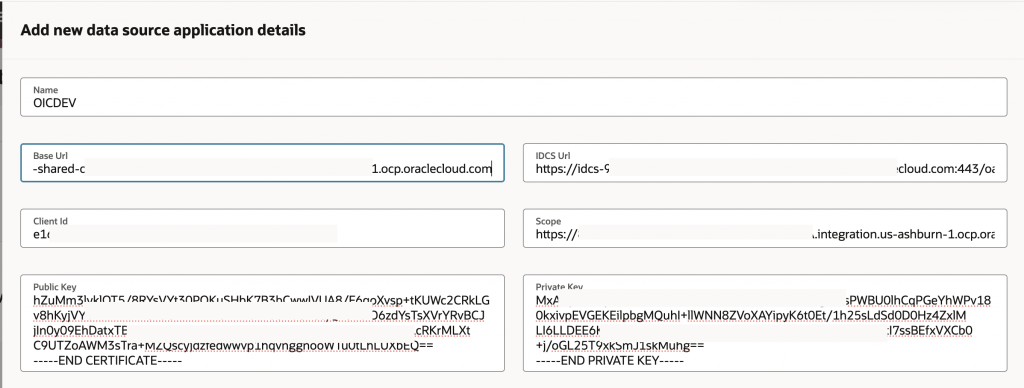
Once configured, Fusion AI Agent Studio can generate JWT user assertions, obtain access tokens from the Identity Domain, and securely invoke Oracle Integration Cloud integrations while preserving the authenticated user’s identity throughout the transaction flow.
AI Agent in FA AI Agent Studio
With the identity propagation configuration in place, the next step is to create an AI Agent that invokes an Oracle Integration Cloud (OIC) integration as a tool. During runtime, the agent uses the authenticated user’s identity together with the Data Source Application configuration to generate a JWT user assertion, obtain an access token, and securely invoke the target integration while preserving the user’s identity. To simplify the implementation and demonstrate the end-to-end flow, we will use the same OIC integration referenced in my colleague’s blog.
1. Create Business Object
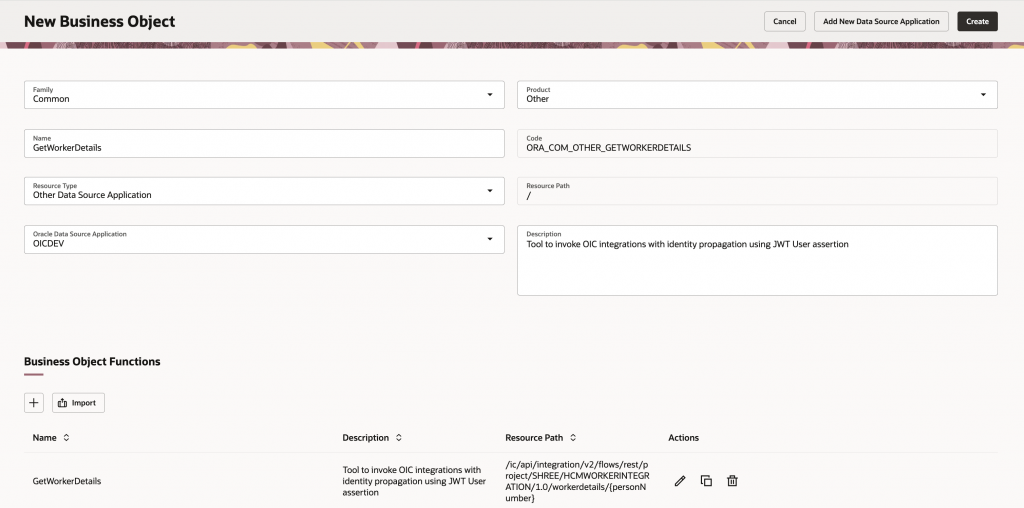
Fusion AI Agent Studio provides the ability to create Business Objects based on a configured Data Source Application. Navigate to the Business Objects tab and create a new Business Object using the Data Source Application configured in the previous section.
As shown in the figure below, the Business Object resource path is automatically derived from the base URL defined in the Data Source Application (OICDEV) and is therefore displayed as a read-only value of “/”. The GetWorkerDetails Business Object function is then configured using the remaining portion of the OIC integration endpoint URL. Parameters required by the integration, such as PersonNumber, are automatically identified and generated based on the resource path definition, reducing manual configuration effort.
2. Create Tool
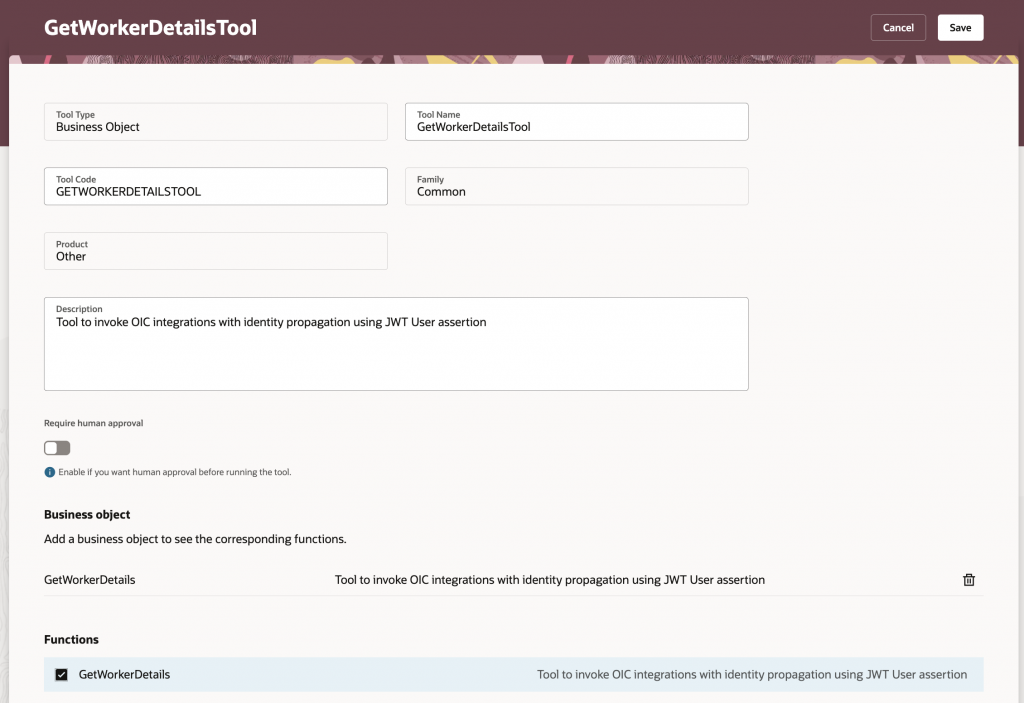
Once the Business Object has been created, create a new Tool based on the Business Object. Provide an appropriate name and description that clearly explains the tool’s purpose. Then select the GetWorkerDetails function to expose it as an action that can be invoked by the AI Agent during runtime.
3. Create Agent
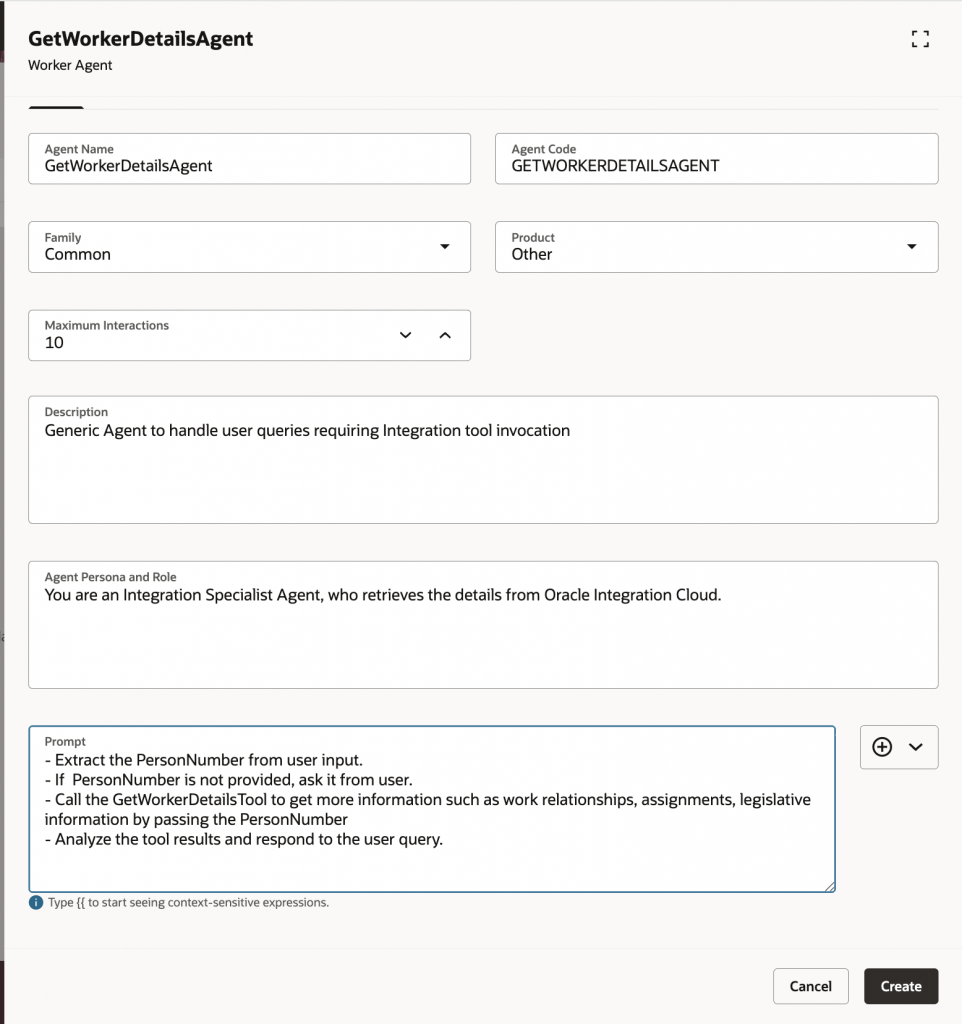
Next, create a new AI Agent and define its description, instructions, persona, and business role. Associate the Tool created in the previous step with the agent so that it can invoke the underlying OIC integration when required. For this example, the default summarization and Large Language Model (LLM) settings can be retained under the LLM tab.
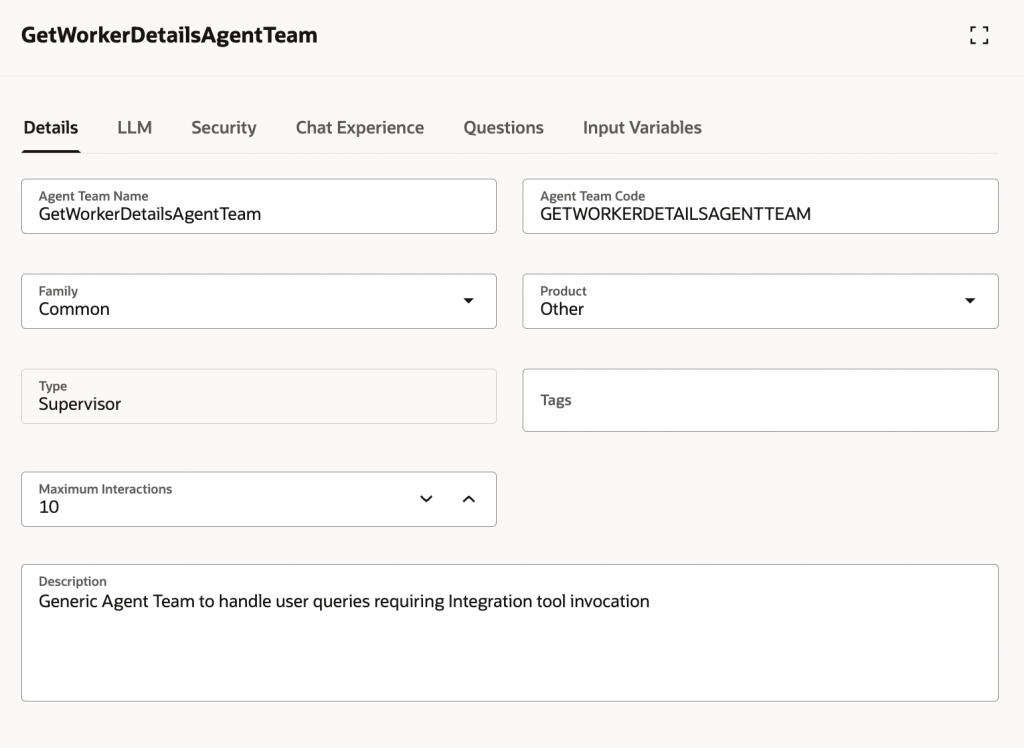
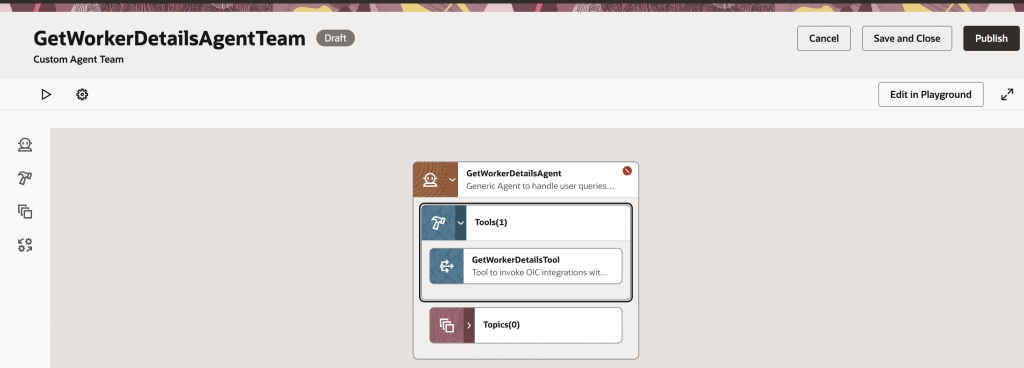
4. Create Agent Team
The final step is to create an Agent Team that hosts the newly created AI Agent. Define an appropriate team description, configure the maximum number of interactions, and add the agent to the team as shown in the screenshot below. Once configured, the Agent Team provides the runtime environment through which users can interact with the AI Agent and invoke the OIC integration using their propagated identity.
Agent Testing
To test the end-to-end identity propagation flow from Fusion AI Agent Studio to Oracle Integration Cloud (OIC), we executed 2 tests using different user personas. The testing approach follows the same methodology described in my colleague’s blog to demonstrate how user permissions are consistently enforced across the entire request lifecycle.
Test Case 1: Authorized HCM User
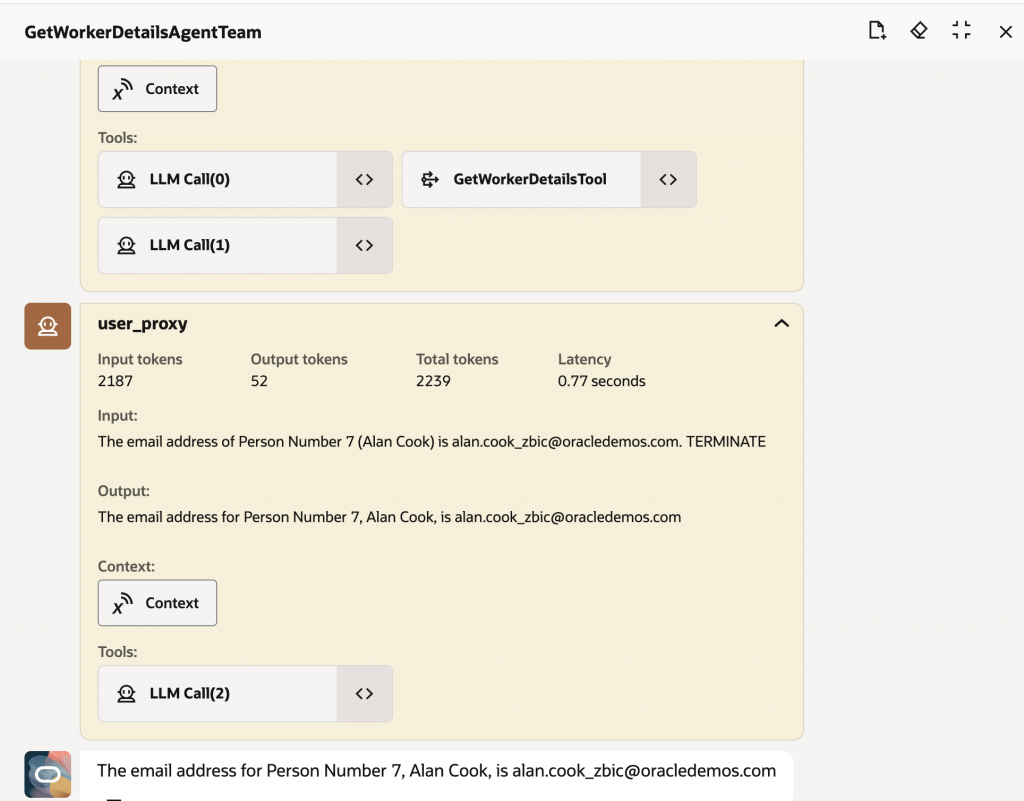
In the first scenario, the test is executed using an HCM user who has the required permissions to invoke both the OIC integration and the Fusion Applications Workers REST API. The user interacts with the AI Agent and requests the email address for worker Person Number 7.
When the request is submitted, Fusion AI Agent Studio generates a JWT user assertion based on the authenticated user’s identity and invokes the OIC integration using the propagated user context. Oracle Integration Cloud then uses the same user identity to invoke the Fusion Workers REST API. Since the user has the necessary privileges, the API request succeeds and the worker’s email address is returned to the integration and subsequently displayed by the AI Agent.
It is worth noting that the Workers REST API could be exposed directly as a Business Object Tool within Fusion AI Agent Studio without involving Oracle Integration Cloud. However, the purpose of this example is to demonstrate the complete identity propagation flow across Fusion AI Agent Studio → Oracle Integration Cloud → Fusion Applications. This approach reflects real-world customer implementations, where AI Agents frequently need to leverage existing custom and prebuilt integrations already deployed in Oracle Integration Cloud.
Test Case 2: Unauthorized SCM User
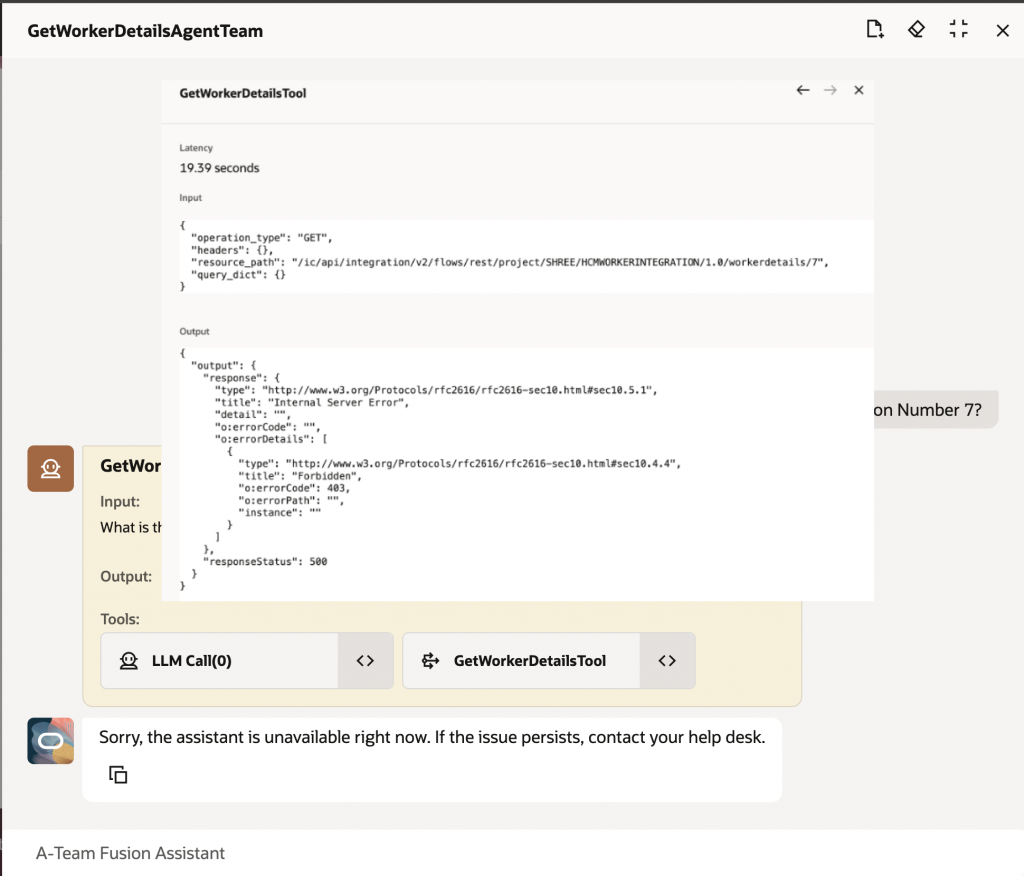
In the second scenario, the test is executed using an SCM user who has permission to invoke the OIC integration but does not have authorization to access the Fusion Workers REST API. The user submits the same request to retrieve the email address for Person Number 7.
As in the previous scenario, Fusion AI Agent Studio propagates the authenticated user’s identity to Oracle Integration Cloud, which then uses that identity to invoke the Fusion Workers REST API. Because the SCM user lacks the required privileges to access the API, Fusion Applications returns an HTTP 403 Forbidden response.
The error is propagated back through Oracle Integration Cloud and ultimately returned to the AI Agent. While the AI Agent displays a generic error message to the end user, the tool execution details clearly show the underlying 403 authorization failure. This behavior confirms that user permissions are preserved and enforced throughout the entire identity propagation flow.
Conclusion
This blog demonstrated how authenticated user identities can be propagated from Fusion AI Agent Studio to Oracle Integration Cloud using the newly introduced Data Source Application capability. By preserving user context across application boundaries, organizations can ensure that authorization policies, security controls, and audit requirements remain intact throughout AI-driven business processes.
Although this example focused on Oracle Integration Cloud and Fusion Applications REST APIs, the same identity propagation pattern can be applied to other Oracle SaaS applications, including Oracle Warehouse Management (WMS), Oracle Transportation Management (OTM), and Enterprise Performance Management (EPM). This capability enables customers to leverage existing integrations and enterprise workflows while extending them through secure, user-aware AI Agent experiences.
Acknowledgement
I would like to thank Shreenidhi Raghuram for his guidance, technical expertise, and valuable contributions to the development of this blog.