

Introduction
Oracle Cloud Infrastructure (OCI) FastConnect provides dedicated connectivity to OCI, while Megaport extends its reach to Megaport enabled data centers without requiring a physical presence at every Oracle interconnection point.
For critical workloads, it is essential to have redundancy and diversity of connectivity between OCI and a customer’s enterprise network. Redundancy provides multiple network paths. Diversity is the separation of network paths across distinct devices, locations, and infrastructure such that a single failure cannot disrupt all paths. Deploying multiple FastConnect virtual circuits is the first step towards this goal but is not sufficient by itself. The circuits may still share single points of failure, such as the customer router, Megaport-OCI on-ramp, Megaport diversity zone, or MCR.
This blog explains how to achieve diversity for redundant connections using Megaport, an Oracle FastConnect partner, with Megaport Cloud Routers (MCRs) terminating the FastConnect virtual circuits.
The following terms are used throughout the blog; refer to the linked resources for more details.
- Megaport Port
- Megaport Diversity Zones
- Megaport Virtual Circuit (VXC)
- Megaport Cloud Router (MCR)
- OCI FastConnect
- OCI Dynamic Routing Gateway (DRG)
FastConnects with Megaport Cloud Router (MCR)
Some customers may not have an on-premises datacenter of their own. Their entire infrastructure may be hosted on Cloud platforms or SaaS products, interconnected via Megaport. Alternately, it is possible that a customer may have an on-premises facility but may want the inter-cloud routing to happen within Megaport, without traffic hair-pinning through their facility. The solution to both these use cases is a Megaport Cloud Router (MCR).
An MCR is a managed virtual router running on Megaport’s infrastructure which can establishes Layer 3 connectivity with endpoints connected via Megaport. When using an MCR with an OCI FastConnect, the BGP peering is between the OCI DRG and the MCR. If connectivity needs to be extended to on-premises, another Megaport private VXC between the MCR and an on-premises router(s) will need to be established.
Customers may use either a single MCR (for cost or other purposes) or multiple MCRs to get true redundancy and diversity. In the following sections, we will discuss how you can achieve FastConnect connection diversity for both these cases.
Scenarios
Using a single MCR
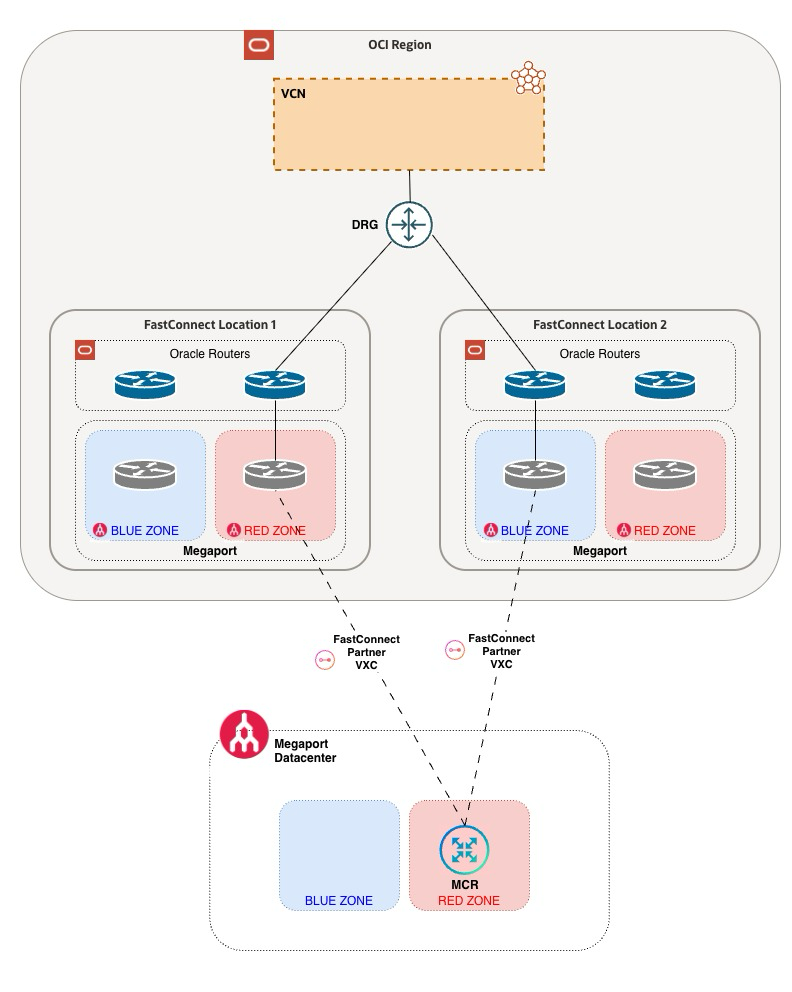
This design can be used when connecting a single OCI region to a single data center. Both FastConnect virtual circuits terminate on the same Dynamic Routing Gateway (DRG) but different logical devices.
OCI-side Configuration
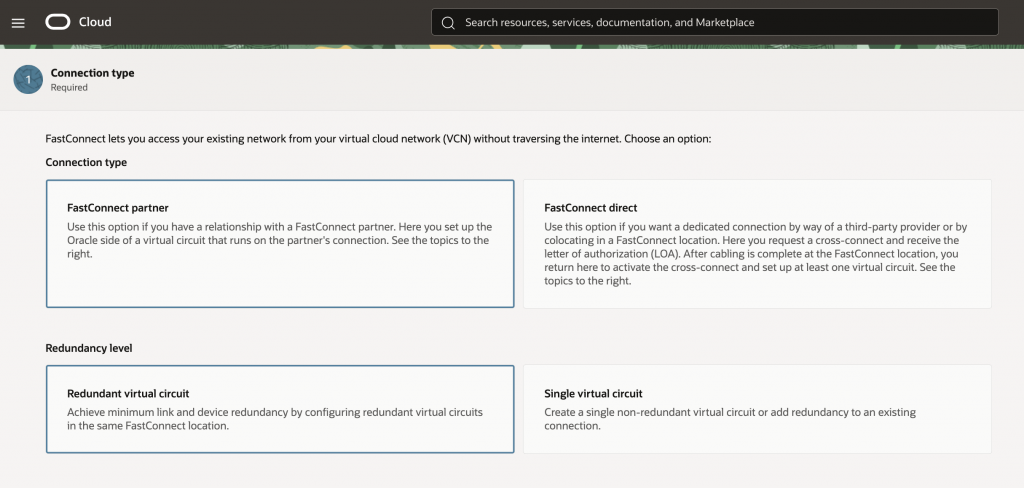
When configuring FastConnect in the OCI Console, choose redundant partner virtual circuits, selecting Megaport Service as the partner and using unique BGP peering addresses for each circuit. Selecting redundant virtual circuits ensures that OCI terminates them on different logical devices in the backend, eliminating a single point of failure. Both virtual circuits can terminate on the same Dynamic Routing Gateway (DRG) and be configured as Active-Standby using BGP attributes or Active-Active using ECMP. Note the OCID of each virtual circuit
Megaport-side Configuration
When using a Megaport Cloud Router to terminate a FastConnect virtual circuit, there are no physical Megaport Ports in the datacenter for termination. Instead, both virtual circuits are connected to the MCR virtually by Megaport via their software-defined fabric.
Virtual Circuit 1
You add a new connection to Oracle Cloud Cloud by clicking on the ‘+’ icon next to the Megaport Cloud Router.
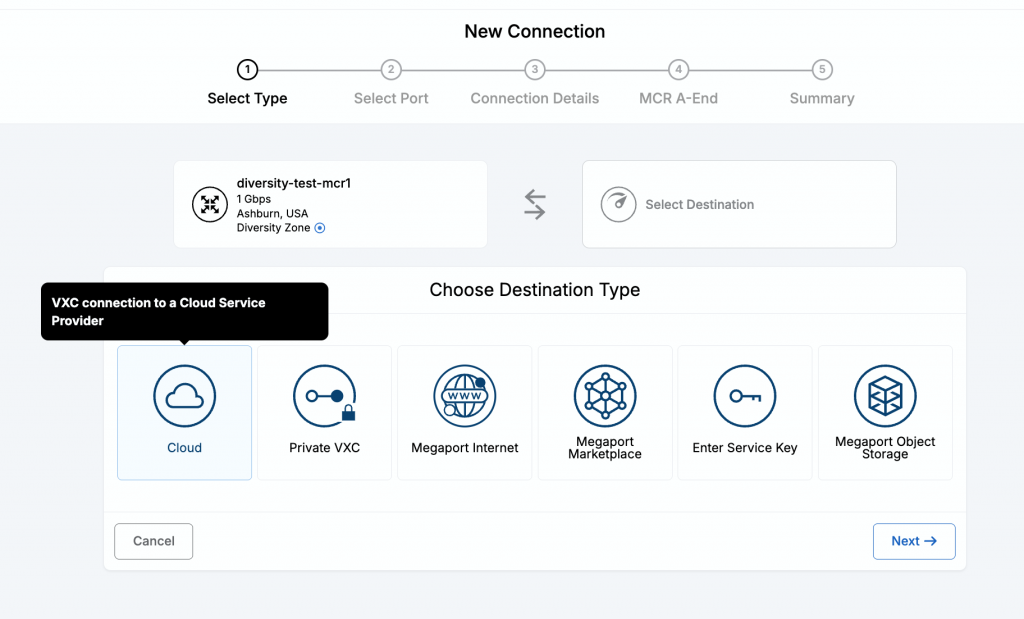
Enter the OCID of the first virtual circuit and select an on-ramp port in one of the diversity zones. In this example, we have selected the RED diversity zone.
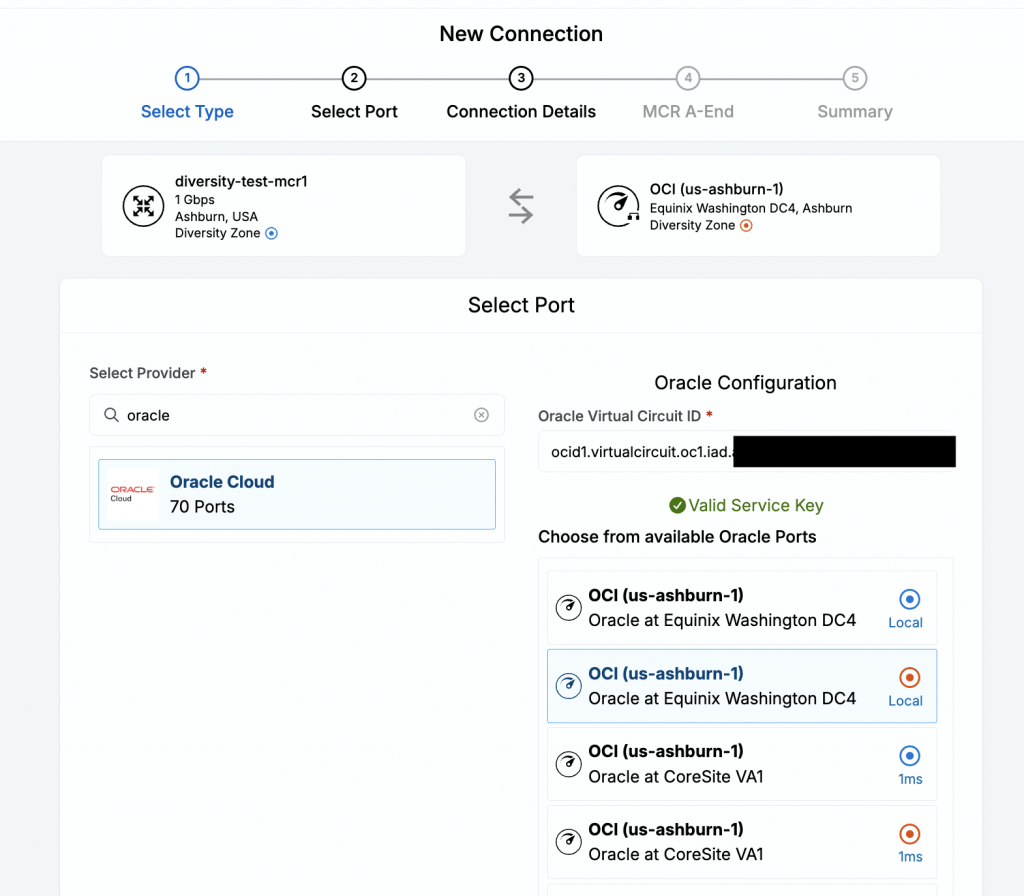
Complete all the configuration for this virtual circuit by entering the name, desired bandwidth, contract terms an the BGP configuration. Remember to match the BGP configuration correctly with what is configured on the FastConnect page on the OCI Console.
Virtual circuit 2
For the second virtual circuit, follow the same steps but select a different Oracle port for the connection. In this case, select an Oracle port in a different diversity zone (BLUE) and you can also select it in a different facility than the one used for the first virtual circuit. In this example, we selected a port in the BLUE diversity zone in the Coresite VA1 facility for the second virtual circuit because the first virtual circuit used a port in the RED diversity zone in Equinix DC4. Complete the rest of the configuration for this virtual circuit, similar to how it was done for the first virtual circuit.
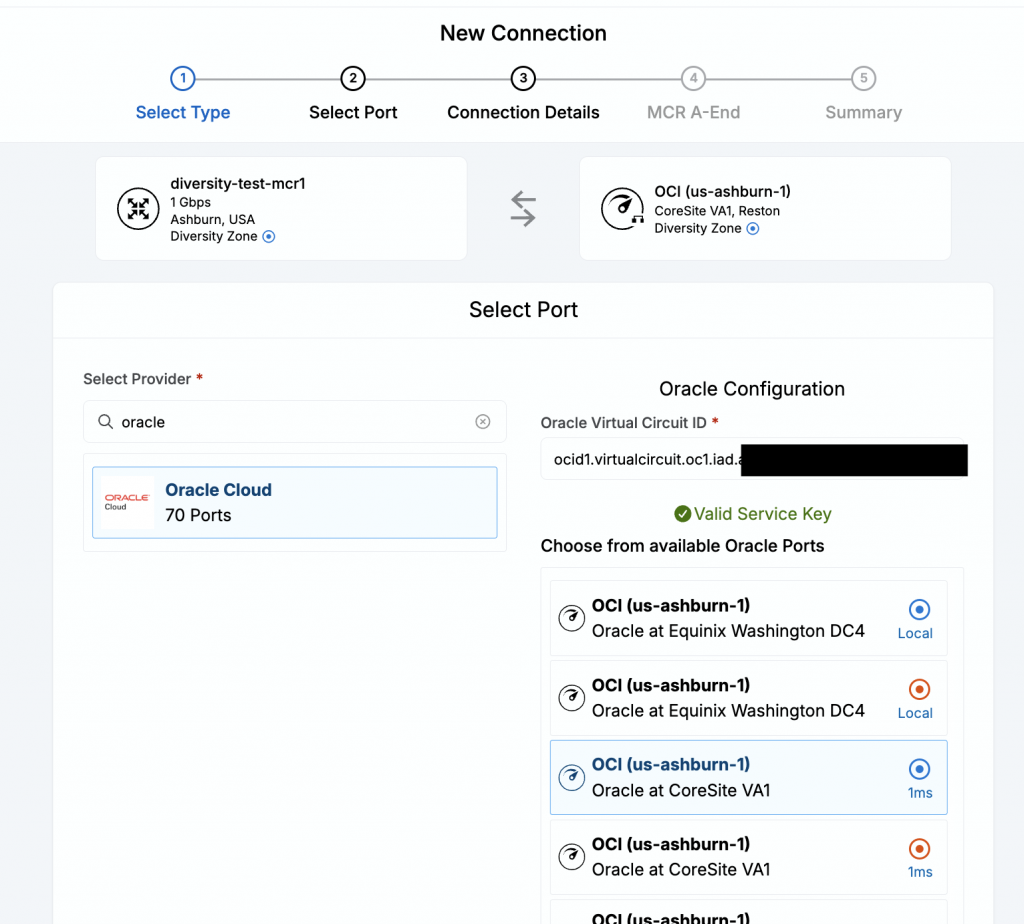
Once the connections have been built, BGP configuration for both connections is completed on the MCR. With this configuration, you can achieve diversity in every other component along the path other than the MCR. The next section will discuss how you can deploy multiple MCRs to achieve full diversity.
Using multiple MCRs
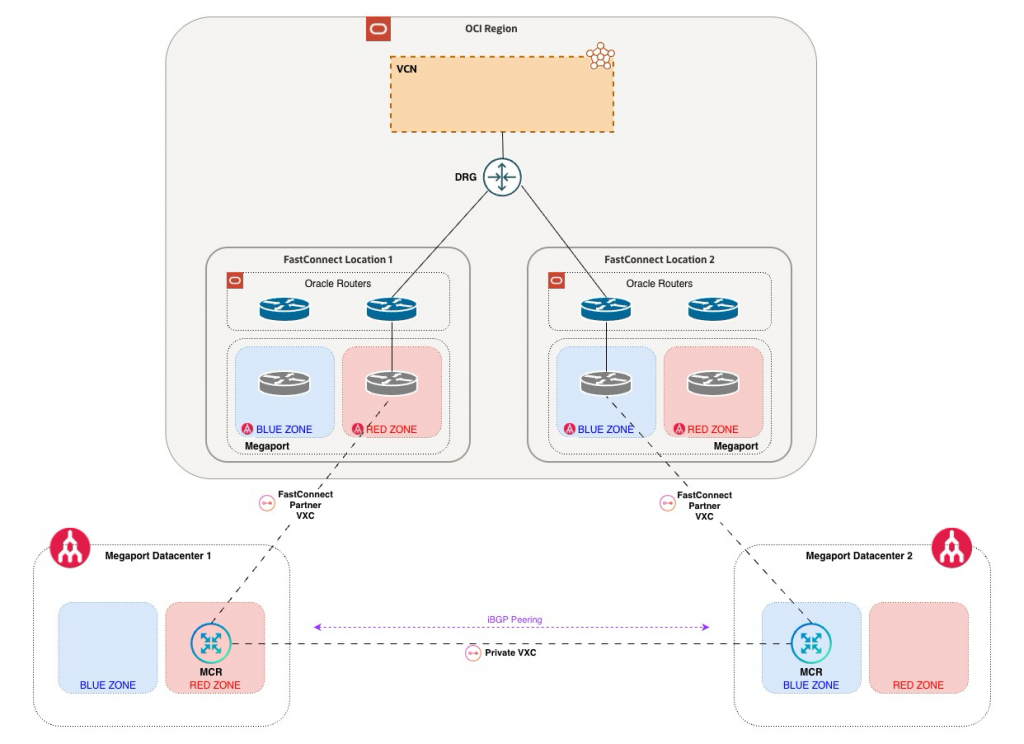
When deploying a new MCR, a customer has the same diversity options as those available when selecting ports or connections. For multiple MCRs, it is recommended to deploy one MCR in a RED diversity zone in one facility while deploying the other MCR in a BLUE diversity zone in another facility, in the same metro area.
On the OCI Console, assuming that the connections are to the same region, you would deploy a redundant pair of virtual circuits and note their OCID, similar to how it has been discussed in the previous scenario.
On the Megaport portal, you would then create a connection to Oracle cloud from the MCR hosted in the RED diversity zone via an Oracle on-ramp port in the RED diversity zone. Thereafter, you would create another connection to Oracle cloud from the MCR hosted in the BLUE diversity zone via an Oracle on-ramp port in the BLUE diversity zone. Optionally, to interconnect the two MCRs a private virtual circuit can be created within Megaport, between the two MCRs.
The following BGP peerings would need to be established:
- EBGP peering for FastConnect virtual circuit 1 between OCI and the RED zone MCR
- EBGP peering for FastConnect virtual circuit 2 between OCI and the BLUE zone MCR
- Optionally IBGP peering between the two MCRs
With this dual MCR topology, customers can achieve diversity not only in ports and connection paths but also with the virtual CPE.
Validation
Validation on the Megaport side can easily be done by confirming that each on-ramp port and MCR reside in different diversity zones. On the OCI side, once configuration is completed and BGP peering is up for both we can validate that the OCI side is diverse by verifying the status values on the console.
IPv4 Redundancy
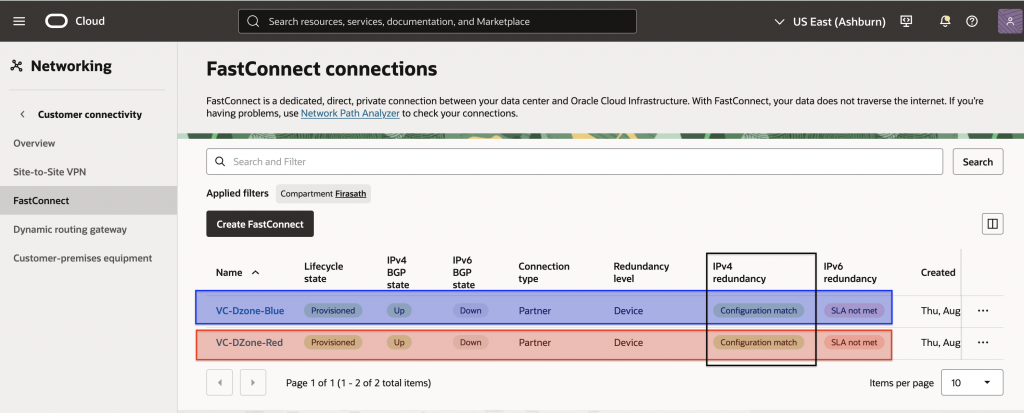
The console will confirm that you have IPv4 redundancy as shown in the following image.
Note that the Red and Blue ribbons have been added to the image to highlight the Megaport diversity zones that the virtual circuits have been terminated on and are not actually visible on the OCI console.
OCI device diversity
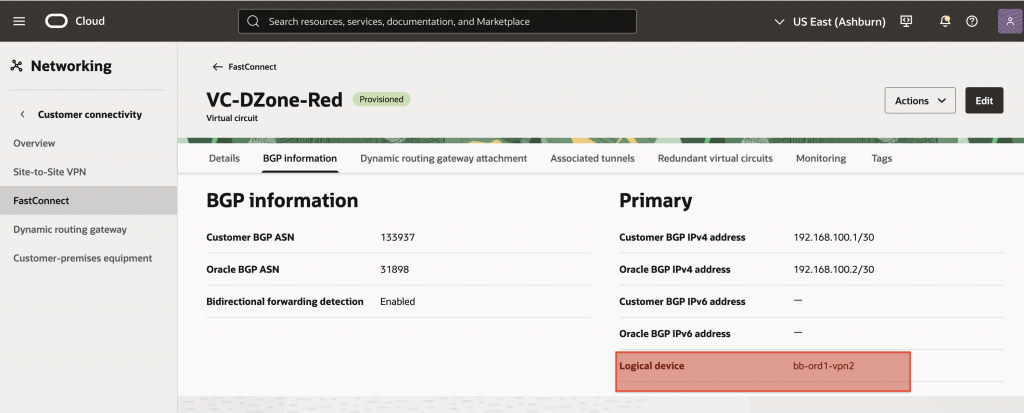
When creating redundant FastConnect virtual circuits, OCI terminates them on different logical devices to provide diversity. This can be verified from the BGP information, as shown below, the RED and BLUE virtual circuits terminate on different OCI logical devices.
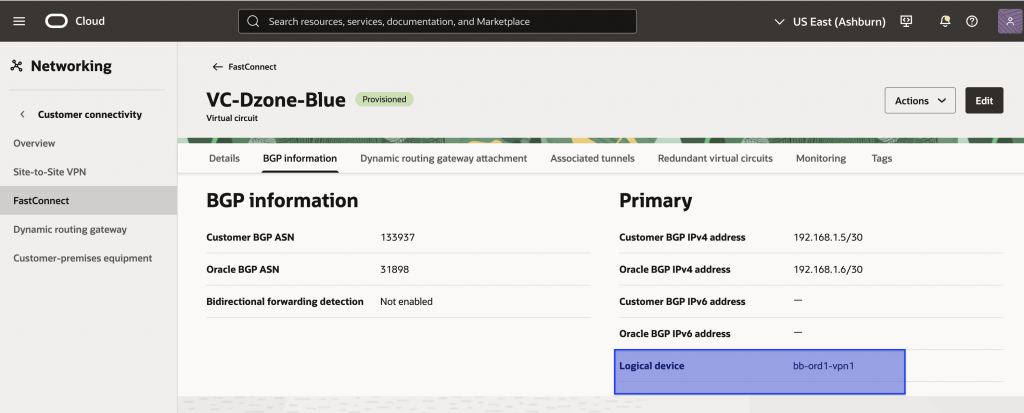
DRG overall redundancy status
The OCI Console also provides you an overall redundancy status for connectivity terminating on your OCI Dynamic Routing Gateway (DRG). This can be seen by navigating to the Dynamic Routing Gateway page of the OCI console as shown below.
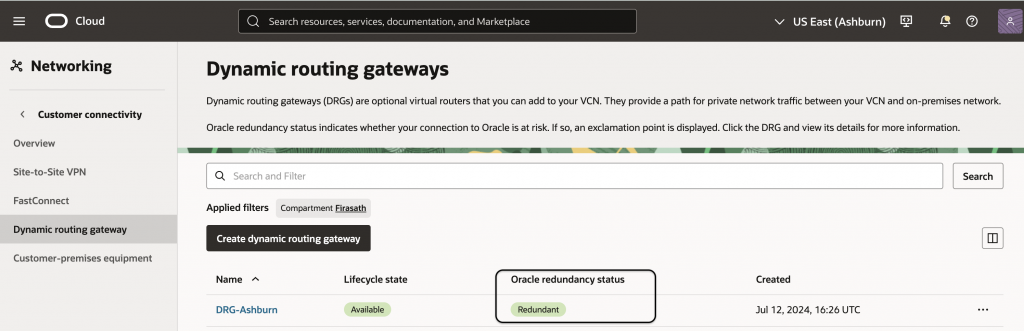
If it shows a value of “Redundant”, it confirms that the customer has multiple paths between OCI and on-premises and that they have been terminated on diverse equipment within OCI and that all are UP and functional. If the value is “Non-Redundant”, either the paths are not diverse or one of them has gone down or there is only a single connection. Customers should validate their network and circuit status and also refer to the Redundancy Remedies document for guidance.
Conclusion
Achieving resilient and diverse OCI FastConnect connectivity over Megaport requires eliminating shared failure points across CPE, Megaport diversity zones, MCRs, facilities, and Oracle on-ramps. On the OCI side, redundant FastConnect virtual circuits should be deployed since they terminate on separate Oracle devices. Also, appropriate DRG routing policies such as ECMP or active-standby BGP should be planned and consciously deployed to provide reliable failover.
The completed design should be tested end to end to confirm that OCI workloads remain reachable and the surviving path can carry the required production traffic. Furthermore, capacity utilization and latency of each path should also be regularly measured to ensure that the diverse paths are also capable of delivering the desired performance.