
Introduction
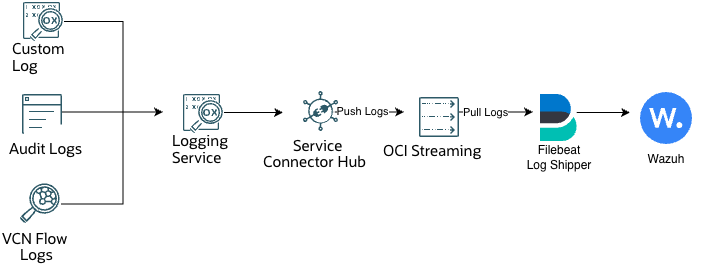
Following Part 1, we now have a Security Information and Event Management (SIEM) tool in Oracle Cloud Infrastructure (OCI) through Wazuh. However, nothing is connected to the SIEM, so we still have no visibility in our tenancy. Whether it’s a stray API Call, unknown login, service outage, unusual network traffic or unexpected resource deployment within our OCI tenancy. Wazuh will not be aware of these incidents since the collection of these actions has not been configured. And so, in this part we will discuss how to ingest OCI Logs, primarily Audit Logs, but the steps can be reused for others such as Service or Custom Logs.
By default, the OCI Audit Service automatically records OCI API endpoints as event logs, and currently as services are recorded. [1] Aside from OCI API endpoint calls, Audit Service also records the OCI Console, OCI CLI, OCI SDK, and custom clients. And all logs collected from the OCI Audit Service will be known as Audit Logs, which serves as a fundamental source for visibility in a tenancy. Therefore, we will leverage OCI Audit Logs to provide visibility into a tenancy for Wazuh.
Since Wazuh does not natively ingest OCI Logs, we must use a log shipper as an intermediary step between OCI and Wazuh. The log shipper repackages OCI logs into a compatible format for Wazuh to ingest. [2] In this example, we will leverage Filebeat as our log shipper since it’s supported in OCI and Wazuh. [3]
By the end of post, we will have done:
- Filebeat User Identity, so that Filebeat can ingest from the Kafka Connector
- Deployed Filebeat as a log shipper
- Configured Wazuh to archive OCI Audit Logs
Prerequisites
Prior to deploying Filebeat, the following resources need to be configured:
- A Service Connector
- A Stream for Audit Logs
- And it’s respective Stream Pool, whether Private or Public
- If using Private, ensure the Network Security Group and Network Security Lists Rules are properly configured
- Proper Policies for the Service Connector
- These can be provisioned while creating the Service Connector
- An existing Wazuh Deployment
- For this guide, we will highlight the process for both Kubernetes and the Quickstart Deployment of Wazuh.
Once all is in place, we can move forward to the next step, which is creating an OCI IAM User Identity for Filebeat. [4]
Create Filebeat’s User Identity
For the filebeat service to pull from the Stream’s Kafka Connector, the service must authenticate with OCI. At this point in time, instance principal is not supported for this, except when using the Java SDK. So, for this guide, we’ll use a User Auth Token and Kafka’s SASL/PLAIN Mechanism. [5]
Creating the User and Group
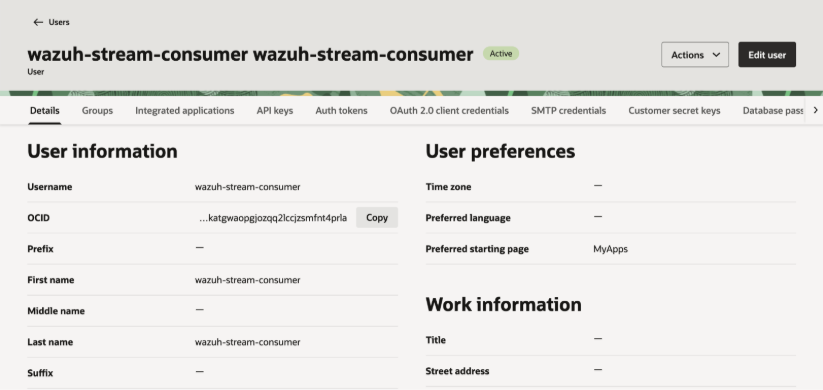
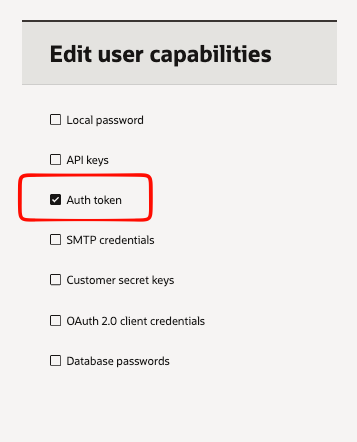
Within a domain (default or custom), create a user and limit the user’s capabilites to just Auth Token. In this example, the username for my user is “wazuh-stream-consumer”
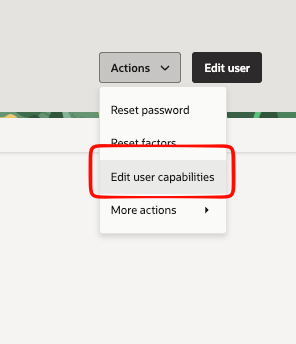
To limit the user capabilities, click “Actions” then edit User Capabilities. We only want the user to authenticate via Auth Token.
Creating the policy to pull from the stream
Once the User and Group have been created, the policy to allow the group to pull from a stream (in this case the Audit Log Stream) must also be created.
The main policy needed will be the ability to pull from a stream which is the following policy:
Allow group '<IDENTITY_DOMAIN>'/'<GROUP_NAME>' to use stream-pull in compartment id <COMPARTMENT_OCID>If using the Default domain, then there is no need to mention the identity domain in the policy.
Configuring the Log Shipper for Wazuh on OCI
Since we are covering multiple methods on deploying the log shipper, the steps for Kubernetes and Quickstart will be in collapsible, respctive sections. Please be sure to expand to view them fully.
Configuring Filebeat as a Log Shipper in a Separate Oracle Kubernetes Engine (OKE) Node Pool
Creating a dedicated log-shipper node pool isolates ingestion workloads from the Wazuh manager, indexer, dashboard, and application workloads. Although this deployment initially consumes OCI Audit records, the same pool can later host dedicated shippers for VCN Flow Logs or other OCI log sources.
In the OCI Console, go to Developer Services > Kubernetes Clusters (OKE), select the target cluster, open Node Pools, and select Add Node Pool.
- Name: oci-audit-shipper
- Node count: Start with one node.
- Worker configuration: Use a compatible Kubernetes version, node shape, worker subnet, and availability-domain placement for the existing cluster.
- Kubernetes label: Under advanced node-pool options, add name=oci-audit-shipper.
After the node reports Ready, retrieve its Kubernetes node name. Use the Kubernetes node name, not the OCI node-pool display name, for the taint command.
If the label was not added during node-pool creation, identify the new node with kubectl get nodes -o wide, then apply the label manually.
kubectl get nodes -l name=oci-audit-shipper -o wide kubectl label node <SHIPPER_NODE_NAME> name=oci-audit-shipperTaint the node so that ordinary workloads cannot be scheduled onto the dedicated log-shipper pool.
kubectl taint node <SHIPPER_NODE_NAME> workload=oci-log-shipper:NoSchedule

kubectl describe node <SHIPPER_NODE_NAME> | grep -A2 Taints
Discovering Wazuh Service Addresses and Storage Class
Retrieve the private load-balancer addresses for Wazuh enrollment and Wazuh worker traffic. Record these values; they are required in the StatefulSet manifest.
kubectl get storageclass
kubectl -n wazuh get svc wazuh wazuh-workers -o wide

kubectl -n wazuh get svc wazuh -o jsonpath='{.status.loadBalancer.ingress[0].ip}{"\n"}'
kubectl -n wazuh get svc wazuh-workers -o jsonpath='{.status.loadBalancer.ingress[0].ip}{"\n"}'
The first IP address is <WAZUH_ENROLLMENT_IP>. The second is <WAZUH_WORKER_IP>. Also identify the OCI Block Volume StorageClass to use, for example <OCI_BLOCK_STORAGE_CLASS>. The StorageClass will most likely be oci-bv.
Retrieve the Wazuh enrollment password. First, find the manager pod name:
kubectl -n wazuh get podsThen replace <WAZUH_MANAGER_MASTER_POD_NAME> with the manager pod shown in the output.
kubectl -n wazuh exec <WAZUH_MANAGER_MASTER_POD_NAME> -- cat /var/ossec/etc/authd.passCreating the Namespace and Secrets
kubectl create namespace oci-audit-shipperIf the namespace already exists, continue. Enter the sensitive values interactively rather than placing them in a configuration file.
read -r -p "OCI Kafka SASL username: " OCI_STREAM_USERNAME
read -r -s -p "OCI auth token: " OCI_STREAM_TOKEN; echo
read -r -s -p "Wazuh enrollment password: " WAZUH_AUTHD_PASS; echo

kubectl -n oci-audit-shipper create secret generic oci-streaming-kafka --from-literal=username="$OCI_STREAM_USERNAME" --from-literal=auth_token="$OCI_STREAM_TOKEN"
kubectl -n oci-audit-shipper create secret generic wazuh-enrollment --from-literal=authd.pass="$WAZUH_AUTHD_PASS"

unset OCI_STREAM_USERNAME OCI_STREAM_TOKEN WAZUH_AUTHD_PASS
kubectl -n oci-audit-shipper get secrets
Optional: Allowing archives of raw logs
If you have done this step in Part 1, skip. Otherwise, proceed.
For Part 2, you may want to archive logs, but this will also increase the amount of storage needed for the deployment. Update the <global> section within the Wazuh Manager configurations:
wazuh/wazuh_managers/wazuh_conf/master.conf
wazuh/wazuh_managers/wazuh_conf/worker.conf
And the configuration will be updated to the following:
<jsonout_output>yes</jsonout_output>
<alerts_log>yes</alerts_log>
<logall_json>yes</logall_json>
Optional: Forwarding Log Archives to Wazuh Manager
This maps directly to the Quickstart change in /etc/filebeat/filebeat.yml:
filebeat.modules:
  - module: wazuh
    alerts:
      enabled: true
    archives:
      enabled: true
Validate and Deploy like before, these steps are in Part 1.
Creating the Filebeat ConfigMap
nano filebeat.ymlAdd the following configuration. Replace <OCI_STREAMING_BOOTSTRAP_HOST> and <OCI_AUDIT_STREAM_NAME> from values from in OCI Stream Pool and OCI Stream, respectively.
filebeat.inputs:
  - type: kafka
    hosts: ["<OCI_STREAMING_BOOTSTRAP_HOST>:9092"]
    topics: ["<OCI_AUDIT_STREAM_NAME>"]
    group_id: "wazuh-oci-audit-v1"
    initial_offset: oldest
    username: "${OCI_STREAM_USERNAME}"
    password: "${OCI_STREAM_AUTH_TOKEN}"
    ssl.enabled: true
    sasl.mechanism: PLAIN

output.file:
  path: "/var/log/oci"
  filename: "audit.json"
  rotate_every_kb: 10240
  number_of_files: 10
  codec.format:
    string: '%{[message]}'
This configuration makes Filebeat connect securely to your OCI Streaming Kafka endpoint, authenticate with the OCI Streaming username and auth token stored in the credentials file, and read Audit events from the specified stream. For further explanation on the variables used, refer to the filebeat documention on Kafka Inputs and File Outputs. [7], [8]
Save the file, then create or update the ConfigMap. This command works for both the initial deployment and later configuration changes.
kubectl -n oci-audit-shipper create configmap oci-audit-filebeat-config --from-file=filebeat.yml --dry-run=client -o yaml | kubectl apply -f -

kubectl -n oci-audit-shipper get configmap oci-audit-filebeat-config
Creating and Deploying the Stateful Manifest
Create the manifest in the same directory as filebeat.yml.
nano oci-audit-shipper.yamlPaste the complete StatefulSet manifest. Before saving, replace <WAZUH_WORKER_IP>, <WAZUH_ENROLLMENT_IP>, and <OCI_BLOCK_STORAGE_CLASS>.
This manifest deploys Filebeat and a Wazuh agent together on the dedicated OKE log-shipper node. Filebeat pulls OCI Audit events from OCI Streaming and saves the raw JSON to a shared OCI Block Volume. The Wazuh agent monitors those files and forwards them to the Wazuh workers for analysis. It uses Kubernetes Secrets for credentials, persistent storage for Filebeat and agent state, and a node selector plus taint toleration to keep the workload on the dedicated shipper node pool.
Stateful Manifest Code (Update the values in <>)
apiVersion: v1
kind: Service
metadata:
  name: oci-audit-shipper
  namespace: oci-audit-shipper
spec:
  clusterIP: None
  selector:
    app: oci-audit-shipper
---
apiVersion: apps/v1
kind: StatefulSet
metadata:
  name: oci-audit-shipper
  namespace: oci-audit-shipper
spec:
  serviceName: oci-audit-shipper
  replicas: 1
  selector:
    matchLabels:
      app: oci-audit-shipper
  template:
    metadata:
      labels:
        app: oci-audit-shipper
    spec:
      terminationGracePeriodSeconds: 30
      nodeSelector:
        name: oci-audit-shipper
      tolerations:
        - key: workload
          operator: Equal
          value: oci-log-shipper
          effect: NoSchedule
      initContainers:
        - name: prepare-filebeat-data
          image: busybox:1.36
          command: ["/bin/sh", "-c"]
          args:
            - chown -R 1000:0 /usr/share/filebeat/data && chmod -R u+rwX,g+rwX /usr/share/filebeat/data
          volumeMounts:
            - name: filebeat-data
              mountPath: /usr/share/filebeat/data

        - name: prepare-audit-directory
          image: busybox:1.36
          command: ["/bin/sh", "-c"]
          args:
            - mkdir -p /var/log/oci && chgrp 999 /var/log/oci && chmod 0770 /var/log/oci
          volumeMounts:
            - name: audit-data
              mountPath: /var/log/oci

        - name: clean-wazuh-locks
          image: busybox:1.36
          command: ["/bin/sh", "-c"]
          args:
            - mkdir -p /agent/var/run /agent/queue/ossec && rm -f /agent/var/run/*.pid /agent/queue/ossec/*.lock
          volumeMounts:
            - name: wazuh-agent-data
              mountPath: /agent

        - name: seed-wazuh-agent
          image: docker.io/wazuh/wazuh-agent:4.14.6
          command: ["/bin/sh", "-c"]
          args:
            - |
              if [ ! -d /agent/bin ]; then
                tar -C /var/ossec -cf - . | tar -C /agent -xpf -
              fi
          volumeMounts:
            - name: wazuh-agent-data
              mountPath: /agent

        - name: configure-wazuh-agent
          image: busybox:1.36
          command: ["/bin/sh", "-c"]
          args:
            - |
              mkdir -p /agent/etc
              cat > /agent/etc/ossec.conf <<'EOF'
              <ossec_config>
                <client>
                  <server>
                    <address><WAZUH_WORKER_IP></address>
                    <port>1514</port>
                    <protocol>tcp</protocol>
                  </server>
                  <enrollment>
                    <enabled>yes</enabled>
                    <agent_name>oci-audit-filebeat</agent_name>
                    <manager_address><WAZUH_ENROLLMENT_IP></manager_address>
                    <port>1515</port>
                    <authorization_pass_path>/var/ossec/etc/authd.pass</authorization_pass_path>
                  </enrollment>
                </client>
                <localfile>
                  <location>/var/log/oci/audit.json*</location>
                  <log_format>json</log_format>
                  <label key="@source">oci_audit</label>
                </localfile>
              </ossec_config>
              EOF
              chown 999:999 /agent/etc/ossec.conf
              chmod 0640 /agent/etc/ossec.conf
          volumeMounts:
            - name: wazuh-agent-data
              mountPath: /agent

        - name: copy-enrollment-password
          image: busybox:1.36
          command: ["/bin/sh", "-c"]
          args:
            - |
              cp /secret/authd.pass /agent/etc/authd.pass
              chown 0:999 /agent/etc/authd.pass
              chmod 0640 /agent/etc/authd.pass
          volumeMounts:
            - name: wazuh-agent-data
              mountPath: /agent
            - name: wazuh-enrollment
              mountPath: /secret/authd.pass
              subPath: authd.pass
              readOnly: true

      containers:
        - name: filebeat
          image: docker.elastic.co/beats/filebeat:9.5.3
          securityContext:
            runAsUser: 0
            runAsGroup: 0
          args:
            - -e
            - -c
            - /usr/share/filebeat/filebeat.yml
            - --path.data
            - /usr/share/filebeat/data
            - --strict.perms=false
          env:
            - name: OCI_STREAM_USERNAME
              valueFrom:
                secretKeyRef:
                  name: oci-streaming-kafka
                  key: username
            - name: OCI_STREAM_AUTH_TOKEN
              valueFrom:
                secretKeyRef:
                  name: oci-streaming-kafka
                  key: auth_token
          volumeMounts:
            - name: filebeat-config
              mountPath: /usr/share/filebeat/filebeat.yml
              subPath: filebeat.yml
              readOnly: true
            - name: filebeat-data
              mountPath: /usr/share/filebeat/data
            - name: audit-data
              mountPath: /var/log/oci

        - name: wazuh-agent
          image: docker.io/wazuh/wazuh-agent:4.14.6
          command: ["/bin/sh", "-c"]
          args:
            - ln -sf /var/ossec/etc/ossec.conf /etc/ossec.conf && exec /init
          securityContext:
            runAsUser: 0
            runAsGroup: 0
          volumeMounts:
            - name: wazuh-agent-data
              mountPath: /var/ossec
            - name: audit-data
              mountPath: /var/log/oci
              readOnly: true

      volumes:
        - name: filebeat-config
          configMap:
            name: oci-audit-filebeat-config
        - name: wazuh-enrollment
          secret:
            secretName: wazuh-enrollment

  volumeClaimTemplates:
    - metadata:
        name: filebeat-data
      spec:
        accessModes: ["ReadWriteOnce"]
        storageClassName: <OCI_BLOCK_STORAGE_CLASS>
        resources:
          requests:
            storage: 2Gi

    - metadata:
        name: audit-data
      spec:
        accessModes: ["ReadWriteOnce"]
        storageClassName: <OCI_BLOCK_STORAGE_CLASS>
        resources:
          requests:
            storage: 10Gi

    - metadata:
        name: wazuh-agent-data
      spec:
        accessModes: ["ReadWriteOnce"]
        storageClassName: <OCI_BLOCK_STORAGE_CLASS>
        resources:
          requests:
            storage: 3Gi
Validate and deploy the complete manifest.
kubectl apply --dry-run=client -f oci-audit-shipper.yaml
kubectl apply -f oci-audit-shipper.yaml
kubectl -n oci-audit-shipper get pods -o wide -w
Initial Pending and Init states are expected while OCI Block Volumes are created and attached. The final expected state is oci-audit-shipper-0 2/2 Running.
Validating the Log Shipper
kubectl -n oci-audit-shipper get pods -o wide
kubectl -n oci-audit-shipper get pvc

kubectl -n oci-audit-shipper logs oci-audit-shipper-0 -c filebeat --tail=100
kubectl -n oci-audit-shipper exec oci-audit-shipper-0 -c filebeat -- ls -lh /var/log/oci/

kubectl -n oci-audit-shipper logs oci-audit-shipper-0 -c wazuh-agent --tail=100
The Wazuh-agent log should show a successful connection to <WAZUH_WORKER_IP>:1514 and identify files matching /var/log/oci/audit.json*.
Viewing raw logs
To see latest records (20) use the following command:
kubectl -n oci-audit-shipper exec oci-audit-shipper-0 -c filebeat -- sh -c 'tail -n 20 /var/log/oci/audit.json*'To see live logs, use this command:
kubectl -n oci-audit-shipper exec -it oci-audit-shipper-0 -c filebeat -- sh -c 'tail -F /var/log/oci/audit.json*'Configuring Filebeat as a Log Shipper using the Quickstart Deployment of Wazuh
Allowing for Archives of Raw OCI Audit Logs
Wazuh alerts are intentionally selective. To retain raw OCI records, enable JSON archives and have the bundled Wazuh Filebeat module to ship both alerts and archives.
Note: Enabling Archives will lead to rapid storage usage since all logs will be stored onto the instance’s storage.
In the Wazuh Dashboard, open the main menu and select Server management → Settings. Edit the Wazuh manager configuration (ossec.conf). Inside the existing <global> section, make sure these settings exist once:
<jsonout_output>yes</jsonout_output>
<alerts_log>yes</alerts_log>
<logall_json>yes</logall_json> 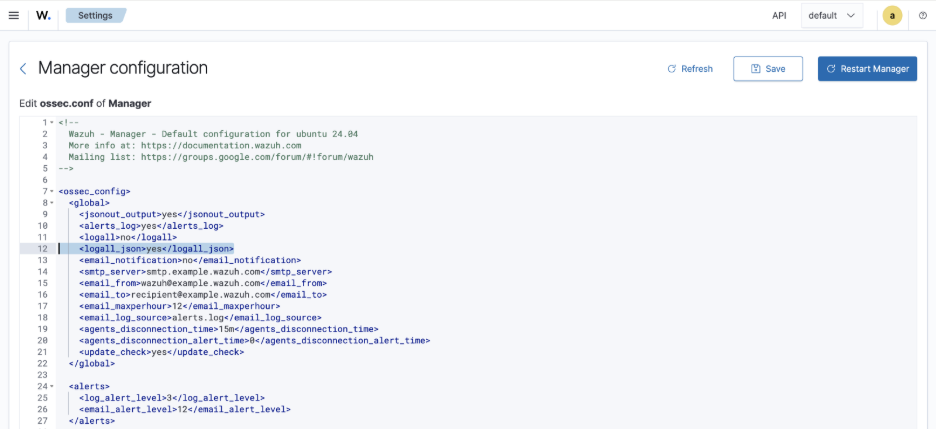
Save the manager configuration in the Dashboard. A Wazuh administrator role is required to edit server configuration. Use Server management → Status to check component health and then restart the manager either on the UI or with CLI.
sudo systemctl restart wazuh-managerThe bundled Wazuh Filebeat configuration is a host-level service configuration, so it remains a CLI step. Open it and modify archives: enabled: false to archives enabled: true.
sudoedit /etc/filebeat/filebeat.yml filebeat.modules:
- module: wazuh
alerts:
enabled: true
archives:
enabled: trueRestart and validate it:
sudo systemctl restart wazuh-manager
sudo systemctl restart filebeat
sudo systemctl status wazuh-manager filebeat --no-pager
sudo filebeat test output
Install Filebeat as a Separate Consumer on the Instance
Keep the Wazuh-managed Filebeat service dedicated to Wazuh alerts and archives. A second Filebeat instance consumes the OCI Kafka stream and writes a protected, local spool that the Wazuh manager reads. This separation avoids overwriting Wazuh’s supplied Filebeat configuration.
The example below uses the Filebeat 9.5.3 Linux AMD64 tarball. Select a supported Filebeat tarball matching your CPU architecture if your system is ARM or you standardize on a different version. [6]
cd /tmp
curl -fLO https://artifacts.elastic.co/downloads/beats/filebeat/filebeat-9.5.3-linux-x86_64.tar.gz
curl -fLO https://artifacts.elastic.co/downloads/beats/filebeat/filebeat-9.5.3-linux-x86_64.tar.gz.sha512
sha512sum -c filebeat-9.5.3-linux-x86_64.tar.gz.sha512
sudo tar -xzf filebeat-9.5.3-linux-x86_64.tar.gz -C /opt
sudo mv /opt/filebeat-9.5.3-linux-x86_64 /opt/oci-audit-filebeat
Create the directories and give the service the same local identity Wazuh uses. This lets the Wazuh manager read the spool without making it world-readable:
sudo install -d -o root -g wazuh -m 0750 /etc/oci-audit-filebeat
sudo install -d -o wazuh -g wazuh -m 0750 /var/lib/oci-audit-filebeat
sudo install -d -o wazuh -g wazuh -m 0750 /var/log/oci-audit-filebeat
sudo install -d -o wazuh -g wazuh -m 0750 /var/log/oci
sudo install -o root -g wazuh -m 0640 /dev/null /etc/oci-audit-filebeat/credentials
Edit the credentials file. Use the exact username displayed by the Kafka connection settings in OCI Stream Pool, and has the following format:
<tenancy>/<identity-domain>/<username>/<streampool-ocid>
If using the default domain, then the identity domain can be omitted.
The auth token will also need to be generated for the user.
sudoedit /etc/oci-audit-filebeat/credentials Input the following values in the file.
OCI_STREAM_USERNAME='<exact Kafka username from OCI>'
OCI_STREAM_AUTH_TOKEN='<dedicated user auth token>'
Create /etc/oci-audit-filebeat/filebeat.yml:
sudoedit /etc/oci-audit-filebeat/filebeat.yml Within the file, add the following:
filebeat.inputs:
  - type: kafka
    hosts: ["<KAFKABOOTSTRAP>"]
    topics: ["<STREAM_NAME>"]
    group_id: "wazuh-oci-audit-v1"
    initial_offset: oldest
    username: "${OCI_STREAM_USERNAME}"
    password: "${OCI_STREAM_AUTH_TOKEN}"
    ssl.enabled: true
    sasl.mechanism: PLAIN

output.file:
  path: /var/log/oci
  filename: audit.json
  rotate_every_kb: 102400
  number_of_files: 50
  permissions: 0640
  codec.format:
    string: 'oci_audit %{[message]}'

logging.level: info
logging.to_files: true
logging.files:
  path: /var/log/oci-audit-filebeat
  name: filebeat
  keepfiles: 7
  permissions: 0640
Replace <KAFKABOOTSTRAP> with the complete endpoint displayed by OCI. For example, use cell-1.streaming.<REGION>.oci.oraclecloud.com:9092. And for <STREAM_NAME> use the Stream Name from the OCI Stream Pool.
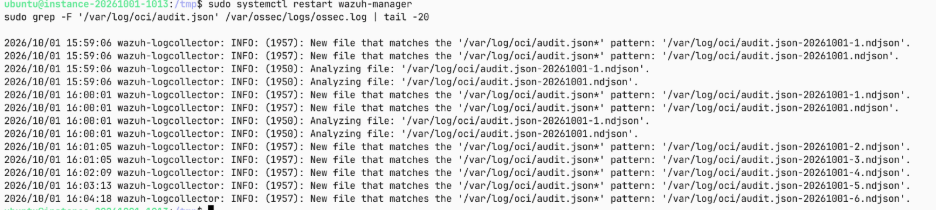
The oci_audit prefix is deliberate as it highlights which log comes from OCI Audit but can be modified. Filebeat writes timestamped spool files such as audit.json-YYYYMMDD.ndjson and audit.json-YYYYMMDD-1.ndjson. The local spool is not the system of record: Filebeat rotates it, while OCI Streaming and Wazuh/OpenSearch retention should be designed separately. Further, information on Filebeat’s inputs are found in the Kafka Documentation. [7] Filebeat’s file output documentation describes the rotation settings. [8]
Create the systemd unit:
sudoedit /etc/systemd/system/oci-audit-filebeat.service Within the systemd file, add the following:
[Unit]
Description=OCI Audit Kafka Filebeat consumer
Wants=network-online.target
After=network-online.target

[Service]
Type=simple
User=wazuh
Group=wazuh
UMask=0027
EnvironmentFile=/etc/oci-audit-filebeat/credentials
ExecStart=/opt/oci-audit-filebeat/filebeat -e -c /etc/oci-audit-filebeat/filebeat.yml --path.home /opt/oci-audit-filebeat --path.config /etc/oci-audit-filebeat --path.data /var/lib/oci-audit-filebeat --path.logs /var/log/oci-audit-filebeat
Restart=always
RestartSec=5

[Install]
WantedBy=multi-user.target
Load and start the unit:
sudo systemctl daemon-reload
sudo systemctl enable --now oci-audit-filebeat
sudo systemctl status oci-audit-filebeat --no-pager
sudo journalctl -u oci-audit-filebeat -n 100 --no-pager
Have Wazuh read from the Audit Log Spool
In the Wazuh Dashboard, open Server management → Settings, edit the manager configuration, and add one entry immediately before the final </ossec_config> tag:
<localfile>
  <location>/var/log/oci/audit.json*</location>
  <log_format>generic</log_format>
</localfile> 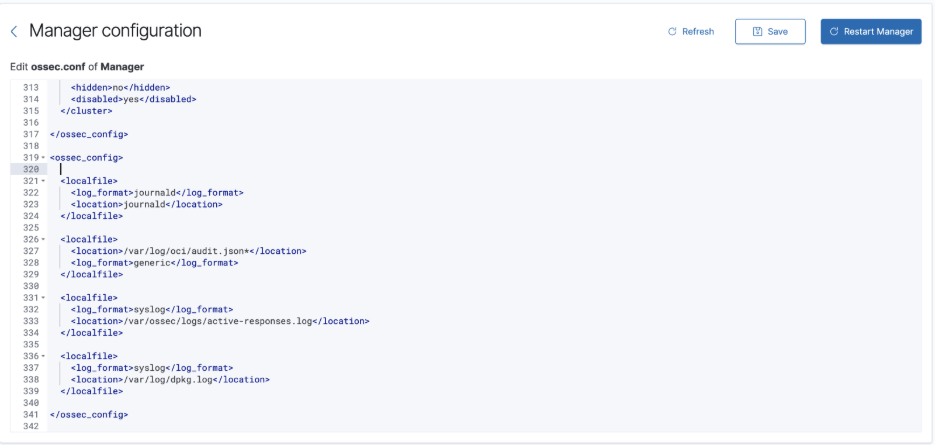
Save the configuration in the Dashboard, restart the manager, and verify that it discovers the files:
sudo systemctl restart wazuh-manager
sudo grep -F '/var/log/oci/audit.json' /var/ossec/logs/ossec.log | tail -20
Expected Output:
Optional: Exclude Manager-Host Journald Logs
The default Wazuh manager configuration also reads the manager VM’s journald logs. If the intended scope is only OCI Audit plus remote Wazuh Agents, remove or comment out this localfile block in Server management → Settings after OCI ingestion is verified:
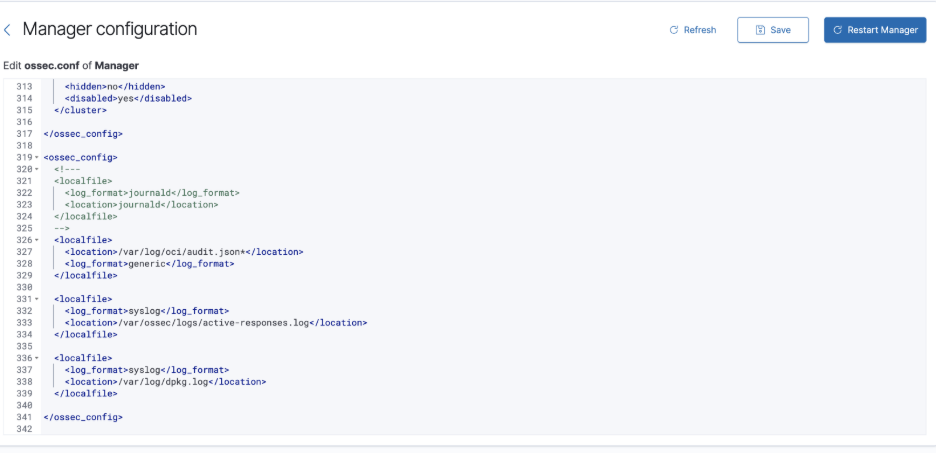
This stops collection of the manager host’s journal records, including shell and sudo activity. It does not stop logs sent by enrolled Wazuh Agents. Save the configuration and restart wazuh-manager. Keep journald enabled if manager-host monitoring is required.
How to view archives of the raw OCI Logs
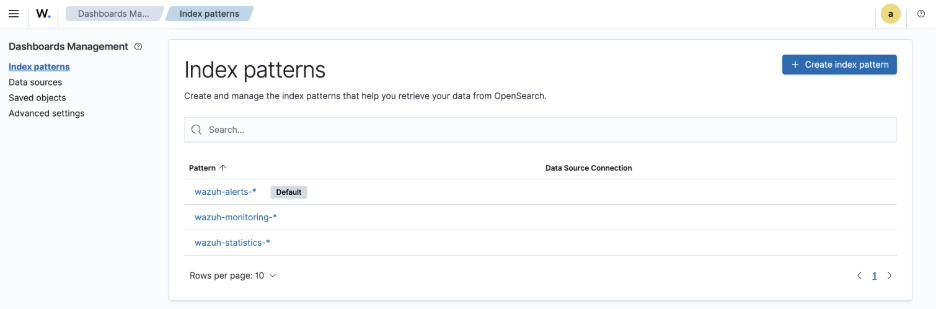
After the first archive event is indexed, open Dashboard Management → Data views (called Index patterns in some Wazuh Dashboard versions) → Create data view.
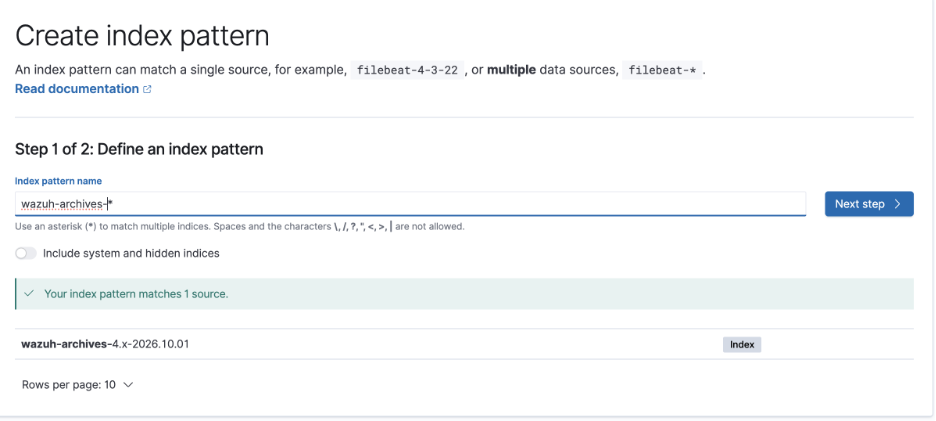
Enter wazuh-archives-*
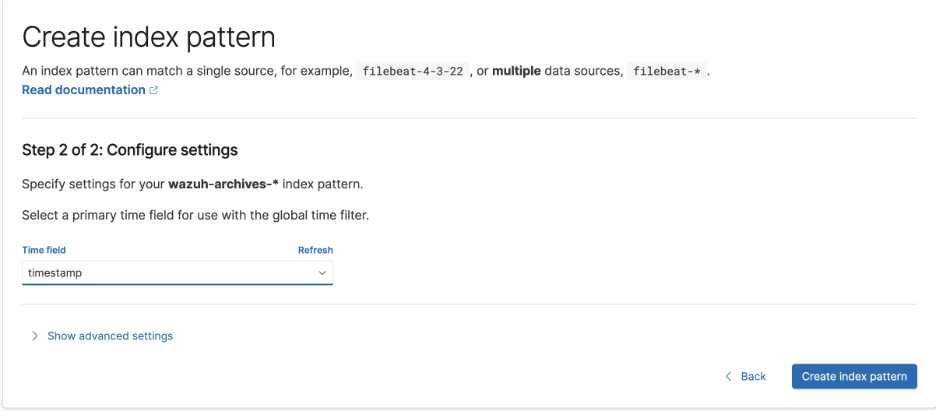
Select timestamp (not @timestamp) as the time field and save the data view.
In Discover, select wazuh-archives-*, broaden the time range while a backlog is being consumed, and search full_log: "oci_audit".