On September 16th, 2026, Oracle introduced support for traffic draining on FastConnect private virtual circuits using BGP Graceful Shutdown, giving network administrators a way to move traffic off a FastConnect virtual circuit before taking it out of service. OCI FastConnect provides private, dedicated connectivity between on-premises networks and Oracle Cloud Infrastructure (OCI). For customers using redundant FastConnect connections, there are times when a circuit needs to be taken offline for planned maintenance, router upgrades, or other network changes. Simply shutting down a circuit can cause a brief disruption while BGP reconverges and traffic moves to an alternate path.
FastConnect Circuit Draining provides a more controlled way to handle these situations. Instead of abruptly shutting down a connection, administrators can use BGP Graceful Shutdown, a standardized mechanism defined in RFC 8326, to signal to BGP peers that a particular path should no longer be preferred. This allows traffic to shift to an alternate connection while the original circuit remains up, reducing the likelihood of dropped packets or interrupted connections during maintenance.
For example, if you need to upgrade a router connected to OCI through FastConnect, you can drain the affected circuit and allow traffic to move to a redundant connection before taking the router offline. The same approach works when replacing network equipment or performing maintenance on a physical connection. Once traffic has moved and you’ve confirmed the alternate path is handling the load, you can proceed with the maintenance and return the circuit to normal operation when the work is complete.
The benefit is straightforward: you can move traffic away from a circuit before taking it down, rather than relying on BGP to recover after the connection is lost.
In the rest of this blog, we will walk through the steps to drain traffic, show a sample CPE configuration, and use verification commands to confirm the routing changes.
Contents
- Architecture and Initial Configuration
- Draining the Circuit
- Verifying BGP Changes
- Restoring the Circuit
- Vendor Considerations
Architecture and Initial Configuration
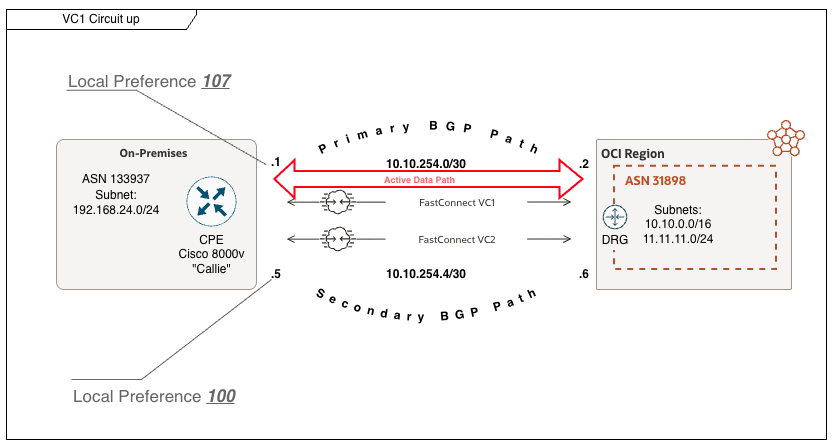
Before we begin, let’s look at the architecture used in this example. Traffic from the CPE to OCI uses Virtual Circuit 1 because routes learned over that circuit have a local preference of 107, compared with 100 over Virtual Circuit 2.
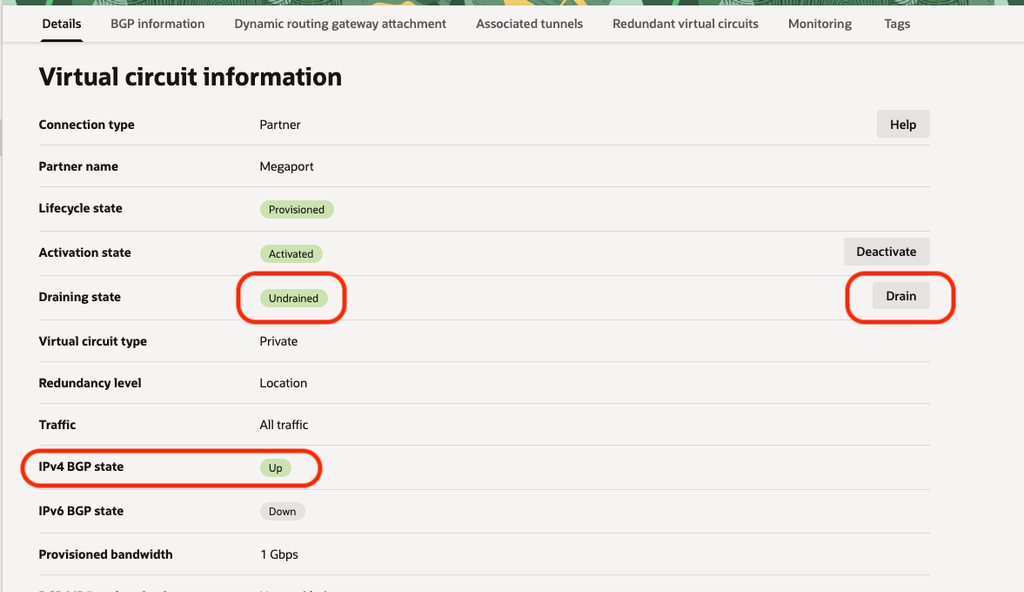
First, examine the default state of a virtual circuit that is up and passing traffic. In Figure 1, the draining state is “Undrained” and the IPv4 BGP state is “Up”.
Now let’s switch to what you may see on your customer premises equipment (CPE).
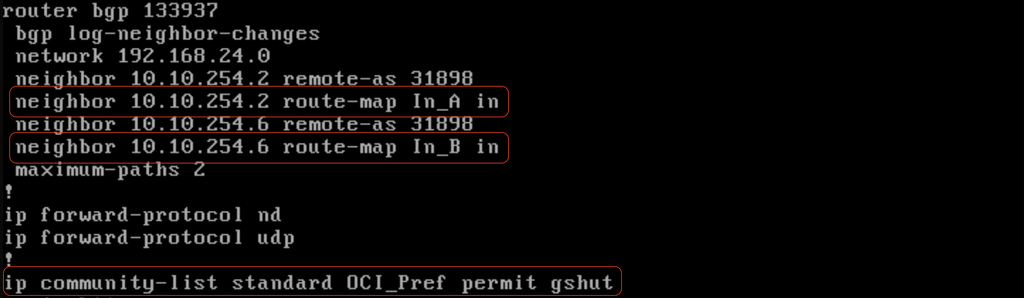
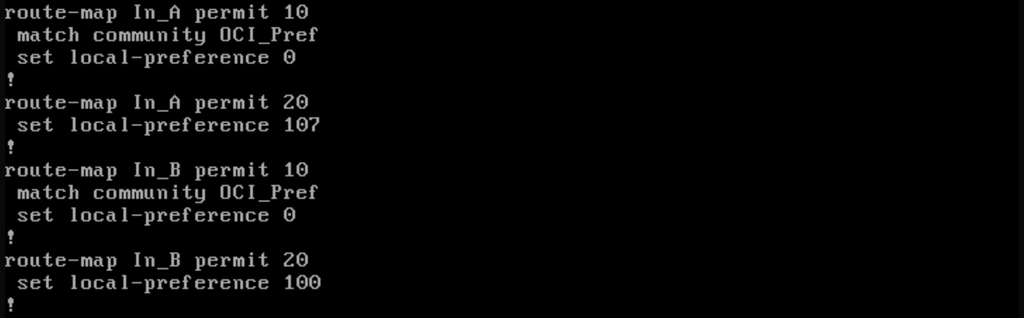
Figure 2 shows a basic BGP configuration for a Cisco® Catalyst 8000V virtual router, including the neighbor configuration and community list. Figure 3 shows the route maps applied to those neighbors.
Under normal conditions, the CPE prefers routes received from neighbor 10.10.254.2 because the inbound route map assigns them a local preference of 107. When circuit draining is activated and those routes carry the “gshut” community, the CPE’s inbound route map sets their local preference to 0. Routes received from neighbor 10.10.254.6 retain a local preference of 100 and become preferred.
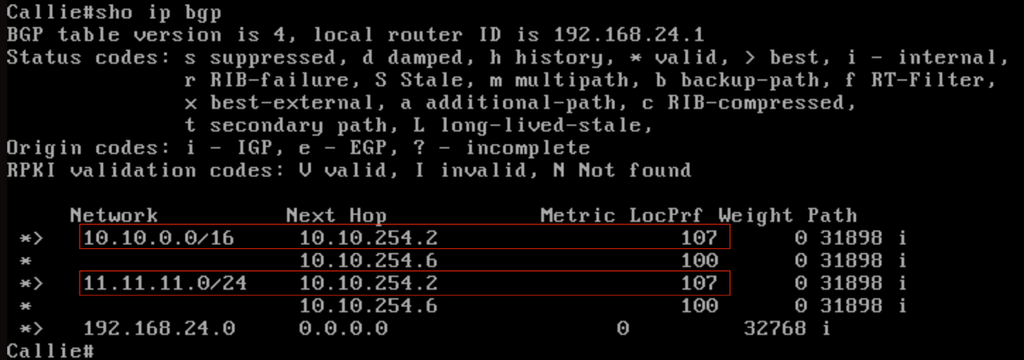
Now let’s look at the BGP unicast table. It shows the routes received from each peer and which paths are selected. In Figure 4, two routes are received from each peer. Neighbor 10.10.254.2 is preferred for both prefixes because its routes have a local preference of 107.
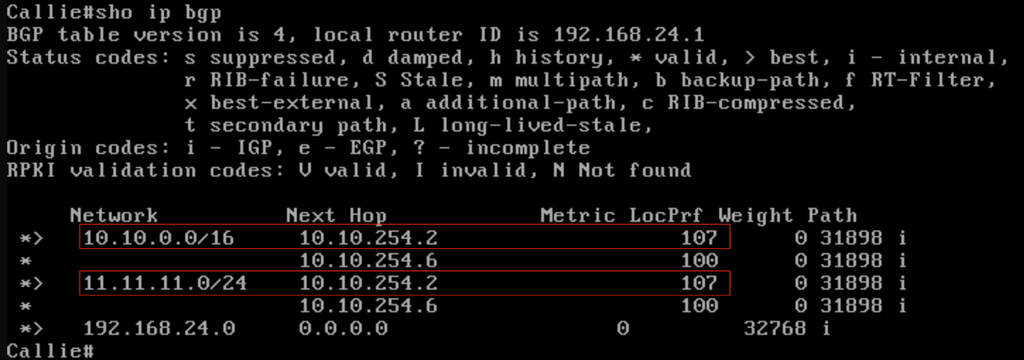
Each AS_PATH shown in Figure 4 contains a single occurrence of ASN 31898, the Oracle ASN used in this example.
We can also check whether any routes in the CPE’s BGP table carry the “gshut” community, as shown in Figure 5. The GSHUT community, defined in RFC 8326, is a well-known BGP community with the value 65535:0.

The command returns no matching routes, indicating that no routes in the CPE’s BGP table currently carry the “gshut” community.
Draining the Circuit
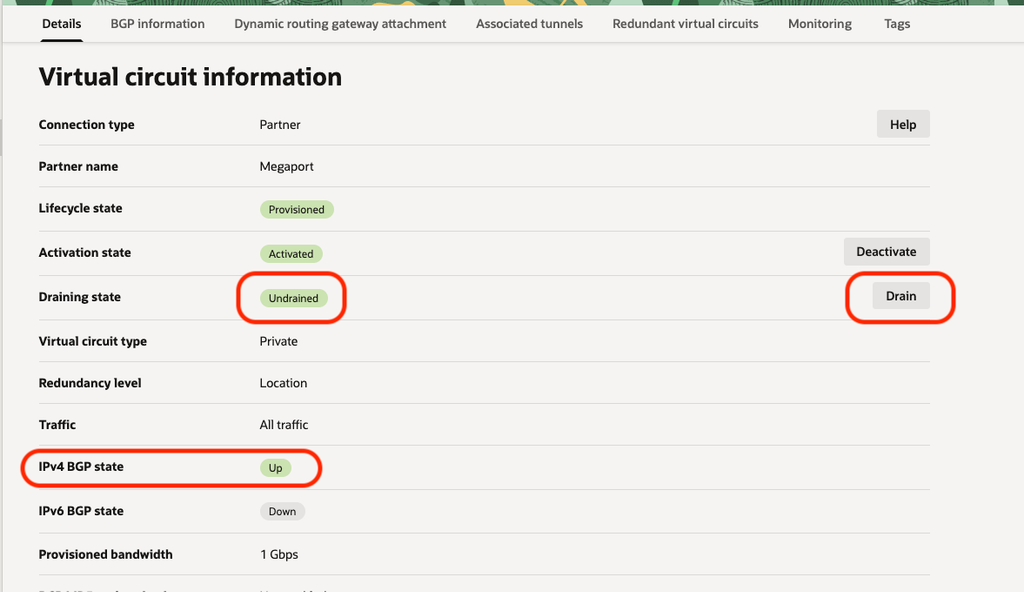
In the OCI Console, open the virtual circuit’s details and locate Draining state on the Details tab. In Figure 6, it is “Undrained”. Select Drain and confirm. Perform this operation during a scheduled maintenance window. Allow the provisioning operation to finish, then verify that the draining state changes to “Drained”.
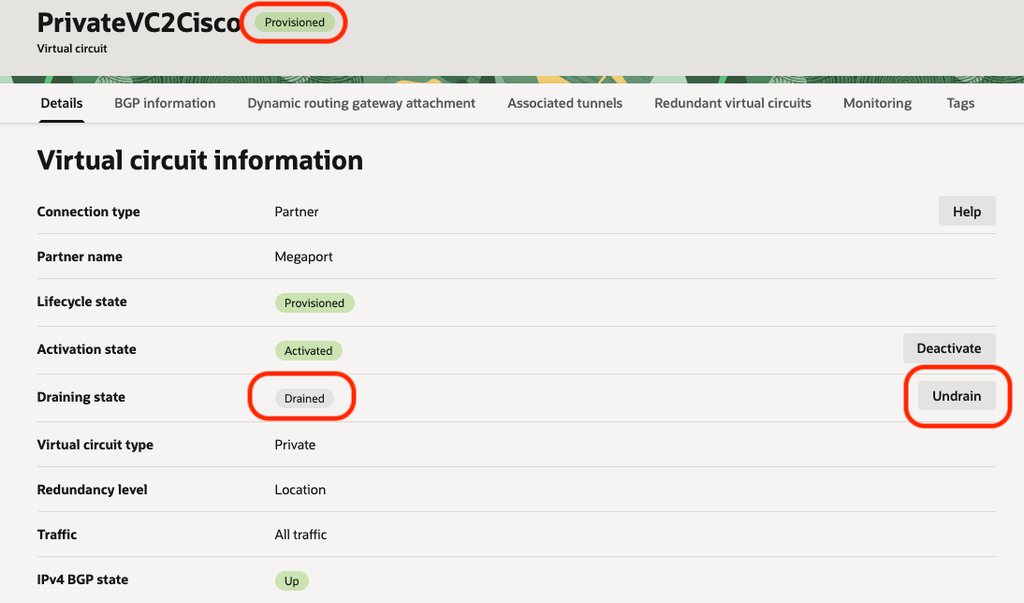
Once the operation completes, the draining state is “Drained” and the Drain button changes to Undrain, as shown in Figure 7. The screenshot shows the lifecycle state as “Provisioned”; Oracle’s current traffic-draining instructions describe the completed lifecycle state as “Available”.
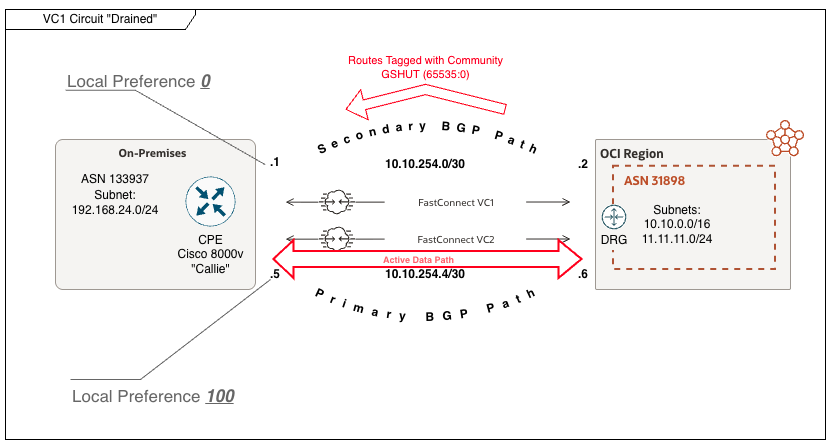
Now let’s look at the architecture again. OCI advertises routes over the drained virtual circuit with the GSHUT community and AS path prepending. The CPE’s inbound route map sets the local preference of those routes to 0. The CPE therefore prefers routes received over Virtual Circuit 2, which retain a local preference of 100.
Verifying BGP Changes
When viewing the BGP table on the CPE, we can observe two changes in Figure 8. ASN 31898 appears four times in the AS_PATH for routes received from neighbor 10.10.254.2, highlighted in red, compared with one occurrence for routes received from neighbor 10.10.254.6, highlighted in blue. Neighbor 10.10.254.6 is now the preferred next hop.
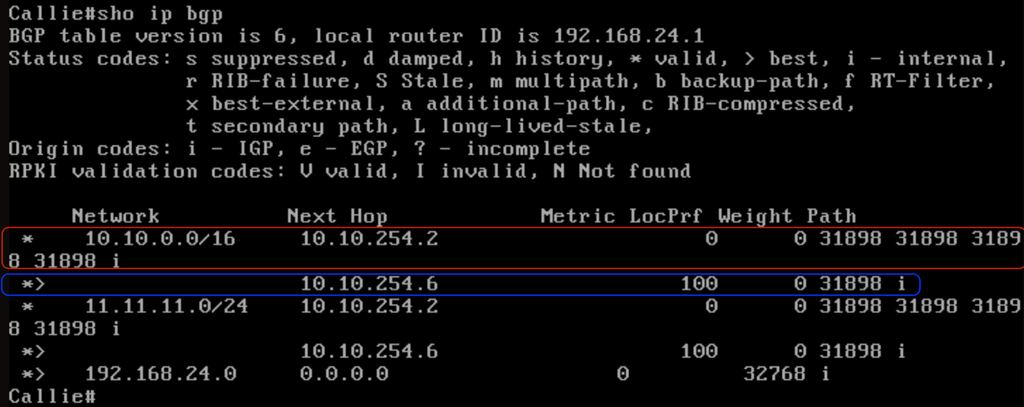
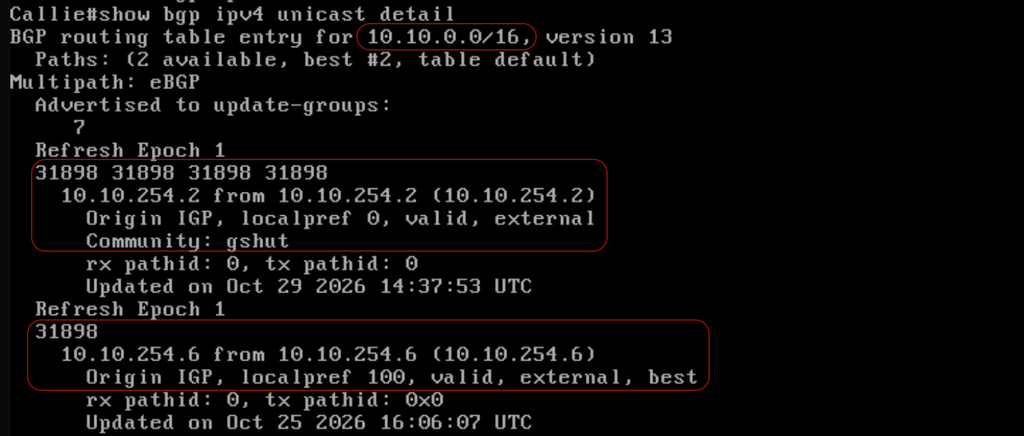
Figure 9 provides more detail about the received paths. For prefix 10.10.0.0/16, the path received from neighbor 10.10.254.2 contains four occurrences of ASN 31898 and carries the “gshut” community. The path received from neighbor 10.10.254.6 contains a single occurrence of ASN 31898 and has no community listed.
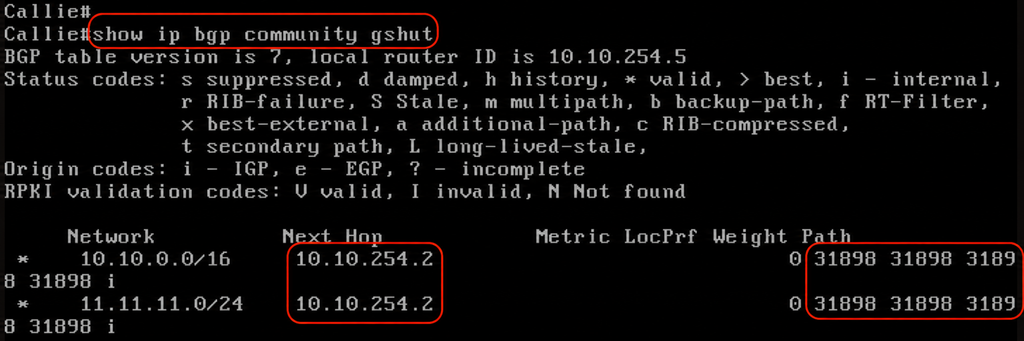
In Figure 10, the BGP community table confirms that routes received from peer 10.10.254.2 carry the “gshut” community.
Restoring the Circuit
To return the circuit to normal routing preference, select Undrain on its details page and confirm. Wait for the operation to complete and verify that the draining state returns to “Undrained”. In Figure 11, both neighbors again advertise routes with a single occurrence of ASN 31898 in each AS_PATH. The CPE selects neighbor 10.10.254.2 because its routes have the higher local preference of 107.
Vendor Considerations
CPE behavior depends on the vendor, platform, software version, and routing policy. Confirm that the redundant circuit can carry the traffic and that the CPE responds to the GSHUT community before taking the drained circuit out of service. Verify traffic flow in both directions, along with any firewall requirements for asymmetric routing.
The Cisco example above uses an explicit inbound policy to lower local preference for routes carrying the GSHUT community. Juniper platforms may handle this automatically, depending on software support and configuration. Validate the behavior on your specific device and software release.
For more information about BGP Graceful Shutdown and vendor-specific behavior, see the following Oracle A-Team article.
https://www.ateam-oracle.com/how-bgp-graceful-shutdown-helps-during-fastconnect-maintenance
References
FastConnect enhancements — September 16, 2026
FastConnect virtual circuit traffic draining