
Oracle Data Transforms has been around for a few years and is now a mature tool letting us easily loading, transforming and merging data from various data sources. It features a modern, intuitive web interface, powered by the proven capabilities of Oracle Data Integrator. Designing data integration pipelines in a web UI feels natural as we can see the flow of our data going from source to target. By using a visual web interface, building data integration pipelines becomes intuitive and easy to manage.
There are times however when manual configuration is not efficient enough, especially when repetitive tasks. We need to script some operations instead of clicking on it manually, either to work faster or to have consistent code and reduce errors. This is why we are excited that Oracle Data Transforms now has a new Python API.
Use Cases
Let’s highlight a few use cases where the Oracle Data Transforms Python API could be beneficial on a project.
Generate objects sharing the same pattern
The first thing which comes to mind when programmatically creating a large number of similar objects is the reduction of development effort and the faster delivery. Creating a hundred 1:1 mappings from a csv file on an Object Storage bucket to a table in Autonomous Database is time-consuming and the repeating clicks on the same button can quickly feel tedious. Scripting the creation of such objects can prove to be faster and future-proof, in case new objects need to be generated later.
An even greater advantage is simplified maintenance and debugging – by automating these tasks, there’s less risk of inconsistency or typo-related errors. When repeating the same operation a hundred times manually, it’s easy to forget to change a parameter (e.g. set the Truncate option to True) in a Data Flow or to make a typo. By scripting the creation of objects, we can ensure that the same conventions, rules and parameters are applied everywhere.
A great example would be to use the Oracle Data Transforms Python API to generate Data Flows to load data from Fusion Applications into an Autonomous Data Warehouse table using the Business Intelligence Cloud Connector (BICC). Every Fusion implementation has potentially hundreds of PVOs to extract to reconcile data with third-party software. In order to reduce development time, reduce errors and easily uptake any new PVO in the future, using scripts for development is best practice.
Schedule, start and monitor execution
Oracle Data Transforms has its own internal scheduler and a tab to review current and past jobs. However many organizations use centralized scheduling tools to manage entreprise-wide workflows. Being able to create a schedule or directly start an execution from such a scheduling tool makes it easier to integrate Oracle Data Transforms jobs within the ecosystem of all the integrations. Through the Python API, we can trigger jobs as part of broader workflows, whether from shell scripts, OML notebooks, or other automation platforms.
Ease migration from other data integration tools
Migrations from one tool to another are never easy and often requires a lot of manual effort. So it’s always good news if metadata can be extracted from the tool we are migrating away from because it opens the door to automating part of the migration. It’s now possible to create a script that reads the metadata and generates corresponding objects in Oracle Data Transforms. While some manual steps are unavoidable, scripting the generation of new objects from exported metadata lowers the overall risk and reduces labor.
Programatically rotate passwords or wallets on your connections
The Oracle Data Transforms Python API is also helpful for SecOps teams who need to change passwords on several connections on a regular basis. Instead of logging in Oracle Data Transforms and navigate through all connections to change them manually, they can script that change and schedule it ahead. This not only saves time for security teams but also helps them maintain compliance by keeping credentials updated reliably.
Source control
When thinking about Enterprise-level development, source control and lifecycle management naturally come to mind. While import and export are now possible from the web UI of Oracle Data Transforms, a more rigorous way to backup, version, branch and promote code can be done via scripting. Managing your code and deployment scripts with tools like Git increases traceability and enables collaborative development and change management. Import and Export methods are not present as of now in the API but will be added in the near future. In the meantime, version-controlling your Python scripts enables repeatable deployments and easier promotion between environments.
Documentation
The documentation and some examples can be found at this url: https://docs.oracle.com/en/database/data-integration/data-transforms/using/python-api-oracle-data-transforms1.html
Installation and setup
This is surprisingly easy to install. The first step is to set up a deployment.config file to point to our Oracle Data Transforms instances. Multiple deployments can be referenced in your configuration file, but only one should be marked as active when executing scripts. The structure of a deployment is different depending on which type of Oracle Data Transforms instance it is – Marketplace instance, Autonomous Database Serverless instance or OCI GoldenGate Service instance. Check the documentation to find the structure for your instance type.
Here is an example for an instance running on ADB-S in Ashburn.
[ACTIVE]
deployment=my_first_deployment

[my_first_deployment]
XFORMS_URL=https://<your_sub-domain>.adb.us-ashburn-1.oraclecloudapps.com/odi
xforms_user=<your_data_transforms_user>
tenancy_ocid=<your_ocid>
adw_name=<your_adb_name>
adw_ocid=<your_adb_ocid>
The next step is to install the Oracle Data Transforms Python API. It is actually part of the oracle-data-studio package.
pip3 install oracle-data-studio
Generate the documentation
The documentation for the package can be generated using pydoc. It provides all the methods and the parameters we will use to develop our Data Entities, Data Loader, Data Flows, Workflows, Schedules and so on. To explore available methods and classes more quickly, auto-generated HTML documentation can be created using simple pydoc commands, as shown in the code snippet below.
python -m pydoc -w datatransforms
python -m pydoc -w datatransforms.dataflow
python -m pydoc -w datatransforms.connection
python -m pydoc -w datatransforms.connection_types
python -m pydoc -w datatransforms.dataentity
python -m pydoc -w datatransforms.dataload
python -m pydoc -w datatransforms.project
python -m pydoc -w datatransforms.dataflow_load_options
python -m pydoc -w datatransforms.workflow
python -m pydoc -w datatransforms.schedule
python -m pydoc -w datatransforms.secrets_util
python -m pydoc -w datatransforms.client
python -m pydoc -w datatransforms.models
python -m pydoc -w datatransforms.variables
python -m pydoc -w datatransforms.workbench
Run a python script connecting to an Oracle Data Transforms instance
Let’s first import the classes we will need to connect to an Oracle Data Transforms instance and create a new Connections object in the repository.
from datatransforms.workbench import DataTransformsWorkbench,WorkbenchConfig
from datatransforms.connection import Connection
from datatransforms.connection_types import  ConnectionTypes, ConnectionTypeDrivers
import logging
In order to connect we need to pass the password corresponding to the user mentioned in the xforms_user parameter in the deployment.config file. We can then create a workbench object which will be our entry point for every object creation later on. For authentication, securely pass your password into the workbench constructor—ideally, this should come from a vault or secrets manager rather than hardcoding it.
logging.getLogger().setLevel(logging.ERROR)
pswd="<your_data_transforms_password>" # ideally retrieved from a vault
connect_params = WorkbenchConfig.get_workbench_config(pswd)
workbench = DataTransformsWorkbench()
workbench.connect_workbench(connect_params)
workbench.print_about_string()
We can now test the creation of a new object. In this example we are adding a new Connection to a new Oracle instance
src_connection = Connection()\
    .connection_name("Oracle_ADW")\
    .of_type(ConnectionTypes.ORACLE)\
    .with_credentials("<schema>",Connection.encode_pwd("<schema_password>"))\
    .using_driver(ConnectionTypeDrivers.ORACLE)
workbench.save_connection(src_connection)
After running this script, Oracle Data Transforms outputs a summary of your deployment, confirming a successful connection and the newly created object.
python create_connection.py

Oracle Data Transforms - Deployment details
----------------------------------------------------------------------
repositoryVersion : 05.02.02.23
releaseName : 2025.05.09.02.00
Current Time in Deployment Instance : 2025-08-30T14:30:32.690
Deployment Type : Autonomous DB
Deployment Instance : https://<a-team_url>.adb.us-ashburn-1.oraclecloudapps.com/odi/odi-rest
----------------------------------------------------------------------
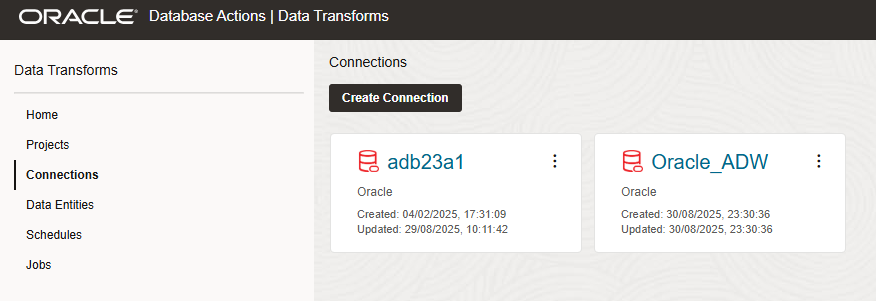
We can check the results in the web UI under Connections; your new connection should be listed and available for immediate use.
We have seen how we can use the Python API to connect to Oracle Data Transforms and create an object. In the next blog, we will see how to import a Data Entity or create it from scratch, how to create a Data Flow and how to schedule its execution using the Oracle Data Transforms Python API.