

Introduction
In continuation to my blog on Introducing the scheduler REST API and guidelines for monitoring scheduling jobs in Fusion Cloud Applications, I hope to share my tips on modernizing the “Scheduled Processes” user experience by leveraging Oracle Visual Builder (“VB”) Studio.
Oracle Fusion applications cloud provisions VB Studio as the default mechanism for extending and creating business-friendly applications. By designing, developing, and deploying application extensions with VB Studio, you can quickly improve your users’ experience.
This blog will provide you with an approach to (1) create an application extension using the Scheduler REST API in Visual Builder Studio for modernizing “Scheduled Processes” user interface and (2) Oracle Solution options for Orchestrating ESS Jobs.
Please note that this blog is not recommending replacement features for current “Scheduled Processes” features.
1. Modernizing “Scheduled Processes” user interface feature
The section aims to provide ideas to create an application extension using Visual Builder Studio (VB Studio) within Fusion Cloud Applications, using the “Scheduler” REST endpoints.
Use Cases
Application administrators use the “Scheduled Processes” functionality to search and schedule jobs. With Visual Builder Studio, you can configure and create application extension using “Scheduler” REST endpoints to for your business requirements. This will provide application administrators an easy way to help identify the jobs to optimize and facilitate operational governance. The most common requirements that can be enabled are:
- Search scheduled jobs with additional criteria.
- Summarize administrators’ view of ESS Jobs to enable proactive monitoring.
- Extend user-friendly view on scheduled jobs.
- Present scheduled jobs in a calendar view.
- Orchestrate ESS jobs for integrating applications.
Solution
Oracle VB Studio enables you to extend and configure to meet your business requirements. My blog Using Visual Builder Studio, empower your users with Fusion Applications cross-pillar data provides details on how you can use VB Studio for application extensions.
The Scheduler REST API provides many operations including query job requests, submit a new job request, cancel, force-cancel, hold, register a call back URL. More details are available in the blog on Introducing the scheduler REST API and guidelines for monitoring scheduling jobs in Fusion Cloud Applications.
The sample screenshots demonstrate the modernization of the “Scheduled Processes” feature. These sample screens provide you with a concept to create new features based on your requirements.
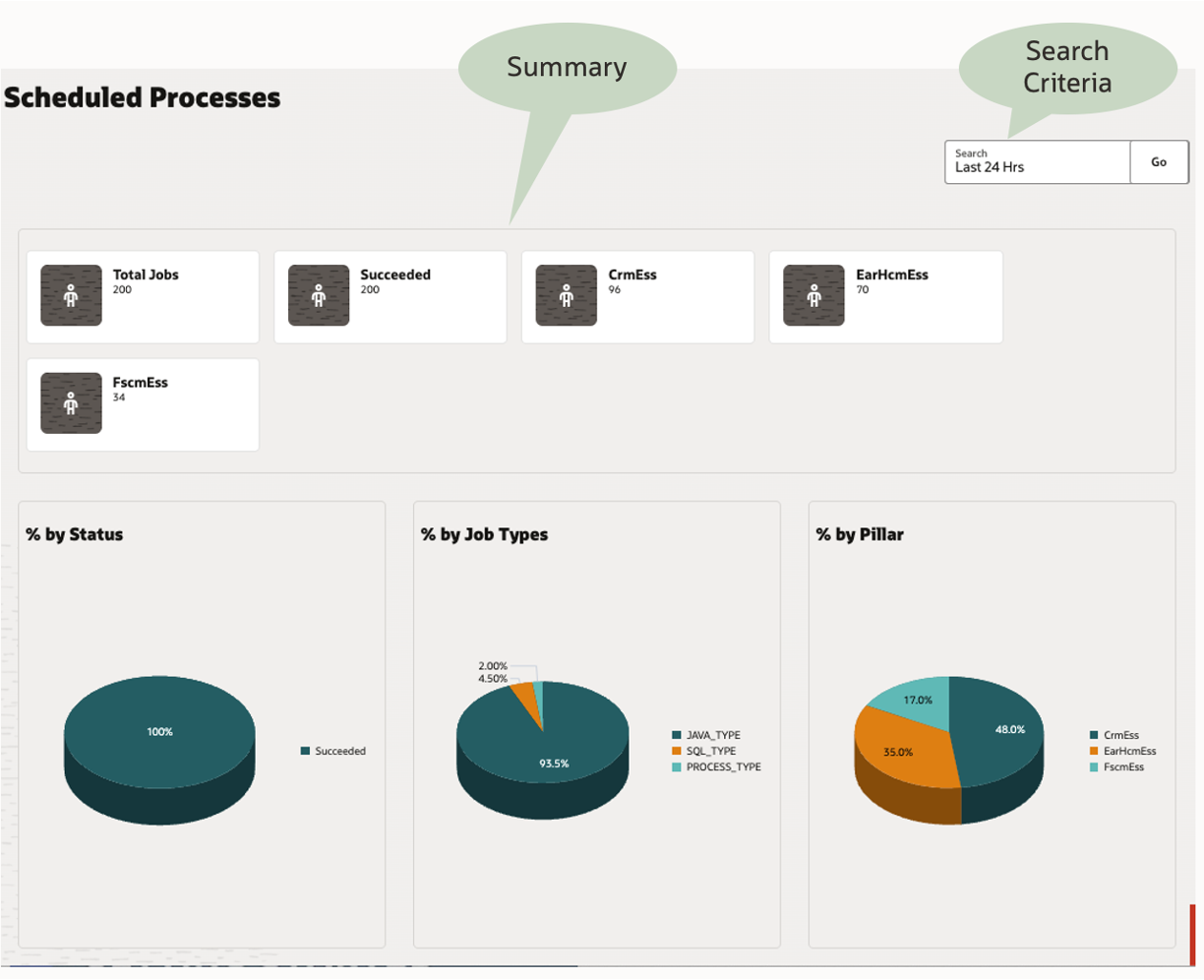
1. Summarized view of Scheduled Processes.
The screen-shot below provides a sample application extension view of scheduled processes (ESS jobs) in VB Studio using “Scheduler” REST. You can design your view based on your requirements.
2. Sample Calendar View
Oracle’s Redwood has a Redwood Calendar component to interact with time-related data in your application. The calendar component shows date and time-related information through monthly, weekly, daily, and list views. You can use this component to build a calendar view of your scheduled jobs. Refer to the “Working with the Redwood Calendar Component” blog for more details.
Providing calendar views will help your application administrators identify overscheduling and pro-actively plan the schedule for new/custom jobs.
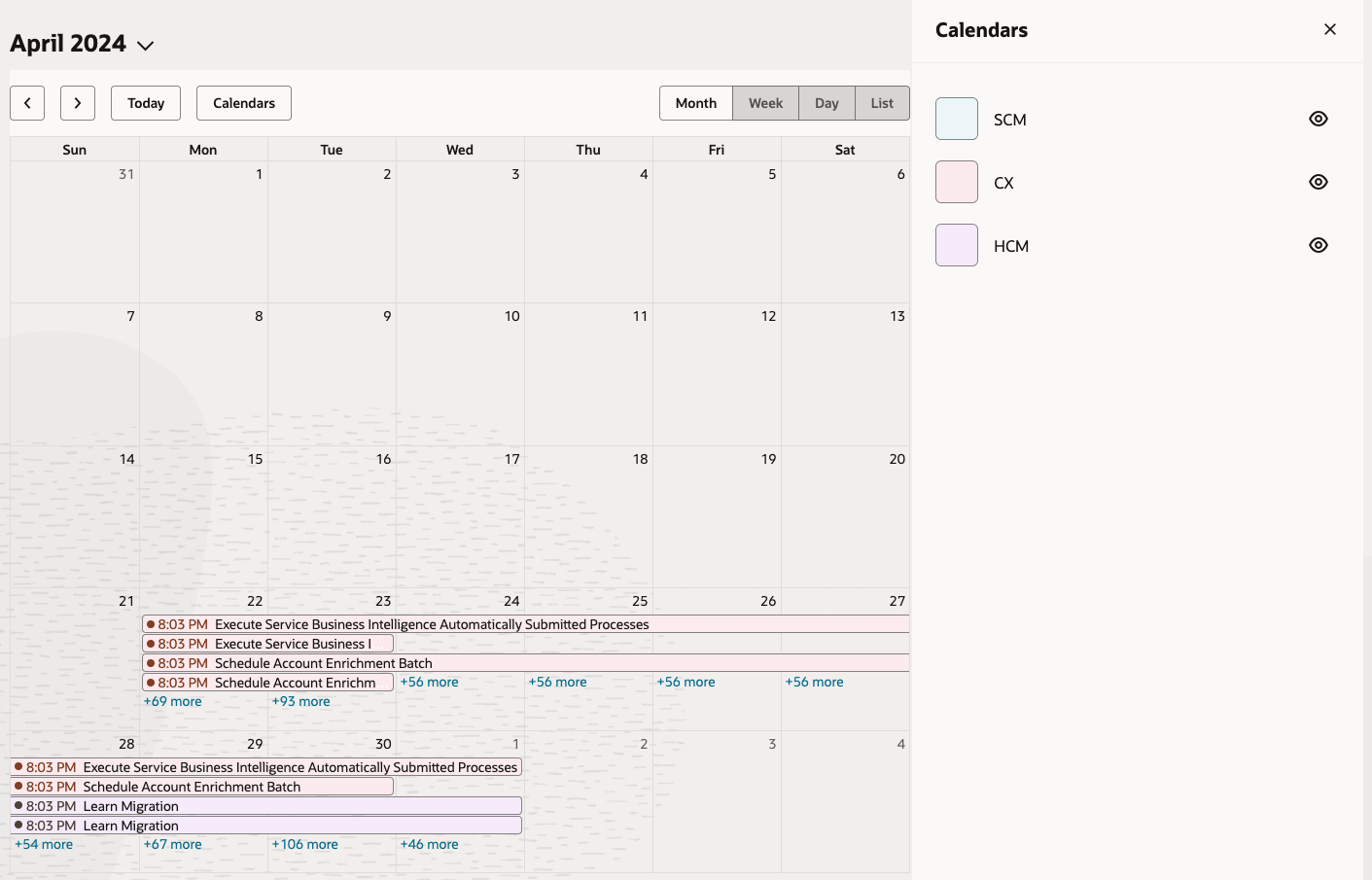
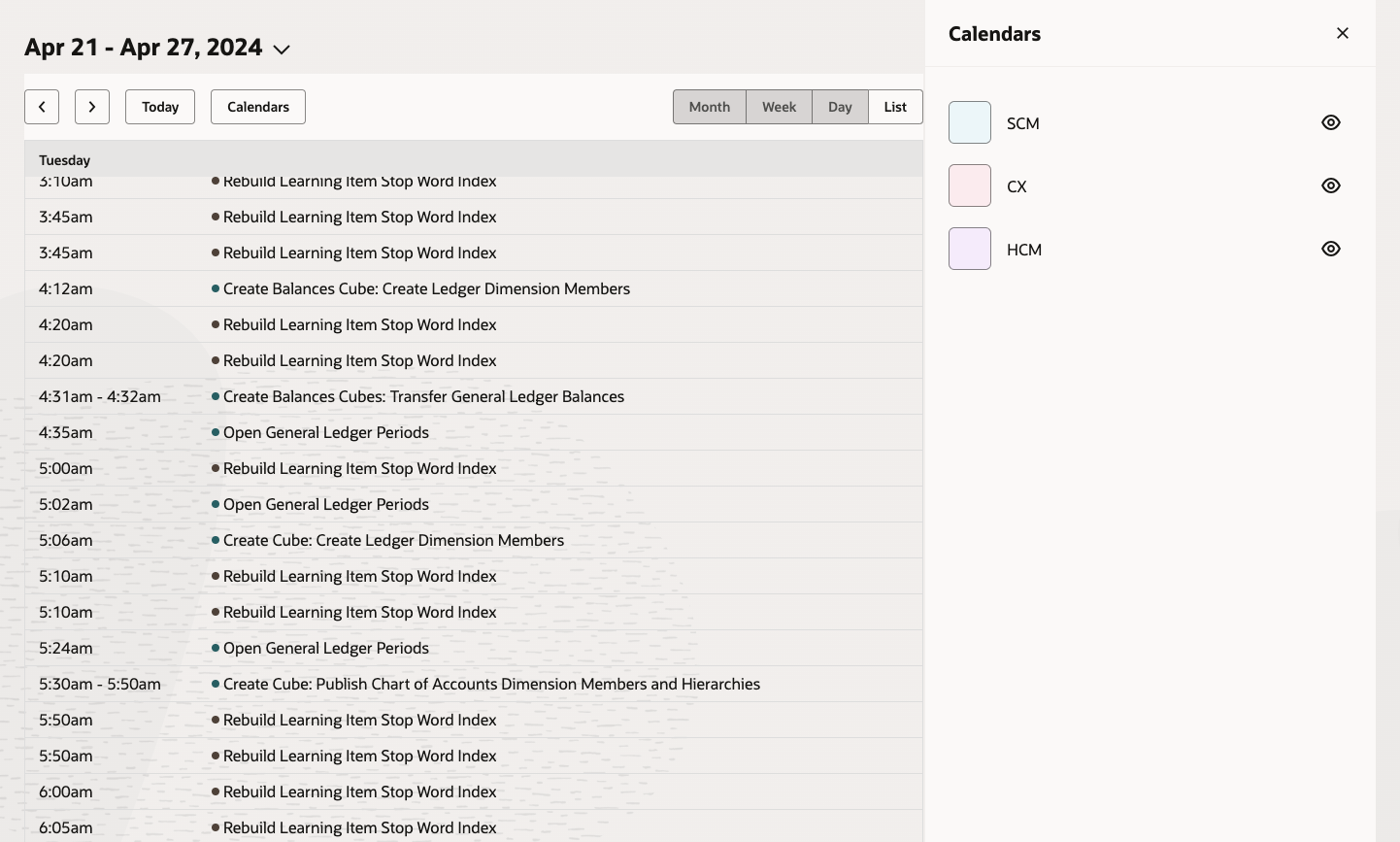
A few requirements for calendar views are:
- Pillar (ERP/HCM/SCM/CX) based calendar to show all scheduled processes.
- Display calendar view for a specific process.
- Last month’s run data
- Next month’s scheduled data
Guidelines
- Summarizing all the existing scheduled processes history data may cause performance issues. Create appropriate search criteria to limit the number of records returned.
- Create an extension after a thorough analysis of your job scheduling and monitoring requirements. Perform gap analysis with out-of-the-box/standard “Scheduled Processes” feature. Start with fewer requirements and expand.
- Leverage a tool, like Postman to test all the REST operations prior to finalizing your requirements. This will help you understand all available operations and data via REST to design your screens. Create customer connect ideas if you find limitations or have additional requirements.
2. Oracle Solution Options for Orchestrating ESS Jobs
An ESS orchestration process is a sequence of steps that automate your ESS jobs. The three common Oracle solution options are:
- Scheduled Processes within Fusion Cloud Applications
- Extend using VB Studio Application Extension
- Oracle Integration Cloud for ESS Orchestration
1. Scheduled Process within Fusion Cloud Applications
A scheduled process takes care of tasks that are difficult or time-consuming when done manually, such as importing data, updating many records, exporting data and running reports. A scheduled process can be run on a recurring schedule and notifications can be sent based on the result.
The Scheduled Processes work area within the Fusion Cloud Application allows you to run all the processes you’ve access to and to manage submissions. You can navigate via Tools Scheduled Processes.
The most common business requirements for scheduling jobs can be met with this option.
2. Extend using VB Studio Application Extension
It is recommended that you choose this option if you have requirements to streamline, monitor and orchestrate schedules. Configuration and extension of this option will require VB Studio, which is included in Fusion Cloud Applications.
Using VB Studio you can build application extensions using available Fusion REST APIs. For example, with Scheduler REST you can submit, cancel, get details of ESS jobs.
3. Oracle Integration Cloud (“OIC”) for ESS Orchestration
Oracle Fusion Cloud Applications integration scenarios generally involve system-to-system integration flows between distinct on-premises systems, third-party or legacy systems, and Cloud systems.
The Oracle ERP Cloud Adapter enables you to easily integrate on-premises or SaaS applications with Oracle ERP Cloud without having to know about the specific details involved in the integration. The Oracle ERP Cloud Adapter enables you to create an integration with Oracle Enterprise Resource Planning (ERP) applications.
Refer to External Data Integration Services for ERP Cloud document for details.
You can use available Oracle REST APIs and SOAP services to view and manage data stored in Oracle Fusion Cloud Applications. Key REST APIs are listed below.
| Pillar |
Service |
Description |
| Common ** |
Provides external operations for ESS jobs. |
|
| ERP |
The ERP processes resource is used to view details of ERP processes. |
|
| ERP |
The ERP integrations resource automates bulk data import and export flows. It also provides key features such as callback and error notifications, as part of these flows. |
|
| ERP |
The ERP business events resource is used to retrieve or update a business event-enabled record to determine whether the business event can be initiated. |
** Common REST APIs can be used by all pillars (ERP, SCM, HCM, CX)
Use Cases
- Inbound data management requires data from on-premises or external business systems to be imported into Oracle Fusion Cloud Applications.
- Orchestrate file-based data import and calling ESS Import jobs.
- Ability to manage jobs via services.
- Examples
- Import journal entries in a batch into Oracle ERP Cloud.
- Configure and receive a callback from Oracle ERP Cloud.
- Synchronize product data in real-time with the supply chain.
- Examples
- Outbound data management requires data exports from Oracle Fusion Cloud Applications to feed downstream systems.
- Orchestrate ESS jobs based on Oracle Fusion business events.
- Orchestrate & manage data extracts and reports.
- Examples
- Run a report and use the output for additional processing.
- Automated payment data extract from ERP Cloud to update downstream external application.
- Seamless launch of payables registers, trial balance, and reconciliation reports.
- Trigger an integration based on events in Oracle ERP Cloud.
- Examples
- Using callback mechanism, post-processing of ESS jobs can be configured in OIC. For Inbound example the event is raised by the application regardless of whether the load/import job succeeds or fails. The Oracle cloud ERP application then invokes the Oracle Integration endpoint that is the callback integration.
- When using other than OIC, you could use the getEssJobStatus operations to monitor the status of an ESS job. Invoke the getEssJobStatus operation in loop until either a terminal status is received in response or maximum retry is reached. The terminal statuses are SUCCEEDED, CANCELLED, ERROR, and WARNING.
Guidelines
- Document your requirements and define your scope clearly.
- Perform thorough analysis before finalizing the solution options.
- Avoid adding features that already exists within Fusion Cloud Applications.
- Schedule business critical jobs during peak hours and less critical jobs during non-peak hours to avoid concurrency issues.
- Establish a governance process to centralize job scheduling.
- Optimize the number of ESS threads for business-critical jobs.
- Limit the number of jobs to < 15 jobs per job set to reduce complexity.
Conclusion
To summarize, Visual Builder Studio can be used within Oracle Fusion Cloud applications to create an extension for modernizing the user experience for Scheduled Processes. With the given options and guidelines, you can now use REST APIs for orchestrating and automating ESS jobs. Finally, we would like to thank Karthick Saravanan, Oracle Consulting for his contribution.
I hope this blog will help you to enhance Scheduled Processes user experience and to choose the right ESS jobs orchestration option.
References
Note: Always refer to the latest documentation.
- Fusion Applications: ESS Frequently Asked Questions (FAQ’s) (Doc ID 2723272.1)
- What are the Tables Where the ESS Jobs and Custom Job Sets are Stored? (Doc ID 2430380.1)
- Post migration schedule processes list – Customer Connect
- Batch Processing Framework Functional Requirements – ESS
- Using External Data Integration Services for Oracle ERP Cloud (Doc ID 2102800.1)
- PaaS Integration Patterns
- Introducing Scheduler REST and guidelines for monitoring ESS jobs