
ORACLE CPQ INTEGRATION PATTERNS
Introduction
Oracle CPQ (Configure, Price, Quote) is a powerful tool for streamlining complex sales processes. However, its true potential is unlocked when it’s seamlessly integrated with your other enterprise systems. Whether you’re connecting to a CRM, ERP, PLM, or other specialized applications, robust integrations are vital for ensuring data accuracy, process automation, and a smooth user experience.
In this post, we’ll explore common integration solution patterns employed with Oracle CPQ. We’ll discuss how each pattern works, its strengths and weaknesses, and when to leverage it to build effective and scalable solutions.
Integration Patterns with Oracle CPQ
Point-to-Point Integration
Description: Direct integration between Oracle CPQ and another application (Oracle or non-Oracle) where data is exchanged directly without intermediaries like Oracle Integration Cloud or any other middleware or iPaaS. This pattern is particularly useful for simple integrations where the source and target systems are well-defined.
Use Case: Oracle CPQ to Oracle Sales Cloud for opportunity-to-quote synchronization.
Technology: No specific intermediary technology is required; relies on direct system-to-system communication. Makes use for CPQ’s capabilities such as Integration XSL File, BML Integrattion and REST APIs.
Suitability: Best for straightforward, low-complexity integrations with minimal transformation needs.
Limitations: Lacks scalability and flexibility for complex or multi-system integrations.
Request-Response Pattern
Description: The Request-Response pattern involves the CPQ system making a request to another system (e.g., Oracle Fusion Order Management) and immediately waiting for a response before proceeding.
Use Case: Converting CPQ quotes into Sales Orders in Oracle Fusion Order Management. The user (or a system calling the CPQ API) wants confirmation of the sales order creation and typically needs the Sales Order Number.
Trigger: This can be triggered by a user action in the CPQ system (e.g., clicking a “Book Order” button) or programmatically via CPQ APIs.
Technology:
- OIC is used as intermediary to transform the quote from CPQ in SalesOrder on Fusion Order Management
- A REST API (
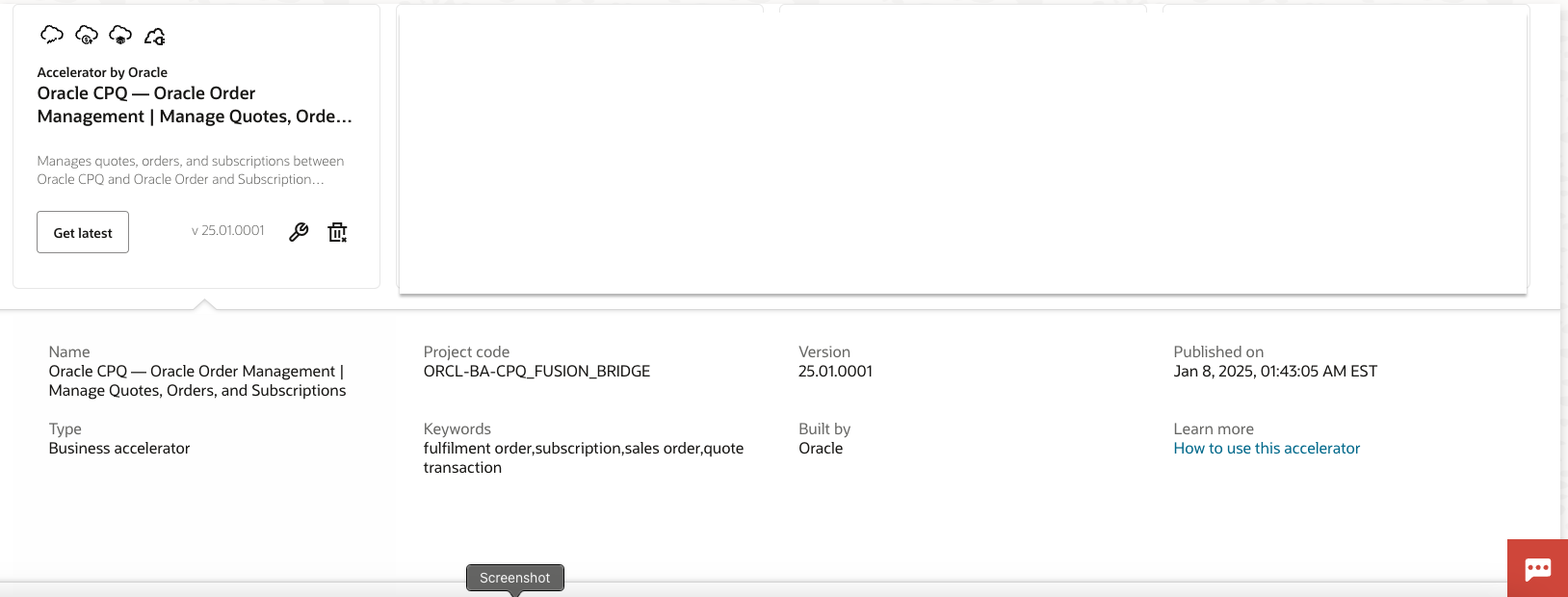
/fscmRestApi/resources/11.13.18.05/salesOrdersForOrderHub) is used to communicate with Oracle Fusion Order Management to create Sales Order - Prebuilt Integration: The integration is available as an accelerator in the Oracle Integration Cloud Integration Store, making it easier to implement.
Workflow:
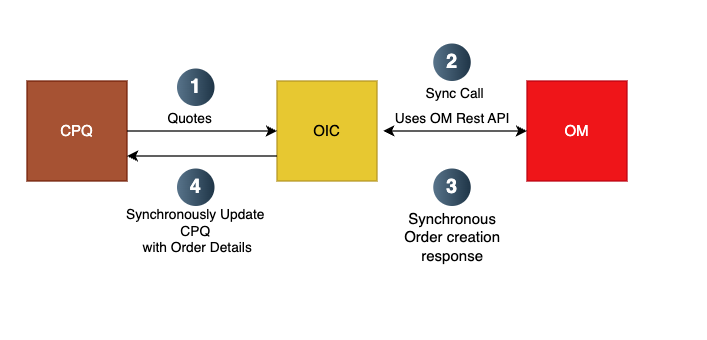
- CPQ sends request: CPQ transmits quotes for Sales Order creation to OIC.
- OIC translates and sends request: OIC transforms the quote data and invokes the `
salesOrdersForOrderHub` REST API in Fusion Order Management. - Fusion Order Management Response: Fusion Order Management creates the Sales and immediately provides response to OIC synchronously with Order Details like Order Number.
- CPQ gets Response: OIC sends back the Fusion Order Management Response back to CPQ and transformation.
Suitability: This pattern is well-suited for:
- Smaller Quotes/Orders: The performance depends on the speed of the downstream system and the amount of data being transferred. It’s ideal when the downstream system can process the request and return a response quickly.
- Real-Time Feedback: When the user or calling system needs immediate confirmation and the sales order number to proceed.
Limitations:
Performance Issues with Large Orders: The main problem is long response times. If the order contains many line items, the request to Fusion Order Management could take a significant amount of time, potentially leading to:
- User Experience Problems: The user has to wait, leading to frustration and potentially impacting productivity.
- Timeouts: The CPQ system or intermediate layers might have timeout limits, causing the integration to fail even if the downstream system eventually processes the request.
- System Load: Tying up resources in the CPQ system while waiting for the response.
Oneway Fire and Forget Pattern
Description: This pattern addresses the limitations of the Request-Response pattern when integrating Oracle CPQ with Oracle Fusion Order Management, specifically for large quotes containing many line items. In this approach, CPQ initiates a request (typically to create a Sales Order) and does not immediately wait for a response. Instead, the response and any relevant data, like the Sales Order Number, are asynchronously updated back to CPQ once the downstream process in Fusion Order Management completes. The One-Way Fire and Forget pattern with asynchronous updates provides a robust and scalable solution for integrating Oracle CPQ with Fusion Order Management when dealing with large quotes. By leveraging asynchronous communication, it avoids the limitations of the Request-Response pattern, delivering a better user experience and improving system performance.
Use Case: Creating Sales Orders in Oracle Fusion Order Management from large CPQ quotes (tens to hundreds of line items).
Trigger: Primarily triggered programmatically via CPQ APIs due to the large size of the quotes. This might also be initiated by a user action, but the user is not blocked waiting for the process to complete.
Technology:
- Stage Order and Run ESS: Given that Fusion Order Management REST API for Sales Order Creation does a lot of heavy lifting in terms of validation, orechestration and creation it is better suited for smaller orders with few order lines. Hence an asynchronous mechanism is vital here. For this we will use the Stage Order using Import Sales Order documented here – https://docs.oracle.com/en/cloud/saas/supply-chain-and-manufacturing/25a/faspc/import-sales-order.html#u30230989
- Integration Layer (e.g., Oracle Integration Cloud – OIC): OIC acts as the intermediary, translating the CPQ quote data into the format expected by the `CreateOrderAsync` web service and managing the asynchronous communication and status updates.
Workflow:
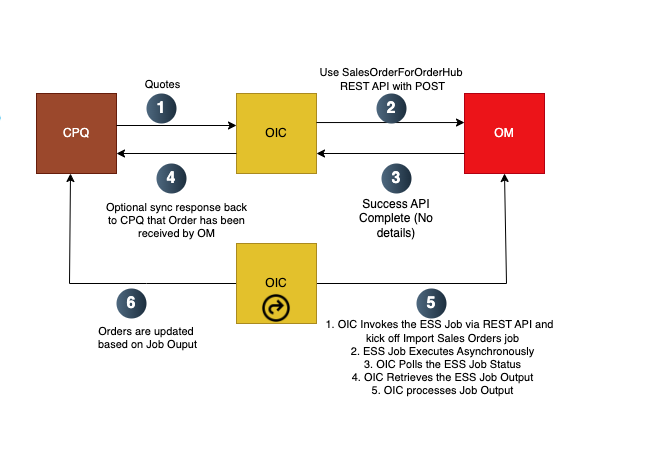
- CPQ sends request: CPQ transmits quotes for Sales Order creation to OIC.
- OIC translates and sends request: OIC transforms the quote data and invokes the SalesOrderForOrderHub REST API with a POST method. The POST method helps to just stage the orders in the interface tables.
- Fusion Order Management gives a HTTP 200 OK once the SalesOrderForHub POST call is successful.
- OIC can optionally synchronously update CPQ if there is response expected from CPQ. However the response to CPQ will not contain any Order Details or Order Number since the Order is created asynchronously in Fusion OM.
- An OIC schedule-based integration runs periodically to do –
- 1.OIC Invokes the ESS Job via REST API and kick off Import Sales Orders job
- ESS Job Executes Asynchronously
- OIC Polls the ESS Job Status
- OIC Retrieves the ESS Job Output
- OIC processes Job Output
- OIC reads through the Job Output got from the ESS job output and updates the orders in CPQ asy
Benefits:
- Eliminates Timeouts: Solves the timeout issues experienced with the Request-Response pattern, especially with large orders that take a long time to process in Fusion Order Management. Neither CPQ nor the user is blocked while waiting for a lengthy operation to complete.
- Improved User Experience: Users are not kept waiting for extended periods while large quotes are being converted to Sales Orders. The CPQ system can provide a notification when the Sales Order is successfully created.
- Enhanced Scalability and Performance : Frees up resources in CPQ (and OIC) that would otherwise be tied up waiting for synchronous responses. This allows the system to handle more concurrent requests.
Suitability:
- Large Quotes/Orders: Ideally suited for scenarios with many line items where processing in the downstream system (Fusion Order Management) is likely to take a significant amount of time.
- Asynchronous Nature of the Downstream System: It’s essential to be compatible with the downstream system’s capabilities. In this case, using an asynchronous SOAP web service (`CreateOrderAsync`) in Fusion Order Management is critical.
- Delayed Need for Sales Order Number: Works well when the user or calling system doesn’t need the Sales Order Number *immediately* upon initiating the booking process. The number can be retrieved later through the asynchronous update mechanism.
*Note:
Oracle plans to offer this pattern as a prebuilt accelerator in the Oracle Integration Cloud, similar to the Request-Response pattern, making it easier for customers and system integrators to implement this integration between CPQ and Fusion Order Management for handling large orders. In the meantime, customers and SIs can implement their own integrations based on this design pattern.
Throttling Pattern
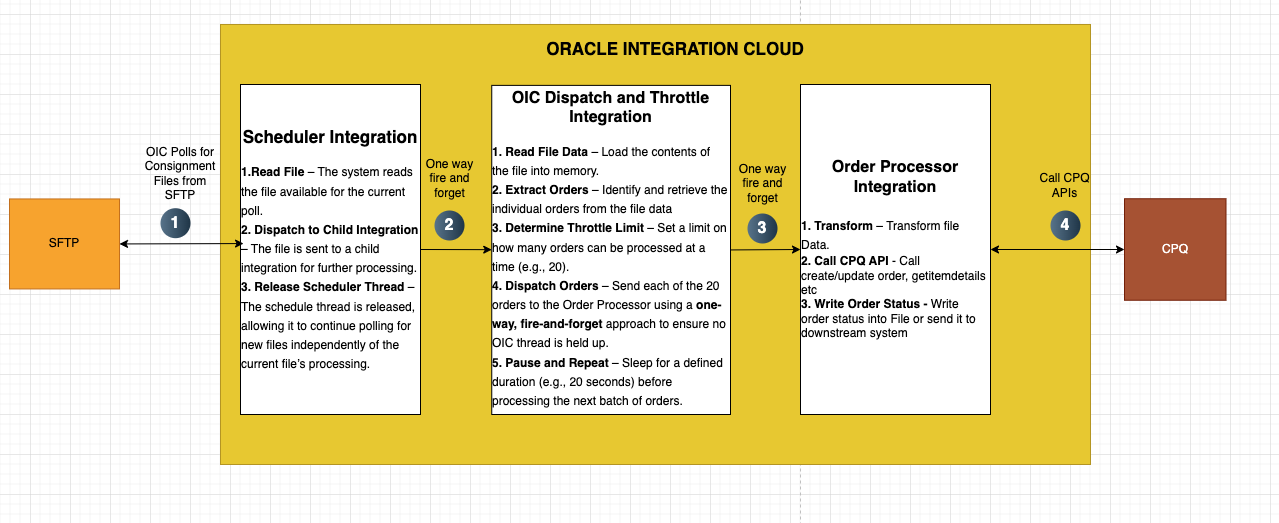
Description: This pattern manages high-volume order processing by limiting the rate of API requests to prevent system overload, particularly during peak periods.
Use Case: A large Oracle customer handles a high volume of consignments (packages/shipments). This likely involves order capture, pricing (configuration, pricing, and quoting – CPQ), and subsequent processing and integration for fulfillment through their operations.
- Key Steps:
- Customers (or internal systems) submit orders for consignments.
- The Oracle CPQ (Configure, Price, Quote) system processes the order, likely determining pricing, configuring services, and generating quotes.
- The CPQ system needs to transfer this information to OIC (Oracle Integration Cloud) for downstream processes, such as scheduling delivery, generating shipping labels, tracking, etc.
- OIC interacts with various backend systems (e.g., inventory, logistics, shipping partners).
- The consignments are processed for delivery and fulfillment.
- Challenges/Pain Points:
- Time Sensitivity: Customers are submitting files close to the cut-off time for same-day collections, requiring rapid processing.
- High Volume: The company deals with a large number of consignments daily (around 30,000 records).
- API Dependency: The CPQ process relies heavily on a specific set of APIs (5 APIs per consignment), which are causing strain on the system.
- System Bottlenecks: The CPQ system becomes overloaded during peak periods (heavy load)
- Error Handling: Frequent “500” errors occur, causing failures in the automatic processing and requiring manual intervention.
- Manual Workarounds: Planners are spending time manually re-processing failed files.
In short, the business scenario is a high-volume order processing environment where system limitations (particularly in CPQ and its integration with other systems) are causing significant operational problems. The focus is on improving system performance, error handling, and scalability to ensure timely and efficient order fulfillment.
Workflow:
Benefits:
- CPQ System Stability:
- Prevents Overload: Throttling directly addresses the problem of overwhelming the CPQ system with too many API requests at once. By limiting the number of concurrent requests, it reduces the risk of the CPQ system becoming unresponsive or crashing.
- Reduces “500” Errors: By preventing overload, throttling reduces the likelihood of “500 Internal Server Error” and timeout issues in the CPQ system.
- Ensures Consistent Performance: Throttling helps maintain a consistent performance level for the CPQ system by ensuring it is not overloaded, even during peak periods. This benefits all users and integrations that rely on CPQ.
- Improved OIC Performance and Reliability:
- Optimized Resource Usage: By limiting the number of concurrent API calls, throttling allows OIC to manage its resources more efficiently. This improves the overall performance and reliability of the integration.
- Prevents OIC Thread Starvation: The “fire and forget” approach for dispatching orders and the pausing mechanism prevent the OIC threads from being held up by slow or unresponsive CPQ API calls. This allows OIC to continue processing other tasks.
- Enhanced Scalability:
- Handles High Volume: Throttling enables the system to handle a higher volume of consignment files/orders without compromising the stability of the CPQ system.
- Controlled Scaling: It provides a mechanism to control how the system scales. The throttle limit can be adjusted based n the CPQ system’s capacity and performance characteristics.
Suitability: High-volume, time-sensitive environments with API dependency and system bottlenecks.
Publish-Subscribe (Pub-Sub) Pattern
Description: Oracle CPQ publishes data to an OIC messaging queue, and subscribers (other applications) can listen and act on this data. This pattern supports asynchronous communication and is ideal for scenarios where multiple systems need to react to changes in CPQ data.
Use Case: Publishing new quotes from CPQ to be subscribed by both Oracle ERP and external CRM systems.
Workflow:
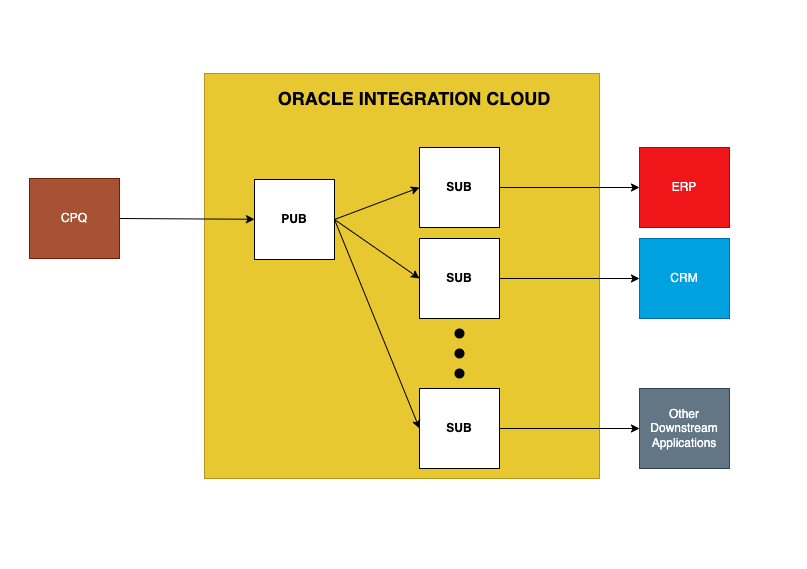
Technology: Uses OIC messaging queue for publishing and subscribing.
Benefits: Enables multiple systems to react to CPQ data changes efficiently.
Suitability: Ideal for scenarios where multiple systems need to respond to CPQ updates asynchronously.
Batch Processing:
Description: Scheduled or triggered batch jobs to move large volumes of data from CPQ to other systems or vice versa. This is useful for nightly data syncs or periodic data reconciliation.
Use Case: Daily synchronization of product catalogs or pricing changes from CPQ to Oracle Commerce Cloud.
Workflow: The batch synchronization can be both ways to and from Oracle CPQ.
Technology: Pattern details available at: Oracle Product Hub to CPQ Synchronization.
Suitability: Best for non-real-time, large-scale data transfers.
Data Augmentation:
Description: Enriching CPQ data with external sources or vice versa to gain valuable insights.
Use Case: Augmenting CPQ product data with Fusion Application to analyze average quote value, conversion rates, sales team performance, discounts, rejection reasons, and revenue by channel or location.
Technology: Pattern details available at: Transforming Oracle CPQ Data into Insight with FDIP.
Benefits: Provides actionable business insights from CPQ data.
Suitability: Ideal for analytics and reporting needs.
Event-Driven Integration
Description: Triggered by specific events within Oracle Fusion (e.g., subscription creation or order status updates), OIC orchestrates actions to update CPQ.
Use Case: When a subscription is created in Oracle Fusion Subscription Service, a renewables quote is created in CPQ.
Technology: Prebuilt integration available as an accelerator in the Oracle Integration Cloud Integration Store.
Benefits: Real-time updates driven by system events.
Suitability: Best for event-based, dynamic interactions between systems.
API-Based Integration:
Description: Uses REST or SOAP APIs provided by Oracle CPQ to interact with other applications, with OIC as a mediator for secure, scalable API interactions.
Use Case: Utilizing CPQ’s REST API to update sales orders in SAP or other ERP systems.
Technology: Relies on CPQ’s REST/SOAP APIs and OIC mediation.
Suitability: Suitable for direct, API-driven system interactions.
Hybrid Integration:
Description: Integrates on-premises systems with Oracle CPQ in the cloud through OIC, using connectivity agents or secure connections like VPN or FastConnect.
Use Case: Integrating Oracle CPQ with an on-premises Oracle E-Business Suite for customer information, order fulfillment, inventory, and material reservation.
Technology:
- Direct integration per whitepaper: CPQ Cloud to EBS Integration White Paper (Doc ID 1991064.1).
- Alternative: OIC with EBS Adapter and OIC Agents.
Suitability: Ideal for hybrid cloud/on-premises environments.
Orchestration Pattern:
Description: OIC orchestrates a sequence of interactions across multiple systems including CPQ, managing complex business processes with multiple steps or conditional logic.
Use Case: Managing the entire quote-to-order process across CPQ, ERP, CRM, and payment gateways.
Benefits: Handles complex, multi-system workflows effectively.
Suitability: Best for intricate, multi-step business processes.
Conclusion
In this blog, we explored a variety of integration patterns for connecting Oracle CPQ with both Oracle and non-Oracle applications using Oracle Integration Cloud (OIC). From the simplicity of point-to-point setups to the complexity of orchestrated workflows, these patterns offer a snapshot of what’s possible in the ever-evolving landscape of enterprise integration. However, this is just the beginning—countless combinations of these approaches can give rise to innovative new patterns tailored to specific business needs.
A special thanks goes out to my colleagues Shreeni Raghuram, Dipak Chablani, and Patrick McErleans for their invaluable contributions and expertise, which helped shape this discussion. Together, we’ve only scratched the surface of what Oracle CPQ and OIC can achieve, paving the way for more seamless, efficient, and powerful integrations in the future.