
It is quite natural that the technology landscape of enterprises has a myriad of applications. However, and interestingly, it is also not unusual to come across the identity landscape in enterprises with a plethora of identity providers (IDP) where different applications tie up with different IDPs for their identity needs.
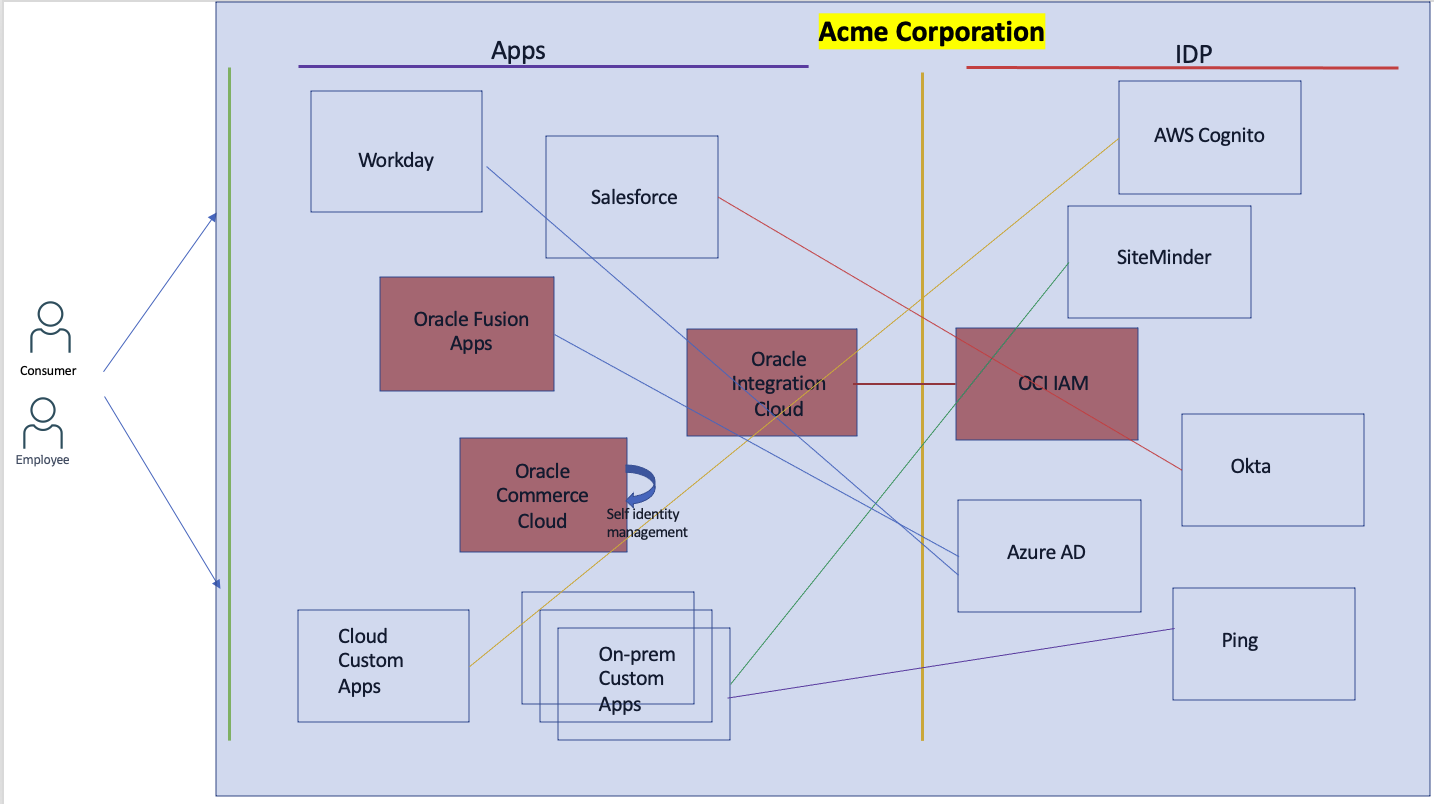
Fig 1
It is not just proliferation of IDPs, even applications are sometimes configured to use their own identity management stacks (Commerce Cloud in Fig 1) instead of federating with an IDP, thus adding to the complexity. The reasons for ending up with the above topology are quite a handful, but we will not delve into them here. However, you can consolidate various identity management solutions into OCI IAM and benefit from its rich and powerful features to secure your applications, both Oracle as well as non-Oracle.
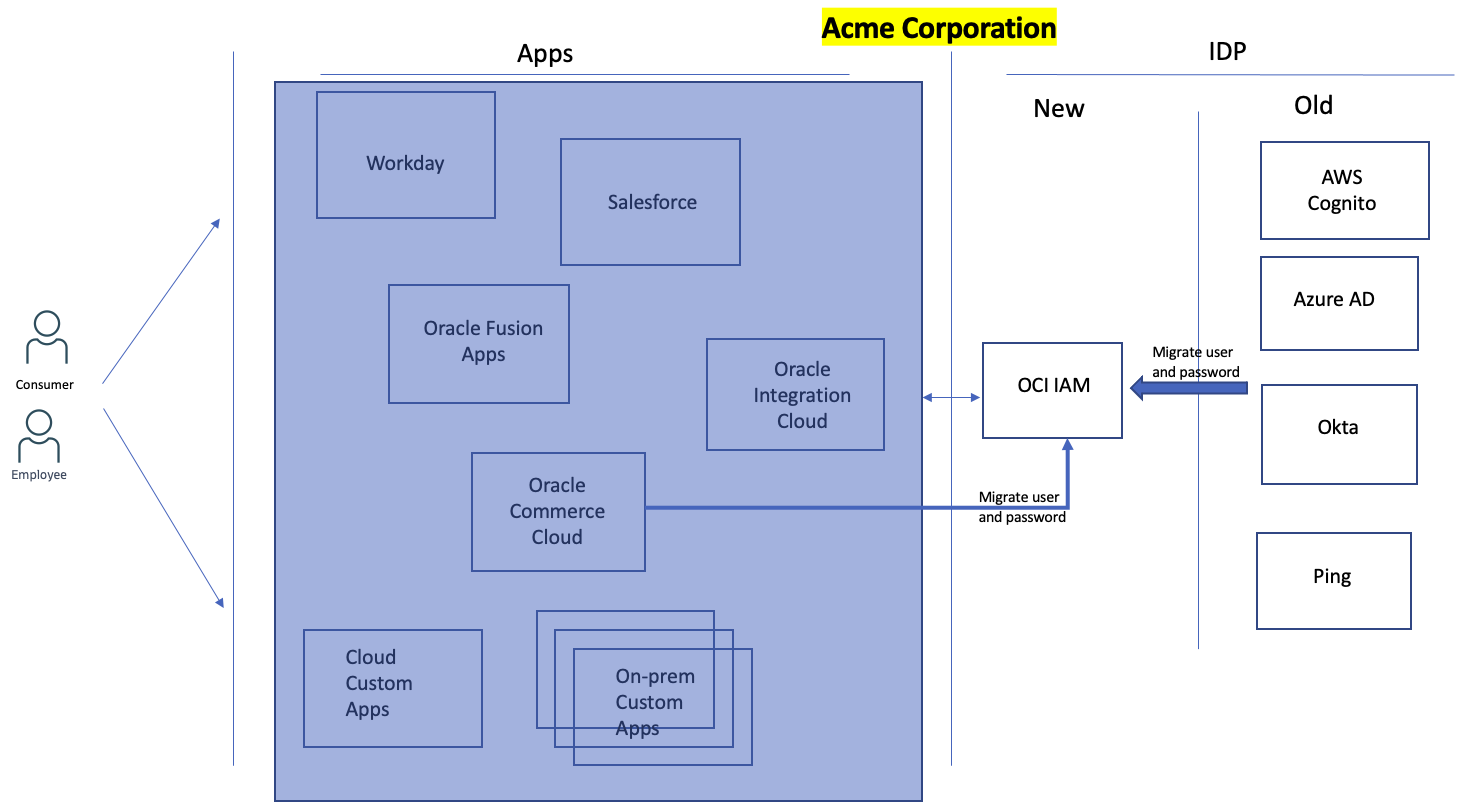
Fig 2
To replace any IDP with OCI IAM, identities in the existing IDP need to be migrated into OCI IAM. OCI IAM provides various ways to achieve that: uploading using csv files and REST API. This is well documented and well understood.
An astute reader will quickly observe that migrating user identities is just half the story. Each user in an existing IDP will already be using a credential say password. If consolidating various IDPs into OCI IAM requires every user to reset their password, then that will be a significant downgrade in user experience. There can be millions of users, hence, any solution for consolidation should be cognizant of that. OCI IAM though allows you to import user passwords in hashed formats. However, not all IDPs allow export of user passwords. Additionally, a user should be unaware or oblivious of the migration. In other words, the user experience should be seamless.
So How Do I Migrate The Passwords?
As an example, let us consider AWS Cognito as the IDP from where we would like to migrate users along with their passwords into OCI IAM. A typical federation flow would look like the following:
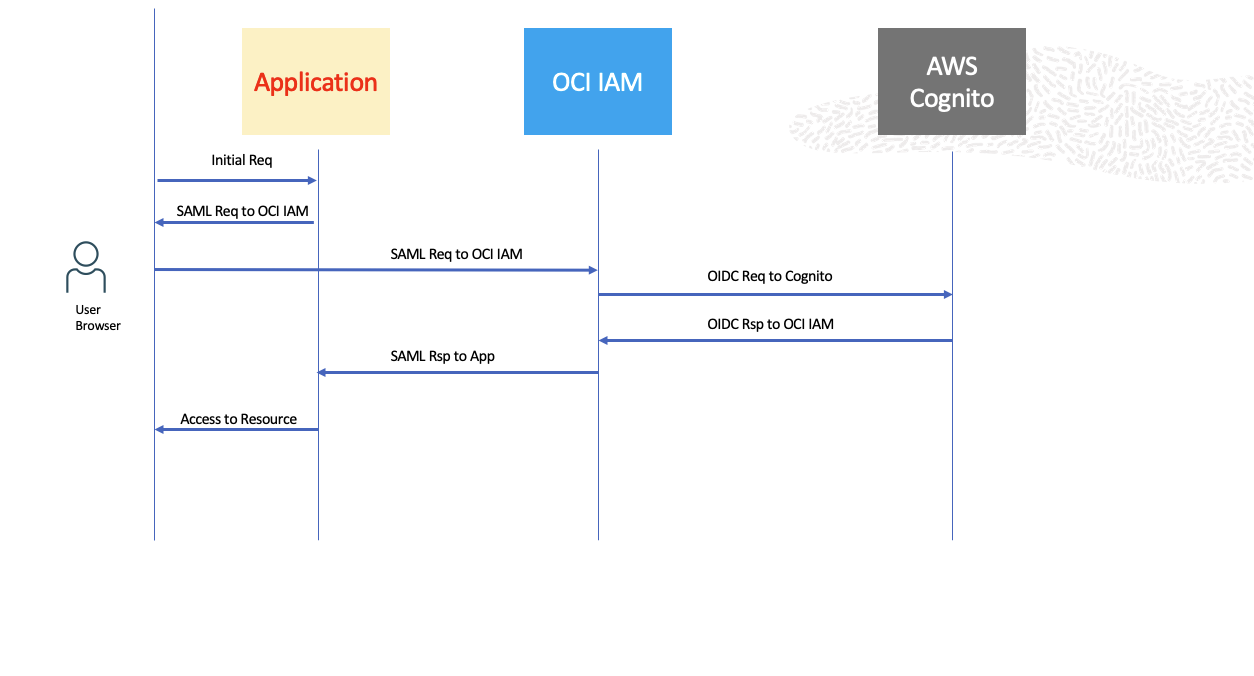
Fig 3
In the above authentication flow, the user ends up at AWS Cognito which collects user information – username and password – and authenticates the user. The entire flow involves lots of browser redirections (with multiple federation protocols – SAML, OIDC – involved under the hood). To migrate passwords into OCI IAM, the above browser-based flow needs to be broken; essentially three things need to happen:
- Credential collection should be removed from Cognito.
- Authentication of the user with Cognito should happen out-of-band, i.e. non-browser or independent of the browser, using Cognito REST API.
- The user password is updated in OCI IAM using its REST API, also out-of-band.
The following diagram illustrates this concept. The entire authentication process, especially the interaction between OCI IAM and Cognito no longer occurs as a browser flow. Instead, it has been replaced by the combo of two components – Credential Collector and the Authenticator. They use a bunch of REST API calls before returning the authentication results to the OCI IAM.
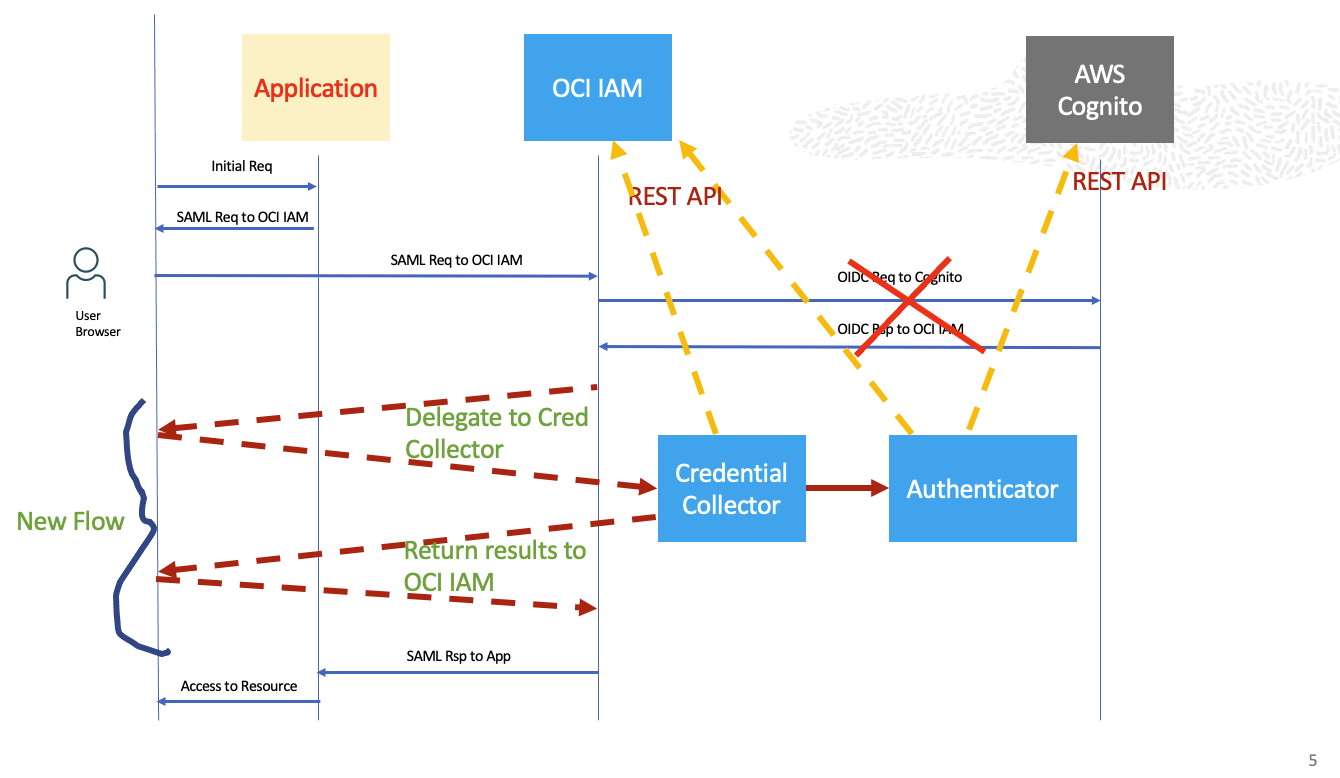
Fig 4
For #1 above (Credential Collector in Fig 4) , we can use the Custom Login Widget. For #2 and 3, we can use OCI Functions to implement the logic, front-ended by the API Gateway.
The Solution
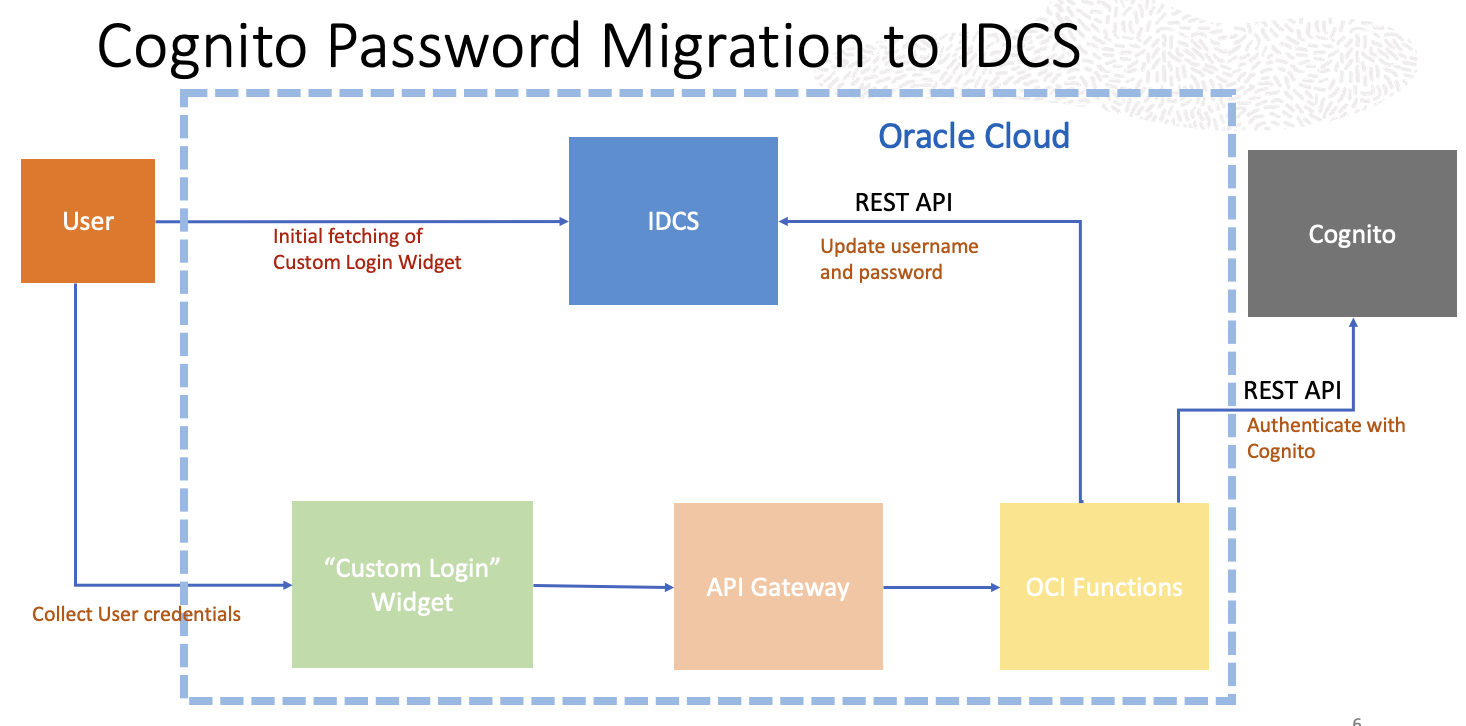
Fig 5
The typical user authentication flow for the Custom Login Widget (CLW) is discussed in the OBE. However, we will take a detour for our use case. When the user accesses the application in Fig 3 above, OCI IAM delegates credential collection and subsequent authentication with OCI IAM to the CLW. The CLW prompts the user for its <username, password>. After collecting the user credential, instead of authenticating with the OCI IAM as in the typical scenario, the CLW invokes an OCI Function which does two things:
- Authenticate <username, password> with Cognito using REST.
- If Cognito authentication is successful, create the user account (<username,password>) in OCI IAM. This is done using OCI IAM REST API.
Once the Function returns, the CLW makes the usual authentication call to OCI IAM with the newly minted <username, password> which should return success.
Although the main focus was on password migration, the user information (profile) is also being migrated along with the password. In other words, you start with a clean slate in OCI IAM and as each user attempts sign-in, the user’s account will get migrated to OCI IAM. The whole migration experience is seamless: ther user is oblivious of the plumbing involved with Functions. This preserves the user experience which was one of the requirements of the password migration excercise. A corollary of this approach is that the migration is happening at “Just-in-time”!
Pattern
Although in the above section (Fig 5), we considered AWS Cognito as the IDP from where users and their passwords are migrated to OCI IAM, the suggested approach is not unique to Cognito. It can be applied to any IDP such Okta or even applications which have Identity Management Systems (IDM) as long as the IDP/IDM supports REST API for authentication. For example, Oracle Commerce Cloud (CXC) has an IDM which allows users to create user accounts with passwords. That is, CXC does not require federation to function (see Fig 1 where “self” identity management is shown for CXC). The same solution applied to Cognito can work for CXC too, since CXC also provides REST API for authentication. In other words, the technique discussed here for password migration at real-time is a pattern which can be applied for multiple IDP/IDM.
Summary
In this blog post we discuss a pattern to migrate users along with their passwords to OCI IAM from different identity management systems. The technique using the Custom Login Widget along with OCI Functions (front-ended by API Gateway) provides a seamless user experience while migrating their passwords to OCI IAM.
To learn more about OCI IAM, please visit Oracle OCI IAM page.