
What if an OAuth client could introduce itself to an authorization server simply by providing a URL? No registration, no separate client ID to provision in an identity domain, no dynamic client registration as well. With CIMD support in OCI IAM, this becomes possible. In this post, we’ll put it into practice by connecting Codex to a protected remote MCP server.
What is CIMD (Client ID Metadata Document)?
CIMD (Client ID Metadata Document) is a proposed OAuth extension that lets an application publish information about itself at an HTTPS URL and use that URL as its OAuth client_id. An authorization server the service that handles access approval and issues tokens can retrieve this information without requiring a separate client registration beforehand.
The metadata is a JSON document describing the application, including its name, allowed redirect URLs, and authentication method. For example:
{
  "client_id": "https://app.example.com/oauth-client.json",
  "client_name": "Example App",
  "redirect_uris": ["https://app.example.com/callback"],
  "token_endpoint_auth_method": "none"
}
The example describes a public client. Its client_id exactly matches the URL hosting the document.
How does it work?:
- The application publishes its metadata.
- It uses the document’s URL as its client identifier.
- A supporting authorization server fetches and validates the document.
- The OAuth flow continues using that metadata.
CIMD can simplify onboarding across multiple authorization servers. It does not automatically make an application trustworthy or replace access policies, user consent, or client authentication where required. Documents must exclude secrets and private keys.
CIMD is currently an IETF Internet-Draft and remains work in progress. Reference: OAuth Client ID Metadata Document.
CIMD Support in OCI
OCI IAM identity domains now support Client ID Metadata Documents (CIMD). Announced on September 23, 2026, this capability lets an OAuth client publish its metadata at a stable HTTPS URL and use that URL as its client_id. The same metadata URL can be used across multiple identity domains, reducing the need to maintain a separate client registration in each domain. Each domain retains control over which metadata locations it trusts and which clients can access protected resources. Oracle release note.
CIMD is an OAuth extension for client identification and metadata discovery. Its design is independent of a particular OAuth grant type, although supported flows depend on the authorization server’s implementation.
MCP clients and AI agents are a compelling use case: they can use CIMD to simplify client onboarding across authorization servers. The specification remains an IETF Internet-Draft. CIMD specification.
This post shows how to use OCI IAM’s CIMD support to connect Codex to a remote MCP server with OAuth-based authorization.
CIMD for MCP Client and MCP Server
Traditional OAuth registration works well for a small number of long-lived applications. It becomes cumbersome when a client is distributed to many developer workstations, evolves frequently, or must connect to multiple identity domains. CIMD changes the client identifier from an opaque value to an HTTPS URL that resolves to the client’s metadata.
OCI IAM or an Authorization server validates that URL before using it. A trusted metadata location is necessary, but it is not sufficient: the protected resource application must separately authorize the CIMD client. This separation is important. Trusting a document source does not implicitly grant access to an MCP server or any underlying OCI resource. OCI IAM CIMD documentation
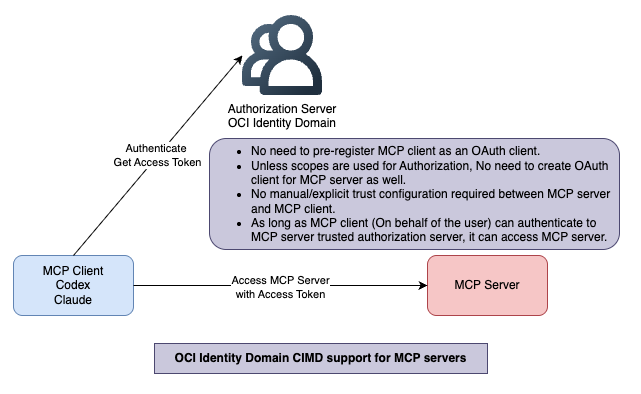
The client first discovers the protected resource and authorization server. It then uses its CIMD URL as `client_id` in the OAuth authorization-code flow. OCI IAM retrieves and validates the client metadata, and the MCP server receives a bearer token after the user authenticates and consents.
OpenAI’s MCP guidance recommends CIMD when the authorization server supports it. It also requires the server to publish protected-resource metadata, OAuth authorization-server metadata, PKCE support, and proper handling of the OAuth `resource` parameter. OpenAI authentication guidance
End to end request flow for MCP client authentication using CIMD is as below.
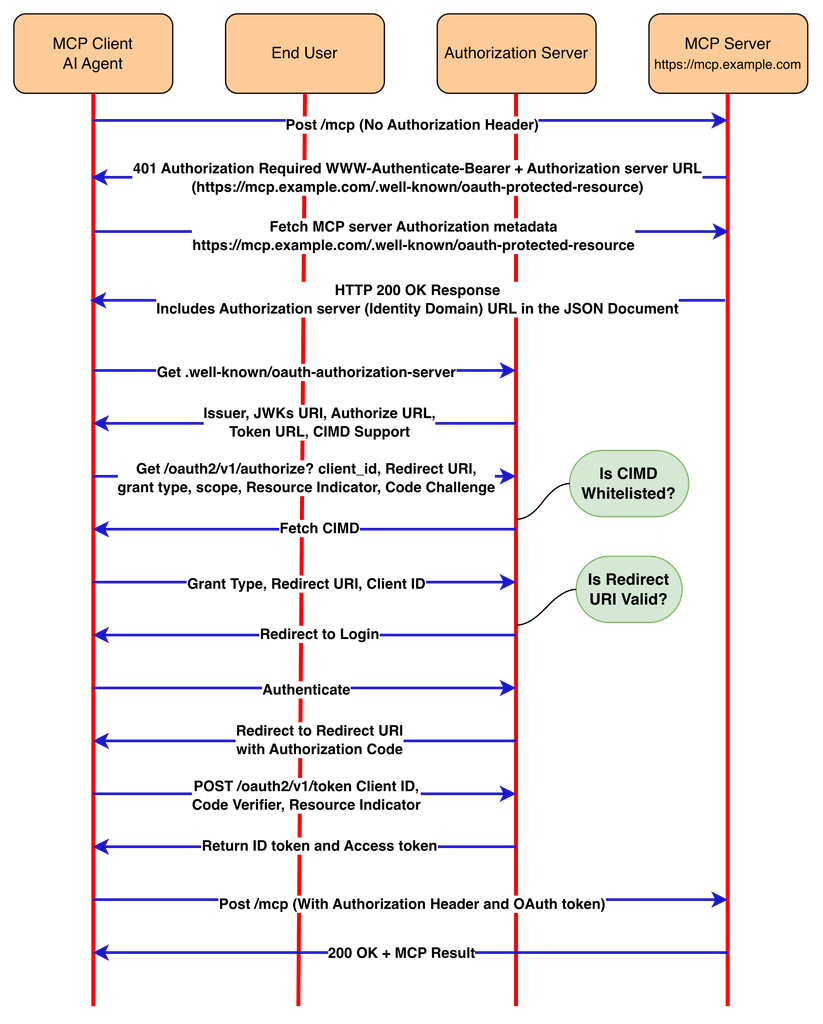
CIMD setup between Codex (MCP Client) and OCI Identity Domain (Authorization server)
Pre-requisites
Before configuring Codex, have the following in place:
- An OCI IAM identity domain with CIMD enabled.
- A public HTTPS endpoint for the MCP server.
- An HTTPS CIMD metadata document published by the OAuth client owner (Codex in this case).
- A protected-resource application representing the MCP API.
- A remote MCP server that can validate OCI IAM-issued access tokens.
Do not expose broad OCI administrator privileges through a general-purpose MCP tool. Model tool operations as narrowly scoped business or platform actions, verify authorization in the MCP server, and require confirmation for state-changing calls.
MCP server’s OAuth discovery metadata
An OAuth-protected MCP server should expose protected-resource metadata, commonly at: MCP server URL followed by .well-known/oauth-protected-resource. For example https://mcp.example.com/.well-known/oauth-protected-resource
The metadata points clients to the OCI IAM authorization server and identifies the resource they are requesting:
{
  "resource": "https://mcp.example.com",
  "authorization_servers": [
    "https://<identity-domain>.identity.oraclecloud.com"
  ],
  "scopes_supported": ["inventory.read", "change.request"]
}
For unauthenticated requests, return a `401 Unauthorized` response with a `WWW-Authenticate` challenge referring to this metadata URL. The OAuth server must also expose its authorization-server metadata at `/.well-known/oauth-authorization-server` (or OpenID Connect discovery metadata).
Once CIMD is enabled, OCI IAM authorization-server metadata advertises:
{
  "client_id_metadata_document_supported": true
}
That discovery field tells compatible clients that they can use a client metadata URL as the OAuth `client_id`.
Configure OCI IAM trust and resource authorization
OCI IAM performs two separate checks for a CIMD client:
1. Domain trust — add the full HTTPS CIMD metadata URL to the identity-domain allowlist (`allowedCimdDomains`). This authorizes OCI IAM to retrieve and validate that client metadata.
2. Resource authorization — add the same full CIMD client identifier to the protected resource application’s CIMD client allowlist. This authorizes access to *that* MCP-protected resource. This is required when you are planning to use scopes to enforce authorization for MCP server. Database MCP server creates protected resource application. For database MCP server integration, you have to whitelist CIMD for the resource application as well.
Note: If you are not planning to use MCP server tools scopes and create MCP server as resource server then you can use openid scope. In that case, setting resource authorization scope is not required.
The exact URL matters. OCI IAM requires the `client_id` in the metadata document to match the document’s HTTPS URL exactly. For public clients, the metadata must include `client_id`, `client_name`, `redirect_uris`, `grant_types`, `response_types`, and `token_endpoint_auth_method`; authorization-code requests must use PKCE. CIMD Format
Add a trusted CIMD client to the Identity Domain
Treat this as a two-stage configuration. First allow OCI IAM to trust and retrieve the client metadata; then allow that client to use the specific OAuth resource application that protects the MCP server.
1. Capture the exact client metadata URL. It must be an externally reachable HTTPS JSON document, for example `https://client.example.com/oauth/client-metadata.json`. Do not allowlist only the hostname or a parent path. The URL must exactly equal the `client_id` value in the document and the value used in the OAuth request.
2. Validate the document before adding it. Confirm it returns JSON over HTTPS, has no redirect dependency, declares the intended loopback or HTTPS redirect URIs, and—for a public client—sets `token_endpoint_auth_method` to `none` and uses authorization code + PKCE.
3. Add the full URL to the identity-domain CIMD allowlist. An identity-domain administrator can patch the Settings resource through the IAM SCIM Admin API. The following example adds two trusted metadata documents; replace the placeholders with the approved client URLs and your identity-domain stripe URL.
curl --request PATCH \
  "https://<identity-domain>.identity.oraclecloud.com/admin/v1/Settings/Settings" \
  --header "Authorization: Bearer <administrator-access-token>" \
  --header "Content-Type: application/json" \
  --data '{
    "schemas": [
      "urn:ietf:params:scim:api:messages:2.0:PatchOp"
    ],
    "Operations": [
      {
        "op": "add",
        "path": "allowedCimdDomains",
        "value": [
          {
            "domainUri": "https://client.example.com/oauth/client-metadata.json"
          },
          {
            "domainUri": "https://developer.example.net/oauth/client-metadata.json"
          }
        ]
      }
    ]
  }'
Authorize the same client for the MCP resource server application in Identity domain
Trust alone does not permit a token to be issued for your MCP API. Patch the application’s `cimdClientsAllowlist` using its application GUID:
curl --request PATCH \
  "https://<identity-domain>.identity.oraclecloud.com/admin/v1/Apps/<mcp-resource-app-guid>" \
  --header "Authorization: Bearer <administrator-access-token>" \
  --header "Content-Type: application/json" \
  --data '{
    "schemas": [
      "urn:ietf:params:scim:api:messages:2.0:PatchOp"
    ],
    "Operations": [
      {
        "op": "add",
        "path": "cimdClientsAllowlist",
        "value": [
          "https://client.example.com/oauth/client-metadata.json"
        ]
      }
    ]
  }'
MCP Server
Creation of MCP server that supports CIMD is outside of scope for this blog. However, you can refer to Sample MCP 2.0 server implementation for OCI object storage.
Verify discovery and test login
Confirm `client_id_metadata_document_supported` is `true` in `https://<identity-domain>.identity.oraclecloud.com/.well-known/oauth-authorization-server`. Then test the Codex login flow and inspect the MCP server’s token validation logs. OCI IAM rejects an untrusted identifier before it fetches the remote document, so a trust failure should be fixed at the allowlist—not by weakening redirect or token validation rules.
CIMD URL for codex desktop of online is in the below format. The callback ID for every MCP server changes.
https://chatgpt.com/oauth/codex/ServerCallbackID/client.json
The identity domain caches validated CIMD metadata according to HTTP cache semantics. Plan metadata and key rotations accordingly, and remove unused CIMD URLs from both allowlists during off boarding. An illustrative CIMD document for codex looks like this.
{
  "client_id": "https://chatgpt.com/oauth/codex/ServerCallbackID/client.json",
  "client_uri": "https://chatgpt.com/codex",
  "application_type": "native",
  "redirect_uris": [
    "http://127.0.0.1/callback/ServerCallbackID",
    "http://localhost/callback/ServerCallbackID"
  ],
  "token_endpoint_auth_method": "none",
  "token_endpoint_auth_methods_supported": [
    "none"
  ],
  "grant_types": [
    "authorization_code",
    "refresh_token"
  ],
  "response_types": [
    "code"
  ],
  "client_name": "Codex",
  "logo_uri": "https://persistent.oaistatic.com/sonic/misc/openai-logo.png"
}
Register the remote MCP server in Codex
Add the server URL to Codex:
codex mcp add oci-server --url https://mcp.example.com/mcpThen start an OAuth login explicitly choosing CIMD.
Note: You may have to upgrade codex cli if your version of cli does not support CIMD.
codex mcp login oci-server --oauth-client-registration cimdCodex prints or opens the authorization URL. The user signs in through OCI IAM, grants the requested scopes, and Codex stores the resulting OAuth credential locally. Verify the connection with:
codex mcp listThe output should show `oci-server` as enabled with OAuth authentication.
Validate tokens in the MCP server—not in the model
The MCP server remains the authorization enforcement point. On every tool call, validate:
- The token signature against OCI IAM signing keys;
- Issuer (`iss`), audience/resource (`aud` or resource claim), expiry, and not-before time;
- Granted scopes;
- The authenticated user and any application-specific policy;
- The tool’s least-privilege authorization requirements.
Reject missing, expired, incorrectly scoped, or incorrectly audience-bound tokens with `401`/`403` responses.
Common failure modes
| Symptom | Likely cause | Corrective action |
| invalid_client | Metadata URL is not trusted, cannot be fetched, or does not exactly match `client_id` | Add the exact HTTPS metadata URL to the identity-domain allowlist; verify TLS, JSON, and URL binding. |
| invalid_request during authorization | A public CIMD client omitted PKCE. | Send an `S256` code challenge and verifier. |
| Repeated metadata fetches or delayed changes | Metadata caching is in effect. | Set appropriate `Cache-Control` headers and plan rollout/rotation. |
| OAuth reaches the wrong resource | The OAuth `resource` parameter is lost between authorization and token exchange. | Preserve and validate the resource indicator throughout the flow. |
Production checklist
- Host CIMD and JWKS documents only over public HTTPS.
- Use strict URL, DNS, redirect, timeout, and response-size controls for metadata retrieval.
- Keep the CIMD domain allowlist and protected-resource allowlist separate and reviewed.
- Use authorization code + PKCE for public Codex-style clients.
- Request only the scopes required by each MCP tool.
- Validate tokens at the MCP server on every request.
- Log authentication decisions without logging access tokens, authorization codes, or PKCE verifiers.
- Establish an explicit rotation process for metadata, keys, scopes, and tool permissions.
Closing perspective
OCI IAM CIMD support removes a major operational barrier to secure MCP adoption: every desktop or agent client does not need a bespoke, permanent OAuth registration in every identity domain. The benefit is not “authentication without governance.” It is portable client identity combined with explicit identity-domain trust, explicit resource authorization, PKCE, and MCP-server-side enforcement.
References