
Introduction
This blog continues the discussion from a previous insightful post on multi-region FastConnect and VPN redundancy, which you can find here.
In this blog, we will explore advanced strategies for establishing redundant connections, featuring multiple FastConnect links within each region and using Remote Peering Connection (RPC) as a backup of last resort. This approach will provide deeper insights into traffic path selection when integrating these connectivity options.
For scenarios involving multiple FastConnects in each region, please refer to Part 2 of this blog, which can be found here.
A robust and reliable network infrastructure is crucial in today’s digital landscape. By employing multiple FastConnect and VPN connections across each region, we can significantly enhance the redundancy and resilience of our network architecture. This strategy mitigates the risk of potential failures and optimizes the performance and availability of mission-critical applications.
In this blog, I will outline best practices for implementing these redundant connections, highlight considerations for seamless integration, and share insights from real-world use cases.
First, let’s examine the DRG (Dynamic Routing Gateway) routing decision-making process outlined in the official Oracle documentation. When a DRG needs to determine the routing path for a subnet that is being dynamically accessed through various attachment types, the routing priority is as following:
- VCN (Virtual Cloud Network): This attachment is prioritized first, as it offers a direct connection within Oracle’s cloud infrastructure, providing optimal performance and reliability.
- VC (Virtual Circuit): This option is chosen next, leveraging Oracle FastConnect for a dedicated, high-bandwidth connection to your on-premises network or other cloud environments.
- IPSec: This secure VPN tunnel is the third choice, offering encrypted connections over the public internet, making it suitable for secure data transmission when direct connections are unavailable.
- RPC (Remote Peering Connection): This option is selected as a last resort. It provides peering connectivity between different regions or tenancies, adding an additional layer of redundancy.
Understanding this routing order is essential for designing a comprehensive network strategy that maximizes efficiency and ensures business continuity by effectively leveraging the strengths of each attachment type.
In addition to the DRG’s attachment order, it will also adhere to well-established routing rules within the routing table:
- Static Route Precedence: Static route rules take precedence over dynamic route rules. This means that manually defined routes will always be selected over those learned dynamically, providing administrators with greater control over routing paths.
- Longest Prefix Match: This principle states that the route in a routing table with the most specific subnet mask (the longest prefix) will be preferred among multiple potential routes. This ensures that traffic is directed along the most specific path available, enhancing routing accuracy and efficiency.
By keeping these routing table rules in mind, you can design your network more effectively, ensuring optimal data flow and meeting your organization’s connectivity needs.
It’s important to understand that the prefixes advertised by OCI over BGP do not include any AS Path Length on any of the advertisement links. This is true even for FastConnect links that are not in the same region as the Virtual Cloud Network (VCN). Given this information, please ensure that the on-premises Customer Premises Equipment (CPE) is properly configured for BGP so that the traffic to OCI resources follows the desired path.
Prerequisites
Focus will be on achieving redundancy by utilizing one or multiple FastConnect connections per region, and implementing RPC as a last-resort backup. To effectively understand and apply these strategies, it is essential to familiarize yourself with key components of Dynamic Routing Gateway (DRG) Routing Management, as detailed in the official Oracle documentation.
This blog will not cover the creation of required components for end-to-end connectivity, such as VCNs, subnets, security lists, compute instances, DRGs, or other on-premises components.
We will not focus on configuring critical components that you already should know how to create, delete, modify, and utilize:
- DRG Import Route Distribution: Understand how to manage the import of route distributions to ensure that your DRG dynamically learns and incorporates routes from various connections.
- DRG Routing Tables: Learn how to configure and manipulate routing tables to define the rules governing how traffic is routed through your network. This setup includes establishing static routes and prioritizing them over dynamic ones.
- DRG Attachments: Explore how to create and manage attachments to the DRG, including FastConnect connections, to ensure your network can effectively handle traffic from diverse sources.
By understanding these components and their functionalities, you will be better equipped to establish a resilient and strategically redundant network configuration that meets your organization’s needs.
As a prerequisite, it’s crucial to understand that a DRG routing table plays a vital role in managing incoming traffic for its respective attachments. For instance, when a DRG routing table is linked to a Virtual Cloud Network (VCN), it becomes instrumental in managing traffic leaving the VCN and reaching the DRG.
Here’s how this works:
- Incoming Traffic Management: When traffic is directed from a Virtual Cloud Network (VCN), Virtual Cloud (VC), or Remote Peering Connection (RPC) to the Dynamic Routing Gateway (DRG), the DRG’s routing table determines how that traffic is managed and routed. It evaluates the defined routing rules to decide the next destination for the traffic, which could be on-premises networks (VC), other VCNs, or RPC.
- Routing Logic: The routing table applies established rules, including the order of attachment types and the precedence of static versus dynamic routes. This ensures that the traffic follows the most suitable path based on your configurations.
- Resulting Connectivity: By correctly configuring the DRG routing table for incoming traffic from various attachments, you can optimize connectivity and ensure that data flows efficiently to its intended destination.
Solution Description
Scenario 1 – One FastConnect Virtual Circuit in Each Region
If you prefer to view rather than read, check out this configuration video.
In this first scenario, as illustrated in the accompanying diagram, we have the following routing setup:
- On-premises network is advertising the IP range 10.0.0.0/8, which encompasses all addresses within that subnet. This range represents a significant portion of the IP space and serves as the primary entry point for traffic into the cloud infrastructure. In some real-world use cases I’ve encountered, customers typically choose to summarize their on-premises prefixes.
- Within the Oracle Cloud Infrastructure (OCI), the Phoenix region is configured with the subnet 10.1.0.0/16. This subnet is designated for resources hosted in that region, allowing for efficient traffic routing intended for these resources. Similarly, the San Jose region uses the subnet 10.2.0.0/16, which is designated for its own set of resources. This ensures a distinct and manageable addressing scheme for resources located in this regions.
In this configuration, traffic from the on-premises network can reach both the Phoenix and San Jose regions through appropriate routing rules established at the DRG level. The redundancy achieved through FastConnect connections in each region, along with RPC as a last-resort backup, enhances the network’s reliability and availability.
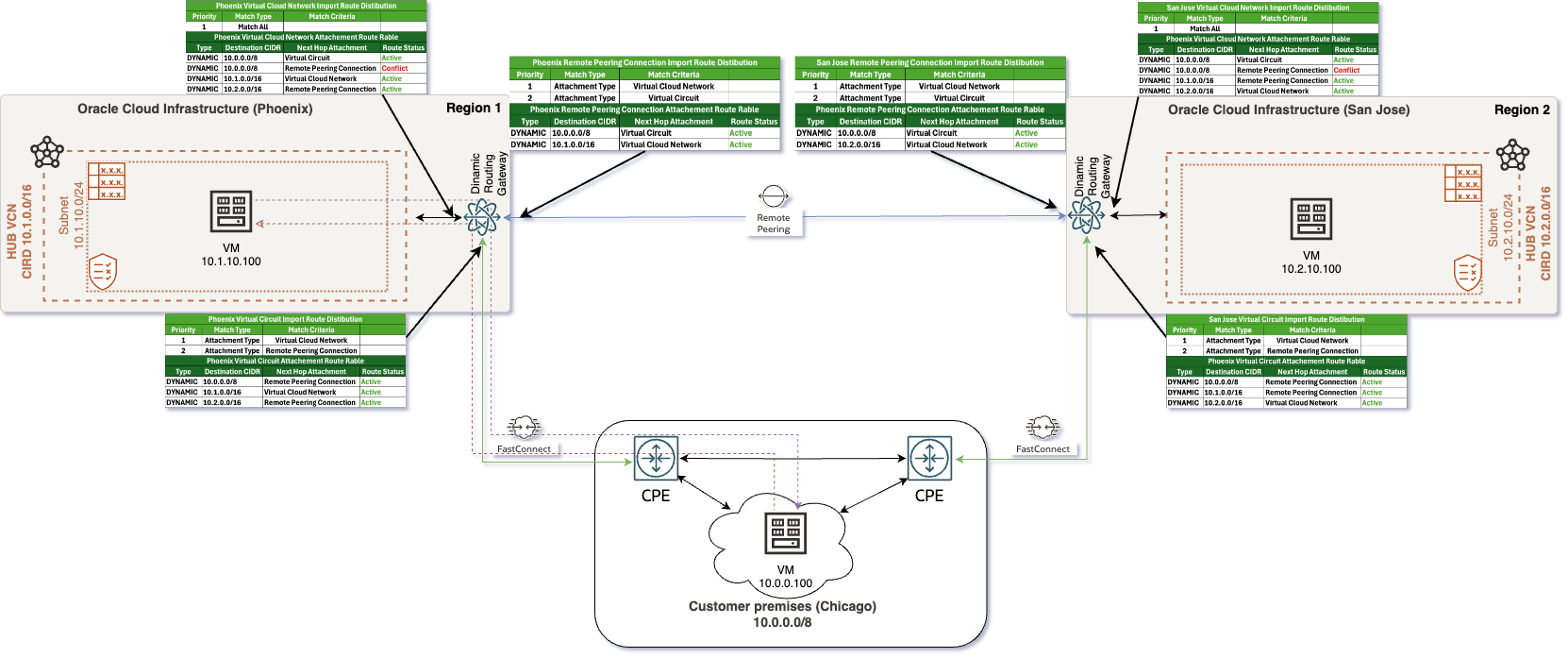
To effectively establish the required network configuration, three distinct routing tables need to be set up, each serving specific functions:
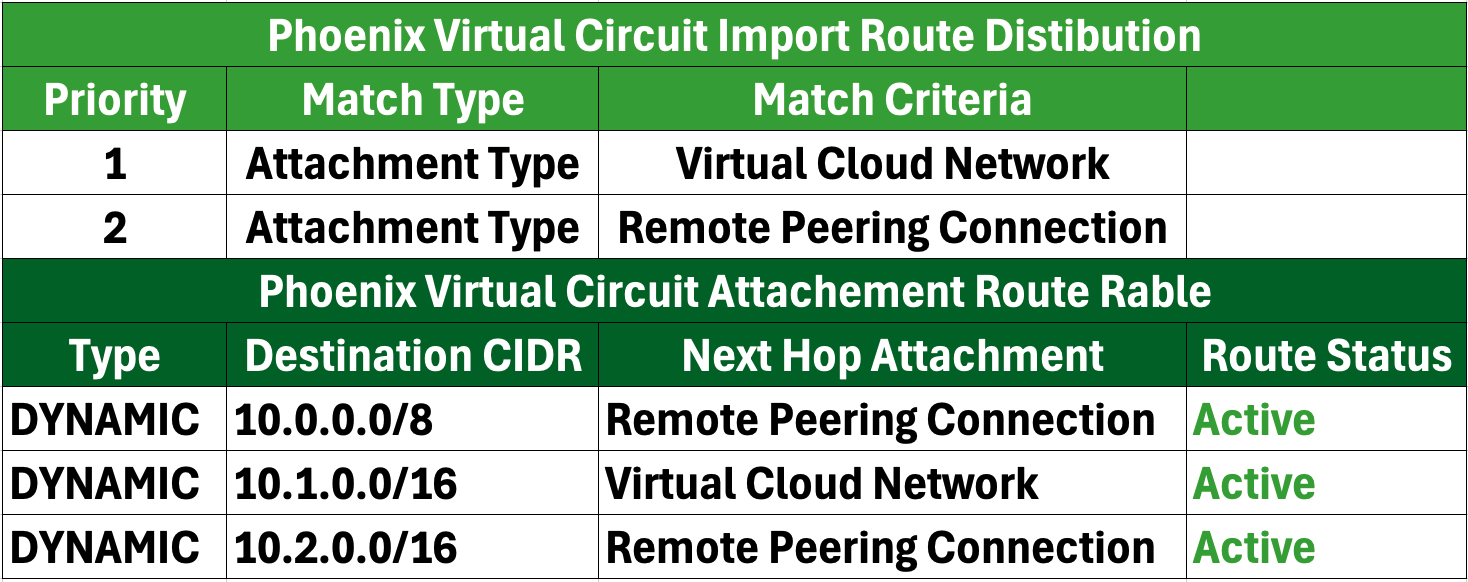
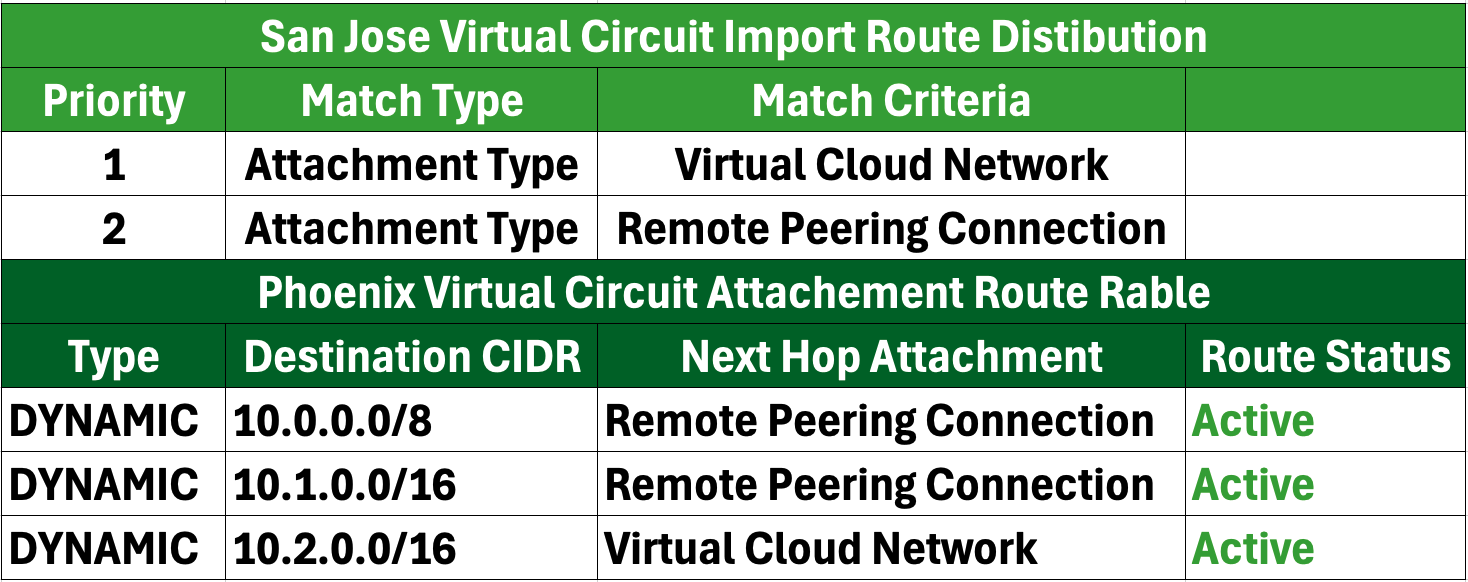
a. VC Routing Table: This routing table will include an import distribution list that imports routes from Virtual Cloud Networks (VCN) and RPC attachment types. This setup enables routing of traffic that originates from VCN or RPC back to the on-premises network or other connected networks, ensuring seamless communication.
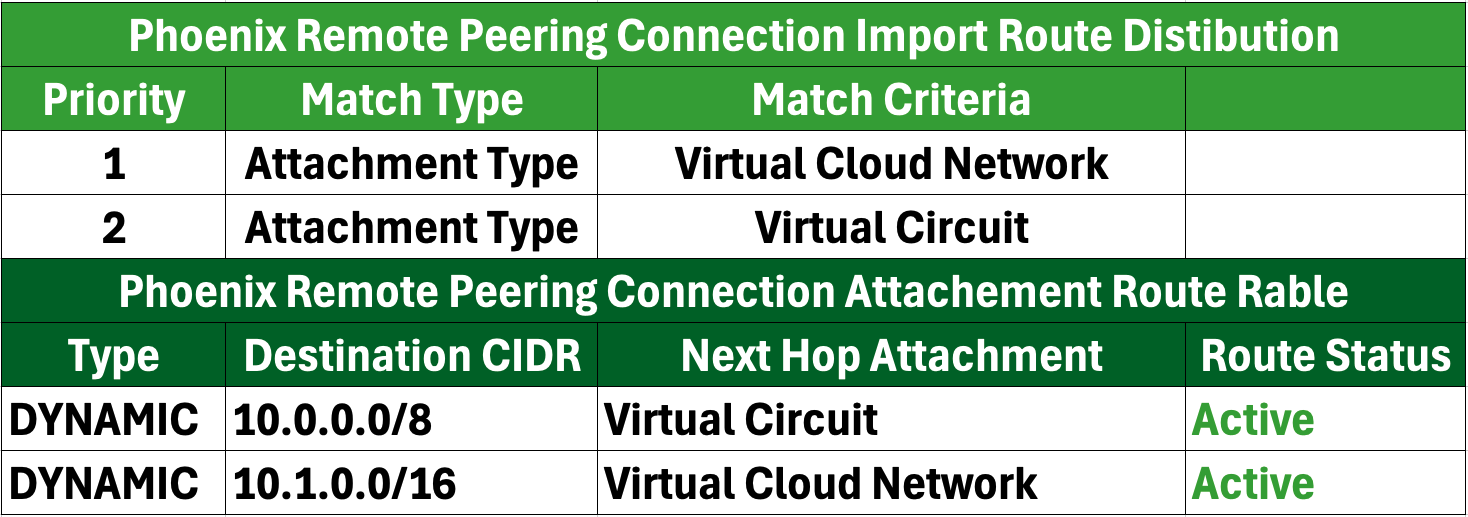
b. RPC Routing Table: The RPC routing table will also have an import distribution list designed to import routes from VC and VCN attachment types. This is crucial for managing traffic from the VC and VCN connections, enabling efficient routing across different regions within the OCI environment.
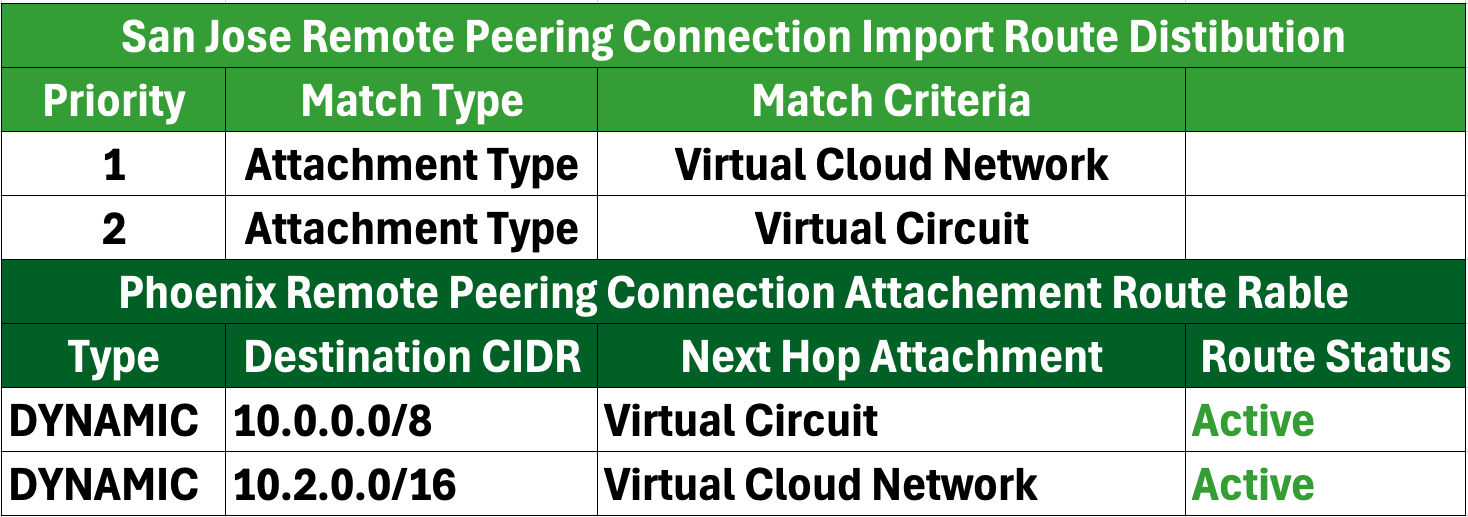
c. VCN Routing Table: In contrast, the VCN routing table will feature an import distribution list with a “Match All” rule. This rule allows the routing table to import routes from all attachment types: VCN, VC, and RPC. This configuration ensures comprehensive routing capabilities, allowing the VCN attachment to flexibly and efficiently handle outgoing traffic to various sources.
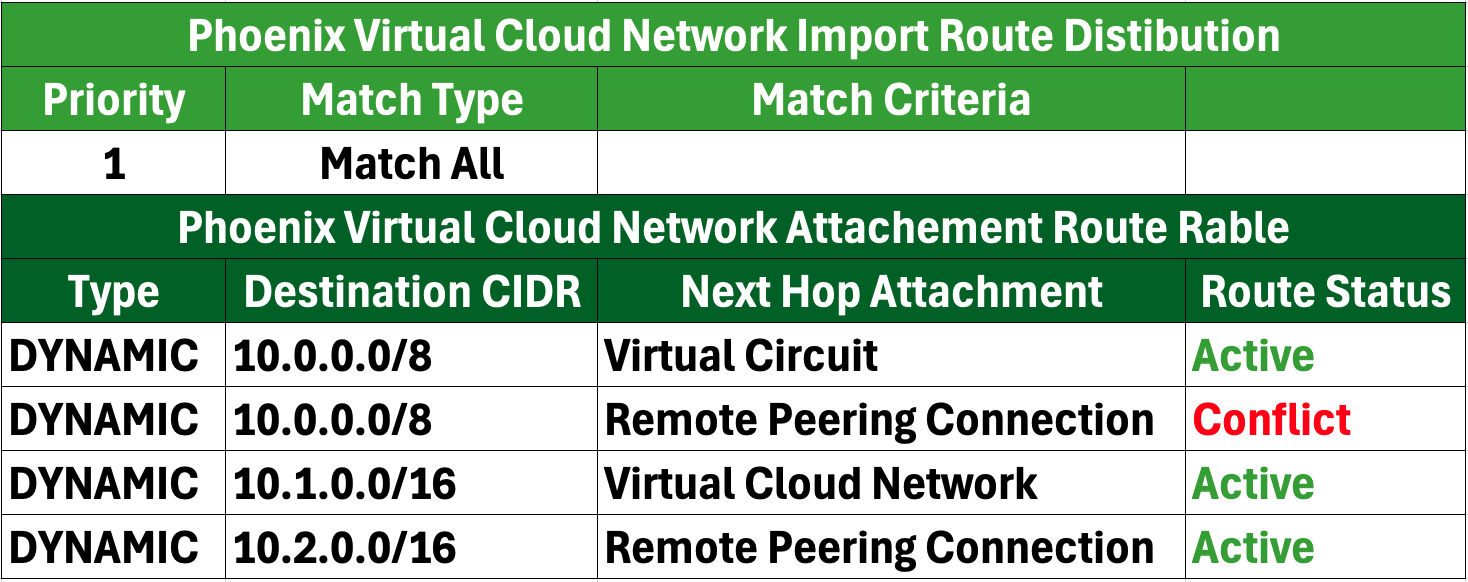
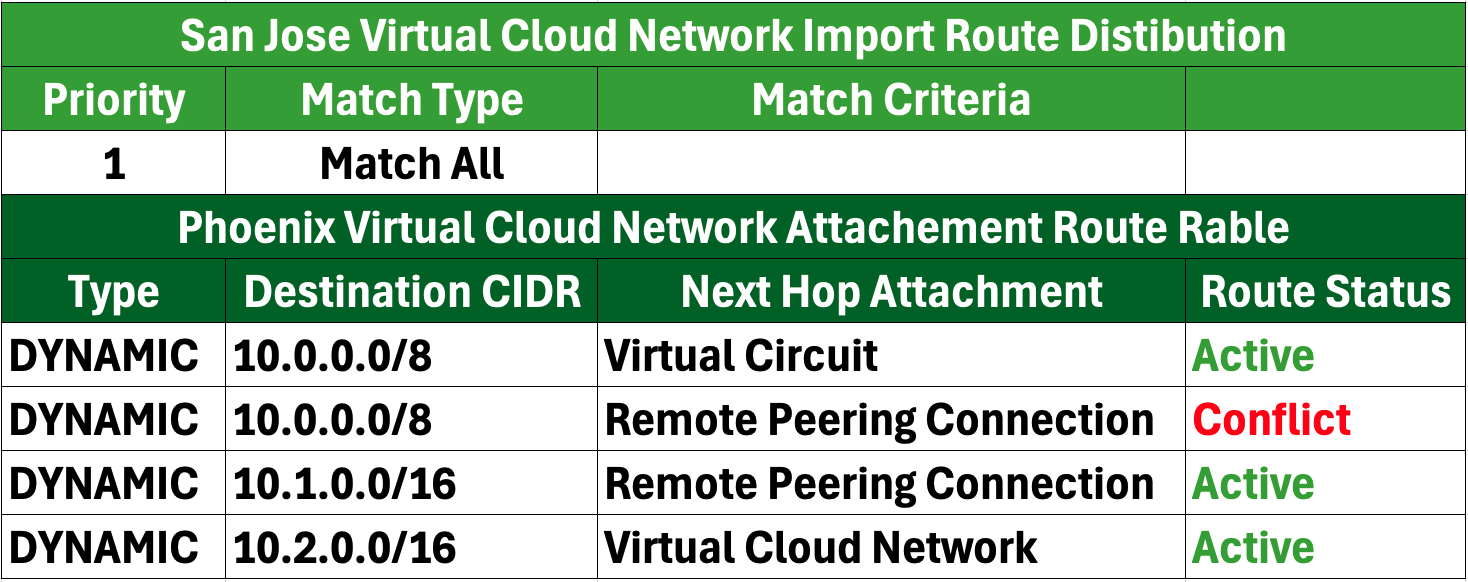
In the scenario where both FastConnect links are operational, it is important to note that connectivity via RPC will not be installed in the routing table. Instead, it will appear with a status of “Conflict”.
In the event that one FastConnect link goes down—specifically, if the FastConnect connection in the Phoenix region becomes inactive— the architecture will adjust to maintain connectivity. Here’s how this situation unfolds:
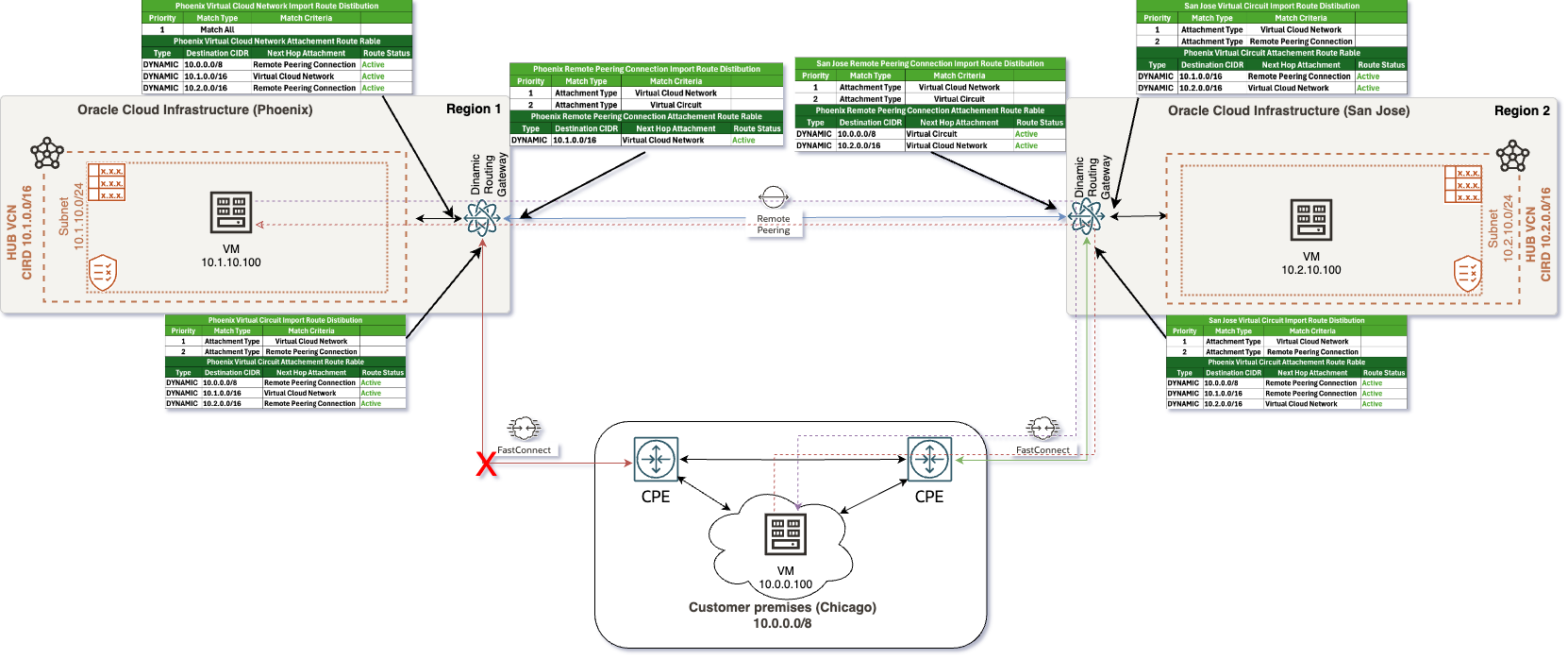
a. FastConnect Failure: When the FastConnect link in the Phoenix region goes down, the DRG must adapt to the modified network conditions. This failure will lead to the evaluation of the remaining connections for traffic routing.
b. Routing Table Update: The routing table will automatically update to remove any rules associated with the inactive FastConnect link in the Phoenix region. The routing paths will now focus on the available connections. Consequently, the VCN and RPC routing tables will reflect this change:
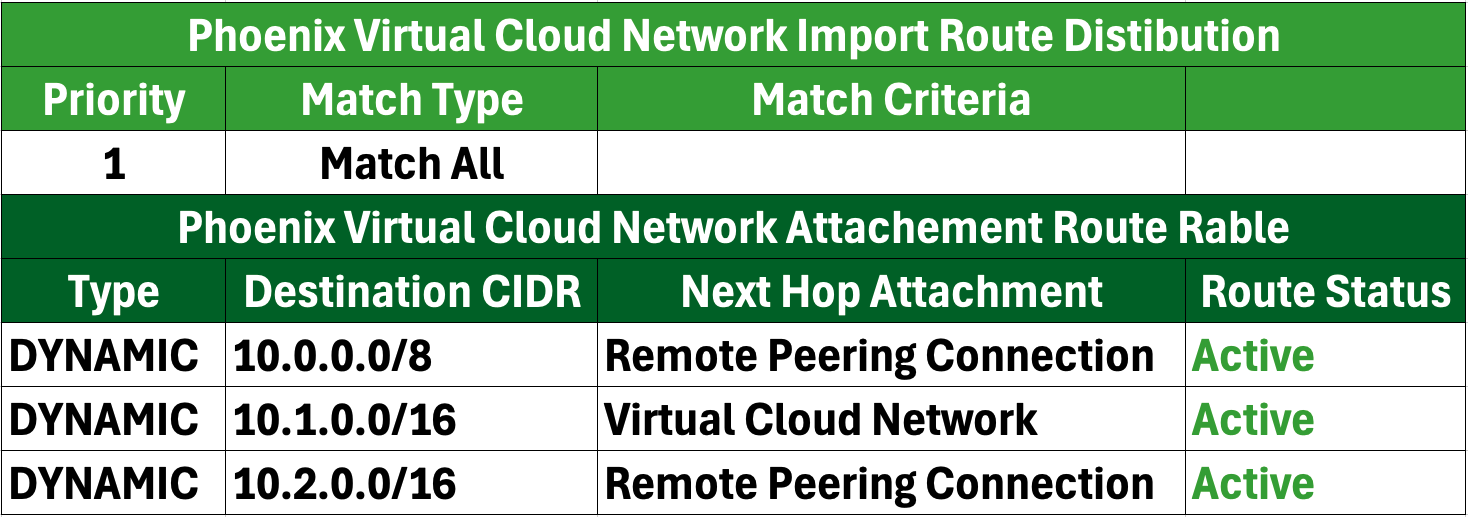
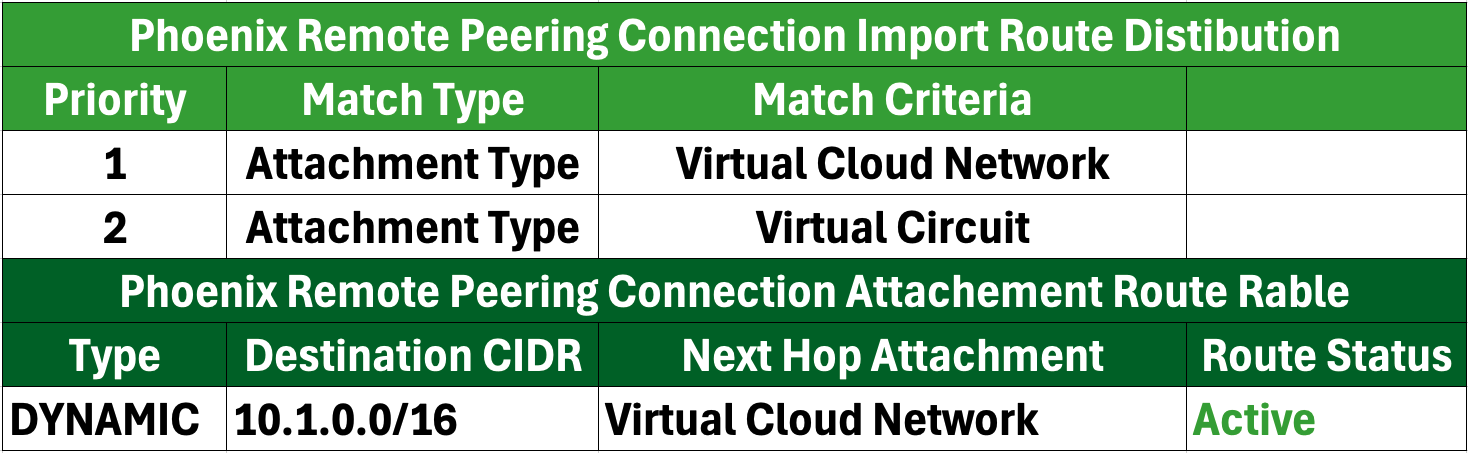
As a result, in the Phoenix region, the route to VC for the on-premises network will no longer be installed in the VCN and RPC routing tables.
c. Utilization of Remaining Links: The operational FastConnect link in the San Jose region will continue to handle incoming and outgoing traffic for on-premises networks, even if that traffic is directed toward the Phoenix region. If appropriately configured, the RPC connection will activate as a backup route, ensuring that communication can still occur between the on-premises network and the affected region, thus facilitating business continuity.
d. Redundant Connectivity: This configuration maintains network resilience, allowing traffic to reroute seamlessly through the operational components and minimizing disruptions caused by the failure of one FastConnect connection.
e.Up-to-date Routing Status: The RPC connection may now be active in the routing table, indicating that it is being used to route traffic that would have otherwise gone through the Phoenix region’s FastConnect link.
This concludes the current scenario.
For scenarios involving multiple FastConnects in each region, please refer to Part 2 of this blog, which can be found here. This follow-up will explore advanced configurations and strategies to enhance network performance and redundancy.
Thank you for reading, and happy networking!