
Background
Oracle Fusion Data Intelligence (FDI) delivers AI-ready analytics tailored for Fusion Applications across ERP, HCM, SCM, and CX. While FDI provides pre-built, Oracle-managed data pipelines and analytics, organizations often need to extend this data with external or non-Fusion sources.
Oracle offers two ways to extend FDI with non-Fusion data:
- FDI Data Augmentation: A no-code FDI functionality for simpler data enrichment and extensions.
- Oracle Data Transforms: A low-code, cloud-native solution for data engineers needing advanced integration, complex transformations, and support for a wider range of sources.
Knowing when to use each option helps ensure scalable, efficient, and flexible data extensibility within Fusion Data Intelligence. It provides an AI-ready unified analytics platform with prebuilt components such as data models, AI models, analytics subject areas, and visualizations tailored for all four Fusion Applications pillars: ERP, HCM, SCM, and CX.
Oracle Fusion Data Intelligence
Oracle Fusion Data Intelligence (FDI) is Oracle’s analytics platform for Fusion Applications.
It also supports external third-party applications and data with its built-in connectors. It is built using Autonomous Database, Analytics Cloud, and OCI AI Services. It can now integrate with the new AI Data Platform for data science and other advanced use cases.
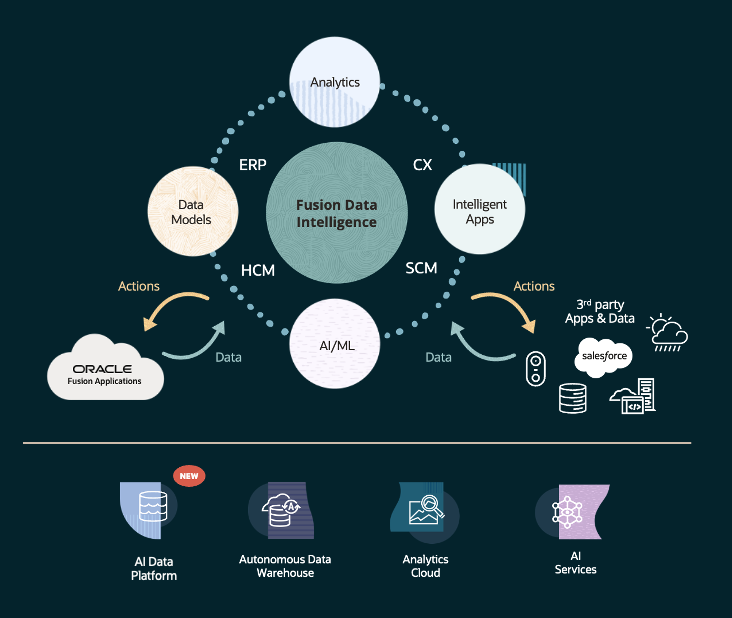
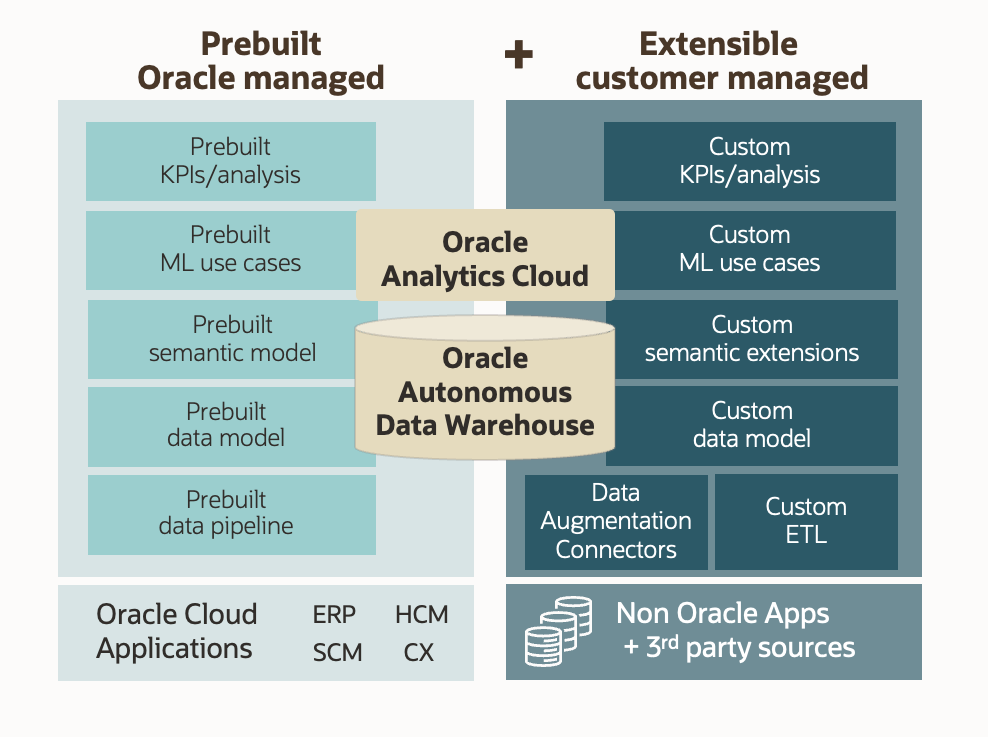
Fusion Data Intelligence is both a pre-built and fully extensible analytics platform. As shown on the diagram below the left side includes all the pre-built content—from the data foundation and data pipelines to analytics content—all of which are packaged and Oracle-managed (including updates and patching).
On the right side, all layers are extensible, including the customer-managed data pipeline, which offers a data augmentation capability to extend the pre-built data with non-Fusion, third-party sources. It covers the most common data extensibility use cases, including lookup tables, files, or non-Fusion attributes, through a no-code interface.
While not intended for complex data engineering tasks, Data Augmentation provides a fast, governed, and efficient way to extend FDI data with minimal effort and no need for external tools. In many cases, it is the preferred method when simplicity, speed, and business user autonomy are key.
However, as analytics requirements grow more complex, there are scenarios where FDI Data Augmentation alone may not meet all technical or operational needs, requiring ETL or data pipeline capabilities to extend FDI data. This is where Data Transforms comes into play.
Oracle Data Transforms
Oracle Data Transforms (ODT) is a cloud-native solution designed for advanced data integration and transformation needs. It provides data engineers and architects with a low-code interface for ingesting, transforming, and loading data from a wide range of sources—including external systems. Data Transforms is a component of Data Studio, the Autonomous Database data platform.
In a Fusion Data Intelligence context, some of the most common use cases for using Data Transforms to extend non-Fusion data include:
– Extracting data from sources not supported by FDI connectors
– Handling large volumes of non-Fusion data with complex transformations
– Event-driven pipeline execution and data flows called externally (only Python APIs are currently available)
– Flexible graphical user interface for defining complex data pipelines
– Full control over ETL pipeline orchestration and access to detailed logging information
Data Transforms Sample Use Case: Extracting Fusion Apps with Data Transforms
This use case illustrates how Data Transforms complements Fusion Data Intelligence by extending its data while preserving pre-built analytics components.
Scenario: Enrich supplier data with supplier performance and weather data. Weather events can significantly impact supplier costs and delivery timelines.
- Supplier and supplier performance data are sourced from Fusion Applications
- Weather data is sourced from a third-party external data provider
Challenge: Supplier performance data is stored in Fusion Applications (SCM). However, it is not included in the standard FDI data pipeline and is available only through the Business Intelligence Cloud Service (BICC). (Hypothetical scenario for the purpose of this use case.)
Solution: Use Data Transforms to
- Extract SCM performance data using the BICC connector
- Extract weather data from an external data provider via API connector
- Calculate and assign supplier performance scores and weather-related impact
- Transform and load data into a separate ADW, augmenting supplier data
Benefits: Data Transforms’ ability to extract data from BICC and external sources, combined with FDI analytics, provides an effective way to manage and analyze supplier performance.
Sample Use Case Architecture
It is best practice to run Data Transforms in a separate Autonomous Database instance to prevent any performance impact on the Fusion Data Intelligence core data pipelines in its data warehouse.
In the diagram below, the data flows in blue represent Fusion Data Intelligence out-of-the-box functionalities, whereas those in green represent Data Transforms.
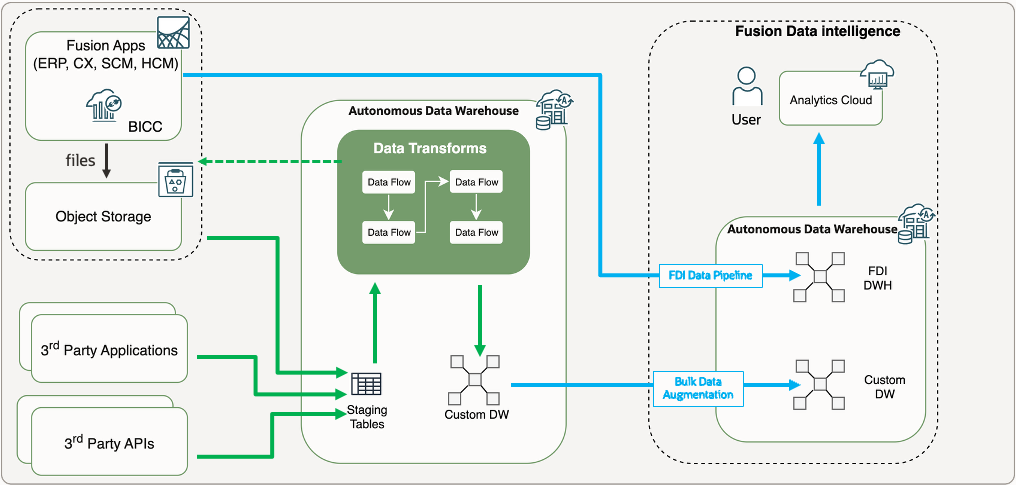
- Supplier data is loaded from Fusion Apps to Fusion Data Intelligence’s Data Warehouse using the out-of-the-box FDI Data Pipelines.
- Supplier performance data resides in Fusion Apps, but isn’t exposed through standard FDI pipelines (hypothetical scenario for the purpose of this use case).
- Supplier performance data is extracted via Fusion Apps’ BICC (Business Intelligence Cloud Connector), which Data Transforms has a built-in connector for, among its many other connectors.
- Data Transforms also extracts weather data from an external data provider using its REST API and third-party connectors.
- Data Transforms integrates data extracted from these different sources, assigns supplier performance ratings, and estimates the weather impact on the supply chain using its data flows.
- Data is then transformed into star schema format (facts and dimensions).
- All the data processing takes place in a separate Autonomous Data Warehouse instance, so this workload does not impact FDI’s core data pipelines.
- The custom data warehouse tables are then copied to Fusion Data Intelligence’s Data Warehouse using its Bulk Data Augmentation feature.
Fusion Apps data (supplier) is augmented with additional Fusion Apps data (supplier performance) and non-Fusion data (weather) and available in a single analytics platform, alongside all data from other Fusion Apps. This architecture demonstrates how Data Transforms can be safely isolated from core Fusion Data Intelligence workloads, ensuring performance and modularity.
Cost Implications of Using Data Transforms with Fusion Data intelligence
If using a separate Autonomous Database for Data Transforms (best practice) the following costs apply:
- Autonomous Database
- Data Transforms processing (CPU)
- Additional storage, depending on custom data volumes
If using the same Autonomous Database as Fusion Data Intelligence—which is technically possible, but not recommended—the following costs apply:
- Data Transforms processing (CPU)
- Autonomous Database scale up costs (CPU and storage), depending on custom data volumes.
While these costs are important to consider, they are typically outweighed by the business value gained from scalable, automated, and integrated pipelines that support advanced analytics use cases.
References
Want to Learn More?
Click here to sign up for the RSS feed to receive notifications for when new A-team blogs are published.
Summary
In summary, Oracle Fusion Data Intelligence offers two primary methods for extending analytics beyond standard Fusion Applications data: Data Augmentation and Data Transforms. Data Augmentation is best for straightforward, business-led enrichment scenarios that require minimal technical overhead. For more complex requirements—such as integrating external sources, handling larger non-Fusion data volumes, or performing advanced transformations—Data Transforms provides additional flexibility and control.
Selecting the right approach depends on your organization’s data landscape, integration needs, and available resources. Understanding the distinctions between these options helps ensure that both simple and advanced analytics use cases can be addressed efficiently and in alignment with best practices.