



Introduction
Ranveer Tiwari’s ESS Job Health & Risk Observatory demonstrates how a custom BI Publisher report and its data model can produce job-level performance and risk information for Fusion Enterprise Scheduler Service (ESS). This includes execution counters, historical runtime baselines, runtime-regression signals, risk scores, confidence measures, and alert context. The original architecture uses Oracle Integration Cloud (OIC) to invoke BI Publisher, decode and normalize the response, and expose the resulting data through REST.
This blog post shows how to ingest that ESS job-performance and risk data directly into OCI Log Analytics by configuring the OCI Management Agent with a SOAP-compatible OCI Log Analytics REST API source. The custom BI Publisher report and its data model determine which ESS requests, operational metadata, execution counters, historical baselines, and derived performance and risk signals are returned. SOAP provides the transport that allows the Management Agent to collect this information directly from BI Publisher ReportService.
Because the Management Agent calls BI Publisher directly, OIC is not required solely as a telemetry relay. The source invokes BI Publisher ReportService, extracts reportBytes from the SOAP response, invokes a Base64-decoding subparser, and passes the restored XML to the report-specific parser. OCI Log Analytics then retains the resulting ESS performance and risk records for searches, dashboards, correlation, detections, and alerts. This approach improves ESS request coverage and gives operators more context for investigation, but collection completeness should still be validated against known requests in each environment.
Addressing ESS Monitoring Gaps with a New Log Collection Paradigm
The earlier Scheduler REST API-based solution established request-level ESS monitoring in Log Analytics. Customer feedback revealed that some requests operators expected to investigate, and some metadata needed to interpret them, were not represented in the collected data. That made cancelled, blocked, long-running, and potentially stuck jobs harder to troubleshoot.
The custom ESS Health report and data model address this need by aggregating ESS activity across execution windows and returning job identity, execution timestamps, status counters, runtime baselines, application and product context, and derived risk signals. This gives operations teams a job-centric view for identifying recurring failures, runtime regressions, prolonged running states, and elevated stuck-job or SLA-breach risk.
This view complements Scheduler REST collection: REST remains useful for request-level detail, while the BI Publisher dataset provides cross-run context and prioritization. Because coverage depends on report logic, polling windows, and deployment configuration, validate collected records against known requests in each environment.
Reference Architecture
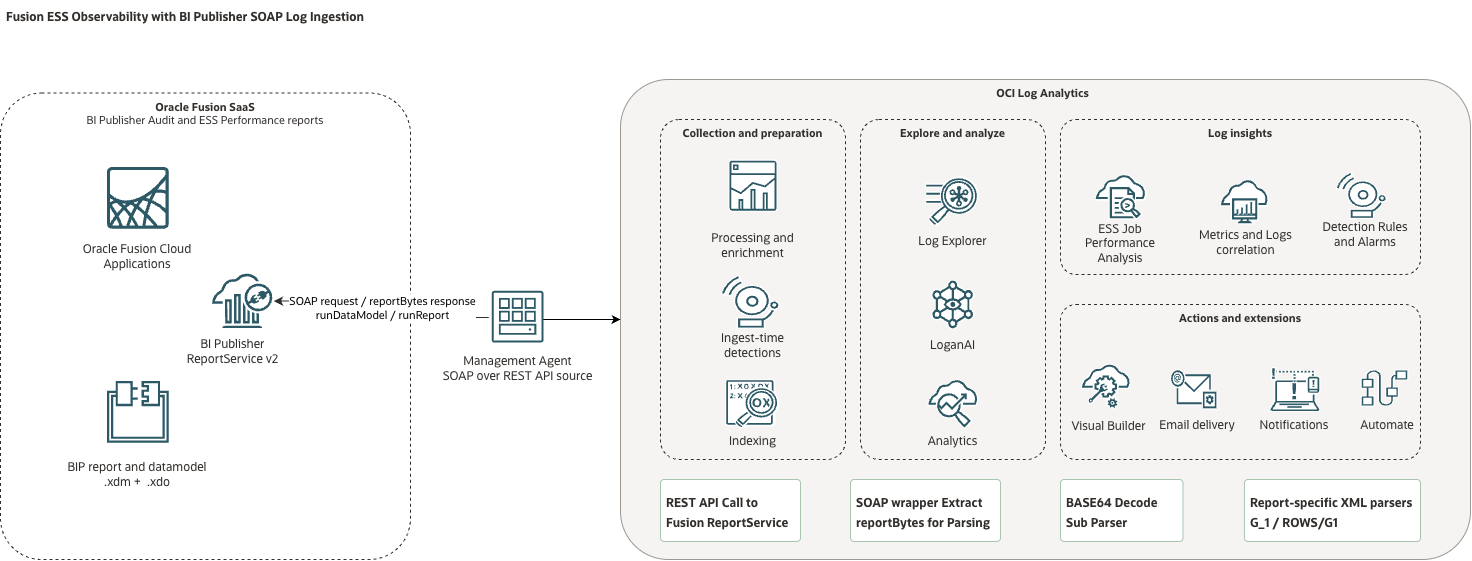
Although the collection is configured as an OCI Log Analytics REST API source, the Management Agent sends a SOAP XML request to BI Publisher ReportService v2. The ESS source invokes runReport, while the companion BI Publisher execution-audit source invokes runDataModel. Both operations return the requested report data inside reportBytes. Within Log Analytics, the first processing stage extracts reportBytes from the SOAP response. A Base64-decoding subparser then restores the report XML, and a report-specific parser maps each XML record and field into the Log Analytics data model. The SOAP transport and decoding stages are reusable, but the final XML parser must match the report being collected.
The broader ESS monitoring coverage comes from the custom BI Publisher report and its data model, which determine which ESS requests, operational metadata, counters, and derived performance signals are returned. SOAP provides the transport that allows the Management Agent to collect that information directly.
This direct path removes the need to use Oracle Integration Cloud solely as a telemetry relay. OIC remains appropriate when the integration requires multi-system orchestration, shared transformations, approval logic, or a separately managed REST contract. When Log Analytics is the only consumer and can parse the BI Publisher XML directly, the Management Agent approach reduces the number of components required for collection.
Get Operational Insights into Fusion Enterprise Scheduler Job Requests
The immediate value of the new collection paradigm is the operational insight it provides into Fusion Enterprise Scheduler job requests. The ESS Job Health & Risk Observatory turns the collected ESS activity, performance baselines, and calculated health signals into a consolidated operational view.
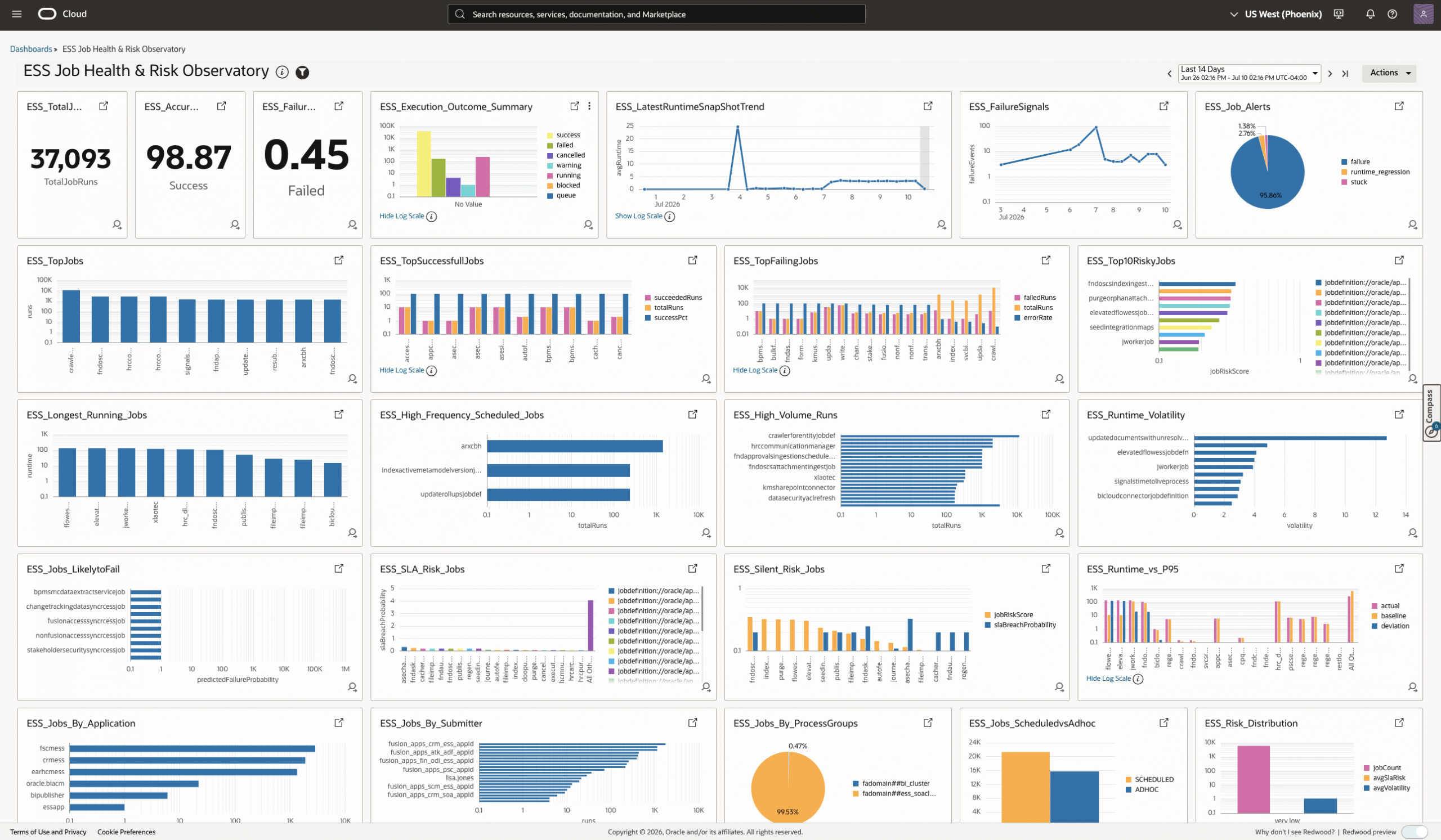
The dashboard helps Fusion Applications operations teams answer the questions they most frequently ask about ESS workload health:
- Measure the ESS execution success rate. Understand the percentage of ESS executions that completed successfully during the selected period.
- Track the ESS failure rate. Determine whether failures are isolated events or indicate a broader degradation in ESS workload health.
- Find the top failing jobs. Rank jobs by failed executions and error rate so that the most persistent failures can be investigated first.
- Detect high-volume runs. Find jobs with the greatest execution volume and determine whether unexpectedly frequent runs are contributing to system load.
- Analyze runtime volatility. Identify jobs whose execution durations vary significantly and may therefore be difficult to predict or schedule reliably.
- Identify long-running jobs. See which jobs have the longest runtimes, including the job name or definition and the observed runtime that requires investigation.
- Find the applications with the most ESS activity. Understand which Fusion Applications generate the greatest ESS job volume and where operational attention may be concentrated.
Together, these dashboard views allow an operator to move from service-level health to workload patterns and then to the specific jobs that require attention. Success rate, failure rate, execution outcomes, and high-volume runs summarize activity within the selected reporting period. Long-running, runtime-volatility, regression, and risk views combine the latest job state with historical execution baselines.
Prerequisites
Before configuring the ESS SOAP collection, confirm the following requirements:
- Fusion administrator access that can import a BI Publisher catalog, manage catalog permissions, and provision a service account.
- An OCI tenancy and compartment in which you can configure Log Analytics resources, Management Agents, entities, log groups, saved searches, and dashboards.
- A client host or OCI Compute instance with outbound HTTPS connectivity to the Fusion Applications endpoint. This host runs the Management Agent used for source-entity association.
- Access to the ESS Health catalog, Log Analytics source package, endpoint-validation script, and dashboard packages referenced in the following steps.
If you also deploy the companion BI Publisher report-execution audit use case, confirm separately that /Custom/Audit/Data Models/BIP Audit Report DM.xdm exists and that the collection account can execute it. This source uses the BI Publisher runDataModel operation. Access to the ESS Health report does not automatically provide access to the BI Publisher audit data model.
Configure the ESS Health SOAP Collection
Ranveer Tiwari’s original ESS Job Health & Risk Observatory established the BI Publisher report, service-account requirements, health and risk analysis, and an OIC-based collection architecture. This article builds on that work and adapts the collection path for direct ingestion through the OCI Management Agent.
This procedure reuses only the first two Fusion preparation steps from Ranveer’s installation guide: installing ESSHealth.catalog and provisioning a Fusion service account with access to BI Publisher and ESS job data. The OIC configuration is not required because the Management Agent connects directly to BI Publisher ReportService. The original documentation and supporting artifacts remain available in the ESS Job Health & Risk Observatory GitHub repository.
Step 1: Install the ESS Health BI Publisher catalog
Download ESSHealth.catalog from the ESS Job Health & Risk Observatory GitHub repository.
Sign in to Fusion BI Publisher:
https://<fusion-host>/analytics
Open the BI Publisher catalog, navigate to /shared/Custom, and select Unarchive. In the Unarchive dialog, select the downloaded ESSHealth.catalog file, as shown in Figure 3.
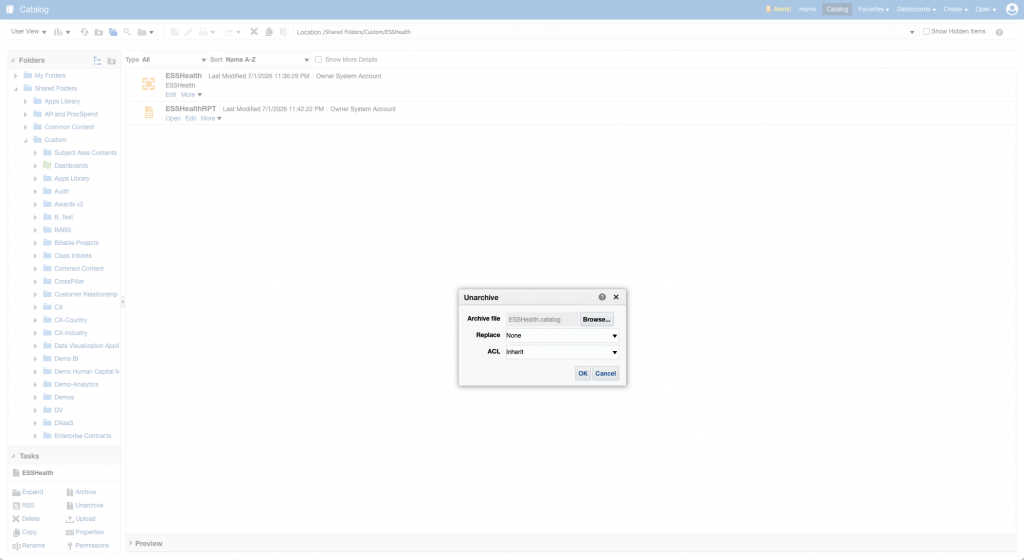
For this direct SOAP implementation, unarchive the catalog under /shared/Custom rather than the Human Capital Management folder. Verify that the operation creates /shared/Custom/ESSHealth and that the ESSHealth data model and ESSHealthRPT report are present.
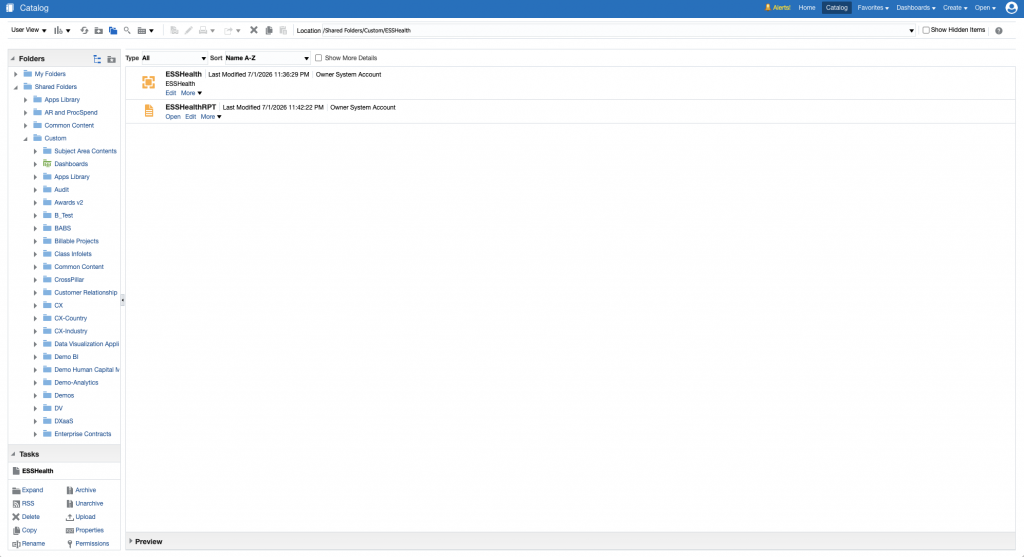
The imported Log Analytics source calls this exact report path:
/Custom/ESSHealth/ESSHealthRPT.xdo
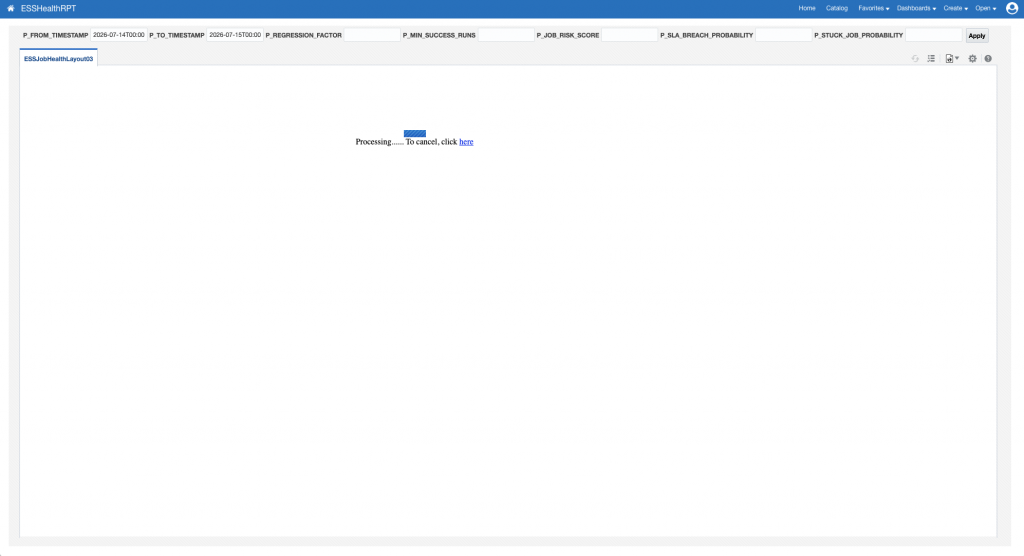
Run ESSHealthRPT in BI Publisher with a short period containing known ESS activity. Confirm that the report completes and returns job health records before continuing.
Step 2: Provision the Fusion service account
Create or identify a dedicated Fusion service account for ESS monitoring collection. Assign the following Fusion roles:
BI Consumer Role: BIConsumer
ESS Monitor Role: ESSMonitor
If your Fusion security model groups these permissions through a custom abstract role, you can follow the original installation guide and create an ESS_Monitor role containing the required access.
Grant the account permission to open and execute the report under /shared/Custom/ESSHealth. Catalog permissions and Fusion application roles are separate controls, so validate both.
After creating or changing the role assignments, run the following Fusion scheduled process if required by your environment:
Import User and Role Application Security Data
Confirm that the service account can execute ESSHealthRPT and read the underlying ESS job data without catalog, data-source, or authorization errors.
Step 3: Provision the Management Agent and enable REST API collection
Complete the following Management Agent and Log Analytics prerequisites. For additional Scheduler REST collection background, see Fusion Apps Observability by Collecting ESS Logs Using OCI Logging Analytics REST API Ingestion.
- Set up the Log Analytics service policies and user permissions. See Enable Access to Log Analytics and Its Resources and Prerequisite IAM Policies.
- Install the Management Agent on a client host VM that has HTTP or HTTPS access to the Fusion Applications endpoint. Deploy the Log Analytics plug-in during installation and use this host for the source-entity association. See Install Management Agents and Set Up Continuous Log Collection Using Management Agent.
- On OCI Compute, you can enable the Management Agent through the Oracle Cloud Agent. See Deploy Management Agents on Compute Instances.
- Create or edit an entity of type
Oracle Fusion Applications, select the Management Agent, and configure the requiredlogin_urlandpod_urlproperties. See Create Log Analytics Resources and Set Up REST API Log Collection. - From the Management Agent host, verify DNS resolution and HTTPS access to
https://<fusion-host>/xmlpserver/services/v2/ReportService. Oracle’s REST API log collection procedure recommends checking endpoint reachability from the agent host with a tool such ascurl.
On Unix-based hosts, the agent operating-system user depends on the deployment:
Standalone Management Agent:  mgmt_agent
Oracle Cloud Agent plug-in:   oracle-cloud-agent
Although the Fusion endpoint uses SOAP, Log Analytics uses its REST API source type to send the HTTP POST request and collect the XML response.
Locate emd.properties in the appropriate Management Agent configuration directory:
Oracle Cloud Agent plug-in:
/var/lib/oracle-cloud-agent/plugins/oci-managementagent/polaris/agent_inst/config/

Standalone Management Agent:
/opt/oracle/mgmt_agent/agent_inst/config/
Enable REST API collection and set the polling interval to ten minutes:
loganalytics.rest_api.enable_oci_api=true
loganalytics.rest_api.report_interval=600
Restart the applicable agent service and confirm that the agent returns to an active state:
Oracle Cloud Agent:
sudo systemctl restart oracle-cloud-agent

Standalone Management Agent:
sudo systemctl restart mgmt_agent
Step 4: Register the Fusion credential
Create a temporary credential file named FA-BIP-BASIC.json. The current Oracle REST API collection format uses HTTPSBasicAuthCreds for a Basic Authentication credential:
{
  "source": "lacollector.la_rest_api",
  "name": "FA-BIP-BASIC",
  "type": "HTTPSBasicAuthCreds",
  "description": "These are HTTPS Basic Authentication credentials.",
  "properties": [
    {
      "name": "HTTPSUserName",
      "value": "CLEAR[<fusion-service-account>]"
    },
    {
      "name": "HTTPSPassword",
      "value": "CLEAR[<fusion-service-account-password>]"
    }
  ]
}
This example is for a Fusion HTTPS endpoint whose certificate chain is already trusted by the Management Agent host. If you must explicitly provide a JKS trust store, Oracle documents HTTPSCreds as the credential type that accepts ssl_trustStoreType, ssl_trustStoreLocation, and ssl_trustStorePassword. Do not add those properties to an HTTPSBasicAuthCreds credential.
Protect the temporary file with owner-only permissions:
chmod 600 /tmp/FA-BIP-BASIC.json
Register it with the credential-management utility for your installation type:
Oracle Cloud Agent plug-in:
cat /tmp/FA-BIP-BASIC.json | sudo sh /var/lib/oracle-cloud-agent/plugins/oci-managementagent/polaris/agent_inst/bin/credential_mgmt.sh -o upsertCredentials -s logan

Standalone Management Agent:
cat /tmp/FA-BIP-BASIC.json | sudo sh /opt/oracle/mgmt_agent/agent_inst/bin/credential_mgmt.sh -o upsertCredentials -s logan
Securely remove the temporary credential file after registration. The imported source selects BASIC_AUTH and references the credential as:
FA-BIP-BASIC:BASIC_AUTH
The SOAP request uses only {USERNAME} and {PASSWORD}. The Management Agent replaces these macros from the selected credential at collection time. Never place literal Fusion credentials in the source package, SOAP payload, article, scripts, screenshots, or dashboard files.
Step 5: Test the BI Publisher endpoint
Use run_ess_health_rpt.sh to validate the report through BI Publisher ReportService before enabling scheduled collection. The script requires zsh, curl, sed, perl, base64, and xmllint.
From the repository root, use an explicit Fusion URL, service-account name, and short UTC test window. Do not append Z to the timestamp values accepted by this script. Omit BIP_PASSWORD so that the script prompts for it without echoing it:
chmod +x ./scripts/run_ess_health_rpt.sh
umask 077
BIP_BASE_URL='https://<fusion-host>' \
BIP_USER='<fusion-service-account>' \
P_FROM_TIMESTAMP='2026-07-15T18:00:00.000' \
P_TO_TIMESTAMP='2026-07-15T19:00:00.000' \
OUTPUT_DIR='./output/esshealthrpt-test' \
./scripts/run_ess_health_rpt.sh
The script loads an environment file only when ENV_FILE is explicitly set. For an interactive validation, leave both ENV_FILE and BIP_PASSWORD unset so the password is not read from a plaintext file or supplied through the child-process environment.
The script posts runReport to:
https://<fusion-host>/xmlpserver/services/v2/ReportService
It calls /Custom/ESSHealth/ESSHealthRPT.xdo, checks for an HTTP success response and non-empty reportBytes, Base64-decodes the report content, validates the DATA_DS XML, and requires at least one /DATA_DS/ROWS/G1 record.
Inspect the generated decoded XML and confirm that representative records contain REQUEST_EVENT_TIME and the expected ESS metadata. The script validates the decoded record structure but does not validate every individual field.
The request, response, and decoded report files can contain usernames, request details, or other sensitive ESS metadata. Retain the restrictive umask, protect the output directory, and remove test artifacts when they are no longer required.
Step 6: Import the Fusion Apps lookup table
The ESS Health SOAP source includes an enabled field-enrichment function that maps Fusion product abbreviations to product and product-family information. The source refers to this lookup internally as Fusion_Products_Lookup, so create or verify the lookup before importing the source package.
- Download
Fusion_Products_Lookup.csvfrom GitHub. - Select Create Lookup.
- For Name, enter
Fusion_Products_Lookup - For Type, select Simple.
- Select the downloaded
Fusion_Products_Lookup.csvfile. - Select Create and confirm that the lookup is available before continuing.
Step 7: Import the ESS Health SOAP source
In Log Analytics, navigate to:
Administration
  -> Administration Overview
  -> Import Configuration Content
Download Fusion_ESSHealthRPT_SOAP_1784581422642.zip from GitHub and import the log source:
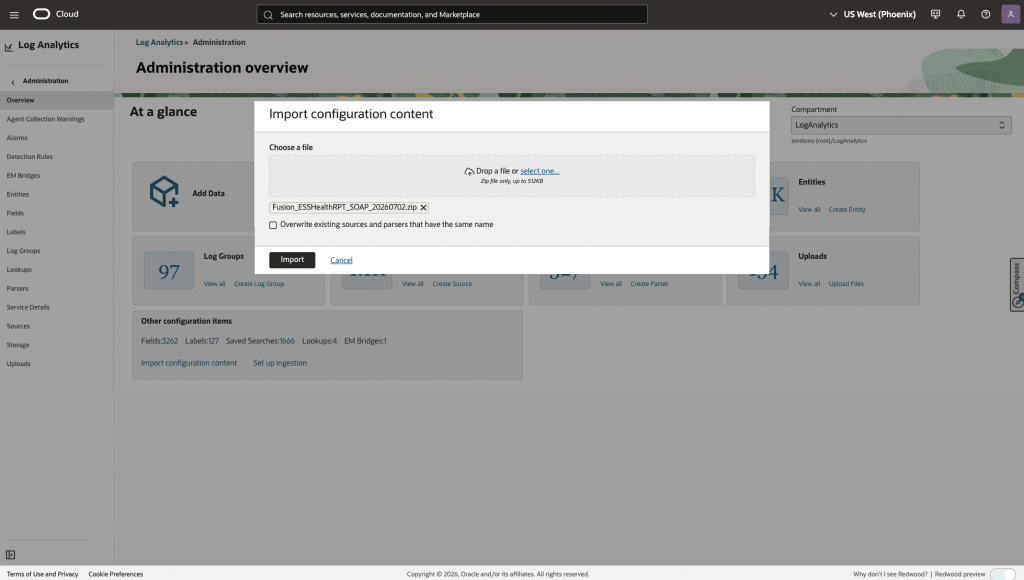
After the import, verify these objects:
Source:         Fusion_ESSHealthRPT_SOAP
Wrapper parser: Fusion_ESSHealthRPT_SOAP_ReportBytes_XML
Decoded parser: Fusion_ESSHealthRPT_Decoded_XML
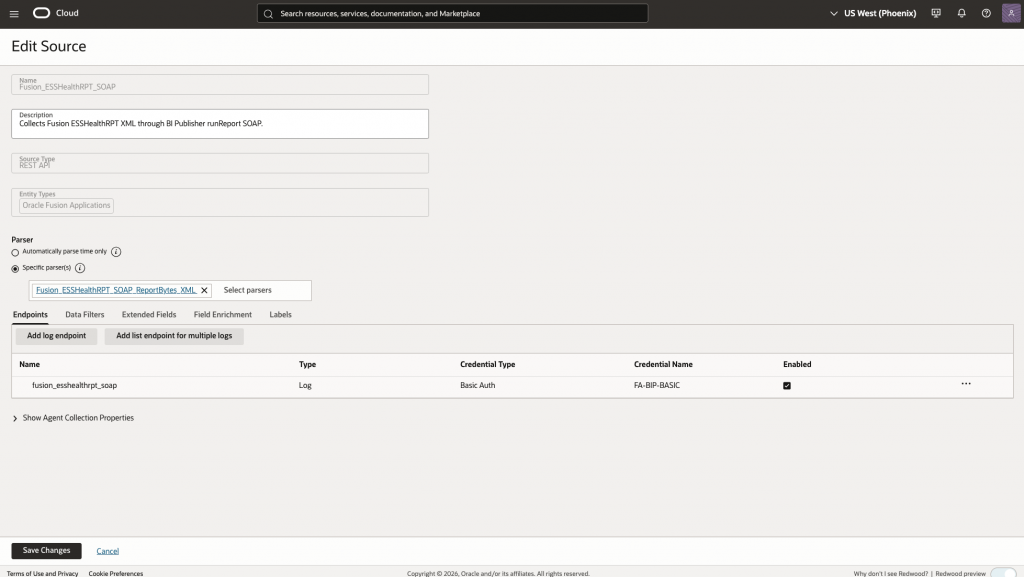
Open the imported source and confirm these settings. The endpoint resolves pod_url from the associated Fusion Applications entity, so the package does not contain a tenant-specific Fusion hostname.
Source type:          REST API
Entity type:          Oracle Fusion Applications
Endpoint name:        fusion_esshealthrpt_soap
Method:               POST
Endpoint URL:         https://{pod_url}/xmlpserver/services/v2/ReportService
Request content type: application/xml
Response content type: application/xml
Credential:           FA-BIP-BASIC
Report path:          /Custom/ESSHealth/ESSHealthRPT.xdo
Collection interval:  10 minutes
The source supplies the report window with these Log Analytics macros:
P_FROM_TIMESTAMP = {START_TIME:yyyy-MM-dd'T'HH:mm:ss.SSS.TZ=UTC}
P_TO_TIMESTAMP   = {CURR_TIME:yyyy-MM-dd'T'HH:mm:ss.SSS.TZ=UTC}
The wrapper parser extracts runReportReturn/reportBytes and invokes the Base64-decoding subparser. The decoded report XML is then passed to Fusion_ESSHealthRPT_Decoded_XML, which creates one Log Analytics record for each /DATA_DS/ROWS/G1 element and maps REQUEST_EVENT_TIME to the Log Analytics Time field.
Step 8: Associate and validate the source
Associate and validate the source as follows:
- In Log Analytics, navigate to Administration, select Entities, and open the
Oracle Fusion Applicationsentity managed by the collection agent. - Edit the Agent Collection Properties. For the first collection, set Historical Data to ten minutes or one hour and set Enable Filter Duplicate Records to
true. - Navigate to Administration, select Sources, and open
Fusion_ESSHealthRPT_SOAP. - Select Unassociated Entities, click Add Association, and select the Fusion Applications entity.
- Select the Log Analytics log group and submit the association.
Start with a bounded historical interval rather than a large interval such as P30D. A large initial START_TIME range can make the BI Publisher report exceed the Management Agent read timeout.
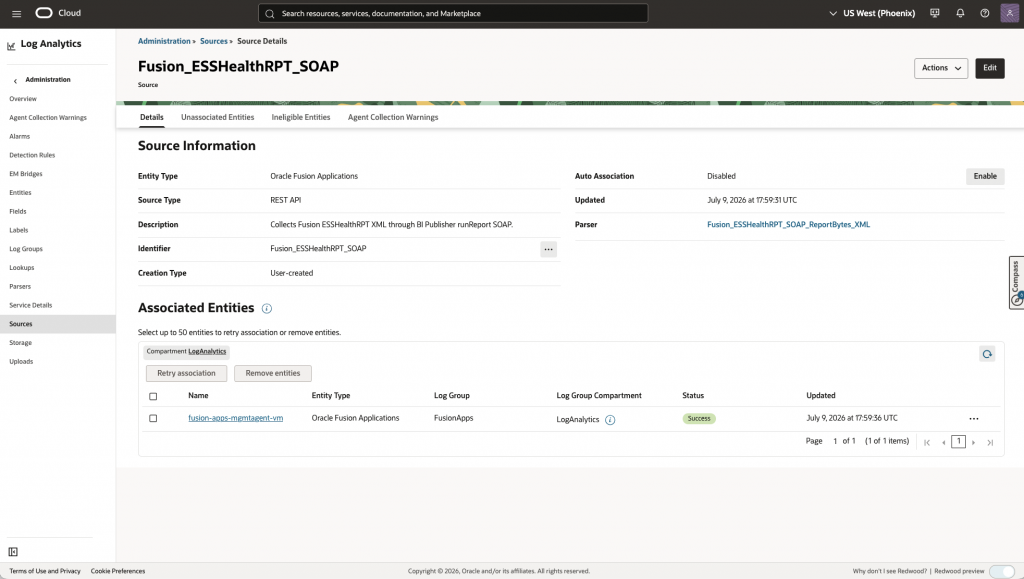
Confirm that the entity moves to Associated Entities and that its association status is Success.
After the first ten-minute collection interval, run:
'Log Source' = Fusion_ESSHealthRPT_SOAP
| timestats count as Records by 'Log Source'
Inspect several parsed records, not only Original Log Content. Compare request IDs, job names, applications, submitters, execution counters, and timestamps with the bounded BI Publisher report output from Step 5.
Step 9: Import the ESS dashboard
In Log Analytics, navigate to:
Dashboards
  -> Overview
  -> Import dashboards
Import ESS_Job_Health_Risk_Observatory_BIP_SOAP.json. Select the target compartment for the dashboard and the target compartment for its saved searches, and then select Import.
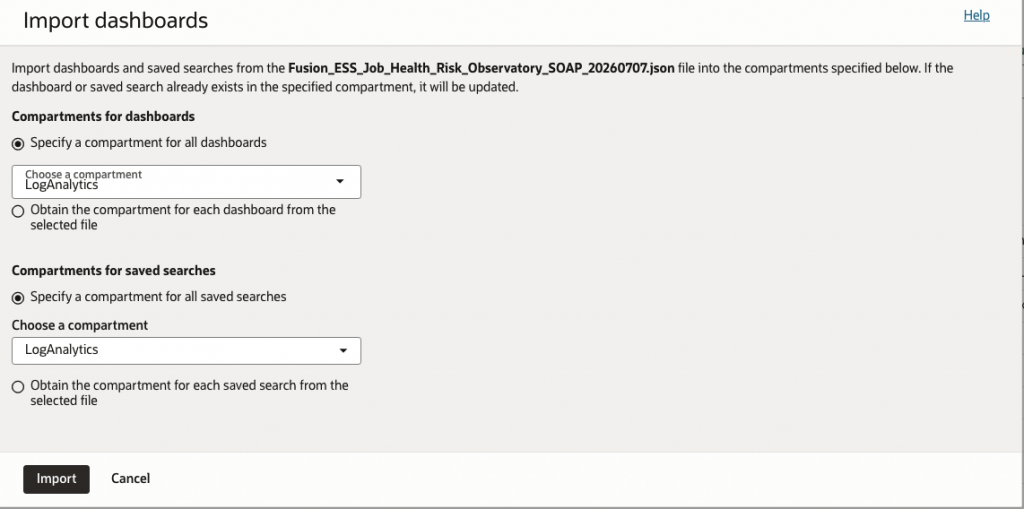
Open Fusion ESS Job Health & Risk Observatory - SOAP and confirm that its widgets return data from Fusion_ESSHealthRPT_SOAP.
To deploy the complementary broad ESS workload dashboard, download the dashboard from GitHub and repeat the import procedure with ESS_Job_Health_Risk_Observatory_BIP_SOAP.json.
Analyze ESS Workload Distribution and Runtime Behavior
After importing and validating both dashboards, begin with Oracle Fusion Apps Enterprise Scheduler Service (ESS) Analysis - SOAP for broad workload health, then use the ESS Job Health & Risk Observatory to prioritize the job definitions that require investigation.
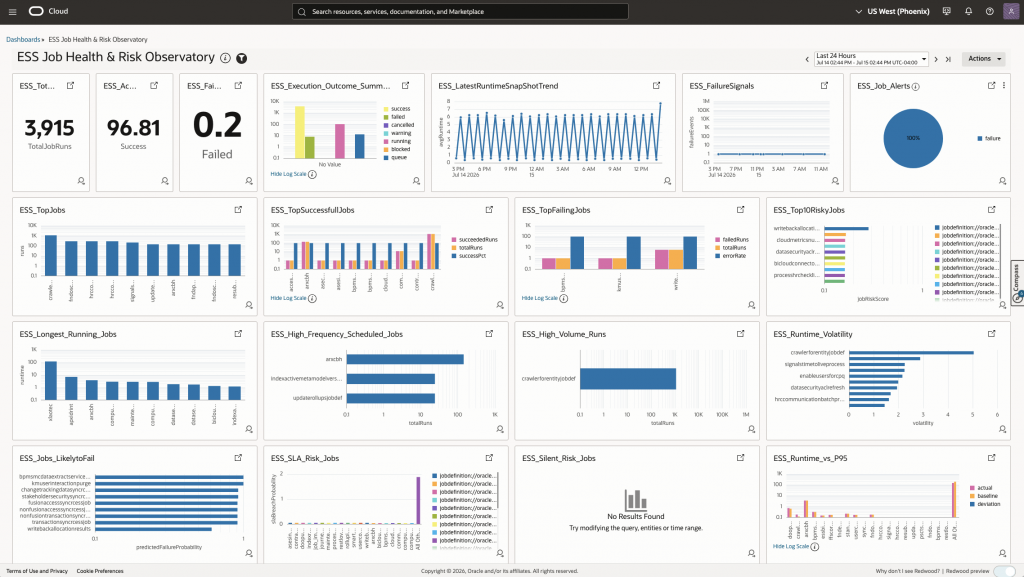
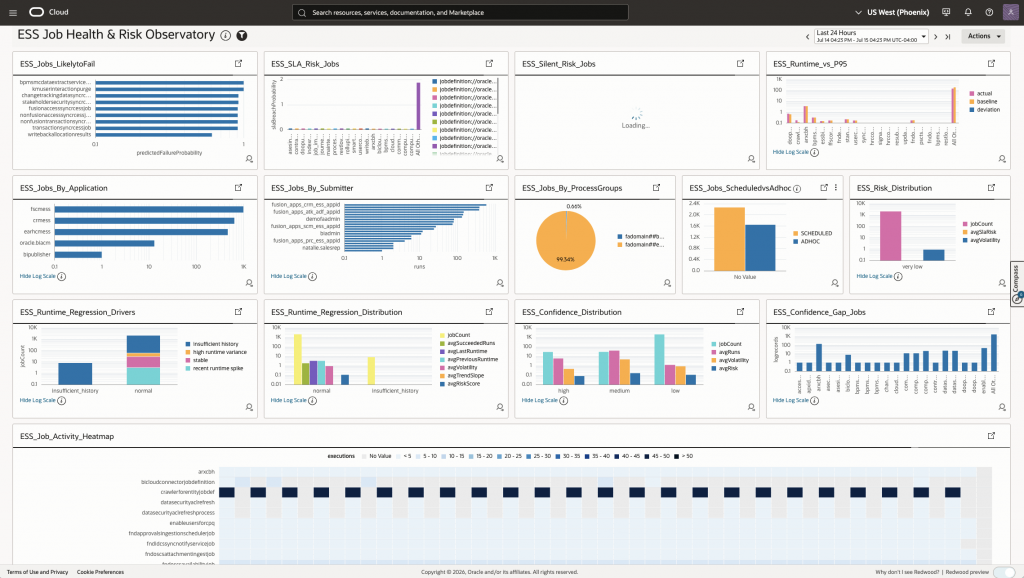
After identifying an unusual workload or runtime pattern, operators can use the distribution widgets to determine where that activity originates.
- Locate workload concentration.
ESS_Jobs_By_ApplicationandESS_Jobs_By_ProcessGroupsshow which Fusion Applications and processing groups account for the greatest execution volume.
- Identify workload submitters.
ESS_Jobs_By_Submitteridentifies the user or service-account identities submitting the most ESS work.
- Compare execution patterns.
ESS_Jobs_ScheduledvsAdhocshows the balance between scheduled and ad hoc activity.
- Find recurring workload peaks.
ESS_Job_Activity_Heatmapshows when individual jobs are most active, helping operators recognize recurring peaks and overlapping execution patterns.
- Investigate runtime regression signals.
ESS_Runtime_Regression_DriversandESS_Runtime_Regression_Distributiondistinguish observations associated with recent runtime spikes, high runtime variance, stable behavior, or insufficient history.
- Assess risk-signal confidence.
ESS_Risk_Distribution,ESS_Confidence_Distribution, andESS_Confidence_Gap_Jobsshow how broadly risk is distributed and where limited execution history may weaken confidence in the calculated signals.
- Investigate jobs that remain alerted.
ESS_Active_Alertsshows the latest job-level health record for each alerted job definition, including its current status, recent failures, maximum running duration, severity, alert cause, calculated failure, SLA-breach and stuck-job probabilities, confidence, and request identifiers. A running status alone does not mean that a job is stuck; confirm the signal against its duration, historical baseline, repeated state, and underlying Fusion request.
Together, these widgets provide a practical investigation path: locate workload concentration, identify abnormal runtime behavior, determine the affected application and submitter, and prioritize the jobs that require further analysis.
The activity heatmap represents observed executions rather than configured schedule definitions. Runtime-regression drivers classify the conditions associated with a signal; they do not prove its root cause. Predicted failure probabilities and risk scores are prioritization signals rather than guaranteed outcomes, so operators should confirm the underlying ESS request details before taking corrective action.
For detailed definitions of the report fields, computation scopes, parameters, thresholds, and formulas behind these widgets, see the Report Columns, Query Parameters, and ESS Job Health Signal Calculations sections in Ranveer Tiwari’s ESS Job Health & Risk Observatory article. That article documents the original OIC-based design; use the direct Management Agent SOAP procedure in this article for deployment.
Conclusion
The resulting architecture preserves the custom BI Publisher report and data model that supply ESS performance and risk context, uses SOAP and the Management Agent for direct transport, and keeps Scheduler REST available for individual-request detail.
The customer and operational value of this enhancement includes:
- Complementary REST and SOAP coverage: Scheduler REST provides detailed information about an individual ESS request, while BI Publisher SOAP provides job-centric summaries, historical performance baselines, and prioritization signals across multiple executions. SOAP enhances the existing REST-based monitoring approach; it does not replace it.
- Direct BI Publisher collection: The Management Agent collects ESS Health report data directly while preserving Ranveer’s custom report, data model, and health-analysis logic. OIC is no longer required solely as a telemetry relay, although it remains appropriate for broader orchestration, transformation, or integration requirements.
- Offloaded observability analysis: ESS job-performance and risk data are stored in OCI Log Analytics. Historical searches, dashboards, workload analysis, correlations, detections, and alerts operate on this offloaded data instead of repeatedly querying Fusion Applications.
- Reduced monitoring workload on Fusion Applications: Multiple users, dashboards, and alerts can analyze the same collected records without generating a corresponding BI Publisher report request for every investigation. The scheduled SOAP extraction still consumes some Fusion resources, so collection intervals and report windows should be sized appropriately.
- Broader operational insight: The additional job metadata and cross-run context help operators identify recurring failures, abnormal runtimes, workload volatility, high-risk jobs, and potentially stuck requests. This helps close the customer-reported ESS monitoring gap.
References
- Allow Continuous Log Collection Using Management Agents
- Fusion Apps Observability by Collecting Enterprise Scheduler ESS Logs Using OCI Logging Analytics REST API Ingestion
- Beyond Monitoring: AI-Driven Fusion ESS Job Health & Risk Observatory
- BI Publisher Audit Reports: A Complete Guide to Set Up BI Publisher Audit Reports for Fusion Applications
- How To Configure And Use Audit In BI Publisher For Fusion SaaS Cloud Customers? (My Oracle Support Doc ID 2059102.1)
- How To Configure And Use Audit For Usage and Performance In OTBI For Fusion SaaS Cloud Customers (My Oracle Support Doc ID 2731495.1)
- Set Up REST API Log Collection
- Create a Parser