
Introduction
This is a two-part blog series focused on building an OCI Monitoring Agent for Oracle Integration Cloud (OIC) with MCP Integration. In the first part, we created the agent using built-in tools to perform OIC monitoring tasks. In this second part, we will build an OIC Monitoring MCP (Model Context Protocol) server that publishes the 4 OIC monitoring tools described earlier, along with a system prompt template. We’ll then enhance the agent by defining an MCP client within its code. This client will connect to the MCP server, retrieve the published tools and prompt templates, and replace the built-in tools and prompts with those provided by the MCP server.
OIC Monitoring: MCP Server
The server is built using the FastMCP Python library, following the guidelines of the Model Context Protocol (MCP) SDK. The @mcp.tool() decorator is used to publish tools to the MCP server, while the @mcp.prompt() decorator registers prompt templates. Although not covered in this blog, the @mcp.resource() decorator can also be used to publish resources.
The server code below sets up an OIC Monitoring MCP server with four tools and one prompt. These tools mirror the logic of the agent’s built-in tools and invoke OIC Monitoring REST APIs using an access token from a local token.txt file. The prompt template is defined in the oic_monitoring_agent_prompt function. Before running the code, make sure to update the oic_base_url and oicinstance values to match your specific OIC environment. The MCP specification now supports OAuth 2.1, allowing clients and servers to securely delegate authorization through standardized flows. For production environments, securing MCP communication using OAuth is strongly recommended.
import os,requests,json
from mcp.server.fastmcp import FastMCP
# Create an MCP server
mcp = FastMCP("OICMonitoring")

# OIC Instance URL and Integration Instance ()
oic_base_url="https://xxx.ocp.oraclecloud.com"
oicinstance="integration Instance Part of Design time url"


@mcp.tool()
def runtime_summary_retrieval() :
    """Use this tool to retrieve the summary of all integration messages by viewing aggregated counts of total, processed, succeeded, errored, and aborted messages"""
    apiEndpoint = "/ic/api/integration/v1/monitoring/integrations/messages/summary"
    oicUrl = oic_base_url+apiEndpoint+"?integrationInstance="+oicinstance
    print(oicUrl)

    with open("./token.txt", "r") as f:
        token = f.read().strip()

    headers = {
        "Authorization": f"Bearer {token}",
        "Accept": "application/json"
    }

    response = requests.get(oicUrl,headers=headers)
    if response.status_code >= 200 and response.status_code < 300:
        messageSummary = response.json()['messageSummary']
        return (json.dumps(messageSummary))
    else:
        return f"Failed to call events API with status code {response.status_code}"

@mcp.tool()
def get_integration_message_metrics(integration_name: str,timewindow: str) -> dict:
    """Use this tool to retrieve message metrics for given integration and time window by viewing aggregated counts of total, processed, succeeded, errored, and aborted messages."""
    apiEndpoint = "/ic/api/integration/v1/monitoring/integrations"
    qParameter="{name:'"+integration_name+"',timewindow:'"+timewindow+"'}"
    oicUrl = oic_base_url+apiEndpoint+"?integrationInstance="+oicinstance+"&q="+qParameter
    print(oicUrl)

    with open("./token.txt", "r") as f:
        token = f.read().strip()

    headers = {
        "Authorization": f"Bearer {token}",
        "Accept": "application/json"
    }

    response = requests.get(oicUrl,headers=headers)
    if response.status_code >= 200 and response.status_code < 300:

        integration_details = [{
            "name": item['name'],
            "version": item['version'],
            "noOfAborted": item['noOfAborted'],
            "noOfErrors": item['noOfErrors'],
            "noOfMsgsProcessed": item['noOfMsgsProcessed'],
            "noOfMsgsReceived": item['noOfMsgsReceived'],
            "noOfSuccess": item['noOfSuccess'],
            "scheduleApplicable": item['scheduleApplicable'],
            "scheduleDefined": item['scheduleDefined']
        } for item in response.json()['items']]
        return (json.dumps(integration_details))
    else:
        return (f"Failed to call events API with status code {response.status_code}")

@mcp.tool()
def get_errored_instances(timewindow: str) -> dict:
    """Use this tool to find all recently errored integration instances and prioritize them based on the latest update time."""
    apiEndpoint = "/ic/api/integration/v1/monitoring/errors"
    qParameter="{timewindow:'"+timewindow+"'}"
    limit="5"
    oicUrl = oic_base_url+apiEndpoint+"?integrationInstance="+oicinstance+"&q="+qParameter+"&limit="+limit
    print(oicUrl)

    with open("./token.txt", "r") as f:
        token = f.read().strip()

    headers = {
        "Authorization": f"Bearer {token}",
        "Accept": "application/json"
    }

    response = requests.get(oicUrl,headers=headers)
    if response.status_code >= 200 and response.status_code < 300:

        error_integration_details = [{
            "instanceId": item['instanceId'],
            "primaryValue": item['primaryValue'],
            "recoverable": item['recoverable'],
            "errorCode": item['errorCode'],
            "errorDetails": item['errorDetails']
        } for item in response.json()['items']]
        return (json.dumps(error_integration_details))
    else:
        return (f"Failed to call events API with status code {response.status_code}")

@mcp.tool()
def resubmit_errored_integration(instanceId) -> str:
    """Use this tool to automatically resubmit a failed integration instance by providing its unique identifier, helping you recover from errors quickly."""
    apiEndpoint = f"/ic/api/integration/v1/monitoring/errors/{instanceId}/resubmit"
    oicUrl = oic_base_url+apiEndpoint+"?integrationInstance="+oicinstance

    with open("./token.txt", "r") as f:
        token = f.read().strip()

    headers = {
        "Authorization": f"Bearer {token}",
        "Accept": "application/json"
    }

    response = requests.post(oicUrl,headers=headers)
    if response.status_code >= 200 and response.status_code < 300:
        return ("Your resubmission request was processed successfully.")
    else:
        return f"Failed to call events API with status code {response.status_code}"

@mcp.prompt()
def oic_monitoring_agent_prompt() -> str:
    """OIC Monitoring Agent designed to help administrators and support teams actively monitor and manage Oracle Integration Cloud runtime activity."""

    return """You are The OIC Monitoring Agent designed to help administrators and support teams actively monitor and manage Oracle Integration Cloud runtime activity.
        It provides real‑time insights into integration health and also supports automated remediation actions.

        Core Capabilities:

        1. Runtime Summary Retrieval
        The agent can retrieve an aggregated summary of all messages (integration instances) currently present in the tracking runtime, broken down into:
        - Total messages
        - Processed
        - Succeeded
        - Errored
        - Aborted
        Use **runtime_summary_retrieval** tool to retrieve the data. This gives a quick health snapshot of your OIC environment.

        2. Retrieve Message Metrics for provided Integration and time window
        The agent can retrieve an aggregated summary of messages for specified integration within specified timewindow :
        - Total
        - Processed
        - Succeeded
        - Errored
        - Aborted
        timewindow values: 1h, 6h, 1d, 2d, 3d, RETENTIONPERIOD. Default value is 1h.
        Use **get_integration_message_metrics** tool to retrieve the data.
        This allows you to quickly identify which integrations are generating errors or bottlenecks.

        3. Errored Instances Discovery
        The agent can fetch information about all integration instances with an errored status in the past hour.
        timewindow values: 1h, 6h, 1d, 2d, 3d, RETENTIONPERIOD. Default value is 1h.
        Use **get_errored_instances** tool to retrieve the data.
        Results are ordered by last updated time, making it easy to prioritize the most recent or urgent failures.

        4. Automatic Resubmission of Error Integrations
        For recovery actions, the agent can resubmit an errored integration instance when provided with its unique identifier, helping to automate operational fixes without manual intervention.
        Use **resubmit_errored_integration** tool to resubmit the error instance.
        """

if __name__ == "__main__":
    mcp.run(transport='stdio')
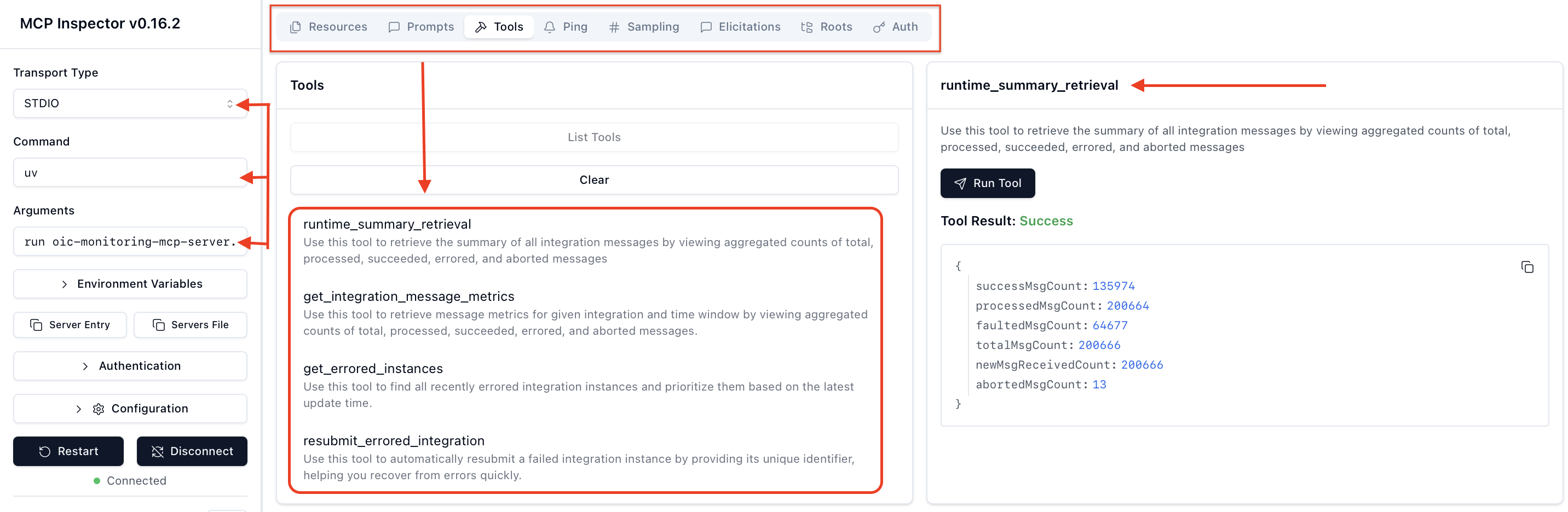
Once your MCP server is created, you can test and validate it using the MCP Inspector before integrating it with your agent. The MCP Inspector is a visual testing framework that combines a local proxy server with a browser-based UI, allowing developers to interactively explore, debug, and verify MCP servers. With the MCP Inspector, you can easily discover and inspect all published tools, prompts, and resources along with their schemas, descriptions, and parameters. It also allows you to manually invoke tools and prompts, provide test inputs, and observe real-time responses for validation. To launch the Inspector for your server, simply run the following command in terminal, but before that you will need to install Node.js to run the Inspector and it is developed and maintained by the Model Context Protocol (MCP) team.
npx @modelcontextprotocol/inspector uv run oic-monitoring-mcp-server.py
The screenshot below demonstrates the Inspector in action, executing the runtime_summary_retrieval tool from the OIC Monitoring MCP server.
OIC Monitoring: MCP Client
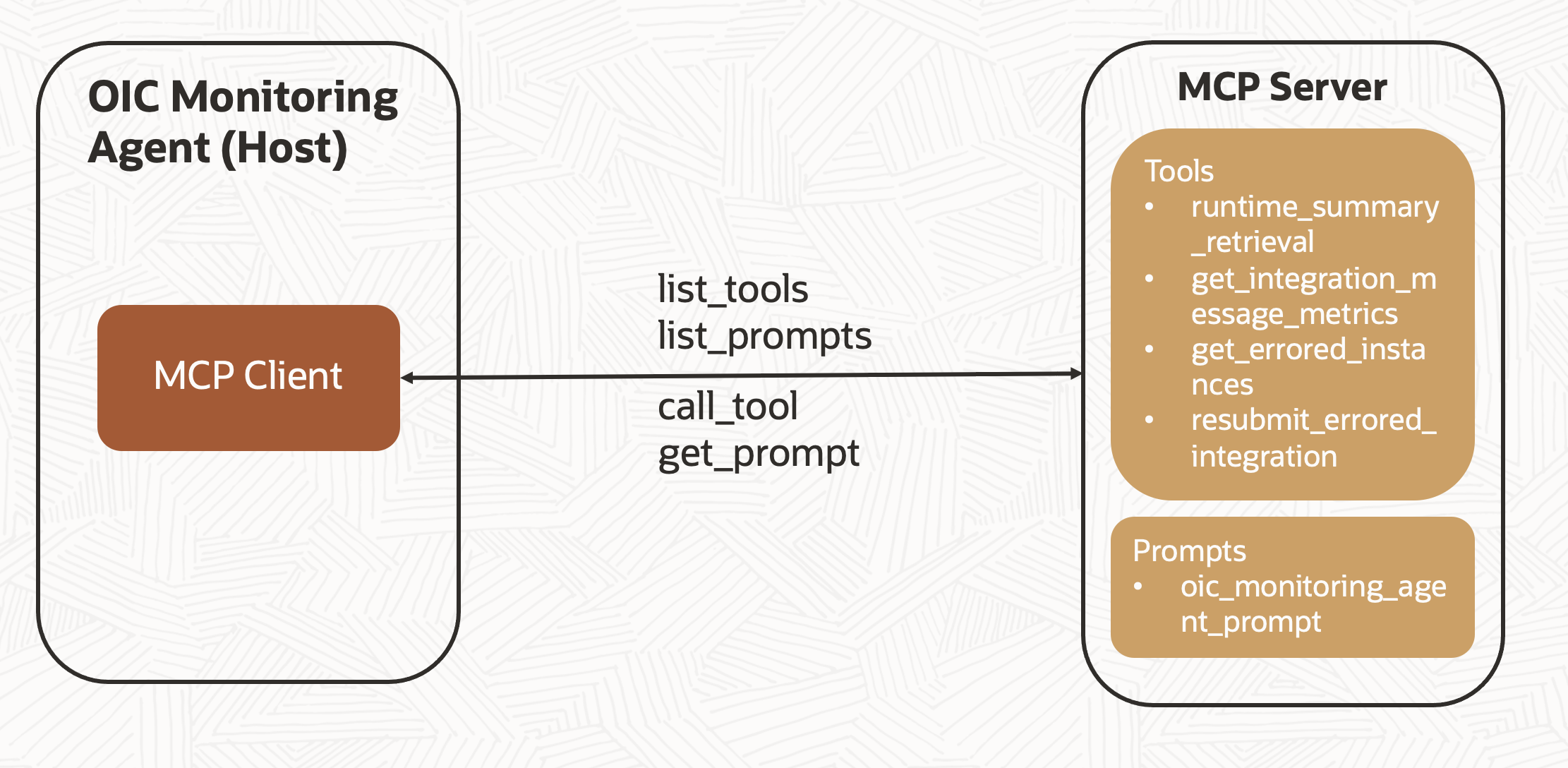
The MCP client establishes a one-to-one connection with the MCP server using the server’s connection parameters object with connection type, and startup commands. Once connected, it receives the server’s read and write streams, which are then used to create a session object. The session is initialized, and available tools and prompts are retrieved using the list_tools() and list_prompts() methods. If applicable, resources can be retrieved using the list_resources() method. The retrieved prompts and tools are stored in the available_prompts and available_tools object variables, respectively. An additional parameter (“type”: “FUNCTION”) is included for OCI Gen AI models to properly identify the tools. The agent begins by invoking the connect_to_mcp_server() method, which initializes the MCP client and establishes the server connection.
async def connect_to_mcp_server(self):
    # Create server parameters for stdio connection
    server_params = StdioServerParameters(
    command="uv",  # Executable
    args=["run", "oic-monitoring-mcp-server.py"],  # Optional command line arguments
    env=None,  # Optional environment variables
    )
    async with stdio_client(server_params) as (read, write):
        async with ClientSession(read, write) as session:
            # Initialize the connection
            self.session = session
            await session.initialize()

            # List available tools
            prompt_response = await session.list_prompts()
            tool_response = await session.list_tools()

            print("\nConnected to server with prompts and tools..")

            self.available_prompts = [{
                "name": prompt.name,
                "description": prompt.description,
                "arguments": prompt.arguments
            } for prompt in prompt_response.prompts]

            self.available_tools = [{
                "name": tool.name,
                "description": tool.description,
                "type": "FUNCTION",
                "parameters": tool.inputSchema
            } for tool in tool_response.tools]
            print("Printing Tools Schema..")
            print(json.dumps(self.available_tools))
            await self.start_chat()
OIC Monitoring Agent with MCP Integration
The OIC Monitoring Agent has been enhanced to integrate with an MCP server. The agent first initiates the MCP client to dynamically retrieve available tools and prompt templates from the server. This allows the agent to define its persona and discover tools at runtime, rather than hardcoding them during development.
- Tools: The built-in tools have been replaced by tools published on the MCP server. The MCP client fetches these tools and stores them in the available_tools object. The agent is already designed to reference available_tools when associating tools with the OCI xai.grok-3-mini model. The key change lies in how the tools are executed, the agent now uses the client session’s call_tool() method instead of execute_tool_result() to process tool call requests.
- Prompt: The system prompt used earlier is now replaced by a prompt template retrieved from the MCP server. The MCP client stores the template in the available_prompts object. The agent reads the prompt name from available_prompts and then uses the client session’s get_prompt() method to fetch the actual prompt content, which is then added as a system message in the call to the OCI xai.grok-3-mini model.
- Deployment: In this blog, the MCP server is created and connected locally using Stdio transport. However, for production use, the MCP server can be containerized and deployed on cloud-native services to support scalability and high availability. The MCP client can then connect via the Streamable HTTP protocol to interact with the server and retrieve tools, prompts, and resources. MCP server can also be hosted on OCI Data Science platform. For a detailed guide on hosting the MCP server on OCI Data Science and connecting via Streamable HTTP, refer to the blog: Hosting MCP Servers on OCI Data Science.
Full Agent Code with MCP Integration
import oci
import json
from mcp import ClientSession, StdioServerParameters, types
from mcp.client.stdio import stdio_client
from typing import List
import asyncio
import nest_asyncio

nest_asyncio.apply()

class MCP_Agent:

    def __init__(self):
        # Initialize session and client objects
        self.session: ClientSession = None
        self.available_prompts: List[dict] = []
        self.available_tools: List[dict] = []
        self.compartment_id = "Your OCI compartment identifier"
        self.config = oci.config.from_file('~/.oci/config', "DEFAULT")
        self.model_id="The OCID of the xai.grok-3-mini model"
        self.endpoint = "https://inference.generativeai.us-chicago-1.oci.oraclecloud.com"

    async def process_request(self,user_query):
        generative_ai_inference_client = oci.generative_ai_inference.GenerativeAiInferenceClient(config=self.config, service_endpoint=self.endpoint, retry_strategy=oci.retry.NoneRetryStrategy(), timeout=(10,240))
        chat_detail = oci.generative_ai_inference.models.ChatDetails()

        syscontent = oci.generative_ai_inference.models.TextContent()
        prompt_result = await self.session.get_prompt(self.available_prompts[0]['name'])
        if prompt_result and prompt_result.messages:
            #print(f"system prompt : {prompt_result.messages[0].content.text}")
            syscontent.text = prompt_result.messages[0].content.text

        sysmessage = oci.generative_ai_inference.models.Message()
        sysmessage.role = "SYSTEM"
        sysmessage.content = [syscontent]

        usercontent = oci.generative_ai_inference.models.TextContent()
        usercontent.text = user_query
        usermessage = oci.generative_ai_inference.models.Message()
        usermessage.role = "USER"
        usermessage.content = [usercontent]

        messages = [sysmessage, usermessage]

        chat_request = oci.generative_ai_inference.models.GenericChatRequest()
        chat_request.api_format = oci.generative_ai_inference.models.BaseChatRequest.API_FORMAT_GENERIC
        chat_request.max_tokens = 4000
        chat_request.temperature = 0.3
        #chat_request.top_p = 1
        #chat_request.top_k = 0
        chat_request.tools = self.available_tools

        chat_detail.compartment_id = self.compartment_id
        chat_detail.serving_mode = oci.generative_ai_inference.models.OnDemandServingMode(model_id=self.model_id)

        while True:
            chat_request.messages = messages
            chat_detail.chat_request = chat_request
            response = generative_ai_inference_client.chat(chat_detail)

            if not response.data.chat_response.choices[0].message.tool_calls:
                final_response=response.data.chat_response.choices[0].message.content[0].text
                break
            else:
                tool_calls=response.data.chat_response.choices[0].message.tool_calls
                print("Priting Tool Call Message from Assistant:", tool_calls)
                tool_call_id=tool_calls[0].id
                tool_name=tool_calls[0].name
                tool_args=tool_calls[0].arguments

                toolsmessage = oci.generative_ai_inference.models.AssistantMessage()
                toolsmessage.role = "ASSISTANT"
                toolsmessage.tool_calls=tool_calls
                messages.append(toolsmessage)

            # === 2. handle tool calls ===
            for tool_call in tool_calls:
                tool_result=await self.session.call_tool(tool_call.name,json.loads(tool_call.arguments))
                print(f'Printing Tool Result : {tool_result.content[0].text}')

                toolcontent = oci.generative_ai_inference.models.TextContent()
                toolcontent.text = tool_result.content[0].text

                toolsresponse = oci.generative_ai_inference.models.ToolMessage()
                toolsresponse.role = "TOOL"
                toolsresponse.tool_call_id=tool_call.id
                toolsresponse.content = [toolcontent]

                messages.append(toolsresponse)

        # Print result
        print("**************************Final Agent Response**************************")
        print(final_response)

    async def start_chat(self):
        print("Type your queries or 'quit' to exit.")
        while True:
            try:
                query = input("Query: ").strip()
                if query.lower() == 'quit':
                    break

                await self.process_request(query)
                print("\n")
            except Exception as e:
                print(f"\nError: {str(e)}")

    async def connect_to_mcp_server(self):
        # Create server parameters for stdio connection
        server_params = StdioServerParameters(
        command="uv",  # Executable
        args=["run", "oic-monitoring-mcp-server.py"],  # Optional command line arguments
        env=None,  # Optional environment variables
        )
        async with stdio_client(server_params) as (read, write):
            async with ClientSession(read, write) as session:
                # Initialize the connection
                self.session = session
                await session.initialize()

                # List available tools
                prompt_response = await session.list_prompts()
                tool_response = await session.list_tools()

                print("\nConnected to server with prompts and tools..")

                self.available_prompts = [{
                    "name": prompt.name,
                    "description": prompt.description,
                    "arguments": prompt.arguments
                } for prompt in prompt_response.prompts]

                self.available_tools = [{
                    "name": tool.name,
                    "description": tool.description,
                    "type": "FUNCTION",
                    "parameters": tool.inputSchema
                } for tool in tool_response.tools]
                print("Printing Tools Schema..")
                print(json.dumps(self.available_tools))
                await self.start_chat()

async def main():
    mcp_agent = MCP_Agent()
    await mcp_agent.connect_to_mcp_server()

if __name__ == "__main__":
    asyncio.run(main())
Demo
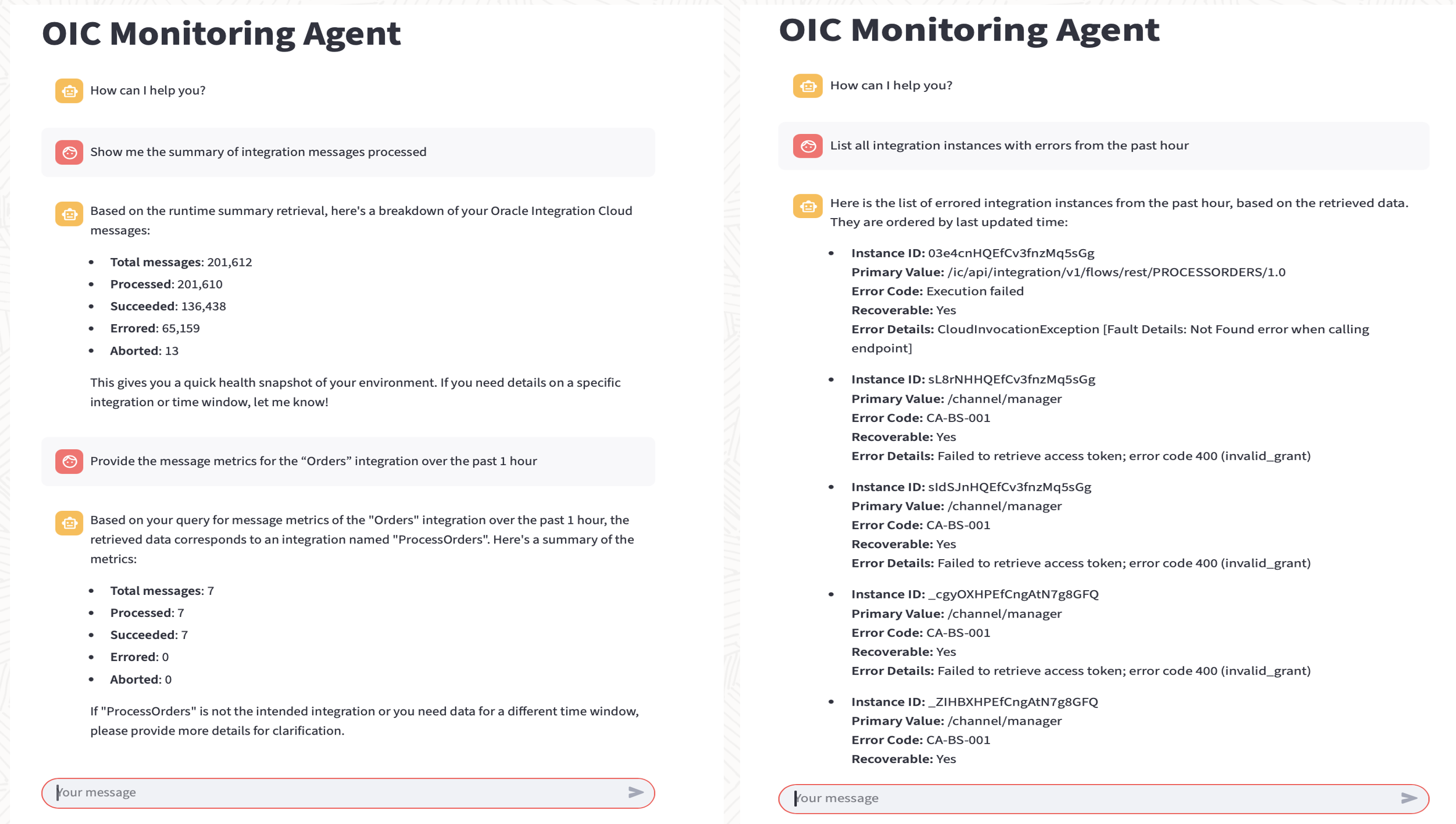
This demo highlights three use cases where the OIC Monitoring Agent interacts with tools on the MCP server and displays the output to the user.
Conclusion
This two-part blog series explores the key components of the Model Context Protocol (MCP) and uncovers the underlying implementation details that are typically hidden behind today’s AI agent SDKs by building an OIC Monitoring Agent integrated with MCP server.