
Introduction
This two-part blog series explores secure MCP integration within an agentic application architecture. In the first part, we focused on securing the MCP server using the Oracle Identity Domain, including a detailed overview of the MCP server implementation.
In this second part, the focus shifts to the MCP client implementation. Specifically, we demonstrate how the client leverages Identity Domain SDKs to obtain an access token and securely invoke the protected MCP server. The client establishes a connection to the MCP server, discovers the published tools and prompt templates, and integrates them into the agentic workflow to enable secure and dynamic execution.
Secure MCP Client Implementation Architecture
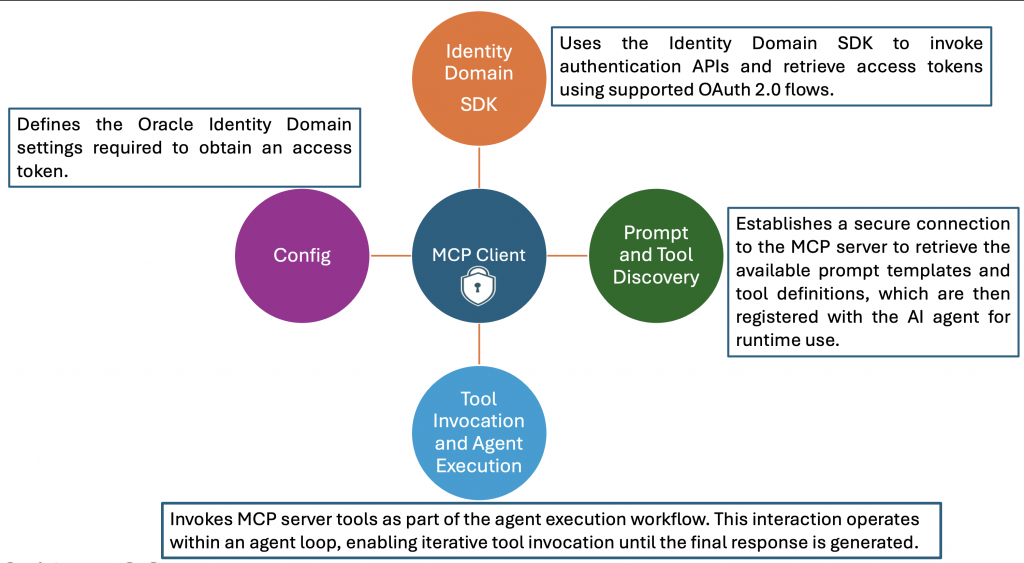
A secure MCP client implementation relies on the Oracle Identity Domain SDKs to obtain access tokens and securely invoke the MCP server. The client architecture is organized into four key components, each responsible for authentication, discovery, and secure tool invocation over an encrypted channel.
In addition, the Oracle Cloud Infrastructure (OCI) Generative AI team has introduced the OCI OpenAI package, a Python library that enables developers to interact with models hosted on the OCI Generative AI Service using familiar OpenAI SDK interfaces. This approach improves developer productivity and significantly reduces the amount of code required to build agentic applications. The OIC Monitoring Agent has been enhanced to use this OCI OpenAI package, resulting in a more streamlined implementation.
Config
The configuration file (typically JSON format) contains the environment-specific parameters required to authenticate with the Oracle Identity Domain and obtain an access token. These parameters include Client ID, Client Secret, Token Issuer (BaseUrl) and Scope. Before proceeding, create a Confidential Application in the Oracle Identity Domain if one does not already exist. Assign the Service Invoker role to this application, as this role is required to invoke OIC integrations.
This blog focuses on the Client Credentials flow. In production scenarios where end-user identity propagation is required, from the application to the agent and ultimately to the MCP server, the JWT Assertion flow should be implemented and OCI vault can be considered to store the config details.
#file_name : config.json
{
   "ClientId" : "Confidential App Client Id",
   "ClientSecret" : "Confidential App Client Secret",
   "BaseUrl" : "https://idcs-xxx.identity.oraclecloud.com",
   "Scope" : "Confidential App Scope"
}
Identity Domain SDKs
The OCI Identity Domain provides SDKs in multiple programming languages to support secure application development. In this implementation, the Python SDK is used to obtain the access token. The MCP client uses the getAccessToken method from the AccessTokenManager class, which requires the Client ID, Client Secret, Token Issuer, and Scope as configuration parameters. When a token request is initiated, the SDK performs the following sequence:
- Checks the token cache and returns the token if it exists and is still valid.
- If no valid token is found, validates that the Client ID and Client Secret are present.
- Initializes an AuthenticationManager instance using the provided configuration.
- Invokes the clientCredentials method to request a new access token.
- Stores the token in the cache and returns it to the client.
The retrieved access token is then included in the Authorization header for all MCP server requests. While this implementation uses the Client Credentials flow, the same architecture can be extended to support Resource Owner or JWT Assertion flows.
Prompt and Tool Discovery
After establishing a secure connection, the MCP client retrieves the available prompt templates and tools using the list_prompts and list_tools methods.These definitions are transformed into a structured JSON format compatible with the OCI OpenAI package. Each tool is represented as a separate JSON object with:
- Type: function
- Name
- Description
- Parameters
The processed definitions are stored in self.available_prompt and self.available_tools. These objects are then passed to the agent or large language model (LLM) during execution.
Tool Invocation and Agent Execution Flow
The process_request method initiates the agent interaction workflow. The execution sequence includes:
- Initializing the OpenAI client using the OCI authentication mechanism (OciUserPrincipalAuth).
- Constructing the system prompt from self.available_prompt.
- Creating the user message based on the incoming query.
- Invoking the chat completion API with system message, user message and available tools
When the LLM determines that a tool invocation is required, the MCP client executes the tool using the session.call_tool method. The results are returned to the agent and incorporated into the response. This process continues iteratively until the agent produces a final response, which is then returned to the user.
# file_name : oic-monitoring-agent.py
import oci,httpx
import json
from mcp import ClientSession, types
from typing import List
import asyncio
import nest_asyncio
from mcp.client.streamable_http import streamablehttp_client
from IdcsClient import AccessTokenManager
from openai import OpenAI
from oci_openai import OciUserPrincipalAuth

nest_asyncio.apply()

class MCP_Agent:

    def __init__(self):
        # Initialize session and client objects
        self.session: ClientSession = None
        self.available_prompts: List[dict] = []
        self.available_tools: List[dict] = []
        self.compartment_id = "Your OCI compartment identifier"
        self.model = "xai.grok-3-mini"
        self.endpoint = "https://inference.generativeai.us-chicago-1.oci.oraclecloud.com/20231130/actions/v1"

    async def process_request(self,user_query):
        client = OpenAI(
            api_key="OCI",
            base_url=self.endpoint,
            http_client=httpx.Client(
                auth=OciUserPrincipalAuth(profile_name="DEFAULT"),
                headers={"CompartmentId": self.compartment_id}
            ),
        )

        prompt_result = await self.session.get_prompt(self.available_prompts[0]['name'])
        if prompt_result and prompt_result.messages:
            system_prompt = prompt_result.messages[0].content.text
            #print(f"system prompt : {system_prompt}")

        messages = []
        messages.append({"role": "system", "content": system_prompt})
        messages.append({"role": "user", "content": user_query})

        while True:

            response = client.chat.completions.create(
                model=self.model,
                messages=messages,
                tools=self.available_tools
            )
            response_message = response.choices[0].message
            messages.append(response_message)

            if not response_message.tool_calls:
                break

            for tool_call in response_message.tool_calls:
                print(f"printing tool_call {tool_call}")
                tool_result=await self.session.call_tool(tool_call.function.name,json.loads(tool_call.function.arguments))
                print(f'Printing Tool Result : {tool_result.content[0].text}')

                tool_result_message = {
                    "role": "tool",
                    "tool_call_id": tool_call.id,
                    "content": tool_result.content[0].text
                }
                messages.append(tool_result_message)

        # Print result
        print("**************************Final Agent Response**************************")
        print(messages[-1].content)

    async def start_chat(self):
        print("Type your queries or 'quit' to exit.")
        while True:
            try:
                query = input("Query: ").strip()
                if query.lower() == 'quit':
                    break

                await self.process_request(query)
                print("\n")
            except Exception as e:
                print(f"\nError: {str(e)}")

    async def connect_to_mcp_server(self):
        # Create server parameters for stdio connection
        mcp_server_url = "http://localhost:9002/mcp"

        fo = open("mcp_client_config.json", "r")
        config = fo.read()
        config_options = json.loads(config)

        atm = AccessTokenManager(config_options)
        auth_token = atm.getAccessToken()
        print("Access Token : ")
        print(auth_token)
        headers = {"Authorization": f"Bearer {auth_token}"}

        async with streamablehttp_client(url=mcp_server_url, headers=headers) as (read_stream, write_stream, get_session_id):
            async with ClientSession(read_stream, write_stream) as session:
                # Initialize the connection
                self.session = session
                await session.initialize()

                # List available tools
                prompt_response = await session.list_prompts()
                tool_response = await session.list_tools()

                print("\nConnected to server with prompts and tools..")

                self.available_prompts = [{
                    "name": prompt.name,
                    "description": prompt.description,
                    "arguments": prompt.arguments
                } for prompt in prompt_response.prompts]

                self.available_tools = [
                {
                    "type": "function",
                    "function":
                    {
                        "name": tool.name,
                        "description": tool.description,
                        "parameters": tool.inputSchema
                    }
                }
                for tool in tool_response.tools]
                print("Printing Tools Schema..")
                print(json.dumps(self.available_tools))
                await self.start_chat()

async def main():
    mcp_agent = MCP_Agent()
    await mcp_agent.connect_to_mcp_server()

if __name__ == "__main__":
    asyncio.run(main())
Testing the Secure MCP Server Execution
To validate the MCP server’s end-to-end security flow, follow the steps below. During this process, the MCP client retrieves an access token from the Oracle Identity Domain and uses it to establish a secure connection with the MCP server. The server then validates the token with the Identity Domain, executes the requested tools, and returns the response to the client.
- Start the MCP Server
- Open a terminal and run the following command: uv run server.py
- The MCP server will start and be accessible at: http://localhost:9002/mcp
- Start the Agent Execution
- Open a terminal and run the following command: uv run oic-monitoring-agent.py
- Enter the user query as “Show me the summary of integration messages processed”
Conclusion
This two-part blog series highlights one of the most critical aspects of MCP deployments—security. In Part 1, we demonstrated how to secure the MCP server using the Oracle Identity Domain. In Part 2, we focused on the MCP client implementation, showing how it obtains secure access tokens using Identity Domain SDKs, connects to and authenticates with the MCP server, discovers and invokes tools securely, Integrates with the OCI OpenAI package to enable streamlined agent execution. With these enhancements, the OIC Monitoring Agent now provides a secure, scalable, and developer-friendly foundation for building enterprise-grade agentic applications on OCI.