
Oracle Cloud Infrastructure (OCI) IAM App Gateway can be used to add single-sign-on (SSO) authentication to applications that support HTTP header-based authentication but do not provide a direct standards-based integration with an identity provider.
This blog describes a selective SSO design for the Sales application in Siebel CRM 26.7 on OCI. The app is protected by App Gateway, while other apps retain their existing authentication methods.
The configuration is described at a solution level; installation of Siebel CRM or App Gateway components is outside the scope of this blog.
Solution Architecture
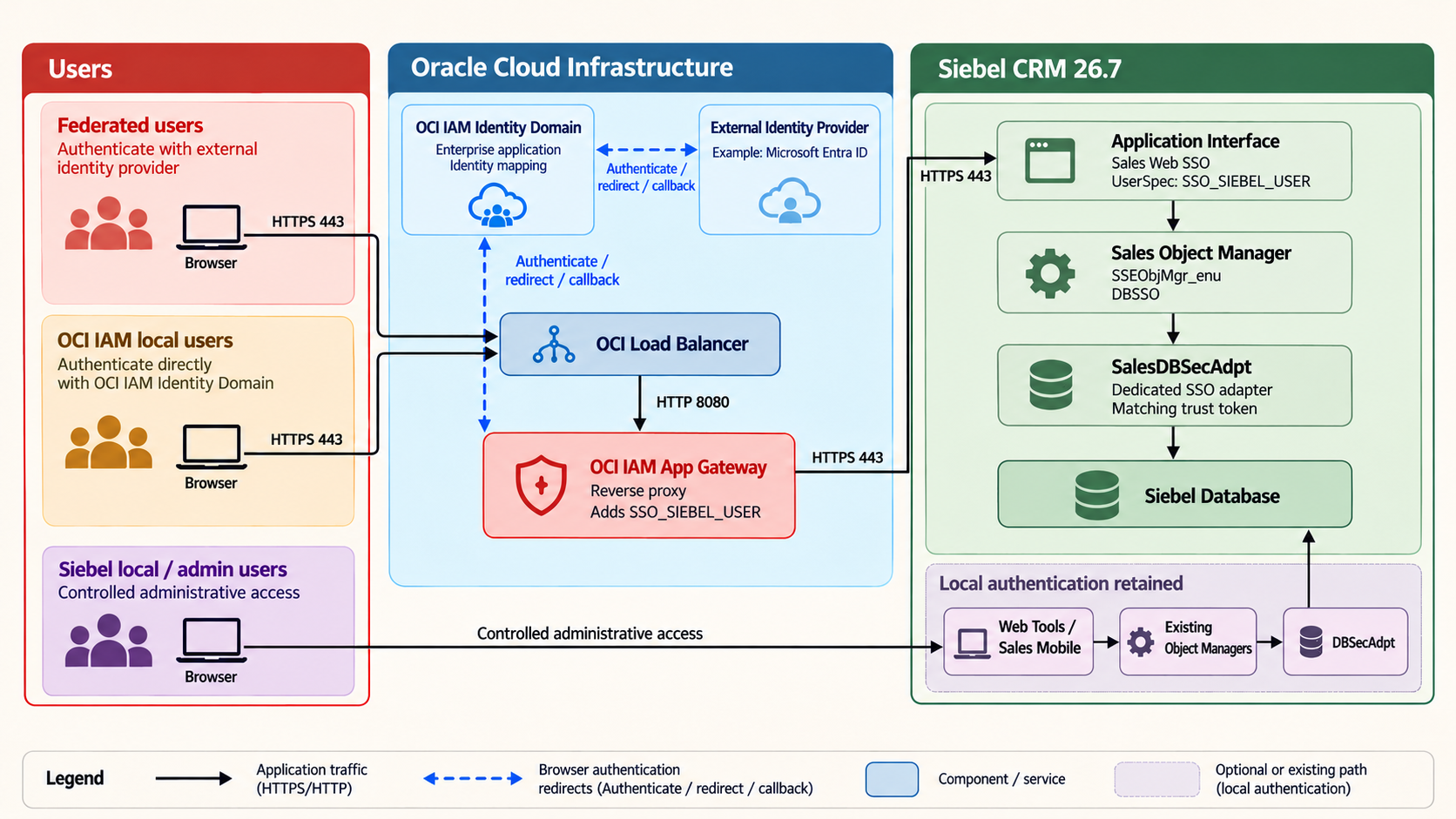
The request path is shown below:
Browser
  |
  | HTTPS 443
  v
OCI Load Balancer
  |
  | HTTP 8080
  v
OCI IAM App Gateway
  |
  | HTTPS 443
  v
Siebel Application Interface
  |
  | HTTPS 4430
  v
Sales Object Manager (SSEObjMgr_enu)
  |
  v
SalesDBSecAdpt -> Siebel database- Public TLS is terminated at the OCI Load Balancer
- App Gateway checks for an OCI IAM session and redirects an unauthenticated browser to the configured sign-in flow
- After authentication, the mapped Siebel user ID is added to the request as an HTTP header
- The Siebel Application Interface receives the header, reads it, then routes the request to the Sales Object Manager
- The Object Manager uses a dedicated database-security adapter in ‘SSO’ mode to establish the Siebel session
NOTE: In this Siebel deployment, HTTPS port 4430 belongs to the external Apache Tomcat connector used by the containerized Application Interface. It is an internal, deployment-specific port; it is not the communication port between the Application Interface and the Sales Object Manager. Other Siebel deployments can use a different ingress and connector arrangement.
Currently, multiple applications are deployed with their own authentication methods.
| Siebel application | Application Interface entry | Object Manager | Authentication |
|---|---|---|---|
| Sales | sales/enu | SSEObjMgr_enu | OCI IAM |
| Sales Mobile | salesm/enu | SalesmObjMgr_enu | Existing local authentication |
| Web Tools | webtools/enu | SWToolsObjMgr_enu | Existing local authentication |
For the purpose of this demo, we will work with the ‘SSEObjMgr_enu' object manager only.
Prerequisites
The following are required:
- An operational Siebel environment with local administrative access
- Administrative access to the Siebel security adapter, Application Interface profile, Sales Object Manager
- An OCI IAM Identity Domain Adminstrator
- An OCI IAM App Gateway deployment that can reach the Siebel endpoint
- Users in the IAM domain with an attribute that can map to the Siebel username
- A public DNS name and TLS certificate for the SSO endpoint
Section 1: Configure Selective SSO in Siebel
Retain a local authentication Path
Verify that Siebel Management Console (regular and Safe Mode), Web Tools are accessible so that configuration and recovery remain available. For this deployment, below are the example URLs:
https://<siebel-origin>/siebel/app/webtools/enu
https://<smc-host>/siebel/smc/index.html
Create a Dedicated Security Adapter
Instead of modifying the shared DBSecAdpt, create a new security adapter. Other applications can continue to reference the shared adapter. In SMC, open Configuration, select the target enterprise, and navigate to Profile Configuration. Add a profile using the following values:
| Item | Value |
|---|---|
| Profile display name | Sales DB SSO Adapter (example) |
| Alias | SalesDBSecAdpt (example) |
| Subsystem type | Siebel DB Security Adapter (InfraSecAdpt_DB) |
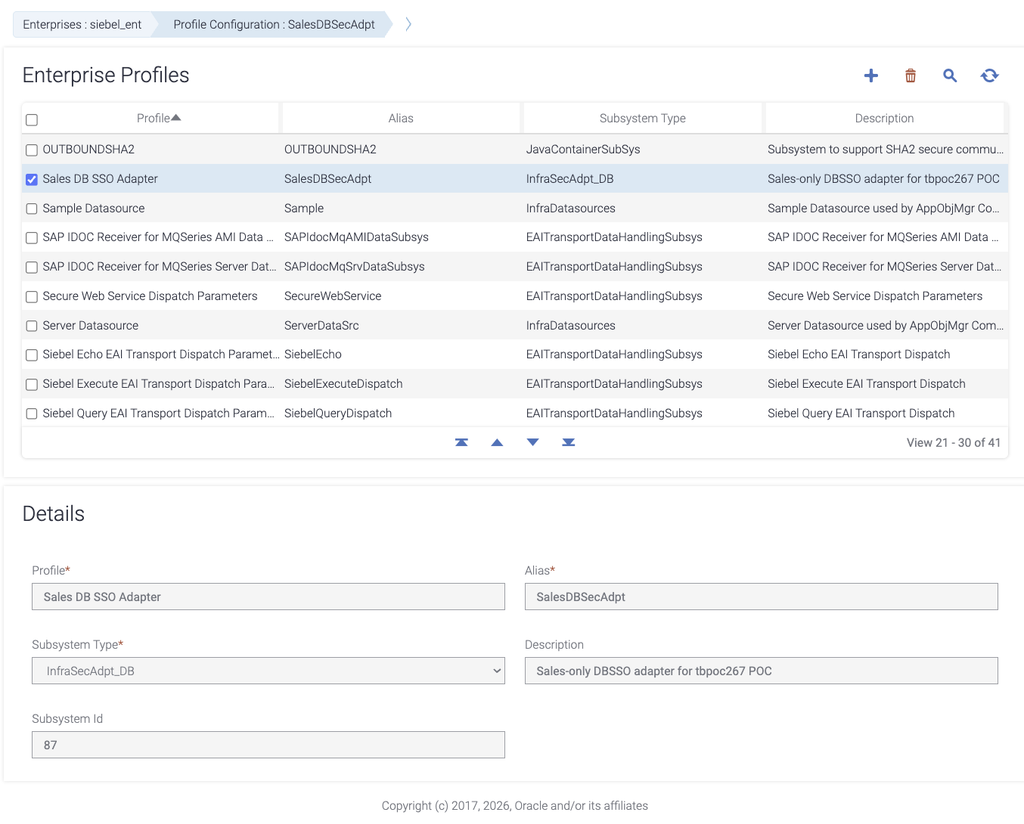
Save the profile, and open its Advanced parameters. Configure the following settings:
| Setting | Value |
|---|---|
| Security Adapter DLL Name | sscfsadb |
| Data Source Name | The Siebel server data source; ServerDataSrc in this deployment |
| Shared DB Username and Password | Protected Siebel database credentials |
| Single Sign On | True |
| Trust Token | A new shared secret |
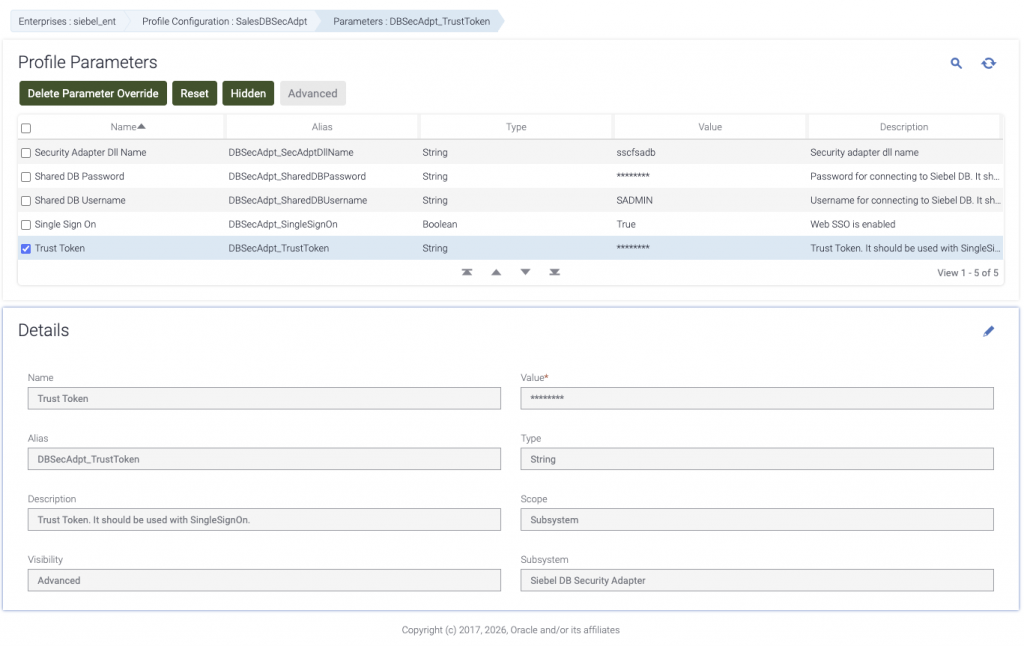
To generate a random trust token, run the following command on a trusted terminal :
openssl rand -hex 24Configure the same token in the dedicated adapter and in the Sales entry of the Application Interface profile later on. The token is a shared secret between these Siebel components; it is not a user password or password hash.
Align the Identity Header and Siebel Components
The following diagram shows how the authenticated identity maps to the Siebel USERID:
OCI IAM attribute: siebelUserId
        |
        v
Upstream request header: SSO_SIEBEL_USER
        |
        v
Application Interface User Specification
        |
        v
Siebel USERID
Create the users in the application administration, or review the User ID of the accounts.
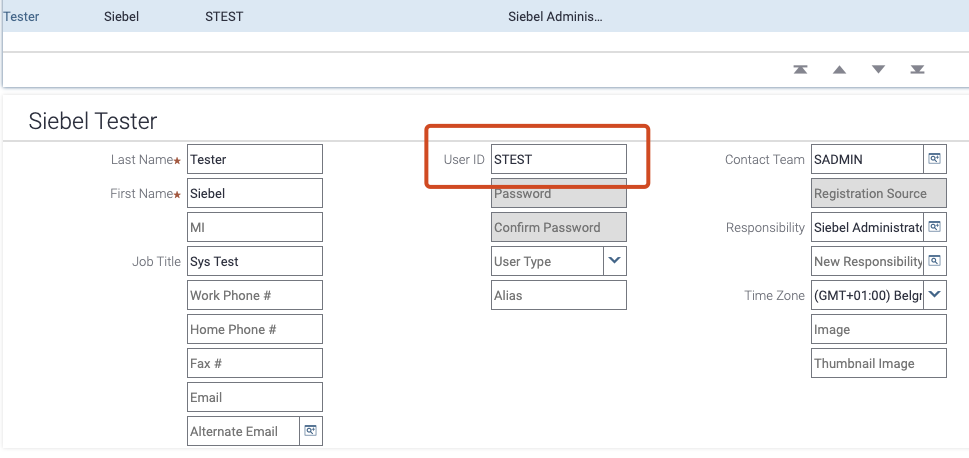
Next, configure the sales/enu Application Interface entry as follows:
| Setting | Value |
|---|---|
| Single Sign On | Enabled |
| User Specification | SSO_SIEBEL_USER |
| Trust Token | Same value as SalesDBSecAdpt |
| Object Manager | SSEObjMgr_enu |
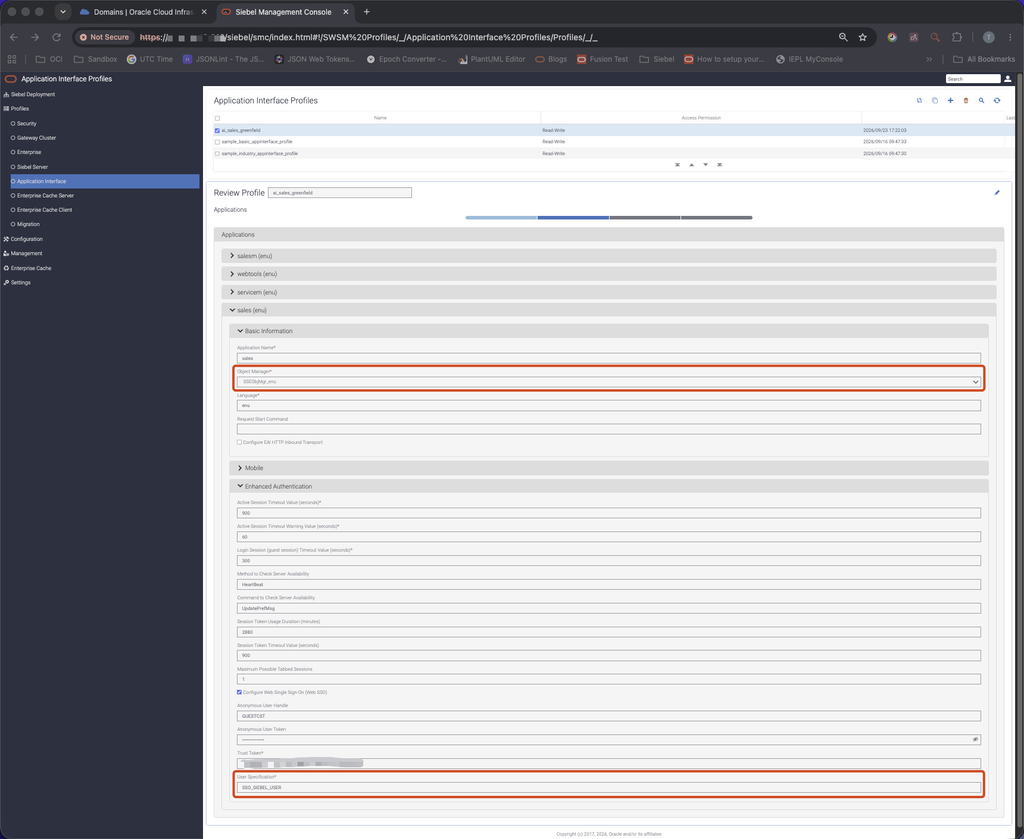
Associate the Sales Object Manager with the new adapter SalesDBSecAdpt, and set the adaptor mode to DBSSO.
SecAdptMode = DBSSO
SecAdptName = SalesDBSecAdpt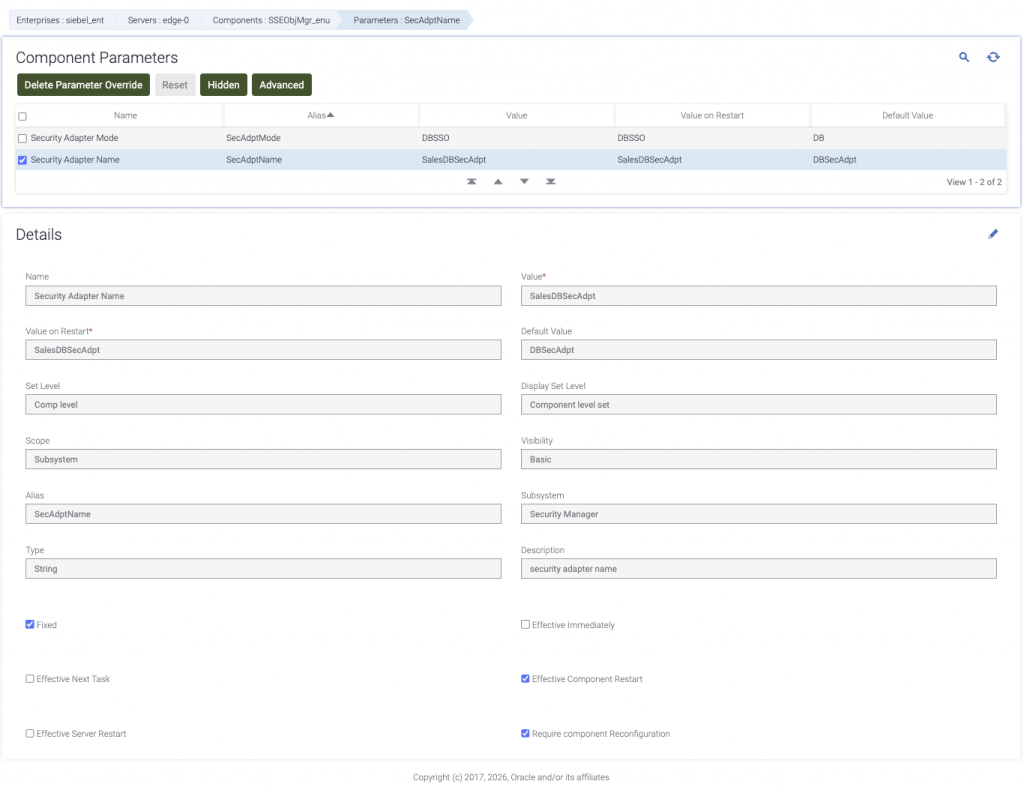
Section 2: Configure the OCI IAM Enterprise Application
Define the Application and Resources
Configure the enterprise application with the public Sales URL:
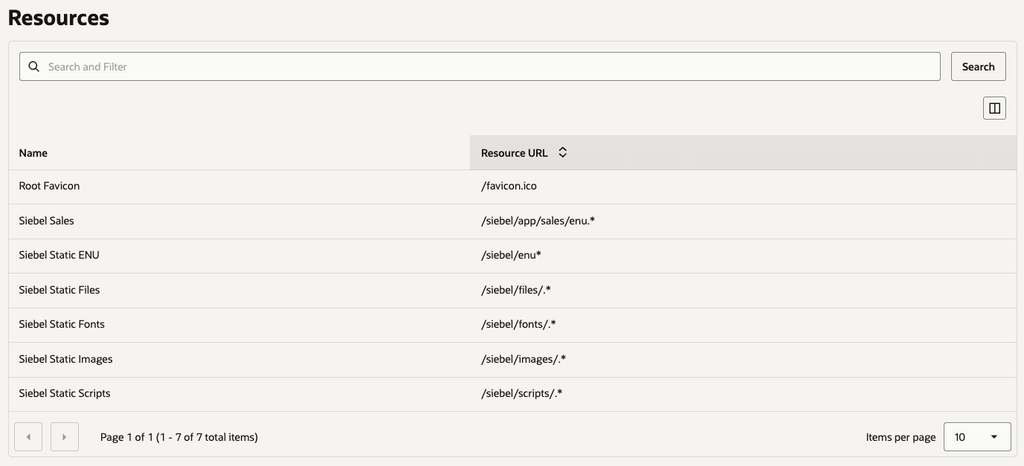
https://<sso-host>/siebel/app/sales/enuAdd the following managed resources. Enable regular-expression matching for expressions that use .*.
| Priority | Purpose | Resource URL | Authentication method |
|---|---|---|---|
| 1 | Root favicon | /favicon.ico | Public |
| 2 | Static files | /siebel/files/.* | Public |
| 3 | Static images | /siebel/images/.* | Public |
| 4 | Static scripts | /siebel/scripts/.* | Public |
| 5 | Static fonts | /siebel/fonts/.* | Public |
| 6 | Static ENU resources | /siebel/enu* | Public |
| 7 | Siebel Sales | /siebel/app/sales/enu.* | Form or Access token |
App Gateway protects the Sales application path while allowing the presentation assets required by the Siebel interface to load without starting a separate authentication flow for each asset. Public access applies only to these static resources; it does not make Siebel application data public.
Map the Siebel User
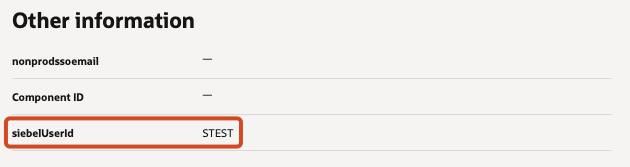
On the Siebel Sales managed resource, add the following identity header to the upstream request:
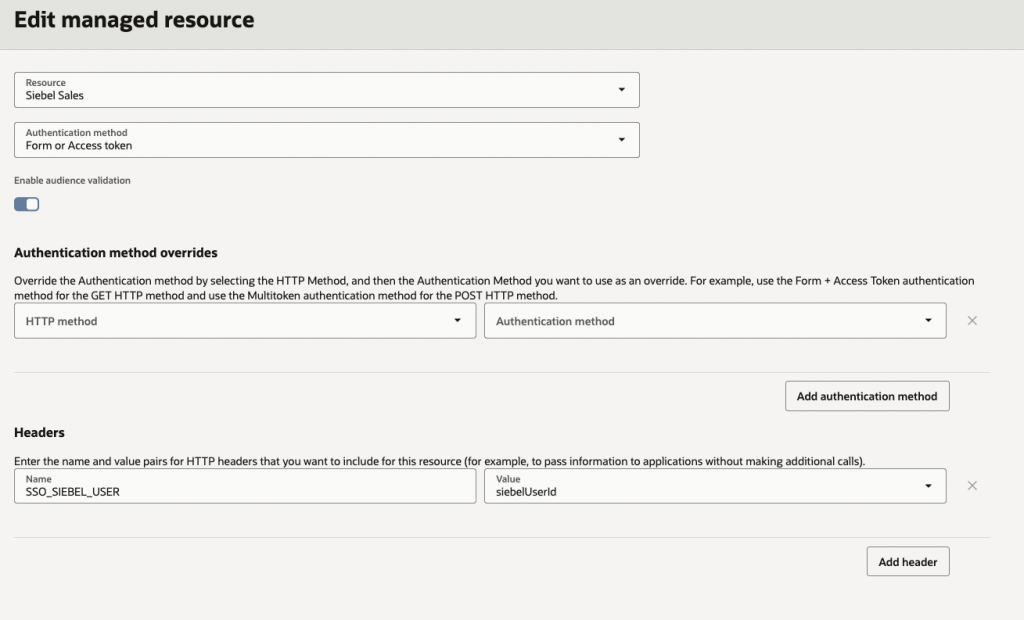
In this demo, siebelUserId is the attribute that has the Siebel username of the respective users. App Gateway adds the resulting header to the request sent to Siebel. Populate the OCI IAM attribute siebelUserId of the users with the exact Siebel USERID assigned to each user.
Configure the App Gateway Mapping
Configure the App Gateway host entry:
| Item | Value |
|---|---|
| Host identifier | Customer-selected; for example, SiebelSalesHost |
| Public host | <sso-host> |
| App Gateway listener | HTTP 8080 |
| SSL enabled | No, when TLS terminates at the OCI Load Balancer |
In the App Gateway Apps table, map the enterprise application to the Siebel origin:
| Item | Value |
|---|---|
| Enterprise application | Siebel Sales |
| Resource prefix | / |
| Origin server | https://<siebel-origin>:443/ |
In this deployment, the App Gateway container uses host networking. NGINX inside the container listens directly on host TCP port 8080. When TLS terminates at the OCI Load Balancer, add the following request header before forwarding traffic to App Gateway:
is_ssl: ssl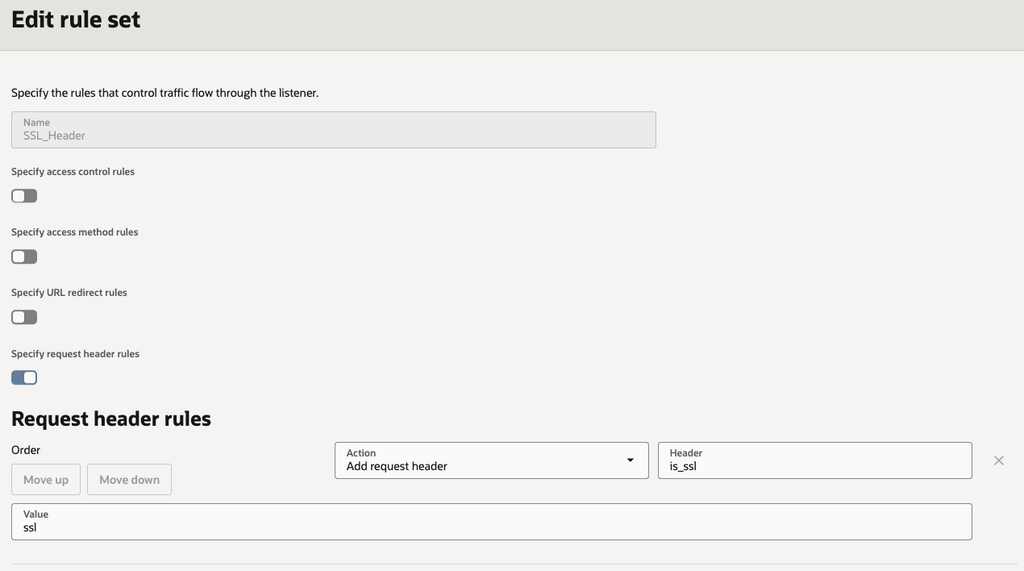
This allows https:// callback URLs and secure cookies to be generated by the App Gateway even though the Load Balancer-to-App-Gateway connection uses HTTP.
Section 3: Supporting configuration considerations
Preserve the Public Application Address
Configure the public FQDN of the App Gateway in the Siebel Application Interface profile. This should match with the host configuration of App Gateway.
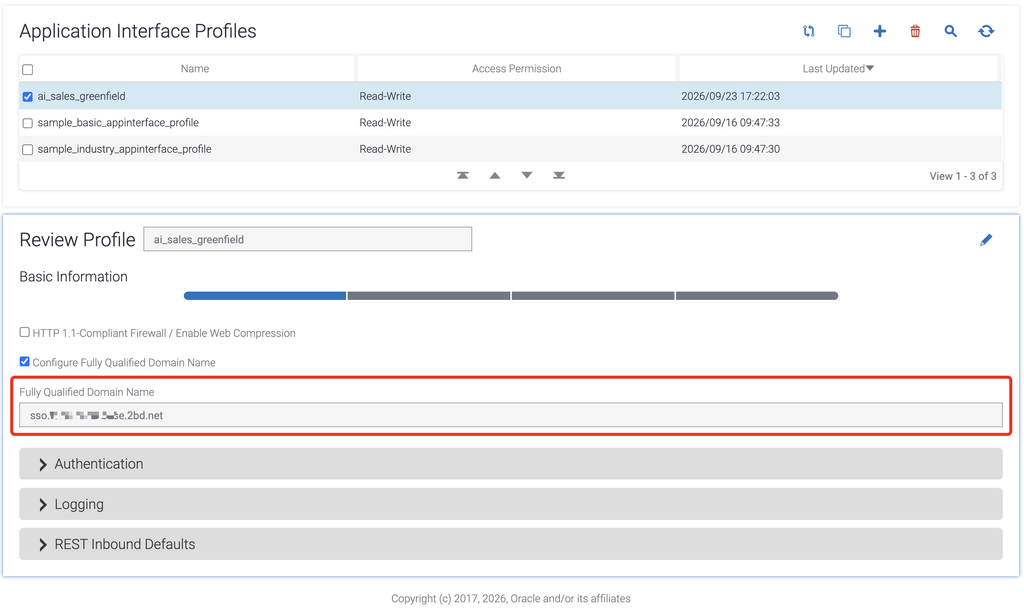
This prevents generated links, redirects, and cookies from referring to the internal Siebel address or bypassing App Gateway.
Allow for Larger SSO Request Headers
Requests protected by App Gateway carry IAM session cookies and identity headers in addition to the application cookies already used by Siebel. The combined request headers can therefore exceed the default limit of the Siebel Application Interface.
Siebel CRM 26.7 uses an Apache Tomcat application container for the Application Interface. For this particular deployment, the request-header limit is increased to 32KB.
/persistent/<ai-interface-pod>/applicationcontainer_external/conf/server.xml

<Connector
    port="4430"
    maxHttpRequestHeaderSize="32768"
    ... />
Note: The value should be applied through the supported declarative deployment configuration in production. Request-header growth should be monitored rather than increasing the limit without an identified requirement. Back up
server.xmlbefore changing it and restart or recreate only the Application Interface afterwards.
Prevent Origin Bypass
The Siebel origin should accept application traffic only from the trusted App Gateway path. If the origin remains directly accessible to users, the protected URL can be bypassed and the identity header can potentially be supplied outside the intended authentication flow.
Section 4: Validate the Configuration
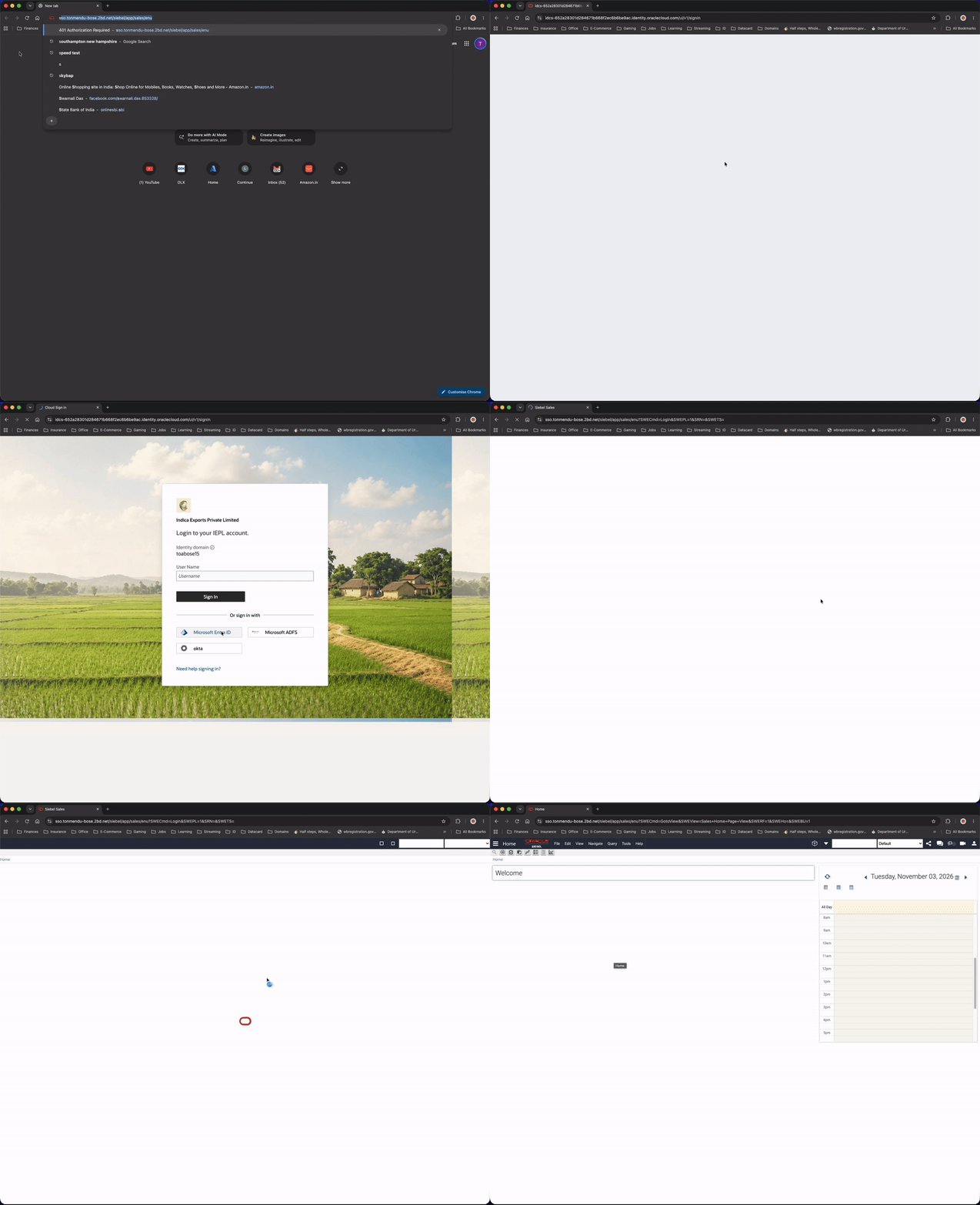
Open a fresh browser session at:
https://<sso-host>/siebel/app/sales/enuVerify the following behaviour:
- The request is redirected by App Gateway to OCI IAM.
- The configured sign-in flow or external identity provider is invoked.
- The authentication callback returns through App Gateway.
- Siebel Sales opens without displaying the native Siebel login page.
Logout Limitation
Clicking on Logout from the user menu terminates the Siebel application session and returns the browser to the Siebel sign-in page, but it does not end the OCI IAM session. The Oracle Siebel Security Guide describes this behaviour in Known Issues in Siebel IDCS Integration and notes that scripting is required to invalidate the relevant browser cookie and navigate the user to the identity-service sign-in page.
Conclusion
Partial SSO provides a practical migration path when an organization is not ready to change the authentication method for every Siebel application.