
Background
Many Fusion SaaS customers who use both Fusion Applications and Oracle Analytics Cloud (OAC) have implemented data extraction from operational sources using Public View Objects (PVOs). These are commonly exposed via the BI Cloud Connector (BICC), which generates data files that are stored in Oracle Object Storage. A common approach for these customers has been the use of OAC Data Replication to ingest and synchronize these files into Autonomous Data Warehouse (ADW) for analytical consumption. OAC then provides data models, dashboards, and reports from this warehouse. Another option is Fusion Data Intelligence (FDI), a Fusion Analytics platform. Refer to this link to know more about it, as it is not covered by this blog post.
With the deprecation of OAC Data Replication, Oracle now recommends migrating to Data Transforms (DT), a service integrated with Autonomous Database that manages extraction and transformation pipelines. Data Transforms executes data flows within the database, eliminating reliance on OAC compute resources. This shift leads to more maintainable and scalable data integration processes, along with improved operational governance.
Why Migrate the Data Replication from OAC to Data Transforms (DT)
The need to migrate from OAC Data Replication to Oracle Data Transforms (DT) is driven by both strategic and technical factors:
Oracle Data Transforms, embedded directly within ADW, moves extraction, transformation, and loading operations from OAC to the database itself. This shift brings improved performance and operational simplicity. DT offers a graphical, low-code interface supporting complex joins, aggregations, calculations, and conditional logic.
Note: BICC extractions still land files in Oracle Object Storage, and Data Transforms reads from there for ingestion into ADW.
High Level Data Flow
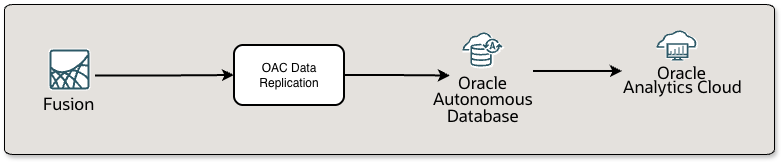
Previously, OAC Data Replication handled Fusion SaaS data extraction and loading by orchestrating pipelines within OAC, resulting in cross-service dependencies and increased management overhead.
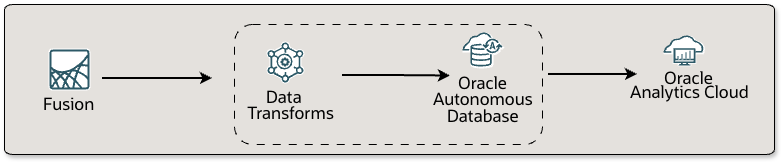
Oracle Data Transforms streamlines this process by executing all extraction, transformation, and loading tasks natively within Autonomous Data Warehouse (ADW), applying transformation logic directly in the database. This modernizes the architecture by decoupling data integration from analytics, allowing OAC to focus purely on analytics and reporting.
Migrating OAC Replications to Oracle Data Transforms: Step-by-Step Approach
Migrating from OAC Data Replication to Oracle Data Transforms (DT) in Autonomous Data Warehouse (ADW) requires a process to ensure a smooth transition and continuity for analytics users. The following steps outline best practices for a successful migration.
1. Inventory of the Existing OAC Replication Jobs. Begin by cataloging all active OAC replication jobs. Document source PVOs, selected columns, target table structures, transformation logic, replication schedules, data refresh frequencies, data volumes, and any dependencies on analytic reports or business processes. Also, identify OAC artifacts such as semantic models, OAC data flows, and visualizations that depend on these tables.
2. Assess and Update Functional Requirements: Review the jobs in the inventory to determine which data flows are still relevant. Update transformation logic to reflect current business rules, and identify opportunities for optimization.
3. Prepare the Target ADW Schema: Set up the target ADW schema. This could mean continuing with an existing schema or creating a new. Assign appropriate privileges and role-based permissions to ensure DT can write to the necessary tables and OAC can read from the target tables. To prevent breaking OAC dependencies, match the replicated table structure, column names, and data types as closely as possible to the original.
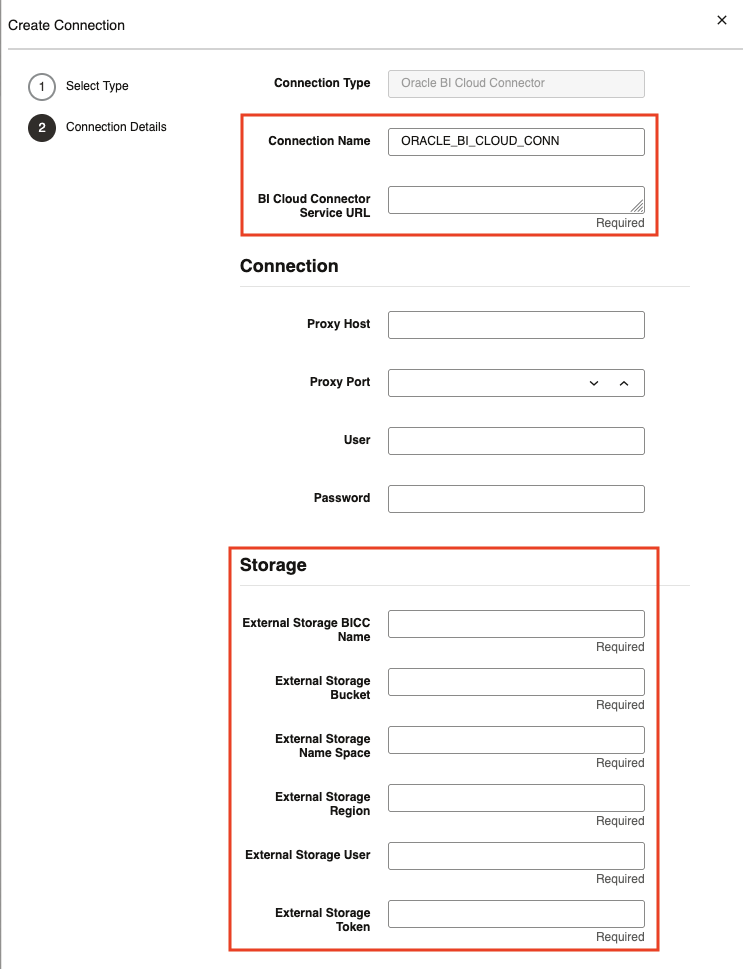
4. Recreate Pipelines in Data Transforms: Set up the Fusion Applications (BICC) connector in Data Transforms, ensuring you provide both the Object Storage location for BICC extracts and the required Fusion Applications credentials.
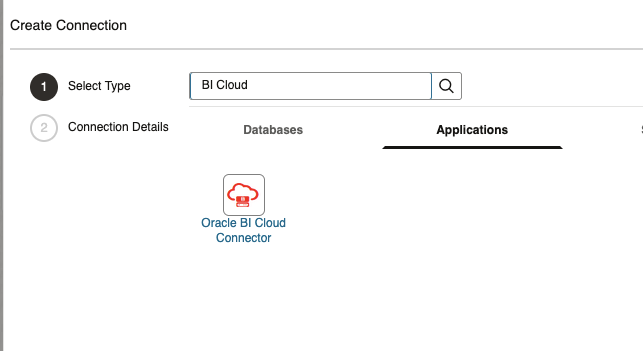
Enter the source Fusion Apps and Object Storage details in the connector settings.
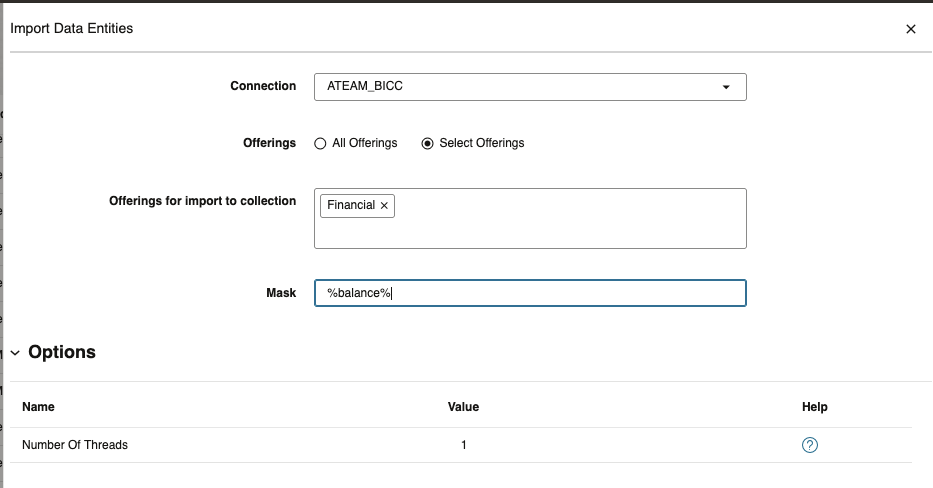
Using the ADW console’s Data Transforms interface, import the relevant source PVOs.
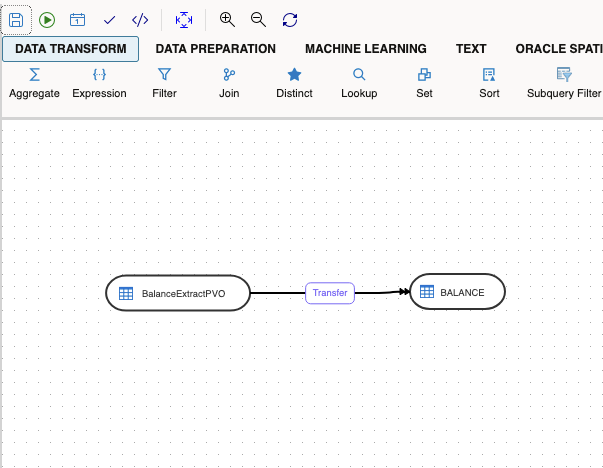
Create new data flows by selecting the BICC extract files as sources, mapping columns, and applying transformation logic such as joins, aggregations, filters, or calculated fields, if required. Schedule these jobs to match business requirements.
5. Validate Data and Workflows: Perform unit and integration testing loading sample and full datasets through the new DT pipelines, and compare row counts, aggregated measures, and key metrics against those from the original OAC replication jobs. Check that all OAC dashboards, semantic models, and data flows continue to function with the new tables and data. Running both OAC and DT pipelines in parallel for a period can help ensure continuity and consistent results.
6. Coordinate Cutover and Decommission Legacy Jobs: Plan the transition with key stakeholders. Disable or remove legacy OAC replication jobs to eliminate redundancy.
7. Monitor and Optimize Post-Migration: Utilize DT’s built-in monitoring tools to track execution, identify and resolve issues, and optimize performance on an ongoing basis.
By following these high level steps, organizations can ensure a controlled and efficient migration to Oracle Data Transforms.
Comparison: OAC Replication vs Data Transforms
Both OAC Data Replication and Oracle Data Transforms (DT) move data from Oracle Fusion SaaS applications using BICC, into Autonomous Data Warehouse (ADW), but they differ in flexibility and architecture.
| Feature | OAC Data Replication | Data Transforms (Data Flows) |
| Deployment | OAC compute resources | Runs in Autonomous Database (ADW) |
| Data Source | BICC extract from Object Storage | BICC extract from Object Storage |
| Transformation Logic | Basic | Supports mapping, joins, calculations, aggregations, conditional logic |
| Error Handling | Limited | Comprehensive logging and error reporting |
| Scalability | Tied to OAC resources | Uses ADW scaling |
| Observability | Basic job logs | Run history, detailed logs |
| Automation | Limited | REST APIs for flows/schedules, CI/CD friendly. See our blog on DT automation |
Want to Learn More?
Click here to sign up for the RSS feed to receive notifications for when new A-team blogs are published.
Summary
Oracle has announced the deprecation of OAC Data Replication. Organizations that rely on this feature should plan to migrate their pipelines to Oracle Data Transforms (DT) within Autonomous Data Warehouse (ADW) to ensure long-term support and alignment with Oracle’s cloud integration strategy. By adopting DT, data extraction and transformation processes are centralized in ADW, which streamlines operational management and reduces risks associated with unsupported features. This transition enables greater flexibility, improved monitoring, and scalability for evolving analytics requirements.