
Few weeks ago I finished a GoldenGate@Azure deployment for a customer of mine and I thought it is important to share some very useful points regarding GoldenGate@Azure custom DNS. The custom DNS for any Oracle AI Database@Azure deployment is somehow a sensitive topic since it will require in some cases additional configuration for end to end DNS to work properly.
Our today focus is on the GoldenGate@Azure custom DNS configuration:
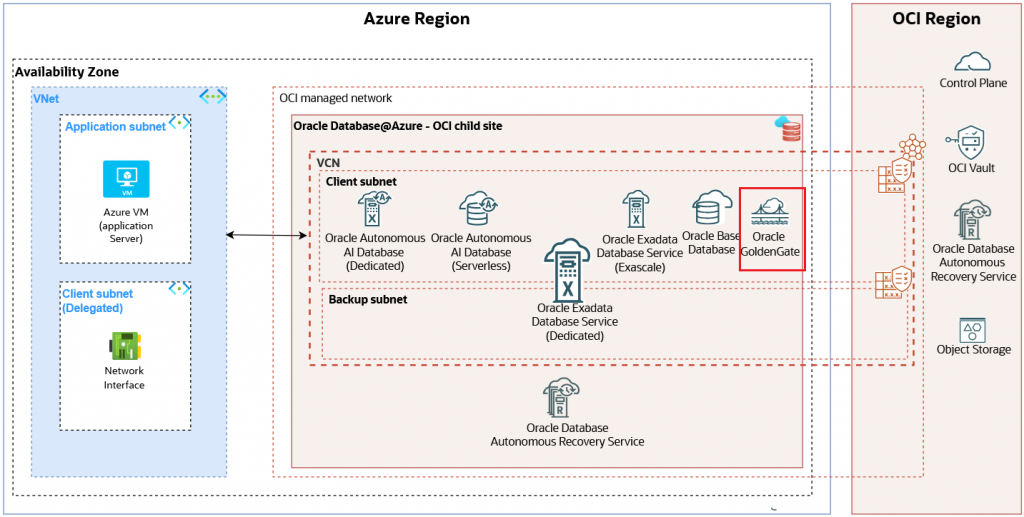
GoldenGate@Azure supports the newly added concept of Network Anchors. The Network Anchors has a very important impact on the DNS part since it creates the infrastructure necessary for Azure->OCI and vice-versa DNS resolution.
When it comes to DNS for all Oracle AI Database@Azure including GoldenGate@Azure we have two ways to define it: Default DNS and Custom DNS.
The Default DNS (*.oraclevcn.com) is the most simple way since when it is used, Oracle manages the DNS setup during the provisioning process and creates a record for the VM Cluster. The scan uses the *.oraclevcn.com FQDN. During the deployment, the service automatically creates an Azure Private DNS Zone for oraclevcn.com and a virtual network link to the Oracle AI Database@Azure VNet.
Make sure the Custom DNS checkbox is empty.
A Custom DNS domain is used for all Oracle AI Database@Azure resources, integrating them into your existing corporate namespace when you need to use your organization’s own DNS domain (for example, oradb.prod.dnsdemo.xyz) for the Oracle AI Database@Azure deployment. As we already discussed, this option imply is most cases some additional configuration steps since the records are not automatically synchronized between OCI and Azure.
For GoldenGate@Azure deployment we first need to complete some prerequisites and configure from Azure portal the Resource and Network Anchors.
The GoldenGate@Azure configuration is done from OCI console and here is a step-by-step guide on how to provision the service.
Note (September 10, 2026) – The GoldenGate@Azure deployment can be configured from Azure portal.
The first important question related to GoldenGate@Azure is related to the FQDN length we can use. For example, we can use this type of FQDN format (or shorter) label1.label2.label3.label4.label5.label6.com. The FQDN must be between 4 and 253 characters long and can be resolved. The customer will have to create the certificate for custom FQDN used.
The Network Anchor configured as part of the prerequisites for GoldenGate@Azure creates the DNS Listener and Forwarder endpoints.
As we recall, the Listener endpoint IP address will be used as a target IP address for DNS conditional forwarding rules configured on Azure or on-premises for GoldenGate@Azure domain name.
The Forwarder endpoint IP will be used as a source IP address for any DNS request from GoldenGate@Azure to Azure VNETs or on-premises DNS resolution if the DNS conditional forwarding exists (configured under Domain Names):
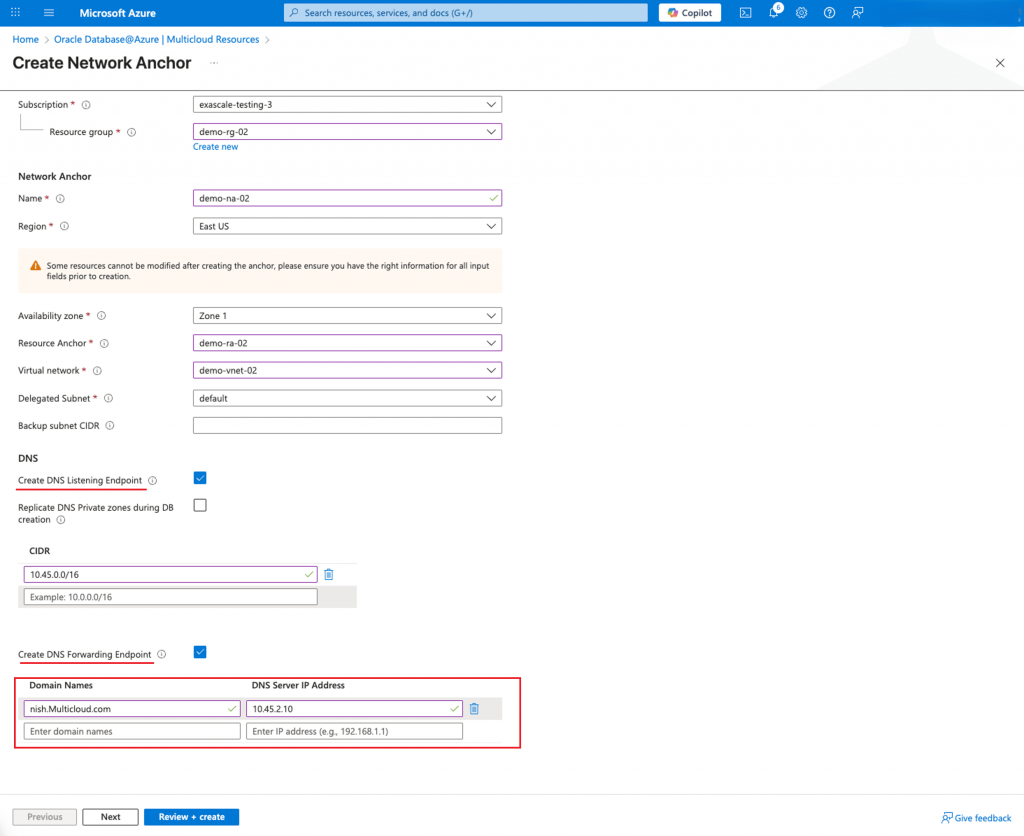
Note: The “Create DNS Listening Endpoint” and “Replicate DNS Private zones during DB creation” are until a certain point overlapping functions. Only when using the Default DNS, the private zone created is synchronized between Azure and OCI. If only using the Default DNS you can use Replicate DNS Private Zones or you can still use the DNS Listening and Forwarder endpoints, one or another.
For custom domains, the above options need to be checked and if we have any Azure domains that should be resolved from GoldenGate@Azure, we can configure using the section Domain Names (red squared above). As we already explained, the above configuration will create the Listener and Forwarder endpoints together with the conditional forwarding rules. This configuration is replicated to OCI.
As a later stage, if we need to configure more conditional DNS forwarding rules, we can use the Go to OCI option:
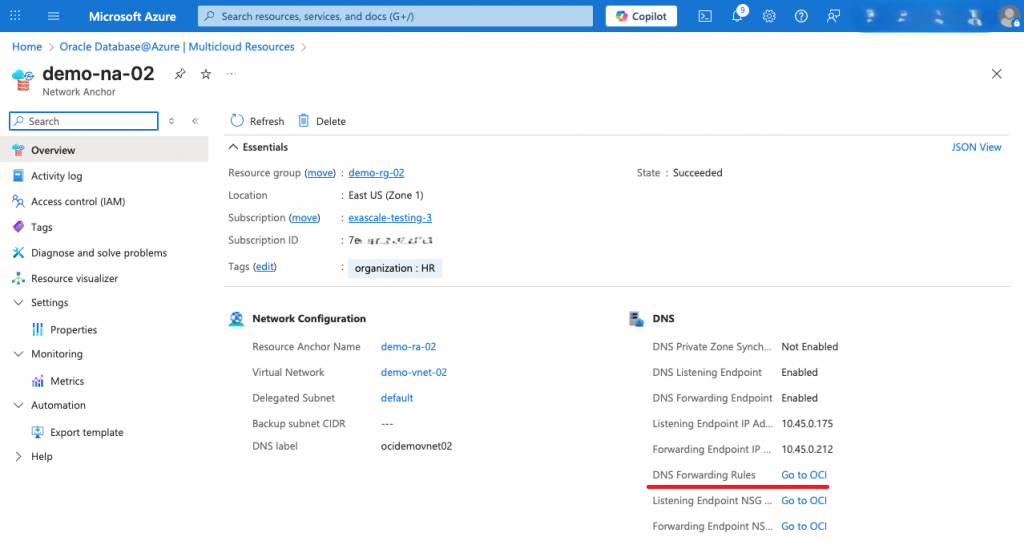
The second important question is related to the custom DNS private zone creation. When using a custom domain name, the GG deployment automatically creates the custom DNS private zone with all the necessary A entries for DNS resolution. This zone is NOT replicated to Azure. At this point, we will just configure DNS conditional forwarding rules on Azure for the custom domain we used to define the GG deployment with the Listening endpoint IP address as target and the DNS resolution will successfully complete (don’t forget to add the source IP address of the DNS query in the Listening Endpoint NSG plus the routing configured).
This concludes our discussion. I do hope that this blog will help to have smooth GoldenGate@Azure deployments.