
In today’s cloud-native world, logs are more than just records—they’re narratives of what’s happening across your cloud infrastructure. From configuration changes to security incidents and performance bottlenecks, logs are essential for understanding system behavior, meeting compliance requirements, and responding to threats in real time.
Oracle Cloud Infrastructure (OCI) generates a wide range of logs across its services, while CrowdStrike LogScale (formerly Humio) is a powerful SIEM and observability platform, purpose-built for high-volume log ingestion and analysis. When you combine these two, you create a robust pipeline for security intelligence and operational visibility.
In this blog, we explore the key log sources in Oracle Cloud Infrastructure (OCI) and the benefits of integrating OCI logs with CrowdStrike LogScale. We also cover different integration methods to forward OCI logs to LogScale, along with some helpful resources.
Let’s first review some essential concepts, including the types of logs available in OCI and a brief overview of the Connector Hub.
Key Log Sources in OCI
There are three types of logs in OCI that you may want to forward to LogScale SIEM. Here they are:
- Audit Logs: Emitted by the OCI Audit service that includes record of API calls, user activity, etc
- Service Logs: Emitted by OCI native services, such as VCN flow logs, API Gateway, Events, Load Balancing, and Object Storage.
- Custom Logs: Collected from custom applications, other cloud providers, or an on-premises environment.
All these logs are stored in the OCI Logging Service, a centralized platform for collecting, filtering, and routing logs within the OCI ecosystem. These logs are indexed and can be searched via the Console, API, or CLI.
Connector Hub
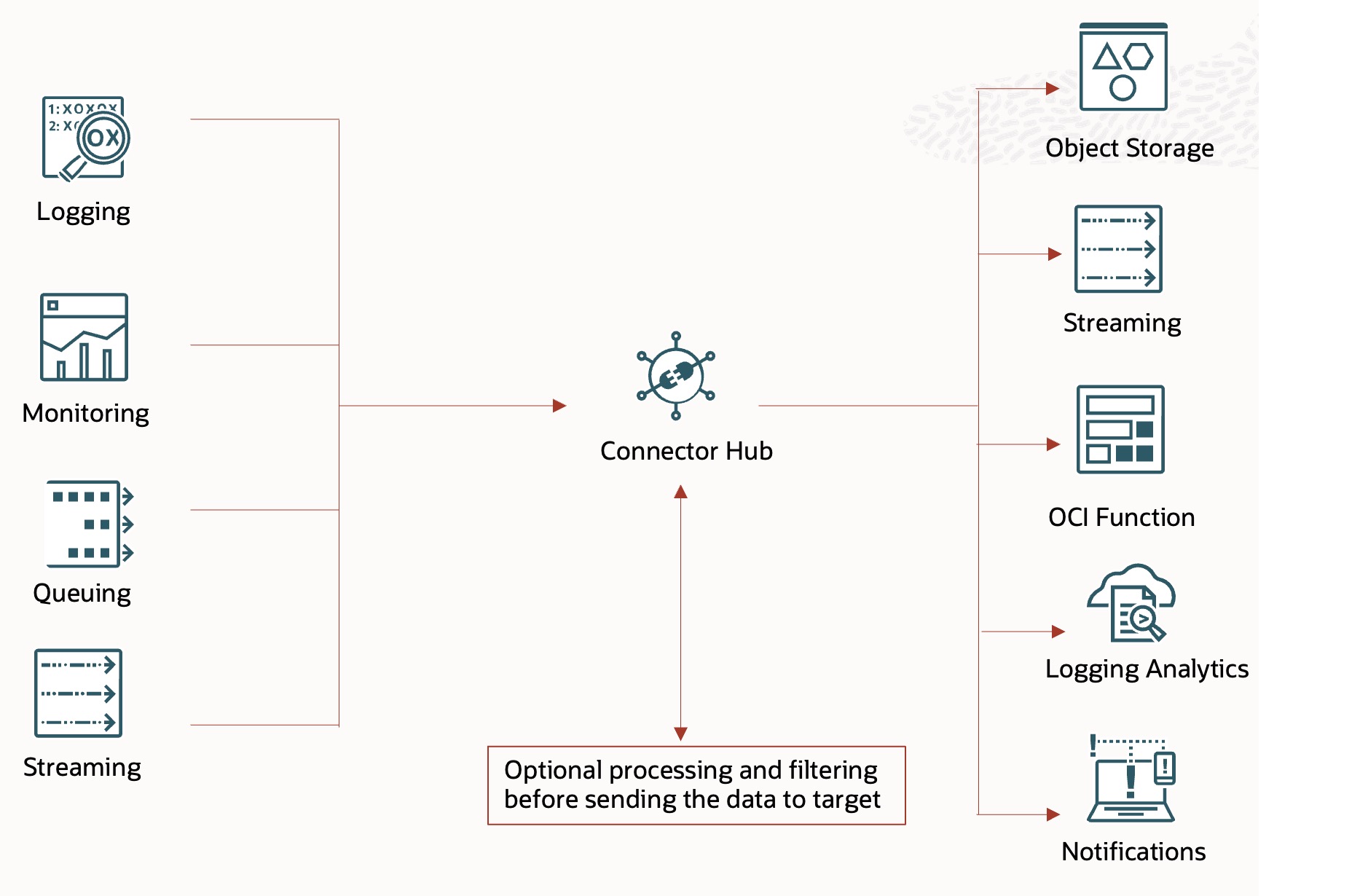
OCI Connector Hub helps you move data from one OCI service to another. For example, you can use it to transfer data from the OCI Logging service to the OCI Streaming service. This data can include audit logs, service logs, custom logs, metrics, event data, queue messages, and more.
Connector Hub reads data from a source, optionally processes and filters it, and transfers it to a target. A source is a service that contains the data to be moved and a target is a service that receives data from the source.
Below is a self-explanatory diagram of the OCI Connector Hub.
Why Integrate OCI Logs with CrowdStrike LogScale SIEM?
If CrowdStrike LogScale is your enterprise-wide SIEM, integrating OCI logs with it is a smart move. When paired with Oracle Cloud Infrastructure (OCI), it offers:
- Centralized Logging: Aggregates your OCI logs into a centralized repository i.e. LogScale SIEM.
- Real-Time Monitoring: Offers live visibility into OCI security events and incidents through custom queries and dashboards.
- Event Correlation: Links OCI logs with other log sources to create a unified view, helping to identify patterns & potential threats.
- Faster Incident Response: Enables quicker detection & response to security incidents by generating alerts based on predefined rules.
- Speed up troubleshooting: Query logs at scale for instant issue diagnosis.
Ways to forward OCI Logs to CrowdStrike LogScale SIEM
OCI Connector Hub plays a crucial role in integrating OCI with any external SIEM, including LogScale. The way OCI logs are transferred to LogScale SIEM depends on the target where the service connector is writing the logs. For this integration, the possible targets include Object Storage, Streaming service, or OCI Functions.
Let’s take a closer look at each of these integration patterns.
Option 1: OCI Connector Hub + OCI Streaming Service
In this approach, the connector hub transfers logs from OCI Logging service to the OCI Streaming Service.
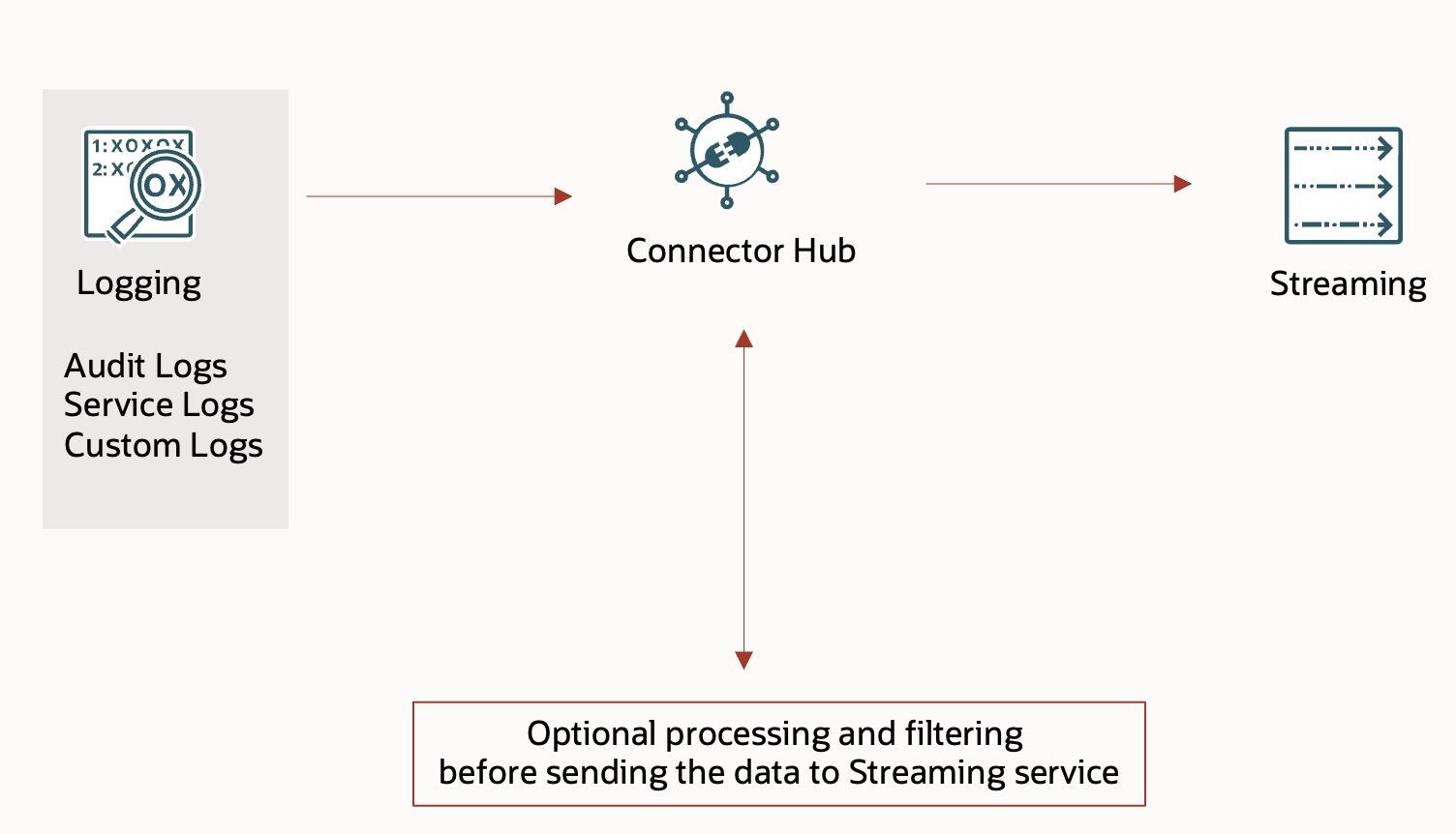
Note: OCI Streaming service provides a fully managed, scalable, and durable solution for ingesting and consuming high-volume data streams in real-time. It is compatible with Kafka APIs, allowing you to use applications written for Kafka to send messages to and receive messages from the Streaming service without having to rewrite your code.
Once the logs are streamed to the Streaming service, there are several ways to forward them to CrowdStrike LogScale.
- LogScale HEC Kafka Connect: The LogScale HEC connector is designed to read messages from a Kafka streaming topic and forward them as events to the HTTP Event Collector (HEC) endpoint (/api/v1/ingest/hec) of a LogScale system.
With this approach, you need to configure the LogScale’s HEC Kafka connector to read messages from the OCI Streaming service and send them to LogScale’s HEC endpoint. For more information, refer to LogScale’s official documentation and GitHub repository on this topic.
- Log Shippers: A log shipper is a tool or service that collects, processes, and forwards messages from a source to a destination. LogScale is able to ingest data from a wide range of log shippers and it is compatible with the following log shippers. You can refer to the documentation for more details.
Falcon LogScale Collector
Elastic Beats
Cribl CrowdStream
Logstash
Vector
Other Log Shippers
- Custom Kafka Consumer: You can build your own Kafka consumer to read messages from the OCI Streaming service, transform them as needed, and send them to LogScale using its ingestion APIs. CrowdStrike LogScale provides a variety of ingestion APIs that allow you to send log data directly to the platform.
Option 2: OCI Connector Hub + OCI Object Storage
In this approach, the connector hub transfers logs from OCI Logging service to the OCI Object Storage.
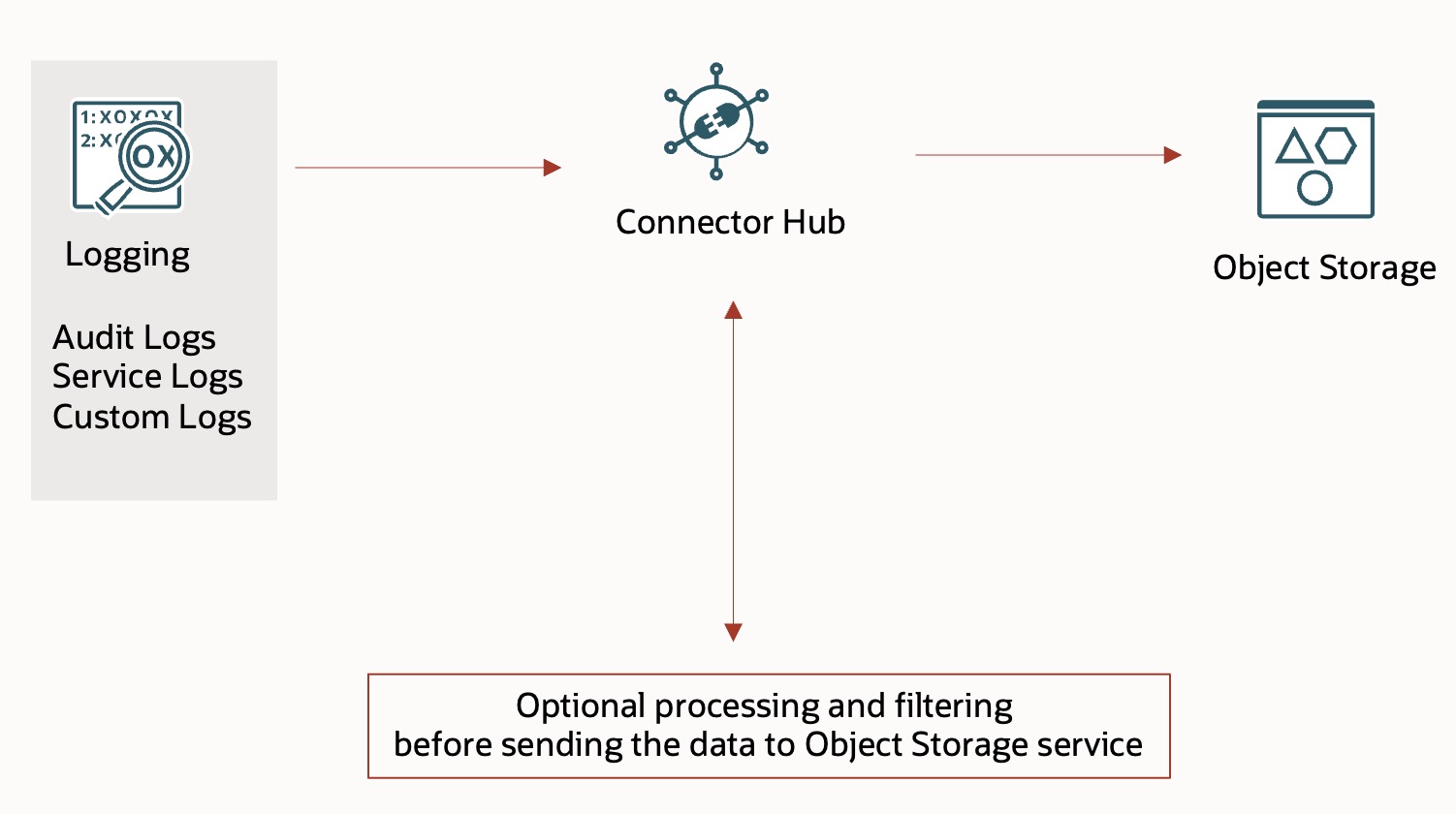
Note: Amazon S3 Compatibility API supported by the Oracle Cloud Infrastructure Object Storage Service.
Once the logs are available in OCI Object Storage bucket, you can use LogScale S3 ingestion feature to forwared them to LogScale.
- LogScale S3 Ingestion: OCI logs stored in an Object Storage bucket can be ingested into LogScale using the S3-compatible ingest feature. Although this feature is designed for AWS S3 buckets, it may work with OCI Object Storage as OCI Object Storage service is compatible with Amazon S3 APIs.
Option 3: OCI Connector Hub + OCI Function
In this approach, the Connector Hub transfers logs to an OCI Function. This function should be responsible for sending the logs to LogScale.
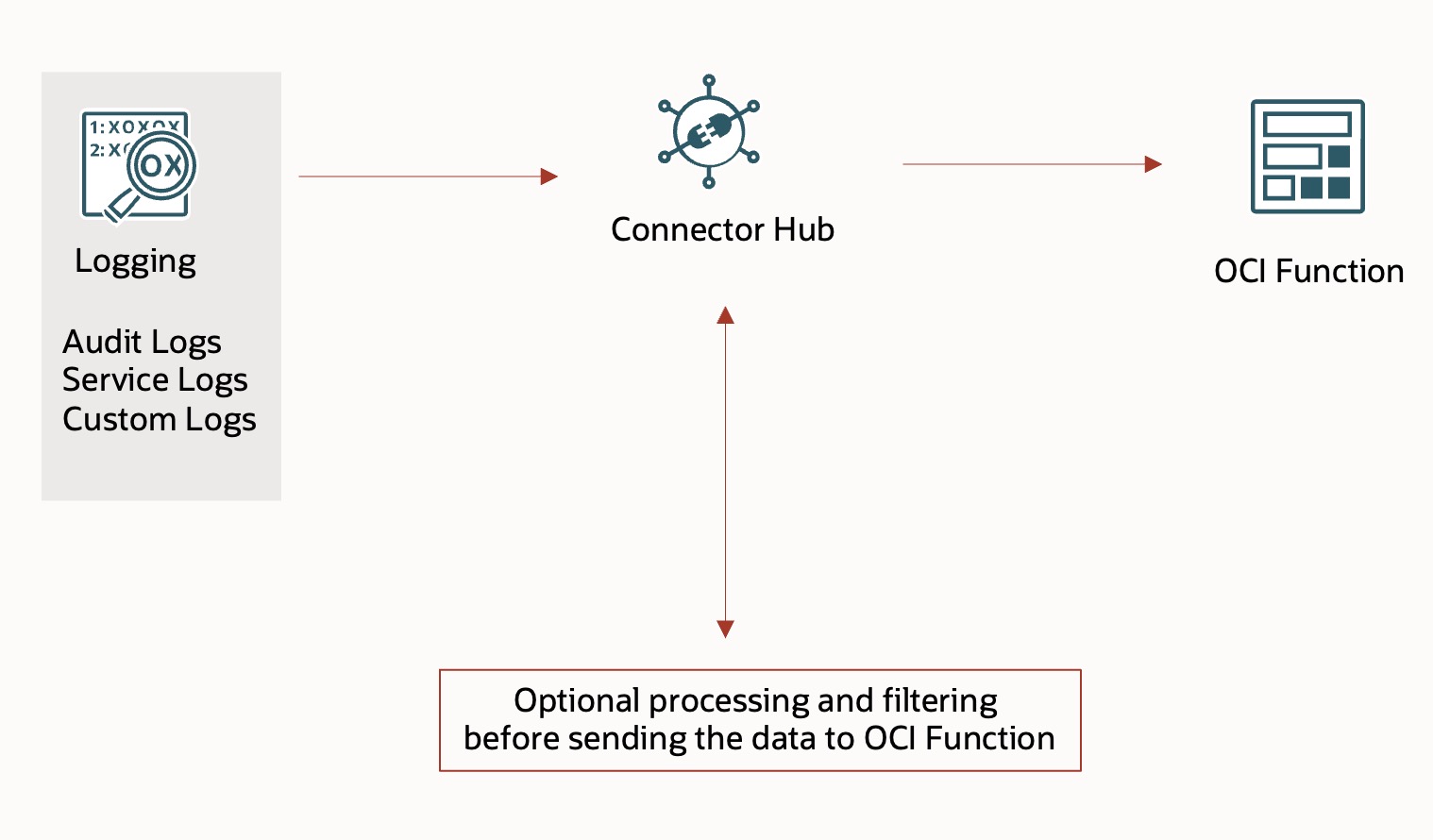
Note: OCI Functions is a serverless compute service that lets you develop, run, and scale applications without managing any infrastructure.
- OCI Function with LogSclale Ingestion APIs: Develop an OCI function that forwards logs to LogScale using its ingestion APIs. CrowdStrike LogScale provides a variety of ingestion APIs that allow you to send log data directly to the platform.
This concludes our exploration of the various methods for sending OCI logs to the CrowdStrike LogScale platform.
Final Thoughts
Logs are more than just raw data—they’re storytellers, but only if we listen. OCI provides the data, and LogScale gives us the lens to interpret it. By integrating OCI with CrowdStrike LogScale, you can unlock powerful insights, improve your security posture, and empower your security and operations teams with deep visibility, rapid detection, and actionable insights.
Start by identifying the most critical logs in your environment and choose the integration pattern that best fits your architecture. Whether you prefer real-time streaming or batch ingestion, there’s an integration pattern that aligns with both your architecture and goals.
Some helpful OCI resources:
- Blog Post: Ingest Oracle Cloud Infrastructure Logs into Third-Party SIEM Platforms Using Log Shippers
- Tutorial: Ingest Oracle Cloud Infrastructure Logs into Third-Party SIEM Platforms using Log Shippers
- Sample Python Kakfka Client
Some helpful CrowdStrike LogScale resources: