
Oracle AI Database@AWS is having a great traction and many OCI customers are using the service as of today. During many implementations of the service with my customers, I made a collection of customer networking questions that I received during the networking implementation part.
Why the answers to those questions are important? The answers are important because, either the uses cases are not covered by the documentation or simply, the explanation is vague.
Having a brief view of how the Oracle AI Database@AWS service integration looks like:
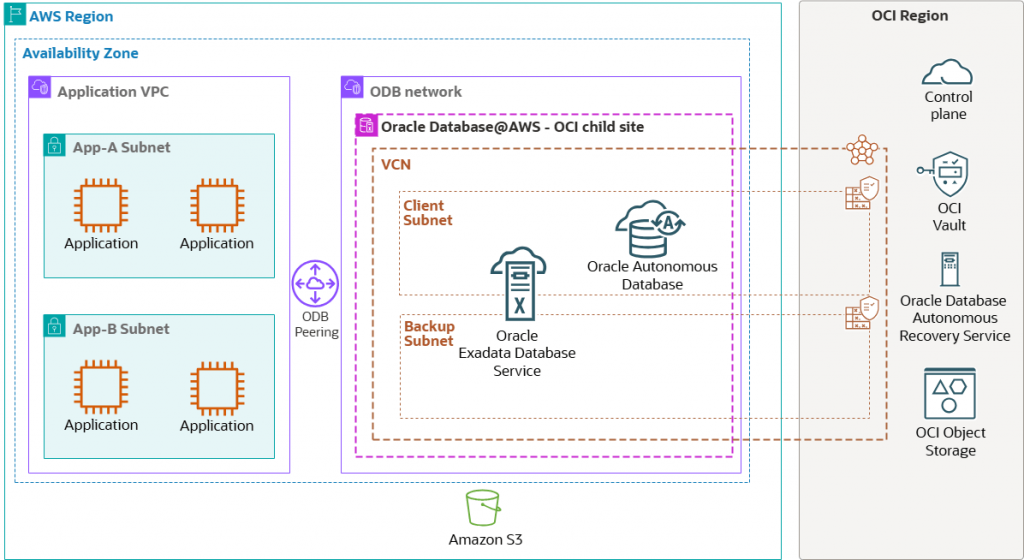
An OCI region (parent site) is connected with an AWS region’s Availability Zone (child site) through an OCI managed network as part of Oracle AI Database@AWS. An application server deployed on Amazon EC2 connects to the Oracle Databases deployed in an Oracle Database (ODB) network through ODB peering.
The control plane, which is highly available and fault-tolerant, is deployed in the OCI Region.
Oracle AI Database@AWS is only created in a special networking construct created by AWS called ODB Network. The ODB Network has some special networking characteristics. It is a private and isolated network hosting the Oracle Exadata VM clusters and Autonomous VM clusters. It is not an AWS VPC.
1. IP addressing for ODB Network
ODB Network requires a careful planning for IP addresses that will be used. Following the ODB Network Design we can find all the relevant information regarding the IP address planning for Oracle AI Database@AWS.
2. What is the ODB Peering and how many ODB Peering can we create?
ODB Peering is a user-created network connection that enables traffic to be routed privately between an Amazon VPC and an ODB network. In Oracle Multicloud architecture, traffic between applications in the VPC and the Oracle Database in the ODB network is routed privately through ODB Peering without moving over the public internet.
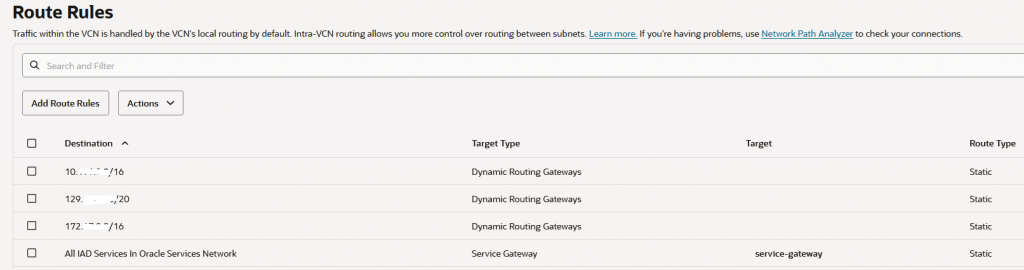
Creating an ODB Peering for a destination VPC CIDR, will automatically add routes to the peered VPC for IP reachability. This can be checked by analyzing the OCI Client subnet route table. All the routes added via the Peered CIDR configuration will have the DRG as next-hop.
An ODB Network supports up to 45 ODB Peering Connections.
Note: ODB networks in US East (N. Virginia) and US West (Oregon) created before February 7, 2026, require a network upgrade before adding more than 1 ODB peering. To upgrade, you need to fully recreate your ODB network. Deletion of ODB network requires you to delete all Exadata VMs but does not require you to delete or recreate your Exadata Infrastructure.
You can create ODB Peering between Oracle AI Database@AWS and AWS VPC in the same account or you create a cross-account ODB Peering between Oracle AI Database@AWS and AWS VPC only after the ODB Network was shared using AWS RAM.
VPC to ODB Network peering in different AWS availability zones is also supported.
3. Can we enable the IP connectivity between the ODB Network and AWS VPCs which are not directly peered with the ODB Network?
Yes, this connectivity model is supported. One of the peered VPCs needs to be defined as a Transit VPC and it needs to be attached to an AWS Transit Gateway or Cloud WAN. Both scenarios are supported.
The Transit VPC must contain routes to the remote VPCs (via TGW or CWAN) before configuring the ODB Peering for the remote VPCs. If the routes to the remote VPCs are not configured in the Transit VPC and if you go first with configuring the remote Peered CIDRs on ODB Network, then the ODB Network will enter the Failed state.
AWS actually posted a very good blog post exploring different architectures for enabling the IP connectivity for remote VPCs: Implement network connectivity patterns for Oracle Database@AWS.
4. Where I configure the Peered CIDRs on ODB Network?
The Peered CIDR configuration on ODB Network is created under Create ODB peering connection, details below:
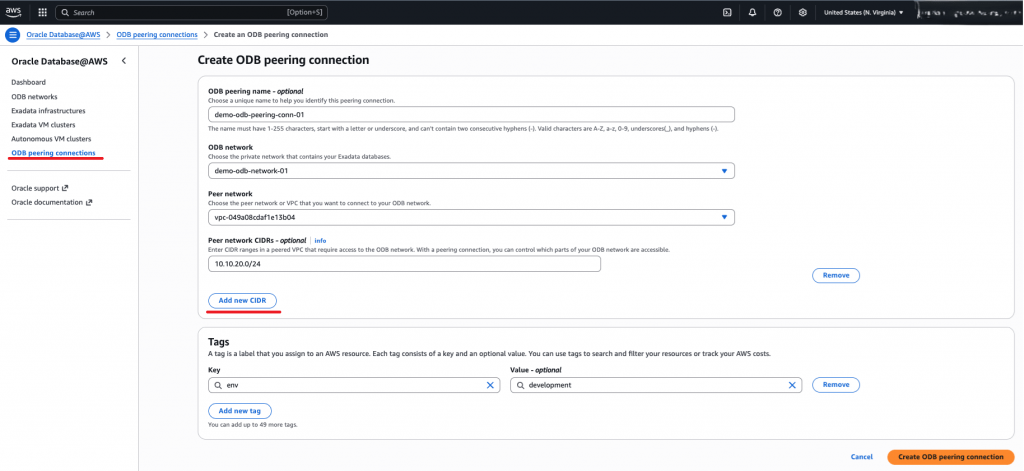
After a new Peer CIDR is added, the automation is adding a route for the Peer CIDR in the OCI route table associated with the Client subnet with the DRG as next-hop. It is recommended to not delete any route added by automation. If you want a specific route to be deleted, just delete the Peer CIDR from AWS.
An example is listed below:
Note1: Oracle AI Database@AWS currently does not support a 0.0.0.0/0 route in the Peered CIDR.
Note2: Oracle AI Database@AWS currently does not support a route summarization that includes the ODB Network itself.
Note3: Oracle AI Database@AWS currently does not support Peered CIDRs to overlap with the ODB Network and with any configured peered VPC.
Note4: Currently AWS supports Peered CIDRs of /16 to /28.
5. How do I configure the VPC route table for reaching the ODB Network?
The Transit VPC or any other directly peered VPC will need routing information on how to reach the ODB Network. The routes to ODB Network are created only by using AWS CLI “ec2 create-route” command.
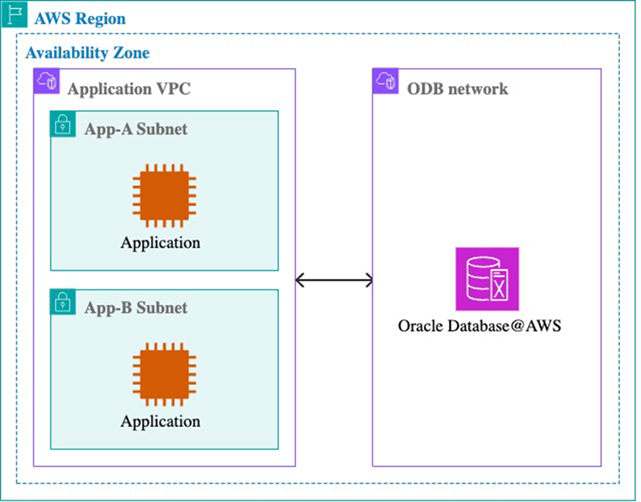
The remote peered VPC will follow the AWS defined routing path to ODB Network. This needs to be configured by the customer using the TGW or CWAN.
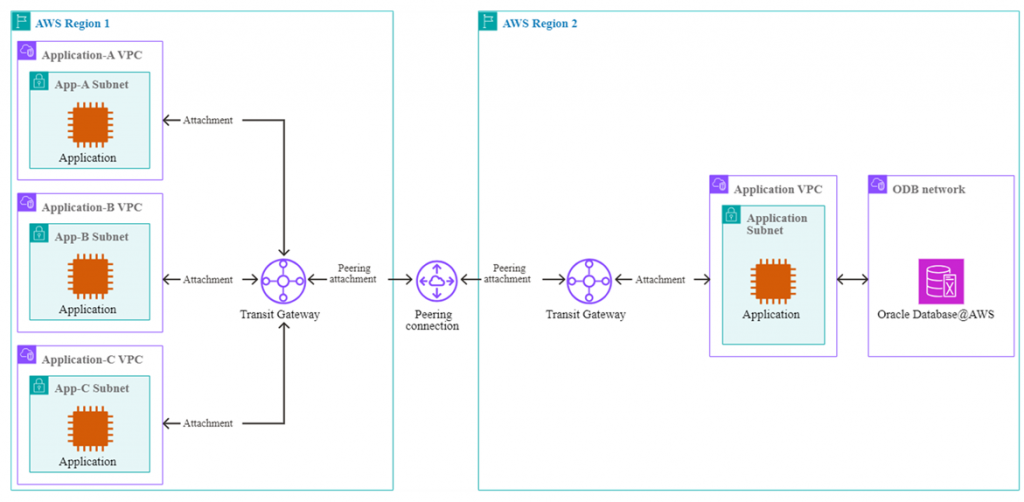
6. Where I’m managing the security for accessing the Oracle Exadata VM clusters and Autonomous VM clusters?
Even if the networking topologies for ODB@AWS includes traffic inspection through a firewall in AWS for ODB Network, we have built-in security for managing the access to DBs.
When a Peered CIDR is added, among other events and configuration created by automation, one is very interesting and relevant for this point. The automation creates some NSGs and an NSG named “exa_1521_adjustable_nsg” for Exadata and “adb_1521_2484_adjustable_nsg” for ADB will be used to control the access to DBs. The automation includes for each and every Peered CIDR five Ingress rules and one Egress Rule, for a total of six NSG entries.
Taking into account that an OCI NSG can have up to 120 (total ingress plus egress) this means that we can have by default a maximum of 120 / 6 = 20 Peered CIDR.
If we need more Peered CIDRs, we need to request a limit increase for the NSGs to the maximum allowed.
An example is listed below:
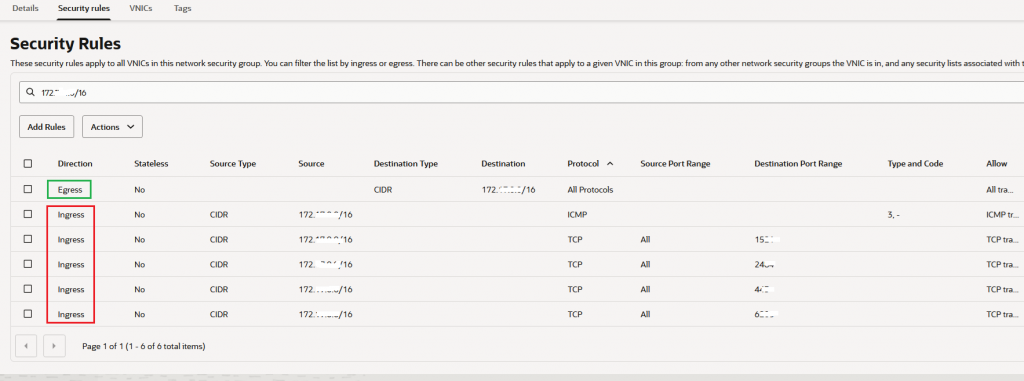
Important feature added – April 2026: Custom NSG Support
Note: As of May 2026, the automation is adding only 4 rules per each peer CIDR added, thus, with the default limit of 120 security entries, the NSG support up to 30 peer CIDRs. A limit increase can still be requested.
7. Internet access for ODB Network
Internet access for ODB Network is one of the most debated topics since it can be achieved in two ways, either by using the AWS network or OCI network.
Using the AWS network for ODB Network Internet access requires a very careful planning, mostly it will require increasing the limit for the NSG since we will need to configure many Peered CIDRs for Internet destinations (not 0.0.0.0/0 since this is not allowed), traffic routed through AWS network to reach a NAT GW or a firewall that can perform SNAT for ODB Network Internet traffic.
AWS has some other limitations for response traffic from the Internet that needs to be sent back to ODB Network. If the requirement is to use the AWS network for Internet traffic, then the best way is to work with the AWS engineers to plan the solution.
On another hand, we can have a very simple configuration for Internet connectivity from ODB Network (especially from the client subnet) by using the OCI network.
In the most simple form, it can be achieved in the following way:
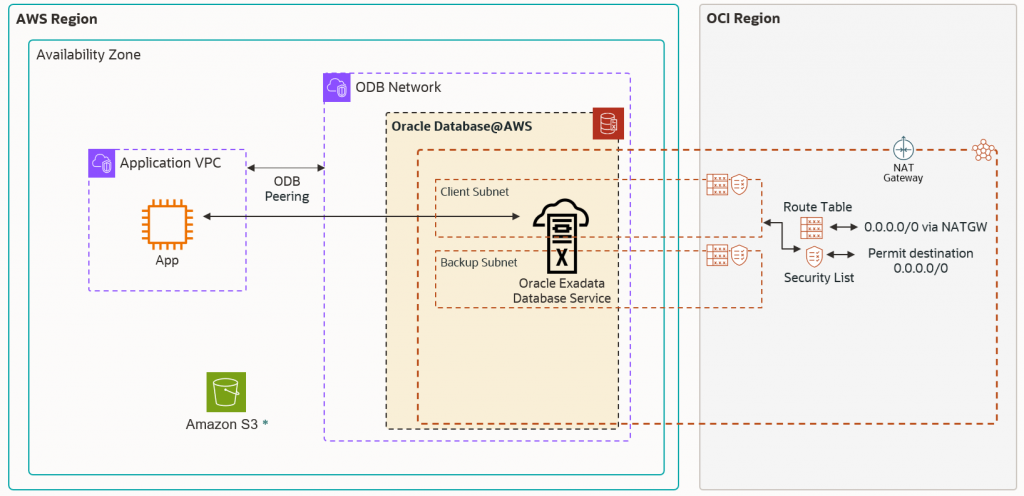
A NATGW is required to be attached to the shadow VCN. Then, the route table associated with the client subnet needs to be updated with a default route with the NATGW as a next-hop.
The Security List associated with the client subnet needs to be configured with an egress security rule to permit the desired traffic flow from DB to Internet.
If we adopt the OCI network for Internet egress traffic, we might have a requirement to inspect all Internet traffic. This requirement can be accomplished in the following way:
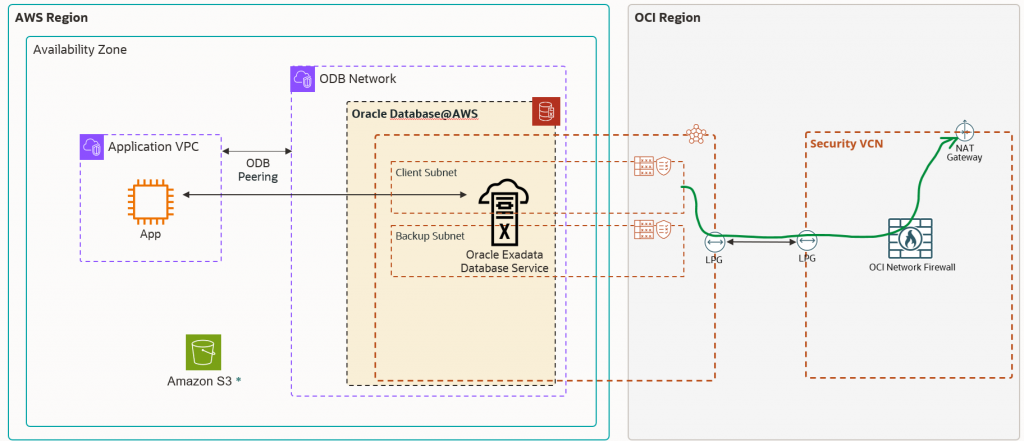
The above configuration implies only a new VCN where the OCI NFW and NATGW will be deployed. Peering the ODB VCN with the Security VCN using LPGs, will accomplish the traffic to the Internet through the OCI NFW acting as an inspection point.
8. Is the SSH allowed by default after a Peered CIDR is configured?
The answer is NO, the automation is not adding any ingress security rule in the NSG to allow the SSH traffic. If SSH is needed, my recommendation is to add an ingress security rule allowing destination TCP port 22 in the security list associated with the client subnet (not under NSG). You can match specific source IP addresses as source.
9. How DNS for Oracle AI Database@AWS works?
Oracle AI Database@AWS allows customers to choose from either default DNS (oraclevcn.com) or a custom domain name in the ODB Network creation step. When an ODB Network is created with a custom domain name, a default domain is also created in addition to the custom domain name. While the default domain name can be used by both Oracle Exadata Database Service on Dedicated Infrastructure and Oracle Autonomous AI Database on Dedicated Exadata Infrastructure services, the custom domain name can only be used by the Oracle Exadata Database Service on Dedicated Infrastructure service.
Oracle Autonomous AI Database on Dedicated Exadata Infrastructure always uses the default name.
During the ODB Network creation flow, both Forwarder Endpoint and Listener Endpoints are created automatically:
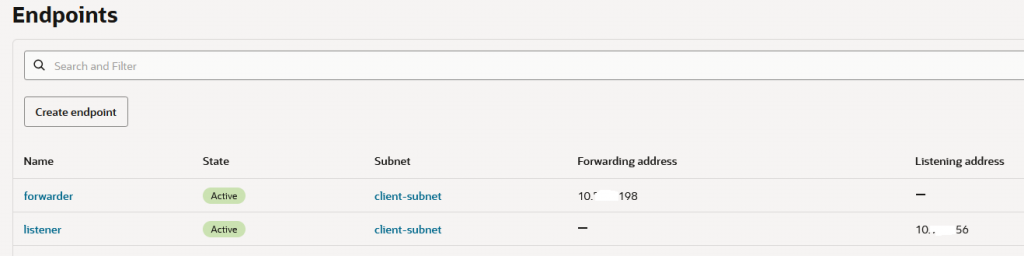
The DNS NSG is also created to permit AWS DNS queries for ODB Network and from ODB Network to AWS resources. The following diagram depicts the DNS resolution process:
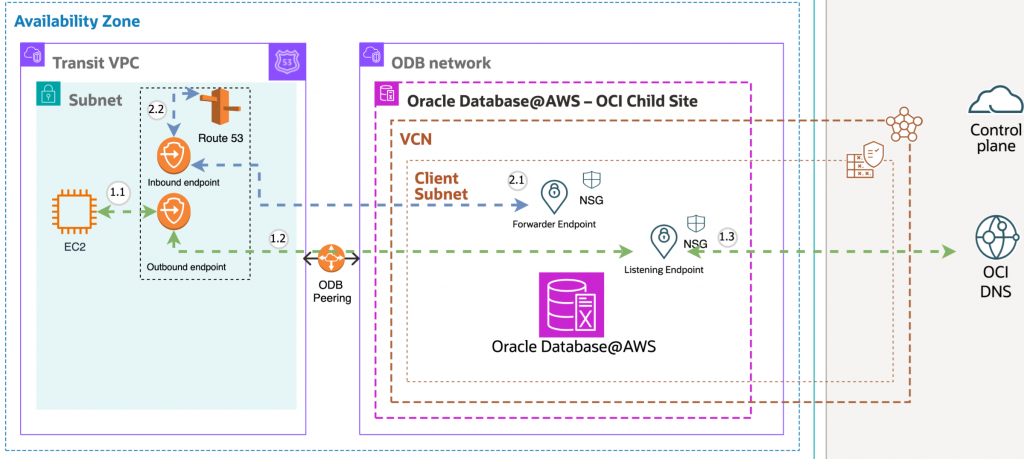
AWS to OCI DNS Resolution: A database client running on an Amazon EC2 instance resolves the hostname in the database connection string using DNS.
1.1 The database client initiates a connection using the hostname.
1.2 The DNS query is handled by Route 53 DNS outbound endpoint of the VPC and matches the Route 53 resolver rule to forward the query to the OCI Private DNS listener endpoint.
1.3 The OCI Private DNS listener endpoint resolves the query to OCI DNS and returns the IP address to the database client.
OCI to AWS DNS Resolution: An agent installed on the database host needs to resolve the host zone in AWS.
2.1 The database query a hostname, the query is handled by OCI Private DNS forwarder endpoint using the DNS conditional forwarding rule created.
2.2 The DNS query is forwarded to the VPC Route 53 Inbound endpoint and the IP address is returned to the database.
10. After the infrastructure is created and the DBs deployed, what is the most rapid way to test the connectivity to ODB Network resources?
The most rapid way to test the connectivity to ODB Network resources is to initiate connections from the Transit VPC or directly peered VPCs over port 1521 or 1522, we can use curl, telnet or just a DB connection. We need to make sure that point number 5 from above is configured correctly.
An example is listed below:
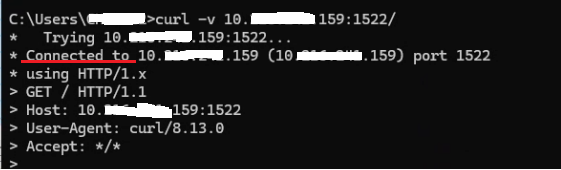
If the connections are successfully established, then we have a successful deployment.