
TL;DR
- Integration in Fusion is pattern-driven, not tool-driven
- Always choose based on volume + latency, not convenience
- Real-time (REST) → Low volume, transactional
- Near real-time (Events / Async via OIC) → Medium volume
- Batch (FBDI / Data Extraction / BICC) → High volume
- Data Extraction (26A+) is the preferred outbound strategy
- BICC supports incremental and is used when Data Extraction coverage is not available
- BI Publisher (BIP) and OTBI are not integration tools
- Most failures are due to incorrect pattern selection, not platform limitation
1. Integration as a Core Architectural Pillar
In the 7-Pillar Fusion Cloud Implementation Architecture Framework, Integration defines how data moves across systems, processes, and enterprise boundaries.
If Data establishes the foundation, Integration enables execution.
It connects:
- Fusion pillars (ERP, SCM, HCM, CX)
- External enterprise systems — on-premise, cloud, and home-grown applications
- Data platforms, analytics, and AI ecosystems
More importantly, it enables end-to-end business processes.
Integration is not simply about connectivity.
It is about orchestrating data movement aligned to volume, latency, and business purpose.
2. Integration in Fusion: Architectural Characteristics
Fusion Cloud is:
- API-first → All capabilities exposed via REST/SOAP
- Event-enabled → Business events for key objects
- Security-governed → Role-based access
- Streaming-based → Large payloads delivered incrementally
This leads to a key principle:
Integration design is about selecting the right pattern, not maximizing API usage.
3. Integration Patterns in Fusion (Inbound and Outbound)
Integration patterns are best understood by direction of data movement:
- Inbound → Data entering Fusion
- Outbound → Data leaving Fusion
These patterns must be selected based on volume and latency considerations.
Note: The data volume thresholds provided below are indicative and for guidance only. Actual thresholds vary based on your business need, object complexity, payload size, and integration design.
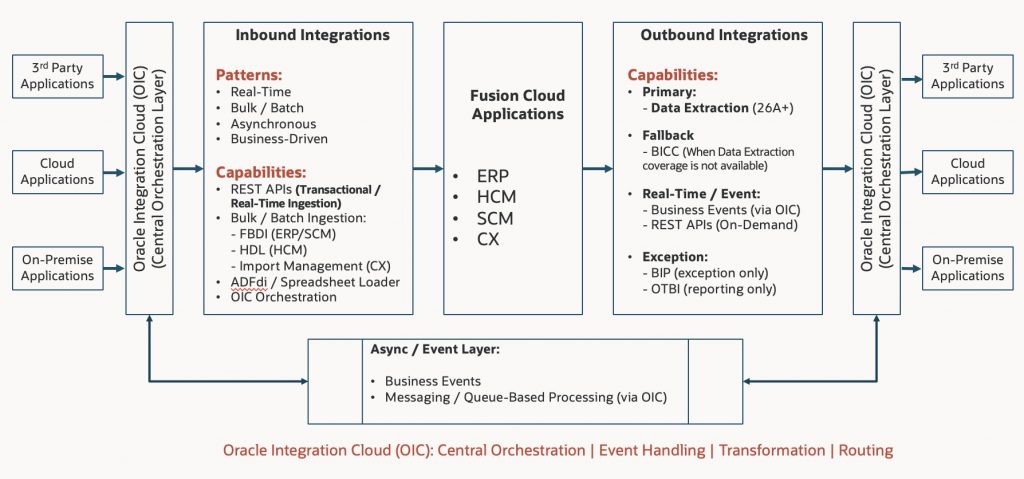
3.1 Inbound Integration (Into Fusion)
Patterns and Capabilities
| Pattern | Usage | Volume | Capability | Example |
|---|---|---|---|---|
| Real-Time | Transactional updates | Low (<500) | REST APIs | CX lead creation |
| Bulk / Batch | Migration & large loads | High (>50K) | FBDI / HDL / Import Management | ERP invoice migration |
| Asynchronous | Decoupled ingestion | Medium–High | OIC + APIs | SCM order ingestion |
| Business-Driven | User-triggered loads | Low–Medium | ADFdi / Import Management | CX data upload |
Inbound Architectural Guidance
- REST APIs are designed for real-time transactional ingestion, not bulk loads
- Bulk ingestion must use framework-driven approaches:
- ERP/SCM → FBDI
- HCM → HDL (HCM Data Loader)
- CX → Import Management
- Data dependencies must define load sequence (e.g., Accounts → Contacts)
- OIC should orchestrate ingestion pipelines for:
- Validation
- Transformation
- Error handling
3.2 Outbound Integration (From Fusion)
Outbound integrations distribute data to:
- External systems (on-prem, cloud, home-grown)
- Data platforms, analytics, and AI environments
Patterns and Capabilities
| Pattern | Usage | Volume | Capability | Example |
|---|---|---|---|---|
| Real-Time | On-demand access | Low | REST APIs | Invoice lookup |
| Event-Driven | Near real-time | Low–Medium | Business Events (via OIC) | Opportunity updates |
| Batch (Preferred) | Large-scale & incremental | High | Data Extraction (26A+) | Order extract |
| Batch (Fallback) | Large-scale | High | BICC | Inventory extract |
| Exception | Limited scenarios | Medium | BIP / Audit tables | Temporary workaround |
Important Note on BI Publisher
Oracle Analytics Publisher (formerly BI Publisher) is the recommended tool for a reporting and document generation tool and should not be used as a primary mechanism for integration-grade synchronous data extraction.
Outbound Strategy
- Primary: Data Extraction (26A+)
- Fallback: BICC (supports incremental extraction and is used where Data Extraction coverage is not available)
- Avoid: OTBI and BI Publisher (BIP) for integration
These tools are designed for reporting and analytics, not integration workloads.
3.3 Hybrid Integration
Enterprise processes combine patterns:
- Inbound ingestion
- Processing within Fusion
- Outbound distribution
Hybrid integration is the default enterprise model, not an exception.
4. Integration Architecture in Fusion
Fusion integration follows a layered architecture:
| Layer | Responsibility | Example |
|---|---|---|
| Experience | User interaction, channels, and external touchpoints | External application UI invoking Fusion REST APIs for order creation |
| Process | Business process orchestration and workflow execution | OIC orchestrating Order-to-Cash flow across ERP and SCM |
| Integration | API mediation, routing, and lightweight transformations | OIC transforming payload and routing request from external system to Fusion API |
| Data Movement | Bulk data ingestion and extraction (FBDI, Data Extraction, BICC) | ERP invoice upload via FBDI; Orders extract using Data Extraction |
| Event | Event-driven communication and change notifications (Business Events via OIC) | Business Event triggered on order status change and consumed via OIC |
| Security | Authentication, authorization, and data access control | OAuth2 authentication with role-based data access controlling API response |
Role of Oracle Integration Cloud (OIC)
OIC acts as the central orchestration layer:
- Process orchestration
- Routing and transformation
- Error handling and retries
- Consumption of Business Events
OIC enables:
- Decoupling
- Scalability
- Event-driven architectures
It should not be used as a compute-heavy processing engine.
These layers work together to ensure that integration design remains scalable, decoupled, and aligned with business processes rather than system constraints.
5. Integration Design Principles
- Select patterns based on volume and latency requirements
- Use APIs for real-time, low-volume transactions
- Use events for near real-time responsiveness
- Use batch for scale and efficiency
- Minimize payload size
- Avoid synchronous chaining across systems
- Align security with integration design
6. Integration Decision Framework
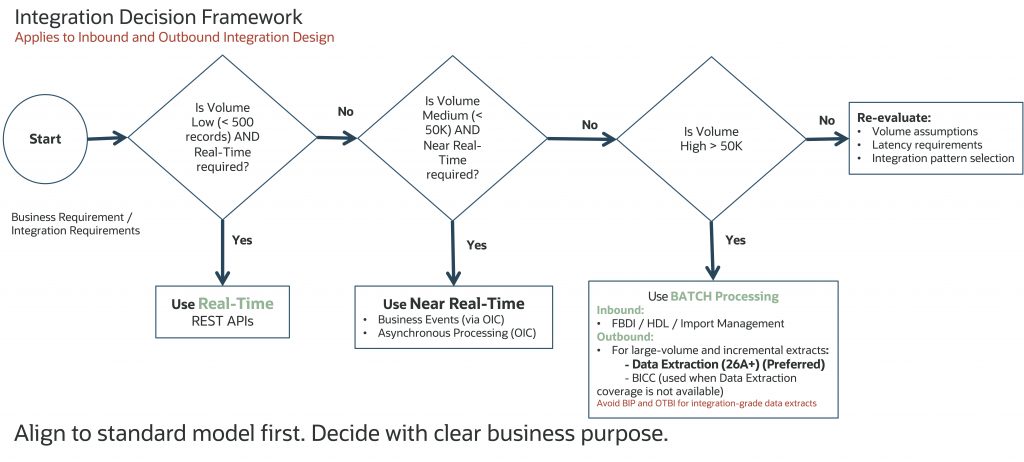
| Volume | Latency Requirement | Pattern | Capability |
|---|---|---|---|
| Low (<500) | Real-Time | Synchronous | REST APIs |
| Medium (<50K) | Near Real-Time | Async / Event | OIC + Business Events |
| High (>50K) | Batch | Bulk Processing | FBDI / HDL (Inbound)Data Extraction (Preferred)BICC (Fallback) |
Always align to the standard model first. Decide only with clear business purpose.
Volume ranges are indicative and may vary by your business requirements, object complexity, payload size, and integration design.
7. Integration Anti-Patterns
| Type | Anti-Pattern | Why It Fails | Recommended Approach |
|---|---|---|---|
| Inbound | Using REST for bulk loads | API throttling, poor performance | Use FBDI / HDL |
| Inbound | Ignoring data sequence | Load failures | Follow dependency order |
| Outbound | Using BIP for integration | Not scalable, DB load | Use Data Extraction |
| Outbound | Ignoring Data Extraction | Missed scalability benefits | Use Data Extraction |
| Cross | Chatty integrations | Latency, inefficiency | Use coarse-grained APIs |
| Cross | Synchronous chaining | High latency, fragile flows | Use async patterns |
| Cross | Event explosion | Noise and processing overhead | Filter business-relevant events |
| Cross | OIC as compute engine | Performance degradation | Keep OIC focused on orchestration |
Real Examples
- A customer used BI Publisher with custom SQL every 2 minutes for delta detection → resulted in database load and performance degradation
- A supply chain implementation used 15+ API calls per transaction (chatty integration) → caused latency issues and API throttling
Most integration failures are not due to missing capabilities — they result from applying incorrect patterns at scale.
8. Integration and AI-Readiness
Integration enables:
- Real-time data pipelines
- Event-driven automation
- Continuous data availability
It is foundational for:
- AI models
- Predictive analytics
- Intelligent workflows
9. Critical Success Factors
- Pattern-driven integration design
- Centralized orchestration using OIC
- Alignment with business processes
- Scalable and resilient architecture
- AI-ready data movement
10. Key Takeaways
- Integration orchestrates enterprise data movement
- Pattern selection drives scalability and performance
- If the right integration pattern is not selected, it will lead to scalability and performance issues
- Data Extraction is the strategic outbound approach
- BICC is a valid fallback when needed
- BI Publisher (BIP) and OTBI are not integration tools
- Anti-patterns are the primary cause of failures
11. Conclusion
Integration in Oracle Fusion Cloud is not a tooling exercise – it is an architectural discipline grounded in pattern selection, scalability, and business alignment. The most successful implementations are those that adopt a pattern-driven approach, align integration strategies with volume and latency requirements, and leverage standard capabilities such as Data Extraction, OIC, and event-driven design appropriately.
This deep dive moves beyond theory to reflect real-world implementation experience, highlighting both proven patterns and common anti-patterns that directly impact performance and scalability. By applying the decision framework and architectural principles outlined here, organizations can establish a consistent, scalable, and AI-ready integration foundation.
Ultimately, integration should not be an afterthought – it should be a governed, repeatable design capability that enables business agility while avoiding complexity and performance bottlenecks.