
Hi! In this blog entry, we will talk about network architectures for the Oracle Golden Gate service.
Oracle Golden Gate service
Golden Gate, Oracle’s industry leading data replication tool, supports multiple network architectures for connecting to the various supported data sources. The focus of this blog is networking so Golden Gate specific configuration will not be covered. Also, while Golden Gate can be installed as software running on any Virtual Machine, the topic of this blog is the Golden Gate service which is a managed service that runs natively on Oracle Cloud.
When you deploy the Oracle GG service, there are some specifics for the network side which need to be covered.
The Golden Gate Deployment
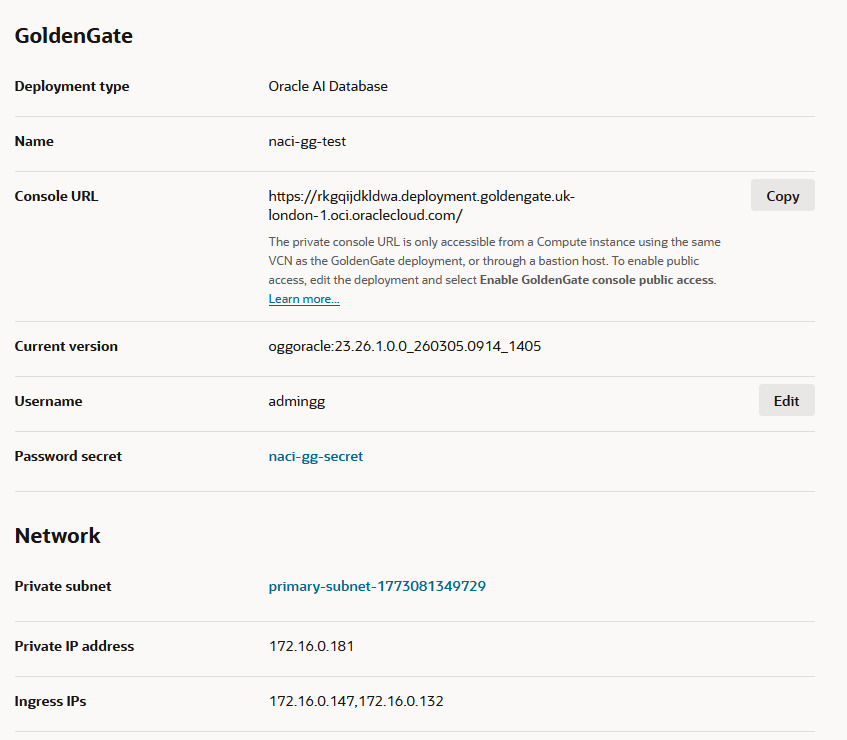
In this initial step you need to provide an OCI Virtual Cloud Network Subnet where the GG endpoints will be deployed. Once the target subnet is selected, the following will be deployed:
- 1 private IP dedicated to GG admins inbound connectivity to the service, for configuration purposes.
- 1 private DNS entry in the target VCN DNS resolver in the format
[random-characters].deployment.goldengate.[region].oci.oraclecloud.com
This will be used by GG admins to connect to the service. Some additional notes here:
– Custom domains are supported if SSL certificates are provided at the deployment time.
– Based on the location of the GG admin, some additional DNS configuration might be needed, for example DNS conditional forwarding. - 2 private IPs dedicated for the service to connect to targets, called “Ingress IPs”.
A standard deployment would look like this:
Public access
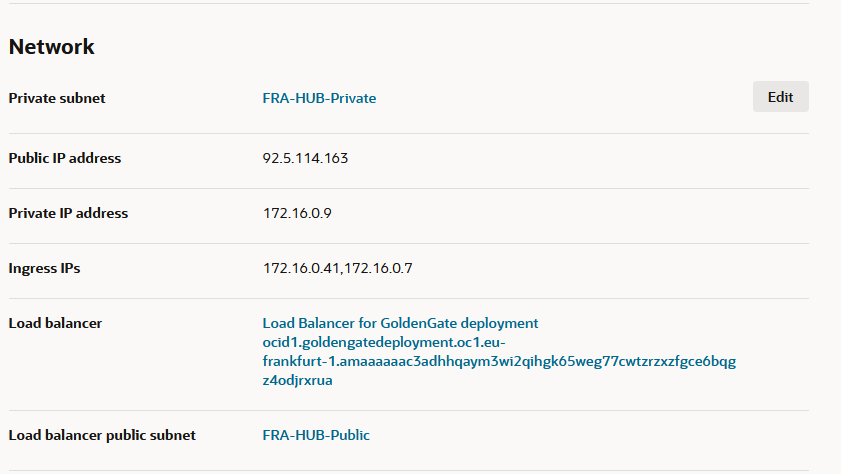
In the Deployment menu there is an optional “Enable GoldenGate console public access” button. If you enable it, the following will happen:
- The menu requests an OCI VCN Public Subnet in which the service will deploy a Public Load Balancer.
- The Load Balancer comes preconfigured with:
- A TCP 443 Listener which means it will not perform any SSL handshake, it will just be a passthrough.
- The backend will be preconfigured with the Golden Gate management IP.
- A Network Security Group which allows all traffic (0.0.0.0/0) inbound on port 443. This can be manually restricted to a more specific list of IP CIDRs.
- Security constructs between the LB and the GG backend must be manually updated to allow the traffic.
- A public DNS entry which will be an exact match of the private entry created for the private access, in the format:
[random-characters].deployment.goldengate.[region].oci.oraclecloud.com
Note: At this step, the same DNS entry exists in both the private DNS side and the public DNS side. Depending on the user location and the DNS architecture of the whole OCI deployment, the user may use either of the 2 paths.
A deployment with Public access enabled would look like this:
Custom Endpoint
Finally, one of the other network-relevant option for the Deployment is the Custom Endpoint. This allows you to access the service with your own domain URL. If you want to enable this feature you need to provide a valid SSL certificate and the private key for that certificate.
If you choose to use a custom endpoint, note that you will need to create the DNS entries, either private or public (or both) as the service only covers the default domain DNS entries.
The Golden Gate Connection
Actual connections to GG targets are created in a different menu, called “Connections”. When creating a Connection, the following are needed:
- Target details: DNS name, credentials, type, and other details are requested based on the type of target selected.
- Endpoints used for this connection – when creating a connection, there are 2 options for the endpoints:
- Shared Endpoint – when selecting shared endpoint, the GG deployment will use the Ingress IPs deployed at step 1 to connect to the target.
- Dedicated Endpoint – A dedicated endpoint will deploy a new set of 2 Ingress IPs specifically for this connection, in the same VCN subnet or a completely different one.
- Session mode:
- Direct – for target databases not running Real Application Clusters.
- Redirect – for target databases with RAC enabled, such as Exadata VM clusters.
Note: For connections to Exadata it is recommended to use a Dedicated Endpoint and required to use a Redirect session mode.
One important thing to note is that the Connections are not tied to a specific Golden Gate deployment until the next step, they are considered standalone constructs which you can assign to any GG deployment and even multiple deployments at the same time.
Connection – Deployment mapping
The last step is to assign the Connection created at step 2 to a GG deployment created at step 1. This is done from the Deployment menu. You can:
- Assign the same Connection to multiple Deployments.
- Assign multiple Connections to the Deployment.
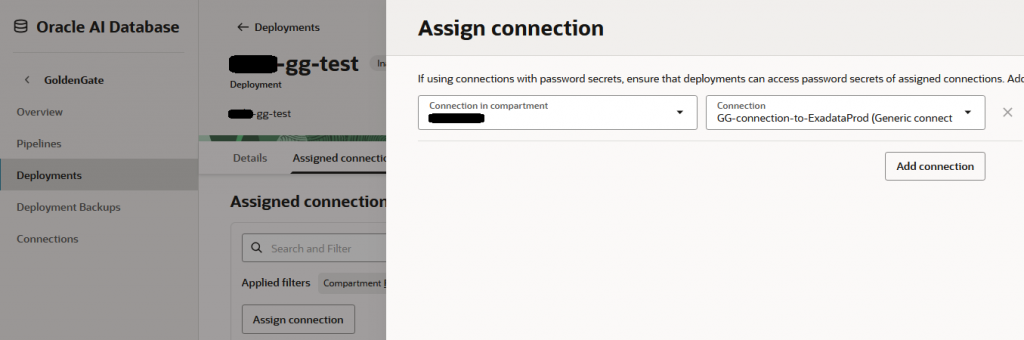
All these steps are done in the OCI Console and are required to be completed before doing the configuration in the GG Admin Console.
DNS
Let’s discuss some requirements for DNS:
- Connections to targets can be done with either DNS names or IPv4 addresses. The DNS name is recommended but if you choose to use IPv4 targets, the service will create an internal DNS entry that converts that IP to a DNS name.
- The VCN DNS Resolver from which the connection is initiated must be able to resolve the target DNS hostname. Note that there are situations where the Dedicated Endpoints are in a different VCN from the Shared Endpoints so the VCN that holds the dedicated endpoints must resolve the target.
- There are multiple ways on how to make the DNS resolution work, some examples would be:
- If the GG endpoints and the target are in the same VCN it will work without any action.
- If the endpoints and the target are in different VCNs but same region, you can attach the DNS Private View of the target to the VCN that holds the endpoints.
- If the endpoints and the target are in different locations (different regions or in your datacenter) you will need to use DNS Conditional Forwarding.
- You can also manually create a DNS zone for the specific target and add a static entry there and attach it to the Endpoints VCN. While this is not recommended for production, it is a quick fix for making DNS resolution work.
Example architecture diagram
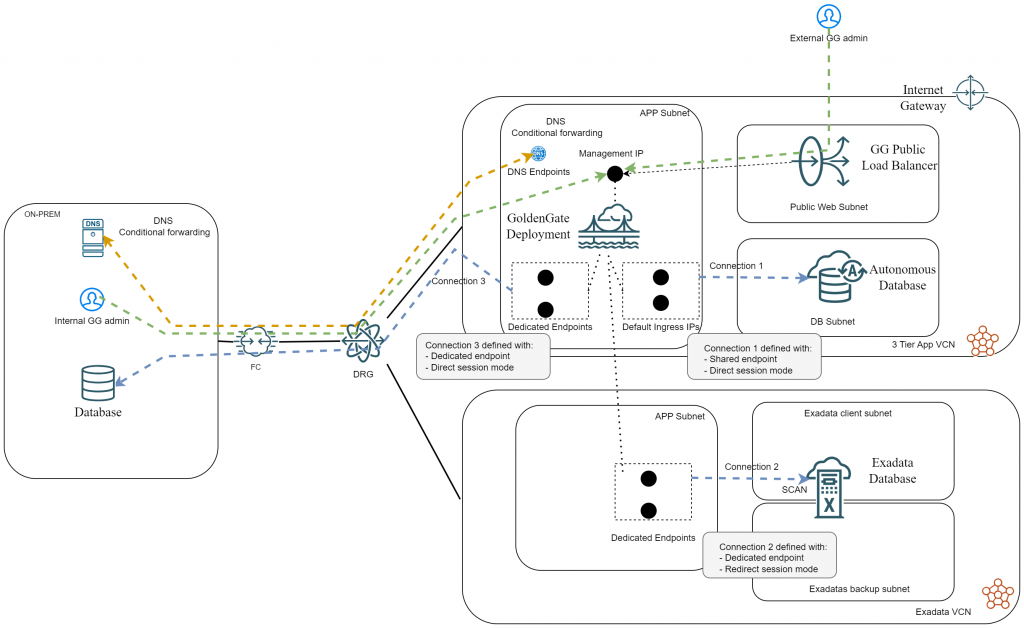
Let’s see a diagram showing all the above, with an example architecture:
- We have a GG deployment in VCN1.
- Connection 1 is to an Oracle Autonomous DB residing in the same VCN and is using the shared endpoints.
- Connection 2 is to an Oracle Exadata VM Cluster which is deployed in VCN2 and is using Dedicated Endpoints in that VCN.
- Connection 3 is to an Oracle Database deployed on-prem and is using Dedicated Endpoints in VCN1.
- All 3 Connections are assigned to the same GG Deployment.
- Public Access is allowed to the management interface and GG admins are connecting from both the private side and the public side.
- DNS Forwarding between on-prem and OCI is configured.
And that’s it! I hope this helps you.